system file checker

Timeless try a Ubuntu bootable disk >make the disk with ImgBurn and boot from it use the TRY version not the install and when it opens up you can find the drive in that Linux based OS no need to even go near windows. Click on the drive and open it up or scan it.

Download Ubuntu | Ubuntu
 

My Computer

Computer type
PC/Desktop
Computer Manufacturer/Model Number
Own build (new) Desk1 / Asus ROG Win 7 / Desk2 1st build
OS
Desk1 7 Home Prem / Desk2 10 Pro / Main lap Asus ROG 10 Pro 2 laptop Toshiba 7 Pro Asus P2520 7 & 10
CPU
Desk1 i5 3750K / Laptop i7 GTX 860M / Desk2 i5 2500
Motherboard
Desk1 Asus P877-V / Desk2 Gigabyte H67 UD3H / Laptop ?
Memory
Desk1 8GB (1866) / Desk2 16GB (1333) / Laptop 8Gb DDR3
Graphics Card(s)
Desk 1& 2NVidia GTX 650 & Laptops on board Intel
Sound Card
Desk 1 & 2 -XONAR DG Realtek High Def audio Laptop
Monitor(s) Displays
Desk 1 Benq HD 2450 / Desk2 Philips 24" / Laptop 17.5"
Screen Resolution
1920x1080 D1 & D2 & Laptop 1
Hard Drives
Desk1 Samsung 120GB 830 SSD
Asus ROG 256GB 850 Pro SSD
Desk2 Samsung 840 256 SSD
Toshiba 120GB EVO
PSU
Desk 1 Corsair HX 1050/ Laptop ? / Desk 2 Corsair HX 650
Case
Desk 1 Cooler HAF XM ? Toshiba laptop / Desk2 Coolermaster
Cooling
Fans on all Desk1 -2 Desk2 - all Coolermasters 5 Laptop ?
Keyboard
Desk 1 MS Sidewinder X6 Desk 2 MS Sidewinder X 4
Mouse
Desk 1&2 - Gigabyte MS 900 gamer - laptop - Logitec wireless
Internet Speed
ADSL2+
Other Info
One other Desktop (tester) and spare Toshba laptop both with SSD's
Running Kaspersky 2016 ISS on all machines config'd identically
Logitec audio stereo systems on each machine (x3)
Canon MG5250MFC
Router/modem TP-Link running WPA2SK
what options would l need to use to scan the drive? as lve no problems with creating a live disk to try this (just as long as scanning wont cause issues lol).


Edit:

l tried loading the live disk and it wouldnt pick up my drive. in fact l had to disconnect it to get it to load up when l connected it when booted into the live disk it wouldnt pick up the drive.
 
Last edited:

My Computer

Computer type
PC/Desktop
Computer Manufacturer/Model Number
Custom build
OS
Windows 7 Professional (64bit)
CPU
Intel i5 4440 3.10ghz
Motherboard
Gigabyte GA-H97M-D3H
Memory
Corsair 32GB (4x8GB) DDR3 1600MHz Vengeance Memory Kit 1.5V
Graphics Card(s)
Intel Graphics 4600 (on board)
Sound Card
External Creative Soundblaster
Monitor(s) Displays
32" TV
Screen Resolution
1360*768
Hard Drives
Kingston SSDNow UV400 240GB 2.5inch SATAIII SSD
1 1TB WD WD10EADS
3 1TB WD WD10EZEX
PSU
Coolermaster GM-Series 550W Semi Modular
Case
Aerocool X-Predator X1 Devil Red
Cooling
5x 120mil (Arctic F12)
Keyboard
Microsoft Curve 2000 v1
Mouse
Trust MaxTrack Mini Mouse - 6 button(s) - wired - USB
Internet Speed
34Meg
Antivirus
Bitdefender 2017
Browser
Firefox
a surface test looks to take 30 hours :/ l couldnt get it to go past a certain record annoyingly..

regardless.. l didnt want to spend out more but lve scraped some cash from my budget and grabbed another 3tb drive along with a caddy which should take up to 3TB (would be hell of allot better than using my current method of powering and transferring.

l guess what l could do once lve backed up the data is do a full format which should resolve the issue l assume because if its bad sectors ld assume it would remap them.
 

My Computer

Computer type
PC/Desktop
Computer Manufacturer/Model Number
Custom build
OS
Windows 7 Professional (64bit)
CPU
Intel i5 4440 3.10ghz
Motherboard
Gigabyte GA-H97M-D3H
Memory
Corsair 32GB (4x8GB) DDR3 1600MHz Vengeance Memory Kit 1.5V
Graphics Card(s)
Intel Graphics 4600 (on board)
Sound Card
External Creative Soundblaster
Monitor(s) Displays
32" TV
Screen Resolution
1360*768
Hard Drives
Kingston SSDNow UV400 240GB 2.5inch SATAIII SSD
1 1TB WD WD10EADS
3 1TB WD WD10EZEX
PSU
Coolermaster GM-Series 550W Semi Modular
Case
Aerocool X-Predator X1 Devil Red
Cooling
5x 120mil (Arctic F12)
Keyboard
Microsoft Curve 2000 v1
Mouse
Trust MaxTrack Mini Mouse - 6 button(s) - wired - USB
Internet Speed
34Meg
Antivirus
Bitdefender 2017
Browser
Firefox

Attachments

  • ADAPTOR.PNG
    ADAPTOR.PNG
    64 KB · Views: 2

My Computer

Computer type
PC/Desktop
Computer Manufacturer/Model Number
Own build (new) Desk1 / Asus ROG Win 7 / Desk2 1st build
OS
Desk1 7 Home Prem / Desk2 10 Pro / Main lap Asus ROG 10 Pro 2 laptop Toshiba 7 Pro Asus P2520 7 & 10
CPU
Desk1 i5 3750K / Laptop i7 GTX 860M / Desk2 i5 2500
Motherboard
Desk1 Asus P877-V / Desk2 Gigabyte H67 UD3H / Laptop ?
Memory
Desk1 8GB (1866) / Desk2 16GB (1333) / Laptop 8Gb DDR3
Graphics Card(s)
Desk 1& 2NVidia GTX 650 & Laptops on board Intel
Sound Card
Desk 1 & 2 -XONAR DG Realtek High Def audio Laptop
Monitor(s) Displays
Desk 1 Benq HD 2450 / Desk2 Philips 24" / Laptop 17.5"
Screen Resolution
1920x1080 D1 & D2 & Laptop 1
Hard Drives
Desk1 Samsung 120GB 830 SSD
Asus ROG 256GB 850 Pro SSD
Desk2 Samsung 840 256 SSD
Toshiba 120GB EVO
PSU
Desk 1 Corsair HX 1050/ Laptop ? / Desk 2 Corsair HX 650
Case
Desk 1 Cooler HAF XM ? Toshiba laptop / Desk2 Coolermaster
Cooling
Fans on all Desk1 -2 Desk2 - all Coolermasters 5 Laptop ?
Keyboard
Desk 1 MS Sidewinder X6 Desk 2 MS Sidewinder X 4
Mouse
Desk 1&2 - Gigabyte MS 900 gamer - laptop - Logitec wireless
Internet Speed
ADSL2+
Other Info
One other Desktop (tester) and spare Toshba laptop both with SSD's
Running Kaspersky 2016 ISS on all machines config'd identically
Logitec audio stereo systems on each machine (x3)
Canon MG5250MFC
Router/modem TP-Link running WPA2SK
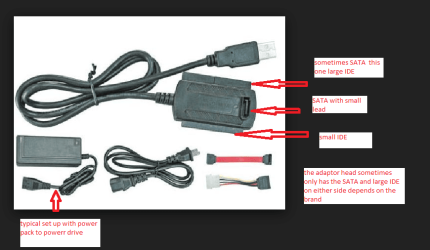
thats the sort of thing l have, it was the only thing that allowed me to partition the drive, however lve got my hands on a caddy for the drive that says it supports 3TB or larger drives.

tho l am wondering if the problem is related to my messing around before l got the adapter.. you see for a couple of days l was trying to get the drive to partition, l guess its entirely possible that the last transfers of data happened to cross an area of bad data from when l extended the partition. the best thing l can start with is just running a quick format when l put the drive in the caddy (once l have its data backed up) and if scandisk still has issues then l guess lm going to have to leave the damn thing testing for a while, its just annoying that l have to go through so much effort just to sort out the drive.
 

My Computer

Computer type
PC/Desktop
Computer Manufacturer/Model Number
Custom build
OS
Windows 7 Professional (64bit)
CPU
Intel i5 4440 3.10ghz
Motherboard
Gigabyte GA-H97M-D3H
Memory
Corsair 32GB (4x8GB) DDR3 1600MHz Vengeance Memory Kit 1.5V
Graphics Card(s)
Intel Graphics 4600 (on board)
Sound Card
External Creative Soundblaster
Monitor(s) Displays
32" TV
Screen Resolution
1360*768
Hard Drives
Kingston SSDNow UV400 240GB 2.5inch SATAIII SSD
1 1TB WD WD10EADS
3 1TB WD WD10EZEX
PSU
Coolermaster GM-Series 550W Semi Modular
Case
Aerocool X-Predator X1 Devil Red
Cooling
5x 120mil (Arctic F12)
Keyboard
Microsoft Curve 2000 v1
Mouse
Trust MaxTrack Mini Mouse - 6 button(s) - wired - USB
Internet Speed
34Meg
Antivirus
Bitdefender 2017
Browser
Firefox
l should be able to do that tomorrow at some point. lm just wondering if it is down to the adapter considering its a cheapie from ebay, might be worth running scan disk while in the caddy just to see what it does..
 

My Computer

Computer type
PC/Desktop
Computer Manufacturer/Model Number
Custom build
OS
Windows 7 Professional (64bit)
CPU
Intel i5 4440 3.10ghz
Motherboard
Gigabyte GA-H97M-D3H
Memory
Corsair 32GB (4x8GB) DDR3 1600MHz Vengeance Memory Kit 1.5V
Graphics Card(s)
Intel Graphics 4600 (on board)
Sound Card
External Creative Soundblaster
Monitor(s) Displays
32" TV
Screen Resolution
1360*768
Hard Drives
Kingston SSDNow UV400 240GB 2.5inch SATAIII SSD
1 1TB WD WD10EADS
3 1TB WD WD10EZEX
PSU
Coolermaster GM-Series 550W Semi Modular
Case
Aerocool X-Predator X1 Devil Red
Cooling
5x 120mil (Arctic F12)
Keyboard
Microsoft Curve 2000 v1
Mouse
Trust MaxTrack Mini Mouse - 6 button(s) - wired - USB
Internet Speed
34Meg
Antivirus
Bitdefender 2017
Browser
Firefox
Sure. The best way to understand the exact condition of a HD is to run the HD Diagnostics followed by full Disk Check.

Let us know how it goes, and any other performance issues you might have.
 
took nearly 16 hours but finally backed up the drive also quick formatted the drive then ran scandisk.

the drive hasnt given off any errors since the format or at least no errors were picked up by partition wizard, would that be an indication that my issue was related to problems with the file system and not the drive itself? because before ld pick up quite a few errors when running a check wish scan disk, or should l run a full scandisk which includes the second option on the windows scandisk prompt?

my best guess is all the original issues l had when trying to get the drive to initialise originally could have been part of the problem because originally l couldnt get the drive to be recognised. (l need sleep now but if its recommended l could run further diagnostics later and use the search for bad sectors option windows gives now l can scan the drive without errors showing up).
 

My Computer

Computer type
PC/Desktop
Computer Manufacturer/Model Number
Custom build
OS
Windows 7 Professional (64bit)
CPU
Intel i5 4440 3.10ghz
Motherboard
Gigabyte GA-H97M-D3H
Memory
Corsair 32GB (4x8GB) DDR3 1600MHz Vengeance Memory Kit 1.5V
Graphics Card(s)
Intel Graphics 4600 (on board)
Sound Card
External Creative Soundblaster
Monitor(s) Displays
32" TV
Screen Resolution
1360*768
Hard Drives
Kingston SSDNow UV400 240GB 2.5inch SATAIII SSD
1 1TB WD WD10EADS
3 1TB WD WD10EZEX
PSU
Coolermaster GM-Series 550W Semi Modular
Case
Aerocool X-Predator X1 Devil Red
Cooling
5x 120mil (Arctic F12)
Keyboard
Microsoft Curve 2000 v1
Mouse
Trust MaxTrack Mini Mouse - 6 button(s) - wired - USB
Internet Speed
34Meg
Antivirus
Bitdefender 2017
Browser
Firefox
three quaters of the way through scandisk (with the scanning of bad sectors option checked) been 5ish hours since l started but its not thrown off any problems yet.

tbh l think it was a file system problem caused my original issues partitioning the drive, the reason lve came to this conclusion is 1) windows isnt telling me l need to scan the drive any more and 2) l could actually finish running scandisk without it becoming unresponsive and 3) partition wizard picked nothing up on its scans, it picked up quite a few errors when it originally checked.
 

My Computer

Computer type
PC/Desktop
Computer Manufacturer/Model Number
Custom build
OS
Windows 7 Professional (64bit)
CPU
Intel i5 4440 3.10ghz
Motherboard
Gigabyte GA-H97M-D3H
Memory
Corsair 32GB (4x8GB) DDR3 1600MHz Vengeance Memory Kit 1.5V
Graphics Card(s)
Intel Graphics 4600 (on board)
Sound Card
External Creative Soundblaster
Monitor(s) Displays
32" TV
Screen Resolution
1360*768
Hard Drives
Kingston SSDNow UV400 240GB 2.5inch SATAIII SSD
1 1TB WD WD10EADS
3 1TB WD WD10EZEX
PSU
Coolermaster GM-Series 550W Semi Modular
Case
Aerocool X-Predator X1 Devil Red
Cooling
5x 120mil (Arctic F12)
Keyboard
Microsoft Curve 2000 v1
Mouse
Trust MaxTrack Mini Mouse - 6 button(s) - wired - USB
Internet Speed
34Meg
Antivirus
Bitdefender 2017
Browser
Firefox
while its not showing the scan disk prompt any more when plugged in it stopped near virtually near the end of the bad sector scan.. left it there for a good 30mins but didnt move, maybe the drive does have an issue :/
 

My Computer

Computer type
PC/Desktop
Computer Manufacturer/Model Number
Custom build
OS
Windows 7 Professional (64bit)
CPU
Intel i5 4440 3.10ghz
Motherboard
Gigabyte GA-H97M-D3H
Memory
Corsair 32GB (4x8GB) DDR3 1600MHz Vengeance Memory Kit 1.5V
Graphics Card(s)
Intel Graphics 4600 (on board)
Sound Card
External Creative Soundblaster
Monitor(s) Displays
32" TV
Screen Resolution
1360*768
Hard Drives
Kingston SSDNow UV400 240GB 2.5inch SATAIII SSD
1 1TB WD WD10EADS
3 1TB WD WD10EZEX
PSU
Coolermaster GM-Series 550W Semi Modular
Case
Aerocool X-Predator X1 Devil Red
Cooling
5x 120mil (Arctic F12)
Keyboard
Microsoft Curve 2000 v1
Mouse
Trust MaxTrack Mini Mouse - 6 button(s) - wired - USB
Internet Speed
34Meg
Antivirus
Bitdefender 2017
Browser
Firefox
Back
Top