System Handgs up after startup, starts up in safe mode

saharawarpub

New member
Member
Local time
11:11 AM
Messages
25
hey , Windows screen just freezes after few seconds of start up cursor works fine though, Starts up in safe mode with N/Wing so ran SFC/SCANNOW in elevated cmd , CBS.LOG file was generated for the errors found, i cant understand a thing in that file. Im also scanning entire system with malwarebytes.
 
Last edited:

My Computer My Computer

At a glance

Windows 7 started 32bitatom2gb
Computer Manufacturer/Model Number
HP mini 2100
OS
Windows 7 started 32bit
CPU
atom
Memory
2gb
hey , Windows screen just freezes after few seconds of start up cursor works fine though, Starts up in safe mode with N/Wing so ran SFC/SCANNOW in elevated cmd , CBS.LOG file was generated for the errors found, i cant understand a thing in that file. Im also scanning entire system with malwarebytes.

Zip it and upload

Also Please run Autoruns and then click on File> Save.. Save the file in .arn format and upload here. Will have a look
 

My Computer My Computer

At a glance

Windows 7 ultimate x64
Computer Manufacturer/Model Number
Nothing specific....what ever the clients provide for Repair
OS
Windows 7 ultimate x64
Uploading the files, malwarebytes detected rootkit n removed it. the issue but still have same problem.
 

Attachments

My Computer My Computer

At a glance

Windows 7 started 32bitatom2gb
Computer Manufacturer/Model Number
HP mini 2100
OS
Windows 7 started 32bit
CPU
atom
Memory
2gb
First in Autoruns... uncheck all the items marked in Yellow.. they will be disabled at startup. These are apps or drivers that were not properly uninstalled..

Then under Logon uncheck the below
  1. n/a HP Media Suite ArcSoft Inc. c:\program files\hewlett-packard\hp media suite\home\hpmediasuite.exe
  2. n/a c:\program files\hewlett-packard\hp media suite\home\pinitem.vbs
  3. uTorrent µTorrent BitTorrent, Inc. c:\program files\utorrent\utorrent.exe

Under Explorer Where ever you see "Zecter" uncheck these

Under Services
  1. Application Updater
  2. DvmMDES
  3. GamesAppService
  4. HP Support Assistant Service
  5. HPDrvMntSvc.exe
  6. IAStorDataMgrSvc

Also your MSE Antivirus is not properly installed. Suggest you download the latest version and install it. And do a full scan of your system.. It looks like there are some infections

Do these and let me know
 

My Computer My Computer

At a glance

Windows 7 ultimate x64
Computer Manufacturer/Model Number
Nothing specific....what ever the clients provide for Repair
OS
Windows 7 ultimate x64
Well i did uncheck all the boxes u suggested, however its giving me the same problem, safe mode wont allow me to unistall MSE.
 

My Computer My Computer

At a glance

Windows 7 started 32bitatom2gb
Computer Manufacturer/Model Number
HP mini 2100
OS
Windows 7 started 32bit
CPU
atom
Memory
2gb
did you reboot after unchecking them ???
 

My Computer My Computer

At a glance

Windows 7 ultimate x64
Computer Manufacturer/Model Number
Nothing specific....what ever the clients provide for Repair
OS
Windows 7 ultimate x64
Yes, i did reboot in normal mode, thats when i learnt that its not working.
 

My Computer My Computer

At a glance

Windows 7 started 32bitatom2gb
Computer Manufacturer/Model Number
HP mini 2100
OS
Windows 7 started 32bit
CPU
atom
Memory
2gb
Please use this tool to post all the files here

Also rerun Autoruns and post the .arn file here
 

My Computer My Computer

At a glance

Windows 7 ultimate x64
Computer Manufacturer/Model Number
Nothing specific....what ever the clients provide for Repair
OS
Windows 7 ultimate x64
Here are the files u requested.

@gregrocker I do not have an iso file, windows came in preinstalled on this m/c , however i do have a recovery drive, would recovering my system delete all my data?
 

Attachments

My Computer My Computer

At a glance

Windows 7 started 32bitatom2gb
Computer Manufacturer/Model Number
HP mini 2100
OS
Windows 7 started 32bit
CPU
atom
Memory
2gb
Please update your bios to F.24...this has fix USB power.... Coupled with the BSOD dumps... which are very old... could resolve issue regarding the usb powering up lately.

Again

Under Explorer you missed

under HKLM\Software\Classes\*\ShellEx\ContextMenuHandlers
  1. Zecter

and under HKLM\Software\Classes\Folder\ShellEx\ContextMenuHandlers
  1. Zecter

Under Services
  1. HP Wireless Assistant Service
  2. hpqwmiex
  3. HPWMISVC

try these and Let me know
 

My Computer My Computer

At a glance

Windows 7 ultimate x64
Computer Manufacturer/Model Number
Nothing specific....what ever the clients provide for Repair
OS
Windows 7 ultimate x64
The latest official Win7 installer .iso is provided in Step 5 of tutorial along with tool to burn to DVd or write to flash stick, boot to do repairs or if necessary the reinstall.

Work through the steps in tutorial after working with centaur78 on his good ideas.
 
hey my pc boots up in normal mode, however the firewall wont start, i uninstalled MSe downloaded the latest version, tried to install it however it wont install, i had this problem few days back as well, this http://www.sevenforums.com/network-sharing/271306-dhcp-not-starting-2.html is the thread for that issue, as soon as my firewall started working i had this booting issue and now got reed of booting issue firewall wont start it gives me error code 0x8007042 tried the fix that worked earlied but in vain. Updated the bios to f.24
 

My Computer My Computer

At a glance

Windows 7 started 32bitatom2gb
Computer Manufacturer/Model Number
HP mini 2100
OS
Windows 7 started 32bit
CPU
atom
Memory
2gb
hey my pc boots up in normal mode, however the firewall wont start, i uninstalled MSe downloaded the latest version, tried to install it however it wont install, i had this problem few days back as well, this http://www.sevenforums.com/network-sharing/271306-dhcp-not-starting-2.html is the thread for that issue, as soon as my firewall started working i had this booting issue and now got reed of booting issue firewall wont start it gives me error code 0x8007042 tried the fix that worked earlied but in vain. Updated the bios to f.24

Since the booting issue is resolved for now..

Lets move on to the next step.. getting the firewall issue fixed for the error code 0x8007042.Follow this fix for it

We will then move on to the MSE installation
 

My Computer My Computer

At a glance

Windows 7 ultimate x64
Computer Manufacturer/Model Number
Nothing specific....what ever the clients provide for Repair
OS
Windows 7 ultimate x64
unfortunately the fix dint work, im still getting the same error code i.e 0x8007042c .
 

My Computer My Computer

At a glance

Windows 7 started 32bitatom2gb
Computer Manufacturer/Model Number
HP mini 2100
OS
Windows 7 started 32bit
CPU
atom
Memory
2gb
BFE is not started when i try to bring it up manually it gives me errror 1079, firewall gives me an error code 1068. no malware were found in the quick scan.
 

My Computer My Computer

At a glance

Windows 7 started 32bitatom2gb
Computer Manufacturer/Model Number
HP mini 2100
OS
Windows 7 started 32bit
CPU
atom
Memory
2gb
Error 1079: The account specified for this service is different from the account specified for other services running in the same process.

The service needs to be started in Local Service account ..

To do so, type services.msc in start search and hit Enter to open Services.

Scroll down to the Windows Firewall service and double click on it to open its Properties box.

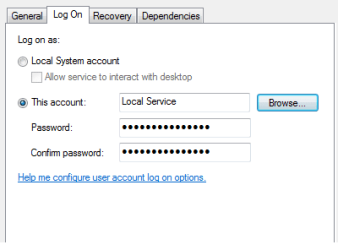
Click Log On tab and under This account, type NT AUTHORITY\LocalService. You set both Password fields blank.

Click Apply/OK.

Repeat this step for the Base Filtering Engine service too, as BFE is a service that manages firewall and Internet Protocol security.

You will now be able to start the service.


Let me know
 

My Computer My Computer

At a glance

Windows 7 ultimate x64
Computer Manufacturer/Model Number
Nothing specific....what ever the clients provide for Repair
OS
Windows 7 ultimate x64
Well, I have already tried that, tried it once more but its not working.:confused:
Ill download the registry for bfe n firewall n let u know the results after that.
 

My Computer My Computer

At a glance

Windows 7 started 32bitatom2gb
Computer Manufacturer/Model Number
HP mini 2100
OS
Windows 7 started 32bit
CPU
atom
Memory
2gb
Now here is a thing, for BFE i tried to change the logon to local system n it starts up, then i change the logon to local services wipe out password fields click on apply , go to firewall try to start it but do get an error 1079.
 

My Computer My Computer

At a glance

Windows 7 started 32bitatom2gb
Computer Manufacturer/Model Number
HP mini 2100
OS
Windows 7 started 32bit
CPU
atom
Memory
2gb
you need to same process for firewall as you did for BFE

services logon.png

Both needs the Log On account to be Local Service with blank password.
 

My Computer My Computer

At a glance

Windows 7 ultimate x64
Computer Manufacturer/Model Number
Nothing specific....what ever the clients provide for Repair
OS
Windows 7 ultimate x64
Back
Top