
System hanging/freezing randomly

Incomp

New member
Local time
2:34 AM
Messages
2
Location
Arizona
Hi! My name is Steven, I'm a Java programmer and I make server-sided mods for Minecraft. I've been having an "infuriatingly-inconvenient" issue with my computer. Out of the blue (not bsod), my computer will just cease to respond. Let me break up the problem below.

TIMELINE OF EVENTS 1
  1. Enjoying time on computer
  2. Current window stops responding
  3. Go to taskbar to minimize
  4. Taskbar stops responding
  5. Hard reset

TIMELINE OF EVENTS 2
  1. Started up computer and after it's done booting, I decide to mess around on my laptop
  2. Urge to play a game or do something that only my desktop can handle
  3. Click start menu on desktop
  4. Start menu doesn't appear
  5. Taskbar stops responding
  6. Desktop (dwm.exe) stops responding
  7. Hard reset

TIMELINE OF EVENTS 3
  1. Right-click at any time
  2. explorer.exe stops responding
  3. Everything stops responding
  4. Hard reset

ADDITIONAL DETAILS
  1. I do not get any "program.exe has stopped responding" pop-ups. I just get the loading cursor.
  2. I've ran a virus scan with ASC 7.
  3. My HDD is failing and I'm trying to perpetuate it for as long as I can while I buy a new one and back up my files.
  4. My system will hang (or freeze, can't tell) even during system restores and chkdsk protocols.
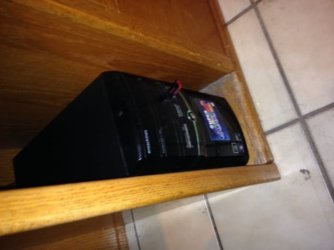
  5. Here in Arizona, it gets extremely hot in the summer, and it's the start of July at the time of this thread's creation. Not to mention, I store my tower in a little compartment with little to no ventilation, so overheating may be a big factor here. I've attached an image of what I mean.

I'm currently doing a system restore to June 25th.

Any help on this would be heavily appreciated. I know I'm asking a lot from my first thread on here but hey, I'm sure you're all an intelligent group. Thank you in advance!

Steven
 

Attachments
  • image.jpeg
    image.jpeg
    28.6 KB · Views: 11

My Computer

Computer type
PC/Desktop
Computer Manufacturer/Model Number
eMachines + customizations
OS
Windows 7 Home Premium x64
CPU
AMD Athlon 2.7 GHz Dual Core
Motherboard
Unknown
Memory
7GB DDR2
Graphics Card(s)
Radeon HD 6540 w/ 1GB VRAM
Hard Drives
7200RPM 750GB HDD
Antivirus
Microsoft Security Essentials
Browser
Google Chrome
Determine with certainty if its overheating by installing CoreTemp, putting its temps in the SysTray and setting Protection it to hibernate the PC if it reaches 90% of max. All vents should be clear and if overheating you need a case fan or cooler environment, keep case and heatsink clean and freshly pasted with Thermal Compound.

This step and others to check over your PC are in Troubleshooting Steps for Windows 7.

If your HD is failing you've probably already found your problem. Do the HD test in tutorial to be sure. You must have it backed up against failure or risk losing your files.
 
After doing what Greg has suggested I recommend removing your compute from the cabinet you have it stuck in. It can't breath. The poor thing is starving for air stuck in that hole.
 

My Computer

Computer type
PC/Desktop
Computer Manufacturer/Model Number
Home made Desktop
OS
Windows 10 Pro. 64/ version 1709 Windows 7 Pro/64
CPU
Intel i7-6800K @ 4.3
Motherboard
ASUS X-99 Deluxe II
Memory
Corsair Platinum 16 gig @2400
Graphics Card(s)
EVGA GTX 1070 OC
Monitor(s) Displays
Asus 27" LED LCD/VE278Q
Screen Resolution
1920-1080 or 1280-720 HDMI
Hard Drives
INTEL SSD 730-240 Gb Sata 3.0/
PSU
EVGA Platium 1200W
Case
Phanteks Luxe Tempered Glass 8 fans/ one radiator
Cooling
XSPC/ Water Cooled CPU
Keyboard
Das 4 Professional
Mouse
Logitech M705/MX Anywhere 2-S
Internet Speed
100 mbits
Antivirus
Microsoft Security Essentials/ Malwarebytes Premium 3.0/ SAS
Browser
I.E. 11 default/Firefox/ ISP Time Warner Cable/Spectrum
Other Info
LG BluRay Burner/
Sound system-KLipsch-THX/
Icy Dock ssd Hot Swap bays.
I'm in NV and know what you mean about hot weather in July.
You must have A/C running which should help the ambient temperature.
Make sure all fans operate and the grills are reasonably clean.
Put a box fan 5 to 10 feet from the front of the case and run it on low speed.
The box fan drops the ambient temp of my system 5-10F or so.
Might work for you until you can replace the HD.
 

My Computer

Computer type
PC/Desktop
Computer Manufacturer/Model Number
Home Built
OS
Windows 7 Home Pro SP1 64bit
CPU
Intel Xeon E-3 1240v2
Motherboard
HP
Memory
8GB
Graphics Card(s)
NVIDIA 300
Sound Card
Onboard
Monitor(s) Displays
Hanns G 25"
Screen Resolution
1920x1080
Hard Drives
Hitachi 2GB
PSU
Seasonic 430W
Case
Antec
Cooling
Stock
Keyboard
Logitech
Mouse
Logitech
Internet Speed
5MB
Thanks a lot for the helpful advice. I've decided that my HDD is not worth the trouble. It's backed up and I'm replacing it with a 1TB HDD. I'll move the tower to a more open area and I'll keep you guys posted as I'm still awaiting for my new HDD to ship to BestBuy.
 

My Computer

Computer type
PC/Desktop
Computer Manufacturer/Model Number
eMachines + customizations
OS
Windows 7 Home Premium x64
CPU
AMD Athlon 2.7 GHz Dual Core
Motherboard
Unknown
Memory
7GB DDR2
Graphics Card(s)
Radeon HD 6540 w/ 1GB VRAM
Hard Drives
7200RPM 750GB HDD
Antivirus
Microsoft Security Essentials
Browser
Google Chrome
An SSD is the best Upgrade you can do, faster than a new $1000 rig without one.
 
Back
Top