
System Health Report

lizzybee

New member
Local time
2:00 AM
Messages
3
In November I cleanly installed Win7 Ultimate on my machine and all has been great but for the fact that I am not able to generate a system health report anymore. I get the attached error. I cannot understand this as all the other monitoring aspects work fine: I can monitor power usage, defrag, etc but I can't generate the system health report. Is it possible that a registry cleaning recently messed up a driver? System Health Report.PNG
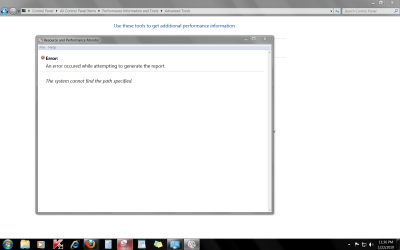
I apologize that I can't provide anymore details- I did do a system restore yesterday thinking that maybe a Windows Update perhaps interfered with this but it didn't make any difference. I wonder if anyone has a thought or suggestion for me that might help. Thank you so very much.
 

My Computer

Computer Manufacturer/Model Number
Dell Inspiron 530 pc
OS
windows 7 ultimate 32bit
Hello Lizzybee,

Welcome to Seven Forums.

If you don't have any older restore points to try, then I would try this. http://www.sevenforums.com/tutorials/1538-sfc-scannow-command-system-file-checker.html

If that doesn't work, then you might try this. http://www.sevenforums.com/tutorials/3413-repair-install.html

Although I'm not positive that the reg cleaner caused this problem, I recommend against the use of registry cleaners as they often cause more trouble than good unless you know exactly what is being deleted.

Hope this helps.

Gary
 

My Computer

Computer Manufacturer/Model Number
Dell XPS420
OS
Vista Ult 64 bit Seven Ult RTM x64
CPU
Intel Core2 Quad Q6600 2.40 gigahertz
Memory
Crucial Ballistix 4x2GB PC2 6400
Graphics Card(s)
NVIDIA GeForce 8600 GTS 256 MB
Sound Card
Creative SB X-Fi audio
Monitor(s) Displays
HP w2207 + HPvs15
Screen Resolution
1680x1050 + 1024x768
Hard Drives
2-WD5000AAKS-500 GB
WD5000AAV-500 GB external
Keyboard
Microsoft Comfort Curve
Mouse
MX Revolution
Other Info
Wacom Intuos 2 Graphics Tablet
Experience Index=5.5
  • Like
Reactions: JMH
Many thanks Gary, I will try this and let you know what happened. I have been previously cautioned about Registry Cleaners ...Beth
 

My Computer

Computer Manufacturer/Model Number
Dell Inspiron 530 pc
OS
windows 7 ultimate 32bit
I have been using Window since Windows 98. I never used a reg cleaner and never had a problem due to that fact.

Just maintain your computer, defrag, clean disc, use AntiVirus etc. and you will be ok.
 

My Computer

Computer type
PC/Desktop
Computer Manufacturer/Model Number
Dell XPS 420
OS
Windows 10, Home Clean Install
CPU
Intel Core2 processsor Q8200(2.33Ghz 1333FSB) Quad Core Tech
Motherboard
Dell
Memory
6 gb
Graphics Card(s)
ATI Radeon 256MB HD3650
Sound Card
Intergrated 7.1 Channel Audio
Monitor(s) Displays
Dell SP2009W 20"
Hard Drives
640 GB Serial ATA Hard drive
Cooling
Fan
Keyboard
Dell USB Keyboard
Mouse
Dell Premium Optical USB
Internet Speed
DSL 2.85
The only Registry cleaner needed is the one the pros all use: CCleaner Reg tab.

Even it will not attempt to remove unwanted Reg items, only discarded "shells."

If the User knows enought to pick and choose which registry items are no longer needed because Software has been uninstalled, then it should be done directly in the 2nd and 3rd Registry hives "Software" keys after setting a System Restore point.

For example, when I remove XYZ program, I always check those Reg hives to see if XYZ is in the Software keys and delete. Just make sure no other programs by that name are still in use.
 

My Computer

Computer Manufacturer/Model Number
Gateway/NV7923u & NV79C52u Laptops
OS
windows 7 professional & ultimate 64bit laptops
CPU
2.27 boost to 2.53 & 2.53 boost to 2.80
Motherboard
Mobile Intel® HM55 Express Chipset ???
Memory
4GB
Graphics Card(s)
Intel® Graphics Media Accelerator HD
Sound Card
realtek High-definition audio support
Monitor(s) Displays
17.3 " HD 1600 x 900
Hard Drives
hatachi Travelstar 5400 500GB & west digital 500GB
Internet Speed
35MB fios
Thank you for all your trouble. I installed my Win7 Ultimate again only I changed from 32 bit to 64 bit and, of course since it was a clean install, I am now able to generate the System Health Report without any problem. I do believe that the Registry Cleaner was responsible for that glitch. All's well now though! I am grateful to all replies...Beth :D
 

My Computer

Computer Manufacturer/Model Number
Dell Inspiron 530 pc
OS
windows 7 ultimate 32bit
super kewl it all works.
I'm afraid to re-image ( reinstall ) it will take 10hrs.
this works for me but I don't know what to look for:o {in the report}
stay well my friend


~Carmine
 

My Computer

Computer Manufacturer/Model Number
Gateway/NV7923u & NV79C52u Laptops
OS
windows 7 professional & ultimate 64bit laptops
CPU
2.27 boost to 2.53 & 2.53 boost to 2.80
Motherboard
Mobile Intel® HM55 Express Chipset ???
Memory
4GB
Graphics Card(s)
Intel® Graphics Media Accelerator HD
Sound Card
realtek High-definition audio support
Monitor(s) Displays
17.3 " HD 1600 x 900
Hard Drives
hatachi Travelstar 5400 500GB & west digital 500GB
Internet Speed
35MB fios
Hello all,

First post here.

I know this is a very old thread, and may not even get a second look for my new post. But I too have a non working Win7 "System Health Report" most of what has been written here rings true with my issue, and I have also used CCleaner quite a few times. I think CCleaner may have removed the registry values/Keys to allow Perfmon/ Generate A System Health Report. I also cant get Perfmon to run using "perfmon.msc" via the run command. My error message reads exactly as the OP's picture. Unfortunately I can't use a restore point (switched off) or resurrect a CCleaner reg/save, as I have cleared them assuming my system was running OK, but when I needed to generate a Health Report found it wasn't working & I can't recall exactly when it stopped functioning.

(Cannot find the path specified) also can't create a "New Data Collection Set" (User Defined) with Perfmon as it seems the C:\Windows\PLA & C:\PerfLogs\System\Diagnostics files and folders are either missing or incomplete.

My Question... Since MS has still not created a Hotfix (2018) to restore the System Health Reporting tool. Other than doing a fresh OS install, Is there a way to restore the PLA & PerfLog file/folder structure and registry keys/values for the Health Report tool and Perfmon. Does anyone know what the correct Foldername's and file structure along with registry values/keys will make it work without reinstalling Win7 fresh/repaired.

It would seem that the tool is a functional part of WER (Win Error Reporting & Error Handling) I'm wondering if a non working HealthReport/Perfmon could affect the general good health of my system and its ability to properly handle System Errors.

Kind Regards Jethro
 
Last edited:

My Computer

Computer type
PC/Desktop
Computer Manufacturer/Model Number
Custom Build
OS
Windows7 / 64bit / Pro
CPU
i7 4770k / O.C 4.6Ghz
Motherboard
ASUS - Z87 EXPERT
Memory
Corsair Vengeance Pro - DDR3 2400Mhz 16GB (2x8 kit)
Graphics Card(s)
Gigabyte - GV-N770OC-4GD / GTX770
Sound Card
Onboard
Monitor(s) Displays
24" Samsung SyncMaster S24B370
Screen Resolution
1920x1080x32 UHD Desktop (native)+DSR 2.0 (Simulation/Games)
Hard Drives
Many WD HDD's - 5x Internal sata - 3x 1Tb Blue + 2x 500Gb drives 1black 1Blue + 2x External WD 1Tb drives
PSU
CoolerMaster V850 Modular
Case
CoolerMaster HAF-X 942
Cooling
Noctua NH-D15 Twin Tower 2x 15cm Noctua Fans - Push Pull
Keyboard
MS - USB
Mouse
MS - Optical 3 button - USB
Internet Speed
Blinking awful Australian internet Sloooooooooow
Antivirus
Symantec NIS2018
Browser
IE11, Chrome, MozillaFireFox

My Computer

Computer type
PC/Desktop
Computer Manufacturer/Model Number
medionl/Aspire 6930G/acer x55a
OS
W7 home premium 32bit/W7HP 64bit/w10 tp insider ring
CPU
E5300 dual core
Motherboard
medion MS7366
Memory
3gb
Graphics Card(s)
Nvidia Geforce 7100 Nforce 630i
Monitor(s) Displays
avixc
Internet Speed
n (isp resticted to 72)
Antivirus
mse/pands
Browser
palemoon
Other Info
Belkin Fd7050 n USB using Railink RT2870 drivers, more upto date
Thanks for responding Roy, much appreciated since it is a very old thread.

I may eventually need to do exactly as you suggest, (Repair option using my W7 install disk), but was hoping to avoid doing so. The instructions are very clear and well constructed, but I fear that like others I will find some glitch that then forces me to do a clean reinstall of W7 and everything else if I can devote the time for such a total rebuild.
Reason being is that I have a finely tuned and configured Flight Simulator + Gigs of addons sitting in the mix which will be affected should I find myself going down the repair road. I realise that Personal files/data would be unaffected but these are the least of my concerns.
I'm not sure, (need to check) but I think my Genuine W7 64bitPro software disk is OEM per the product Key licence sticker It is not a (W764SP1 disk though). It is white center with all the correct official labelling and holograms on a copper wavy rim, it came from a reputable system builder and has been checked for authenticity. I also have the W7 SP1 ISO which I may need to use instead. I also would like to keep my MediaCenter & WLM which seem to present a problem after repair, according to the link info Repair Install
My concern.... if I choose to ignore the Non working SystemHealthReporter and Perfmon would there be any negative affect with other OS utilities and programs. Is it safe to leave well enough alone and continue on in ignorant bliss, or am I setting myself up for a OS disaster down the track.

Kind Regards Jethro
 

My Computer

Computer type
PC/Desktop
Computer Manufacturer/Model Number
Custom Build
OS
Windows7 / 64bit / Pro
CPU
i7 4770k / O.C 4.6Ghz
Motherboard
ASUS - Z87 EXPERT
Memory
Corsair Vengeance Pro - DDR3 2400Mhz 16GB (2x8 kit)
Graphics Card(s)
Gigabyte - GV-N770OC-4GD / GTX770
Sound Card
Onboard
Monitor(s) Displays
24" Samsung SyncMaster S24B370
Screen Resolution
1920x1080x32 UHD Desktop (native)+DSR 2.0 (Simulation/Games)
Hard Drives
Many WD HDD's - 5x Internal sata - 3x 1Tb Blue + 2x 500Gb drives 1black 1Blue + 2x External WD 1Tb drives
PSU
CoolerMaster V850 Modular
Case
CoolerMaster HAF-X 942
Cooling
Noctua NH-D15 Twin Tower 2x 15cm Noctua Fans - Push Pull
Keyboard
MS - USB
Mouse
MS - Optical 3 button - USB
Internet Speed
Blinking awful Australian internet Sloooooooooow
Antivirus
Symantec NIS2018
Browser
IE11, Chrome, MozillaFireFox
May I suggest that before you go any further you set up Macrium Reflect (Free) and create a backup image of your system as it is now then if things go wrong you can use the backup file to restore your system to exactly as it was when you created the backup.
 

My Computer

Computer type
PC/Desktop
OS
Microsoft Windows 7 Home Premium 64-bit 7601 Multiprocessor Free Service Pack 1
CPU
Intel(R) Core(TM) i7-3770 CPU @ 3.40GHz
Motherboard
ASUSTeK COMPUTER INC. P8H77-M
Memory
8.00 GB
Graphics Card(s)
Intel(R) HD Graphics 4000
Sound Card
On Board
Monitor(s) Displays
Dell 24"
Screen Resolution
1920 x 1080
Hard Drives
(1) INTEL SSDSC2CT180A3 ATA Device (2) ST500DM002-1BD142 ATA Device (3) WDC WD3200AAKS-75L9A0 ATA Device (4) Generic- Compact Flash USB Device (5) Generic- MS/MS-Pro USB Device (6) Generic- SD/MMC USB Device (7) Generic- SM/xD-Picture USB
PSU
500w Corsair
Case
Cooler Master
Cooling
3 Fans
Keyboard
Logitech MK300
Mouse
Logitech WOM
Internet Speed
75Mb
Antivirus
Norton 360
Browser
Firefox, Opera, IE
Thanks Mitchell,

Excellent suggestion, I will make a new system image before I do anything else, I haven't created a fresh system image since installing the MS patches for Meltdown & Spectre. (So previous Acronis image may now be redundant)
I am currently using (WD Edition Acronis True Image), would (Macrium Reflect 7) be better or much the same.

Kind Regards Jethro
 

My Computer

Computer type
PC/Desktop
Computer Manufacturer/Model Number
Custom Build
OS
Windows7 / 64bit / Pro
CPU
i7 4770k / O.C 4.6Ghz
Motherboard
ASUS - Z87 EXPERT
Memory
Corsair Vengeance Pro - DDR3 2400Mhz 16GB (2x8 kit)
Graphics Card(s)
Gigabyte - GV-N770OC-4GD / GTX770
Sound Card
Onboard
Monitor(s) Displays
24" Samsung SyncMaster S24B370
Screen Resolution
1920x1080x32 UHD Desktop (native)+DSR 2.0 (Simulation/Games)
Hard Drives
Many WD HDD's - 5x Internal sata - 3x 1Tb Blue + 2x 500Gb drives 1black 1Blue + 2x External WD 1Tb drives
PSU
CoolerMaster V850 Modular
Case
CoolerMaster HAF-X 942
Cooling
Noctua NH-D15 Twin Tower 2x 15cm Noctua Fans - Push Pull
Keyboard
MS - USB
Mouse
MS - Optical 3 button - USB
Internet Speed
Blinking awful Australian internet Sloooooooooow
Antivirus
Symantec NIS2018
Browser
IE11, Chrome, MozillaFireFox

My Computer

Computer type
PC/Desktop
Computer Manufacturer/Model Number
medionl/Aspire 6930G/acer x55a
OS
W7 home premium 32bit/W7HP 64bit/w10 tp insider ring
CPU
E5300 dual core
Motherboard
medion MS7366
Memory
3gb
Graphics Card(s)
Nvidia Geforce 7100 Nforce 630i
Monitor(s) Displays
avixc
Internet Speed
n (isp resticted to 72)
Antivirus
mse/pands
Browser
palemoon
Other Info
Belkin Fd7050 n USB using Railink RT2870 drivers, more upto date
Hello Roy,

Many thanks for following this through with me. Should I have started my own thread, is it too late to continue in a new thread/topic.

I have used the DISM / Update readiness tool 64bit version, when I had trouble with Windows update not working about 2 years ago, Win update returned to full function afterward. I have also on many occasions used the elevated "cmd window" to run SFC /scannow, most recent SFC showed no integrity violations, and ended cleanly as it always does. I also ran the chkdsk command /reboot which also said everything was good.

Kind Regards Jethro

Attached below are my CBS.log CheckSUR.log & 10/02/2018 SFC result

1ac1620ada0729ff821e7cb3adfb976b.jpg
 
Last edited:

My Computer

Computer type
PC/Desktop
Computer Manufacturer/Model Number
Custom Build
OS
Windows7 / 64bit / Pro
CPU
i7 4770k / O.C 4.6Ghz
Motherboard
ASUS - Z87 EXPERT
Memory
Corsair Vengeance Pro - DDR3 2400Mhz 16GB (2x8 kit)
Graphics Card(s)
Gigabyte - GV-N770OC-4GD / GTX770
Sound Card
Onboard
Monitor(s) Displays
24" Samsung SyncMaster S24B370
Screen Resolution
1920x1080x32 UHD Desktop (native)+DSR 2.0 (Simulation/Games)
Hard Drives
Many WD HDD's - 5x Internal sata - 3x 1Tb Blue + 2x 500Gb drives 1black 1Blue + 2x External WD 1Tb drives
PSU
CoolerMaster V850 Modular
Case
CoolerMaster HAF-X 942
Cooling
Noctua NH-D15 Twin Tower 2x 15cm Noctua Fans - Push Pull
Keyboard
MS - USB
Mouse
MS - Optical 3 button - USB
Internet Speed
Blinking awful Australian internet Sloooooooooow
Antivirus
Symantec NIS2018
Browser
IE11, Chrome, MozillaFireFox
Hi Jethro,

Good and BAD news

CheckSur identified the problem from KB2949927 :geek:
Theres a standard fix - extract the missing packages from the KB and install them via a checksur Temp file

Unfortunately yours is one of the more infamous MS botched updates, subsequently pulled and replaced:mad:

So we need to go a different route
from an elevated command mode, copy/paste the next line

wusa /uninstall /KB:2949927

was it successfull, if so please Reboot
check for updates - install - Reboot

Is KB
3123479 on your installed list - the replacement

check if perfmon is populated


IF NOT
please download this program
Farbar Recovery Scan Tool Download

we will need to do more cleaning.

Either way please rerun KB947821, post results

on a further note your CBS log was showing entries from 2009 VERY unusuall


Roy

Snick
have you got that KB in your library


Last edited:

My Computer

Computer type
PC/Desktop
Computer Manufacturer/Model Number
medionl/Aspire 6930G/acer x55a
OS
W7 home premium 32bit/W7HP 64bit/w10 tp insider ring
CPU
E5300 dual core
Motherboard
medion MS7366
Memory
3gb
Graphics Card(s)
Nvidia Geforce 7100 Nforce 630i
Monitor(s) Displays
avixc
Internet Speed
n (isp resticted to 72)
Antivirus
mse/pands
Browser
palemoon
Other Info
Belkin Fd7050 n USB using Railink RT2870 drivers, more upto date
Many thanks Roy,
really appreciate hearing that there is GOOD news and that the BAD may be fixable. I'm following your procedures very carefully, but as yet have not had time to create my backup system image, its been a busy weekend and now its about 30+ degrees in my computer room (way too hot for comfort) so I may need to hold off until its cooler. Weather report says a cool change is coming fingers crossed.
Can you give me a couple of days to get it all together and complete the tasks. Then get back to you with the results. I also decided to D/L a fresh copy of the Update Readiness Tool 64bit just to be sure it was the most recent version.

Kind Regards Jethro
 

My Computer

Computer type
PC/Desktop
Computer Manufacturer/Model Number
Custom Build
OS
Windows7 / 64bit / Pro
CPU
i7 4770k / O.C 4.6Ghz
Motherboard
ASUS - Z87 EXPERT
Memory
Corsair Vengeance Pro - DDR3 2400Mhz 16GB (2x8 kit)
Graphics Card(s)
Gigabyte - GV-N770OC-4GD / GTX770
Sound Card
Onboard
Monitor(s) Displays
24" Samsung SyncMaster S24B370
Screen Resolution
1920x1080x32 UHD Desktop (native)+DSR 2.0 (Simulation/Games)
Hard Drives
Many WD HDD's - 5x Internal sata - 3x 1Tb Blue + 2x 500Gb drives 1black 1Blue + 2x External WD 1Tb drives
PSU
CoolerMaster V850 Modular
Case
CoolerMaster HAF-X 942
Cooling
Noctua NH-D15 Twin Tower 2x 15cm Noctua Fans - Push Pull
Keyboard
MS - USB
Mouse
MS - Optical 3 button - USB
Internet Speed
Blinking awful Australian internet Sloooooooooow
Antivirus
Symantec NIS2018
Browser
IE11, Chrome, MozillaFireFox
Hi Jethro

No Worries, you wanna move back here -6 the other night.

Keep an eye open tho if Snick has the packages it will be easier.
note
Your Macrium back-up will have the error as well


Roy
 

My Computer

Computer type
PC/Desktop
Computer Manufacturer/Model Number
medionl/Aspire 6930G/acer x55a
OS
W7 home premium 32bit/W7HP 64bit/w10 tp insider ring
CPU
E5300 dual core
Motherboard
medion MS7366
Memory
3gb
Graphics Card(s)
Nvidia Geforce 7100 Nforce 630i
Monitor(s) Displays
avixc
Internet Speed
n (isp resticted to 72)
Antivirus
mse/pands
Browser
palemoon
Other Info
Belkin Fd7050 n USB using Railink RT2870 drivers, more upto date
Cheers Roy, yes but -6:what:maybee too cold.

Yes I agree, the Image backup will reintroduce the issue if used to resurrect the system if it goes pear shaped all our efforts will be for naught. (I may give the Image a miss this time and go straight to your previous posted procedures)

Keep an eye out for me in a few days, back soon and all the better for it we hope. :thumbsup:
 

My Computer

Computer type
PC/Desktop
Computer Manufacturer/Model Number
Custom Build
OS
Windows7 / 64bit / Pro
CPU
i7 4770k / O.C 4.6Ghz
Motherboard
ASUS - Z87 EXPERT
Memory
Corsair Vengeance Pro - DDR3 2400Mhz 16GB (2x8 kit)
Graphics Card(s)
Gigabyte - GV-N770OC-4GD / GTX770
Sound Card
Onboard
Monitor(s) Displays
24" Samsung SyncMaster S24B370
Screen Resolution
1920x1080x32 UHD Desktop (native)+DSR 2.0 (Simulation/Games)
Hard Drives
Many WD HDD's - 5x Internal sata - 3x 1Tb Blue + 2x 500Gb drives 1black 1Blue + 2x External WD 1Tb drives
PSU
CoolerMaster V850 Modular
Case
CoolerMaster HAF-X 942
Cooling
Noctua NH-D15 Twin Tower 2x 15cm Noctua Fans - Push Pull
Keyboard
MS - USB
Mouse
MS - Optical 3 button - USB
Internet Speed
Blinking awful Australian internet Sloooooooooow
Antivirus
Symantec NIS2018
Browser
IE11, Chrome, MozillaFireFox
Attached, please find the missing cat(s) & mum(s).

Extract CheckSur from the attached compressed folder (missing files)to desktop. double-left click zip folder > extract to > desktop
copy the bold text > highlight > right-click copy C:\Windows\Temp
click the start orb lower-left corner of display
in the search-box, paste C:\Windows\Temp
may take a few seconds for search to find temp folder
Click on temp folder when it appears
copy or cut and paste the CheckSur folder into the Temp folder
run the SURT tool again.

Glad to be able to assist you!
 

Attachments

Last edited:

My Computer

Computer type
PC/Desktop
Computer Manufacturer/Model Number
HP Desktop & Compaq Laptop
OS
Win 10 x64, Linux Lite, Win 7 x64, BlackArch, & Kali
Hard Drives
Samsung 850 Pro 256Gb,
Hitachi HDD 1Tb,
Crucial MX SSD 250Gb
Segate 3Tb USB 3.0 Ext. Backup HDD
Internet Speed
150Mbps dn, 20Mbps up
Antivirus
Avast Free, Malwarebytes Anti-Exploit & Anti-Ransomware
Browser
Firefox, Chrome, Opera, & VPN
Back
Top