System heating + 100% CPU Usage

vivek669

New member
Local time
2:55 AM
Messages
13
Hello, I have a HP 6910tx which was purchased 2 years back. I have installed Windows 7 Ultimate RC7600 on it at the moment. Few days back, I had a system crash and the Tech guys at HP said my laptop had multiple problems, and I eventually had my hard disk and Nvidia Graphics Card replaced. I am still facing nagging issues with my laptop for which I have no answers to.

I have done a clean install of Win 7 and my laptop at the moment doesn't have any software or application that is capable of sucking the memory out. But I still see 100% CPU usage sometimes even though the system is practically idle. This is resulting in overheating of my laptop which is very worrying. My guess is that it may be because of assembling the laptop incorrectly which is causing the problem, but it's just an educated guess at the most. I am really concerned about the health of my laptop as it was running in top notch condition just a few weeks back. I am attaching the system specs with a HijackThis log taken a while back. Can anybody please help me out and advice before it's too late. I shall be much obliged.

Regards,
Viv

System: Hp DV6910tx, Intel Core 2 Duo, 2Ghz, 3GB Ram, 320 GB Hard disk, Nvidia GE Force 8400GS Graphics Card

Code:
Logfile of Trend Micro HijackThis v2.0.4
Scan saved at 09:37:04, on 19-12-2010
Platform: Windows 7  (WinNT 6.00.3504)
MSIE: Internet Explorer v8.00 (8.00.7600.16385)
Boot mode: Normal

Running processes:
C:\Windows\system32\taskhost.exe
C:\Windows\system32\Dwm.exe
C:\Windows\Explorer.EXE
C:\Program Files\uTorrent\uTorrent.exe
C:\Program Files\Sify Broadband\BBClient.exe
C:\Program Files\Sify Broadband\BBImpSec.exe
C:\Program Files\Mozilla Firefox\firefox.exe
C:\Program Files\Mozilla Firefox\plugin-container.exe
C:\Windows\system32\wuauclt.exe
C:\Program Files\SpeedFan\speedfan.exe
C:\Windows\system32\taskmgr.exe
C:\Windows\system32\SearchFilterHost.exe
E:\hijackthis\Trend Micro\HiJackThis\HiJackThis.exe

R1 - HKCU\Software\Microsoft\Internet Explorer\Main,Search Page = [URL="http://go.microsoft.com/fwlink/?LinkId=54896"]Bing[/URL]
R0 - HKCU\Software\Microsoft\Internet Explorer\Main,Start Page = [URL="http://www.sify.com"]India News | Indian Business, Finance News | Sports: Cricket India | Bollywood, Tamil, Telugu Movies |Sify Mail,Astrology, Indian Recipes[/URL]
R1 - HKLM\Software\Microsoft\Internet Explorer\Main,Default_Page_URL = [URL="http://go.microsoft.com/fwlink/?LinkId=69157"]MSN.com[/URL]
R1 - HKLM\Software\Microsoft\Internet Explorer\Main,Default_Search_URL = [URL="http://go.microsoft.com/fwlink/?LinkId=54896"]Bing[/URL]
R1 - HKLM\Software\Microsoft\Internet Explorer\Main,Search Page = [URL="http://go.microsoft.com/fwlink/?LinkId=54896"]Bing[/URL]
R0 - HKLM\Software\Microsoft\Internet Explorer\Main,Start Page = [URL="http://go.microsoft.com/fwlink/?LinkId=69157"]MSN.com[/URL]
R0 - HKLM\Software\Microsoft\Internet Explorer\Search,SearchAssistant = 
R0 - HKLM\Software\Microsoft\Internet Explorer\Search,CustomizeSearch = 
R0 - HKCU\Software\Microsoft\Internet Explorer\Toolbar,LinksFolderName = 
O4 - HKCU\..\Run: [uTorrent] "C:\Program Files\uTorrent\uTorrent.exe"
O4 - HKCU\..\Run: [SifyBB] C:\Program Files\Sify Broadband\BBImpSec.exe
O4 - HKUS\S-1-5-19\..\Run: [Sidebar] %ProgramFiles%\Windows Sidebar\Sidebar.exe /autoRun (User 'LOCAL SERVICE')
O4 - HKUS\S-1-5-19\..\RunOnce: [mctadmin] C:\Windows\System32\mctadmin.exe (User 'LOCAL SERVICE')
O4 - HKUS\S-1-5-20\..\Run: [Sidebar] %ProgramFiles%\Windows Sidebar\Sidebar.exe /autoRun (User 'NETWORK SERVICE')
O4 - HKUS\S-1-5-20\..\RunOnce: [mctadmin] C:\Windows\System32\mctadmin.exe (User 'NETWORK SERVICE')
O16 - DPF: {FFB3A759-98B1-446F-BDA9-909C6EB18CC7} (PCPitstop Exam) - [URL]http://utilities.pcpitstop.com/Optimize3/pcpitstop2.dll[/URL]
O17 - HKLM\System\CCS\Services\Tcpip\..\{C3E70A2E-3131-4566-A36C-750E300B685F}: NameServer = 202.144.95.4,202.144.66.6
O23 - Service: NVIDIA Driver Helper Service (NVSvc) - NVIDIA Corporation - C:\Windows\system32\nvvsvc.exe

--
End of file - 2571 bytes
 

My Computer

Computer Manufacturer/Model Number
HP dv6910tx
OS
Windows 7 Ultimate, 32-bit
Memory
3gb ram
Then perhaps it is some other hardware that needs replacement as well. Could there be any BIOS or other setting that reduces the maximum use of your CPU? You could very well only be using a percentage of what you have installed if that were the case. Your power supply is sufficient? Try enabling high performance in the power options of your computer, cause you may be power saving o.0.
 

My Computer

Computer type
PC/Desktop
Computer Manufacturer/Model Number
Custom Asus Build
OS
Microsoft Windows 8.1 Pro 64-bit
CPU
Intel(R) Core(TM) i3-4130 CPU @ 3.40GHz
Motherboard
B85M-E
Memory
8.00 GB
Graphics Card(s)
None
Sound Card
Realtek High Definition Audio
Monitor(s) Displays
Asus 23.6" Monitor
Screen Resolution
1920 x 1080 x 32 bits (4294967296 colors) @ 60 Hz
Hard Drives
INTEL SSDSC2BW180A4
Samsung SSD 840 PRO Series
PSU
Seasonic S12II-380Bronze
Case
Lian Li
Cooling
Fan, Passive
Keyboard
Logitech K120
Mouse
Microsoft Touch Mouse
Internet Speed
4ms Ping, 19.0 Mbps Download, 19.0 Mbps Upload
Antivirus
Eset Endpoint
Browser
Internet Explorer, Chrome
Hello Vivek,

Can you post a snipshot of the task manager? Before doing that, click on the CPU tab once or twice to arrange in descending order. Post multiple snipshots if required, so we can see the top 10 cpu hoggers.

The Hijackthis log doesnt suggest anything suspicious, though to be safe run a scan with the freeware malwarebytes program.

For the overheating, see if you can get a laptop coolpad. For the time being raise the back of the laptop and make sure theres free flow of air underneath. You can also try blowing out the vents with compressed air and, if you are handy unscrew the bottom and clean out the interior.

Also try using Balanced or Power saver power plans in case you are using the high performance plan right now.
 

My Computer

Computer Manufacturer/Model Number
Too many to describe...
OS
Windows 7 x64 pro/ Windows 7 x86 Pro/ XP SP3 x86
For the overheating, see if you can get a laptop coolpad. For the time being raise the back of the laptop and make sure theres free flow of air underneath. You can also try blowing out the vents with compressed air and, if you are handy unscrew the bottom and clean out the interior.

Also try using Balanced or Power saver power plans in case you are using the high performance plan right now.
I'm sorry, Bill here is right. I overlooked that bit about overheating and only saw your struggling CPU. DO use a Balanced or Power saving mode, at least until you can find out why it is overheating. +1 Bill
 

My Computer

Computer type
PC/Desktop
Computer Manufacturer/Model Number
Custom Asus Build
OS
Microsoft Windows 8.1 Pro 64-bit
CPU
Intel(R) Core(TM) i3-4130 CPU @ 3.40GHz
Motherboard
B85M-E
Memory
8.00 GB
Graphics Card(s)
None
Sound Card
Realtek High Definition Audio
Monitor(s) Displays
Asus 23.6" Monitor
Screen Resolution
1920 x 1080 x 32 bits (4294967296 colors) @ 60 Hz
Hard Drives
INTEL SSDSC2BW180A4
Samsung SSD 840 PRO Series
PSU
Seasonic S12II-380Bronze
Case
Lian Li
Cooling
Fan, Passive
Keyboard
Logitech K120
Mouse
Microsoft Touch Mouse
Internet Speed
4ms Ping, 19.0 Mbps Download, 19.0 Mbps Upload
Antivirus
Eset Endpoint
Browser
Internet Explorer, Chrome
With Screenshot

Hi Sailor, Bill,

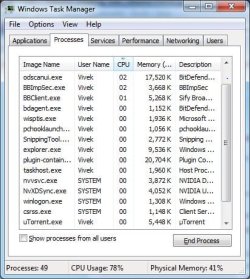
Please see the screenshot I have attached now. The Task Manager is showing me a usage between 60-100%. Still if you see there is no such application that is hogging the resources. I do have a Belkin Cooling Pad. I am using it as much as possible to keep my laptop cool. But with the constraints of being mobile, I can't take the cooling pad with me.

I have both Balanced and Power Saver Modes on my laptop. If there is a hardware problem, is there any software or utility that will show which part in specific is troublesome?

I am sorry, I am not very well versed with tweaking or checking the BIOS. Thanks for helping out guys. Really appreciate :)

Viv
 

Attachments

  • Task Mgr.JPG
    Task Mgr.JPG
    51.9 KB · Views: 20

My Computer

Computer Manufacturer/Model Number
HP dv6910tx
OS
Windows 7 Ultimate, 32-bit
Memory
3gb ram
Did you arrange the cpu usage column in descending order? Can you post a snip that shows all the processes? Also, before doing that, check the box at the bottom "Show processes from all users".
 

My Computer

Computer Manufacturer/Model Number
Too many to describe...
OS
Windows 7 x64 pro/ Windows 7 x86 Pro/ XP SP3 x86
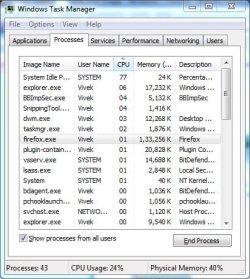
Sure, attached the screenshot with application usage in descending order. But now funnily, the system usage shows 24%. Why am I seeing such a variable system usage while all I do is gawk at the screen?
 

Attachments

  • Task Mgr1.JPG
    Task Mgr1.JPG
    51 KB · Views: 12

My Computer

Computer Manufacturer/Model Number
HP dv6910tx
OS
Windows 7 Ultimate, 32-bit
Memory
3gb ram
Let me post other screenshots of all the applications too.
 

My Computer

Computer Manufacturer/Model Number
HP dv6910tx
OS
Windows 7 Ultimate, 32-bit
Memory
3gb ram
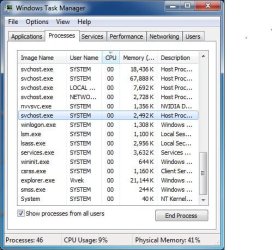
Ok this is with all the applications running in the background. The indicators have dipped below 20% now.
 

Attachments

  • 1.JPG
    1.JPG
    52 KB · Views: 12
  • 2.JPG
    2.JPG
    52.8 KB · Views: 10
  • 3.JPG
    3.JPG
    52.9 KB · Views: 11

My Computer

Computer Manufacturer/Model Number
HP dv6910tx
OS
Windows 7 Ultimate, 32-bit
Memory
3gb ram
In the earlier snip, you had 49 processes running, in this one you have 43. Logically speaking, one of the processes that is closed now was hogging a lot of cpu. Also windows explorer's consuming a lot. Please do the following:

1) Run a full scan with malwarebytes antimalware, its freeware, just google for it. Let it clean whatever it finds.

2) The high cpu usage could be indicative of software or driver conflicts. To isolate the problem, use a clean boot procedure.

How to Troubleshoot a Problem by Performing a Clean Startup in Windows 7 or Vista

Edit: Just saw the new snips- firefox, bitdefender and bbimp (whats that?) seem to be the major culprits. You can try alternatives to these apps or at least try reinstall them.
 
Last edited by a moderator:

My Computer

Computer Manufacturer/Model Number
Too many to describe...
OS
Windows 7 x64 pro/ Windows 7 x86 Pro/ XP SP3 x86
Cool, I just did a clean Install Windows 7 in my laptop yesterday but I will definitely take into account what you have suggested. Thanks again for your help. I will repost soon after I have actioned all the steps.
 

My Computer

Computer Manufacturer/Model Number
HP dv6910tx
OS
Windows 7 Ultimate, 32-bit
Memory
3gb ram
...Just saw the new snips- firefox, bitdefender and bbimp (whats that?) seem to be the major culprits. You can try alternatives to these apps or at least try reinstall them.
Agree, I noticed firefox was there. It is a great browser but sometimes computers can't handle it as it can hog memory and processing power.

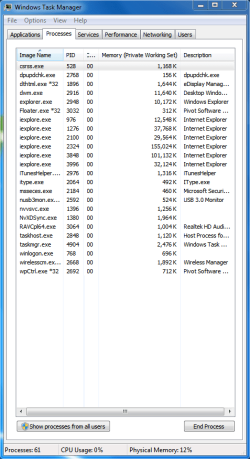
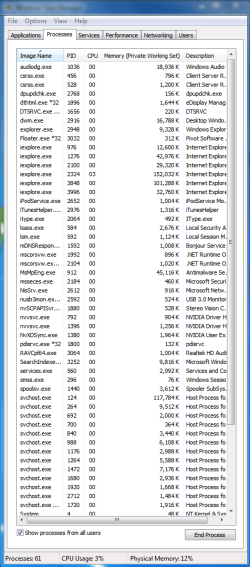
BUT, I noticed in all of those snips, it only managed to capture half of the task manager. You can expand the manager by dragging its bottom out so we can actually see all the resource hogs. For example, here is a pic of mine:

Repost when the CPU is high again. Does it happen when you have a lot of programs open or just when nothing is going on except background services? EDIT* oh and make sure you click "Show processes from all users" at the bottom, you may need to make the task manager full length, I'll post the second image to show what I mean:

Notice I didn't even manage to get everything? Hopefully you will, or post two pics
 

Attachments

  • Capture.PNG
    Capture.PNG
    23.3 KB · Views: 10
  • Capture2.PNG
    Capture2.PNG
    31.2 KB · Views: 11

My Computer

Computer type
PC/Desktop
Computer Manufacturer/Model Number
Custom Asus Build
OS
Microsoft Windows 8.1 Pro 64-bit
CPU
Intel(R) Core(TM) i3-4130 CPU @ 3.40GHz
Motherboard
B85M-E
Memory
8.00 GB
Graphics Card(s)
None
Sound Card
Realtek High Definition Audio
Monitor(s) Displays
Asus 23.6" Monitor
Screen Resolution
1920 x 1080 x 32 bits (4294967296 colors) @ 60 Hz
Hard Drives
INTEL SSDSC2BW180A4
Samsung SSD 840 PRO Series
PSU
Seasonic S12II-380Bronze
Case
Lian Li
Cooling
Fan, Passive
Keyboard
Logitech K120
Mouse
Microsoft Touch Mouse
Internet Speed
4ms Ping, 19.0 Mbps Download, 19.0 Mbps Upload
Antivirus
Eset Endpoint
Browser
Internet Explorer, Chrome
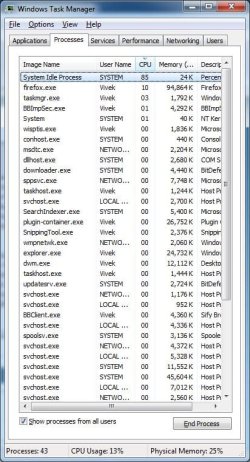
Ran the the malwarebytes antimalware suggested by Bill and also did a clean Boot for Win7. Nothing seems to be working. The problems to be honest doesn't persist from the moment the laptop is switched on but whenever there is a medium to heavy usage of the system. I notice this in particular when I plug my external drive to put my backed up data into the system. Right now as I type, the memory usage is beautifully showing 6% which is pleasing to the eye.

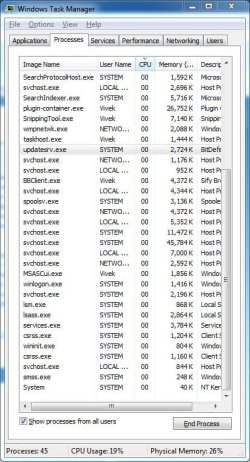
Could the sudden surge be due to some svchost service running in the background? I see a lot of them btw. I went to services.msc and disabled whatever application I thought was not worth running in my system. Two things I noticed is that the system idle Process shows 95% when the system is using low resources and the tasks always move up and down (For e.g. Firefox which appears number 2 on the Task manager always skips up and down within few seconds. And this happens with most of the applications).

Have included the screenshots of the Task manager with processes running from all users. Thanks again!

Viv
 

Attachments

  • Full sys.JPG
    Full sys.JPG
    80.8 KB · Views: 6
  • Secondary.JPG
    Secondary.JPG
    77.6 KB · Views: 5

My Computer

Computer Manufacturer/Model Number
HP dv6910tx
OS
Windows 7 Ultimate, 32-bit
Memory
3gb ram
So you notice that your computer can run slow, or is it just that you notice the high CPU scores every once in a while? Firefox takes 10% at times it looks like, it can be a resource hog. You still notice it jump up to 100%? Perhaps you should consider nocking down some graphics a few notches: Right click computer, go to properties. On the left side, click Advanced System Settings. On the Advanced Tab, Under Performance, click settings. Adjust the Visual effects to something less but that you still can live with, you might even try and see what you like.

Then go to these tutorials. You don't have to follow everything, but the more you follow, generally the faster your computer can get: http://www.sevenforums.com/tutorials/11728-optimize-windows-7-a.html and http://www.sevenforums.com/tutorials/1401-startup-programs-change.html?filter. I recommend disabling most if not all of these startup programs.

I think your CPU is functioning normally, you may just have a lot going on. I suggest uninstalling programs you don't need, as they may slow down your computer (I have no way of knowing which ones you have, but generally, if you need it, keep it, if not, then don't). I saw a process that was BBImpSec.exe and that took up 1% at the time of the snapshot. I don't have that process, and if you don't need it, find the program it belongs to and uninstall it. But in dealing with the SVChosts: they are part of your system, you need them.

1% may not be a lot, but it adds up, esspecially when you do something that takes a lot of CPU power. If you can, I suggest sticking with internet explorer. Some tests suggest it is a safer browser than firefox, and firefox takes a lot out of your computer from what I can see in your screenshots. Your CPU may go high, but that is okay and normal. After you've done all this and you are still having problems, let us know and we'll see what more we can do ;)

Hope this works for you, I can do some more tweaks for you but it gets deeper into the system and disables things (that most people don't need, but I don't know exactly what you want and need, so it can get tedious). Let me know if you want to go that route.

ALSO, make sure you defragment (Just type in defragment) and use disk cleanup through this tutorial: http://www.sevenforums.com/tutorials/818-disk-cleanup-open-use.html. Delete only things you know you don't need. if you delete anything that says temporary, it is okay cause the system will replace them later. If you don't know what something is, either leave it there or look it up to find out and then decide from there. Hope this all helps ya out bud. If you want to ask what something does, you can make a list right here and someone else or if I'm around would be more than happy to answer those questions.

(Forgive me if I sound really dumbed down, I don't know what your computer experience is like so I'm trying to make it simple for ya :) )
 

My Computer

Computer type
PC/Desktop
Computer Manufacturer/Model Number
Custom Asus Build
OS
Microsoft Windows 8.1 Pro 64-bit
CPU
Intel(R) Core(TM) i3-4130 CPU @ 3.40GHz
Motherboard
B85M-E
Memory
8.00 GB
Graphics Card(s)
None
Sound Card
Realtek High Definition Audio
Monitor(s) Displays
Asus 23.6" Monitor
Screen Resolution
1920 x 1080 x 32 bits (4294967296 colors) @ 60 Hz
Hard Drives
INTEL SSDSC2BW180A4
Samsung SSD 840 PRO Series
PSU
Seasonic S12II-380Bronze
Case
Lian Li
Cooling
Fan, Passive
Keyboard
Logitech K120
Mouse
Microsoft Touch Mouse
Internet Speed
4ms Ping, 19.0 Mbps Download, 19.0 Mbps Upload
Antivirus
Eset Endpoint
Browser
Internet Explorer, Chrome
:) I don't mind that one bit. I am a bit of a retard when it comes to computing. I was good when I was a studying. I had a doubt which is getting stronger and stronger and I feel we may have overlooked during the analysis. Correct me if I am wrong.

Can the high CPU usage be because of the laptop fan not functioning properly? I feel, the laptop may not have been reassembled properly when I sent it for service. My logic says, the programs are running in the background and the fan is running faster but something is stopping the fan from rotating freely which is causing the system to overheat (which may also contribute to the system overheat perhaps). Share your thoughts. :)

Thanks to all of you, I am learning a lot more on computers than ever. :)
 

My Computer

Computer Manufacturer/Model Number
HP dv6910tx
OS
Windows 7 Ultimate, 32-bit
Memory
3gb ram
For sure, if your CPU is overheating, it has stops set up that lower its activity so that it can cool down. If your fan isn't rotating, that is a big issue that you should fix. Motherboards can have it set up to where the CPU's usage is decreased incrementally depending on how hot its getting, so a cool CPU would allow you to use it to its max.
 

My Computer

Computer type
PC/Desktop
Computer Manufacturer/Model Number
Custom Asus Build
OS
Microsoft Windows 8.1 Pro 64-bit
CPU
Intel(R) Core(TM) i3-4130 CPU @ 3.40GHz
Motherboard
B85M-E
Memory
8.00 GB
Graphics Card(s)
None
Sound Card
Realtek High Definition Audio
Monitor(s) Displays
Asus 23.6" Monitor
Screen Resolution
1920 x 1080 x 32 bits (4294967296 colors) @ 60 Hz
Hard Drives
INTEL SSDSC2BW180A4
Samsung SSD 840 PRO Series
PSU
Seasonic S12II-380Bronze
Case
Lian Li
Cooling
Fan, Passive
Keyboard
Logitech K120
Mouse
Microsoft Touch Mouse
Internet Speed
4ms Ping, 19.0 Mbps Download, 19.0 Mbps Upload
Antivirus
Eset Endpoint
Browser
Internet Explorer, Chrome
Solved :) As we had suspected, the fan wasn't rotating as properly. It was due to a lot of dust that had accumulated and settled near the fan. The laptop is working like a dream machine now.

Thanks a lot Sailor. You've had a lot of patience. Much appreciated Sir!

Viv
 

My Computer

Computer Manufacturer/Model Number
HP dv6910tx
OS
Windows 7 Ultimate, 32-bit
Memory
3gb ram
Glad to hear it. I should have realized that your CPU is a pretty good one, a pretty fast one in fact. I concentrated on software and not on hardware problems like dust. You have taught me a fine lesson, so I thank you for that. I'd take compressed air and dust the rest of your system (not on the carpet as I'm prone to do lol) also, or just a few good deep breaths (being careful not to breath back in the dust, as I do, once again). cheers, I hope for a long lasting solution to your problem
 

My Computer

Computer type
PC/Desktop
Computer Manufacturer/Model Number
Custom Asus Build
OS
Microsoft Windows 8.1 Pro 64-bit
CPU
Intel(R) Core(TM) i3-4130 CPU @ 3.40GHz
Motherboard
B85M-E
Memory
8.00 GB
Graphics Card(s)
None
Sound Card
Realtek High Definition Audio
Monitor(s) Displays
Asus 23.6" Monitor
Screen Resolution
1920 x 1080 x 32 bits (4294967296 colors) @ 60 Hz
Hard Drives
INTEL SSDSC2BW180A4
Samsung SSD 840 PRO Series
PSU
Seasonic S12II-380Bronze
Case
Lian Li
Cooling
Fan, Passive
Keyboard
Logitech K120
Mouse
Microsoft Touch Mouse
Internet Speed
4ms Ping, 19.0 Mbps Download, 19.0 Mbps Upload
Antivirus
Eset Endpoint
Browser
Internet Explorer, Chrome
Back
Top