System Image and MBR

mjf

New member
Guru
Gold Member
VIP
Local time
5:09 PM
Messages
5,968
Location
Australia
I've looked and cannot find an answer.
When restoring a Windows system image:

(1) Does the MBR (first 512 bytes) get saved when the image is made and restored?

(2) Do partitions get replaced in exactly the same position when restored to a new disk?
 

My Computer

Computer type
PC/Desktop
Computer Manufacturer/Model Number
Own build
OS
Windows 7x64 Home Premium SP1
CPU
Intel i7 2600k
Motherboard
ASUS P8Z68 Deluxe
Memory
G.Skill Ripjaws (DDR3-1600) 2x4GB
Graphics Card(s)
Nvidia GeForce GTS 450; Intel HD Graphics 3000(GT2+)
Monitor(s) Displays
Dell Ultrasharp IPS panel U2311H, Samsung SyncMaster P2350
Screen Resolution
1920x1080
Hard Drives
Samsung 850 Pro SSD 256GB, Samsung SSD 840 120GB, Seagates 1TB Barracuda ST31000528AS x2
PSU
Seasonic M12II 520W
Case
Lian Li Lancool PC-K60
Cooling
Case: 1x120mm, 3x140mm CPU: Hyper 212+
Keyboard
Logitech MK520 (wireless)
Mouse
Logitech MK520
Internet Speed
6-7 Mbps
Antivirus
Norton Security Premium, Malwarebytes on 2 (MSE on 3rd PC)
Browser
FireFox
Other Info
Audio: Logitech Z523 2.1
Yes the System MBR is copied with the image, which is why if the System drive is another one besides Win7 it will require you to include that drive in image. In that case the placement on the disk(s) is the same.

If only the WIn7 partition amongst others is selected for reimaging, it may provide you with options to place it where you want, otherwise you can do so after reimaging using free Partition Wizard bootable CD which can Resize, Move and Copy partitions wherever you want, although this sometimes requires repairing the MBR with Startup Repair from DVD.

Some users prefer using free Macrium Reflect or Paragon Backup 10 because they offer more reimaging options. The paid choices like Acronis and Norton offer even more but not enough that I'd spend the money.
 
But the MBR is not part of the system reserved active partition (the little 100MB partition when seperate from the OS boot partition). The MBR is fixed in place on the first 512 bytes of the boot device (1st sector of HDD).
It contains the tiny IPL (Initial Program loader) that the Bios uses as well as the partition tables. The active partition location is pulled from the partition table in the MBR and control is passed over to the boot manager in the system reserved active partition which uses the BCD (Boot configuration data) to locate the final boot partition.

At least this is my understanding. So the MBR and correct locations of the system reserved partition (if you have the little separate 100M one) and boot partition all have to be correct for things to work.
Hence my question.
 

My Computer

Computer type
PC/Desktop
Computer Manufacturer/Model Number
Own build
OS
Windows 7x64 Home Premium SP1
CPU
Intel i7 2600k
Motherboard
ASUS P8Z68 Deluxe
Memory
G.Skill Ripjaws (DDR3-1600) 2x4GB
Graphics Card(s)
Nvidia GeForce GTS 450; Intel HD Graphics 3000(GT2+)
Monitor(s) Displays
Dell Ultrasharp IPS panel U2311H, Samsung SyncMaster P2350
Screen Resolution
1920x1080
Hard Drives
Samsung 850 Pro SSD 256GB, Samsung SSD 840 120GB, Seagates 1TB Barracuda ST31000528AS x2
PSU
Seasonic M12II 520W
Case
Lian Li Lancool PC-K60
Cooling
Case: 1x120mm, 3x140mm CPU: Hyper 212+
Keyboard
Logitech MK520 (wireless)
Mouse
Logitech MK520
Internet Speed
6-7 Mbps
Antivirus
Norton Security Premium, Malwarebytes on 2 (MSE on 3rd PC)
Browser
FireFox
Other Info
Audio: Logitech Z523 2.1
Yes, that boot sector of the HD is known as the El Torito sector because it's concept was sketched on a napkin over lunch by engineers at a Silicon Valley El Torito restaurant.

You are right that we fall too deeply into shorthand about "rewriting" and "moving" the MBR when we are only updating code to the boot sector. The only thing that might move is the System flag.

But most who come here for help are looking for easy answers and automated solutions, so we try to keep it simple but not stupid.
 
Greg G,
No offence intended - I'm just trying to figure it out.
And you certainly do provide an enormous amount of helpfull advice.
 

My Computer

Computer type
PC/Desktop
Computer Manufacturer/Model Number
Own build
OS
Windows 7x64 Home Premium SP1
CPU
Intel i7 2600k
Motherboard
ASUS P8Z68 Deluxe
Memory
G.Skill Ripjaws (DDR3-1600) 2x4GB
Graphics Card(s)
Nvidia GeForce GTS 450; Intel HD Graphics 3000(GT2+)
Monitor(s) Displays
Dell Ultrasharp IPS panel U2311H, Samsung SyncMaster P2350
Screen Resolution
1920x1080
Hard Drives
Samsung 850 Pro SSD 256GB, Samsung SSD 840 120GB, Seagates 1TB Barracuda ST31000528AS x2
PSU
Seasonic M12II 520W
Case
Lian Li Lancool PC-K60
Cooling
Case: 1x120mm, 3x140mm CPU: Hyper 212+
Keyboard
Logitech MK520 (wireless)
Mouse
Logitech MK520
Internet Speed
6-7 Mbps
Antivirus
Norton Security Premium, Malwarebytes on 2 (MSE on 3rd PC)
Browser
FireFox
Other Info
Audio: Logitech Z523 2.1
There are numerous methods on the web to copy the MBR and some imaging programs offer that option while others have it built in. I assume Win7 does because it starts up when reimaged.

I haven't had to deal with copying MBR because what we do here a lot is help fix MBR's to start Win7. The standard methods using bootrec, bootsect commands are all automated in Win7 Startup Repair.

So we just make sure the correct partition is marked Active and then advise to to run Startup Repair up to 3 separate times, which is often how many times it takes to run its many tests and then decide to repair or rewrite the MBR.
 
Hello guys.


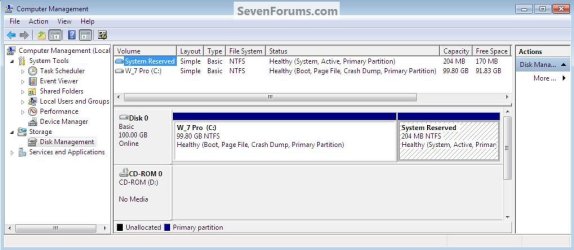
I'm not sure this is exactaly what you are talking about but the "System Reserved" partition can be created anywhere and it will work as intended.

I had all this sorted when I was writing this tutorial at the link below but over-all it's too involved a process to include in the tutorial so I left it out.

Dual Boot : Create Partitions Using PWBD
click to enlarge
SR Second.jpg
 

My Computer

Computer Manufacturer/Model Number
* BFK Customs *
OS
W 7 64-bit Ultimate
CPU
Intel Q9550 Yorkfield
Motherboard
ASUS P5Q Pro
Memory
8GB Dominator 8500C5D
Graphics Card(s)
ATI : XFX 5870
Sound Card
Realtek HD Audio 7-1
Monitor(s) Displays
1x 47" LCD HDMI & 3x 26" LCD HDMI
Screen Resolution
1920x1080P & 1920x1200
Hard Drives
1x 80GB Intel X25-M G2 SSD : 1x 500GB & 1x 640GB WD Caviar Black(s)
PSU
Corsair 620HX
Case
Cooler Master RC-690
Cooling
Tuniq Tower 120, 2x 140mm and 3x 120mm case fans
Keyboard
Microsoft 500
Mouse
Razer Diamondback 3G
Internet Speed
14 Mb/s
Other Info
1x Koutech 3Gb/s SATA HDD Hot Swap Rack
I've looked and cannot find an answer.
When restoring a Windows system image:

(1) Does the MBR (first 512 bytes) get saved when the image is made and restored?

(2) Do partitions get replaced in exactly the same position when restored to a new disk?
For any subsequent searches on the topic and the benefit of others. I believe the answers are
(1) Yes
(2) Yes

I just went through the exercise.
New 1TB HDD out of the bag;
Old HDD out new HDD plugged in;
Boot from repair disk and image restored (Windows imaging) and system automatically booted.
MBR (including disk signature) same as when imaged. Partitions in the same place.
All third party applications appear to running as before.
That's it. (Hopefully).
 

My Computer

Computer type
PC/Desktop
Computer Manufacturer/Model Number
Own build
OS
Windows 7x64 Home Premium SP1
CPU
Intel i7 2600k
Motherboard
ASUS P8Z68 Deluxe
Memory
G.Skill Ripjaws (DDR3-1600) 2x4GB
Graphics Card(s)
Nvidia GeForce GTS 450; Intel HD Graphics 3000(GT2+)
Monitor(s) Displays
Dell Ultrasharp IPS panel U2311H, Samsung SyncMaster P2350
Screen Resolution
1920x1080
Hard Drives
Samsung 850 Pro SSD 256GB, Samsung SSD 840 120GB, Seagates 1TB Barracuda ST31000528AS x2
PSU
Seasonic M12II 520W
Case
Lian Li Lancool PC-K60
Cooling
Case: 1x120mm, 3x140mm CPU: Hyper 212+
Keyboard
Logitech MK520 (wireless)
Mouse
Logitech MK520
Internet Speed
6-7 Mbps
Antivirus
Norton Security Premium, Malwarebytes on 2 (MSE on 3rd PC)
Browser
FireFox
Other Info
Audio: Logitech Z523 2.1
Hello again.


Glad it seems you have it sorted and thanks for the info.
 

My Computer

Computer Manufacturer/Model Number
* BFK Customs *
OS
W 7 64-bit Ultimate
CPU
Intel Q9550 Yorkfield
Motherboard
ASUS P5Q Pro
Memory
8GB Dominator 8500C5D
Graphics Card(s)
ATI : XFX 5870
Sound Card
Realtek HD Audio 7-1
Monitor(s) Displays
1x 47" LCD HDMI & 3x 26" LCD HDMI
Screen Resolution
1920x1080P & 1920x1200
Hard Drives
1x 80GB Intel X25-M G2 SSD : 1x 500GB & 1x 640GB WD Caviar Black(s)
PSU
Corsair 620HX
Case
Cooler Master RC-690
Cooling
Tuniq Tower 120, 2x 140mm and 3x 120mm case fans
Keyboard
Microsoft 500
Mouse
Razer Diamondback 3G
Internet Speed
14 Mb/s
Other Info
1x Koutech 3Gb/s SATA HDD Hot Swap Rack
Hi all,

From reading this thread (great info as always here :)) I think this is answered but I had this post ready before finding this thread so I'll post it to see if I have the right idea about this:

------------------------------------------------------------------------------------------------------------------------

I'm a routine cloner and I also run periodic full-disk images. I've been reading about this subject recently:

1) Will a removal of the partitions completely remove all previous malware/virus objects on a HDD?

I've been affected a couple of times the past couple of years with malware/virus but recovered fast with my cloned HDD that I keep on the shelf. After I was running on my replacement HDD for a while, I deleted the partitions on the infected HDD, reformatted, and re-cloned back to it. The newly-cloned HDD tested ok, booted up, etc. I returned the HDD to the shelf for my next spare. In both instances, a removal of the partitions and a reformat removed the malicious objects.

The question I have is regarding to the MBR and its location on a standard (no customized install options) Windows 7 HDD.

I'm running Windows 7 x64 Home Premium with a standard install with the 2 common partitions, the "System Reserved" partition and the main partition.

The question that I have is, where does the MBR reside on a Windows 7 standard-install HDD? Until recently, I had thought that all boot objects, MBR, Boot Mgr, etc, were located within the 100Mb "System Reservd" partition.

I've since read articles that seem to indicate that the MBR isn't located in any partition. It's located in the first sector of the HDD, "sector 0", whereas the first partition in a standard Windows 7 HDD starts at Sector 2048.

If I have this part right, that means that if the user removes all partitions on the HDD, the original MBR is still present on the HDD, and, if infected with a rootkit in the MBR sector, that also remains on the HDD.

Is that right?

If so, I'm assuming that a complete disk wipe, using "DBAN" or another HDD wipe tool, would remove all traces of any remaining malicious objects residing in the MBR, which would then allow the user to reformat and use the HDD for a cloned spare, restoring it into one's backup use.


2) From reading this thread and a couple others at this forum, my understanding is that cloning and full-disk imaging (where any "include the MBR", etc box is ticked during the imaging setup process) will include the MBR.

That would seem so, since I've test-recovered several full-disk images with Macruim (free) and Acronis 2011 and they've all booted into Windows without problems.

 

My Computer

Computer type
PC/Desktop
Computer Manufacturer/Model Number
Built at Micro Center Richardson, TX
OS
Windows 7 Home Premium 64 bit
CPU
Intel i5 650 Dual Core 3.20 GHz Cache 4MB Threads: 4
Motherboard
ASUS PRO P7P55D-E
Memory
Corsair 16GB DDR3 1600MHz 9-9-9-24 P/N: CMZ8GX3M2A1600C
Graphics Card(s)
ZOTAC GeFORCE 9500 ZT-95TEK2M-FSL 1GB GDDR2
Sound Card
Mother Bd
Monitor(s) Displays
ASUS V228H 21.5” Diag
Screen Resolution
1440 x 900
Hard Drives
SEAGATE BARRACUDA (2ea) 3.5” INTERNAL 1Tb 16 MB SATA ST1000DM003-9YN162 7200RPM, 64MB, SATA 6Gb/s ** 2 Sata Hot-Swap Racks installed in Tower
PSU
Thermaltake Model TR2 RX 750W
Cooling
2 Tower Fans
Keyboard
Dell Quietkey PS/2 Windows 104 P/N 0463CD
Mouse
Kensington Mechanical Trackball USB Model 64217
Internet Speed
35/35
Antivirus
Norton 360 & MBAM Pro
Browser
IE10
Other Info
Printer: HP DeskJet 3520 USB 2.0 **
Speakers: ALTEC Model VS4621 2.1 28 W/Channel w/Sub-woofer **
IOGEAR HDMI Monitor Switcher Swx3 MODEL GHDSW3 ** Addonics ZDRWESU3 eSata/USB 3.0 external DVD Read/Write DVD Drive** SEAGATE GoFlex USB 2.0 Portable HD 500GB 5400 RPM P/N: 9ZF2A2-570
Back
Top