system image backup failure - 0x8007001B

jtoby

New member
Local time
10:43 PM
Messages
4
Location
Michigan, USA
Hello, I've been having problems creating a system image on an external hard drive. The backup process gets almost all the way to the end, and then gives me error 0x8007001B, saying the sector cannot be found.

I've read a few threads on this forum dealing with this error, and as per responses to those I've run a disk check on the hard drive looking for bad sectors, and I have also tried using the command prompt sfc /scannow command. Neither scan finds any problems with the hard drive.
 

My Computer My Computer

Computer Manufacturer/Model Number
HP / Pavilion p6520f Desktop PC
OS
Windows 7 Home Premium, 64 Bit
CPU
AMD Athlon II x4 635, 2.90 GHz
Motherboard
AMD 785G
Memory
6G
Graphics Card(s)
ATI Radeon HD 4600 series
Sound Card
integrated
Monitor(s) Displays
LG 22 inch flatscreen
Screen Resolution
1600x900
Hard Drives
1 TB SATA II
PSU
Antec Earthwatts 380W
Case
standard HP case
Keyboard
IBM USB Thinkpad keyboard with trackpoint
Internet Speed
DSL
Hi, welcome to the forums :)

You may want to check your advanced power options to see if you've got it set to turn off the HDD after xx time.
   Note
type 'power' into the Start Menu search box, click 'Power Options' then you want to 'Change plan settings' then 'Change advanced power settings'. Under 'Hard Disk' change the time down to 'Never'.


OS
 

My Computer My Computer

Computer Manufacturer/Model Number
Compaq Desktop
OS
Windows 7 Ultimate x64
CPU
AMD Sempron Dual Core
Memory
3GB
Graphics Card(s)
NVIDIA GeForce 6150SE nForce 430
Screen Resolution
1024x768
Hard Drives
150GB Sata
Welcome to the Seven Forums! jtoby

A little information on what type of drive you have could be a help. Is it an external usb or eSata? Format? Factory Fat32 or NTFS or reformatted by you to NTFS? How large is the drive as far as how much free drive space is available to store an image that can vary in size?

The sfc /scannow command for the System File Checker wouldn't for checking out a drive. The manufacturer's diagnostics utilities would be preferred. The lack of drive space or a volume that is heavily fragmented or seeing a loss of Partition Table information for some reason can be causes.
 

My Computers My Computers

System One System Two

  • Computer type
    PC/Desktop
    Computer Manufacturer/Model Number
    Custom builds = 2
    OS
    W7 Ultimate x64/W10 Pro x64/W11 Pro Triple Boot - Main PC W7 Remote PC Micro ATX W7 Pro x64/W11 Pro
    CPU
    AMD Phenom II X4 975 Deneb 3.6ghz - 965 2nd remote pc
    Motherboard
    Gigabyte GA-790XTA-UD4-Gigabyte GA-880GM-D2H remote pc
    Memory
    Kingston Hyper X DDR3 1600 1.5v 16gb - Hyper X Fury 8gb 2nd
    Graphics Card(s)
    MSI HD Radeon 5750 1gb - MSI HD Radeon 6450 on mini tower
    Sound Card
    Creative Labs X-Fi Xtreme Audio P - Realtek onooard 2nd case
    Monitor(s) Displays
    ASUS VW199T-P 19" HP 2082a Main-HP 2082a 20" remote pc
    Screen Resolution
    Asus 1440x900 - HP 1600x900
    Hard Drives
    WD Black 1TB HD per OS W7, W10, and pending W11 presently on 500gb OS Drive - Pending Triple 1TB HDs for Spanned Storage/backup volume
    Single 2TB external USB enclosure, single 1TB System 7 Host/Boot drive, Pending 8TB external HD for system image b
    PSU
    Corsair 750TX - primary / Corsair CX600 - second
    Case
    Antec 900-2 - SSD compatible / NZXT Vulcan mini tower
    Cooling
    Zalman CNPS9900A
    Keyboard
    AZIO L70 Backlit Letters Gaming - ONN Cordless/USB
    Mouse
    MSI DS200 Programmable, Logitech Cordless
    Internet Speed
    30mbps upgrade - primary hard wired - mini tower usb WiFi
    Antivirus
    GFI VIPRE Internet Security 2014 on W7 2016 beta on W10,
    Browser
    Cyberfox, WaterFox 64bit FF variants, FireFox x64, Pale Moon
    Other Info
    Accomdata fan cooled usb 2.0 PIDE/Sata II, III external enclosure.
    Sambient usb/eSata PATA/Sata II, III external enclosure.
  • Computer type
    PC/Desktop
    System Manufacturer/Model Number
    CUSTOM ASSEMBLY
    OS
    W7 Pro x64/W11 Pro
    CPU
    AMD Deneb 3.6ghz - 965
    Motherboard
    Gigabyte GA-880GM-D2H remote pc
    Memory
    Kingston Hyper X Fury 8gb
    Graphics Card(s)
    MSI HD Radeon 6450 DVI Output
    Sound Card
    Realtek onooard Creative or Other separate PENDING
    Monitor(s) Displays
    VIZIO 32" LCD TV Separate LCD Pending
    Screen Resolution
    1600x1080
    Hard Drives
    WD 500GB OS Host/Boot WD Green 1TB Storage/Backup
    PSU
    Corsair 600W - THERMALTAKE 600W spare case
    Case
    NZXT Vulcan mini tower
    Cooling
    Twin 120mm Top Fans - 240mm Side Cover
    Keyboard
    ONN Cordless/USB Logitech Cordless
    Mouse
    ONN USB/Cordless - Logitech Cordless
    Internet Speed
    DSL 5G
    Browser
    MS Edge, FireFox, WaterFox x64, FireFox Nightly
    Other Info
    OS Testing-Remote Access to Main TeamViewer
It's a LACIE external USB hard drive, 225G with about 110G free. The system image would require 80G. I reformatted it to NTFS myself.

Thanks for all the ideas. I changed the power setting, and I'll defragment it and free up some extra space, then try the backup again. I'll post again afterward.
 

My Computer My Computer

Computer Manufacturer/Model Number
HP / Pavilion p6520f Desktop PC
OS
Windows 7 Home Premium, 64 Bit
CPU
AMD Athlon II x4 635, 2.90 GHz
Motherboard
AMD 785G
Memory
6G
Graphics Card(s)
ATI Radeon HD 4600 series
Sound Card
integrated
Monitor(s) Displays
LG 22 inch flatscreen
Screen Resolution
1600x900
Hard Drives
1 TB SATA II
PSU
Antec Earthwatts 380W
Case
standard HP case
Keyboard
IBM USB Thinkpad keyboard with trackpoint
Internet Speed
DSL
After clearing more free space on the external hard drive and defragging it, and changing the power settings on the desktop hard drive, the system image still won't finish. The same error is given, 0x8007001B, "the drive cannot find the sector requested."

I decided to download a different backup program and give it a try. EASEUS Todo Backup Home 2.0 created a system image without a problem.
 
Last edited:

My Computer My Computer

Computer Manufacturer/Model Number
HP / Pavilion p6520f Desktop PC
OS
Windows 7 Home Premium, 64 Bit
CPU
AMD Athlon II x4 635, 2.90 GHz
Motherboard
AMD 785G
Memory
6G
Graphics Card(s)
ATI Radeon HD 4600 series
Sound Card
integrated
Monitor(s) Displays
LG 22 inch flatscreen
Screen Resolution
1600x900
Hard Drives
1 TB SATA II
PSU
Antec Earthwatts 380W
Case
standard HP case
Keyboard
IBM USB Thinkpad keyboard with trackpoint
Internet Speed
DSL
Too bad it wasn't a WD or Seagate external since they provide a free version of the Acronis Disk Director suite. That's always available for their customers at the support sites.

At least you found one program that will work. For secondary internal drives here however the 7 backup tool has proven itself over again several times upon creation and restoration of images.

But I still haven't fired up the drive in the external enclosure to see one stored there quite yet. Generally that is switched off since I use a high performance custom plan to rule out any go to sleep problems. I'll run that to see if any similar problem comes up.
 

My Computers My Computers

System One System Two

  • Computer type
    PC/Desktop
    Computer Manufacturer/Model Number
    Custom builds = 2
    OS
    W7 Ultimate x64/W10 Pro x64/W11 Pro Triple Boot - Main PC W7 Remote PC Micro ATX W7 Pro x64/W11 Pro
    CPU
    AMD Phenom II X4 975 Deneb 3.6ghz - 965 2nd remote pc
    Motherboard
    Gigabyte GA-790XTA-UD4-Gigabyte GA-880GM-D2H remote pc
    Memory
    Kingston Hyper X DDR3 1600 1.5v 16gb - Hyper X Fury 8gb 2nd
    Graphics Card(s)
    MSI HD Radeon 5750 1gb - MSI HD Radeon 6450 on mini tower
    Sound Card
    Creative Labs X-Fi Xtreme Audio P - Realtek onooard 2nd case
    Monitor(s) Displays
    ASUS VW199T-P 19" HP 2082a Main-HP 2082a 20" remote pc
    Screen Resolution
    Asus 1440x900 - HP 1600x900
    Hard Drives
    WD Black 1TB HD per OS W7, W10, and pending W11 presently on 500gb OS Drive - Pending Triple 1TB HDs for Spanned Storage/backup volume
    Single 2TB external USB enclosure, single 1TB System 7 Host/Boot drive, Pending 8TB external HD for system image b
    PSU
    Corsair 750TX - primary / Corsair CX600 - second
    Case
    Antec 900-2 - SSD compatible / NZXT Vulcan mini tower
    Cooling
    Zalman CNPS9900A
    Keyboard
    AZIO L70 Backlit Letters Gaming - ONN Cordless/USB
    Mouse
    MSI DS200 Programmable, Logitech Cordless
    Internet Speed
    30mbps upgrade - primary hard wired - mini tower usb WiFi
    Antivirus
    GFI VIPRE Internet Security 2014 on W7 2016 beta on W10,
    Browser
    Cyberfox, WaterFox 64bit FF variants, FireFox x64, Pale Moon
    Other Info
    Accomdata fan cooled usb 2.0 PIDE/Sata II, III external enclosure.
    Sambient usb/eSata PATA/Sata II, III external enclosure.
  • Computer type
    PC/Desktop
    System Manufacturer/Model Number
    CUSTOM ASSEMBLY
    OS
    W7 Pro x64/W11 Pro
    CPU
    AMD Deneb 3.6ghz - 965
    Motherboard
    Gigabyte GA-880GM-D2H remote pc
    Memory
    Kingston Hyper X Fury 8gb
    Graphics Card(s)
    MSI HD Radeon 6450 DVI Output
    Sound Card
    Realtek onooard Creative or Other separate PENDING
    Monitor(s) Displays
    VIZIO 32" LCD TV Separate LCD Pending
    Screen Resolution
    1600x1080
    Hard Drives
    WD 500GB OS Host/Boot WD Green 1TB Storage/Backup
    PSU
    Corsair 600W - THERMALTAKE 600W spare case
    Case
    NZXT Vulcan mini tower
    Cooling
    Twin 120mm Top Fans - 240mm Side Cover
    Keyboard
    ONN Cordless/USB Logitech Cordless
    Mouse
    ONN USB/Cordless - Logitech Cordless
    Internet Speed
    DSL 5G
    Browser
    MS Edge, FireFox, WaterFox x64, FireFox Nightly
    Other Info
    OS Testing-Remote Access to Main TeamViewer
Dear jtoby,
Congrats on selecting a backup software like the EASEUS Todo Backup Home 2.0 ! It has a Linux-based Bootable CD which makes "RESTORE", so very smooth! The one vital factor missing in Todo Home is,you cannot "Verify" the backup, and especially in your sit., it's important (it goes for everybody too!)! EASEUS backup software comparison: choose the best backup solution for your data and system.
Any B & R software's reputation stands or falls ,based on the RESTORE ability of the backed up image or partition.

The one thing i have a fixation about is, the space of the EXTN.HDD. Your's is 250GB and your backup image has already taken up 80GB! At what frequency do you take backups? If you have enough cash, i really request you to spend that money on a 1TB Western digital or Seagate, etc, external HD and mind you, the portable ones do not come cheap!

I've been using the free version of Macrium-Reflect for backup and Restore since more than a decade and it has not failed me once! Macrium Reflect FREE Edition - Information and download

I appalaud you for the foresight in taking backups and pat yourself on the back! Great work!:)

Regards,
Sreedhav:cool:
 

My Computer My Computer

Computer Manufacturer/Model Number
Sony Vaio C series VPCCB35FN laptop
OS
MS Windows 7 Home Premium 64-bit SP1
CPU
IntelCore [email protected]; Sandy Bridge 32nm Tech.
Motherboard
Sony Vaio Version:C609NJYJ
Memory
4096Mb RAM; Single ChannelDDR3@665MHz; DRAM Freq:662MHz
Graphics Card(s)
AMD Radeon HD 6630M; GPU:Whistler;BIOS Core&mem Clock:123.36
Sound Card
REALTEK High Definition Audio Device; INTEL Display Card
Monitor(s) Displays
Generic PnP Intel HD;Resolution:1920*1040 Pixels; BPP:32bits
Screen Resolution
Current Resolution:1920*1080 Pixels; Monitor Frequency:60Hz
Hard Drives
Internal HD:TOSHIBA MK5061GSY; Real Size:488 GB;NTFS; 3 Partitions; SATA; HEADS:16

External HDD: WD Elements 1023 PORTABLE; Estimated Size: 1TB; NTFS; 3 Partitions
Cooling
Lateral Exhaust with a Cooling Pad Placed Beneath.
Keyboard
Logitech Bluetooth+ Generic Integrated K-B
Mouse
Logitech Bluetooth
Internet Speed
2MBPS
Other Info
1)Trend Micro Titanium Maximum Security Suite Version:3
2)SAS-PRO

3)MBAM--PRO


4)WATERFOX+IE9 +WOT+LINKEXTEND+ DRWEBCUREIT LINK CHECKER

5)SPYWAREBLASTER

6) WINPATROL PLUS

7) SANDBOXIE and
8) A BIT OF COMMON SENSE.
To Sreedhav: Um. Thanks?

To Night Hawk: Thank you very much for your help, I really would prefer having an image created by Windows 7. Please let me know if you encounter the same problem, or if you come across a solution.
 

My Computer My Computer

Computer Manufacturer/Model Number
HP / Pavilion p6520f Desktop PC
OS
Windows 7 Home Premium, 64 Bit
CPU
AMD Athlon II x4 635, 2.90 GHz
Motherboard
AMD 785G
Memory
6G
Graphics Card(s)
ATI Radeon HD 4600 series
Sound Card
integrated
Monitor(s) Displays
LG 22 inch flatscreen
Screen Resolution
1600x900
Hard Drives
1 TB SATA II
PSU
Antec Earthwatts 380W
Case
standard HP case
Keyboard
IBM USB Thinkpad keyboard with trackpoint
Internet Speed
DSL
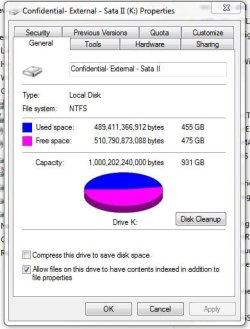
I'm starting a new image at this time after removing 3 old images from last June, Sept. and Oct. I still had stored on the 1tb drive placed in an external fan cooled enclosure. The WD Green Power 1tb drive was removed from the original WD provided casing and placed into an Acomdata usb enclosure seen at Newegg.com - acomdata SMBXXXU2E-Red Aluminum 3.5" Radiant Red USB 2.0 Samba Enclosure Kit

As you will note from the image here once those 3 old images were removed a good deal of drive space was freed up for the estmated 320gb going on now. I'm not expecting any stalls or errors to come up but... I'll be the first to update here if it does.

There's one thing for sure you are far from being alone with that error since it was also seen with the previous version at times. While waiting to see how that goes you may want to look over the MS article regarding this type of problem. Error code 0x8100002F and or error code 0x80070002 when you back up files in Windows 7

Did you ever download and install the MS Virtual PC/XP Mode by chance even if you removed it later? When everything checks out with no bad sectors or Windows errors being seen other then a failed backup one situation involves the VPC's "virtual machines" library the VPC creates. Note the last reply on the MS Answers thread seen at 0x80070002 error during Win 7 backup.

UPDATE: Like I thought no problem was seen except for the amount of time it took! Try some 3hrs. 40min. to save an image to the drive in the usb enclosure to the typical 35min. seen with the 320gb image going to one of the internal storage drives.

Hopefully one of those references will be a help for you since there seems to be several possible causes.
 

Attachments

  • Disk Image Before.jpg
    Disk Image Before.jpg
    65.7 KB · Views: 16
  • Disk Image Afterwards.jpg
    Disk Image Afterwards.jpg
    38.3 KB · Views: 9
Last edited:

My Computers My Computers

System One System Two

  • Computer type
    PC/Desktop
    Computer Manufacturer/Model Number
    Custom builds = 2
    OS
    W7 Ultimate x64/W10 Pro x64/W11 Pro Triple Boot - Main PC W7 Remote PC Micro ATX W7 Pro x64/W11 Pro
    CPU
    AMD Phenom II X4 975 Deneb 3.6ghz - 965 2nd remote pc
    Motherboard
    Gigabyte GA-790XTA-UD4-Gigabyte GA-880GM-D2H remote pc
    Memory
    Kingston Hyper X DDR3 1600 1.5v 16gb - Hyper X Fury 8gb 2nd
    Graphics Card(s)
    MSI HD Radeon 5750 1gb - MSI HD Radeon 6450 on mini tower
    Sound Card
    Creative Labs X-Fi Xtreme Audio P - Realtek onooard 2nd case
    Monitor(s) Displays
    ASUS VW199T-P 19" HP 2082a Main-HP 2082a 20" remote pc
    Screen Resolution
    Asus 1440x900 - HP 1600x900
    Hard Drives
    WD Black 1TB HD per OS W7, W10, and pending W11 presently on 500gb OS Drive - Pending Triple 1TB HDs for Spanned Storage/backup volume
    Single 2TB external USB enclosure, single 1TB System 7 Host/Boot drive, Pending 8TB external HD for system image b
    PSU
    Corsair 750TX - primary / Corsair CX600 - second
    Case
    Antec 900-2 - SSD compatible / NZXT Vulcan mini tower
    Cooling
    Zalman CNPS9900A
    Keyboard
    AZIO L70 Backlit Letters Gaming - ONN Cordless/USB
    Mouse
    MSI DS200 Programmable, Logitech Cordless
    Internet Speed
    30mbps upgrade - primary hard wired - mini tower usb WiFi
    Antivirus
    GFI VIPRE Internet Security 2014 on W7 2016 beta on W10,
    Browser
    Cyberfox, WaterFox 64bit FF variants, FireFox x64, Pale Moon
    Other Info
    Accomdata fan cooled usb 2.0 PIDE/Sata II, III external enclosure.
    Sambient usb/eSata PATA/Sata II, III external enclosure.
  • Computer type
    PC/Desktop
    System Manufacturer/Model Number
    CUSTOM ASSEMBLY
    OS
    W7 Pro x64/W11 Pro
    CPU
    AMD Deneb 3.6ghz - 965
    Motherboard
    Gigabyte GA-880GM-D2H remote pc
    Memory
    Kingston Hyper X Fury 8gb
    Graphics Card(s)
    MSI HD Radeon 6450 DVI Output
    Sound Card
    Realtek onooard Creative or Other separate PENDING
    Monitor(s) Displays
    VIZIO 32" LCD TV Separate LCD Pending
    Screen Resolution
    1600x1080
    Hard Drives
    WD 500GB OS Host/Boot WD Green 1TB Storage/Backup
    PSU
    Corsair 600W - THERMALTAKE 600W spare case
    Case
    NZXT Vulcan mini tower
    Cooling
    Twin 120mm Top Fans - 240mm Side Cover
    Keyboard
    ONN Cordless/USB Logitech Cordless
    Mouse
    ONN USB/Cordless - Logitech Cordless
    Internet Speed
    DSL 5G
    Browser
    MS Edge, FireFox, WaterFox x64, FireFox Nightly
    Other Info
    OS Testing-Remote Access to Main TeamViewer
If you have a 100MB system reserved check what fee space is available. Ideally Windows needs 50MB free for a shadow copy when using the inbuilt windows imaging. 40MB free is generally ok but less is likely to give problems.

If Windows imaging causes problems, free Macrium Reflect is an excellent product.
 

My Computer My Computer

Computer type
PC/Desktop
Computer Manufacturer/Model Number
Own build
OS
Windows 7x64 Home Premium SP1
CPU
Intel i7 2600k
Motherboard
ASUS P8Z68 Deluxe
Memory
G.Skill Ripjaws (DDR3-1600) 2x4GB
Graphics Card(s)
Nvidia GeForce GTS 450; Intel HD Graphics 3000(GT2+)
Monitor(s) Displays
Dell Ultrasharp IPS panel U2311H, Samsung SyncMaster P2350
Screen Resolution
1920x1080
Hard Drives
Samsung 850 Pro SSD 256GB, Samsung SSD 840 120GB, Seagates 1TB Barracuda ST31000528AS x2
PSU
Seasonic M12II 520W
Case
Lian Li Lancool PC-K60
Cooling
Case: 1x120mm, 3x140mm CPU: Hyper 212+
Keyboard
Logitech MK520 (wireless)
Mouse
Logitech MK520
Internet Speed
6-7 Mbps
Antivirus
Norton Security Premium, Malwarebytes on 2 (MSE on 3rd PC)
Browser
FireFox
Other Info
Audio: Logitech Z523 2.1
Back
Top