system image backup on 5 DVDs

PeteL

New member
Local time
12:01 PM
Messages
5
Hi guys, I've read with interest this forum.. I'll try & keep this brief as I can... I did a W7 system image backup on 5 DVDs. My Pc is a DELL XPS 15z which has the eject button as a key on the keyboard. I had a virus on my PC & tried to reinstall the image but I can only get as far as entering the last disc from the back up set.. when I try to eject the dvd it won't work unless I abort & boot into windows!! Since then I did a clean reinstall of windows 7, but I have realised I've lost my Microsoft office that came with the original Dell system software.I've also lost the original Dell back up so I can't restore with Dell recovery. How can I gt this problem solved? I have the image on 5 DVDs but I can't get it back on the laptop! Can it be transferred to a usb flash drive or a partition in my hard drive? Any help would be really appreciated.
 

My Computer

Computer type
PC/Desktop
Computer Manufacturer/Model Number
Dell XPS 15z
OS
Windows 7 Home Premium X64
CPU
intel core i5

My Computer

Computer type
Laptop
Computer Manufacturer/Model Number
Employer provided Dell Latitude
OS
W7 Pro SP1 64bit
CPU
i7
Memory
8GB
Graphics Card(s)
Intel HD Graphics
Hard Drives
crappy SSD
Antivirus
Employer mandated Symantec Endpoint Protection
Browser
Pale Moon 64bit, IE11 64bit & Chrome 64bit
Welcome to the Seven Forums.

You might try the steps in this tutorial:
http://www.sevenforums.com/tutorials/85813-windows-7-universal-installation-disc-create.html

See the note box above step 1.

That note box has a link where you might be able to download a Windows ISO file.

I say "might" because the links to some of the ISO files are not always functional as of late.

Thanks for the info... I don't quite understand how this would work for me. I have an original Windows 7 installation Disc (the one I used to do a clean install of windows with) already. I'm trying to reinstall the version of windows that was on my PC before I installed the current version of windows 7 I have now.. I did the system image 2 months ago & it has all of the original Dell software bundle & Dell back up data on those 5 system image discs... Does the universal DVD facilitate recovery from those discs? :confused:
 

My Computer

Computer type
PC/Desktop
Computer Manufacturer/Model Number
Dell XPS 15z
OS
Windows 7 Home Premium X64
CPU
intel core i5
Sorry - I misunderstood the goal :-(

Maybe others will have an answer for you :-)
 

My Computer

Computer type
Laptop
Computer Manufacturer/Model Number
Employer provided Dell Latitude
OS
W7 Pro SP1 64bit
CPU
i7
Memory
8GB
Graphics Card(s)
Intel HD Graphics
Hard Drives
crappy SSD
Antivirus
Employer mandated Symantec Endpoint Protection
Browser
Pale Moon 64bit, IE11 64bit & Chrome 64bit
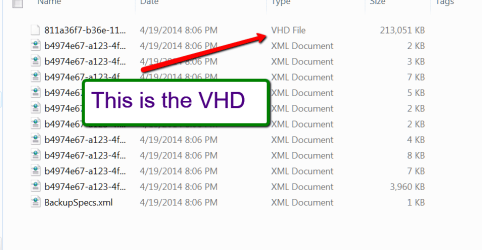
I would try to copy the 5 DVDs into a folder in the PC. This should be a VHD which would look like the picture below - Note this is an image of a little 2GB test partition that I just made for demo puprposes. I usually use Macrium that does not create VHDs but MRIMs.

Once you have the image on the system, you can attach it via Disk Management > Action tab (you will have to drill down 4 levels. Every time you get a permission message. Just click 'Continue').

Once attached, the VHD will be in Computer like any other volume. There you can open it and retrieve any information from it. But programs will be difficult unless there is an installation .exe. Installed programs have all kinds of settings in the registry that you will probably not find.
 

Attachments

  • 2014-04-19_2012.png
    2014-04-19_2012.png
    12.7 KB · Views: 1

My Computer

Computer Manufacturer/Model Number
HP, Dell, Gateway, Toshiba - 4 laptops and 2 desktops
OS
Vista, Windows7, Mint Mate, Zorin, Windows 8
CPU
from 1.6GHz Duo to i7
Monitor(s) Displays
2x HP w2207
Hard Drives
5x HDD, 7x SSD, 12x Externals
Keyboard
with trackball - no mices
Mouse
Trackball mice
Internet Speed
DSL 6000
@WHS Thanks for that info.. I did read somewhere else on this forum about creating the vhd file.. I'll try that but how can I retrieve the relevant data eg; the Dell partition of my previous hard drive format & the Microsoft office software & product license key? I'm not too worried about everything else I had because I've pretty much restored it. Another question if I get it all back to the vhd folder would it show up as a previous back up if I tried to re-image my laptop?
 

My Computer

Computer type
PC/Desktop
Computer Manufacturer/Model Number
Dell XPS 15z
OS
Windows 7 Home Premium X64
CPU
intel core i5
If you did a true clean install you have probably reformatted and wiped the Dell recovery partition. Did you make the Dell factory restore DVDs (~2 DVDs) when you bought the PC? These are different from a system image. You can have a look at this link but it may not help if you have reformatted your HDD.
techieNetizen's Web Log: XPS 15z: Factory reset, recovery and partitions
Another option is to contact Dell. They appear to be very good with direct support.
 

My Computer

Computer type
PC/Desktop
Computer Manufacturer/Model Number
Own build
OS
Windows 7x64 Home Premium SP1
CPU
Intel i7 2600k
Motherboard
ASUS P8Z68 Deluxe
Memory
G.Skill Ripjaws (DDR3-1600) 2x4GB
Graphics Card(s)
Nvidia GeForce GTS 450; Intel HD Graphics 3000(GT2+)
Monitor(s) Displays
Dell Ultrasharp IPS panel U2311H, Samsung SyncMaster P2350
Screen Resolution
1920x1080
Hard Drives
Samsung 850 Pro SSD 256GB, Samsung SSD 840 120GB, Seagates 1TB Barracuda ST31000528AS x2
PSU
Seasonic M12II 520W
Case
Lian Li Lancool PC-K60
Cooling
Case: 1x120mm, 3x140mm CPU: Hyper 212+
Keyboard
Logitech MK520 (wireless)
Mouse
Logitech MK520
Internet Speed
6-7 Mbps
Antivirus
Norton Security Premium, Malwarebytes on 2 (MSE on 3rd PC)
Browser
FireFox
Other Info
Audio: Logitech Z523 2.1
If you have access to a Windows 7 Ultimate or a Windows 8 pro system, you could boot with the VHD, run Belarc Advisor and thus find all your product keys.

how can I retrieve the relevant data eg; the Dell partition of my previous hard

Everything that was imaged would be in the VHD and could be retrieved.

Another question if I get it all back to the vhd folder would it show up as a previous back up if I tried to re-image my laptop?
This I don't understand. Can you elaborate.
 

My Computer

Computer Manufacturer/Model Number
HP, Dell, Gateway, Toshiba - 4 laptops and 2 desktops
OS
Vista, Windows7, Mint Mate, Zorin, Windows 8
CPU
from 1.6GHz Duo to i7
Monitor(s) Displays
2x HP w2207
Hard Drives
5x HDD, 7x SSD, 12x Externals
Keyboard
with trackball - no mices
Mouse
Trackball mice
Internet Speed
DSL 6000
If you did a true clean install you have probably reformatted and wiped the Dell recovery partition. Did you make the Dell factory restore DVDs (~2 DVDs) when you bought the PC? These are different from a system image. You can have a look at this link but it may not help if you have reformatted your HDD.
techieNetizen's Web Log: XPS 15z: Factory reset, recovery and partitions
Another option is to contact Dell. They appear to be very good with direct support.

I bought the PC used from ebay so no back up discs unfortunately.
When I re-installed windows with a proper windows 7 disc it wiped everything except for REOVERY (E) which is set aside by Dell... However if I try to do a factory back up with Dell recovery I get a message saying original system image missing (or something along those lines)
 

My Computer

Computer type
PC/Desktop
Computer Manufacturer/Model Number
Dell XPS 15z
OS
Windows 7 Home Premium X64
CPU
intel core i5
If you have access to a Windows 7 Ultimate or a Windows 8 pro system, you could boot with the VHD, run Belarc Advisor and thus find all your product keys.

how can I retrieve the relevant data eg; the Dell partition of my previous hard
Everything that was imaged would be in the VHD and could be retrieved.

Another question if I get it all back to the vhd folder would it show up as a previous back up if I tried to re-image my laptop?
This I don't understand. Can you elaborate.

What I meant was I've copied the discs into a separate partition on my hard drive but not created a vhd folder yet.. I don't know where the folder should be placed even! Should it be on (C) or the new volume (D) where I just copied the discs to. I don't have access to W7 ultimate or W8 pro.. All I've got is windows 7 home premium... I do have Hirens boot CD is there anything on that I could use to restore my back up? What I meant by would the VHD be shown as a previous back up is.. When you put the W7 repair disc in, it offers you various choices- system restore etc.. When you click on "system recovery options" then click on recover from a back up you made earlier, will those vhd folders be recognised as the earlier back up? (phew got there in the end lol!)
 

My Computer

Computer type
PC/Desktop
Computer Manufacturer/Model Number
Dell XPS 15z
OS
Windows 7 Home Premium X64
CPU
intel core i5
The VHD is the image file. If you have copied the DVDs into a folder of your system, then the VHD should be in there. Just keep clicking thru the 4 layers and you should find it.

If you have no access to a higher level system, there is not much you can do with it other than attach it and copy data from it.

There is a procedure to convert VHDs to VMDKs and make them work in VMware Player. But I never had any luck with that. Maybe you want to try that and have more luck. You could start with this guys approach.
 

My Computer

Computer Manufacturer/Model Number
HP, Dell, Gateway, Toshiba - 4 laptops and 2 desktops
OS
Vista, Windows7, Mint Mate, Zorin, Windows 8
CPU
from 1.6GHz Duo to i7
Monitor(s) Displays
2x HP w2207
Hard Drives
5x HDD, 7x SSD, 12x Externals
Keyboard
with trackball - no mices
Mouse
Trackball mice
Internet Speed
DSL 6000
I think the keyboard control of the optical drive eject is a mini program with the original OS (Dell in your case). There must be a physical eject control of the drive, sometimes by using a straightened paper clip or a very small spot to press. If you can do this, you may be able to load your image properly, and your keyboard control will establish when image is loaded.

Art.
 

My Computer

Computer type
PC/Desktop
Computer Manufacturer/Model Number
Home built
OS
Win7 sp1 Pro 64bit / XP sp2 Pro (games only)
CPU
Intel Core 2 Duo E8400 @ 3.00GHz
Motherboard
Intel Corporation DP35DP (CPU1)
Memory
8.00 GB Dual-Channel DDR2 @ 400MHz (5-5-5-18)
Graphics Card(s)
1024MB GeForce GTX 560
Sound Card
NVIDIA High Definition Audio
Monitor(s) Displays
SyncMaster (2048x1152@60Hz)
Hard Drives
240GB Sandisc Extreme Pro SSD
244GB Seagate ST3250410AS
488GB Seagate ST500DM002-1BD142
931GB Western Digital WDC WD1003FZEX
PSU
Corsair 720
Case
ATX
Keyboard
HID Keyboard Device Logitech
Mouse
HID-compliant mouse Microsoft
Other Info
TSSTcorp CDDVDW SH-S223L

HL-DT-ST BD-RE BH12LS35
Back
Top