
System Image - Extract Files Using Disk Management

How to Extract Windows 7 System Image Files Using Disk Management


   Information
When you create a system image, Windows 7 creates a Virtual Hard Disk VHD file that contains all of your files. This will show you how to attach (mount) this VHD file using Disk Management to manually extract and restore specific files of your choice from the system image instead of doing the default full system image recovery.
   Note
System images are saved in this format:

(selected backup location's drive letter)\WindowsImageBackup\(your computer name)\Backup (year-month-day) (time-hhmmss)

For example, if your computer name is Windows7-PC, your backup image location is on hard disk or partition (network or local) D: , and you backed up on September 14th 2008 at 4:39:45 AM (it uses 24 hour time), then that system image VHD file will be located in the D:\WindowsImageBackup\Windows7-PC\Backup 2009-09-14 043945 folder.


OPTION ONE

To Attach the VHD to Extract Files from System Image


1. Open the Control Panel (icons View).
A) Click on the Administrative Tools icon, and click on Computer Management.

B) Go to step 3.
OR

2. Open the Start Menu.
A) In the Search box, type compmgmt.msc and press Enter.
3. If prompted by UAC, then click on Yes.

4. In the left pane, right click on Disk Management, and click on Attach VHD. (See screenshot below)
NOTE: You can also click on Disk Management, Action on the menu bar, and Attach VHD.
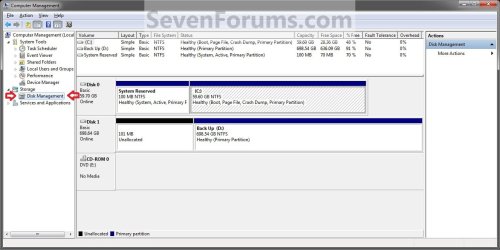
Step1.jpg
5. Click on the Browse button. (See screenshot below)
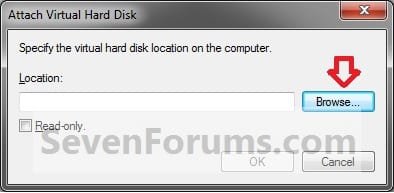
Step2.jpg
6. Navigate to the drive or partition that you selected to save the created system image to, then select a listed VHD file for the disk that you want to extract files from. (See screenshot below)
NOTE: See the NOTE box at the top of the tutorial to see where to find your system image VHD file at.

   Note
There will be a VHD file for each hard disk that was included in the system image backup when it was created.

You will not be able to open the VHD for the 100 MB System Reserved partition if you had one created during the installation of your Windows 7.
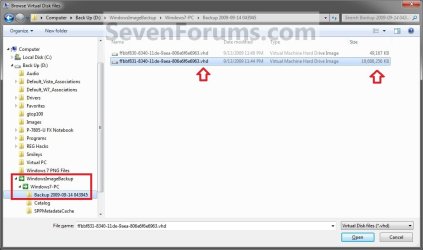
Step3.jpg
7. Click on OK. (See screenshot below)
NOTE: Be sure to leave the Read only box unchecked if you wish to have more than read-only access.
Step4.jpg
8. You will now notice that the VHD file has been attached (mounted) as a separate virtual disk with it's own drive letter (ex: F: ) in Disk Management. Close Disk Management.(See screenshot below)
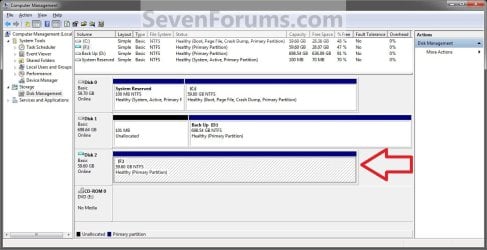
Step5.jpg
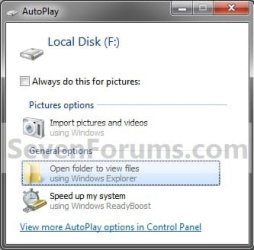
9. You may also get a AutoPlay pop-up window. Double click on the Open folder to view files option. (See screenshot below)
NOTE: If you did not get a AutoPlay pop-up, then you can open the new attached VHD virtual disk (ex: F) from the Computer window like any other hard drive or partition.
Step6.jpg
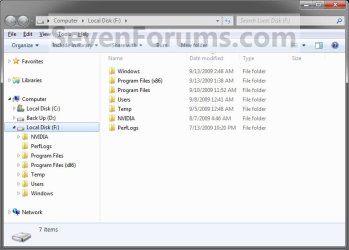
10. You can now copy any files that you want from the attached system image VHD disk (ex: F: ) to restore back to your Windows 7 C: drive. (See screenshot below)
Step7.jpg


OPTION TWO

To Detach the VHD in Disk Management


NOTE: This will show you to detach the VHD file in Disk Management from OPTION ONE above without affecting the system image.
1. Open the Control Panel (icons View).
A) Click on the Administrative Tools icon, and click on Computer Management.

B) Go to step 3.
OR

2. Open the Start Menu.
A) In the Search box, type compmgmt.msc and press Enter.
3. If prompted by UAC, then click on Yes.

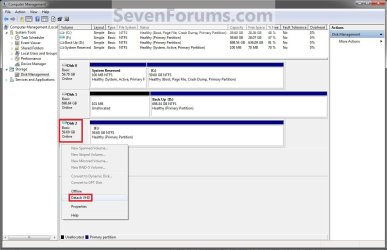
4. In the middle pane, right click on the Disk # of the attached VHD (ex: F: ), and click on Detach VHD. (See screenshot below)
Detach_VHD.jpg
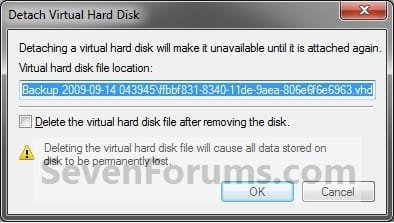
5. Click on OK. (See sreenshot below)
WARNING: DO NOT CHECK the Delete the virtual hard disk file after removing the disk box. If you do, you will destroy the created system image. Leaving this box unchecked will leave your created system image intact an unharmed so you can still be able to use it to do a full system image recovery.
Detach2.jpg
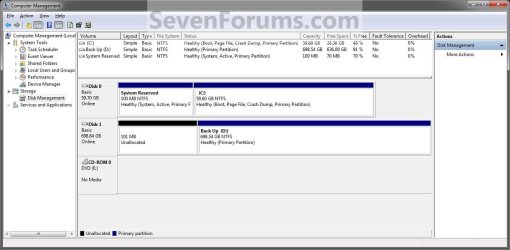
6. You will now notice that the VHD (ex: F: ) has been detached in Disk Management. (See screenshot below)
Detach3.jpg
7. Close Disk Management.
That's it,
Shawn


Last edited:
Thanks Shawn. I went ahead and burned a system repair disc and put it in a safe place. :)
 

My Computer

Computer type
Laptop
Computer Manufacturer/Model Number
Toshiba Satellite U845W-S410
OS
Windows 7 Home Premium 64 bit
CPU
Intel ® Core™ i5-3317U Processor
Memory
6GB DDR3 1600MHz
Graphics Card(s)
Mobile Intel ® HD Graphics with 64MB-1696MB dynamically allo
Monitor(s) Displays
All-in-one -- Generic PnP Monitor
Screen Resolution
14.4” diagonal widescreen TruBrite ® TFT display at 1792 x 7
Hard Drives
500GB (5400 RPM, Serial ATA) with dedicated 32GB mSATA SSD disk
cache
Keyboard
Logitech
Mouse
Logitech
Brink,

Great! I am relatively new to 7 (a few weeks) & I love how System Image is faster than backup & I was thinking " wouldn't it be nice to be able to extract individual files....

Now I can! Thanks for your help courtesy of these tutorials. I'm loving Win7.... elisedai
 

My Computer

Computer Manufacturer/Model Number
Gateway GT5040 Home Media Center
OS
Win 7 x64 Home Premium
CPU
Pentium D 820 dual core 2.8 Ghz
Memory
3Gb
You're most welcome Elisedai, and welcome to Seven Forums. :)
 

My Computer

Computer type
PC/Desktop
Computer Manufacturer/Model Number
Self built custom
OS
64-bit Windows 11 Pro for Workstations
CPU
Intel i7-8700K OC'd to 5 GHz
Motherboard
ASUS ROG Maximus XI Formula Z390
Memory
64 GB (4x16GB) G.SKILL TridentZ RGB DDR4 3600 MHz
Graphics Card(s)
ASUS ROG-STRIX-GTX1080TI-O11G-GAMING
Sound Card
Integrated
Monitor(s) Displays
2 x Samsung Odyssey G7 27"
Screen Resolution
2560x1440
Hard Drives
1TB Samsung 990 PRO M.2,
4TB Samsung 990 PRO PRO M.2,
TerraMaster F8 SSD Plus NAS
PSU
Seasonic Prime Titanium 850W
Case
Thermaltake Core P3
Cooling
Corsair Hydro H115i
Keyboard
Logitech wireless K800
Mouse
Logitech MX Master 4
Internet Speed
2 Gb/s Download and 100 Mb/s Upload
Antivirus
Malwarebyte Anti-Malware Premium
Browser
Google Chrome
Other Info
Logitech Z625 speaker system,
Logitech BRIO 4K Pro webcam,
HP Color LaserJet Pro MFP M477fdn,
APC SMART-UPS RT 1000 XL - SURT1000XLI,
Galaxy S23 Plus phone
Hi Brink
I went through the easy steps and everything worked fine until the VHD was mounted and “ready to use.” I immediately got a message that “drive H needs to be formatted—do you want to format?”
The VHD I’m trying to mount is from a Vista system that got fried , and the owner upgraded to Win 7. I worked through your similar tutorial on Vista forums. Again, when I mounted the VHD I got the message that I needed to format.
Both great tutorials, but I wished they worked for me.
smile.gif

Have you come across this particular scenario before?
 

My Computer

Computer Manufacturer/Model Number
Self Build #2 Workstation
OS
Windows 7 Enterprise 64bit
CPU
intel core i3 2100 3.1 GH
Motherboard
Gigabyte Z68AP-D3
Memory
Kingston DDR3 1333 8GB
Graphics Card(s)
nvidia Geforce 9500GT
Sound Card
On board Realtek HD Audio
Monitor(s) Displays
ViewSonic
Screen Resolution
1440x900
Hard Drives
1 Maxtor 250GB
1 Seagate 320 GB
1 WD 1TB
PSU
Thermaltake Pure Power 600W
Case
Antec Solo
Hello Frenchy,

Sorry, but no. It seems that they may have been corrupted when Vista was fried as well. You might see if taking ownership of the VHD and "Allow" your user account "Full Control" first may be able to allow you.
 

My Computer

Computer type
PC/Desktop
Computer Manufacturer/Model Number
Self built custom
OS
64-bit Windows 11 Pro for Workstations
CPU
Intel i7-8700K OC'd to 5 GHz
Motherboard
ASUS ROG Maximus XI Formula Z390
Memory
64 GB (4x16GB) G.SKILL TridentZ RGB DDR4 3600 MHz
Graphics Card(s)
ASUS ROG-STRIX-GTX1080TI-O11G-GAMING
Sound Card
Integrated
Monitor(s) Displays
2 x Samsung Odyssey G7 27"
Screen Resolution
2560x1440
Hard Drives
1TB Samsung 990 PRO M.2,
4TB Samsung 990 PRO PRO M.2,
TerraMaster F8 SSD Plus NAS
PSU
Seasonic Prime Titanium 850W
Case
Thermaltake Core P3
Cooling
Corsair Hydro H115i
Keyboard
Logitech wireless K800
Mouse
Logitech MX Master 4
Internet Speed
2 Gb/s Download and 100 Mb/s Upload
Antivirus
Malwarebyte Anti-Malware Premium
Browser
Google Chrome
Other Info
Logitech Z625 speaker system,
Logitech BRIO 4K Pro webcam,
HP Color LaserJet Pro MFP M477fdn,
APC SMART-UPS RT 1000 XL - SURT1000XLI,
Galaxy S23 Plus phone

My Computers

System One System Two

  • Computer type
    PC/Desktop
    OS
    7 X64
    CPU
    i5 8400
    Motherboard
    gigabyte b365m ds3h
    Memory
    2x8gb 3200mhz
    Hard Drives
    various
    PSU
    pure power 11 400w cm
    Case
    Coolermaster
    Cooling
    cryorig m9i
  • Computer type
    PC/Desktop
    OS
    7x64
    CPU
    g5400
    Motherboard
    ga b365m ds3h
    Memory
    8gb ddr4 2400
    PSU
    xfx pro 450w
Thanks Brink!

The Image was stored on an external drive. I copied it to my Win7 backup drive, so maybe the copy process corrupted it.

I'll try your suggestions, and maybe have some luck.

Again, thanks for taking the time to respond.
 

My Computer

Computer Manufacturer/Model Number
Self Build #2 Workstation
OS
Windows 7 Enterprise 64bit
CPU
intel core i3 2100 3.1 GH
Motherboard
Gigabyte Z68AP-D3
Memory
Kingston DDR3 1333 8GB
Graphics Card(s)
nvidia Geforce 9500GT
Sound Card
On board Realtek HD Audio
Monitor(s) Displays
ViewSonic
Screen Resolution
1440x900
Hard Drives
1 Maxtor 250GB
1 Seagate 320 GB
1 WD 1TB
PSU
Thermaltake Pure Power 600W
Case
Antec Solo
SIW2

Thanks for the advice. I'll definitely check it out!
 

My Computer

Computer Manufacturer/Model Number
Self Build #2 Workstation
OS
Windows 7 Enterprise 64bit
CPU
intel core i3 2100 3.1 GH
Motherboard
Gigabyte Z68AP-D3
Memory
Kingston DDR3 1333 8GB
Graphics Card(s)
nvidia Geforce 9500GT
Sound Card
On board Realtek HD Audio
Monitor(s) Displays
ViewSonic
Screen Resolution
1440x900
Hard Drives
1 Maxtor 250GB
1 Seagate 320 GB
1 WD 1TB
PSU
Thermaltake Pure Power 600W
Case
Antec Solo
SIW

You were right about not recognizing the file system. I mounted the backup VHD, paid attention and noticed it registered: (H) 298.xx RAW.

At least I know what the problem is now. Gotta sharpen up my attention to detail skills!

Thanks to you and Win7 forums.
 

My Computer

Computer Manufacturer/Model Number
Self Build #2 Workstation
OS
Windows 7 Enterprise 64bit
CPU
intel core i3 2100 3.1 GH
Motherboard
Gigabyte Z68AP-D3
Memory
Kingston DDR3 1333 8GB
Graphics Card(s)
nvidia Geforce 9500GT
Sound Card
On board Realtek HD Audio
Monitor(s) Displays
ViewSonic
Screen Resolution
1440x900
Hard Drives
1 Maxtor 250GB
1 Seagate 320 GB
1 WD 1TB
PSU
Thermaltake Pure Power 600W
Case
Antec Solo
I attached the image so i can browse it in Windows Explorer or My Computer as a drive, then deleted some stuffs from it, but the remaining space stayed the same, is this normal?
 

My Computer

Computer type
Laptop
Computer Manufacturer/Model Number
Acer Aspire 5810T8929
OS
Windows 10 Home 64b
CPU
Intel Core Solo 1.4Ghz 800Mhz FSB
Memory
Samsung 4GB DDR3
Graphics Card(s)
Intel GMA 4500MHD
Screen Resolution
1366x768
Hard Drives
Seagate Momentus XT (Hybrid HD) 750GB
Internet Speed
40 Mbs
Antivirus
Kaspersky Free Antivirus
Browser
Chrome 60.0.3112.113 (Official Build) (64-bit)
Hello LM,

Yes, the VHD file's size is fixed. Think of it as the same when you partition a hard drive. It's size remains the same no matter what files you delete on the partition.
 

My Computer

Computer type
PC/Desktop
Computer Manufacturer/Model Number
Self built custom
OS
64-bit Windows 11 Pro for Workstations
CPU
Intel i7-8700K OC'd to 5 GHz
Motherboard
ASUS ROG Maximus XI Formula Z390
Memory
64 GB (4x16GB) G.SKILL TridentZ RGB DDR4 3600 MHz
Graphics Card(s)
ASUS ROG-STRIX-GTX1080TI-O11G-GAMING
Sound Card
Integrated
Monitor(s) Displays
2 x Samsung Odyssey G7 27"
Screen Resolution
2560x1440
Hard Drives
1TB Samsung 990 PRO M.2,
4TB Samsung 990 PRO PRO M.2,
TerraMaster F8 SSD Plus NAS
PSU
Seasonic Prime Titanium 850W
Case
Thermaltake Core P3
Cooling
Corsair Hydro H115i
Keyboard
Logitech wireless K800
Mouse
Logitech MX Master 4
Internet Speed
2 Gb/s Download and 100 Mb/s Upload
Antivirus
Malwarebyte Anti-Malware Premium
Browser
Google Chrome
Other Info
Logitech Z625 speaker system,
Logitech BRIO 4K Pro webcam,
HP Color LaserJet Pro MFP M477fdn,
APC SMART-UPS RT 1000 XL - SURT1000XLI,
Galaxy S23 Plus phone
Deleted one of two incremental images...

Hi all!
I have made two images of my system partition C: on separate network folders.
Because i didn't know the images from Win 7 tool are incremental, I deleted the firs image and leave only the second. (It was stupid, I know :sarc:).
Now the recovery tool couldn't see the second image when i want to restore my C: partition.
If I use the attache VHD function and manually copy files from VHD to C:, will this operation restore my system to the condition from the image, or it will crash it totally?

If anyone has other idea please let me know...

Thank you all in advance! :)
 

My Computer

Computer Manufacturer/Model Number
Lenovo 3000 C100 Type 0761 D2G
OS
Windows 7 Enterprise
CPU
Celeron 1.5
Memory
2 GB
Graphics Card(s)
Intel 915GM
Sound Card
Realtek AC'97
Monitor(s) Displays
15"
Hard Drives
80GB
Hello Vagabondgt, and welcome to Seven Forums.

Sorry, but no it will not allow you to restore from the image. It will only allow you to copy individual files from within the VHD. :(
 

My Computer

Computer type
PC/Desktop
Computer Manufacturer/Model Number
Self built custom
OS
64-bit Windows 11 Pro for Workstations
CPU
Intel i7-8700K OC'd to 5 GHz
Motherboard
ASUS ROG Maximus XI Formula Z390
Memory
64 GB (4x16GB) G.SKILL TridentZ RGB DDR4 3600 MHz
Graphics Card(s)
ASUS ROG-STRIX-GTX1080TI-O11G-GAMING
Sound Card
Integrated
Monitor(s) Displays
2 x Samsung Odyssey G7 27"
Screen Resolution
2560x1440
Hard Drives
1TB Samsung 990 PRO M.2,
4TB Samsung 990 PRO PRO M.2,
TerraMaster F8 SSD Plus NAS
PSU
Seasonic Prime Titanium 850W
Case
Thermaltake Core P3
Cooling
Corsair Hydro H115i
Keyboard
Logitech wireless K800
Mouse
Logitech MX Master 4
Internet Speed
2 Gb/s Download and 100 Mb/s Upload
Antivirus
Malwarebyte Anti-Malware Premium
Browser
Google Chrome
Other Info
Logitech Z625 speaker system,
Logitech BRIO 4K Pro webcam,
HP Color LaserJet Pro MFP M477fdn,
APC SMART-UPS RT 1000 XL - SURT1000XLI,
Galaxy S23 Plus phone
Hello Brink!
Thank you for the answer!
It seems I have to re-install Windows and all programs.
Maybe I'll use 3th party application for system backup and wait MS to make their tool better. :warn:

Rayko
 

My Computer

Computer Manufacturer/Model Number
Lenovo 3000 C100 Type 0761 D2G
OS
Windows 7 Enterprise
CPU
Celeron 1.5
Memory
2 GB
Graphics Card(s)
Intel 915GM
Sound Card
Realtek AC'97
Monitor(s) Displays
15"
Hard Drives
80GB
You're welcome Rayko.

It's best not to delete anything in the backup folder as you have found out. It will almost always render it unusable to restore Windows 7 from it. :(
 

My Computer

Computer type
PC/Desktop
Computer Manufacturer/Model Number
Self built custom
OS
64-bit Windows 11 Pro for Workstations
CPU
Intel i7-8700K OC'd to 5 GHz
Motherboard
ASUS ROG Maximus XI Formula Z390
Memory
64 GB (4x16GB) G.SKILL TridentZ RGB DDR4 3600 MHz
Graphics Card(s)
ASUS ROG-STRIX-GTX1080TI-O11G-GAMING
Sound Card
Integrated
Monitor(s) Displays
2 x Samsung Odyssey G7 27"
Screen Resolution
2560x1440
Hard Drives
1TB Samsung 990 PRO M.2,
4TB Samsung 990 PRO PRO M.2,
TerraMaster F8 SSD Plus NAS
PSU
Seasonic Prime Titanium 850W
Case
Thermaltake Core P3
Cooling
Corsair Hydro H115i
Keyboard
Logitech wireless K800
Mouse
Logitech MX Master 4
Internet Speed
2 Gb/s Download and 100 Mb/s Upload
Antivirus
Malwarebyte Anti-Malware Premium
Browser
Google Chrome
Other Info
Logitech Z625 speaker system,
Logitech BRIO 4K Pro webcam,
HP Color LaserJet Pro MFP M477fdn,
APC SMART-UPS RT 1000 XL - SURT1000XLI,
Galaxy S23 Plus phone
I agree with you Brink, but I want to make independent images and when I need more space to delete the old ones.
Which 3th party software do you thing is the best? With maximum features.
I have look at this comparison sheet:
Data Backup Software Review 2010 - TopTenREVIEWS
 

My Computer

Computer Manufacturer/Model Number
Lenovo 3000 C100 Type 0761 D2G
OS
Windows 7 Enterprise
CPU
Celeron 1.5
Memory
2 GB
Graphics Card(s)
Intel 915GM
Sound Card
Realtek AC'97
Monitor(s) Displays
15"
Hard Drives
80GB

My Computer

Computer type
PC/Desktop
Computer Manufacturer/Model Number
Self built custom
OS
64-bit Windows 11 Pro for Workstations
CPU
Intel i7-8700K OC'd to 5 GHz
Motherboard
ASUS ROG Maximus XI Formula Z390
Memory
64 GB (4x16GB) G.SKILL TridentZ RGB DDR4 3600 MHz
Graphics Card(s)
ASUS ROG-STRIX-GTX1080TI-O11G-GAMING
Sound Card
Integrated
Monitor(s) Displays
2 x Samsung Odyssey G7 27"
Screen Resolution
2560x1440
Hard Drives
1TB Samsung 990 PRO M.2,
4TB Samsung 990 PRO PRO M.2,
TerraMaster F8 SSD Plus NAS
PSU
Seasonic Prime Titanium 850W
Case
Thermaltake Core P3
Cooling
Corsair Hydro H115i
Keyboard
Logitech wireless K800
Mouse
Logitech MX Master 4
Internet Speed
2 Gb/s Download and 100 Mb/s Upload
Antivirus
Malwarebyte Anti-Malware Premium
Browser
Google Chrome
Other Info
Logitech Z625 speaker system,
Logitech BRIO 4K Pro webcam,
HP Color LaserJet Pro MFP M477fdn,
APC SMART-UPS RT 1000 XL - SURT1000XLI,
Galaxy S23 Plus phone

My Computer

Computer Manufacturer/Model Number
Lenovo 3000 C100 Type 0761 D2G
OS
Windows 7 Enterprise
CPU
Celeron 1.5
Memory
2 GB
Graphics Card(s)
Intel 915GM
Sound Card
Realtek AC'97
Monitor(s) Displays
15"
Hard Drives
80GB
You're welcome Rayko. :)
 

My Computer

Computer type
PC/Desktop
Computer Manufacturer/Model Number
Self built custom
OS
64-bit Windows 11 Pro for Workstations
CPU
Intel i7-8700K OC'd to 5 GHz
Motherboard
ASUS ROG Maximus XI Formula Z390
Memory
64 GB (4x16GB) G.SKILL TridentZ RGB DDR4 3600 MHz
Graphics Card(s)
ASUS ROG-STRIX-GTX1080TI-O11G-GAMING
Sound Card
Integrated
Monitor(s) Displays
2 x Samsung Odyssey G7 27"
Screen Resolution
2560x1440
Hard Drives
1TB Samsung 990 PRO M.2,
4TB Samsung 990 PRO PRO M.2,
TerraMaster F8 SSD Plus NAS
PSU
Seasonic Prime Titanium 850W
Case
Thermaltake Core P3
Cooling
Corsair Hydro H115i
Keyboard
Logitech wireless K800
Mouse
Logitech MX Master 4
Internet Speed
2 Gb/s Download and 100 Mb/s Upload
Antivirus
Malwarebyte Anti-Malware Premium
Browser
Google Chrome
Other Info
Logitech Z625 speaker system,
Logitech BRIO 4K Pro webcam,
HP Color LaserJet Pro MFP M477fdn,
APC SMART-UPS RT 1000 XL - SURT1000XLI,
Galaxy S23 Plus phone
Thank-you very much:D

Great tut.
 

My Computer

Computer Manufacturer/Model Number
DIY and dell vostro 1200
OS
Vista, Server08, Win7, XP
CPU
E6400, E6600, T7250, X2 5000+, cele 540
Motherboard
Various
Memory
Generic, Crucial, ocz
Graphics Card(s)
3400HD, 2900Xt, 7300GT, on board
Sound Card
NA
Monitor(s) Displays
Dell 2407wfp
Hard Drives
Numerous
PSU
Antec true power, thermaltake toughpower, Coolermaster RP Pr
Case
Various
Cooling
Stock to Watercooled
Back
Top