System image is including unwanted drives

Bob565656

New member
Local time
1:49 PM
Messages
13
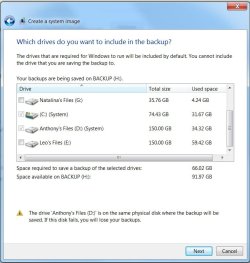
When attempting to create a system image, windows is including three drives by default: the C: (windows), the System Reserved, and the D: (storage)

For some reason, windows things the D drive is a system drive and thus it cannot be excluded from the system image. Is there a way to fix this? Thanks.
 

My Computer My Computer

OS
Windows 7 Ultimate x64
CPU
Intel i7-2600K
Memory
4GB DDR3
Graphics Card(s)
HIS Radeon 6850
Keyboard
Saitek Eclipse II
Mouse
Logitech G500
Hello Bob565656, welcome to Seven Forums!


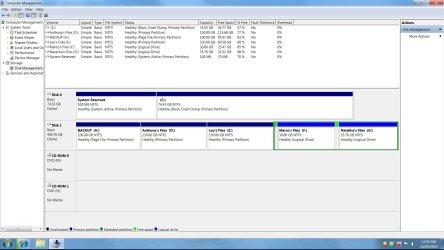
Will you please post a snip/screen-shot of the entire disk management drive map so we can see what you have going on as there may be a fairly simple way to resolve the situation.

In the Windows start menu right click computer and click manage, in the left pane of the "Computer Management" window that opens click disk management and post a snip of that.


How to Post a Screenshot in Seven Forums
 

My Computer My Computer

Computer Manufacturer/Model Number
* BFK Customs *
OS
W 7 64-bit Ultimate
CPU
Intel Q9550 Yorkfield
Motherboard
ASUS P5Q Pro
Memory
8GB Dominator 8500C5D
Graphics Card(s)
ATI : XFX 5870
Sound Card
Realtek HD Audio 7-1
Monitor(s) Displays
1x 47" LCD HDMI & 3x 26" LCD HDMI
Screen Resolution
1920x1080P & 1920x1200
Hard Drives
1x 80GB Intel X25-M G2 SSD : 1x 500GB & 1x 640GB WD Caviar Black(s)
PSU
Corsair 620HX
Case
Cooler Master RC-690
Cooling
Tuniq Tower 120, 2x 140mm and 3x 120mm case fans
Keyboard
Microsoft 500
Mouse
Razer Diamondback 3G
Internet Speed
14 Mb/s
Other Info
1x Koutech 3Gb/s SATA HDD Hot Swap Rack
re:

Here are the screenshots
 

Attachments

  • Untitled.jpg
    Untitled.jpg
    161.7 KB · Views: 47
  • Untitled2.jpg
    Untitled2.jpg
    56.5 KB · Views: 30

My Computer My Computer

OS
Windows 7 Ultimate x64
CPU
Intel i7-2600K
Memory
4GB DDR3
Graphics Card(s)
HIS Radeon 6850
Keyboard
Saitek Eclipse II
Mouse
Logitech G500
Hello again Bob.


That's really odd that the backup utility sees D: as "System" when it clearly is not, as you can see from the snip the "System, Reserved" partition is the system partition, that's the reason it's included in the backup as that's where Windows has stored the files needed to boot the system and if they're not included in the backup Windows will not boot if you use the backup to do a restore.

I'm kind-of stumped for the time being where to go from here; keep checking back though as someone may come up with the solution for you at any time; if you find a resolution in the mean-time be sure to post back what you did to maybe help others with the same issue.
 

My Computer My Computer

Computer Manufacturer/Model Number
* BFK Customs *
OS
W 7 64-bit Ultimate
CPU
Intel Q9550 Yorkfield
Motherboard
ASUS P5Q Pro
Memory
8GB Dominator 8500C5D
Graphics Card(s)
ATI : XFX 5870
Sound Card
Realtek HD Audio 7-1
Monitor(s) Displays
1x 47" LCD HDMI & 3x 26" LCD HDMI
Screen Resolution
1920x1080P & 1920x1200
Hard Drives
1x 80GB Intel X25-M G2 SSD : 1x 500GB & 1x 640GB WD Caviar Black(s)
PSU
Corsair 620HX
Case
Cooler Master RC-690
Cooling
Tuniq Tower 120, 2x 140mm and 3x 120mm case fans
Keyboard
Microsoft 500
Mouse
Razer Diamondback 3G
Internet Speed
14 Mb/s
Other Info
1x Koutech 3Gb/s SATA HDD Hot Swap Rack
It's interesting. I gather the other data partitions to D: must be fundamentally different in some way. Are there any system folders on D:?

How does Windows Imaging behave when you say locate "My documents" for example on a "data" partition like D:?
 

My Computer My Computer

Computer type
PC/Desktop
Computer Manufacturer/Model Number
Own build
OS
Windows 7x64 Home Premium SP1
CPU
Intel i7 2600k
Motherboard
ASUS P8Z68 Deluxe
Memory
G.Skill Ripjaws (DDR3-1600) 2x4GB
Graphics Card(s)
Nvidia GeForce GTS 450; Intel HD Graphics 3000(GT2+)
Monitor(s) Displays
Dell Ultrasharp IPS panel U2311H, Samsung SyncMaster P2350
Screen Resolution
1920x1080
Hard Drives
Samsung 850 Pro SSD 256GB, Samsung SSD 840 120GB, Seagates 1TB Barracuda ST31000528AS x2
PSU
Seasonic M12II 520W
Case
Lian Li Lancool PC-K60
Cooling
Case: 1x120mm, 3x140mm CPU: Hyper 212+
Keyboard
Logitech MK520 (wireless)
Mouse
Logitech MK520
Internet Speed
6-7 Mbps
Antivirus
Norton Security Premium, Malwarebytes on 2 (MSE on 3rd PC)
Browser
FireFox
Other Info
Audio: Logitech Z523 2.1
There are no system folders on D. Sorry mjf, I don't understand the last question. There is no 'my documents' folder on D.

I did, however, install a copy of VMWare on the D, which was then deleted manually since the uninstaller didn't work. I'm guessing windows thinks that there is a program still installed on D and included it in the backup. If this is the case, what can I do about it?
 

My Computer My Computer

OS
Windows 7 Ultimate x64
CPU
Intel i7-2600K
Memory
4GB DDR3
Graphics Card(s)
HIS Radeon 6850
Keyboard
Saitek Eclipse II
Mouse
Logitech G500
When attempting to create a system image, windows is including three drives by default: the C: (windows), the System Reserved, and the D: (storage)

For some reason, windows things the D drive is a system drive and thus it cannot be excluded from the system image. Is there a way to fix this? Thanks.

Which software are you using to create the "system image"?

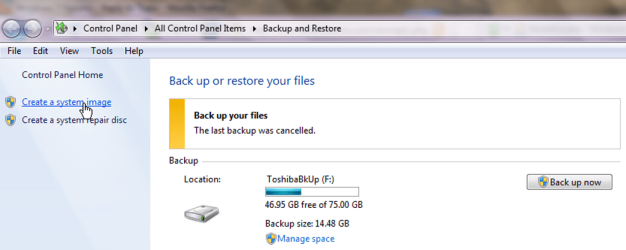
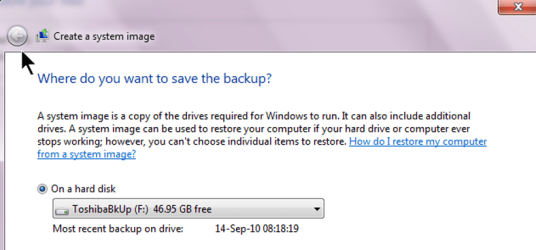
If you are using Windows Backup and Restore, then to make a System Image backup, then please take a close look at following from my laptop:

Select Create a System Image.png

Where to store backup.png

Select Drives to backup.png
 

My Computer My Computer

Computer Manufacturer/Model Number
Toshiba Satellite S875D-S7239 laptop
OS
MS Windows 7 Ultimate SP1 64-bit
CPU
AMD A10-4600M
Motherboard
AMD Pumori (Socket FT1)
Memory
6.00 GB Dual-Channel DDR3 @ 798MHz (11-11-12-28)
Graphics Card(s)
AMD Radeon HD 7660G
Sound Card
High Definition Audio Device
Monitor(s) Displays
Generic PnP Monitor (1600x900@60Hz)
Screen Resolution
1600x900@60Hz
Hard Drives
SSD 119GB Corsair CSSD-V128GB2 ATA Device
Keyboard
Standard PS/2 Keyboard
Mouse
HP Wireless Optical Mobile Mouse Model FHA-3410
Internet Speed
What the local pub, local coffee shop offers.
Other Info
Optical Drive:MATSHITA BD-CMB UJ160B ATA Device


Also have an Asus ha1002xp netbook with Win 7 Ultimate installed.
Hello Bob.


If there's no resolution forth-coming and there is nothing on the D: partition that you want to save, if there is maybe you could move it somewhere safe for a while or make a backup of it; the Option Three in this tutorial shows how to do a partition specific wipe "secure erase" of the desired partition, it over-writes everything on the partition with zeroes effectively 'removing' all data; then the data could be put back if need be.

Partition Wizard : Use the Bootable CD


The "Move To" option in this tutorial can be used to great effect to move personal data from one location to another.

Context Menu - Add Copy To Folder and Move To Folder
 

My Computer My Computer

Computer Manufacturer/Model Number
* BFK Customs *
OS
W 7 64-bit Ultimate
CPU
Intel Q9550 Yorkfield
Motherboard
ASUS P5Q Pro
Memory
8GB Dominator 8500C5D
Graphics Card(s)
ATI : XFX 5870
Sound Card
Realtek HD Audio 7-1
Monitor(s) Displays
1x 47" LCD HDMI & 3x 26" LCD HDMI
Screen Resolution
1920x1080P & 1920x1200
Hard Drives
1x 80GB Intel X25-M G2 SSD : 1x 500GB & 1x 640GB WD Caviar Black(s)
PSU
Corsair 620HX
Case
Cooler Master RC-690
Cooling
Tuniq Tower 120, 2x 140mm and 3x 120mm case fans
Keyboard
Microsoft 500
Mouse
Razer Diamondback 3G
Internet Speed
14 Mb/s
Other Info
1x Koutech 3Gb/s SATA HDD Hot Swap Rack

My Computers My Computers

System One System Two

  • Computer type
    PC/Desktop
    OS
    7 X64
    CPU
    i5 8400
    Motherboard
    gigabyte b365m ds3h
    Memory
    2x8gb 3200mhz
    Hard Drives
    various
    PSU
    pure power 11 400w cm
    Case
    Coolermaster
    Cooling
    cryorig m9i
  • Computer type
    PC/Desktop
    OS
    7x64
    CPU
    g5400
    Motherboard
    ga b365m ds3h
    Memory
    8gb ddr4 2400
    PSU
    xfx pro 450w
Those are very good products.

Which one is easier, which one is better now that's something for others to debate.

There are those who prefer Acronis, those who prefer Easeus.

As is well known, my personal choice is Windows 7 Backup and Restore which has never failed me.
 

My Computer My Computer

Computer Manufacturer/Model Number
Toshiba Satellite S875D-S7239 laptop
OS
MS Windows 7 Ultimate SP1 64-bit
CPU
AMD A10-4600M
Motherboard
AMD Pumori (Socket FT1)
Memory
6.00 GB Dual-Channel DDR3 @ 798MHz (11-11-12-28)
Graphics Card(s)
AMD Radeon HD 7660G
Sound Card
High Definition Audio Device
Monitor(s) Displays
Generic PnP Monitor (1600x900@60Hz)
Screen Resolution
1600x900@60Hz
Hard Drives
SSD 119GB Corsair CSSD-V128GB2 ATA Device
Keyboard
Standard PS/2 Keyboard
Mouse
HP Wireless Optical Mobile Mouse Model FHA-3410
Internet Speed
What the local pub, local coffee shop offers.
Other Info
Optical Drive:MATSHITA BD-CMB UJ160B ATA Device


Also have an Asus ha1002xp netbook with Win 7 Ultimate installed.
There are no system folders on D. Sorry mjf, I don't understand the last question. There is no 'my documents' folder on D.

I did, however, install a copy of VMWare on the D, which was then deleted manually since the uninstaller didn't work. I'm guessing windows thinks that there is a program still installed on D and included it in the backup. If this is the case, what can I do about it?
My second questions appears academic based on what you say.
What I meant was when you
* Go to your "My documents"..say > right click, select properties > select location tab > locate it on another partition.

Imaging preferences is an endless debate. Your favourite is always the best until it lets you down. I hedge bets with two:
(1) Windows imaging (hasn't let me down yet)
(2) Macrium Reflect (easy to use, strong following). A simple double click mounts the image for browsing if required.

I tried Paragon as well but you have to draw the line somewhere.
 

My Computer My Computer

Computer type
PC/Desktop
Computer Manufacturer/Model Number
Own build
OS
Windows 7x64 Home Premium SP1
CPU
Intel i7 2600k
Motherboard
ASUS P8Z68 Deluxe
Memory
G.Skill Ripjaws (DDR3-1600) 2x4GB
Graphics Card(s)
Nvidia GeForce GTS 450; Intel HD Graphics 3000(GT2+)
Monitor(s) Displays
Dell Ultrasharp IPS panel U2311H, Samsung SyncMaster P2350
Screen Resolution
1920x1080
Hard Drives
Samsung 850 Pro SSD 256GB, Samsung SSD 840 120GB, Seagates 1TB Barracuda ST31000528AS x2
PSU
Seasonic M12II 520W
Case
Lian Li Lancool PC-K60
Cooling
Case: 1x120mm, 3x140mm CPU: Hyper 212+
Keyboard
Logitech MK520 (wireless)
Mouse
Logitech MK520
Internet Speed
6-7 Mbps
Antivirus
Norton Security Premium, Malwarebytes on 2 (MSE on 3rd PC)
Browser
FireFox
Other Info
Audio: Logitech Z523 2.1
Macrium Reflect (easy to use, strong following). A simple double click mounts the image for browsing if required.

87e3bf13.png


+1 Macruim Reflect has never let me down either.

~Maxx~
.
da59fa57.png
 

My Computer My Computer

Computer Manufacturer/Model Number
HP HPE 270f
OS
Windows 7 x64 Home Premium
CPU
Intel Core i7 930 @ 2.8 Ghz Socket 1366 LGA
Motherboard
Pegatron Truckee v1.04E41
Memory
8 GB 1366 Mhz DDR3 (PC3-10700) RAM
Graphics Card(s)
ATI Radeon 5770 1 GB DDR5 RAM
Sound Card
Realtech High Definition
Monitor(s) Displays
32" Sony Bravia
Screen Resolution
1366 X 768
Hard Drives
Intel 25nm 120 GB Series 320 SSD HD Tune- 265 MBps Read/ 130 MBps Write

LaCie 1TB + 1TB RAID 0 eSATA Drive HD Tune- 160 MBps Read/ 90 MBps Write
Keyboard
Logitech Illuminated
Mouse
Logitech MX Revolution
Internet Speed
36.4 Mbps Maximum on a 37 Mbps Motorola SB501 Modem
Back
Top