System Image on External Hard Disk Forces Freeze at Startup?

CFerguson73

New member
Local time
7:34 PM
Messages
4
Ok, here is the deal, and I don't know why it happened. If someone can explain why this happens, I'd be grateful.

For some reason the system hung/froze at the Windows flag logo during start-up. I know what caused it, but I don't know why, and would like to understand why.

I made a backup of the system image, and backed it up on an external hard disk. I restarted the computer, and it hung at the Windows flag log. The flag animation froze and the system become completely unresponsive. The only way to shut the power down was pushing the power button to force computer to do a hard shut down. Ie started the computer back up and it booted into the Windows Error Recovery screen.

I first chose the ‘Start Windows Normally’ option, and it froze at the Windows flag logo again. I forced the system to shut down by pushing the power button, and chose the ‘Launch Startup Repair’ option when the computer booted back up. Windows was unable to repair the computer after two attempts, and the computer recommended that I use a Restore Point to fix the error. I chose the most recent restore point that I created earlier. I rebooted the computer and loaded into Windows just fine. But to make sure everything was O.K., I restarted the computer again, and it froze again at the Windows flag logo. I shut the computer down and restarted it, and the Windows Error Recovery screen appeared again. The computer failed to repair the program, chose my restore point again, and when the computer booted back up I deleted the system image on the back-up hard disk, and restarted the computer again, and it booted up just fine.

I did this three times to see if we would get the same results every time. For some reason, the backed-up system image on the external hard disk would refuse to allow Windows to boot up and load properly.

Anyone know why this happened?
 

My Computer My Computer

Computer type
PC/Desktop
Computer Manufacturer/Model Number
Apple Mac mini - Mid-2010
OS
Windows 7 Home Premium x64
CPU
2.66 GHz Intel Core 2 Duo
Motherboard
Apple Model A1347
Memory
8 GB 1067 MHz DDR3 SO-DIMMs (2x4GB)
Graphics Card(s)
NVIDIA GeForce 320M 256 MB
Hard Drives
Seagate Momentus 5400.6 ST9500325ASG 500GB 5400 RPM 8MB Cache SATA 3.0Gb/s 2.5" Internal Notebook Hard Drive

LaCie 2TB external hard disk drive
Antivirus
AVG and Malwarebytes
Browser
Internet Explorer, Google Chrome
Anyone have any ideas what would cause this?
 

My Computer My Computer

Computer type
PC/Desktop
Computer Manufacturer/Model Number
Apple Mac mini - Mid-2010
OS
Windows 7 Home Premium x64
CPU
2.66 GHz Intel Core 2 Duo
Motherboard
Apple Model A1347
Memory
8 GB 1067 MHz DDR3 SO-DIMMs (2x4GB)
Graphics Card(s)
NVIDIA GeForce 320M 256 MB
Hard Drives
Seagate Momentus 5400.6 ST9500325ASG 500GB 5400 RPM 8MB Cache SATA 3.0Gb/s 2.5" Internal Notebook Hard Drive

LaCie 2TB external hard disk drive
Antivirus
AVG and Malwarebytes
Browser
Internet Explorer, Google Chrome
All of you Windows guru's here and nobody can explain why this happened? I would really know why this happened, and I'm stumped. Any help would be greatly appreciated.
 

My Computer My Computer

Computer type
PC/Desktop
Computer Manufacturer/Model Number
Apple Mac mini - Mid-2010
OS
Windows 7 Home Premium x64
CPU
2.66 GHz Intel Core 2 Duo
Motherboard
Apple Model A1347
Memory
8 GB 1067 MHz DDR3 SO-DIMMs (2x4GB)
Graphics Card(s)
NVIDIA GeForce 320M 256 MB
Hard Drives
Seagate Momentus 5400.6 ST9500325ASG 500GB 5400 RPM 8MB Cache SATA 3.0Gb/s 2.5" Internal Notebook Hard Drive

LaCie 2TB external hard disk drive
Antivirus
AVG and Malwarebytes
Browser
Internet Explorer, Google Chrome
What program did you use to create the system image ?
- Win 7 Built in utility, Macrium, Acronis, Aomei, etc.

How did you make the backup of the system image ?
- Windows Explorer copy n paste, Robocopy, some other utility, etc.

If you're using the Win 7 built in utility, that's the most finicky, difficult to use, and problematic, imho.
Macrium is often recommended here, I use it and Acronis, I don't use the Win 7 built in utility.
I've found Robocopy more reliable than Windows Explorer copy n paste to "backup" (copy) a system image.
 

My Computer My Computer

Computer type
PC/Desktop
Computer Manufacturer/Model Number
home built
OS
Multi-Boot W7_Pro_x64 W8.1_Pro_x64 W10_Pro_x64 +Linux_VMs +Chromium_VM
CPU
AMD Athlon II x4 620
Motherboard
Gigabyte GA-MA785G-UD3H
Memory
6GB GSkill DDR2 800
Graphics Card(s)
AMD 4670 GPU + AMD 4200 IGP
Sound Card
on board Realtek ALC889A
Monitor(s) Displays
RCA 40" LCD TV, Insignia 32" LCD TV, HP 15" LCD monitor
Screen Resolution
1680 x 1050
Hard Drives
OCZ Vertex 3 120GB,
Samsung F3 1TB (3),
Several others - WD, Seagate, Hitachi, ...
PSU
Corsair 500 W
Case
Rosewill mid tower
Cooling
CM 90mm rifle
Keyboard
Gyration wireless, Logitech wireless, Dell USB wired
Mouse
Gyration wireless, Logitech wireless, V7 USB wired
Internet Speed
Spectrum - 100Mbps D / 10Mbps U
Antivirus
Avast, MBAM3, EMET, WinPatrol
Browser
Pale Moon, Firefox, IE
Other Info
2 multi-boot PC's
Mainly HTPC/Office/Gen purpose (no gaming).
Trendnet USB KVM.
LG DVD burner/Blue Ray Player.
Tray system for removable SATA backup drives.

Not currently OCd, under-volted.
I use Hybrid sleep, rarely re-boot or shutdown.

Hauppauge HD-PVR, Avermedia PCIe TV Tuner, Hauppauge PCI TV Tuner.
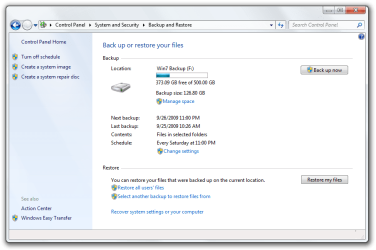
Hello David. I used the built-in Windows Backup utility to do it. I used the "Create system image" link on the left side of the window, and I chose my Lacie external HDD to back it up on. This is the same back-up HDD that I have all of my user files backed up on as well.
 

Attachments

  • Backup_and_Restore_in_Windows_7.png
    Backup_and_Restore_in_Windows_7.png
    39 KB · Views: 1

My Computer My Computer

Computer type
PC/Desktop
Computer Manufacturer/Model Number
Apple Mac mini - Mid-2010
OS
Windows 7 Home Premium x64
CPU
2.66 GHz Intel Core 2 Duo
Motherboard
Apple Model A1347
Memory
8 GB 1067 MHz DDR3 SO-DIMMs (2x4GB)
Graphics Card(s)
NVIDIA GeForce 320M 256 MB
Hard Drives
Seagate Momentus 5400.6 ST9500325ASG 500GB 5400 RPM 8MB Cache SATA 3.0Gb/s 2.5" Internal Notebook Hard Drive

LaCie 2TB external hard disk drive
Antivirus
AVG and Malwarebytes
Browser
Internet Explorer, Google Chrome
Guess i misunderstood when you said "I made a backup of the system image" :o
I thought that meant you created a system (backup) image, and then created a backup of that system image...

See if this tutorial by Brink helps:
http://www.sevenforums.com/tutorials/663-backup-complete-computer-create-image-backup.html

I don't use the built in utility (too quirky for me), i recommend Macrium for System Images.
Macrium Reflect FREE Edition - Information and download

You can post questions in the tutorial, Brink is the resident alien guru and knows a lot more than me :)
 

My Computer My Computer

Computer type
PC/Desktop
Computer Manufacturer/Model Number
home built
OS
Multi-Boot W7_Pro_x64 W8.1_Pro_x64 W10_Pro_x64 +Linux_VMs +Chromium_VM
CPU
AMD Athlon II x4 620
Motherboard
Gigabyte GA-MA785G-UD3H
Memory
6GB GSkill DDR2 800
Graphics Card(s)
AMD 4670 GPU + AMD 4200 IGP
Sound Card
on board Realtek ALC889A
Monitor(s) Displays
RCA 40" LCD TV, Insignia 32" LCD TV, HP 15" LCD monitor
Screen Resolution
1680 x 1050
Hard Drives
OCZ Vertex 3 120GB,
Samsung F3 1TB (3),
Several others - WD, Seagate, Hitachi, ...
PSU
Corsair 500 W
Case
Rosewill mid tower
Cooling
CM 90mm rifle
Keyboard
Gyration wireless, Logitech wireless, Dell USB wired
Mouse
Gyration wireless, Logitech wireless, V7 USB wired
Internet Speed
Spectrum - 100Mbps D / 10Mbps U
Antivirus
Avast, MBAM3, EMET, WinPatrol
Browser
Pale Moon, Firefox, IE
Other Info
2 multi-boot PC's
Mainly HTPC/Office/Gen purpose (no gaming).
Trendnet USB KVM.
LG DVD burner/Blue Ray Player.
Tray system for removable SATA backup drives.

Not currently OCd, under-volted.
I use Hybrid sleep, rarely re-boot or shutdown.

Hauppauge HD-PVR, Avermedia PCIe TV Tuner, Hauppauge PCI TV Tuner.

My Computer My Computer

Computer Manufacturer/Model Number
HP, Dell, Gateway, Toshiba - 4 laptops and 2 desktops
OS
Vista, Windows7, Mint Mate, Zorin, Windows 8
CPU
from 1.6GHz Duo to i7
Monitor(s) Displays
2x HP w2207
Hard Drives
5x HDD, 7x SSD, 12x Externals
Keyboard
with trackball - no mices
Mouse
Trackball mice
Internet Speed
DSL 6000
Back
Top