Solved System image restore failed, error 0x80042412

Tsremix777

New member
Member
Local time
2:49 AM
Messages
8
.

My mothers hp computer had a failing hard drive. (It kept giving warnings telling her to backup her files.) It was a 500gb 1tb HDD, and I purchased a 750gb replacement hard drive for her. After a bit of struggling, I managed to get a system image backup saved onto a 1tb external hard drive. I created a system repair disc, replaced the hard drive, and tried to restore. I got the error "The system image restore failed. No disk that can be used for recovering the system disk can be found." (0x80042412) The old hard drive still works, if that information is useful. It's also worth mentioning that the actual used space from the system image was around 350gb.

I believe she's running windows 7 home premium 64bit. Any suggestions?

Edit: "Thanks for the help, guys. I went ahead and followed ThrashZone's advice and made another image with macrium, then decreased the main partition size to fit on the new hard drive, and it worked flawlessly."
 
Last edited by a moderator:

My Computer

Computer type
PC/Desktop
Computer Manufacturer/Model Number
Custom Build
OS
Windows 7 Ultimate 64bit
CPU
AMD FX-6300
Motherboard
ASRock 970 Pro3 R2.0
Memory
Crucial Ballistix Sport 16GB (2 x 8GB) DDR3-1600
Graphics Card(s)
Sapphire Radeon HD 7870 GHz. Edition
Hard Drives
1tb Western Digital Caviar Blue
Antivirus
Windows Security Essentials
Browser
Google Chrome
Is the system image in its own partition?
 

My Computer

Computer type
PC/Desktop
Computer Manufacturer/Model Number
dell precision t3400 tower
OS
Linux Lite 3.2 x64; Windows 7, 8.1
CPU
Core2Duo 2.4
Memory
6GB ddr2
Graphics Card(s)
nVidia
Hard Drives
120gb SSD, 1TB HD, 2TB HD; sata II
Internet Speed
12/2
Browser
Vivaldi, Slimjet (Chromium) x64
Is the system image in its own partition?

There is only one partition on the drive, which contains the image backup folder and a few office documents.
 

My Computer

Computer type
PC/Desktop
Computer Manufacturer/Model Number
Custom Build
OS
Windows 7 Ultimate 64bit
CPU
AMD FX-6300
Motherboard
ASRock 970 Pro3 R2.0
Memory
Crucial Ballistix Sport 16GB (2 x 8GB) DDR3-1600
Graphics Card(s)
Sapphire Radeon HD 7870 GHz. Edition
Hard Drives
1tb Western Digital Caviar Blue
Antivirus
Windows Security Essentials
Browser
Google Chrome
Have you initialized/formatted the new drive?
 

My Computers

System One System Two

  • Computer type
    PC/Desktop
    OS
    7 X64
    CPU
    i5 8400
    Motherboard
    gigabyte b365m ds3h
    Memory
    2x8gb 3200mhz
    Hard Drives
    various
    PSU
    pure power 11 400w cm
    Case
    Coolermaster
    Cooling
    cryorig m9i
  • Computer type
    PC/Desktop
    OS
    7x64
    CPU
    g5400
    Motherboard
    ga b365m ds3h
    Memory
    8gb ddr4 2400
    PSU
    xfx pro 450w
Have you initialized/formatted the new drive?

Using the command prompt I entered the exact commands:
diskpart
list disk
select disk 0
clean
create partition primary
format quick fs=ntfs
assign
exit

I then restarted and retried the restore, but I got the same results.

Also, I'm not plugging in the external hard drive until after the computer has booted via the repair disk.
 

My Computer

Computer type
PC/Desktop
Computer Manufacturer/Model Number
Custom Build
OS
Windows 7 Ultimate 64bit
CPU
AMD FX-6300
Motherboard
ASRock 970 Pro3 R2.0
Memory
Crucial Ballistix Sport 16GB (2 x 8GB) DDR3-1600
Graphics Card(s)
Sapphire Radeon HD 7870 GHz. Edition
Hard Drives
1tb Western Digital Caviar Blue
Antivirus
Windows Security Essentials
Browser
Google Chrome
What program did you use to create the image of the old hard drive?.
 

My Computer

Computer type
PC/Desktop
Computer Manufacturer/Model Number
Self built using existing case
OS
Windows 7 Home Premium 64 bit sp1
CPU
Intel i5 3570 3.4Ghz Ivy Bridge SKT 1155 quad core
Motherboard
Gigabyte Z77-HD3 SKT 1155 2xSata 3, 4x USB 3.0
Memory
G-Skill Rip Jaws 16Gb (8x2) DDR3 -1600 PC3 12800 CL 10 red
Graphics Card(s)
Gigabyte NVIDIA GT610 1Gb DDR3 810/1200 PCI-E 2.0 Silent
Sound Card
NVIDIA High Definition & Realtech High Definition Audio
Monitor(s) Displays
2 x Philips 226V4L 16:9 aspect ratio
Screen Resolution
1920 x 1080 HD
Hard Drives
Samsung 840 Pro 256gb SSD, SATA 3.
Hitachi Touro Portable 1tb, USB 3.0 HDD used for image b/ups.
PSU
Corsair VS450
Case
Codeng
Cooling
PSU fan & CPU fan
Keyboard
Logitech
Mouse
Logitech Wireless trackball M570
Internet Speed
Wireless 3G. 3mg down & 550kb up.
Antivirus
Bitdefender Internet Security 2020
Browser
Opera (Current Version) & Firefox
Other Info
MS Office 2013 Pro. Davis weather station software. MGE Nova 600 avr UPS.
There is only one partition on the drive, which contains the image backup folder and a few office documents.

Do I understand this correctly? You have the image on the same partition you want to restore to? If so, that's not going to work. The image must be in an partition independent of the new OS partition, or it would be wiped as the new partition is laid down.

Does the existing install work well? If not, it would be better to do a fresh Reset on the new drive than to restore from an image.
 

My Computer

Computer type
PC/Desktop
Computer Manufacturer/Model Number
dell precision t3400 tower
OS
Linux Lite 3.2 x64; Windows 7, 8.1
CPU
Core2Duo 2.4
Memory
6GB ddr2
Graphics Card(s)
nVidia
Hard Drives
120gb SSD, 1TB HD, 2TB HD; sata II
Internet Speed
12/2
Browser
Vivaldi, Slimjet (Chromium) x64
There is only one partition on the drive, which contains the image backup folder and a few office documents.

Do I understand this correctly? You have the image on the same partition you want to restore to? If so, that's not going to work. The image must be in an partition independent of the new OS partition, or it would be wiped as the new partition is laid down.

Does the existing install work well? If not, it would be better to do a fresh Reset on the new drive than to restore from an image.

That's not the way I read the OP's post. The old hard drive it failing, they made an image to a 1tb external drive. Purchased a new 750gb hard drive & installed it & then tried to install the image to that new drive, with no success.

That's why I am asking what program was used for the back up image, so we can see what may be wrong.
 

My Computer

Computer type
PC/Desktop
Computer Manufacturer/Model Number
Self built using existing case
OS
Windows 7 Home Premium 64 bit sp1
CPU
Intel i5 3570 3.4Ghz Ivy Bridge SKT 1155 quad core
Motherboard
Gigabyte Z77-HD3 SKT 1155 2xSata 3, 4x USB 3.0
Memory
G-Skill Rip Jaws 16Gb (8x2) DDR3 -1600 PC3 12800 CL 10 red
Graphics Card(s)
Gigabyte NVIDIA GT610 1Gb DDR3 810/1200 PCI-E 2.0 Silent
Sound Card
NVIDIA High Definition & Realtech High Definition Audio
Monitor(s) Displays
2 x Philips 226V4L 16:9 aspect ratio
Screen Resolution
1920 x 1080 HD
Hard Drives
Samsung 840 Pro 256gb SSD, SATA 3.
Hitachi Touro Portable 1tb, USB 3.0 HDD used for image b/ups.
PSU
Corsair VS450
Case
Codeng
Cooling
PSU fan & CPU fan
Keyboard
Logitech
Mouse
Logitech Wireless trackball M570
Internet Speed
Wireless 3G. 3mg down & 550kb up.
Antivirus
Bitdefender Internet Security 2020
Browser
Opera (Current Version) & Firefox
Other Info
MS Office 2013 Pro. Davis weather station software. MGE Nova 600 avr UPS.
That's not the way I read the OP's post. The old hard drive it failing, they made an image to a 1tb external drive. Purchased a new 750gb hard drive & installed it & then tried to install the image to that new drive, with no success.

You're absolutely right. I stand corrected!

Tsremix777 said:
Also, I'm not plugging in the external hard drive until after the computer has booted via the repair disk.

It looks like this is a backup image made by the Win7 built-in facility? Can you navigate to the external hard drive via the restore function? If not, have you tried having the external drive plugged in at boot?
 

My Computer

Computer type
PC/Desktop
Computer Manufacturer/Model Number
dell precision t3400 tower
OS
Linux Lite 3.2 x64; Windows 7, 8.1
CPU
Core2Duo 2.4
Memory
6GB ddr2
Graphics Card(s)
nVidia
Hard Drives
120gb SSD, 1TB HD, 2TB HD; sata II
Internet Speed
12/2
Browser
Vivaldi, Slimjet (Chromium) x64

My Computer

Computer type
PC/Desktop
Computer Manufacturer/Model Number
Custom assembled by me :}
OS
Win-7-Pro64bit 7-H-Prem-64bit
CPU
i7-5930K 2nd i9-9940x both water blocked VRM's too
Motherboard
ASUS SABERTOOTH X99 2nd ASUS x299 Apex
Memory
Trident-z 3200C14 2nd Trident-z 3600C16
Graphics Card(s)
EVGA 1080ti ftw3 2nd Titan Xp both water blocked
Sound Card
Built-in Realtek
Monitor(s) Displays
1-AOC G2460PG 24"G-Sync 144Hz/ 2nd 1-ASUS VG248QE 24" 144Hz
Screen Resolution
1920 x 1080 144Hz
Hard Drives
2-Samsung M.2 Evo & Evo Plus
2-Samsung 850 EVO 500GB SSD's/ 3-2.5 W.D. Black 1tb-&3-1tb/3-3.5 WD Black 1tb hdd's
PSU
EVGA SuperNOVA 1000-P2 2nd 1200-P2
Case
2-Corsair Obsidian Series 450D Black ATX Mid Tower
Cooling
Custom water loops
Keyboard
Logitech G710+/ 2nd Logitech G910
Mouse
2-RedDragon M901 Perdition 16400 dpi Gaming mouse = wired
Internet Speed
Comcast Ping 19ms 89.31mbps download speed 6.12mbps upload
Antivirus
Malwarebytes Pro/ Superantispyware Pro
Browser
FireFox & Pale moon
Other Info
2nd ASUS X299 Apex/Intel i9-9940x with Custom water loop/7H-Prem-x64/Corsair 450D case/Ram Trident-z 3600C16 4x8gb / Samsung970Evo plus 500gb SSD/Dual ssd EZ swap evo/PSU EVGA SuperNova 1200w-P2 80+Platinum/GPU Titan Xp /8-ML-140 on push-pull on 2-280GTX rads
That's not the way I read the OP's post. The old hard drive it failing, they made an image to a 1tb external drive. Purchased a new 750gb hard drive & installed it & then tried to install the image to that new drive, with no success.

This is correct.

What program did you use to create the image of the old hard drive?.

I just used the default windows image backup.

Hi,
Yes it would be nice to know what you used to create the image and restore disk :)
This is the recommended program to do the tasks with,
Imaging with free Macrium

Windows not so much :/

Thanks! I'll look into it. If I'm unable to get this working I'll give it a shot.
 

My Computer

Computer type
PC/Desktop
Computer Manufacturer/Model Number
Custom Build
OS
Windows 7 Ultimate 64bit
CPU
AMD FX-6300
Motherboard
ASRock 970 Pro3 R2.0
Memory
Crucial Ballistix Sport 16GB (2 x 8GB) DDR3-1600
Graphics Card(s)
Sapphire Radeon HD 7870 GHz. Edition
Hard Drives
1tb Western Digital Caviar Blue
Antivirus
Windows Security Essentials
Browser
Google Chrome
paul1149 said:
It looks like this is a backup image made by the Win7 built-in facility? Can you navigate to the external hard drive via the restore function? If not, have you tried having the external drive plugged in at boot?

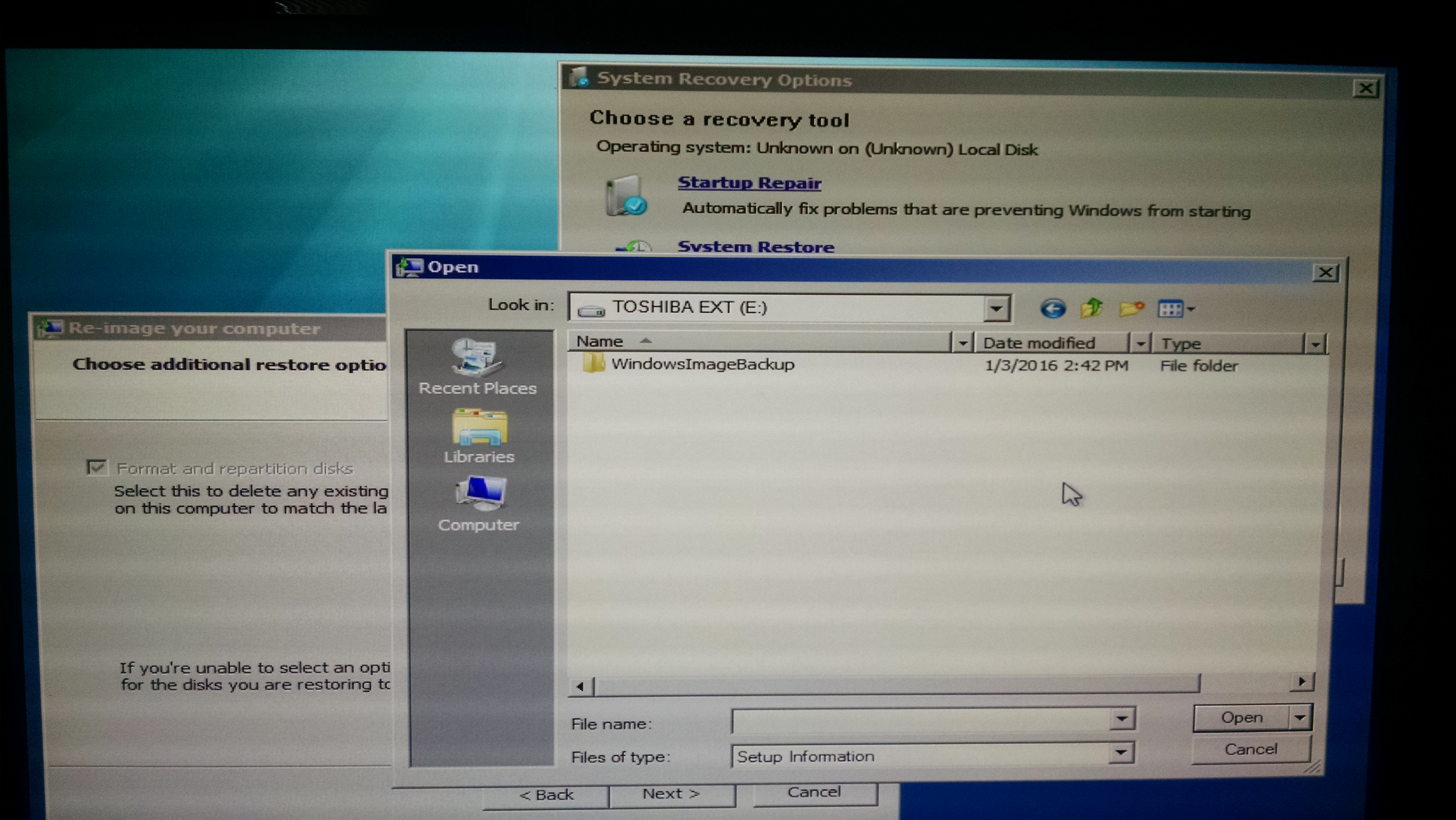
I'm not sure what you mean. I can select "install drivers" and browse through the external hard drive's files, so it is accessible. (See attached image) It's also detecting the backup on the external hard drive.

I20Vvil.jpg
 

My Computer

Computer type
PC/Desktop
Computer Manufacturer/Model Number
Custom Build
OS
Windows 7 Ultimate 64bit
CPU
AMD FX-6300
Motherboard
ASRock 970 Pro3 R2.0
Memory
Crucial Ballistix Sport 16GB (2 x 8GB) DDR3-1600
Graphics Card(s)
Sapphire Radeon HD 7870 GHz. Edition
Hard Drives
1tb Western Digital Caviar Blue
Antivirus
Windows Security Essentials
Browser
Google Chrome
Ok then, it's seeing the backup image. The error message probably refers to the new drive then. Can you boot into the old drive and see if the new drive is visible from there in Disk Manager?
 

My Computer

Computer type
PC/Desktop
Computer Manufacturer/Model Number
dell precision t3400 tower
OS
Linux Lite 3.2 x64; Windows 7, 8.1
CPU
Core2Duo 2.4
Memory
6GB ddr2
Graphics Card(s)
nVidia
Hard Drives
120gb SSD, 1TB HD, 2TB HD; sata II
Internet Speed
12/2
Browser
Vivaldi, Slimjet (Chromium) x64
Ok then, it's seeing the backup image. The error message probably refers to the new drive then. Can you boot into the old drive and see if the new drive is visible from there in Disk Manager?

Yes, the new hard drive is detected and healthy.

I just realized that her old (dying) hard drive is 1tb, not 500gb.
 

My Computer

Computer type
PC/Desktop
Computer Manufacturer/Model Number
Custom Build
OS
Windows 7 Ultimate 64bit
CPU
AMD FX-6300
Motherboard
ASRock 970 Pro3 R2.0
Memory
Crucial Ballistix Sport 16GB (2 x 8GB) DDR3-1600
Graphics Card(s)
Sapphire Radeon HD 7870 GHz. Edition
Hard Drives
1tb Western Digital Caviar Blue
Antivirus
Windows Security Essentials
Browser
Google Chrome
@ Tsremix777.
How much of the old 1tb drive had been used & was it all in one partition. The problem could be that you are trying to install a 1tb image onto a 750gb hard drive.

As paul1149 has requested could you post a screen shot on Disc Management showing the old hard drive & this will help us workout the best way to fix this.

This Forum tutorial will help you with the screen shot.

http://www.sevenforums.com/tutorials/274797-disk-management-post-screen-capture-image.html
 

My Computer

Computer type
PC/Desktop
Computer Manufacturer/Model Number
Self built using existing case
OS
Windows 7 Home Premium 64 bit sp1
CPU
Intel i5 3570 3.4Ghz Ivy Bridge SKT 1155 quad core
Motherboard
Gigabyte Z77-HD3 SKT 1155 2xSata 3, 4x USB 3.0
Memory
G-Skill Rip Jaws 16Gb (8x2) DDR3 -1600 PC3 12800 CL 10 red
Graphics Card(s)
Gigabyte NVIDIA GT610 1Gb DDR3 810/1200 PCI-E 2.0 Silent
Sound Card
NVIDIA High Definition & Realtech High Definition Audio
Monitor(s) Displays
2 x Philips 226V4L 16:9 aspect ratio
Screen Resolution
1920 x 1080 HD
Hard Drives
Samsung 840 Pro 256gb SSD, SATA 3.
Hitachi Touro Portable 1tb, USB 3.0 HDD used for image b/ups.
PSU
Corsair VS450
Case
Codeng
Cooling
PSU fan & CPU fan
Keyboard
Logitech
Mouse
Logitech Wireless trackball M570
Internet Speed
Wireless 3G. 3mg down & 550kb up.
Antivirus
Bitdefender Internet Security 2020
Browser
Opera (Current Version) & Firefox
Other Info
MS Office 2013 Pro. Davis weather station software. MGE Nova 600 avr UPS.
@ Tsremix777.
How much of the old 1tb drive had been used & was it all in one partition. The problem could be that you are trying to install a 1tb image onto a 750gb hard drive.

As paul1149 has requested could you post a screen shot on Disc Management showing the old hard drive & this will help us workout the best way to fix this.

This Forum tutorial will help you with the screen shot.

Disk Management - Post a Screen Capture Image

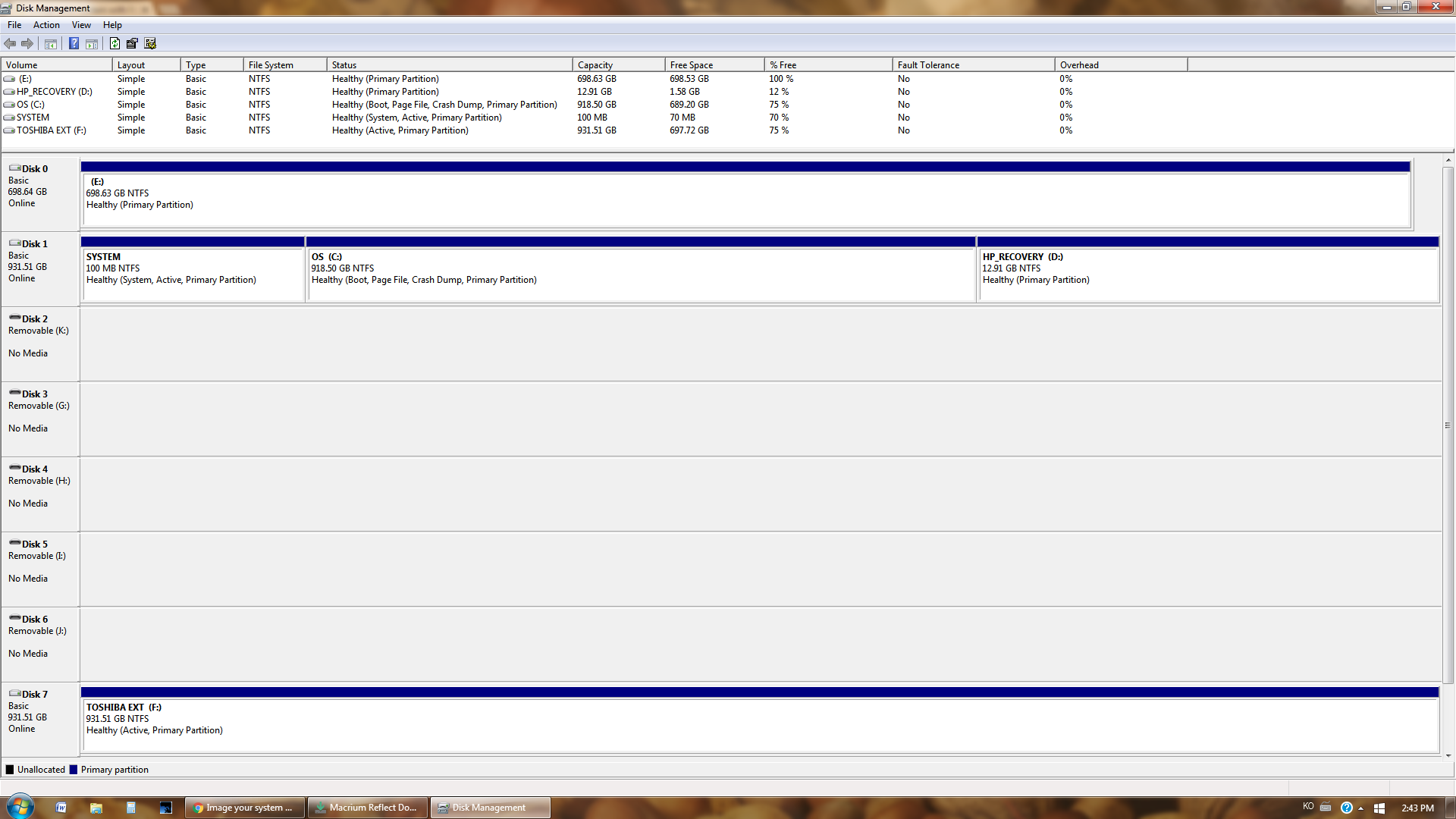
About 220gb are used, I'll attach a screenshot of the disk management. Please note that the old, dying hard drive is (C:), the new internal hard drive is (E:), and the external hard drive (which contains the image) is (F:)

VBjRQau.png
 

My Computer

Computer type
PC/Desktop
Computer Manufacturer/Model Number
Custom Build
OS
Windows 7 Ultimate 64bit
CPU
AMD FX-6300
Motherboard
ASRock 970 Pro3 R2.0
Memory
Crucial Ballistix Sport 16GB (2 x 8GB) DDR3-1600
Graphics Card(s)
Sapphire Radeon HD 7870 GHz. Edition
Hard Drives
1tb Western Digital Caviar Blue
Antivirus
Windows Security Essentials
Browser
Google Chrome

My Computer

Computer type
PC/Desktop
Computer Manufacturer/Model Number
Custom assembled by me :}
OS
Win-7-Pro64bit 7-H-Prem-64bit
CPU
i7-5930K 2nd i9-9940x both water blocked VRM's too
Motherboard
ASUS SABERTOOTH X99 2nd ASUS x299 Apex
Memory
Trident-z 3200C14 2nd Trident-z 3600C16
Graphics Card(s)
EVGA 1080ti ftw3 2nd Titan Xp both water blocked
Sound Card
Built-in Realtek
Monitor(s) Displays
1-AOC G2460PG 24"G-Sync 144Hz/ 2nd 1-ASUS VG248QE 24" 144Hz
Screen Resolution
1920 x 1080 144Hz
Hard Drives
2-Samsung M.2 Evo & Evo Plus
2-Samsung 850 EVO 500GB SSD's/ 3-2.5 W.D. Black 1tb-&3-1tb/3-3.5 WD Black 1tb hdd's
PSU
EVGA SuperNOVA 1000-P2 2nd 1200-P2
Case
2-Corsair Obsidian Series 450D Black ATX Mid Tower
Cooling
Custom water loops
Keyboard
Logitech G710+/ 2nd Logitech G910
Mouse
2-RedDragon M901 Perdition 16400 dpi Gaming mouse = wired
Internet Speed
Comcast Ping 19ms 89.31mbps download speed 6.12mbps upload
Antivirus
Malwarebytes Pro/ Superantispyware Pro
Browser
FireFox & Pale moon
Other Info
2nd ASUS X299 Apex/Intel i9-9940x with Custom water loop/7H-Prem-x64/Corsair 450D case/Ram Trident-z 3600C16 4x8gb / Samsung970Evo plus 500gb SSD/Dual ssd EZ swap evo/PSU EVGA SuperNova 1200w-P2 80+Platinum/GPU Titan Xp /8-ML-140 on push-pull on 2-280GTX rads
I think Ranger4 is correct about the size problem. I would make a decision here on whether or not you want to preserve the Factory restore partition. If so, use a commercial backup prog to clone the entire disk, and then adjust partition sizes during the restoration. If not, you can simply shrink the C partition in place using Windows disk management, then take a new windows image and restore it.
 

My Computer

Computer type
PC/Desktop
Computer Manufacturer/Model Number
dell precision t3400 tower
OS
Linux Lite 3.2 x64; Windows 7, 8.1
CPU
Core2Duo 2.4
Memory
6GB ddr2
Graphics Card(s)
nVidia
Hard Drives
120gb SSD, 1TB HD, 2TB HD; sata II
Internet Speed
12/2
Browser
Vivaldi, Slimjet (Chromium) x64
Thanks for the help, guys. I went ahead and followed ThrashZone's advice and made another image with macrium, then decreased the main partition size to fit on the new hard drive, and it worked flawlessly.
 

My Computer

Computer type
PC/Desktop
Computer Manufacturer/Model Number
Custom Build
OS
Windows 7 Ultimate 64bit
CPU
AMD FX-6300
Motherboard
ASRock 970 Pro3 R2.0
Memory
Crucial Ballistix Sport 16GB (2 x 8GB) DDR3-1600
Graphics Card(s)
Sapphire Radeon HD 7870 GHz. Edition
Hard Drives
1tb Western Digital Caviar Blue
Antivirus
Windows Security Essentials
Browser
Google Chrome
Great news Macrium is very good indeed
Happy imaging and restoring :)
 

My Computer

Computer type
PC/Desktop
Computer Manufacturer/Model Number
Custom assembled by me :}
OS
Win-7-Pro64bit 7-H-Prem-64bit
CPU
i7-5930K 2nd i9-9940x both water blocked VRM's too
Motherboard
ASUS SABERTOOTH X99 2nd ASUS x299 Apex
Memory
Trident-z 3200C14 2nd Trident-z 3600C16
Graphics Card(s)
EVGA 1080ti ftw3 2nd Titan Xp both water blocked
Sound Card
Built-in Realtek
Monitor(s) Displays
1-AOC G2460PG 24"G-Sync 144Hz/ 2nd 1-ASUS VG248QE 24" 144Hz
Screen Resolution
1920 x 1080 144Hz
Hard Drives
2-Samsung M.2 Evo & Evo Plus
2-Samsung 850 EVO 500GB SSD's/ 3-2.5 W.D. Black 1tb-&3-1tb/3-3.5 WD Black 1tb hdd's
PSU
EVGA SuperNOVA 1000-P2 2nd 1200-P2
Case
2-Corsair Obsidian Series 450D Black ATX Mid Tower
Cooling
Custom water loops
Keyboard
Logitech G710+/ 2nd Logitech G910
Mouse
2-RedDragon M901 Perdition 16400 dpi Gaming mouse = wired
Internet Speed
Comcast Ping 19ms 89.31mbps download speed 6.12mbps upload
Antivirus
Malwarebytes Pro/ Superantispyware Pro
Browser
FireFox & Pale moon
Other Info
2nd ASUS X299 Apex/Intel i9-9940x with Custom water loop/7H-Prem-x64/Corsair 450D case/Ram Trident-z 3600C16 4x8gb / Samsung970Evo plus 500gb SSD/Dual ssd EZ swap evo/PSU EVGA SuperNova 1200w-P2 80+Platinum/GPU Titan Xp /8-ML-140 on push-pull on 2-280GTX rads
Back
Top