System Image with Ubuntu Dualboot?

chromium

New member
Member
Local time
3:49 PM
Messages
56
Hello im planning on making a system image of my windows 7 hdd(365gb partition). I currently have ubuntu installed on another 100gb partition, and the bootloader is grub2.

When i make the system image will the fact that ubuntu's bootloader is being used instead of win7, affect how the system image is made? If i restore it will it boot properly?

also ive read that windows system image is unreliable. Is this true? if so, does anyone have any better suggestions on how to backup my whole win7 drive?

Thanks
 
Last edited:

My Computer

Computer type
Laptop
OS
Windows 7 Home Premium 64Bit
CPU
Intel Core i5-2450m @ 2.5GHz
Memory
6GB
First of all, Ubuntu's boot loader is ONLY being used to boot Ubuntu; it can not boot Windows -- only the Windows boot loader does that. GRUB hands off control to the Windows boot loader.

Second, if Win7 came preinstalled on your PC, there is likely a small partition containing the Windows boot loader files. IF that's the case, when you make an image backup, be SURE to include that small partition, as well. You need that partition in order to boot Windows.

If you later restore Windows using the same tool that you used to image it, then no, that is not going to affect Ubuntu in any way.

I don't use Windows System imaging; instead, I use Macrium Reflect -- the FREE version will do image backups and restores.

And finally, MS insists on using the word "drive" when they actually mean "partition". You don't have a Windows 7 "drive" -- because if you did, there would be no partitions on that "drive" containing anything else. Instead, you have (likely) a Win7 boot partition, and a Win7 OS partition.
 

My Computer

Computer type
PC/Desktop
Computer Manufacturer/Model Number
Custom
OS
Win7 Pro 32-bit, Win8 Pro 32-bit
CPU
AMD Phenom II X6 1090T
Motherboard
Gigabyte
Memory
4GB ddr3 1300
Graphics Card(s)
AMD HD 4290 onboard
Sound Card
Builtin Realtek HD Audio
Monitor(s) Displays
Samsung 24" widescreen, LG 23" widescreen
Screen Resolution
1920x1200/1920x1080
Hard Drives
Kingston 256GB SSD
Keyboard
Logitech Illuminated Keyboard
Mouse
Logitech M705 wireless mouse
Antivirus
Norton Av 2013
Browser
IE v10
If I use macrium will it backup Ubuntu as well?
I want a backup only of my win7 partition.
 

My Computer

Computer type
Laptop
OS
Windows 7 Home Premium 64Bit
CPU
Intel Core i5-2450m @ 2.5GHz
Memory
6GB
With free Macrium you can image (backup) any partition. It does not matter what the content is (Windows, Ubuntu, Data, whatever). But as Mark said, do not forget to also backup the small 100MB system partition (if you have it). That you need to image only once as long as you do not add/delete an OS.
 

My Computer

Computer Manufacturer/Model Number
HP, Dell, Gateway, Toshiba - 4 laptops and 2 desktops
OS
Vista, Windows7, Mint Mate, Zorin, Windows 8
CPU
from 1.6GHz Duo to i7
Monitor(s) Displays
2x HP w2207
Hard Drives
5x HDD, 7x SSD, 12x Externals
Keyboard
with trackball - no mices
Mouse
Trackball mice
Internet Speed
DSL 6000
so basically i just need to backup my windows 7 partition and the 100mb partition.
As long as i do this, it will boot properly if i restore despite the fact that ubuntu's grub is my current bootloader?
 

My Computer

Computer type
Laptop
OS
Windows 7 Home Premium 64Bit
CPU
Intel Core i5-2450m @ 2.5GHz
Memory
6GB
post screenshot of disk management with all fields visible. Do it in win7
 

My Computer

Computer type
Laptop
Computer Manufacturer/Model Number
ACER ASPIRE 5742G
OS
Microsoft Windows 7 Home Premium 64-bits 7601 Multiprocessor Free Service Pack 1
CPU
Intel(R) Core(TM) i3 CPU M 370 @ 2.40GHz
Motherboard
Acer Aspire 5742G
Memory
4,00 GB
Graphics Card(s)
ATI Mobility Radeon HD 5400 Series
Sound Card
(1) AMD High Definition Audio Device (2) Realtek High Defi
Screen Resolution
1366 x 768 x 32 bits (4294967296 colors) @ 60 Hz
Hard Drives
WDC WD5000BEVT-22ZAT0
diskmgmt.png

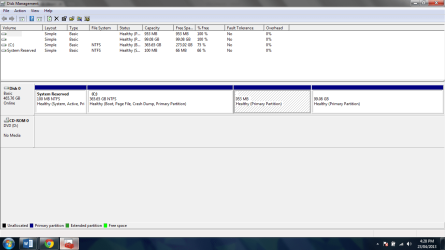
-The C: partition is windows 7
-The 953 MB is a swap partition for ubuntu
-99.08 GB parition is ubuntu
 

My Computer

Computer type
Laptop
OS
Windows 7 Home Premium 64Bit
CPU
Intel Core i5-2450m @ 2.5GHz
Memory
6GB
View attachment 265277

-The C: partition is windows 7
-The 953 MB is a swap partition for ubuntu
-99.08 GB parition is ubuntu
Thanx for screenshot. Are you sure grub is the main bootmanager which continues to windows bootmanager if you select "windows" in grub menu?
 
Last edited:

My Computer

Computer type
Laptop
Computer Manufacturer/Model Number
ACER ASPIRE 5742G
OS
Microsoft Windows 7 Home Premium 64-bits 7601 Multiprocessor Free Service Pack 1
CPU
Intel(R) Core(TM) i3 CPU M 370 @ 2.40GHz
Motherboard
Acer Aspire 5742G
Memory
4,00 GB
Graphics Card(s)
ATI Mobility Radeon HD 5400 Series
Sound Card
(1) AMD High Definition Audio Device (2) Realtek High Defi
Screen Resolution
1366 x 768 x 32 bits (4294967296 colors) @ 60 Hz
Hard Drives
WDC WD5000BEVT-22ZAT0
I think grub is the main bootloader. When i boot up my pc, it goes to grub. If i choose windows, it directly boots windows. It doesnt go into another windows bootloader.

Heres the output of the bcdedit command:

Code:
Windows Boot Manager
--------------------
identifier              {bootmgr}
device                  partition=\Device\HarddiskVolume1
description             Windows Boot Manager
locale                  en-US
inherit                 {globalsettings}
integrityservices       Enable
default                 {current}
resumeobject            {83f1add9-73c9-11e2-9ab2-877cfe5d3724}
displayorder            {current}
toolsdisplayorder       {memdiag}
timeout                 30

Windows Boot Loader
-------------------
identifier              {current}
device                  partition=C:
path                    \Windows\system32\winload.exe
description             Windows 7
locale                  en-US
inherit                 {bootloadersettings}
recoverysequence        {83f1addb-73c9-11e2-9ab2-877cfe5d3724}
recoveryenabled         Yes
osdevice                partition=C:
systemroot              \Windows
resumeobject            {83f1add9-73c9-11e2-9ab2-877cfe5d3724}
nx                      OptIn

Thanks again
 

My Computer

Computer type
Laptop
OS
Windows 7 Home Premium 64Bit
CPU
Intel Core i5-2450m @ 2.5GHz
Memory
6GB
I think grub is the main bootloader. When i boot up my pc, it goes to grub. If i choose windows, it directly boots windows. It doesnt go into another windows bootloader.

Heres the output of the bcdedit command:

Code:
Windows Boot Manager
--------------------
identifier              {bootmgr}
device                  partition=\Device\HarddiskVolume1
description             Windows Boot Manager
locale                  en-US
inherit                 {globalsettings}
integrityservices       Enable
default                 {current}
resumeobject            {83f1add9-73c9-11e2-9ab2-877cfe5d3724}
displayorder            {current}
toolsdisplayorder       {memdiag}
timeout                 30
 
Windows Boot Loader
-------------------
identifier              {current}
device                  partition=C:
path                    \Windows\system32\winload.exe
description             Windows 7
locale                  en-US
inherit                 {bootloadersettings}
recoverysequence        {83f1addb-73c9-11e2-9ab2-877cfe5d3724}
recoveryenabled         Yes
osdevice                partition=C:
systemroot              \Windows
resumeobject            {83f1add9-73c9-11e2-9ab2-877cfe5d3724}
nx                      OptIn

Thanks again
So grub is in MBR and jumps to partition 3 (or maybe 4?) to load grub menu. If you select WINDOWS it jumps to "system reserved" the active partition and starts win7 bootmanager. You don't see it because it has only 1 entry (win7) which starts automatically.

Use macrium reflect free as backup. MBR will be backupped automatically.

The restoration of the MBR is controlled by a restore option, under WinPE, select the Advanced Options link on the final page to view this option.
 

My Computer

Computer type
Laptop
Computer Manufacturer/Model Number
ACER ASPIRE 5742G
OS
Microsoft Windows 7 Home Premium 64-bits 7601 Multiprocessor Free Service Pack 1
CPU
Intel(R) Core(TM) i3 CPU M 370 @ 2.40GHz
Motherboard
Acer Aspire 5742G
Memory
4,00 GB
Graphics Card(s)
ATI Mobility Radeon HD 5400 Series
Sound Card
(1) AMD High Definition Audio Device (2) Realtek High Defi
Screen Resolution
1366 x 768 x 32 bits (4294967296 colors) @ 60 Hz
Hard Drives
WDC WD5000BEVT-22ZAT0

My Computer

Computer type
Laptop
Computer Manufacturer/Model Number
ACER ASPIRE 5742G
OS
Microsoft Windows 7 Home Premium 64-bits 7601 Multiprocessor Free Service Pack 1
CPU
Intel(R) Core(TM) i3 CPU M 370 @ 2.40GHz
Motherboard
Acer Aspire 5742G
Memory
4,00 GB
Graphics Card(s)
ATI Mobility Radeon HD 5400 Series
Sound Card
(1) AMD High Definition Audio Device (2) Realtek High Defi
Screen Resolution
1366 x 768 x 32 bits (4294967296 colors) @ 60 Hz
Hard Drives
WDC WD5000BEVT-22ZAT0
i dont want to backup/restore the ubuntu and swap partitions.
I only want the windows 7 partition backed up, and i was wondering if i only backup this partition(and the 100mb system reserved)will it not boot properly if i restore because of how ubuntu is the main bootloader?
 

My Computer

Computer type
Laptop
OS
Windows 7 Home Premium 64Bit
CPU
Intel Core i5-2450m @ 2.5GHz
Memory
6GB
i dont want to backup/restore the ubuntu and swap partitions.
I only want the windows 7 partition backed up, and i was wondering if i only backup this partition(and the 100mb system reserved)will it not boot properly if i restore because of how ubuntu is the main bootloader?
grub is in MBR! So if you don't replace the MBR bootcode.... it's fine.
MBR bootcode is not replaced on restore... and if it is... it restores as it was backupped.

But if you do a "startup repair" in win7.... it replaces the mbr bootcode!!
 

My Computer

Computer type
Laptop
Computer Manufacturer/Model Number
ACER ASPIRE 5742G
OS
Microsoft Windows 7 Home Premium 64-bits 7601 Multiprocessor Free Service Pack 1
CPU
Intel(R) Core(TM) i3 CPU M 370 @ 2.40GHz
Motherboard
Acer Aspire 5742G
Memory
4,00 GB
Graphics Card(s)
ATI Mobility Radeon HD 5400 Series
Sound Card
(1) AMD High Definition Audio Device (2) Realtek High Defi
Screen Resolution
1366 x 768 x 32 bits (4294967296 colors) @ 60 Hz
Hard Drives
WDC WD5000BEVT-22ZAT0
i dont want to backup/restore the ubuntu and swap partitions.
I only want the windows 7 partition backed up, and i was wondering if i only backup this partition(and the 100mb system reserved)will it not boot properly if i restore because of how ubuntu is the main bootloader?
grub is in MBR! So if you don't replace the MBR bootcode.... it's fine.
MBR bootcode is not replaced on restore... and if it is... it restores as it was backupped.

But if you do a "startup repair" in win7.... it replaces the mbr bootcode!!

oooo i see. Thanks for you help.
 

My Computer

Computer type
Laptop
OS
Windows 7 Home Premium 64Bit
CPU
Intel Core i5-2450m @ 2.5GHz
Memory
6GB

My Computer

Computer type
Laptop
Computer Manufacturer/Model Number
ACER ASPIRE 5742G
OS
Microsoft Windows 7 Home Premium 64-bits 7601 Multiprocessor Free Service Pack 1
CPU
Intel(R) Core(TM) i3 CPU M 370 @ 2.40GHz
Motherboard
Acer Aspire 5742G
Memory
4,00 GB
Graphics Card(s)
ATI Mobility Radeon HD 5400 Series
Sound Card
(1) AMD High Definition Audio Device (2) Realtek High Defi
Screen Resolution
1366 x 768 x 32 bits (4294967296 colors) @ 60 Hz
Hard Drives
WDC WD5000BEVT-22ZAT0
Back
Top