System Info - See Your System Specs

How to See Your System Specs with "System Info"

   Information
System Info is free Seven Forums program that CyberZeus has kindly made for us. It let's you easily see all of your system information, and has an option to make filling out your system specs here at Seven Forums easier to do.


Here's How:
1. Click on either Download button below to download and save the SystemInfo.exe file to your desktop.
(EXE file)

Download


(ZIP file)

Download


2. Run the SystemInfo.exe file.
NOTE: This is a standalone .exe file that only runs and does not install anything on your computer. If you would like to stop getting the Run prompt, then unblocking the SystemInfo.exe file will stop it.

3. After System Info loads, you will see a summary of your system's information.
NOTE: There's a Edit System Specs link at the bottom right that will take you to your system specs here at Seven Forums.
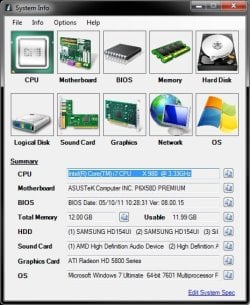
System_Info.jpg
4. Do either step 5 or 6 below for how you would like to fill out your system specs at Seven Forums.

5. To Automatically Fill Out your System Specs at Seven Forums
NOTE: This step can only be done using Internet Explorer.
A) In System Info, click on Options (menu bar), Settings, select (dot) Automatic Mode, and click on OK. (see screenshots below)
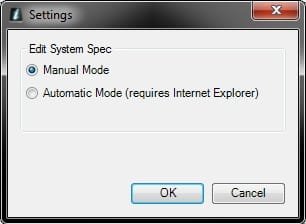
System_Info.jpgOptions_Settings.jpg
B) Click on the Edit System Spec link at the bottom right corner of System Info. (see left screenshot above)

C) If you are not already, log in to Seven Forums in the new IE Seven Forums' Site window that just opened. (see screenshot below)

D) Click on the Set info button at the top left corner to automatically enter the information from System Info into your system specs at Seven Forums, then click on the Save Changes button at the bottom to save them. (see screenshot below)
auto.jpg
6. To Manually Fill Out your System Specs at Seven Forums
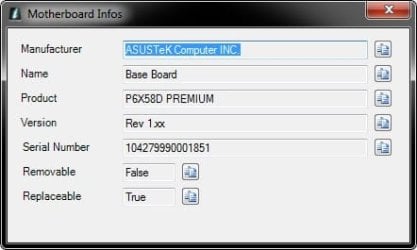
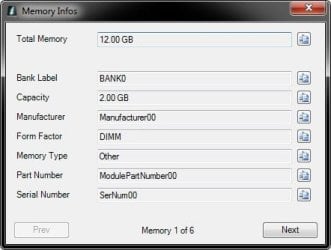
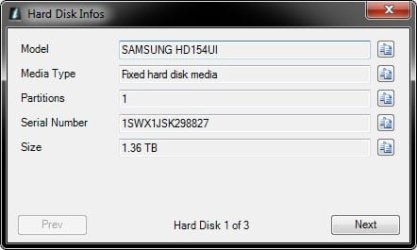
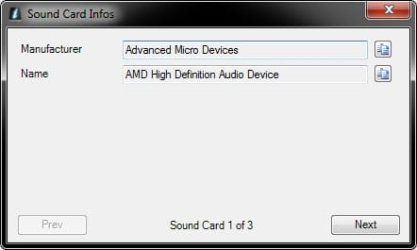
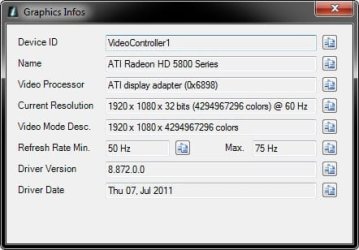
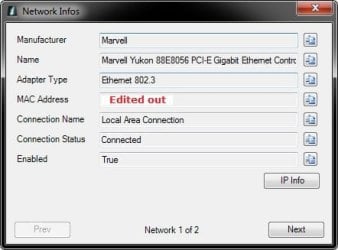
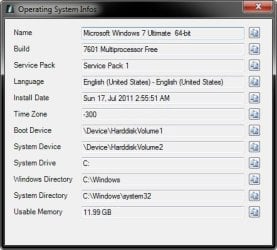
A) Clicking on each device icon will give you a pop-up with more detailed information about that device.
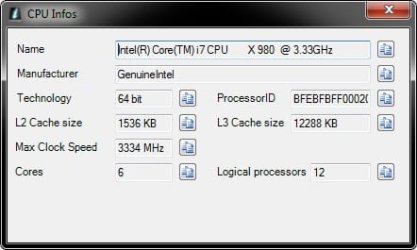
CPU.jpgMotherboard.jpg
BIOS.jpgMemory.jpg
Hard_Disk.jpgLogical_Disk.jpg
Sound_Card.jpgGraphics.jpg
Network.jpgOS.jpg
B) In System Info, click on Options (menu bar), Settings, select (dot) Manual Mode, and click on OK. (see screenshots below)
System_Info.jpgOptions_Settings.jpg
C) Click on the Edit System Spec link at the bottom right corner of System Info. (see left screenshot above)

D) You can now use the information in System Info to fill out your system specs at Seven Forums by clicking on the Copy_to_Clipboard.jpg button to the right of a system spec in System Info to copy it to the clipboard, then right click in a system specs field at Seven Forums like below and click on Paste. When finished filling out your system specs, be sure to click on the Save Changes button at the bottom to save them.
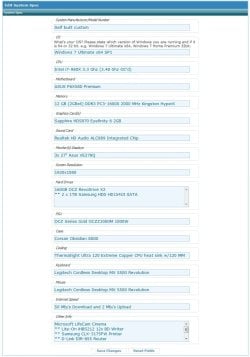
System_Specs.jpg


Attachments

Last edited:
it couldn't run in my system :(

Welcome Samia,

What happened when you tried to run it?

Have you tried to right click, run as admin?
 

My Computer My Computer

At a glance

Win 10 Pro x64Intel I5-2500K @3.3GHz16GB G.Skill Ripjaws X (4x4GB)EVGA GeForce 750 Ti SC 2GB
Computer type
PC/Desktop
Computer Manufacturer/Model Number
Self Built
OS
Win 10 Pro x64
CPU
Intel I5-2500K @3.3GHz
Motherboard
Asrock P67 Extreme4
Memory
16GB G.Skill Ripjaws X (4x4GB)
Graphics Card(s)
EVGA GeForce 750 Ti SC 2GB
Sound Card
ASUS Xonar DG 5.1 Channels 24-bit 96KHz PCI Interface Sound
Monitor(s) Displays
auria eq2367
Screen Resolution
1920 x 1080
Hard Drives
250GB Samsung 850 EVO SSD
1TB WD Blue
1TB Hitachi
PSU
SeaSonic X 650W 80 Plus Gold
Case
Corsair Obsidian 750D
Cooling
Corsair H60, Three 140mm case fans
Keyboard
Logitech Wireless Keyboard K520
Mouse
Logitech Wireless Mouse M310
Internet Speed
Wave Broadband ~ 100 dn 5 up
Antivirus
Windows Defender, Malwarebytes Premium
Browser
Edge, IE11, Chrome
Other Info
Laptop specs: HP g7-1365dx /
CPU: AMD A6-3420M APU with Radeon(tm) HD Graphics /
RAM: Crucial 8Gb (2x4Gb) /
SSD: Crucial M4-CT128M4SSD2 ATA Device/ FW 000F /
GFX: AMD Radeon HD 6520G /
OS: Windows 10 Pro x64
it doesnot runs on my sysytem :(

yes i have run it as administrator but i warning dialog box appers n says it can't be runned you must install .net frame
 
Last edited by a moderator:

My Computer My Computer

At a glance

Windows 7 Professional x32Intel DG41 RQ500GB
Computer Manufacturer/Model Number
Core 2duo 2.93GHz
OS
Windows 7 Professional x32
CPU
Intel DG41 RQ
Memory
500GB
Sound Card
Realtech High definition Audio
Monitor(s) Displays
Accer V193HQ
Case
Legend
Keyboard
A-4 tech KR-85
Mouse
A-4 Tech OP-620D (Usb)
Internet Speed
1 MB
yes i have run it as administrator but i warning dialog box appers n says it can't be runned you must install .net frame

Have you kept your system updated?

Windows update should have .net framework for you.
 

My Computer My Computer

At a glance

Win 10 Pro x64Intel I5-2500K @3.3GHz16GB G.Skill Ripjaws X (4x4GB)EVGA GeForce 750 Ti SC 2GB
Computer type
PC/Desktop
Computer Manufacturer/Model Number
Self Built
OS
Win 10 Pro x64
CPU
Intel I5-2500K @3.3GHz
Motherboard
Asrock P67 Extreme4
Memory
16GB G.Skill Ripjaws X (4x4GB)
Graphics Card(s)
EVGA GeForce 750 Ti SC 2GB
Sound Card
ASUS Xonar DG 5.1 Channels 24-bit 96KHz PCI Interface Sound
Monitor(s) Displays
auria eq2367
Screen Resolution
1920 x 1080
Hard Drives
250GB Samsung 850 EVO SSD
1TB WD Blue
1TB Hitachi
PSU
SeaSonic X 650W 80 Plus Gold
Case
Corsair Obsidian 750D
Cooling
Corsair H60, Three 140mm case fans
Keyboard
Logitech Wireless Keyboard K520
Mouse
Logitech Wireless Mouse M310
Internet Speed
Wave Broadband ~ 100 dn 5 up
Antivirus
Windows Defender, Malwarebytes Premium
Browser
Edge, IE11, Chrome
Other Info
Laptop specs: HP g7-1365dx /
CPU: AMD A6-3420M APU with Radeon(tm) HD Graphics /
RAM: Crucial 8Gb (2x4Gb) /
SSD: Crucial M4-CT128M4SSD2 ATA Device/ FW 000F /
GFX: AMD Radeon HD 6520G /
OS: Windows 10 Pro x64
i'm checking for updates thank you
 

My Computer My Computer

At a glance

Windows 7 Professional x32Intel DG41 RQ500GB
Computer Manufacturer/Model Number
Core 2duo 2.93GHz
OS
Windows 7 Professional x32
CPU
Intel DG41 RQ
Memory
500GB
Sound Card
Realtech High definition Audio
Monitor(s) Displays
Accer V193HQ
Case
Legend
Keyboard
A-4 tech KR-85
Mouse
A-4 Tech OP-620D (Usb)
Internet Speed
1 MB
it doesnot runs on my sysytem :(

yes i have run it as administrator but i warning dialog box appers n says it can't be runned you must install .net frame
You need .NET Framework 4.0 to run it.
Just update your system with Windows Update and it'll run fine!
 

My Computer My Computer

At a glance

Windows 7 Ultimate x64 SP1 clean installAMD Athlon 64 X2 6400+4 GB2 x NVidia Geforce 8600 GTS
Computer Manufacturer/Model Number
Custom Build
OS
Windows 7 Ultimate x64 SP1 clean install
CPU
AMD Athlon 64 X2 6400+
Motherboard
Asus M2N-E SLI
Memory
4 GB
Graphics Card(s)
2 x NVidia Geforce 8600 GTS
Sound Card
Trust 5.1 Surround USB
Monitor(s) Displays
Benq FP931 19"
Screen Resolution
1280x1024@32bit@75MHz
Hard Drives
1 x Western Digital 500GB SATA (OS installation), 2 x Seagate 320GB SATA, 1 x Seagate 250GB IDE (in external USB box), 1 x TrekStor 750GB USB
PSU
650W
Keyboard
Logitech Cordless Desktop EX 100
Mouse
Logitech Cordless Optical
Internet Speed
8192 kbps / 640 kbps

My Computer My Computer

At a glance

Windows 7 Ultimate X64 SP1Intel i5-2550K, Differing ~4.4-4.8GHz No buil...16GB G.Skill Sniper 1866MHz @ 2133MHz 2x8GBASUS GTX650TIB-DC2OC-2GD5, (650TI Boost)
Computer type
PC/Desktop
Computer Manufacturer/Model Number
Home Built Desktop By DataTech
OS
Windows 7 Ultimate X64 SP1
CPU
Intel i5-2550K, Differing ~4.4-4.8GHz No built in GPU
Motherboard
ASUS P8Z68-V PRO/GEN3
Memory
16GB G.Skill Sniper 1866MHz @ 2133MHz 2x8GB
Graphics Card(s)
ASUS GTX650TIB-DC2OC-2GD5, (650TI Boost)
Sound Card
Onboard Realtek 5-1
Monitor(s) Displays
Samsung P2570HD
Screen Resolution
1920x1080
Hard Drives
Samsung 840 Pro 256GB SSD for OS, 500GB Seagate Constellation (Enterprise drive) for Data
PSU
Corsair HX650W
Case
Inwin Dragon Rider
Cooling
Hyper 212 EVO w/two Noctua fans, push-pull, @1300 RPM
Keyboard
E-Z Eyes, bright yellow keys with large characters
Mouse
steelseries SENSEI Laser Pro Gaming
Internet Speed
48-51Mbs Mbs down, 11 Mbs up Xfinity Cable
Antivirus
Norton Internet Security 2013
Browser
IE 10, Opera, Pale Moon if needed
Other Info
4 case fans, LG BluRay-RE, ASUS DVD-RW, Mr. Fusion power supply, 1.21 gigawatts.

My Computer My Computer

At a glance

Windows 7 Ultimate x64 SP1 clean installAMD Athlon 64 X2 6400+4 GB2 x NVidia Geforce 8600 GTS
Computer Manufacturer/Model Number
Custom Build
OS
Windows 7 Ultimate x64 SP1 clean install
CPU
AMD Athlon 64 X2 6400+
Motherboard
Asus M2N-E SLI
Memory
4 GB
Graphics Card(s)
2 x NVidia Geforce 8600 GTS
Sound Card
Trust 5.1 Surround USB
Monitor(s) Displays
Benq FP931 19"
Screen Resolution
1280x1024@32bit@75MHz
Hard Drives
1 x Western Digital 500GB SATA (OS installation), 2 x Seagate 320GB SATA, 1 x Seagate 250GB IDE (in external USB box), 1 x TrekStor 750GB USB
PSU
650W
Keyboard
Logitech Cordless Desktop EX 100
Mouse
Logitech Cordless Optical
Internet Speed
8192 kbps / 640 kbps

My Computer My Computer

At a glance

Windows 7 Ultimate X64 SP1Intel i5-2550K, Differing ~4.4-4.8GHz No buil...16GB G.Skill Sniper 1866MHz @ 2133MHz 2x8GBASUS GTX650TIB-DC2OC-2GD5, (650TI Boost)
Computer type
PC/Desktop
Computer Manufacturer/Model Number
Home Built Desktop By DataTech
OS
Windows 7 Ultimate X64 SP1
CPU
Intel i5-2550K, Differing ~4.4-4.8GHz No built in GPU
Motherboard
ASUS P8Z68-V PRO/GEN3
Memory
16GB G.Skill Sniper 1866MHz @ 2133MHz 2x8GB
Graphics Card(s)
ASUS GTX650TIB-DC2OC-2GD5, (650TI Boost)
Sound Card
Onboard Realtek 5-1
Monitor(s) Displays
Samsung P2570HD
Screen Resolution
1920x1080
Hard Drives
Samsung 840 Pro 256GB SSD for OS, 500GB Seagate Constellation (Enterprise drive) for Data
PSU
Corsair HX650W
Case
Inwin Dragon Rider
Cooling
Hyper 212 EVO w/two Noctua fans, push-pull, @1300 RPM
Keyboard
E-Z Eyes, bright yellow keys with large characters
Mouse
steelseries SENSEI Laser Pro Gaming
Internet Speed
48-51Mbs Mbs down, 11 Mbs up Xfinity Cable
Antivirus
Norton Internet Security 2013
Browser
IE 10, Opera, Pale Moon if needed
Other Info
4 case fans, LG BluRay-RE, ASUS DVD-RW, Mr. Fusion power supply, 1.21 gigawatts.

My Computer My Computer

At a glance

Windows 7 Ultimate x64 SP1 clean installAMD Athlon 64 X2 6400+4 GB2 x NVidia Geforce 8600 GTS
Computer Manufacturer/Model Number
Custom Build
OS
Windows 7 Ultimate x64 SP1 clean install
CPU
AMD Athlon 64 X2 6400+
Motherboard
Asus M2N-E SLI
Memory
4 GB
Graphics Card(s)
2 x NVidia Geforce 8600 GTS
Sound Card
Trust 5.1 Surround USB
Monitor(s) Displays
Benq FP931 19"
Screen Resolution
1280x1024@32bit@75MHz
Hard Drives
1 x Western Digital 500GB SATA (OS installation), 2 x Seagate 320GB SATA, 1 x Seagate 250GB IDE (in external USB box), 1 x TrekStor 750GB USB
PSU
650W
Keyboard
Logitech Cordless Desktop EX 100
Mouse
Logitech Cordless Optical
Internet Speed
8192 kbps / 640 kbps

My Computer My Computer

At a glance

Windows 7 Ultimate - 64-bit | Windows 8 Pro -...Intel® Core™ i7 Processor 3,610QM (2.30Hz, 6M...8 GBNVIDIA® GeForce® GT 650M 2GB Graphics, Optimu...
Computer Manufacturer/Model Number
Samsung NP550P5C-S02IN
OS
Windows 7 Ultimate - 64-bit | Windows 8 Pro - 64-bit
CPU
Intel® Core™ i7 Processor 3,610QM (2.30Hz, 6MB L3 Cach
Memory
8 GB
Graphics Card(s)
NVIDIA® GeForce® GT 650M 2GB Graphics, Optimus™ techno
Sound Card
SoundAlive™ JBL 3 Speakers (With sub-Woofer)
Monitor(s) Displays
39.62cm (15.6) SuperBright 300nit HD+ LED Display
Screen Resolution
1,600 x 900, Anti-Reflective
Hard Drives
1TB S-ATA II Hard Drive (5,400RPM)

My Computer My Computer

At a glance

Windows 7 Ultimate x64 SP1 clean installAMD Athlon 64 X2 6400+4 GB2 x NVidia Geforce 8600 GTS
Computer Manufacturer/Model Number
Custom Build
OS
Windows 7 Ultimate x64 SP1 clean install
CPU
AMD Athlon 64 X2 6400+
Motherboard
Asus M2N-E SLI
Memory
4 GB
Graphics Card(s)
2 x NVidia Geforce 8600 GTS
Sound Card
Trust 5.1 Surround USB
Monitor(s) Displays
Benq FP931 19"
Screen Resolution
1280x1024@32bit@75MHz
Hard Drives
1 x Western Digital 500GB SATA (OS installation), 2 x Seagate 320GB SATA, 1 x Seagate 250GB IDE (in external USB box), 1 x TrekStor 750GB USB
PSU
650W
Keyboard
Logitech Cordless Desktop EX 100
Mouse
Logitech Cordless Optical
Internet Speed
8192 kbps / 640 kbps
I download and install the specs and it messed up my laptop screen. After the welcome page all the desktop icon and everything was gone. After ı deleted the program it went back to normal itself. Although I have a partially black screen problem. It happens sometimes and it comes and goes on the screen.
 
Last edited by a moderator:

My Computer My Computer

At a glance

windows Ultimate
Computer type
Laptop
Computer Manufacturer/Model Number
compaq
OS
windows Ultimate
This tool messed up my laptop. When I try to start my computer the desktop didn't load up. I had to delete this tool.
I was wondering how can this tool mess up your pc ? Are you sure that isn't something else ??
 

My Computer My Computer

At a glance

Windows 10 Pro x64Intel Core i5 4440 @Stock4 x 4GB HyperX Fury DDR3Gigabyte GTX 1050Ti O4G
Computer type
PC/Desktop
Computer Manufacturer/Model Number
Custom Build
OS
Windows 10 Pro x64
CPU
Intel Core i5 4440 @Stock
Motherboard
Gigabyte Z97 D3H
Memory
4 x 4GB HyperX Fury DDR3
Graphics Card(s)
Gigabyte GTX 1050Ti O4G
Sound Card
Integrated
Monitor(s) Displays
Dell P2417H
Screen Resolution
1920 x 1080
Hard Drives
Samsung EVO 850 120GB / Toshiba DT01ACA050 1TB 7200prm 32MB
PSU
Riotoro Onyx 750W
Case
NZXT H500 Black-Red
Cooling
Stock CPU + NZXT 120mm + 2x120mm red fans
Keyboard
Modecom Volcano Lanparty
Mouse
Asus ROG Gladius / DeepCool E-Pad Plus
Internet Speed
DOCSIS 50/3 Mbit
Browser
Google Chrome
Other Info
Asus K55VJ(i5 3210M, GT635M / 2GB, 8GB DDR3, 500GB HDD)
yes I'm sure. Because after I delete it the desktop load up.
 

My Computer My Computer

At a glance

windows Ultimate
Computer type
Laptop
Computer Manufacturer/Model Number
compaq
OS
windows Ultimate
Very strange,I just have downloaded it again,and everything is working fine..
 

My Computer My Computer

At a glance

Windows 10 Pro x64Intel Core i5 4440 @Stock4 x 4GB HyperX Fury DDR3Gigabyte GTX 1050Ti O4G
Computer type
PC/Desktop
Computer Manufacturer/Model Number
Custom Build
OS
Windows 10 Pro x64
CPU
Intel Core i5 4440 @Stock
Motherboard
Gigabyte Z97 D3H
Memory
4 x 4GB HyperX Fury DDR3
Graphics Card(s)
Gigabyte GTX 1050Ti O4G
Sound Card
Integrated
Monitor(s) Displays
Dell P2417H
Screen Resolution
1920 x 1080
Hard Drives
Samsung EVO 850 120GB / Toshiba DT01ACA050 1TB 7200prm 32MB
PSU
Riotoro Onyx 750W
Case
NZXT H500 Black-Red
Cooling
Stock CPU + NZXT 120mm + 2x120mm red fans
Keyboard
Modecom Volcano Lanparty
Mouse
Asus ROG Gladius / DeepCool E-Pad Plus
Internet Speed
DOCSIS 50/3 Mbit
Browser
Google Chrome
Other Info
Asus K55VJ(i5 3210M, GT635M / 2GB, 8GB DDR3, 500GB HDD)
Well I don't I want to download and install it again.
 

My Computer My Computer

At a glance

windows Ultimate
Computer type
Laptop
Computer Manufacturer/Model Number
compaq
OS
windows Ultimate
Well I don't I want to download and install it again.
You just have to run it. It's non-installer file.
Can you please give a try to download it again and if you'll face again with problems,tell us what are that problems. So we can try to help you.
StalkeR
 

My Computer My Computer

At a glance

Windows 10 Pro x64Intel Core i5 4440 @Stock4 x 4GB HyperX Fury DDR3Gigabyte GTX 1050Ti O4G
Computer type
PC/Desktop
Computer Manufacturer/Model Number
Custom Build
OS
Windows 10 Pro x64
CPU
Intel Core i5 4440 @Stock
Motherboard
Gigabyte Z97 D3H
Memory
4 x 4GB HyperX Fury DDR3
Graphics Card(s)
Gigabyte GTX 1050Ti O4G
Sound Card
Integrated
Monitor(s) Displays
Dell P2417H
Screen Resolution
1920 x 1080
Hard Drives
Samsung EVO 850 120GB / Toshiba DT01ACA050 1TB 7200prm 32MB
PSU
Riotoro Onyx 750W
Case
NZXT H500 Black-Red
Cooling
Stock CPU + NZXT 120mm + 2x120mm red fans
Keyboard
Modecom Volcano Lanparty
Mouse
Asus ROG Gladius / DeepCool E-Pad Plus
Internet Speed
DOCSIS 50/3 Mbit
Browser
Google Chrome
Other Info
Asus K55VJ(i5 3210M, GT635M / 2GB, 8GB DDR3, 500GB HDD)
The problem is the desktop will NOT load up. When I delete the program the desktop go back to normal.
 

My Computer My Computer

At a glance

windows Ultimate
Computer type
Laptop
Computer Manufacturer/Model Number
compaq
OS
windows Ultimate
When you downloaded it where did you download it to?
 

My Computer My Computer

At a glance

Microsoft Windows 7 Home Premium 64-bit Servi...Intel(R) Core(TM) i3 CPU M 330 @ 2.13GHz8 GB DDR3Intel(R) HD Graphics
Computer type
Laptop
Computer Manufacturer/Model Number
Hewlett-Packard/G62-107SA Notebook
OS
Microsoft Windows 7 Home Premium 64-bit Service Pack 1
CPU
Intel(R) Core(TM) i3 CPU M 330 @ 2.13GHz
Motherboard
Hewlett-Packard 1425
Memory
8 GB DDR3
Graphics Card(s)
Intel(R) HD Graphics
Sound Card
Realtek High Definition Audio
Monitor(s) Displays
Builtin
Screen Resolution
1366 x 768 x 32 bits (4294967296 colors) @ 60 Hz
Hard Drives
250 GB SATA Hard Disk Drive 7200 rpm
2TB Seagate GoFlex USB 2 Drive
1TB Iomega Prestige USB 2 Drive
1.5TB Iomega Prestige USB 2 Drive (Samsung)
2TB WD MyBook Live NAS.
Mouse
Logitech Anywhere MX
Internet Speed
152 Mbs download 10 Mbs upload
Antivirus
Norton 360
Browser
Chrome
It was in the download program.
 

My Computer My Computer

At a glance

windows Ultimate
Computer type
Laptop
Computer Manufacturer/Model Number
compaq
OS
windows Ultimate
Back
Top