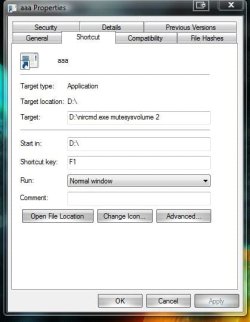
Hope this question is simple! I need to have or make a keyboard shortcut to mute all sounds from the system quickly, as in when I have to pick up the phone. I know F7 works if I'm in Windows Media Player, but I'm usually working in another program and it's time consuming to click over to WMP running over on another monitor to mute. I can use the Volume Control, but again that's a matter of locating it on the hidden toolbar with the mouse, click, click.
I tried a macro with Macro Express, but the Toggle Audio Mute command there doesn't seem to do anything in W7.
Enlightenment and/or suggestions would be appreciated. BTW, sound is from motherboard, VIA VT1708S, latest (7300) drivers. Sounds great!
I tried a macro with Macro Express, but the Toggle Audio Mute command there doesn't seem to do anything in W7.
Enlightenment and/or suggestions would be appreciated. BTW, sound is from motherboard, VIA VT1708S, latest (7300) drivers. Sounds great!
My Computer
- OS
- W7