System Overheating

nialso

New member
Local time
12:51 PM
Messages
7
Location
Indiana
I'm running on an AMD Phenom 9850 X4 2.5 GHz (complete system info in profile). The SYSTIN and CPUTIN fluctuated between 100C - 103C and 50C - 60C respectively, whereas the AUXTIN pretty much remains at a steady 114C. Cores 1 - 4 go through the ranges of 45C to 60C. How much of an issue are these temperatures for AMD systems?

*Temp. ratings are via System Information for Windows (2010 v.)
 

My Computer

Computer Manufacturer/Model Number
HP Pavilion Elite m9515y (Alt.)
OS
Windows 7 Home Premium x64 (Upgrade)
CPU
AMD Phenom 9850 Quad-Core 2.5 GHz (95W)
Motherboard
AMD 780G
Memory
8 GB 800 MHz DDR2 SDRAM
Graphics Card(s)
ATI Radeon HD 4650 1 GB DDR2
Sound Card
Realtek ALC 888S
Monitor(s) Displays
HP 2009m 20" HD Widescreen LCD
Screen Resolution
1600 x 900 x 60 Hz 32-bit
Hard Drives
Seagate Barracuda 7200.12 ST31000528AS 1 TB (SATA 3 GB/s)
HP HD5000S Personal Media Drive 500 GB (USB 2.0; 480 MB/s)
PSU
350W
Case
HP Mid-sized Tower
Cooling
Stock w/AMD Cool'n'Quiet 2.0
Keyboard
HP Multimedia
Mouse
Logitech Optical Wheel SBF-96
Internet Speed
Broadband; 20 Mbit/s (D/L), 2 Mbit/s (U/L)
Other Info
Blu-ray/SuperMulti DVD Burner w/LightScribe
PCI Express x1 TV Tuner
Realtek Cable Modem
Belkin G Wireless Router
HP Deskjet F4280 All-in-One Printer
HP Officejet 6110 All-in-One Printer
Insignia NS-3006 2.1 Speaker System w/Subwoofer
I'm really not sure what the labels to the numbers mean, here are some options anyway:
Option.1) If the system is still under warranty, take it back for checkup, repair or replacement. Option.2a) Check to see if you have both front intake and rear exhaust case fans installed and running, buy what you don't have. Option.2b) Dust out computer with compressed air can. Option.2c) Buy a better aftermarket CPU heatsink.

:p
 

My Computer

OS
Windows 7 Professional
CPU
Intel Core i7-2670QM
Memory
Samsung 8GB
Graphics Card(s)
NVIDIA GT 555M
Hard Drives
Intel 525 120GB | HGST Travelstar 1TB
Mouse
CM Storm Xornet | Microsoft Sculpt Comfort
Internet Speed
25 Mbps | 600 Kbps
Other Info
Centrino 6205 | Seagate Backup Plus 1TB
those temps are to high. it's likely just clogged vents so clean those out first if it's an older system. but if your still covered in warrenty i'd seriously consider returning it.
 

My Computer

Computer Manufacturer/Model Number
Custom
OS
Windows 7 Ultimate Signature Edition
CPU
Intel Core i7 Extreme 3.33GHz
Motherboard
EVGA X-58 SLI Classified
Memory
12GB DDR3
Graphics Card(s)
2x EVGA 285 2GB in SLI
Sound Card
Creative Labs X-Fi ExtremeGamer
Monitor(s) Displays
30" Viewsonic
Hard Drives
2x1TB Western Digital 7200RPM in RAID 0/1TB WD My Book External HDD
PSU
Thermaltake 1000w supporting quad SLI
Case
Thermaltake Armor Full Tower
Cooling
Thermaltake V1 CPU+DIY Liquid cooling
This reply is BS,all nvidea cards are overheating in windows 7 it is nothing to do with dust,dirt,silica compound,fans or any thing else,I have built two computers now one with a dual core amd cpu the other with a quad core amd cpu.
Both ran cool under windows xp 64 bit os, both have oveheated,to the extent of cooking a very expensive dual graphics card,under windows 7.
Playing games on a games oriented machine,is impossible,due to crashing,caused by oveheating cpu snd graphics cards.
It's time microsoft got it sorted,it's not a cheap os to start with then to have it cook your hardware is not funny.
 

My Computer

Computer Manufacturer/Model Number
me
OS
windows7
CPU
amd sephrom quad
Motherboard
m3a32-mpvv deluxe
Memory
8 gig cooled
Graphics Card(s)
nvidea 9800 ge2 (2xgeforce9800) on dual card
Sound Card
built in mobo
Monitor(s) Displays
iiyama
Hard Drives
2x 1TByte mirror raid
PSU
dxx galaxy 1200 watt
Case
nvidea cooler master
Cooling
9xfans 110 mil
This reply is BS, all nvidea cards are overheating in windows 7 it is nothing to do with dust,dirt,silica compound,fans or any thing else,I have built two computers now one with a dual core amd cpu the other with a quad core amd cpu.
Both ran cool under windows xp 64 bit os, both have oveheated,to the extent of cooking a very expensive dual graphics card,under windows 7.
Playing games on a games oriented machine,is impossible,due to crashing,caused by oveheating cpu snd graphics cards.
It's time microsoft got it sorted,it's not a cheap os to start with then to have it cook your hardware is not funny.
I've installed 7 Ultimate x64 on two rigs with NVIDIA GFX, and both GFX cards stayed under 70 degrees celsius under heavy load. Sorry, it isn't the OS.
 

My Computer

Computer Manufacturer/Model Number
NVIDIA
OS
Windows 7 Enterprise x64
CPU
AMD Athlon 64X2 Dual Core 3800+
Motherboard
GeForce 6100-M9
Memory
OCZ Platinum Dual Channel - 4x1Gb
Graphics Card(s)
NVIDIA GeForce 8800 GT PCI Express x16
Sound Card
Creative Audigy Sound Blaster Extreme PCI
Monitor(s) Displays
Compaq 7500
Screen Resolution
1024x768
Hard Drives
C: Seagate ST3250318AS SataII - 250Gb

D: Seagate ST3500418AS SataII - 500Gb
PSU
OCZ 600w Dual 12v Rails
Case
Thermaltake
Cooling
OCZ Heatsinks, Fans, and Thermal Paste on CPU & Chipsets
Keyboard
Logitech
Mouse
Radio Shack PS2
Internet Speed
Cable
Other Info
Dual Pioneer DVD/RW optical drives. LG CD/RW optical drive.
This reply is BS,all nvidea cards are overheating in windows 7 it is nothing to do with dust,dirt,silica compound,fans or any thing else,I have built two computers now one with a dual core amd cpu the other with a quad core amd cpu.
Both ran cool under windows xp 64 bit os, both have oveheated,to the extent of cooking a very expensive dual graphics card,under windows 7.
Playing games on a games oriented machine,is impossible,due to crashing,caused by oveheating cpu snd graphics cards.
It's time microsoft got it sorted,it's not a cheap os to start with then to have it cook your hardware is not funny.

What are you talking about? The poster's specs don't say anything about an nVidia graphics card...:confused:

As the other posters stated, those temps are high. 1) Check airflow within your case; 2) check your cpu cooler; 3) check to make sure your thermal compound is not all dried up; 4) you may want to invest in a better cpu cooler and more case fans.

(Are you absolutely sure those temps you listed are in Celsius?)
 
Last edited:

My Computer

Computer Manufacturer/Model Number
Rig 1
OS
Windows 7 Ultimate x64
CPU
AMD Phenom II X4 940 Black Edition @ 3.4GHz (AM2+)
Motherboard
Gigabyte GA-MA790X-UD4P (AM2+)
Memory
Corsair CM2X4096-8500C5 (4 X 2GB)
Graphics Card(s)
XFX Radeon HD 5770 / Diamond Radeon HD 5770 CrossFireX
Sound Card
Asus Xonar DS (PCI)
Monitor(s) Displays
Samsung SyncMaster 932bw+ (3)
Screen Resolution
4320x900
Hard Drives
OCZ Vertex 2 80 GB - Windows 7 System --
WD Caviar Black 1TB - Music, Movies, Vids, Pics --
WD Caviar Black 640GB - User Profiles & Games --
WD My Book 320GB external
PSU
Corsair CMPSU-750TX
Case
Cooler Master HAF 932
Cooling
Corsair Hydro Series H50
Keyboard
Logitech Desktop Wave
Mouse
Logitech LX8 Laser
Internet Speed
20 down / 2 up
Other Info
LG GGC-H20L Blu-Ray / HDDVD combo --
Hauppauge HVR-1250 --
Silverstone MFP-51 --
Logitech Webcam C600
I'm running on an AMD Phenom 9850 X4 2.5 GHz (complete system info in profile). The SYSTIN and CPUTIN fluctuated between 100C - 103C and 50C - 60C respectively, whereas the AUXTIN pretty much remains at a steady 114C. Cores 1 - 4 go through the ranges of 45C to 60C. How much of an issue are these temperatures for AMD systems?

*Temp. ratings are via System Information for Windows (2010 v.)

1) Try a couple of different temperature measuring softwares... AMD is famous for changing their specs on the thermal diodes at the drop of a hat.

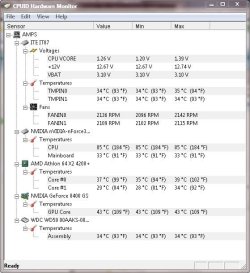
Grab the attached ZIP... what do CPUZ and HWMON say?

HWMonitor will give you a break down by device and is usually quite accurate.

2) If those termperatures are accurate you've got real problems. TJMax on AMD is 90c ... The CPU Temp In is a bit high but at 50 to 60c not dangerous. I'd be more worried about seeing 100c to 103c for your System Temp In readings... that indicates a ChipSet problem. OR... it could be the software just doesn't know how to read the sensors.

Let us know what the tools in the zip tell you... Please...
 

Attachments

My Computer

Computer Manufacturer/Model Number
Homebrew
OS
XP Pro SP3 X86 / Win7 Pro X86
CPU
Amd 64 x2 4200 (2.4ghz)
Motherboard
Asus M2N-MX SE Plus
Memory
Kingston DDR2 800 2gb
Graphics Card(s)
Nvidia GF-8400
Sound Card
Realtek on Motherboard
Monitor(s) Displays
Acer x-193bw
Screen Resolution
1440 x 900
Hard Drives
Western Digital 500g
PSU
350watt In-Win
Case
In-Win
Cooling
Air
Keyboard
yes
Mouse
yes
Internet Speed
5mpbs
Other Info
Also ASRock ION 330 as HTPC (on XP).
Acer Aspire as GP netbook (on XP).
Ok... these are my temperatures on an AMD 64X2 4200 currently being pushed with a lot of I/O and disk thrashing (doing backups...)

Capture.JPG

This is about what you should see under medium light to medium load... note the temperature of the I/O chip... it's been running heavy I/O constantly for 14 hours.
 

My Computer

Computer Manufacturer/Model Number
Homebrew
OS
XP Pro SP3 X86 / Win7 Pro X86
CPU
Amd 64 x2 4200 (2.4ghz)
Motherboard
Asus M2N-MX SE Plus
Memory
Kingston DDR2 800 2gb
Graphics Card(s)
Nvidia GF-8400
Sound Card
Realtek on Motherboard
Monitor(s) Displays
Acer x-193bw
Screen Resolution
1440 x 900
Hard Drives
Western Digital 500g
PSU
350watt In-Win
Case
In-Win
Cooling
Air
Keyboard
yes
Mouse
yes
Internet Speed
5mpbs
Other Info
Also ASRock ION 330 as HTPC (on XP).
Acer Aspire as GP netbook (on XP).
Looking at the information about the system on HP's site and a few photos I've looked at, I'm guessing--and this is a guess--that you don't have sufficient airflow within your case. Most store bought computers will only have two fans installed--one on the heatsink and the other in the back of the case as an exhuast fan (I've had an HP before).
 

My Computer

Computer Manufacturer/Model Number
Rig 1
OS
Windows 7 Ultimate x64
CPU
AMD Phenom II X4 940 Black Edition @ 3.4GHz (AM2+)
Motherboard
Gigabyte GA-MA790X-UD4P (AM2+)
Memory
Corsair CM2X4096-8500C5 (4 X 2GB)
Graphics Card(s)
XFX Radeon HD 5770 / Diamond Radeon HD 5770 CrossFireX
Sound Card
Asus Xonar DS (PCI)
Monitor(s) Displays
Samsung SyncMaster 932bw+ (3)
Screen Resolution
4320x900
Hard Drives
OCZ Vertex 2 80 GB - Windows 7 System --
WD Caviar Black 1TB - Music, Movies, Vids, Pics --
WD Caviar Black 640GB - User Profiles & Games --
WD My Book 320GB external
PSU
Corsair CMPSU-750TX
Case
Cooler Master HAF 932
Cooling
Corsair Hydro Series H50
Keyboard
Logitech Desktop Wave
Mouse
Logitech LX8 Laser
Internet Speed
20 down / 2 up
Other Info
LG GGC-H20L Blu-Ray / HDDVD combo --
Hauppauge HVR-1250 --
Silverstone MFP-51 --
Logitech Webcam C600
Looking at the information about the system on HP's site and a few photos I've looked at, I'm guessing--and this is a guess--that you don't have sufficient airflow within your case. Most store bought computers will only have two fans installed--one on the heatsink and the other in the back of the case as an exhuast fan (I've had an HP before).

That's likely part of it... but when you start seeing 100c temperatures you have to think the heatsinks aren't seated correctly.

Couple of years back I got a repair job on a machine from G___way and it actually got out to the customer's hands without a CPU heatsink installed at all. IOW... stuff happens.

Given this is a fairly expensive PC, warranty return would be the way to go.
 

My Computer

Computer Manufacturer/Model Number
Homebrew
OS
XP Pro SP3 X86 / Win7 Pro X86
CPU
Amd 64 x2 4200 (2.4ghz)
Motherboard
Asus M2N-MX SE Plus
Memory
Kingston DDR2 800 2gb
Graphics Card(s)
Nvidia GF-8400
Sound Card
Realtek on Motherboard
Monitor(s) Displays
Acer x-193bw
Screen Resolution
1440 x 900
Hard Drives
Western Digital 500g
PSU
350watt In-Win
Case
In-Win
Cooling
Air
Keyboard
yes
Mouse
yes
Internet Speed
5mpbs
Other Info
Also ASRock ION 330 as HTPC (on XP).
Acer Aspire as GP netbook (on XP).
Worked for me !

I had my CPU temp around 80C, Fan going like crazy at all times.

Then I set my Power Plan to Power Saver.. and problem solved !

Have you checked your power settings ?
Hope this helps
 

My Computer

Computer Manufacturer/Model Number
HP dv9815
OS
win 7 ultimate x64
CPU
Mobile DualCore AMD Turion 64 X2 TL-60, 2000 MHz
Motherboard
nVIDIA nForce 7150M-630M, AMD Hammer
Memory
3840 MB (DDR2-667 DDR2 SDRAM)
Graphics Card(s)
NVIDIA GeForce 7150M / nForce 630M (128 MB)
Sound Card
Conexant Cx20561 @ nVIDIA MCP67 - High Definition Audio Cont
Monitor(s) Displays
LG Philips LP171WP4-TLN2 [17.1 LCD] 1400x900
Back
Top