Solved System Page File On Diff Disk!!

exitPr0gram

New member
Hi,

I was up late and wasn't paying attention when i deleted the system reserved partition during a re-install of windows, and then made another system reserved file partition. The SSD the the OS is on, now has a system reserved file partition on a separate internal drive.

How do i fix this? Will I be okay? It took a long time to load and even get to my PW screen.

Can i create a 100 MB system reserved partition on my ssd, then make a backup image of the system reserved partition, then apply it to the 100MB page file partition that i created from my SSD?

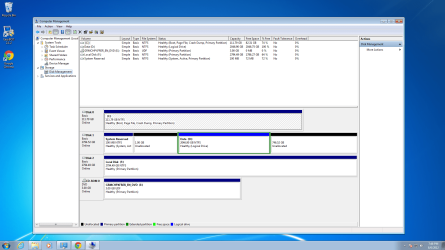
Is that confusing? Sorry if it is. Here is a screen shot of what my device manager looks like.

THanks in advance.
 

Attachments

  • Untitled.png
    Untitled.png
    165.9 KB · Views: 32
Last edited:

My Computer

Computer type
PC/Desktop
Computer Manufacturer/Model Number
Dell Inspiron 530
OS
Windows 7 Professional Version 6.1 Build 7601 SP1
CPU
Q6600
Motherboard
IDK
Memory
4GB Total
Graphics Card(s)
GeForce 9500GT =(
Sound Card
Onboard
Monitor(s) Displays
Smaller than what i want
Screen Resolution
Not up to par
Hard Drives
Not an SSD
PSU
350 Watt or W/E this model comes with
Case
Dell Inspiron 530
Cooling
Factory
Keyboard
Logitech G510
Mouse
Logitech G500
Internet Speed
Eh, its okay.
Browser
Aviator.
Other Info
I want my old computer back.
System Reserved and page file are 2 different things.

Page file is typically kept on C, but I don't think it's a problem if it is elsewhere.

System Reserved is normally on the same drive as C, but you can operate with it elsewhere.

You don't need to have a System Reserved partition at all. I don't have one.

You DO need to have boot files, which are most often in the System Reserved partition, BUT they can be moved to C. Once the boot files are on C, you can get rid of System Reserved.

Look here for WHS's tutorial on moving boot files to C.

http://www.sevenforums.com/tutorials/209885-bootmgr-move-c-easybcd.html

If you ever do a clean install, you can create your C partition in Diskpart early in the installation. If you do that, you will not have a System Reserved. That's what I did.

You could always just start over rather than using Easy BCD, if you would find that easier and you don't have a lot of time invested in your current installation.
 

My Computer

Computer type
PC/Desktop
Computer Manufacturer/Model Number
Ignatz Special; 4 speed manual gearbox; factory air conditioning; one of one
OS
Windows 7 Home Premium SP1, 64-bit
CPU
Intel Skylake i5-6600K, not overclocked
Motherboard
AsRock Z170M Extreme 4, micro ATX
Memory
8 GB HyperX DDR4-2666 (2 x 4 GB)
Graphics Card(s)
none; graphics are integrated on CPU
Sound Card
onboard: Realtek ALC1150; external: USB Behringer UF0-202
Monitor(s) Displays
Dell S2340M 23 inch IPS
Screen Resolution
1600 x 900
Hard Drives
System: Crucial MX100 series SSD, 128 GB;
Data: Samsung Spinpoint 103SJ, 1 TB;
Backup: WD Caviar Green WD30EZRX-00D8PB0, 3 TB
PSU
Rosewill SilentNight 500 watt fanless, semi-modular
Case
Antec Solo II
Cooling
Noctua NH-U12S; Noctua F12 intake, Noctua S12A exhaust
Keyboard
Microsoft 200 6JH-00001 USB
Mouse
Dell or Microsoft optical wired; USB
Antivirus
Microsoft Security Essentials and Malwarebytes Premium
Browser
Pale Moon
Other Info
All fans PWM; speeds at idle: CPU circa 500 rpm; intake circa 600 rpm; exhaust circa 600 rpm; CPU temps 27 idle and 47 C load in a warm room (27 C/81 F) when running Intel Extreme Tuning Utility stress test.
System Reserved and page file are 2 different things.

Page file is typically kept on C, but I don't think it's a problem if it is elsewhere.

System Reserved is normally on the same drive as C, but you can operate with it elsewhere.

You don't need to have a System Reserved partition at all. I don't have one.

You DO need to have boot files, which are most often in the System Reserved partition, BUT they can be moved to C. Once the boot files are on C, you can get rid of System Reserved.

Look here for WHS's tutorial on moving boot files to C.

http://www.sevenforums.com/tutorials/209885-bootmgr-move-c-easybcd.html

If you ever do a clean install, you can create your C partition in Diskpart early in the installation. If you do that, you will not have a System Reserved. That's what I did.

You could always just start over rather than using Easy BCD, if you would find that easier and you don't have a lot of time invested in your current installation.

Thanks for your reply.

Its good to know that it will operate fine, but what i want to know is that since the OS is on the SSD, which is faster, and the other file is stored on a 7200RPM hitachi which is obviously slower ... will there be any notice in performance? Any BIOS settings i should configure to optimize?

One other thing ... Since the 100MB partition is on my other,slower, drive, will that prevent me from creating a new volume on the unallocated space? I am having problems with it not allowing me to do so in Disk Management. DOS Commands for WinRecovery disk, maybe? Disk management also seems to be loading slower than before i reformatted and this happened as well, which is why i'm worried about speed and optimization.

And i will be installing Linux soon, will the System Reserve Partition being on the same drive i'm going to install Linux on cause problems? I wouldn't think so since people sometimes partition their OS drive and install it. Just wanted your opinion on this, that's all.

Thanks again! :D
 

My Computer

Computer type
PC/Desktop
Computer Manufacturer/Model Number
Dell Inspiron 530
OS
Windows 7 Professional Version 6.1 Build 7601 SP1
CPU
Q6600
Motherboard
IDK
Memory
4GB Total
Graphics Card(s)
GeForce 9500GT =(
Sound Card
Onboard
Monitor(s) Displays
Smaller than what i want
Screen Resolution
Not up to par
Hard Drives
Not an SSD
PSU
350 Watt or W/E this model comes with
Case
Dell Inspiron 530
Cooling
Factory
Keyboard
Logitech G510
Mouse
Logitech G500
Internet Speed
Eh, its okay.
Browser
Aviator.
Other Info
I want my old computer back.
See comments in bold:


since the OS is on the SSD, which is faster, and the other file is stored on a 7200RPM hitachi which is obviously slower ... will there be any notice in performance? Any BIOS settings i should configure to optimize?

Having the boot files on the HDD might have some small effect on boot speed, but it may not be noticeable. What is your boot speed now?

If it boots OK as it is, I wouldn't think any BIOS changes are in order.


One other thing ... Since the 100MB partition is on my other,slower, drive, will that prevent me from creating a new volume on the unallocated space? I am having problems with it not allowing me to do so in Disk Management. DOS Commands for WinRecovery disk, maybe? Disk management also seems to be loading slower than before i reformatted and this happened as well, which is why i'm worried about speed and optimization.

Offhand, I don't know why Disk Management is complaining. Disk 1 has only a single partition now. It's also odd that there are 2 contiguous instances of "unallocated space" on that drive, rather than 1 large space.

Partition Wizard is always an alternative for partitioning purposes.

You say you are worried about speed and optimization.

Why worry when you can easily fix it by either reinstalling or using BCD to put boot files on SSD and then delete System Reserved??


And i will be installing Linux soon, will the System Reserve Partition being on the same drive i'm going to install Linux on cause problems? I wouldn't think so since people sometimes partition their OS drive and install it.

I know little about Linux---haven't used it in 15 years. But everything I have read says that the least problematic method is to confine Linux to its own drive, completely unrelated to Windows----not just to a separate partition on the same drive.

I can't say having System Reserved and Windows on the same drive will necessarily cause problems, but again, why worry when it's fixable?
 

My Computer

Computer type
PC/Desktop
Computer Manufacturer/Model Number
Ignatz Special; 4 speed manual gearbox; factory air conditioning; one of one
OS
Windows 7 Home Premium SP1, 64-bit
CPU
Intel Skylake i5-6600K, not overclocked
Motherboard
AsRock Z170M Extreme 4, micro ATX
Memory
8 GB HyperX DDR4-2666 (2 x 4 GB)
Graphics Card(s)
none; graphics are integrated on CPU
Sound Card
onboard: Realtek ALC1150; external: USB Behringer UF0-202
Monitor(s) Displays
Dell S2340M 23 inch IPS
Screen Resolution
1600 x 900
Hard Drives
System: Crucial MX100 series SSD, 128 GB;
Data: Samsung Spinpoint 103SJ, 1 TB;
Backup: WD Caviar Green WD30EZRX-00D8PB0, 3 TB
PSU
Rosewill SilentNight 500 watt fanless, semi-modular
Case
Antec Solo II
Cooling
Noctua NH-U12S; Noctua F12 intake, Noctua S12A exhaust
Keyboard
Microsoft 200 6JH-00001 USB
Mouse
Dell or Microsoft optical wired; USB
Antivirus
Microsoft Security Essentials and Malwarebytes Premium
Browser
Pale Moon
Other Info
All fans PWM; speeds at idle: CPU circa 500 rpm; intake circa 600 rpm; exhaust circa 600 rpm; CPU temps 27 idle and 47 C load in a warm room (27 C/81 F) when running Intel Extreme Tuning Utility stress test.
See comments in bold:


since the OS is on the SSD, which is faster, and the other file is stored on a 7200RPM hitachi which is obviously slower ... will there be any notice in performance? Any BIOS settings i should configure to optimize?

Having the boot files on the HDD might have some small effect on boot speed, but it may not be noticeable. What is your boot speed now?

If it boots OK as it is, I wouldn't think any BIOS changes are in order.


One other thing ... Since the 100MB partition is on my other,slower, drive, will that prevent me from creating a new volume on the unallocated space? I am having problems with it not allowing me to do so in Disk Management. DOS Commands for WinRecovery disk, maybe? Disk management also seems to be loading slower than before i reformatted and this happened as well, which is why i'm worried about speed and optimization.

Offhand, I don't know why Disk Management is complaining. Disk 1 has only a single partition now. It's also odd that there are 2 contiguous instances of "unallocated space" on that drive, rather than 1 large space.

Partition Wizard is always an alternative for partitioning purposes.

You say you are worried about speed and optimization.

Why worry when you can easily fix it by either reinstalling or using BCD to put boot files on SSD and then delete System Reserved??


And i will be installing Linux soon, will the System Reserve Partition being on the same drive i'm going to install Linux on cause problems? I wouldn't think so since people sometimes partition their OS drive and install it.

I know little about Linux---haven't used it in 15 years. But everything I have read says that the least problematic method is to confine Linux to its own drive, completely unrelated to Windows----not just to a separate partition on the same drive.

I can't say having System Reserved and Windows on the same drive will necessarily cause problems, but again, why worry when it's fixable?

The boot time took about 1.5 minutes, got stuck on windows Log On screen. My system usually boots up in about 30 seconds. That's why i was worried. Although, that was without a system password setup.

I've reformatted several times already i quite frankly i'm just tired of messing with it. I just want it fixed, i'm sure you can understand :cry:

The two drives are separated because i split them. One for the Linux OS, and the other for space to hold my media, etc in Windows, instead of on my 120GB SSD.

Finally, i will research the link you gave me about moving the system files to see if its easier than just imaging it, creating another on the OS drive, and then applying the image.

If i have time i will get back to you, to let you know the results after i manage to install Linux.

I learned from you and i thank you for that.
 

My Computer

Computer type
PC/Desktop
Computer Manufacturer/Model Number
Dell Inspiron 530
OS
Windows 7 Professional Version 6.1 Build 7601 SP1
CPU
Q6600
Motherboard
IDK
Memory
4GB Total
Graphics Card(s)
GeForce 9500GT =(
Sound Card
Onboard
Monitor(s) Displays
Smaller than what i want
Screen Resolution
Not up to par
Hard Drives
Not an SSD
PSU
350 Watt or W/E this model comes with
Case
Dell Inspiron 530
Cooling
Factory
Keyboard
Logitech G510
Mouse
Logitech G500
Internet Speed
Eh, its okay.
Browser
Aviator.
Other Info
I want my old computer back.
Gigabyte boards have a way of looking for a DVD drive to boot from. That can add 20 seconds to the boot time.

Are you sure your BIOS is set to boot from SSD first?

I always left my DVD as first boot device and it would be skipped quickly if no bootable disk was found in the DVD tray.

But when I switched to a Gigabyte board, the DVD drive was NOT skipped quickly. It delayed for 20 seconds.

Solution: set SSD to boot first and use a function key to bring up a one-time boot menu for those occasions in which you want to boot from DVD.

That may not be your problem, but it's worth a look.

An SSD normally boots in around 30 seconds. You've got something going on.
 

My Computer

Computer type
PC/Desktop
Computer Manufacturer/Model Number
Ignatz Special; 4 speed manual gearbox; factory air conditioning; one of one
OS
Windows 7 Home Premium SP1, 64-bit
CPU
Intel Skylake i5-6600K, not overclocked
Motherboard
AsRock Z170M Extreme 4, micro ATX
Memory
8 GB HyperX DDR4-2666 (2 x 4 GB)
Graphics Card(s)
none; graphics are integrated on CPU
Sound Card
onboard: Realtek ALC1150; external: USB Behringer UF0-202
Monitor(s) Displays
Dell S2340M 23 inch IPS
Screen Resolution
1600 x 900
Hard Drives
System: Crucial MX100 series SSD, 128 GB;
Data: Samsung Spinpoint 103SJ, 1 TB;
Backup: WD Caviar Green WD30EZRX-00D8PB0, 3 TB
PSU
Rosewill SilentNight 500 watt fanless, semi-modular
Case
Antec Solo II
Cooling
Noctua NH-U12S; Noctua F12 intake, Noctua S12A exhaust
Keyboard
Microsoft 200 6JH-00001 USB
Mouse
Dell or Microsoft optical wired; USB
Antivirus
Microsoft Security Essentials and Malwarebytes Premium
Browser
Pale Moon
Other Info
All fans PWM; speeds at idle: CPU circa 500 rpm; intake circa 600 rpm; exhaust circa 600 rpm; CPU temps 27 idle and 47 C load in a warm room (27 C/81 F) when running Intel Extreme Tuning Utility stress test.
Gigabyte boards have a way of looking for a DVD drive to boot from. That can add 20 seconds to the boot time.

Are you sure your BIOS is set to boot from SSD first?

I always left my DVD as first boot device and it would be skipped quickly if no bootable disk was found in the DVD tray.

But when I switched to a Gigabyte board, the DVD drive was NOT skipped quickly. It delayed for 20 seconds.

Solution: set SSD to boot first and use a function key to bring up a one-time boot menu for those occasions in which you want to boot from DVD.

That may not be your problem, but it's worth a look.

An SSD normally boots in around 30 seconds. You've got something going on.

Indeed. I did change boot order ... but i am sure that I've put it back to boot from HDD, first. I guess i gotta check to see if there is a way to specify the SSD.

Does it matter if i have it boot from the OS drive or from the drive with the System Partition?
 

My Computer

Computer type
PC/Desktop
Computer Manufacturer/Model Number
Dell Inspiron 530
OS
Windows 7 Professional Version 6.1 Build 7601 SP1
CPU
Q6600
Motherboard
IDK
Memory
4GB Total
Graphics Card(s)
GeForce 9500GT =(
Sound Card
Onboard
Monitor(s) Displays
Smaller than what i want
Screen Resolution
Not up to par
Hard Drives
Not an SSD
PSU
350 Watt or W/E this model comes with
Case
Dell Inspiron 530
Cooling
Factory
Keyboard
Logitech G510
Mouse
Logitech G500
Internet Speed
Eh, its okay.
Browser
Aviator.
Other Info
I want my old computer back.
Gigabyte boards have a way of looking for a DVD drive to boot from. That can add 20 seconds to the boot time.

Are you sure your BIOS is set to boot from SSD first?

I always left my DVD as first boot device and it would be skipped quickly if no bootable disk was found in the DVD tray.

But when I switched to a Gigabyte board, the DVD drive was NOT skipped quickly. It delayed for 20 seconds.

Solution: set SSD to boot first and use a function key to bring up a one-time boot menu for those occasions in which you want to boot from DVD.

That may not be your problem, but it's worth a look.

An SSD normally boots in around 30 seconds. You've got something going on.

28sec to boot up to the login screen. You were right. The Gigabyte BIOS setting had an option to specify an exact HDD, and my SSD was NOT first.

It also had a feature for "Fast Boot" or "Quick Boot" or something like that.

I am about to create a windows restore point and then use the program you referred me to. Afterwards, its on to installing Linux.

I'll keep you posted if your curious.
 

My Computer

Computer type
PC/Desktop
Computer Manufacturer/Model Number
Dell Inspiron 530
OS
Windows 7 Professional Version 6.1 Build 7601 SP1
CPU
Q6600
Motherboard
IDK
Memory
4GB Total
Graphics Card(s)
GeForce 9500GT =(
Sound Card
Onboard
Monitor(s) Displays
Smaller than what i want
Screen Resolution
Not up to par
Hard Drives
Not an SSD
PSU
350 Watt or W/E this model comes with
Case
Dell Inspiron 530
Cooling
Factory
Keyboard
Logitech G510
Mouse
Logitech G500
Internet Speed
Eh, its okay.
Browser
Aviator.
Other Info
I want my old computer back.
It also had a feature for "Fast Boot" or "Quick Boot" or something like that.

That's worthwhile---could shave off another second or two.

You can also run msconfig and look at the boot tab. Put a checkmark in "no GUI boot". That will keep the Gigabyte logo from being shown during the boot and will save a second or two.
 

My Computer

Computer type
PC/Desktop
Computer Manufacturer/Model Number
Ignatz Special; 4 speed manual gearbox; factory air conditioning; one of one
OS
Windows 7 Home Premium SP1, 64-bit
CPU
Intel Skylake i5-6600K, not overclocked
Motherboard
AsRock Z170M Extreme 4, micro ATX
Memory
8 GB HyperX DDR4-2666 (2 x 4 GB)
Graphics Card(s)
none; graphics are integrated on CPU
Sound Card
onboard: Realtek ALC1150; external: USB Behringer UF0-202
Monitor(s) Displays
Dell S2340M 23 inch IPS
Screen Resolution
1600 x 900
Hard Drives
System: Crucial MX100 series SSD, 128 GB;
Data: Samsung Spinpoint 103SJ, 1 TB;
Backup: WD Caviar Green WD30EZRX-00D8PB0, 3 TB
PSU
Rosewill SilentNight 500 watt fanless, semi-modular
Case
Antec Solo II
Cooling
Noctua NH-U12S; Noctua F12 intake, Noctua S12A exhaust
Keyboard
Microsoft 200 6JH-00001 USB
Mouse
Dell or Microsoft optical wired; USB
Antivirus
Microsoft Security Essentials and Malwarebytes Premium
Browser
Pale Moon
Other Info
All fans PWM; speeds at idle: CPU circa 500 rpm; intake circa 600 rpm; exhaust circa 600 rpm; CPU temps 27 idle and 47 C load in a warm room (27 C/81 F) when running Intel Extreme Tuning Utility stress test.
Why is this happening ?

It also had a feature for "Fast Boot" or "Quick Boot" or something like that.

That's worthwhile---could shave off another second or two.

You can also run msconfig and look at the boot tab. Put a checkmark in "no GUI boot". That will keep the Gigabyte logo from being shown during the boot and will save a second or two.

Yea i saw that as well. ... but i have another problem.

I coudln't figure out how to use that program that you referred me to....

so i booted into windows recovery from the home premium disc to use DOS...

I tried to delete the system partition thats on my Hitachi (after i used macrium to image it) and attempted to create another partition from my C: drive, which is my Intel SSD, and then flash the system partition image on to the partition i created from my C drive. No luck.

Bottom line... i started windows setup and deleted ALL partitions, except the one holding my data. Then installed windows, AGAIN.

Device manager STILL shows the system partition on a separate disk! What's going on here?! I want the system partition to be on my SSD, not a slower disk....

Please help!

Here is a screenshot of disk management.

The 1GB is going to be for my swap when i install Linux. (which keeps giving me an error saying cant find a certain file, i think its related to system part not being on the OS drive).

And as you can see the system reserved is, once again, on Disk 1 instead of OS Disk 0
 

Attachments

  • Untitled.png
    Untitled.png
    500.3 KB · Views: 6

My Computer

Computer type
PC/Desktop
Computer Manufacturer/Model Number
Dell Inspiron 530
OS
Windows 7 Professional Version 6.1 Build 7601 SP1
CPU
Q6600
Motherboard
IDK
Memory
4GB Total
Graphics Card(s)
GeForce 9500GT =(
Sound Card
Onboard
Monitor(s) Displays
Smaller than what i want
Screen Resolution
Not up to par
Hard Drives
Not an SSD
PSU
350 Watt or W/E this model comes with
Case
Dell Inspiron 530
Cooling
Factory
Keyboard
Logitech G510
Mouse
Logitech G500
Internet Speed
Eh, its okay.
Browser
Aviator.
Other Info
I want my old computer back.
The first rule of Windows 7 installation, when you have multiple hard drives:

Disable or disconnect all hard drives other than the one that will receive Windows 7.

Do that and reinstall.

System reserved and C will then be on the same partition because Windows has nowhere else to put it---the other drives are disconnected.

After you are back up and running, post another screen shot.

Reconnect and worry about the other drives after that.
 

My Computer

Computer type
PC/Desktop
Computer Manufacturer/Model Number
Ignatz Special; 4 speed manual gearbox; factory air conditioning; one of one
OS
Windows 7 Home Premium SP1, 64-bit
CPU
Intel Skylake i5-6600K, not overclocked
Motherboard
AsRock Z170M Extreme 4, micro ATX
Memory
8 GB HyperX DDR4-2666 (2 x 4 GB)
Graphics Card(s)
none; graphics are integrated on CPU
Sound Card
onboard: Realtek ALC1150; external: USB Behringer UF0-202
Monitor(s) Displays
Dell S2340M 23 inch IPS
Screen Resolution
1600 x 900
Hard Drives
System: Crucial MX100 series SSD, 128 GB;
Data: Samsung Spinpoint 103SJ, 1 TB;
Backup: WD Caviar Green WD30EZRX-00D8PB0, 3 TB
PSU
Rosewill SilentNight 500 watt fanless, semi-modular
Case
Antec Solo II
Cooling
Noctua NH-U12S; Noctua F12 intake, Noctua S12A exhaust
Keyboard
Microsoft 200 6JH-00001 USB
Mouse
Dell or Microsoft optical wired; USB
Antivirus
Microsoft Security Essentials and Malwarebytes Premium
Browser
Pale Moon
Other Info
All fans PWM; speeds at idle: CPU circa 500 rpm; intake circa 600 rpm; exhaust circa 600 rpm; CPU temps 27 idle and 47 C load in a warm room (27 C/81 F) when running Intel Extreme Tuning Utility stress test.
Great. Well i've already reinstalled in downloaded updates... now i have to disco drives and reinstall again? Ugh
 

My Computer

Computer type
PC/Desktop
Computer Manufacturer/Model Number
Dell Inspiron 530
OS
Windows 7 Professional Version 6.1 Build 7601 SP1
CPU
Q6600
Motherboard
IDK
Memory
4GB Total
Graphics Card(s)
GeForce 9500GT =(
Sound Card
Onboard
Monitor(s) Displays
Smaller than what i want
Screen Resolution
Not up to par
Hard Drives
Not an SSD
PSU
350 Watt or W/E this model comes with
Case
Dell Inspiron 530
Cooling
Factory
Keyboard
Logitech G510
Mouse
Logitech G500
Internet Speed
Eh, its okay.
Browser
Aviator.
Other Info
I want my old computer back.
If you ask here first, before doing a step, you might find you don't have to do much of this 'starting over' business.

Of course you do miss out on all the learning you get from trial and error. ;)
 

My Computer

OS
Windows 7 Ultimate x64
If you ask here first, before doing a step, you might find you don't have to do much of this 'starting over' business.

Of course you do miss out on all the learning you get from trial and error. ;)

Well i made a windows backup image and it didn't work during the installation or after. Maybe it didn't work because it might have back up that system partition that was on the wrong, slower drive? IDK...

I am downloading the updates, for the fifth time, and all seems well. We will see when i hook up the other drives.

Is there a way i can make an almost COMPLETELY reliable bit by bit backup of windows so that i don't have to re-install windows? Paid or unpaid, idc.
 

My Computer

Computer type
PC/Desktop
Computer Manufacturer/Model Number
Dell Inspiron 530
OS
Windows 7 Professional Version 6.1 Build 7601 SP1
CPU
Q6600
Motherboard
IDK
Memory
4GB Total
Graphics Card(s)
GeForce 9500GT =(
Sound Card
Onboard
Monitor(s) Displays
Smaller than what i want
Screen Resolution
Not up to par
Hard Drives
Not an SSD
PSU
350 Watt or W/E this model comes with
Case
Dell Inspiron 530
Cooling
Factory
Keyboard
Logitech G510
Mouse
Logitech G500
Internet Speed
Eh, its okay.
Browser
Aviator.
Other Info
I want my old computer back.
Is there a way i can make an almost COMPLETELY reliable bit by bit backup of windows so that i don't have to re-install windows? Paid or unpaid, idc.

Completely?

No.

If you will settle for less than completely, the most commonly recommended choice here is to make an image with Macrium Reflect Free Edition.

Macrium Reflect FREE Edition - Information and download

If you have a System Reserved, you will have to image it also.

I'd just image C and System Reserved. Use a file by file program for your data.

I'd make an image a week or so after getting Windows up and running---when most or all of the kinks are worked out. And then maybe monthly or so thereafter. Keep the oldest and maybe the 2 newest.
 

My Computer

Computer type
PC/Desktop
Computer Manufacturer/Model Number
Ignatz Special; 4 speed manual gearbox; factory air conditioning; one of one
OS
Windows 7 Home Premium SP1, 64-bit
CPU
Intel Skylake i5-6600K, not overclocked
Motherboard
AsRock Z170M Extreme 4, micro ATX
Memory
8 GB HyperX DDR4-2666 (2 x 4 GB)
Graphics Card(s)
none; graphics are integrated on CPU
Sound Card
onboard: Realtek ALC1150; external: USB Behringer UF0-202
Monitor(s) Displays
Dell S2340M 23 inch IPS
Screen Resolution
1600 x 900
Hard Drives
System: Crucial MX100 series SSD, 128 GB;
Data: Samsung Spinpoint 103SJ, 1 TB;
Backup: WD Caviar Green WD30EZRX-00D8PB0, 3 TB
PSU
Rosewill SilentNight 500 watt fanless, semi-modular
Case
Antec Solo II
Cooling
Noctua NH-U12S; Noctua F12 intake, Noctua S12A exhaust
Keyboard
Microsoft 200 6JH-00001 USB
Mouse
Dell or Microsoft optical wired; USB
Antivirus
Microsoft Security Essentials and Malwarebytes Premium
Browser
Pale Moon
Other Info
All fans PWM; speeds at idle: CPU circa 500 rpm; intake circa 600 rpm; exhaust circa 600 rpm; CPU temps 27 idle and 47 C load in a warm room (27 C/81 F) when running Intel Extreme Tuning Utility stress test.
Is there a way i can make an almost COMPLETELY reliable bit by bit backup of windows so that i don't have to re-install windows? Paid or unpaid, idc.

Completely?

No.

If you will settle for less than completely, the most commonly recommended choice here is to make an image with Macrium Reflect Free Edition.

Curious about this as I don't typically use Macrium. What makes it "less than completely"? Do you say that because it does images and not clones? Does it not grab all MBR data and the data immediately after it?
 

My Computer

OS
Windows 7 Ultimate x64
I say that in the context of the question exitPrOgram asked, which was:

"Is there a way i can make an almost COMPLETELY reliable bit by bit backup of windows so that i don't have to re-install windows?"

Answer no.

Meaning it's not completely reliable. Nor is any other imaging program.

I think it does both clones and images.
 

My Computer

Computer type
PC/Desktop
Computer Manufacturer/Model Number
Ignatz Special; 4 speed manual gearbox; factory air conditioning; one of one
OS
Windows 7 Home Premium SP1, 64-bit
CPU
Intel Skylake i5-6600K, not overclocked
Motherboard
AsRock Z170M Extreme 4, micro ATX
Memory
8 GB HyperX DDR4-2666 (2 x 4 GB)
Graphics Card(s)
none; graphics are integrated on CPU
Sound Card
onboard: Realtek ALC1150; external: USB Behringer UF0-202
Monitor(s) Displays
Dell S2340M 23 inch IPS
Screen Resolution
1600 x 900
Hard Drives
System: Crucial MX100 series SSD, 128 GB;
Data: Samsung Spinpoint 103SJ, 1 TB;
Backup: WD Caviar Green WD30EZRX-00D8PB0, 3 TB
PSU
Rosewill SilentNight 500 watt fanless, semi-modular
Case
Antec Solo II
Cooling
Noctua NH-U12S; Noctua F12 intake, Noctua S12A exhaust
Keyboard
Microsoft 200 6JH-00001 USB
Mouse
Dell or Microsoft optical wired; USB
Antivirus
Microsoft Security Essentials and Malwarebytes Premium
Browser
Pale Moon
Other Info
All fans PWM; speeds at idle: CPU circa 500 rpm; intake circa 600 rpm; exhaust circa 600 rpm; CPU temps 27 idle and 47 C load in a warm room (27 C/81 F) when running Intel Extreme Tuning Utility stress test.
The first rule of Windows 7 installation, when you have multiple hard drives:

Disable or disconnect all hard drives other than the one that will receive Windows 7.

Do that and reinstall.

System reserved and C will then be on the same partition because Windows has nowhere else to put it---the other drives are disconnected.

After you are back up and running, post another screen shot.

Reconnect and worry about the other drives after that.

I did EXACTLY as you said but i also had to change the way the SATA cables were plugged in to the motherboard... i also switched the power connectors accordingly. Fry's REALLY did a bad job on me. I trusted them, could you believe it!? lol.

BUT (there's always a but) even though i formatted the partition in windows installation for my other, separate, internal drive that was going to use for Linux and data . . . i STILL could not install Linux on to it. I think I did something in Gparted that started the whole mess with the system partition being on the wrong disk.

But when i re installed windows after disconnecting all but my OS SSD drive, as ignatzatsonic recommended, Ubuntu wouldn't install. So i installed Linux Mint Distro instead.... Afterwards i was able to install Ubuntu x64 with 0 problems!! Sorry if i'm excited in know this is Windows 7 forums but, still.

Hope this helps somebody, but at the same time finds a shorter solution than i did, HAH.
 

My Computer

Computer type
PC/Desktop
Computer Manufacturer/Model Number
Dell Inspiron 530
OS
Windows 7 Professional Version 6.1 Build 7601 SP1
CPU
Q6600
Motherboard
IDK
Memory
4GB Total
Graphics Card(s)
GeForce 9500GT =(
Sound Card
Onboard
Monitor(s) Displays
Smaller than what i want
Screen Resolution
Not up to par
Hard Drives
Not an SSD
PSU
350 Watt or W/E this model comes with
Case
Dell Inspiron 530
Cooling
Factory
Keyboard
Logitech G510
Mouse
Logitech G500
Internet Speed
Eh, its okay.
Browser
Aviator.
Other Info
I want my old computer back.
Back
Top