System Protection to create Restore Point only works in manual mode

robls99

New member
Member
Local time
2:26 AM
Messages
96
I have a Win7-64-Pro comp where something happened to it will not create/save Any automatic restore points. When I click on "Show more restore points" it only shows the current day's manual restore point that I do each day even tho the schedule seems to correctly show the daily schedule that I previously set up.

I have a 2nd Win7-64-Pro that works ok.

Is there some easy way I can fix the bad one such as by copying the create/restore folder from the good one or ??????.
 

My Computer My Computer

At a glance

Windows 7 Pro 644gb
Computer type
PC/Desktop
Computer Manufacturer/Model Number
cutom
OS
Windows 7 Pro 64
Memory
4gb
Hard Drives
500GB
Hi Robis99,

open system restore >> config.

How much space is allocated, and are you copying all or just some parts.
If these are identical to your other comp
from an elevated command mode run
sfc /scannow
and KB947821 (SURT)
post the results (zip) from C >> windows >> logs >> cbs )top text file and bottom SURT


Roy
 

My Computer My Computer

At a glance

W7 home premium 32bit/W7HP 64bit/w10 tp insid...E5300 dual core3gbNvidia Geforce 7100 Nforce 630i
Computer type
PC/Desktop
Computer Manufacturer/Model Number
medionl/Aspire 6930G/acer x55a
OS
W7 home premium 32bit/W7HP 64bit/w10 tp insider ring
CPU
E5300 dual core
Motherboard
medion MS7366
Memory
3gb
Graphics Card(s)
Nvidia Geforce 7100 Nforce 630i
Monitor(s) Displays
avixc
Internet Speed
n (isp resticted to 72)
Antivirus
mse/pands
Browser
palemoon
Other Info
Belkin Fd7050 n USB using Railink RT2870 drivers, more upto date
torchwood,

Thanks for the prompt reply.

Please clarify, I'm a little fuzzy on some of what you sent.

1. Space allocated is 10% (100GB)

2. I'm not sure what you mean with "are you copying all or just some parts".
I only mentioned "copying" if it is possible to copy just the Create/Restore folder(??) from 1 comp to another to fix my problem.

3. I understand you want me to run sfc /scannow
4. I looked up KB947821 and understand you want me to run the SURT and then post part of the CBS file.
5. Please point me to the instructions for posting a file.

Thanks,

Rob
 

My Computer My Computer

At a glance

Windows 7 Pro 644gb
Computer type
PC/Desktop
Computer Manufacturer/Model Number
cutom
OS
Windows 7 Pro 64
Memory
4gb
Hard Drives
500GB
Hi Rob,

1) 10% 100 GB is plenty.
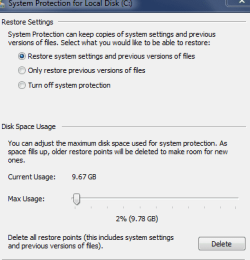
2) on the window after you hit config it has 3 choices basically all, some or none.
just copying the files/folders from another comp is dicey in this case,
thats why i asked you to run those 2 repair tools (3 & 4)

5) follow this tutorial to upload.


Roy
 

My Computer My Computer

At a glance

W7 home premium 32bit/W7HP 64bit/w10 tp insid...E5300 dual core3gbNvidia Geforce 7100 Nforce 630i
Computer type
PC/Desktop
Computer Manufacturer/Model Number
medionl/Aspire 6930G/acer x55a
OS
W7 home premium 32bit/W7HP 64bit/w10 tp insider ring
CPU
E5300 dual core
Motherboard
medion MS7366
Memory
3gb
Graphics Card(s)
Nvidia Geforce 7100 Nforce 630i
Monitor(s) Displays
avixc
Internet Speed
n (isp resticted to 72)
Antivirus
mse/pands
Browser
palemoon
Other Info
Belkin Fd7050 n USB using Railink RT2870 drivers, more upto date
Roy,

Sorry for the delay in getting back to you.

1. I ran scannow and the KB (had to find a Win7-64 version)

2. I did not find any "3 choices basically all, some or none" in System Create/Restore or anywhere else.

3. The resultant files are CheckSUR.log and CheckSUR.persist.log (they are both text files)
Both files are only about 500 bytes.
Do I really have to zip them or can I just attach them (I'm not sure how to zip)

Thanks for your patience.
 

My Computer My Computer

At a glance

Windows 7 Pro 644gb
Computer type
PC/Desktop
Computer Manufacturer/Model Number
cutom
OS
Windows 7 Pro 64
Memory
4gb
Hard Drives
500GB
Roy,

If you are still around, please reply to my last post.

tkx
 

My Computer My Computer

At a glance

Windows 7 Pro 644gb
Computer type
PC/Desktop
Computer Manufacturer/Model Number
cutom
OS
Windows 7 Pro 64
Memory
4gb
Hard Drives
500GB
OOOps Sorry Rob,

missed the reply

System restore options, see screenshot.

W7 has a built in Zip function.
both of these please
CBS
SURT

Right click - send to - compressed zip folder, this creates a new folder
in your next reply - click on the paperclip - browse to the new folder - upload

Roy
 

Attachments

  • sysres.PNG
    sysres.PNG
    8.5 KB · Views: 34

My Computer My Computer

At a glance

W7 home premium 32bit/W7HP 64bit/w10 tp insid...E5300 dual core3gbNvidia Geforce 7100 Nforce 630i
Computer type
PC/Desktop
Computer Manufacturer/Model Number
medionl/Aspire 6930G/acer x55a
OS
W7 home premium 32bit/W7HP 64bit/w10 tp insider ring
CPU
E5300 dual core
Motherboard
medion MS7366
Memory
3gb
Graphics Card(s)
Nvidia Geforce 7100 Nforce 630i
Monitor(s) Displays
avixc
Internet Speed
n (isp resticted to 72)
Antivirus
mse/pands
Browser
palemoon
Other Info
Belkin Fd7050 n USB using Railink RT2870 drivers, more upto date
Hi Rob,

they came back clean..

Lets try another route,
Any 3rd Party Optimiser/cleaner program installed, possible they have a Restore point deletion setting in use.
(including your AV)

Do you have any repair discs --

Read some of your previous posts - is this the BIG one , photos included ??
or the Cloned OS.
(note a System Images is better than a clone, they carry disk problems/errors with them)

Roy
 

My Computer My Computer

At a glance

W7 home premium 32bit/W7HP 64bit/w10 tp insid...E5300 dual core3gbNvidia Geforce 7100 Nforce 630i
Computer type
PC/Desktop
Computer Manufacturer/Model Number
medionl/Aspire 6930G/acer x55a
OS
W7 home premium 32bit/W7HP 64bit/w10 tp insider ring
CPU
E5300 dual core
Motherboard
medion MS7366
Memory
3gb
Graphics Card(s)
Nvidia Geforce 7100 Nforce 630i
Monitor(s) Displays
avixc
Internet Speed
n (isp resticted to 72)
Antivirus
mse/pands
Browser
palemoon
Other Info
Belkin Fd7050 n USB using Railink RT2870 drivers, more upto date
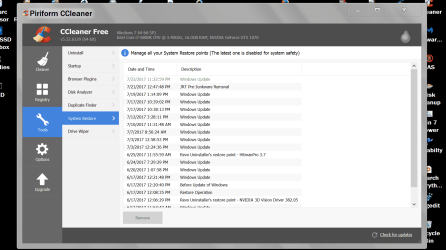
You can delete restore points using Ccleaner.

Just right tick on the one/s you want to remove. You will not be able to remove the last restore point made.

Ccleaner restore points.PNG

Jack
 

My Computer My Computer

At a glance

Windows 10 Pro. 64/ version 1709 Windows 7 Pr...Intel i7-6800K @ 4.3Corsair Platinum 16 gig @2400EVGA GTX 1070 OC
Computer type
PC/Desktop
Computer Manufacturer/Model Number
Home made Desktop
OS
Windows 10 Pro. 64/ version 1709 Windows 7 Pro/64
CPU
Intel i7-6800K @ 4.3
Motherboard
ASUS X-99 Deluxe II
Memory
Corsair Platinum 16 gig @2400
Graphics Card(s)
EVGA GTX 1070 OC
Monitor(s) Displays
Asus 27" LED LCD/VE278Q
Screen Resolution
1920-1080 or 1280-720 HDMI
Hard Drives
INTEL SSD 730-240 Gb Sata 3.0/
PSU
EVGA Platium 1200W
Case
Phanteks Luxe Tempered Glass 8 fans/ one radiator
Cooling
XSPC/ Water Cooled CPU
Keyboard
Das 4 Professional
Mouse
Logitech M705/MX Anywhere 2-S
Internet Speed
100 mbits
Antivirus
Microsoft Security Essentials/ Malwarebytes Premium 3.0/ SAS
Browser
I.E. 11 default/Firefox/ ISP Time Warner Cable/Spectrum
Other Info
LG BluRay Burner/
Sound system-KLipsch-THX/
Icy Dock ssd Hot Swap bays.
Roy,

I'm beginning to think the problem is in the Task Scheduler since I can do manual restore points but not automatic.
When I open the TS, I immediately get an error message:

"The selected task "{0}" no longer exists. To see the current tasks, click Refresh".

(clicking Refresh doesn't do anything)

All the settings for System Restore in the TS look correct.
I googled the error and got tons of responses and multiple solutions.
I'm hesitant to try them since some are a little complicated.

Do you have a suggestion as to the best solution to try?
 
Last edited:

My Computer My Computer

At a glance

Windows 7 Pro 644gb
Computer type
PC/Desktop
Computer Manufacturer/Model Number
cutom
OS
Windows 7 Pro 64
Memory
4gb
Hard Drives
500GB
The error message above seems to relate to the Defrag entry in the Task Scheduler Library.

Based on a suggestion I read, I clicked on each item in the TS Library and the Defrag was the only one that brought up the error message:

"The selected task "{0}" no longer exists. To see the current tasks, click Refresh".

What's the best way to fix that?
 

My Computer My Computer

At a glance

Windows 7 Pro 644gb
Computer type
PC/Desktop
Computer Manufacturer/Model Number
cutom
OS
Windows 7 Pro 64
Memory
4gb
Hard Drives
500GB
The same post suggested to delete the file:

c:\Windows\System32\Tasks\Microsoft\Windows\Defrag\ScheduleDefrag

and then select:
Start > Disk Defragmenter > Configure schedule
to reschedule it (which I really don' use)

Does that sound reasonable?
 

My Computer My Computer

At a glance

Windows 7 Pro 644gb
Computer type
PC/Desktop
Computer Manufacturer/Model Number
cutom
OS
Windows 7 Pro 64
Memory
4gb
Hard Drives
500GB
Roy,

I'd like to try deleting the ScheduleDefrag per the above. Any thoughts on this before I do?

Layback Bear,

Thanks for your reply but the problem is not deleting the Restore Points, the problem is that manual restore points work, but auto/scheduled points do not even tho they seem to be set up properly.
 

My Computer My Computer

At a glance

Windows 7 Pro 644gb
Computer type
PC/Desktop
Computer Manufacturer/Model Number
cutom
OS
Windows 7 Pro 64
Memory
4gb
Hard Drives
500GB
Hi Rob,

NO dont do it via the registry
DELETE it in Task scheduler.
Once you click on it, bottom right window DELETE option

Roy
 

My Computer My Computer

At a glance

W7 home premium 32bit/W7HP 64bit/w10 tp insid...E5300 dual core3gbNvidia Geforce 7100 Nforce 630i
Computer type
PC/Desktop
Computer Manufacturer/Model Number
medionl/Aspire 6930G/acer x55a
OS
W7 home premium 32bit/W7HP 64bit/w10 tp insider ring
CPU
E5300 dual core
Motherboard
medion MS7366
Memory
3gb
Graphics Card(s)
Nvidia Geforce 7100 Nforce 630i
Monitor(s) Displays
avixc
Internet Speed
n (isp resticted to 72)
Antivirus
mse/pands
Browser
palemoon
Other Info
Belkin Fd7050 n USB using Railink RT2870 drivers, more upto date
Sorry for the delayed reply. Here is a summary of the problem to date:

I was able to delete the offending "selected task {0} no longer exists from the Defrag Task Scheduler listing. But no change in the System Restore problem.

I can still store and accumulate manual restore points so the directory is obviously not corrupt. Also Critical Updates get stored but not any Auto restore points

The only programs that run daily are Vipre Anti-Virus and Malwarebytes which have run for years and don't affect SR that I know of and no deletion of SR points.

Some one suggested turning SR off then on again but that didn't help and now I have the same "selected task {0} no longer exists" in the Task Scheduler/System Restore listing.

The problem exists on my main computer

I don't have a repair disk that I know of

Any other suggestions?
 

My Computer My Computer

At a glance

Windows 7 Pro 644gb
Computer type
PC/Desktop
Computer Manufacturer/Model Number
cutom
OS
Windows 7 Pro 64
Memory
4gb
Hard Drives
500GB
Back
Top