Solved System Reserved : Create for Dual Boot

Bare Foot Kid

R.I.P. August 13th 2014
SF Team
Local time
4:32 PM
Messages
22,809
Location
The Lowcountry
I have now created this as an actual tutorial that can be viewed at this link below.
   Note

This method goes with this tutorial at the link below but it was too much for the main body of the tutorial as it made the entire work, as a whole too long and involved a process to follow easily.

Dual Boot : Create Partitions Using PWBD

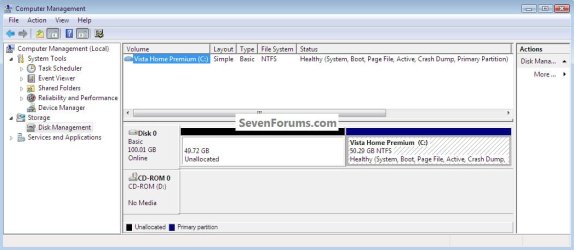
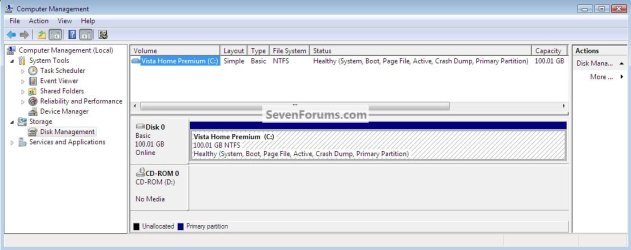
This is what I started with, I'm going to use the free, bootable Partition Wizard CD to shrink the C:\Vista partition to create a partition for the Windows 7 "System Reserved" and a partition to install Windows 7 to ahead (to the left) of the C:\Vista partition.
click any image to enlarge
Vista Start.jpg
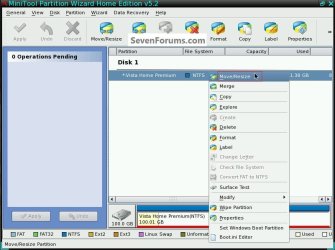
1) Boot the PWBD and right click the partition you want to shrink and click "Move/Resize" do not try to shrink an existing Windows Operating System (OS) smaller than its actual, current size as viewed by clicking the Computer button in the Windows start menu.
Resize.jpg
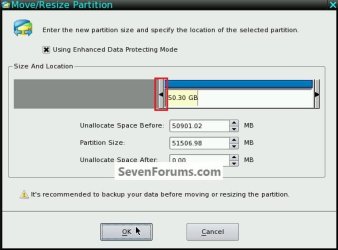
2) In the dialog box that opens, click and hold to drag the left slider to the size you want to shrink the C: partition.
ResizeSize.jpg
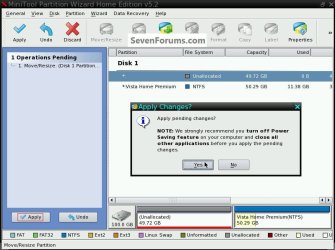
3) Then in the left pane "Operation Pending" column click Apply and then Yes for the "Apply Changes" conformation dialog box.
ShrinkConfirm.jpg
4) You will get a Pending dialog box, just relax and let it work; it may take a while depending on your current partition structure.
ResizePending.jpg
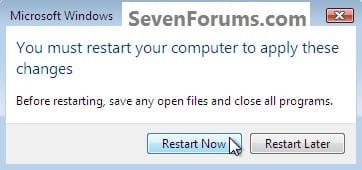
5) You Must restart the PC after the shrink has completed so the existing OS can accept the changes to the partition structure and it will require a restart that you must do to complete the process.

Remove the PWBD and at the upper left corner at "General" click exit to restart the PC, it would be a good idea to do a couple restarts to let the OS accept the changes without issues.
Restart.jpg
VistaDM_AfterShrink.jpg
We're going to do several steps all together so read through this section before you start so you will see the easiest way to go, they can be done as single steps but this is easier and quicker.

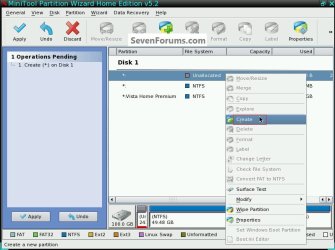
6) Boot back to Partition Wizard and right click the new unallocated space and click create.
Create1.jpg
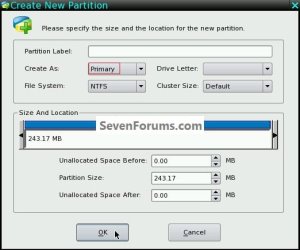
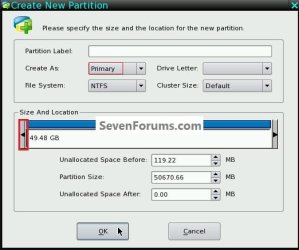
7) Now click and hold to drag the left slider to create space for the "System Reserved" partition, PW is kind'a screwy here and you will get more space than you create so don't take too much time trying to get the sizes to match as I have in the past, just create as small a space as you can and accept the size you get, more is better anyway.

Just be sure to make it a Primary partition as PW defaults to logical, a Label here is not necessary as you will add the labels in the next step.

Don't be concerned with drive letters as the OS will give them letters when you boot back to let the OS accept these new changes, though they will have to be removed before the Windows 7 install.
Create2.jpg
8) Now do the same to create the SysResv, making sure that it's created as a Primary partition as Windows will not boot / is not able to boot from an "Extended/Logical" partition and the SysResv will be the partition where the boot files will be created for the dual boot.

If you are short on Primary partitions you could create the Windows 7 partition as a Logical for the install and then when/if you remove the existing Windows (Vista?) install you could use the PWBD to convert it to a primary at a later time.
Create3.jpg
Create4.jpg
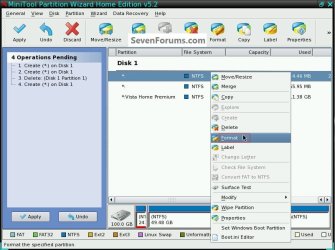
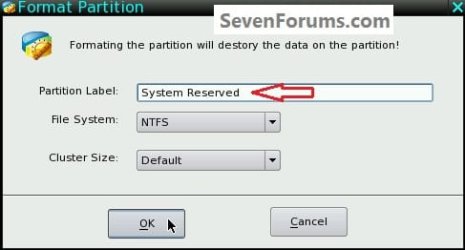
9) Now both partitions have to be formatted to finish this part of the process; right click each in turn and click Format.
Format1.jpg
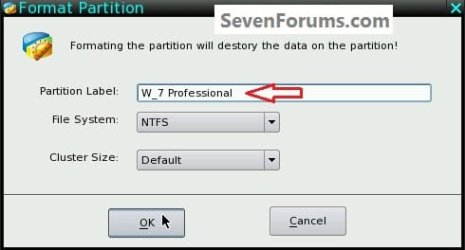
10) Then in the dialog box that opens for each give them a label; it is suggested you label the SysResv partition as System Reserved so the installer will recognize it without issue.
Format2.jpg
Format3.jpg
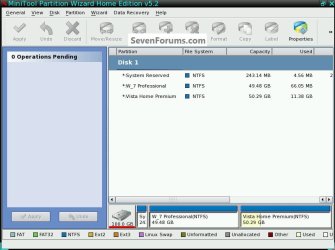
11) Now at the left pane Operations Pending column click Apply, then Yes for the conformation dialog box to finish creating/formatting the partitions; the snip below is what you will have.

Now boot back into the OS so it can accept these new changes to the partition structure and to make sure all is well, I suggest you restart the OS a couple times just to make sure.

You also need to remove the drive letters and mark the SysResv partition as "Active" so the boot files will be created there; I'll cover that briefly below.
Finished_PW.jpg
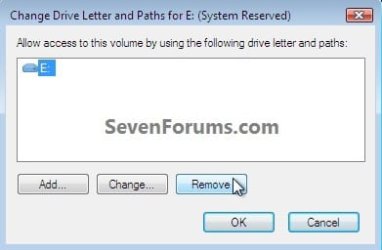
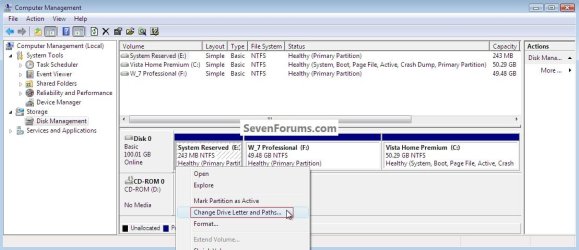
12) Now back in Windows disk management, right click both partitions in turn and remove the drive letters, this will just cause less confusion for the installer; also it is best if the SysResv partition has no letter so that files/data can't be saved there accidentally.
DriveLetter.jpg
DriveLetterRemove.jpg
DLRemoveYes.jpg
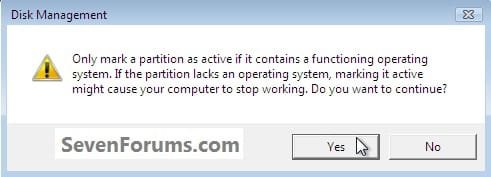
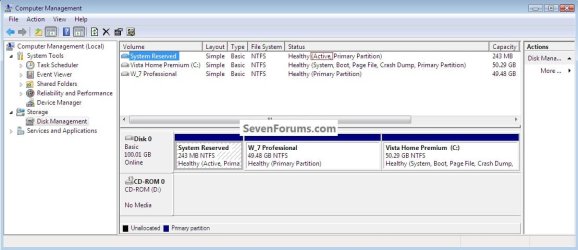
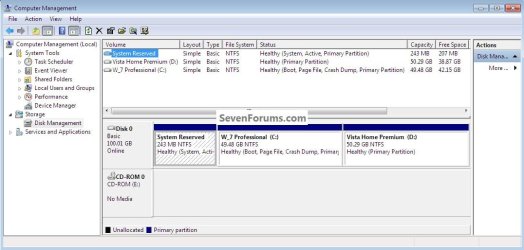
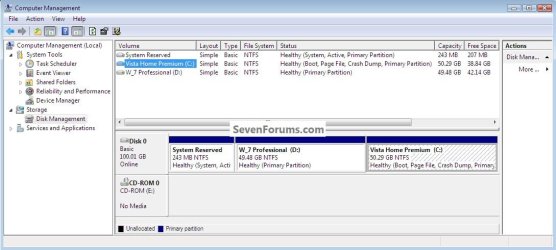
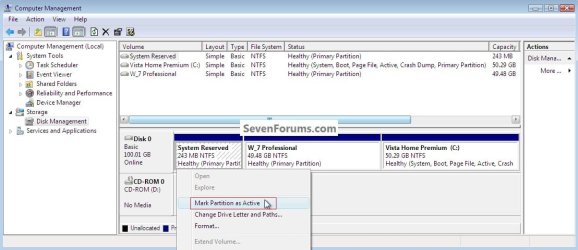
13) Now right click the SysResv partition and click "Mark Partition as Active" and click yes for the conformation dialog box; the third snip down is what you will have when finished.

Note to XP users: Windows XP must be left as the "System, Active" partition for the install of Windows 7, if not you will have to use EasyBCD to first, repair the XP boot files, then you will have to run startup repairs to Windows 7 to get it booting again, then add an entry for XP for it to be added to the Windows (dual boot) boot menu; it is possible to accomplish though it's a lot of work.
ActiveMark.jpg
ActiveYes.jpg
ActiveFinished.jpg
14) Now insert the Windows install media into the Optical Disk Drive (ODD) and restart the PC to set the first boot device as the ODD in the BIOS and install Windows 7 to the created partition.

I suggest you use the installer to format both partitions during the installation to avoid any potential file system errors; click Drive Options (advanced) at this dialog box; don't change anything else though.
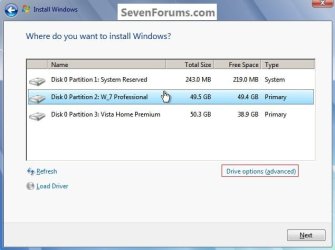
PartitionSelection.jpg
15) Here it is!
BootW_7.jpg
16) One last step to get back to Vista, an entry will have to be added to the Windows (dual boot) boot menu using EasyBCD from within Windows 7 but that's the easiest part of this process.
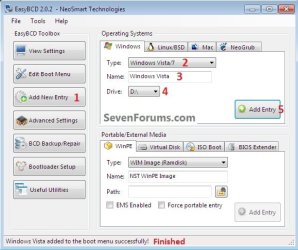
Test.jpg
BootVista.jpg

 
Last edited:

My Computer My Computer

At a glance

W 7 64-bit UltimateIntel Q9550 Yorkfield8GB Dominator 8500C5DATI : XFX 5870
Computer Manufacturer/Model Number
* BFK Customs *
OS
W 7 64-bit Ultimate
CPU
Intel Q9550 Yorkfield
Motherboard
ASUS P5Q Pro
Memory
8GB Dominator 8500C5D
Graphics Card(s)
ATI : XFX 5870
Sound Card
Realtek HD Audio 7-1
Monitor(s) Displays
1x 47" LCD HDMI & 3x 26" LCD HDMI
Screen Resolution
1920x1080P & 1920x1200
Hard Drives
1x 80GB Intel X25-M G2 SSD : 1x 500GB & 1x 640GB WD Caviar Black(s)
PSU
Corsair 620HX
Case
Cooler Master RC-690
Cooling
Tuniq Tower 120, 2x 140mm and 3x 120mm case fans
Keyboard
Microsoft 500
Mouse
Razer Diamondback 3G
Internet Speed
14 Mb/s
Other Info
1x Koutech 3Gb/s SATA HDD Hot Swap Rack
That's a great addition.

You should put this in the Tutorial section, maybe as: Dual Boot : Create Partitions Using PWBD Part 2 - System Reserved : Create for Dual Boot

Thanks for taking the time to write this up.
 

My Computer My Computer

At a glance

Windows 7 Ult x64 - SP1/ Windows 8 Pro x64Intel Core i5-3570K 4.6GHz8GB (2X4GB) DDR3 1600 Corsair Vengeance CL8 1.5vSapphire HD 7770 Vapor-X OC 1GB DDR5
Computer type
PC/Desktop
Computer Manufacturer/Model Number
76~2.0
OS
Windows 7 Ult x64 - SP1/ Windows 8 Pro x64
CPU
Intel Core i5-3570K 4.6GHz
Motherboard
Gigabyte GA-Z77X UD3H, f18
Memory
8GB (2X4GB) DDR3 1600 Corsair Vengeance CL8 1.5v
Graphics Card(s)
Sapphire HD 7770 Vapor-X OC 1GB DDR5
Sound Card
Onboard VIA VT2021
Monitor(s) Displays
22" LCD Dell
Screen Resolution
1680x1050
Hard Drives
Samsung 840Pro 128GB SSD,
Seagate Barracuda 500GB SATA2 7200rpm 32MB cache, Seagate Barracuda 1TB SATA2 7200rpm 32MB cache,
PSU
Corsair HX650W
Case
Cooler Master Storm Scout
Cooling
Corsair H80 2x12cm Noctua NF P12 , 2x14cm case fans
Keyboard
Logitech Wave
Mouse
CM Sentinel
Internet Speed
Dismal
Antivirus
Avast
Browser
Opera Next
Other Info
Haswell laptop: HP Envy 17t-j, i7-4700MQ, GeForce 740M 2GB DDR3, 17.3" Full HD 1920x1080, 16GB RAM, Samsung 840 Pro 128GB, 1TB Hitachi 7200 HDD,
Desktop: eSATA ports,
External eSATA Seagate 500GB SATA2 7200rpm,
External WD USB 500GB
BFK, that's another good one. You are really getting a lot of milage from PW.
 

My Computer My Computer

At a glance

Vista, Windows7, Mint Mate, Zorin, Windows 8from 1.6GHz Duo to i7
Computer Manufacturer/Model Number
HP, Dell, Gateway, Toshiba - 4 laptops and 2 desktops
OS
Vista, Windows7, Mint Mate, Zorin, Windows 8
CPU
from 1.6GHz Duo to i7
Monitor(s) Displays
2x HP w2207
Hard Drives
5x HDD, 7x SSD, 12x Externals
Keyboard
with trackball - no mices
Mouse
Trackball mice
Internet Speed
DSL 6000
That's a great addition.

You should put this in the Tutorial section, maybe as: Dual Boot : Create Partitions Using PWBD Part 2 - System Reserved : Create for Dual Boot

Thanks for taking the time to write this up.

Thanks Dave, I probably will make a proper tutorial out if it; I wanted to get it published before someone at another site, using my research beat me to it. ;)


BFK, that's another good one. You are really getting a lot of milage from PW.

Thanks Wolfgang, it's more interesting that the SysResv partition can be created almost anywhere and function as MS intended when created using the Windows 7 installer.
 

My Computer My Computer

At a glance

W 7 64-bit UltimateIntel Q9550 Yorkfield8GB Dominator 8500C5DATI : XFX 5870
Computer Manufacturer/Model Number
* BFK Customs *
OS
W 7 64-bit Ultimate
CPU
Intel Q9550 Yorkfield
Motherboard
ASUS P5Q Pro
Memory
8GB Dominator 8500C5D
Graphics Card(s)
ATI : XFX 5870
Sound Card
Realtek HD Audio 7-1
Monitor(s) Displays
1x 47" LCD HDMI & 3x 26" LCD HDMI
Screen Resolution
1920x1080P & 1920x1200
Hard Drives
1x 80GB Intel X25-M G2 SSD : 1x 500GB & 1x 640GB WD Caviar Black(s)
PSU
Corsair 620HX
Case
Cooler Master RC-690
Cooling
Tuniq Tower 120, 2x 140mm and 3x 120mm case fans
Keyboard
Microsoft 500
Mouse
Razer Diamondback 3G
Internet Speed
14 Mb/s
Other Info
1x Koutech 3Gb/s SATA HDD Hot Swap Rack
Definitely put it with the tutorials! I would think a separate tutorial but with clear links between the two.

I started playing with PW with a new external HDD. Got the job done but PW did crash once hmm?
 

My Computer My Computer

At a glance

Windows 7x64 Home Premium SP1Intel i7 2600kG.Skill Ripjaws (DDR3-1600) 2x4GBNvidia GeForce GTS 450; Intel HD Graphics 300...
Computer type
PC/Desktop
Computer Manufacturer/Model Number
Own build
OS
Windows 7x64 Home Premium SP1
CPU
Intel i7 2600k
Motherboard
ASUS P8Z68 Deluxe
Memory
G.Skill Ripjaws (DDR3-1600) 2x4GB
Graphics Card(s)
Nvidia GeForce GTS 450; Intel HD Graphics 3000(GT2+)
Monitor(s) Displays
Dell Ultrasharp IPS panel U2311H, Samsung SyncMaster P2350
Screen Resolution
1920x1080
Hard Drives
Samsung 850 Pro SSD 256GB, Samsung SSD 840 120GB, Seagates 1TB Barracuda ST31000528AS x2
PSU
Seasonic M12II 520W
Case
Lian Li Lancool PC-K60
Cooling
Case: 1x120mm, 3x140mm CPU: Hyper 212+
Keyboard
Logitech MK520 (wireless)
Mouse
Logitech MK520
Internet Speed
6-7 Mbps
Antivirus
Norton Security Premium, Malwarebytes on 2 (MSE on 3rd PC)
Browser
FireFox
Other Info
Audio: Logitech Z523 2.1
Hello mjf.


What do you mean by crash, I have had no issues at all using PW for many different scenarios?
 

My Computer My Computer

At a glance

W 7 64-bit UltimateIntel Q9550 Yorkfield8GB Dominator 8500C5DATI : XFX 5870
Computer Manufacturer/Model Number
* BFK Customs *
OS
W 7 64-bit Ultimate
CPU
Intel Q9550 Yorkfield
Motherboard
ASUS P5Q Pro
Memory
8GB Dominator 8500C5D
Graphics Card(s)
ATI : XFX 5870
Sound Card
Realtek HD Audio 7-1
Monitor(s) Displays
1x 47" LCD HDMI & 3x 26" LCD HDMI
Screen Resolution
1920x1080P & 1920x1200
Hard Drives
1x 80GB Intel X25-M G2 SSD : 1x 500GB & 1x 640GB WD Caviar Black(s)
PSU
Corsair 620HX
Case
Cooler Master RC-690
Cooling
Tuniq Tower 120, 2x 140mm and 3x 120mm case fans
Keyboard
Microsoft 500
Mouse
Razer Diamondback 3G
Internet Speed
14 Mb/s
Other Info
1x Koutech 3Gb/s SATA HDD Hot Swap Rack
I didn't use my bootable Partition Wizard. Since I was working on an external HDD I used the installed minitool Partition Wizard. I was just making 3 partitions to a 1TB disk, assigning drive letters and volume names. Left all the operations pending in the left pane. Went to apply and the application failed (event ID 1000, task category 100). When I applied the activities for each partition in turn it was fine - maybe that's what your supposed to do.
I know I could use MS disk management for this simple task but it gave me an opportunity to experiment with PW.
 

My Computer My Computer

At a glance

Windows 7x64 Home Premium SP1Intel i7 2600kG.Skill Ripjaws (DDR3-1600) 2x4GBNvidia GeForce GTS 450; Intel HD Graphics 300...
Computer type
PC/Desktop
Computer Manufacturer/Model Number
Own build
OS
Windows 7x64 Home Premium SP1
CPU
Intel i7 2600k
Motherboard
ASUS P8Z68 Deluxe
Memory
G.Skill Ripjaws (DDR3-1600) 2x4GB
Graphics Card(s)
Nvidia GeForce GTS 450; Intel HD Graphics 3000(GT2+)
Monitor(s) Displays
Dell Ultrasharp IPS panel U2311H, Samsung SyncMaster P2350
Screen Resolution
1920x1080
Hard Drives
Samsung 850 Pro SSD 256GB, Samsung SSD 840 120GB, Seagates 1TB Barracuda ST31000528AS x2
PSU
Seasonic M12II 520W
Case
Lian Li Lancool PC-K60
Cooling
Case: 1x120mm, 3x140mm CPU: Hyper 212+
Keyboard
Logitech MK520 (wireless)
Mouse
Logitech MK520
Internet Speed
6-7 Mbps
Antivirus
Norton Security Premium, Malwarebytes on 2 (MSE on 3rd PC)
Browser
FireFox
Other Info
Audio: Logitech Z523 2.1
It may have been too big a process at once, like you think; thanks for the info.
 

My Computer My Computer

At a glance

W 7 64-bit UltimateIntel Q9550 Yorkfield8GB Dominator 8500C5DATI : XFX 5870
Computer Manufacturer/Model Number
* BFK Customs *
OS
W 7 64-bit Ultimate
CPU
Intel Q9550 Yorkfield
Motherboard
ASUS P5Q Pro
Memory
8GB Dominator 8500C5D
Graphics Card(s)
ATI : XFX 5870
Sound Card
Realtek HD Audio 7-1
Monitor(s) Displays
1x 47" LCD HDMI & 3x 26" LCD HDMI
Screen Resolution
1920x1080P & 1920x1200
Hard Drives
1x 80GB Intel X25-M G2 SSD : 1x 500GB & 1x 640GB WD Caviar Black(s)
PSU
Corsair 620HX
Case
Cooler Master RC-690
Cooling
Tuniq Tower 120, 2x 140mm and 3x 120mm case fans
Keyboard
Microsoft 500
Mouse
Razer Diamondback 3G
Internet Speed
14 Mb/s
Other Info
1x Koutech 3Gb/s SATA HDD Hot Swap Rack

My Computer My Computer

At a glance

W 7 64-bit UltimateIntel Q9550 Yorkfield8GB Dominator 8500C5DATI : XFX 5870
Computer Manufacturer/Model Number
* BFK Customs *
OS
W 7 64-bit Ultimate
CPU
Intel Q9550 Yorkfield
Motherboard
ASUS P5Q Pro
Memory
8GB Dominator 8500C5D
Graphics Card(s)
ATI : XFX 5870
Sound Card
Realtek HD Audio 7-1
Monitor(s) Displays
1x 47" LCD HDMI & 3x 26" LCD HDMI
Screen Resolution
1920x1080P & 1920x1200
Hard Drives
1x 80GB Intel X25-M G2 SSD : 1x 500GB & 1x 640GB WD Caviar Black(s)
PSU
Corsair 620HX
Case
Cooler Master RC-690
Cooling
Tuniq Tower 120, 2x 140mm and 3x 120mm case fans
Keyboard
Microsoft 500
Mouse
Razer Diamondback 3G
Internet Speed
14 Mb/s
Other Info
1x Koutech 3Gb/s SATA HDD Hot Swap Rack
Great tutorial, :)

I knew it would make it to the tutorial forum.

Well done.
 

My Computer My Computer

At a glance

Windows 7 Ult x64 - SP1/ Windows 8 Pro x64Intel Core i5-3570K 4.6GHz8GB (2X4GB) DDR3 1600 Corsair Vengeance CL8 1.5vSapphire HD 7770 Vapor-X OC 1GB DDR5
Computer type
PC/Desktop
Computer Manufacturer/Model Number
76~2.0
OS
Windows 7 Ult x64 - SP1/ Windows 8 Pro x64
CPU
Intel Core i5-3570K 4.6GHz
Motherboard
Gigabyte GA-Z77X UD3H, f18
Memory
8GB (2X4GB) DDR3 1600 Corsair Vengeance CL8 1.5v
Graphics Card(s)
Sapphire HD 7770 Vapor-X OC 1GB DDR5
Sound Card
Onboard VIA VT2021
Monitor(s) Displays
22" LCD Dell
Screen Resolution
1680x1050
Hard Drives
Samsung 840Pro 128GB SSD,
Seagate Barracuda 500GB SATA2 7200rpm 32MB cache, Seagate Barracuda 1TB SATA2 7200rpm 32MB cache,
PSU
Corsair HX650W
Case
Cooler Master Storm Scout
Cooling
Corsair H80 2x12cm Noctua NF P12 , 2x14cm case fans
Keyboard
Logitech Wave
Mouse
CM Sentinel
Internet Speed
Dismal
Antivirus
Avast
Browser
Opera Next
Other Info
Haswell laptop: HP Envy 17t-j, i7-4700MQ, GeForce 740M 2GB DDR3, 17.3" Full HD 1920x1080, 16GB RAM, Samsung 840 Pro 128GB, 1TB Hitachi 7200 HDD,
Desktop: eSATA ports,
External eSATA Seagate 500GB SATA2 7200rpm,
External WD USB 500GB
Thanks Dave, I appreciate that. :)
 

My Computer My Computer

At a glance

W 7 64-bit UltimateIntel Q9550 Yorkfield8GB Dominator 8500C5DATI : XFX 5870
Computer Manufacturer/Model Number
* BFK Customs *
OS
W 7 64-bit Ultimate
CPU
Intel Q9550 Yorkfield
Motherboard
ASUS P5Q Pro
Memory
8GB Dominator 8500C5D
Graphics Card(s)
ATI : XFX 5870
Sound Card
Realtek HD Audio 7-1
Monitor(s) Displays
1x 47" LCD HDMI & 3x 26" LCD HDMI
Screen Resolution
1920x1080P & 1920x1200
Hard Drives
1x 80GB Intel X25-M G2 SSD : 1x 500GB & 1x 640GB WD Caviar Black(s)
PSU
Corsair 620HX
Case
Cooler Master RC-690
Cooling
Tuniq Tower 120, 2x 140mm and 3x 120mm case fans
Keyboard
Microsoft 500
Mouse
Razer Diamondback 3G
Internet Speed
14 Mb/s
Other Info
1x Koutech 3Gb/s SATA HDD Hot Swap Rack
I have started completely from scratch and recreated this tutorial from the ground-up; I wanted to show how to use Windows disk management to create the partitions instead of using Partition Wizard.


System Reserved : Create for Dual Boot
 

My Computer My Computer

At a glance

W 7 64-bit UltimateIntel Q9550 Yorkfield8GB Dominator 8500C5DATI : XFX 5870
Computer Manufacturer/Model Number
* BFK Customs *
OS
W 7 64-bit Ultimate
CPU
Intel Q9550 Yorkfield
Motherboard
ASUS P5Q Pro
Memory
8GB Dominator 8500C5D
Graphics Card(s)
ATI : XFX 5870
Sound Card
Realtek HD Audio 7-1
Monitor(s) Displays
1x 47" LCD HDMI & 3x 26" LCD HDMI
Screen Resolution
1920x1080P & 1920x1200
Hard Drives
1x 80GB Intel X25-M G2 SSD : 1x 500GB & 1x 640GB WD Caviar Black(s)
PSU
Corsair 620HX
Case
Cooler Master RC-690
Cooling
Tuniq Tower 120, 2x 140mm and 3x 120mm case fans
Keyboard
Microsoft 500
Mouse
Razer Diamondback 3G
Internet Speed
14 Mb/s
Other Info
1x Koutech 3Gb/s SATA HDD Hot Swap Rack
Back
Top