
System reserved partition takes 600gb

e344t8u7y

New member
Local time
11:06 AM
Messages
29
After a thunderstorm my computer crashed and refused to boot, windows' system restore didn't work so we returned a disk image which we had taken a few years ago.
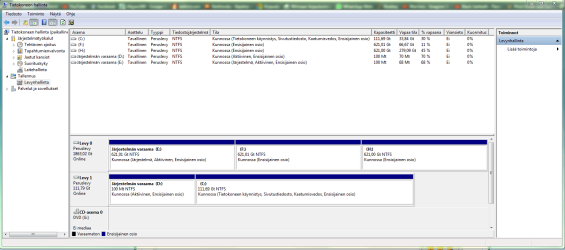
After this, the computer now boots up fine and is working, the only problem is that my System reserved partition: "E" is 600 GBs on disk 0, while the OS is installed in disk 1, I included a picture of my disk management screen in which you can see it for yourself you can also see that there are currently 2 system reserved partitions on both disk 0 and disk 1.
I have access to windows' installation media if it's necessary.
 

Attachments
  • temp.png
    temp.png
    41.4 KB · Views: 24

My Computer My Computer

Computer type
PC/Desktop
Computer Manufacturer/Model Number
custom built
OS
Windows 7 Home Premium 64bit

My Computer My Computer

Computer type
PC/Desktop
Computer Manufacturer/Model Number
me!
OS
Windows 10 Pro x64
CPU
AMD Ryzen 5 1600 @ [email protected]
Motherboard
ASUS B350 PRIME-PLUS
Memory
G.Skill Flare X 16GB (2x8GB) DDR4-2400 @ 2666MHz
Graphics Card(s)
Sapphire Radeon Vega 56 NITRO+
Sound Card
None
Monitor(s) Displays
ASUS VG248QZ
Screen Resolution
1920x1080
Hard Drives
Samsung 850 EVO 250GB*, 1TB Seagate Constellation ES, 2x Samsung 840 250GB in RAID0*

*Thanks ICIT2LOL for supplying me with all of these drives!
PSU
Corsair VS550
Case
Corsair Crystal 460X
Cooling
AMD Wraith Spire
Keyboard
Ducky Shine 6 w/ MX Browns and PBT keycaps
Mouse
Xtrfy M1-Ice
Internet Speed
100MBit/s down, 20MBit/s up
Antivirus
Bitdefender
Browser
Google Chrome
I ran the chkdsk but it didn't give any errors, and the partition still shows up as the 100mb System reserved.
 

My Computer My Computer

Computer type
PC/Desktop
Computer Manufacturer/Model Number
custom built
OS
Windows 7 Home Premium 64bit
In the screen print the upper pane shows the [E] partition as 100 MB and the lower pane shows the [E] partition as 600 GB.
I can't read the language in the screen print, I'm guessing Mt=MB and Gt=GB
I don't know why it would show different sizes for the same partition, but something is wrong.

Some things i would try if i had this problem:
Run a chkdsk on the [E] partition and see what it finds.
Disconnect Disk 0 and see if the PC will boot and run Windows.
If Windows won't start, a Startup Repair might fix it: http://www.sevenforums.com/tutorials/681-startup-repair.html

Mount the Backup Image that was restored to see what is in that backup (I use Macrium Reflect for imaging).
Boot the PC with a Partiton Wizard bootable CD (free) to see what it shows:
https://www.partitionwizard.com/partition-wizard-bootable-cd.html
 

My Computer My Computer

Computer type
PC/Desktop
Computer Manufacturer/Model Number
home built
OS
Multi-Boot W7_Pro_x64 W8.1_Pro_x64 W10_Pro_x64 +Linux_VMs +Chromium_VM
CPU
AMD Athlon II x4 620
Motherboard
Gigabyte GA-MA785G-UD3H
Memory
6GB GSkill DDR2 800
Graphics Card(s)
AMD 4670 GPU + AMD 4200 IGP
Sound Card
on board Realtek ALC889A
Monitor(s) Displays
RCA 40" LCD TV, Insignia 32" LCD TV, HP 15" LCD monitor
Screen Resolution
1680 x 1050
Hard Drives
OCZ Vertex 3 120GB,
Samsung F3 1TB (3),
Several others - WD, Seagate, Hitachi, ...
PSU
Corsair 500 W
Case
Rosewill mid tower
Cooling
CM 90mm rifle
Keyboard
Gyration wireless, Logitech wireless, Dell USB wired
Mouse
Gyration wireless, Logitech wireless, V7 USB wired
Internet Speed
Spectrum - 100Mbps D / 10Mbps U
Antivirus
Avast, MBAM3, EMET, WinPatrol
Browser
Pale Moon, Firefox, IE
Other Info
2 multi-boot PC's
Mainly HTPC/Office/Gen purpose (no gaming).
Trendnet USB KVM.
LG DVD burner/Blue Ray Player.
Tray system for removable SATA backup drives.

Not currently OCd, under-volted.
I use Hybrid sleep, rarely re-boot or shutdown.

Hauppauge HD-PVR, Avermedia PCIe TV Tuner, Hauppauge PCI TV Tuner.
Hey, yeah the OS is in finnish language so you can't probably read it.
Your guesses are correct, it shows up as 100MB when I got to my computer, but shows up as 600GB in disk management.
Windows did boot up fine when I disconnected disk 0.
So I'm guessing my best chance is to see whats on the backup?
 

My Computer My Computer

Computer type
PC/Desktop
Computer Manufacturer/Model Number
custom built
OS
Windows 7 Home Premium 64bit
Open an elevated command prompt and run chkdsk /f /r.
Just for the record, if you run chkdsk /? you will see that /r "implies" or includes /f. So you only need to run chkdsk /r.

What I find as odd is all three partitions on disk 0 (Levy0) show the exact same "621,01" Gt.

If me, I would back up any data on that drive you don't want to lose before doing anything else. I would also scan for malware. Then you might need to rebuild the partition tables. EaseUS Partition Recovery is a free (for home, non-commercial use) program that may help (scroll down to second section).
 

My Computer My Computer

Computer Manufacturer/Model Number
BrightWorks Systems B4
OS
Windows 7 Profession 64-bit
CPU
Intel Core i7-860 Quad
Motherboard
Gigabyte P55-UD4P
Memory
Mushkin 4x2Gb PC12800
Graphics Card(s)
Gigabyte GTX260 896Mb
Sound Card
Integrated 7.1 HD Dolby
Monitor(s) Displays
2 Samsung 2220wm-HAS 22"
Screen Resolution
1680 x 1050 | 1680 x 1050
Hard Drives
WD HE 1Tb
PSU
Corsair TX-750W
Case
Ultra M998
Cooling
OEM
Keyboard
MS Wireless Comfort 5000
Mouse
MS Wireless 5000
Internet Speed
Cable and pretty darn fast
Back
Top