System Reserved Partition????

mowerman

New member
Local time
4:30 PM
Messages
36
Location
Florida
What is it used for?
 

My Computer

Computer Manufacturer/Model Number
Homebuilt
OS
W7 64bit 7600 with SP1
CPU
AMD Athlon 64 DC 4200+ 2.2Ghz
Motherboard
Biostar TForce6100
Memory
4 Gigs
Graphics Card(s)
Radeon X1650 256MB
Sound Card
onboard
Monitor(s) Displays
HP w2207h
Screen Resolution
1680x1050
Hard Drives
OS - WD 320Gig SATA
BackUp - WD 640Gig 32mg cashe SATA
PSU
Antec 500W 80+
Case
Antec

My Computer

Computer Manufacturer/Model Number
HP Pavillion dv-7 1005 Tx
OS
Win 8 Release candidate 8400
CPU
[email protected]
Memory
4 gigs
Graphics Card(s)
Nvidia 9600M
Sound Card
HD built-in
Monitor(s) Displays
17" Wxga
Screen Resolution
1440x900
Cooling
none
Internet Speed
45Mb down 5Mb up
But why did MS make it a separate partition?
 

My Computer

Computer Manufacturer/Model Number
Homebuilt
OS
W7 64bit 7600 with SP1
CPU
AMD Athlon 64 DC 4200+ 2.2Ghz
Motherboard
Biostar TForce6100
Memory
4 Gigs
Graphics Card(s)
Radeon X1650 256MB
Sound Card
onboard
Monitor(s) Displays
HP w2207h
Screen Resolution
1680x1050
Hard Drives
OS - WD 320Gig SATA
BackUp - WD 640Gig 32mg cashe SATA
PSU
Antec 500W 80+
Case
Antec
For BitLocker, if you wanted to use that. From my understanding, only Ultimate makes that partition.
 

My Computer

Computer type
PC/Desktop
Computer Manufacturer/Model Number
Alienware Aurora ALX R4
OS
Windows 10 Pro (x64)
CPU
Intel Core i7-3930K (3.2GHz - 4.5GHz)
Motherboard
Alienware Aurora-R4 x79
Memory
4x Samsung 4GB PC3-12800 DDR3 (16GB 1600MHz)
Graphics Card(s)
Nvidia Geforce GTX 690
Sound Card
SteelSeries Siberia Elite
Monitor(s) Displays
Dell UltraSharp U3011
Screen Resolution
2560x1600
Hard Drives
Samsung 850 Pro 256 GB, Seagate 1TB Desktop Hybrid HDD, 2x Western Digital 4TB Green HDD
PSU
875W Some Dell PSU <.<
Case
Alienware Aurora ALX
Cooling
Custom Liquid Cooling (EK CPU & GPU blocks) dual EK 480RAD
Keyboard
Logitech G710+ Mechanical
Mouse
Logitech G700s
Internet Speed
Verizon Fios (50 mbps average)
Other Info
Server: Intel NUC D54250WYK: i5-4250U, 16GB, 256 GB mSATA, Windows Server 2012 R2
Im not sure but i believe during install win 7 needs a partition to expand files in. Its made during install and I have removed it.

Ken
 

My Computer

Computer Manufacturer/Model Number
HP Pavillion dv-7 1005 Tx
OS
Win 8 Release candidate 8400
CPU
[email protected]
Memory
4 gigs
Graphics Card(s)
Nvidia 9600M
Sound Card
HD built-in
Monitor(s) Displays
17" Wxga
Screen Resolution
1440x900
Cooling
none
Internet Speed
45Mb down 5Mb up
The 100MB system/boot partition will be available for Ultimate, Business and Enterprise editions. Also, in addition to being used for BitLocker encryption, it holds the Recovery environment (WinRE) and boot files.

On a fresh installation of Windows 7, the installer will create the Bitlocker partition. If you do not intend to use Bitlocker, this partition can be subsequently removed.

On machines that have other existing partitions, the Bitlocker partition will not be created.

It is not needed to expand files during installation.
 
I have win 7 64 bit RTM professional version from msdn. i have the 100mb system reserved partition.

Are you guys saying it's safe to delete? Or is it needed to actually boot windows?

thanks
 

Attachments

  • disk.PNG
    disk.PNG
    4.2 KB · Views: 459

My Computer

Computer Manufacturer/Model Number
Custom Built
OS
Windows 7 Pro 64-bit
CPU
AMD Phenom II X2 550 BE
Motherboard
ASUS M4A79XTD EVO
Memory
A-Data DDR3 1600 4gb
Graphics Card(s)
HIS Radeon HD 4670
Sound Card
VIA VT1708S (8 channel onboard)
Monitor(s) Displays
Dell 23" S2309W
Screen Resolution
1920 x 1080
Hard Drives
WD 320,750gb, Seagate 500gb External Backup
PSU
Rosewill Green Series 430W
Case
Coolermaster
Cooling
Scythe SCKTN-3000
It can be used to boot Windows in the absence of the install DVD (or other install medium).

It is as safe to delete as you are confident that you do not need it. If you need 100MB badly enough, or need the partition space.
 
It can be used to boot Windows in the absence of the install DVD (or other install medium).

It is as safe to delete as you are confident that you do not need it. If you need 100MB badly enough, or need the partition space.

Im gonna delete it, I think it's part of the reason I can't use Windows BAckup to create a system image, since there is only 30mb free of the 100mb. I keep getting a disc space error.
 

My Computer

Computer Manufacturer/Model Number
Custom Built
OS
Windows 7 Pro 64-bit
CPU
AMD Phenom II X2 550 BE
Motherboard
ASUS M4A79XTD EVO
Memory
A-Data DDR3 1600 4gb
Graphics Card(s)
HIS Radeon HD 4670
Sound Card
VIA VT1708S (8 channel onboard)
Monitor(s) Displays
Dell 23" S2309W
Screen Resolution
1920 x 1080
Hard Drives
WD 320,750gb, Seagate 500gb External Backup
PSU
Rosewill Green Series 430W
Case
Coolermaster
Cooling
Scythe SCKTN-3000
You won't be able to delete it anyways. Nor is it the reason why Windows Backup is not working.
 

My Computer

Computer type
PC/Desktop
Computer Manufacturer/Model Number
Alienware Aurora ALX R4
OS
Windows 10 Pro (x64)
CPU
Intel Core i7-3930K (3.2GHz - 4.5GHz)
Motherboard
Alienware Aurora-R4 x79
Memory
4x Samsung 4GB PC3-12800 DDR3 (16GB 1600MHz)
Graphics Card(s)
Nvidia Geforce GTX 690
Sound Card
SteelSeries Siberia Elite
Monitor(s) Displays
Dell UltraSharp U3011
Screen Resolution
2560x1600
Hard Drives
Samsung 850 Pro 256 GB, Seagate 1TB Desktop Hybrid HDD, 2x Western Digital 4TB Green HDD
PSU
875W Some Dell PSU <.<
Case
Alienware Aurora ALX
Cooling
Custom Liquid Cooling (EK CPU & GPU blocks) dual EK 480RAD
Keyboard
Logitech G710+ Mechanical
Mouse
Logitech G700s
Internet Speed
Verizon Fios (50 mbps average)
Other Info
Server: Intel NUC D54250WYK: i5-4250U, 16GB, 256 GB mSATA, Windows Server 2012 R2
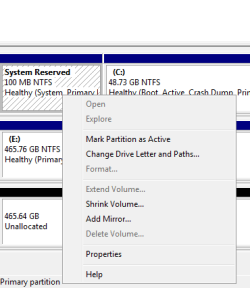
It gives me no option to delete the partition.

Is there a special way to do this?
 

Attachments

  • capture.PNG
    capture.PNG
    6.3 KB · Views: 48

My Computer

Computer Manufacturer/Model Number
Custom Built
OS
Windows 7 Pro 64-bit
CPU
AMD Phenom II X2 550 BE
Motherboard
ASUS M4A79XTD EVO
Memory
A-Data DDR3 1600 4gb
Graphics Card(s)
HIS Radeon HD 4670
Sound Card
VIA VT1708S (8 channel onboard)
Monitor(s) Displays
Dell 23" S2309W
Screen Resolution
1920 x 1080
Hard Drives
WD 320,750gb, Seagate 500gb External Backup
PSU
Rosewill Green Series 430W
Case
Coolermaster
Cooling
Scythe SCKTN-3000

My Computer

Computer Manufacturer/Model Number
Custom Built
OS
Windows 7 Pro 64-bit
CPU
AMD Phenom II X2 550 BE
Motherboard
ASUS M4A79XTD EVO
Memory
A-Data DDR3 1600 4gb
Graphics Card(s)
HIS Radeon HD 4670
Sound Card
VIA VT1708S (8 channel onboard)
Monitor(s) Displays
Dell 23" S2309W
Screen Resolution
1920 x 1080
Hard Drives
WD 320,750gb, Seagate 500gb External Backup
PSU
Rosewill Green Series 430W
Case
Coolermaster
Cooling
Scythe SCKTN-3000
You can't delete it from within Windows. It is possible to delete it after installing Windows 7, but it might not be something you want to undertake, as the guide I read involves quite a few steps.

Here's the guide I found. If the link doesn't open, do a Google search for "Delete W7's Reserved Partition After Install", and view the cached version.
 

My Computer

Computer Manufacturer/Model Number
Dell XPS 15 L502x
OS
Windows 7 Ultimate x64 SP1
CPU
Core i7-2670QM
Memory
8GB DDR3 PC3-10600
Graphics Card(s)
Intel HD Graphics 3000 + GeForce GT 540M
Screen Resolution
1920x1080
Hard Drives
1TB 5400RPM Seagate
You can't delete it from within Windows. It is possible to delete it after installing Windows 7, but it might not be something you want to undertake, as the guide I read involves quite a few steps.

Here's the guide I found. If the link doesn't open, do a Google search for "Delete W7's Reserved Partition After Install", and view the cached version.


thanks for the link, i'll give that a read later tonight or tomorrow. the only thing is the 1st step is create a sys image with windows backup and restore which I am unable to do for some unknown reason...
 

My Computer

Computer Manufacturer/Model Number
Custom Built
OS
Windows 7 Pro 64-bit
CPU
AMD Phenom II X2 550 BE
Motherboard
ASUS M4A79XTD EVO
Memory
A-Data DDR3 1600 4gb
Graphics Card(s)
HIS Radeon HD 4670
Sound Card
VIA VT1708S (8 channel onboard)
Monitor(s) Displays
Dell 23" S2309W
Screen Resolution
1920 x 1080
Hard Drives
WD 320,750gb, Seagate 500gb External Backup
PSU
Rosewill Green Series 430W
Case
Coolermaster
Cooling
Scythe SCKTN-3000
If you read the guide carefully, the author recommends making a back up, in case things go completely awry. If you don't mind just reinstalling, then it's not that important.

I posted a question in your system back up thread.
 

My Computer

Computer Manufacturer/Model Number
Dell XPS 15 L502x
OS
Windows 7 Ultimate x64 SP1
CPU
Core i7-2670QM
Memory
8GB DDR3 PC3-10600
Graphics Card(s)
Intel HD Graphics 3000 + GeForce GT 540M
Screen Resolution
1920x1080
Hard Drives
1TB 5400RPM Seagate
Back
Top