System restoration after a crash

AutumnBreeze

New member
Member
Local time
11:07 AM
Messages
48
Thankfully, my system hasn't crashed yet. I am just trying to plan ahead and prepare.

First, a little background. My system is installed on a separate hard drive, which doesn't store any data. I use AOMEI Backupper Standard (the free version) to back up my data files and to create a system image. Both are stored on an external hard drive.

What do I need to have to be able to restore my Windows 7 if it crashes completely (due to a disk failure, a virus, or something else)? That is, if the computer doesn't boot at all?

I have created a System Repair Disk on a CD using the corresponding Windows utility. Will it be sufficient / reliable in case of a crash or do I need anything else / better?

Also, will this repair disk be compatible with the system image created with AOMEI?.

Anything else I need to know or do?

Thank you for your help in advance!
 

My Computer My Computer

Computer type
Laptop
Computer Manufacturer/Model Number
HP
OS
Windows 7 Professional SP1 64 bit
CPU
Intel(R) Core(TM) i7-3540M CPU @ 3.00 GHz
Motherboard
HP EliteBook 8770w
Memory
16.0 GB
Graphics Card(s)
AMD FirePro M4000
Hard Drives
SAMSUNG MZ7PA256HMDR-010H1 ATA
WDC WD7500BPKT-75PK4T0 ATA
Browser
Google Chrome
Use the Aomei create boot media function. That will create boot media which includes Aomei.

I have created a System Repair Disk on a CD using the corresponding Windows utility.

The regular "system repair disc" does not include aomei.

Alternatively, you can borrow my advanced boot media which also includes aomei
17514x64v22.iso

The iso is best extracted to create bootable usb, using something like View attachment Usb7ice.zip
 

My Computers My Computers

System One System Two

  • Computer type
    PC/Desktop
    OS
    7 X64
    CPU
    i5 8400
    Motherboard
    gigabyte b365m ds3h
    Memory
    2x8gb 3200mhz
    Hard Drives
    various
    PSU
    pure power 11 400w cm
    Case
    Coolermaster
    Cooling
    cryorig m9i
  • Computer type
    PC/Desktop
    OS
    7x64
    CPU
    g5400
    Motherboard
    ga b365m ds3h
    Memory
    8gb ddr4 2400
    PSU
    xfx pro 450w
Use the Aomei create boot media function. That will create boot media which includes Aomei.


The regular "system repair disc" does not include aomei.

Alternatively, you can borrow my advanced boot media which also includes aomei
17514x64v22.iso

The iso is best extracted to create bootable usb, using something like View attachment 412251

I have never restored Windows after a complete crash. i don't know how it works.

I thought I would be able to start the computer using the bootable repair disk created with the Windows utility and then restore the system via AOMEI. Will this not work?
 

My Computer My Computer

Computer type
Laptop
Computer Manufacturer/Model Number
HP
OS
Windows 7 Professional SP1 64 bit
CPU
Intel(R) Core(TM) i7-3540M CPU @ 3.00 GHz
Motherboard
HP EliteBook 8770w
Memory
16.0 GB
Graphics Card(s)
AMD FirePro M4000
Hard Drives
SAMSUNG MZ7PA256HMDR-010H1 ATA
WDC WD7500BPKT-75PK4T0 ATA
Browser
Google Chrome
Use the Aomei create boot media function. That will create boot media which includes Aomei.

SIW2, thank you

I have figured out how to create boot media with AOMEI.

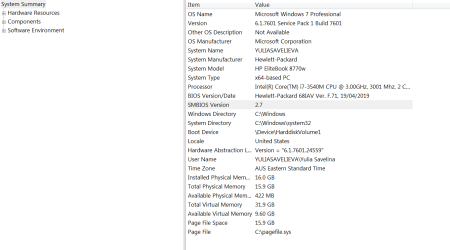
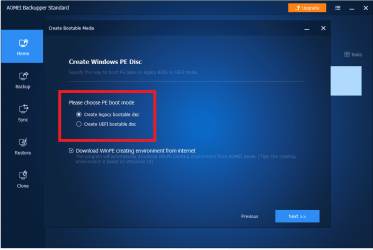
However, I need to choose whether to create a legacy or UEFI bootable disk but can't find which boot mode is used on my laptop.
 

Attachments

  • System Info.png
    System Info.png
    26.7 KB · Views: 0

My Computer My Computer

Computer type
Laptop
Computer Manufacturer/Model Number
HP
OS
Windows 7 Professional SP1 64 bit
CPU
Intel(R) Core(TM) i7-3540M CPU @ 3.00 GHz
Motherboard
HP EliteBook 8770w
Memory
16.0 GB
Graphics Card(s)
AMD FirePro M4000
Hard Drives
SAMSUNG MZ7PA256HMDR-010H1 ATA
WDC WD7500BPKT-75PK4T0 ATA
Browser
Google Chrome

My Computer My Computer

Computer type
PC/Desktop
Computer Manufacturer/Model Number
medionl/Aspire 6930G/acer x55a
OS
W7 home premium 32bit/W7HP 64bit/w10 tp insider ring
CPU
E5300 dual core
Motherboard
medion MS7366
Memory
3gb
Graphics Card(s)
Nvidia Geforce 7100 Nforce 630i
Monitor(s) Displays
avixc
Internet Speed
n (isp resticted to 72)
Antivirus
mse/pands
Browser
palemoon
Other Info
Belkin Fd7050 n USB using Railink RT2870 drivers, more upto date

My Computer My Computer

Computer type
Laptop
Computer Manufacturer/Model Number
HP
OS
Windows 7 Professional SP1 64 bit
CPU
Intel(R) Core(TM) i7-3540M CPU @ 3.00 GHz
Motherboard
HP EliteBook 8770w
Memory
16.0 GB
Graphics Card(s)
AMD FirePro M4000
Hard Drives
SAMSUNG MZ7PA256HMDR-010H1 ATA
WDC WD7500BPKT-75PK4T0 ATA
Browser
Google Chrome
Hi

actually im rather surprised its MBR
my earlier hp8470p is Eufi, but thats besides the point.

if it works in the same way as Macrium it will create the new boot option automatically as soon as you insert the back-up media


Roy
 

My Computer My Computer

Computer type
PC/Desktop
Computer Manufacturer/Model Number
medionl/Aspire 6930G/acer x55a
OS
W7 home premium 32bit/W7HP 64bit/w10 tp insider ring
CPU
E5300 dual core
Motherboard
medion MS7366
Memory
3gb
Graphics Card(s)
Nvidia Geforce 7100 Nforce 630i
Monitor(s) Displays
avixc
Internet Speed
n (isp resticted to 72)
Antivirus
mse/pands
Browser
palemoon
Other Info
Belkin Fd7050 n USB using Railink RT2870 drivers, more upto date
Hi

if it works in the same way as Macrium it will create the new boot option automatically as soon as you insert the back-up media


Roy

With AOMEI, I have to actually select the correct option.
 

Attachments

  • AOMEI.png
    AOMEI.png
    114.1 KB · Views: 0

My Computer My Computer

Computer type
Laptop
Computer Manufacturer/Model Number
HP
OS
Windows 7 Professional SP1 64 bit
CPU
Intel(R) Core(TM) i7-3540M CPU @ 3.00 GHz
Motherboard
HP EliteBook 8770w
Memory
16.0 GB
Graphics Card(s)
AMD FirePro M4000
Hard Drives
SAMSUNG MZ7PA256HMDR-010H1 ATA
WDC WD7500BPKT-75PK4T0 ATA
Browser
Google Chrome
So, I did some googling to try to understand this, and it looks like since I have an MBR system drive, I need to create a legacy bootable disc. Is this correct?
 

My Computer My Computer

Computer type
Laptop
Computer Manufacturer/Model Number
HP
OS
Windows 7 Professional SP1 64 bit
CPU
Intel(R) Core(TM) i7-3540M CPU @ 3.00 GHz
Motherboard
HP EliteBook 8770w
Memory
16.0 GB
Graphics Card(s)
AMD FirePro M4000
Hard Drives
SAMSUNG MZ7PA256HMDR-010H1 ATA
WDC WD7500BPKT-75PK4T0 ATA
Browser
Google Chrome
The efi boot media will also boot under bios mode. You can use it for both. But the legacy version will not boot under efi.

If you tick the download box (as in your screenshot) then it will download about 400mb of stuff which it uses to create the media.

If you don't tick that box, it will use the recovery environment that is already on your pc ( assuming it is available).

If that box was ticked by default, it probably can't find the recovery environment on your pc. Most likely because your recovery sequence is broken.


You can borrow mine which has a lot of extra features

17514x64v22.iso
 

My Computers My Computers

System One System Two

  • Computer type
    PC/Desktop
    OS
    7 X64
    CPU
    i5 8400
    Motherboard
    gigabyte b365m ds3h
    Memory
    2x8gb 3200mhz
    Hard Drives
    various
    PSU
    pure power 11 400w cm
    Case
    Coolermaster
    Cooling
    cryorig m9i
  • Computer type
    PC/Desktop
    OS
    7x64
    CPU
    g5400
    Motherboard
    ga b365m ds3h
    Memory
    8gb ddr4 2400
    PSU
    xfx pro 450w
You can borrow mine which has a lot of extra features

17514x64v22.iso

Thank you SIW2

If I use your boot media, does it matter if my system might be in some ways slightly different to yours?

Also, what size USB do I need to create the boot media?
 

My Computer My Computer

Computer type
Laptop
Computer Manufacturer/Model Number
HP
OS
Windows 7 Professional SP1 64 bit
CPU
Intel(R) Core(TM) i7-3540M CPU @ 3.00 GHz
Motherboard
HP EliteBook 8770w
Memory
16.0 GB
Graphics Card(s)
AMD FirePro M4000
Hard Drives
SAMSUNG MZ7PA256HMDR-010H1 ATA
WDC WD7500BPKT-75PK4T0 ATA
Browser
Google Chrome
AutumnBreeze

I've used SIW2s boot media and have it on USB. The ISO is only 552mb, thefore, a small USB is sufficeint! Mine is on 8GB USB and lots of room left. It will run on most any system.

There are drivers and a driver search program included & it connects via Ethernet to the Internet too! Great Tool!!!!

I used RUFUS to install on USB.

Hope this helps!
 

My Computer My Computer

Computer type
PC/Desktop
Computer Manufacturer/Model Number
HP Desktop & Compaq Laptop
OS
Win 10 x64, Linux Lite, Win 7 x64, BlackArch, & Kali
Hard Drives
Samsung 850 Pro 256Gb,
Hitachi HDD 1Tb,
Crucial MX SSD 250Gb
Segate 3Tb USB 3.0 Ext. Backup HDD
Internet Speed
150Mbps dn, 20Mbps up
Antivirus
Avast Free, Malwarebytes Anti-Exploit & Anti-Ransomware
Browser
Firefox, Chrome, Opera, & VPN
If I use your boot media, does it matter if my system might be in some ways slightly different to yours?
No.
Also, what size USB do I need to create the boot media?

The iso contents are under 600mb.
 

My Computers My Computers

System One System Two

  • Computer type
    PC/Desktop
    OS
    7 X64
    CPU
    i5 8400
    Motherboard
    gigabyte b365m ds3h
    Memory
    2x8gb 3200mhz
    Hard Drives
    various
    PSU
    pure power 11 400w cm
    Case
    Coolermaster
    Cooling
    cryorig m9i
  • Computer type
    PC/Desktop
    OS
    7x64
    CPU
    g5400
    Motherboard
    ga b365m ds3h
    Memory
    8gb ddr4 2400
    PSU
    xfx pro 450w

My Computer My Computer

Computer type
PC/Desktop
Computer Manufacturer/Model Number
HP Desktop & Compaq Laptop
OS
Win 10 x64, Linux Lite, Win 7 x64, BlackArch, & Kali
Hard Drives
Samsung 850 Pro 256Gb,
Hitachi HDD 1Tb,
Crucial MX SSD 250Gb
Segate 3Tb USB 3.0 Ext. Backup HDD
Internet Speed
150Mbps dn, 20Mbps up
Antivirus
Avast Free, Malwarebytes Anti-Exploit & Anti-Ransomware
Browser
Firefox, Chrome, Opera, & VPN
AutumnBreeze

I've used SIW2s boot media and have it on USB. The ISO is only 552mb, thefore, a small USB is sufficeint! Mine is on 8GB USB and lots of room left. It will run on most any system.

There are drivers and a driver search program included & it connects via Ethernet to the Internet too! Great Tool!!!!

I used RUFUS to install on USB.

Hope this helps!

Thank you. I couldn't figure out how to use RUFUS, so used Usb7ice instead ))
 

My Computer My Computer

Computer type
Laptop
Computer Manufacturer/Model Number
HP
OS
Windows 7 Professional SP1 64 bit
CPU
Intel(R) Core(TM) i7-3540M CPU @ 3.00 GHz
Motherboard
HP EliteBook 8770w
Memory
16.0 GB
Graphics Card(s)
AMD FirePro M4000
Hard Drives
SAMSUNG MZ7PA256HMDR-010H1 ATA
WDC WD7500BPKT-75PK4T0 ATA
Browser
Google Chrome
The efi boot media will also boot under bios mode. You can use it for both. But the legacy version will not boot under efi.

If you tick the download box (as in your screenshot) then it will download about 400mb of stuff which it uses to create the media.

If you don't tick that box, it will use the recovery environment that is already on your pc ( assuming it is available).

If that box was ticked by default, it probably can't find the recovery environment on your pc. Most likely because your recovery sequence is broken.


You can borrow mine which has a lot of extra features

17514x64v22.iso

Thank you very much.

I want to make sure I did everything right. Does this look OK? Is FAT32 format OK or do I need to change it?

How do I make sure I did everything correct and have a working boot media? Should I just try to boot from it and see if it works?
 

Attachments

  • USB7ice.png
    USB7ice.png
    10.6 KB · Views: 9

My Computer My Computer

Computer type
Laptop
Computer Manufacturer/Model Number
HP
OS
Windows 7 Professional SP1 64 bit
CPU
Intel(R) Core(TM) i7-3540M CPU @ 3.00 GHz
Motherboard
HP EliteBook 8770w
Memory
16.0 GB
Graphics Card(s)
AMD FirePro M4000
Hard Drives
SAMSUNG MZ7PA256HMDR-010H1 ATA
WDC WD7500BPKT-75PK4T0 ATA
Browser
Google Chrome

My Computers My Computers

System One System Two

  • Computer type
    PC/Desktop
    OS
    7 X64
    CPU
    i5 8400
    Motherboard
    gigabyte b365m ds3h
    Memory
    2x8gb 3200mhz
    Hard Drives
    various
    PSU
    pure power 11 400w cm
    Case
    Coolermaster
    Cooling
    cryorig m9i
  • Computer type
    PC/Desktop
    OS
    7x64
    CPU
    g5400
    Motherboard
    ga b365m ds3h
    Memory
    8gb ddr4 2400
    PSU
    xfx pro 450w

My Computer My Computer

Computer type
PC/Desktop
Computer Manufacturer/Model Number
HP Desktop & Compaq Laptop
OS
Win 10 x64, Linux Lite, Win 7 x64, BlackArch, & Kali
Hard Drives
Samsung 850 Pro 256Gb,
Hitachi HDD 1Tb,
Crucial MX SSD 250Gb
Segate 3Tb USB 3.0 Ext. Backup HDD
Internet Speed
150Mbps dn, 20Mbps up
Antivirus
Avast Free, Malwarebytes Anti-Exploit & Anti-Ransomware
Browser
Firefox, Chrome, Opera, & VPN

My Computer My Computer

Computer type
Laptop
Computer Manufacturer/Model Number
HP
OS
Windows 7 Professional SP1 64 bit
CPU
Intel(R) Core(TM) i7-3540M CPU @ 3.00 GHz
Motherboard
HP EliteBook 8770w
Memory
16.0 GB
Graphics Card(s)
AMD FirePro M4000
Hard Drives
SAMSUNG MZ7PA256HMDR-010H1 ATA
WDC WD7500BPKT-75PK4T0 ATA
Browser
Google Chrome

So the boot media is fine and I am able to boot from it. I realised, however, that I don't know how to use most of the stuff on there, apart from Backupper.

And another question, even though it might be silly. I can see I am connected to the Internet after booting from the recovery USB; but how can I browse the Internet if there's no browser? Would I be able to install a browser (e.g. Chrome) if I keep a setup copy somewhere? The reason I might need to browse the Internet is if I need to find help / instructions for restoring the system. I only have access to one computer, and the smartphone's screen is too small and difficult to use for searching and browsing.
 

My Computer My Computer

Computer type
Laptop
Computer Manufacturer/Model Number
HP
OS
Windows 7 Professional SP1 64 bit
CPU
Intel(R) Core(TM) i7-3540M CPU @ 3.00 GHz
Motherboard
HP EliteBook 8770w
Memory
16.0 GB
Graphics Card(s)
AMD FirePro M4000
Hard Drives
SAMSUNG MZ7PA256HMDR-010H1 ATA
WDC WD7500BPKT-75PK4T0 ATA
Browser
Google Chrome
Back
Top