System restoration after a crash

Qtweb icon should be there on the desktop qtwebicon.jpg

It is basic and doesn't play videos, but it should suffice for reading or posting on this forum, for example. The advantage is that it is very small and low on resource usage

Most of the programs are on the usb stick in the Uprograms folder. If you haven't already looked you are very incurious.

The contents of the Uprograms folder:
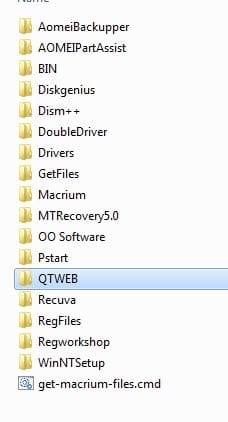
inside-uprograms.jpg
 

My Computers My Computers

System One System Two

  • Computer type
    PC/Desktop
    OS
    7 X64
    CPU
    i5 8400
    Motherboard
    gigabyte b365m ds3h
    Memory
    2x8gb 3200mhz
    Hard Drives
    various
    PSU
    pure power 11 400w cm
    Case
    Coolermaster
    Cooling
    cryorig m9i
  • Computer type
    PC/Desktop
    OS
    7x64
    CPU
    g5400
    Motherboard
    ga b365m ds3h
    Memory
    8gb ddr4 2400
    PSU
    xfx pro 450w
Yes it is! Just fired up your iso.
Beat me 2 it! ;)
 

My Computer My Computer

Computer type
PC/Desktop
Computer Manufacturer/Model Number
HP Desktop & Compaq Laptop
OS
Win 10 x64, Linux Lite, Win 7 x64, BlackArch, & Kali
Hard Drives
Samsung 850 Pro 256Gb,
Hitachi HDD 1Tb,
Crucial MX SSD 250Gb
Segate 3Tb USB 3.0 Ext. Backup HDD
Internet Speed
150Mbps dn, 20Mbps up
Antivirus
Avast Free, Malwarebytes Anti-Exploit & Anti-Ransomware
Browser
Firefox, Chrome, Opera, & VPN
Qtweb icon should be there on the desktop View attachment 412296

It is basic and doesn't play videos, but it should suffice for reading or posting on this forum, for example. The advantage is that it is very small and low on resource usage

Most of the programs are on the usb stick in the Uprograms folder. If you haven't already looked you are very incurious.

The contents of the Uprograms folder:

View attachment 412297

Thank you very much for your help!

As I don't really know what I am doing, I was afraid to go pocking around in case I wreck my system. I know it's probably not possible but I am more afraid not of what I don't know but of what I might not know that I don't know. If something unexpected did happen, it would be a huge problem - that's why I am overcautious. I was even wary of booting from the USB. ))
 

My Computer My Computer

Computer type
Laptop
Computer Manufacturer/Model Number
HP
OS
Windows 7 Professional SP1 64 bit
CPU
Intel(R) Core(TM) i7-3540M CPU @ 3.00 GHz
Motherboard
HP EliteBook 8770w
Memory
16.0 GB
Graphics Card(s)
AMD FirePro M4000
Hard Drives
SAMSUNG MZ7PA256HMDR-010H1 ATA
WDC WD7500BPKT-75PK4T0 ATA
Browser
Google Chrome
I don't want to start another thread so will ask here.

As someone advised me in another thread, I have created another set of boot media / system image using Macrium Reflect - in an unlikely case the AOMEI system restore fails. Macrium wasn't as difficult to figure out as I expected. However, I have a few questions.

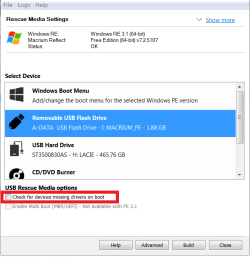
1. When creating boot media, there was an option to 'Check for devices missing drivers on boot'. What is it and what happens if I select it / do I need to select it?

2. Creating a system image creates two files: one I understand is the system image, and the other is an .xml document called 'System Image'. What is this second file and how is it used?

3. And finally, how do you add other stuff to the boot media (like what SIW2 has done with AOMEI)? Does anyone have links to good tutorials about this? I wouldn't mind customising my Macrium boot media as well.

Thank you guys!
 

Attachments

  • Macrium Boot Media.png
    Macrium Boot Media.png
    16.3 KB · Views: 9
  • Macrium System Image.png
    Macrium System Image.png
    3.4 KB · Views: 9

My Computer My Computer

Computer type
Laptop
Computer Manufacturer/Model Number
HP
OS
Windows 7 Professional SP1 64 bit
CPU
Intel(R) Core(TM) i7-3540M CPU @ 3.00 GHz
Motherboard
HP EliteBook 8770w
Memory
16.0 GB
Graphics Card(s)
AMD FirePro M4000
Hard Drives
SAMSUNG MZ7PA256HMDR-010H1 ATA
WDC WD7500BPKT-75PK4T0 ATA
Browser
Google Chrome
how do you add other stuff to the boot media (like what SIW2 has done

I built the winpe first, then added programs to it - one of them being aomei.

It takes years to learn.


You could add the macrium boot.wim to the 17514v22 usb stick, so it is all on one usb stick.

copy the macrium boot.wim to your desktop.

Rename it to macrium.wim

copy macrium.wim into the sources folder of the 17514v22 usb stick.

Then you need to add a boot menu, which I am too lazy to explain, so I have made them for you.

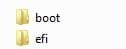
Extract the attached .zip file and copy these onto the usb stick - say yes to replace the bcd files with the new ones.

these.jpg

View attachment usbstick.zip
 

My Computers My Computers

System One System Two

  • Computer type
    PC/Desktop
    OS
    7 X64
    CPU
    i5 8400
    Motherboard
    gigabyte b365m ds3h
    Memory
    2x8gb 3200mhz
    Hard Drives
    various
    PSU
    pure power 11 400w cm
    Case
    Coolermaster
    Cooling
    cryorig m9i
  • Computer type
    PC/Desktop
    OS
    7x64
    CPU
    g5400
    Motherboard
    ga b365m ds3h
    Memory
    8gb ddr4 2400
    PSU
    xfx pro 450w
I built the winpe first, then added programs to it - one of them being aomei.

It takes years to learn.


You could add the macrium boot.wim to the 17514v22 usb stick, so it is all on one usb stick.

copy the macrium boot.wim to your desktop.

Rename it to macrium.wim

copy macrium.wim into the sources folder of the 17514v22 usb stick.

Then you need to add a boot menu, which I am too lazy to explain, so I have made them for you.

Extract the attached .zip file and copy these onto the usb stick - say yes to replace the bcd files with the new ones.

View attachment 412314

View attachment 412313

Thank you so much for this!

I have followed your instructions and created a boot media. However, I have a few questions.

When booting from this USB, I get a menu.

If I choose 1. SIW2 win7pe option, I can't access Macrium. The Macrium subfolder in the Uprograms folder is empty, and I can't find any shortcuts on the desktop.

If I choose 2. Macrium.wim, I only get Macrium. Even though I have network connection, I can't access and start QTWEB (I can access the executable in the Uprograms -> QTWEB folder using the Prompt but obviously can't run it from there).

I have no idea how to use the Advanced options. I will try exploring them more.

Am I doing something wrong or missing something?
 

My Computer My Computer

Computer type
Laptop
Computer Manufacturer/Model Number
HP
OS
Windows 7 Professional SP1 64 bit
CPU
Intel(R) Core(TM) i7-3540M CPU @ 3.00 GHz
Motherboard
HP EliteBook 8770w
Memory
16.0 GB
Graphics Card(s)
AMD FirePro M4000
Hard Drives
SAMSUNG MZ7PA256HMDR-010H1 ATA
WDC WD7500BPKT-75PK4T0 ATA
Browser
Google Chrome
That is correct. You can choose to either boot the original 17514v22 boot.wim, or the macrium.wim.

If you choose to boot the macrium.wim , it does not have wow support or any of the other functions I added to the 17514v22 boot.wim.

I haven't got the time to teach people how to build advanced winpe media, it is not trivial
 

My Computers My Computers

System One System Two

  • Computer type
    PC/Desktop
    OS
    7 X64
    CPU
    i5 8400
    Motherboard
    gigabyte b365m ds3h
    Memory
    2x8gb 3200mhz
    Hard Drives
    various
    PSU
    pure power 11 400w cm
    Case
    Coolermaster
    Cooling
    cryorig m9i
  • Computer type
    PC/Desktop
    OS
    7x64
    CPU
    g5400
    Motherboard
    ga b365m ds3h
    Memory
    8gb ddr4 2400
    PSU
    xfx pro 450w
That is correct. You can choose to either boot the original 17514v22 boot.wim, or the macrium.wim.

If you choose to boot the macrium.wim , it does not have wow support or any of the other functions I added to the 17514v22 boot.wim.

I haven't got the time to teach people how to build advanced winpe media, it is not trivial

OK, thank you.
 

My Computer My Computer

Computer type
Laptop
Computer Manufacturer/Model Number
HP
OS
Windows 7 Professional SP1 64 bit
CPU
Intel(R) Core(TM) i7-3540M CPU @ 3.00 GHz
Motherboard
HP EliteBook 8770w
Memory
16.0 GB
Graphics Card(s)
AMD FirePro M4000
Hard Drives
SAMSUNG MZ7PA256HMDR-010H1 ATA
WDC WD7500BPKT-75PK4T0 ATA
Browser
Google Chrome
Back
Top