Solved System Restore "ComPlusStaging" error

Endzone

New member
Member
Local time
3:40 PM
Messages
53
I have searched everywhere on the internet for hours trying to find a solution to this, but no one seems to know exactly what causes this error when doing a system restore. Here is what it looks like on my computer after I try to do a system restore:
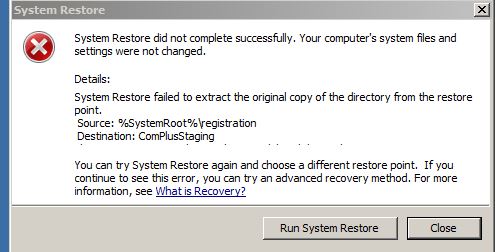
original.jpg

It could be that the "registration" folder is missing from C:\Windows or from C:\Windows\System32.

I wonder if someone might be able to check and see if you have a folder called "Registration" in either of these 2 directories. I have a valid OEM copy of Windows7 that I paid for and registered online about 6 months ago. I have enabled "View all hidden folders and files". Does anyone have any experience with this particular problem? I have the 32-bit version of Windows 7 with SP1.

Thanks,
 

My Computer

Computer type
PC/Desktop
Computer Manufacturer/Model Number
Systemax
OS
Windows 7 32-bit
CPU
Intel E4500
Motherboard
Asus P5GC
Memory
1GB
Graphics Card(s)
GeForce 8400 GS
Hard Drives
Three
Antivirus
None
Browser
IE11
Or, how about if somebody might do a search on "Registration" and see if a folder like this pops up anywhere on Windows 7. I'm wondering if I might have accidently erased this folder.

Thanks,
Endzone
 

My Computer

Computer type
PC/Desktop
Computer Manufacturer/Model Number
Systemax
OS
Windows 7 32-bit
CPU
Intel E4500
Motherboard
Asus P5GC
Memory
1GB
Graphics Card(s)
GeForce 8400 GS
Hard Drives
Three
Antivirus
None
Browser
IE11
Here's how one person solved this problem I am having. He talks about reinstalling a registration folder in the Windows directory. My friends, not one of you can simply go to this directory and see if you have a "registration" folder in windows 7 home premium 32-bit SP1? Is that too much to ask? You can't simply do a search on this folder? That is too much to ask? Thank you very much.

original.jpg
 

My Computer

Computer type
PC/Desktop
Computer Manufacturer/Model Number
Systemax
OS
Windows 7 32-bit
CPU
Intel E4500
Motherboard
Asus P5GC
Memory
1GB
Graphics Card(s)
GeForce 8400 GS
Hard Drives
Three
Antivirus
None
Browser
IE11
I do have a registration folder under C:\Windows.

It contains a file named R000000000001.clb and a folder called CRMLog.

CRMLog is empty.

Total space occupied by the registration folder is 22kb.

I had never noticed it before and have no idea of its purpose.

It was created in July 2009, which is before I last did a Windows install.

I'm using 64 bit Windows 7 Home Premium.
 

My Computer

Computer type
PC/Desktop
Computer Manufacturer/Model Number
Ignatz Special; 4 speed manual gearbox; factory air conditioning; one of one
OS
Windows 7 Home Premium SP1, 64-bit
CPU
Intel Skylake i5-6600K, not overclocked
Motherboard
AsRock Z170M Extreme 4, micro ATX
Memory
8 GB HyperX DDR4-2666 (2 x 4 GB)
Graphics Card(s)
none; graphics are integrated on CPU
Sound Card
onboard: Realtek ALC1150; external: USB Behringer UF0-202
Monitor(s) Displays
Dell S2340M 23 inch IPS
Screen Resolution
1600 x 900
Hard Drives
System: Crucial MX100 series SSD, 128 GB;
Data: Samsung Spinpoint 103SJ, 1 TB;
Backup: WD Caviar Green WD30EZRX-00D8PB0, 3 TB
PSU
Rosewill SilentNight 500 watt fanless, semi-modular
Case
Antec Solo II
Cooling
Noctua NH-U12S; Noctua F12 intake, Noctua S12A exhaust
Keyboard
Microsoft 200 6JH-00001 USB
Mouse
Dell or Microsoft optical wired; USB
Antivirus
Microsoft Security Essentials and Malwarebytes Premium
Browser
Pale Moon
Other Info
All fans PWM; speeds at idle: CPU circa 500 rpm; intake circa 600 rpm; exhaust circa 600 rpm; CPU temps 27 idle and 47 C load in a warm room (27 C/81 F) when running Intel Extreme Tuning Utility stress test.
I do have a registration folder under C:\Windows.

It contains a file named R000000000001.clb and a folder called CRMLog.

CRMLog is empty.

Total space occupied by the registration folder is 22kb.

I had never noticed it before and have no idea of its purpose.

It was created in July 2009, which is before I last did a Windows install.

I'm using 64 bit Windows 7 Home Premium.

Thank you sir. I appreciate you checking that for me. I think this missing folder is my problem.
 

My Computer

Computer type
PC/Desktop
Computer Manufacturer/Model Number
Systemax
OS
Windows 7 32-bit
CPU
Intel E4500
Motherboard
Asus P5GC
Memory
1GB
Graphics Card(s)
GeForce 8400 GS
Hard Drives
Three
Antivirus
None
Browser
IE11
Well I did a Windows 7 repair according to these instructions:

http://www.sevenforums.com/tutorials/3413-repair-install.html

Every thing seems to be just fine now. The "Registration" folder is back in the C:\Windows directory.

I did the repair with my original Windows 7 SP1 32-bit disk that I bought.

There were 171 updates to do at the MS Update site!! It took about 4 or 5 hours to download and install them all. Sometimes the updates got stuck, and I had to shut down the computer and restart it. Yes, even with SP1 on my disk, I still have this many updates. One was IE9 and another was IE11.

The desktop came up with IE8 as my browser instead of IE11 which I normally use. I just had to do the update to get IE11 going.

The little status thingie in the right lower side of the task bar also listed stuff I needed to attend to such as turn on window defender, turn on automatic updates (which I don't do), and turn on an anti-virus, etc. I will take care of all this jazz later.

Other than that all the icons and programs came back just fine! This is what I was hoping for because it took me 3 days to get Windows 7 set up the way I wanted it.

I did not have to re-install any drivers.

I did a backup/restore right after I did all the update downloads as a reference point. I have a D: drive and an E: drive on my computer besides the C: drive.

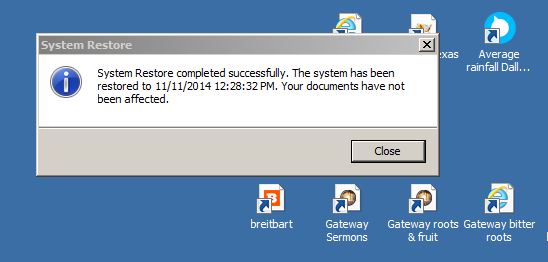
And last but not least, I did a "system restore", and it worked just fine!
My thanks to ignatzatsonic for his assistance.

original.jpg
 

My Computer

Computer type
PC/Desktop
Computer Manufacturer/Model Number
Systemax
OS
Windows 7 32-bit
CPU
Intel E4500
Motherboard
Asus P5GC
Memory
1GB
Graphics Card(s)
GeForce 8400 GS
Hard Drives
Three
Antivirus
None
Browser
IE11
Back
Top