
Solved System Restore Has Stopped Automatically Creating Restore Points

Keith2468

New member
Member
Local time
10:37 AM
Messages
15
Location
Winnipeg, Canada
My last automatically System Restore Point automatically created by the passage of time was created 2013-01-23.

No further automatic system restore points are being created (that means not ever, not daily, not weekly, simply no longer created automatically by the passage of time since last January).

I do not see restore points automatically created by other programs, like Acronis 2014 or Kaspersky KIS 2014 which I installed last week. (But the problem goes way back to January, so these new versions are obviously not involved.)

System restore points are still automatically created by Windows Update and by nVidia driver updates.

System restore points can still be created manually.

The SR task is present in Task Scheduler.

SFC /SCANNOW found no problems.

System Restore is still turned on.

There is free disk space for restore points.

The computer is a Dell Studio 9000, aka XPS 435T, core i7 960.
Windows 7 Home Premium with all the standard Windows Updates.
KIS 2013, now KIS2014
Acronis 2013, then 2014, and currently uninstalled.
 

My Computer

Computer Manufacturer/Model Number
Dell Studio XPS 435T (aka Dell 9000)
OS
Windows Home Premium 64-bit
CPU
Core i7-960
Motherboard
Dell 0x501h (a03) BIOS A16
Memory
12 GB triple channel DDR3 PC3-8500F (7-7-7-20)
Graphics Card(s)
MSI N460GTX Hawk (nVidia 460GTX)
Sound Card
Integrated Realtek HD Audio
Monitor(s) Displays
LG E2350 digital
Screen Resolution
1920 X 1028 (DPI Medium - 125%)
Hard Drives
Intel SSD 520 with 240 GB
Samsung HD745JJ - 700 GB
WDC Caviar Black WD1502FAEX
Case
Dell full desktop
Cooling
Fan and air
Keyboard
Microsoft Natural Ergonomic Keyboard 4000
Mouse
Logitech Performance Mouse MX
Internet Speed
10 Gbps
Other Info
I also have an old Dell Dimension 8200.
Hiyya Keith mate run a chkdsk as well as the sfc you have done already and also these I know you have Kaspersky and so do I (2013) but I still pick up malware with the links .

http://www.sevenforums.com/tutorials/433-disk-check.html

download the ADW from bleeping computer and if you have CCleaner the run a clean up don't forget to save the cookies that you have that use passwords for site s you need and the registry check any faults back them u before you fix.


http://www.superantispyware.com/

http://www.malwarebytes.org/products/malwarebytes_free/
http://www.bleepingcomputer.com/download/adwcleaner/

CCleaner - Download > download from piriform - you probably have but if not....
 

My Computer

Computer type
PC/Desktop
Computer Manufacturer/Model Number
Own build (new) Desk1 / Asus ROG Win 7 / Desk2 1st build
OS
Desk1 7 Home Prem / Desk2 10 Pro / Main lap Asus ROG 10 Pro 2 laptop Toshiba 7 Pro Asus P2520 7 & 10
CPU
Desk1 i5 3750K / Laptop i7 GTX 860M / Desk2 i5 2500
Motherboard
Desk1 Asus P877-V / Desk2 Gigabyte H67 UD3H / Laptop ?
Memory
Desk1 8GB (1866) / Desk2 16GB (1333) / Laptop 8Gb DDR3
Graphics Card(s)
Desk 1& 2NVidia GTX 650 & Laptops on board Intel
Sound Card
Desk 1 & 2 -XONAR DG Realtek High Def audio Laptop
Monitor(s) Displays
Desk 1 Benq HD 2450 / Desk2 Philips 24" / Laptop 17.5"
Screen Resolution
1920x1080 D1 & D2 & Laptop 1
Hard Drives
Desk1 Samsung 120GB 830 SSD
Asus ROG 256GB 850 Pro SSD
Desk2 Samsung 840 256 SSD
Toshiba 120GB EVO
PSU
Desk 1 Corsair HX 1050/ Laptop ? / Desk 2 Corsair HX 650
Case
Desk 1 Cooler HAF XM ? Toshiba laptop / Desk2 Coolermaster
Cooling
Fans on all Desk1 -2 Desk2 - all Coolermasters 5 Laptop ?
Keyboard
Desk 1 MS Sidewinder X6 Desk 2 MS Sidewinder X 4
Mouse
Desk 1&2 - Gigabyte MS 900 gamer - laptop - Logitec wireless
Internet Speed
ADSL2+
Other Info
One other Desktop (tester) and spare Toshba laptop both with SSD's
Running Kaspersky 2016 ISS on all machines config'd identically
Logitec audio stereo systems on each machine (x3)
Canon MG5250MFC
Router/modem TP-Link running WPA2SK
Thanks for your quick reply Dr. Tinkerer.

I ran full scans with SuperAntiSpyware, AdwCleaner and MalwareBytes.

I found some tracking cookies and that was all.

I had earlier run Scandisk on all my drives and CCleaner.

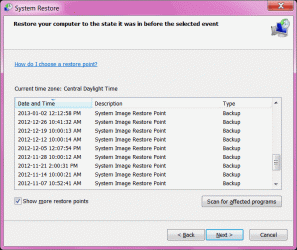
1. I select "Show more restore points" so System Restore shows me all the restore points.
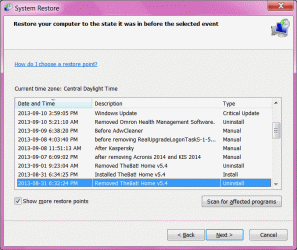
There are no restore points whatsoever at all from 2013-01-23 and 2013-08-05.

So a 6-1/2 month gap.

Since then restore points occur more often than every 7 days, the biggest gap since August 5 was 6 days. (Several Manual, two Windows Update Critical Update, two nVidia driver installs, two 'The Bat' installs and uninstalls.)

So yes, I would not expect an automatic checkpoint since August 5. But that still leaves the unexplained 6-1/2 month gap.

2. I did notice something on the web.

I found one post in Sevenforums that said Volume Shadow Copy was a required service for System Restore.

But this was just one person posting. I could find nothing to confirm that anywhere else.

And since System Restore does work when started manually and when triggered by Windows Update, I do not suspect a missing dependency.

On my computer Volume Shadow Copy is set to Manual start.

3. I tried something.

I went into Task Manager and tried to manually start the SR task there.

It went into Running status, but did not create a restore point. (I left the keyboard locked for 20 minutes. Still didn't run.)

That might be because there were recent restore points, I don't know.

4. There were monthly Windows Updates in February through July 2013. I applied them. But I do not see any restore points automatically created by them. But in August Windows Update did create a restore point.

So, perhaps, IF other people have restore points from Windows Update in that time range, then my problem might be something that was wrong with my computer, but that somehow got fixed. Maybe.

------------

A. So I don't know if System Restore has a dependency on Volume Shadow Copy being set to automatic, or if manual is okay. System Restore does work if manually triggered or triggered by Windows Update and nVidia driver updates, so I think that means its prerequisites are there.

How is the service Volume Shadow Copy set to start on other people's computers?

B. Did Windows Update automatically create restore points on other people's computers when the regular monthly February through July 2013 Windows Update Critical Updates were applied?

C. If you go into Task Manager on a working normally computer, and manually trigger the SR task, does it run regardless of whether it is less than 7 days since the last Restore Point? (That is, does it still that there is no restore point less than 7 days old.)

I got these replies back from another forum:

A. Mine are all set to manual on multiple Windows 7 systems.

B. Yes, restore points were created for Windows update during that time period.

C. No, going to the task manager and manually triggering the SR task does not create a restore point regardless.


-----------------


So I don't know. Maybe this is something that went with my computer in January that got invisibly fixed by some update in August.


Tomorrow is Patch Tuesday, so the computer should make a restore point then. I guess I can wait 8 days and see if it makes a restore point due to the passage of time.

Any other suggestions Dr. Tinkerer? Anyone else?
 

My Computer

Computer Manufacturer/Model Number
Dell Studio XPS 435T (aka Dell 9000)
OS
Windows Home Premium 64-bit
CPU
Core i7-960
Motherboard
Dell 0x501h (a03) BIOS A16
Memory
12 GB triple channel DDR3 PC3-8500F (7-7-7-20)
Graphics Card(s)
MSI N460GTX Hawk (nVidia 460GTX)
Sound Card
Integrated Realtek HD Audio
Monitor(s) Displays
LG E2350 digital
Screen Resolution
1920 X 1028 (DPI Medium - 125%)
Hard Drives
Intel SSD 520 with 240 GB
Samsung HD745JJ - 700 GB
WDC Caviar Black WD1502FAEX
Case
Dell full desktop
Cooling
Fan and air
Keyboard
Microsoft Natural Ergonomic Keyboard 4000
Mouse
Logitech Performance Mouse MX
Internet Speed
10 Gbps
Other Info
I also have an old Dell Dimension 8200.
Now just a simple query what have you got showing in the update history and have you looked in Tools - CCleaner > System restore - is there anything in there?
 

My Computer

Computer type
PC/Desktop
Computer Manufacturer/Model Number
Own build (new) Desk1 / Asus ROG Win 7 / Desk2 1st build
OS
Desk1 7 Home Prem / Desk2 10 Pro / Main lap Asus ROG 10 Pro 2 laptop Toshiba 7 Pro Asus P2520 7 & 10
CPU
Desk1 i5 3750K / Laptop i7 GTX 860M / Desk2 i5 2500
Motherboard
Desk1 Asus P877-V / Desk2 Gigabyte H67 UD3H / Laptop ?
Memory
Desk1 8GB (1866) / Desk2 16GB (1333) / Laptop 8Gb DDR3
Graphics Card(s)
Desk 1& 2NVidia GTX 650 & Laptops on board Intel
Sound Card
Desk 1 & 2 -XONAR DG Realtek High Def audio Laptop
Monitor(s) Displays
Desk 1 Benq HD 2450 / Desk2 Philips 24" / Laptop 17.5"
Screen Resolution
1920x1080 D1 & D2 & Laptop 1
Hard Drives
Desk1 Samsung 120GB 830 SSD
Asus ROG 256GB 850 Pro SSD
Desk2 Samsung 840 256 SSD
Toshiba 120GB EVO
PSU
Desk 1 Corsair HX 1050/ Laptop ? / Desk 2 Corsair HX 650
Case
Desk 1 Cooler HAF XM ? Toshiba laptop / Desk2 Coolermaster
Cooling
Fans on all Desk1 -2 Desk2 - all Coolermasters 5 Laptop ?
Keyboard
Desk 1 MS Sidewinder X6 Desk 2 MS Sidewinder X 4
Mouse
Desk 1&2 - Gigabyte MS 900 gamer - laptop - Logitec wireless
Internet Speed
ADSL2+
Other Info
One other Desktop (tester) and spare Toshba laptop both with SSD's
Running Kaspersky 2016 ISS on all machines config'd identically
Logitec audio stereo systems on each machine (x3)
Canon MG5250MFC
Router/modem TP-Link running WPA2SK

My Computer

Computer Manufacturer/Model Number
Hewlett packard/p6512uk
OS
Microsoft Windows 7 Home Premium 64-bit 7600
CPU
IIx4 amd athelon 635 processor
Motherboard
FOXCONN 2AA9
Memory
2x2gb
Graphics Card(s)
ati radeon HD 5450
Sound Card
(1) Realtek High Definition Audio (2) AMD High Definition
Monitor(s) Displays
samsung lcd tv 32"
Screen Resolution
1360x 768
Hard Drives
(1) WDC WD10 01FAES-60Z2A0 SATA Disk Device (2) Maxtor OneTouch USB Device (3) ST310003 33AS USB Device (4) WD My Book 1111 USB Device
PSU
?
Cooling
air!
Keyboard
wireless hp
Mouse
wireless Hp,optical
Internet Speed
1.10mb/s
Antivirus
MSE
Browser
Firefox

My Computer

Computer type
PC/Desktop
Computer Manufacturer/Model Number
Own build (new) Desk1 / Asus ROG Win 7 / Desk2 1st build
OS
Desk1 7 Home Prem / Desk2 10 Pro / Main lap Asus ROG 10 Pro 2 laptop Toshiba 7 Pro Asus P2520 7 & 10
CPU
Desk1 i5 3750K / Laptop i7 GTX 860M / Desk2 i5 2500
Motherboard
Desk1 Asus P877-V / Desk2 Gigabyte H67 UD3H / Laptop ?
Memory
Desk1 8GB (1866) / Desk2 16GB (1333) / Laptop 8Gb DDR3
Graphics Card(s)
Desk 1& 2NVidia GTX 650 & Laptops on board Intel
Sound Card
Desk 1 & 2 -XONAR DG Realtek High Def audio Laptop
Monitor(s) Displays
Desk 1 Benq HD 2450 / Desk2 Philips 24" / Laptop 17.5"
Screen Resolution
1920x1080 D1 & D2 & Laptop 1
Hard Drives
Desk1 Samsung 120GB 830 SSD
Asus ROG 256GB 850 Pro SSD
Desk2 Samsung 840 256 SSD
Toshiba 120GB EVO
PSU
Desk 1 Corsair HX 1050/ Laptop ? / Desk 2 Corsair HX 650
Case
Desk 1 Cooler HAF XM ? Toshiba laptop / Desk2 Coolermaster
Cooling
Fans on all Desk1 -2 Desk2 - all Coolermasters 5 Laptop ?
Keyboard
Desk 1 MS Sidewinder X6 Desk 2 MS Sidewinder X 4
Mouse
Desk 1&2 - Gigabyte MS 900 gamer - laptop - Logitec wireless
Internet Speed
ADSL2+
Other Info
One other Desktop (tester) and spare Toshba laptop both with SSD's
Running Kaspersky 2016 ISS on all machines config'd identically
Logitec audio stereo systems on each machine (x3)
Canon MG5250MFC
Router/modem TP-Link running WPA2SK
Here are some screen shots of some of the checkpoints Windows has taken, showing the gap from January to August.
 

Attachments

  • Image5.gif
    Image5.gif
    59.6 KB · Views: 49
  • Image1.gif
    Image1.gif
    57.5 KB · Views: 50
  • Image6.gif
    Image6.gif
    53.9 KB · Views: 49

My Computer

Computer Manufacturer/Model Number
Dell Studio XPS 435T (aka Dell 9000)
OS
Windows Home Premium 64-bit
CPU
Core i7-960
Motherboard
Dell 0x501h (a03) BIOS A16
Memory
12 GB triple channel DDR3 PC3-8500F (7-7-7-20)
Graphics Card(s)
MSI N460GTX Hawk (nVidia 460GTX)
Sound Card
Integrated Realtek HD Audio
Monitor(s) Displays
LG E2350 digital
Screen Resolution
1920 X 1028 (DPI Medium - 125%)
Hard Drives
Intel SSD 520 with 240 GB
Samsung HD745JJ - 700 GB
WDC Caviar Black WD1502FAEX
Case
Dell full desktop
Cooling
Fan and air
Keyboard
Microsoft Natural Ergonomic Keyboard 4000
Mouse
Logitech Performance Mouse MX
Internet Speed
10 Gbps
Other Info
I also have an old Dell Dimension 8200.
CCleaner did not show any other restore points.

My Windows Update history has a ton of updates from
2013-01-08
2013-01-09 (ergonomic keyboard 4000)
2013-01-11 (windows defender (WD), although I don't use it. probably KIS was uninstalled or disabled)
2013-01-15 (WD)
(there is a restore point at 2013-01-23, system image restore point, no windows update, i suppose triggered by 7 days passing).
2013-02-13 and now restore points stop
2013-03-26
2013-04-06
2013-04-09
2013-05-14
2013-06-11
2013-06-13
2013-07-09
2013-08-14
2013-08-28 which shows up with a restore point, and restore points appear frequently again
2013-09-10

I may use that script to make restore points. Or do them manually.

I will wait 8 days and see if restore points occur automatically now.
 

My Computer

Computer Manufacturer/Model Number
Dell Studio XPS 435T (aka Dell 9000)
OS
Windows Home Premium 64-bit
CPU
Core i7-960
Motherboard
Dell 0x501h (a03) BIOS A16
Memory
12 GB triple channel DDR3 PC3-8500F (7-7-7-20)
Graphics Card(s)
MSI N460GTX Hawk (nVidia 460GTX)
Sound Card
Integrated Realtek HD Audio
Monitor(s) Displays
LG E2350 digital
Screen Resolution
1920 X 1028 (DPI Medium - 125%)
Hard Drives
Intel SSD 520 with 240 GB
Samsung HD745JJ - 700 GB
WDC Caviar Black WD1502FAEX
Case
Dell full desktop
Cooling
Fan and air
Keyboard
Microsoft Natural Ergonomic Keyboard 4000
Mouse
Logitech Performance Mouse MX
Internet Speed
10 Gbps
Other Info
I also have an old Dell Dimension 8200.
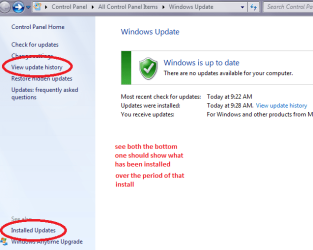
So just what is showing in Windows Update > View update history? and in the Installed updates.

On my old tester they go way back (to may 2012 and even one in 2010) on my frequently used machine I have reinstalled a few times so are not showing that far back.
 

Attachments

  • UP.PNG
    UP.PNG
    24.6 KB · Views: 48

My Computer

Computer type
PC/Desktop
Computer Manufacturer/Model Number
Own build (new) Desk1 / Asus ROG Win 7 / Desk2 1st build
OS
Desk1 7 Home Prem / Desk2 10 Pro / Main lap Asus ROG 10 Pro 2 laptop Toshiba 7 Pro Asus P2520 7 & 10
CPU
Desk1 i5 3750K / Laptop i7 GTX 860M / Desk2 i5 2500
Motherboard
Desk1 Asus P877-V / Desk2 Gigabyte H67 UD3H / Laptop ?
Memory
Desk1 8GB (1866) / Desk2 16GB (1333) / Laptop 8Gb DDR3
Graphics Card(s)
Desk 1& 2NVidia GTX 650 & Laptops on board Intel
Sound Card
Desk 1 & 2 -XONAR DG Realtek High Def audio Laptop
Monitor(s) Displays
Desk 1 Benq HD 2450 / Desk2 Philips 24" / Laptop 17.5"
Screen Resolution
1920x1080 D1 & D2 & Laptop 1
Hard Drives
Desk1 Samsung 120GB 830 SSD
Asus ROG 256GB 850 Pro SSD
Desk2 Samsung 840 256 SSD
Toshiba 120GB EVO
PSU
Desk 1 Corsair HX 1050/ Laptop ? / Desk 2 Corsair HX 650
Case
Desk 1 Cooler HAF XM ? Toshiba laptop / Desk2 Coolermaster
Cooling
Fans on all Desk1 -2 Desk2 - all Coolermasters 5 Laptop ?
Keyboard
Desk 1 MS Sidewinder X6 Desk 2 MS Sidewinder X 4
Mouse
Desk 1&2 - Gigabyte MS 900 gamer - laptop - Logitec wireless
Internet Speed
ADSL2+
Other Info
One other Desktop (tester) and spare Toshba laptop both with SSD's
Running Kaspersky 2016 ISS on all machines config'd identically
Logitec audio stereo systems on each machine (x3)
Canon MG5250MFC
Router/modem TP-Link running WPA2SK
CCleaner did not show any other restore points.

My Windows Update history has a ton of updates from
2013-01-08
2013-01-09 (ergonomic keyboard 4000)
2013-01-11 (windows defender (WD), although I don't use it. probably KIS was uninstalled or disabled)
2013-01-15 (WD)
(there is a restore point at 2013-01-23, system image restore point, no windows update, i suppose triggered by 7 days passing).
2013-02-13 and now restore points stop
2013-03-26
2013-04-06
2013-04-09
2013-05-14
2013-06-11
2013-06-13
2013-07-09
2013-08-14
2013-08-28 which shows up with a restore point, and restore points appear frequently again
2013-09-10

I may use that script to make restore points. Or do them manually.

I will wait 8 days and see if restore points occur automatically now.
Hang in there Keith you are doing very well mate considering it is such a frustrating issue:)

John
 

My Computer

Computer type
PC/Desktop
Computer Manufacturer/Model Number
Own build (new) Desk1 / Asus ROG Win 7 / Desk2 1st build
OS
Desk1 7 Home Prem / Desk2 10 Pro / Main lap Asus ROG 10 Pro 2 laptop Toshiba 7 Pro Asus P2520 7 & 10
CPU
Desk1 i5 3750K / Laptop i7 GTX 860M / Desk2 i5 2500
Motherboard
Desk1 Asus P877-V / Desk2 Gigabyte H67 UD3H / Laptop ?
Memory
Desk1 8GB (1866) / Desk2 16GB (1333) / Laptop 8Gb DDR3
Graphics Card(s)
Desk 1& 2NVidia GTX 650 & Laptops on board Intel
Sound Card
Desk 1 & 2 -XONAR DG Realtek High Def audio Laptop
Monitor(s) Displays
Desk 1 Benq HD 2450 / Desk2 Philips 24" / Laptop 17.5"
Screen Resolution
1920x1080 D1 & D2 & Laptop 1
Hard Drives
Desk1 Samsung 120GB 830 SSD
Asus ROG 256GB 850 Pro SSD
Desk2 Samsung 840 256 SSD
Toshiba 120GB EVO
PSU
Desk 1 Corsair HX 1050/ Laptop ? / Desk 2 Corsair HX 650
Case
Desk 1 Cooler HAF XM ? Toshiba laptop / Desk2 Coolermaster
Cooling
Fans on all Desk1 -2 Desk2 - all Coolermasters 5 Laptop ?
Keyboard
Desk 1 MS Sidewinder X6 Desk 2 MS Sidewinder X 4
Mouse
Desk 1&2 - Gigabyte MS 900 gamer - laptop - Logitec wireless
Internet Speed
ADSL2+
Other Info
One other Desktop (tester) and spare Toshba laptop both with SSD's
Running Kaspersky 2016 ISS on all machines config'd identically
Logitec audio stereo systems on each machine (x3)
Canon MG5250MFC
Router/modem TP-Link running WPA2SK
Hi John -

System restore now shows Windows Update Critical Updates on 2013-09-10 and 2013-09-12.

On the 15th it made a restore point before installing Ad Block for IE.

I'll try to remember not to install anything until the 24th so we can see if checkpoints happen one their own after 7 days.

(Odd thing, moments ago I uninstalled and reinstalled KIS 2014 and it did not make a restore point. I know this has to do with how the KIS install script is written, but I would have thought something as big as an AV would take restore points before and after installing. But that is a KIS matter.)

So I'll post back on the 24th.
 

My Computer

Computer Manufacturer/Model Number
Dell Studio XPS 435T (aka Dell 9000)
OS
Windows Home Premium 64-bit
CPU
Core i7-960
Motherboard
Dell 0x501h (a03) BIOS A16
Memory
12 GB triple channel DDR3 PC3-8500F (7-7-7-20)
Graphics Card(s)
MSI N460GTX Hawk (nVidia 460GTX)
Sound Card
Integrated Realtek HD Audio
Monitor(s) Displays
LG E2350 digital
Screen Resolution
1920 X 1028 (DPI Medium - 125%)
Hard Drives
Intel SSD 520 with 240 GB
Samsung HD745JJ - 700 GB
WDC Caviar Black WD1502FAEX
Case
Dell full desktop
Cooling
Fan and air
Keyboard
Microsoft Natural Ergonomic Keyboard 4000
Mouse
Logitech Performance Mouse MX
Internet Speed
10 Gbps
Other Info
I also have an old Dell Dimension 8200.
Going by memory their have been some 3rd party defrag programs that mess with restore points.
 

My Computer

Computer type
PC/Desktop
Computer Manufacturer/Model Number
Home made Desktop
OS
Windows 10 Pro. 64/ version 1709 Windows 7 Pro/64
CPU
Intel i7-6800K @ 4.3
Motherboard
ASUS X-99 Deluxe II
Memory
Corsair Platinum 16 gig @2400
Graphics Card(s)
EVGA GTX 1070 OC
Monitor(s) Displays
Asus 27" LED LCD/VE278Q
Screen Resolution
1920-1080 or 1280-720 HDMI
Hard Drives
INTEL SSD 730-240 Gb Sata 3.0/
PSU
EVGA Platium 1200W
Case
Phanteks Luxe Tempered Glass 8 fans/ one radiator
Cooling
XSPC/ Water Cooled CPU
Keyboard
Das 4 Professional
Mouse
Logitech M705/MX Anywhere 2-S
Internet Speed
100 mbits
Antivirus
Microsoft Security Essentials/ Malwarebytes Premium 3.0/ SAS
Browser
I.E. 11 default/Firefox/ ISP Time Warner Cable/Spectrum
Other Info
LG BluRay Burner/
Sound system-KLipsch-THX/
Icy Dock ssd Hot Swap bays.
Hi John -

System restore now shows Windows Update Critical Updates on 2013-09-10 and 2013-09-12.

On the 15th it made a restore point before installing Ad Block for IE.

I'll try to remember not to install anything until the 24th so we can see if checkpoints happen one their own after 7 days.

(Odd thing, moments ago I uninstalled and reinstalled KIS 2014 and it did not make a restore point. I know this has to do with how the KIS install script is written, but I would have thought something as big as an AV would take restore points before and after installing. But that is a KIS matter.)

So I'll post back on the 24th.
Ok Keith I shall be interested because the KISS is only just become available out here and I am going to try it out on my tester.
 

My Computer

Computer type
PC/Desktop
Computer Manufacturer/Model Number
Own build (new) Desk1 / Asus ROG Win 7 / Desk2 1st build
OS
Desk1 7 Home Prem / Desk2 10 Pro / Main lap Asus ROG 10 Pro 2 laptop Toshiba 7 Pro Asus P2520 7 & 10
CPU
Desk1 i5 3750K / Laptop i7 GTX 860M / Desk2 i5 2500
Motherboard
Desk1 Asus P877-V / Desk2 Gigabyte H67 UD3H / Laptop ?
Memory
Desk1 8GB (1866) / Desk2 16GB (1333) / Laptop 8Gb DDR3
Graphics Card(s)
Desk 1& 2NVidia GTX 650 & Laptops on board Intel
Sound Card
Desk 1 & 2 -XONAR DG Realtek High Def audio Laptop
Monitor(s) Displays
Desk 1 Benq HD 2450 / Desk2 Philips 24" / Laptop 17.5"
Screen Resolution
1920x1080 D1 & D2 & Laptop 1
Hard Drives
Desk1 Samsung 120GB 830 SSD
Asus ROG 256GB 850 Pro SSD
Desk2 Samsung 840 256 SSD
Toshiba 120GB EVO
PSU
Desk 1 Corsair HX 1050/ Laptop ? / Desk 2 Corsair HX 650
Case
Desk 1 Cooler HAF XM ? Toshiba laptop / Desk2 Coolermaster
Cooling
Fans on all Desk1 -2 Desk2 - all Coolermasters 5 Laptop ?
Keyboard
Desk 1 MS Sidewinder X6 Desk 2 MS Sidewinder X 4
Mouse
Desk 1&2 - Gigabyte MS 900 gamer - laptop - Logitec wireless
Internet Speed
ADSL2+
Other Info
One other Desktop (tester) and spare Toshba laptop both with SSD's
Running Kaspersky 2016 ISS on all machines config'd identically
Logitec audio stereo systems on each machine (x3)
Canon MG5250MFC
Router/modem TP-Link running WPA2SK
@John, I'll go off topic here for a moment.

I think KIS 2014 is much faster at doing disk scans than KIS 2013. At least it seems to be with my system on SSD and some data on HDD. And the real time scanner seems to be lower overhead. Probably they're getting better at making full use of multicore processors (mine is a core i7).

But oddly KIS 2014 won't do a Scandisk on my C:\ drive.
A disk check has been scheduled.
Windows will now check the disk.
Cannot open volume for direct access.
Autochk cannot run due to an error caused by a recently installed software package.

I am dealing with Kaspersky tech support on that and people in the support forum say it is a known bug that should be fixed in a few weeks. Turning KIS 2014 off, even telling it to not start with Windows, does not eliminate the bug, but uninstalling it does.

So KIS 2014 is faster, but I suggest waiting until November before installing KIS 2014 on any production machines, let them get the kinks out.
I don't want to hijack my own topic, so now back to my Windows 7 Restore Point problem.


@Laidback, I don't think I've ever used any third party defragers on this computer. If I did it would have been back in June 2010 when I first got it.

But thanks for the suggestion. Any straw is useful.

That did make me wonder if Acronis might have messed up restore points. But Acronis was installed for many months before the problem started and still installed after the problem hopefully stopped.
 

My Computer

Computer Manufacturer/Model Number
Dell Studio XPS 435T (aka Dell 9000)
OS
Windows Home Premium 64-bit
CPU
Core i7-960
Motherboard
Dell 0x501h (a03) BIOS A16
Memory
12 GB triple channel DDR3 PC3-8500F (7-7-7-20)
Graphics Card(s)
MSI N460GTX Hawk (nVidia 460GTX)
Sound Card
Integrated Realtek HD Audio
Monitor(s) Displays
LG E2350 digital
Screen Resolution
1920 X 1028 (DPI Medium - 125%)
Hard Drives
Intel SSD 520 with 240 GB
Samsung HD745JJ - 700 GB
WDC Caviar Black WD1502FAEX
Case
Dell full desktop
Cooling
Fan and air
Keyboard
Microsoft Natural Ergonomic Keyboard 4000
Mouse
Logitech Performance Mouse MX
Internet Speed
10 Gbps
Other Info
I also have an old Dell Dimension 8200.
@John, I'll go off topic here for a moment.

I think KIS 2014 is much faster at doing disk scans than KIS 2013. At least it seems to be with my system on SSD and some data on HDD. And the real time scanner seems to be lower overhead. Probably they're getting better at making full use of multicore processors (mine is a core i7).

But oddly KIS 2014 won't do a Scandisk on my C:\ drive.
A disk check has been scheduled.
Windows will now check the disk.
Cannot open volume for direct access.
Autochk cannot run due to an error caused by a recently installed software package.

I am dealing with Kaspersky tech support on that and people in the support forum say it is a known bug that should be fixed in a few weeks. Turning KIS 2014 off, even telling it to not start with Windows, does not eliminate the bug, but uninstalling it does.

So KIS 2014 is faster, but I suggest waiting until November before installing KIS 2014 on any production machines, let them get the kinks out.
I don't want to hijack my own topic, so now back to my Windows 7 Restore Point problem.


@Laidback, I don't think I've ever used any third party defragers on this computer. If I did it would have been back in June 2010 when I first got it.

But thanks for the suggestion. Any straw is useful.

That did make me wonder if Acronis might have messed up restore points. But Acronis was installed for many months before the problem started and still installed after the problem hopefully stopped.
Keith you haven't got any other add on stuff like reg cleaners or the like??

By the by check your notifications.:)
 

My Computer

Computer type
PC/Desktop
Computer Manufacturer/Model Number
Own build (new) Desk1 / Asus ROG Win 7 / Desk2 1st build
OS
Desk1 7 Home Prem / Desk2 10 Pro / Main lap Asus ROG 10 Pro 2 laptop Toshiba 7 Pro Asus P2520 7 & 10
CPU
Desk1 i5 3750K / Laptop i7 GTX 860M / Desk2 i5 2500
Motherboard
Desk1 Asus P877-V / Desk2 Gigabyte H67 UD3H / Laptop ?
Memory
Desk1 8GB (1866) / Desk2 16GB (1333) / Laptop 8Gb DDR3
Graphics Card(s)
Desk 1& 2NVidia GTX 650 & Laptops on board Intel
Sound Card
Desk 1 & 2 -XONAR DG Realtek High Def audio Laptop
Monitor(s) Displays
Desk 1 Benq HD 2450 / Desk2 Philips 24" / Laptop 17.5"
Screen Resolution
1920x1080 D1 & D2 & Laptop 1
Hard Drives
Desk1 Samsung 120GB 830 SSD
Asus ROG 256GB 850 Pro SSD
Desk2 Samsung 840 256 SSD
Toshiba 120GB EVO
PSU
Desk 1 Corsair HX 1050/ Laptop ? / Desk 2 Corsair HX 650
Case
Desk 1 Cooler HAF XM ? Toshiba laptop / Desk2 Coolermaster
Cooling
Fans on all Desk1 -2 Desk2 - all Coolermasters 5 Laptop ?
Keyboard
Desk 1 MS Sidewinder X6 Desk 2 MS Sidewinder X 4
Mouse
Desk 1&2 - Gigabyte MS 900 gamer - laptop - Logitec wireless
Internet Speed
ADSL2+
Other Info
One other Desktop (tester) and spare Toshba laptop both with SSD's
Running Kaspersky 2016 ISS on all machines config'd identically
Logitec audio stereo systems on each machine (x3)
Canon MG5250MFC
Router/modem TP-Link running WPA2SK
Keith2468 Do you use or have used Advanced System Care?
 

My Computer

Computer type
PC/Desktop
Computer Manufacturer/Model Number
Home made Desktop
OS
Windows 10 Pro. 64/ version 1709 Windows 7 Pro/64
CPU
Intel i7-6800K @ 4.3
Motherboard
ASUS X-99 Deluxe II
Memory
Corsair Platinum 16 gig @2400
Graphics Card(s)
EVGA GTX 1070 OC
Monitor(s) Displays
Asus 27" LED LCD/VE278Q
Screen Resolution
1920-1080 or 1280-720 HDMI
Hard Drives
INTEL SSD 730-240 Gb Sata 3.0/
PSU
EVGA Platium 1200W
Case
Phanteks Luxe Tempered Glass 8 fans/ one radiator
Cooling
XSPC/ Water Cooled CPU
Keyboard
Das 4 Professional
Mouse
Logitech M705/MX Anywhere 2-S
Internet Speed
100 mbits
Antivirus
Microsoft Security Essentials/ Malwarebytes Premium 3.0/ SAS
Browser
I.E. 11 default/Firefox/ ISP Time Warner Cable/Spectrum
Other Info
LG BluRay Burner/
Sound system-KLipsch-THX/
Icy Dock ssd Hot Swap bays.
Something is wrong here, as per microsofts website here:

System Restore: frequently asked questions

How often are restore points created?
Restore points are created automatically every day, and just before significant system events, such as the installation of a program or device driver. You can also create a restore point manually.

Which is why i suspect something might be wrong. When you create a restore point manually, does it work? You could try turning off the system protection, restart and turn it back on. Very strange though....

1.) My only suggestion is to go into msconfig and disable all running startup programs except critical windows ones and your antivirus. Then see what happens. It sounds to me like the system is hanging up causing the system restore service to restart or stop. Causing the restore points to possibly become corrupt and/or deleting themselves. I would also suggest reinstalling flash and adobe reader again.

2.) Try this link here, and re-download the volume shadow copy and the system restore service
http://www.sevenforums.com/tutorials/236709-services-restore-default-services-windows-7-a.html

3.) If all else fails, I suggest doing a http://www.sevenforums.com/tutorials/3413-repair-install.html
 

My Computer

Computer type
PC/Desktop
Computer Manufacturer/Model Number
Custom Built
OS
Windows 10 Pro
CPU
AMD Ryzen 5 2400G Processor with Radeon RX Vega 11 Graphics
Motherboard
ASRock X470 Master SLI/AC AM4 AMD Promontory X470 SATA 6Gb/s
Memory
G.SKILL Ripjaws V Series 16GB (2 x 8GB) 288-Pin DDR4 SDRAM D
Graphics Card(s)
2047MB NVIDIA GeForce GTX 1060 6GB (EVGA)
Sound Card
Motherboard Built in
Monitor(s) Displays
Acer R240HY bidx 23.8-Inch IPS HDMI DVI VGA (1920 x 1080) Wi
Screen Resolution
1920 x 1080
Hard Drives
1TB Sandisk SSD PLUS (Main drive)
500 GB Seagate 7200 RPM (Games)
500 GB Western Digital 7200 RPM (Virtual Machines)
PSU
CORSAIR TX Series TX650M 650W 80+ Gold Modular Power Supply
Case
CORSAIR CARBIDE SPEC-02 Mid-Tower Gaming Case, Red LED Fan
Cooling
220mm, two 120mm, and four 60mm fans
Keyboard
Wired Dell keyboard
Mouse
Wireless Logitech mouse
Internet Speed
250mb down, 30mb up
Antivirus
Panda Cloud Antivirus
Browser
Chrome-ish x64
Other Info
Your awesome for reading this.
The problem seems to have gone away.

Automatic restore points were taken on 2013-09-22 and 2013-09-29.

I have no idea what changed. Maybe Windows Update or some other update replaced something that had gotten corrupted.

So I'm going to regard my problem as closed.
 

My Computer

Computer Manufacturer/Model Number
Dell Studio XPS 435T (aka Dell 9000)
OS
Windows Home Premium 64-bit
CPU
Core i7-960
Motherboard
Dell 0x501h (a03) BIOS A16
Memory
12 GB triple channel DDR3 PC3-8500F (7-7-7-20)
Graphics Card(s)
MSI N460GTX Hawk (nVidia 460GTX)
Sound Card
Integrated Realtek HD Audio
Monitor(s) Displays
LG E2350 digital
Screen Resolution
1920 X 1028 (DPI Medium - 125%)
Hard Drives
Intel SSD 520 with 240 GB
Samsung HD745JJ - 700 GB
WDC Caviar Black WD1502FAEX
Case
Dell full desktop
Cooling
Fan and air
Keyboard
Microsoft Natural Ergonomic Keyboard 4000
Mouse
Logitech Performance Mouse MX
Internet Speed
10 Gbps
Other Info
I also have an old Dell Dimension 8200.
Ok great! Let us know if the issue occurs again! :)
 

My Computer

Computer type
PC/Desktop
Computer Manufacturer/Model Number
Custom Built
OS
Windows 10 Pro
CPU
AMD Ryzen 5 2400G Processor with Radeon RX Vega 11 Graphics
Motherboard
ASRock X470 Master SLI/AC AM4 AMD Promontory X470 SATA 6Gb/s
Memory
G.SKILL Ripjaws V Series 16GB (2 x 8GB) 288-Pin DDR4 SDRAM D
Graphics Card(s)
2047MB NVIDIA GeForce GTX 1060 6GB (EVGA)
Sound Card
Motherboard Built in
Monitor(s) Displays
Acer R240HY bidx 23.8-Inch IPS HDMI DVI VGA (1920 x 1080) Wi
Screen Resolution
1920 x 1080
Hard Drives
1TB Sandisk SSD PLUS (Main drive)
500 GB Seagate 7200 RPM (Games)
500 GB Western Digital 7200 RPM (Virtual Machines)
PSU
CORSAIR TX Series TX650M 650W 80+ Gold Modular Power Supply
Case
CORSAIR CARBIDE SPEC-02 Mid-Tower Gaming Case, Red LED Fan
Cooling
220mm, two 120mm, and four 60mm fans
Keyboard
Wired Dell keyboard
Mouse
Wireless Logitech mouse
Internet Speed
250mb down, 30mb up
Antivirus
Panda Cloud Antivirus
Browser
Chrome-ish x64
Other Info
Your awesome for reading this.
Back
Top