
System restore & images

crgibson

New member
Member
VIP
Local time
1:44 PM
Messages
145
Location
Southern Oregon
Can anyone tell where Win 7 stores 'System Restore Points' and 'System Images'?:confused:

Thanks
 

My Computer

Computer type
PC/Desktop
Computer Manufacturer/Model Number
Custom
OS
Win 7 HP 64bit w/SP1
CPU
AMD Athlon 64 X2 5200+
Motherboard
Gigabyte Technology Co., Ltd. GA-MA770-UD3 (Socket M2)
Memory
6.0GB Dual-Channel DDR2 @ 387MHz (5-5-5-18)
Graphics Card(s)
Acer AL1906 @ 1280x1024 512MB GeForce 9500 GT (XFX Pine Grou
Sound Card
Realtek High Definition Audio
Monitor(s) Displays
Acer Generic PnP Monitor
Hard Drives
Crucial 128 gig M4 SSD
Seagate Backup 5T
Seagate GoFlex 2T
WDC WD1600JS-00NCB1 USB 1500 Gig
Seagate Backup 3T
Keyboard
Logitech HID-Compliant Keyboard
Mouse
PS/2 Compatible Mouse
Internet Speed
Cable broadband (up to 50Mbps)
Other Info
Nightly runs of Super AntiSpyware, CCleaner and Malware Anti-Malware and System Restore.
Mr

gregrocker - thanks for you reply. Info was very helpful.

This brings up another question. I am just now setting up a new laptop. When I go to create a system image, it says that it will use 'system reserve', Drive D (Downloads) and Drive C (Win 7) for the image. How do I get rid of Drive D for this?:confused:

Thanks
 

My Computer

Computer type
PC/Desktop
Computer Manufacturer/Model Number
Custom
OS
Win 7 HP 64bit w/SP1
CPU
AMD Athlon 64 X2 5200+
Motherboard
Gigabyte Technology Co., Ltd. GA-MA770-UD3 (Socket M2)
Memory
6.0GB Dual-Channel DDR2 @ 387MHz (5-5-5-18)
Graphics Card(s)
Acer AL1906 @ 1280x1024 512MB GeForce 9500 GT (XFX Pine Grou
Sound Card
Realtek High Definition Audio
Monitor(s) Displays
Acer Generic PnP Monitor
Hard Drives
Crucial 128 gig M4 SSD
Seagate Backup 5T
Seagate GoFlex 2T
WDC WD1600JS-00NCB1 USB 1500 Gig
Seagate Backup 3T
Keyboard
Logitech HID-Compliant Keyboard
Mouse
PS/2 Compatible Mouse
Internet Speed
Cable broadband (up to 50Mbps)
Other Info
Nightly runs of Super AntiSpyware, CCleaner and Malware Anti-Malware and System Restore.
gregrocker - thanks for you reply. Info was very helpful.

This brings up another question. I am just now setting up a new laptop. When I go to create a system image, it says that it will use 'system reserve', Drive D (Downloads) and Drive C (Win 7) for the image. How do I get rid of Drive D for this?:confused:

Thanks

The System reserved partition is your active system partition (where the BIOS finds the bootmgr to boot up from and also bitlocker information). You cannot make an image backup without it. It is usually not assigned a drive letter, so it is odd you are using this partition for other uses.

Can you snip and post what my computer -> manage -> Disk management Shows?
 

My Computer

Computer type
PC/Desktop
Computer Manufacturer/Model Number
Home built (GeneO industries)/Model 4
OS
Windows 10 Pro. EFI boot partition, full EFI boot
CPU
i7 4770k 4.4GHz (44-44-43-43 turbo) @ 1.248V
Motherboard
ASUS Maximus VI Hero
Memory
16GB (8GBx2) @2200 MHz G.skill Sniper 10-11-10-30-1, 1.6V
Graphics Card(s)
MSI GTX 970 Gaming 4G
Sound Card
Onboard SupremeFX Audio
Monitor(s) Displays
NEC Spectraview 2490WUXi-SV
Screen Resolution
1920 x 1200
Hard Drives
Samsung 850 Pro 256GB (OS), Samsung 2x 128GB 840 Pro SSD in RAID0, 3x WD Blue 6Gb/s 1TB RAID0, WD 2TB Black external USB 3.0, 2TB WD20EARS Green external USB 3.0, 2x 500GB Seagate and 1 750 GB external USB, 1x 350GB external USB3
PSU
Seasonic X-850 (2012 KM3 model)
Case
Fractal Design Define R4
Cooling
NH-D14, NF-F12, NF-A15; NF-P14, NF-P12,NF-A14, S12A PWM
Keyboard
Cooler Master Storm Quickfire Rapid - Brown
Mouse
Logitech G602
Internet Speed
126.4 Mb/s down, 24.3 Mb/s up
Other Info
USB 3.0 x8 , SATA III x8, eSATA, USB 2.0 x6. Samsung DVD R/W drive.

WEI: CPU 7.8, Memory 7.9, Graphics 7.9, Disk 7.9
You should be able to uncheck the D drive in imaging app, unless some of your System files have been derailed to it during install.

Post back the requested screenshot of maximized full Disk Mgmt drive map with listings and we can advise you better.
 
Will have find out how to post snipping tool. can make the image but can't post it.
Will be able to do it next PM.
 

My Computer

Computer type
PC/Desktop
Computer Manufacturer/Model Number
Custom
OS
Win 7 HP 64bit w/SP1
CPU
AMD Athlon 64 X2 5200+
Motherboard
Gigabyte Technology Co., Ltd. GA-MA770-UD3 (Socket M2)
Memory
6.0GB Dual-Channel DDR2 @ 387MHz (5-5-5-18)
Graphics Card(s)
Acer AL1906 @ 1280x1024 512MB GeForce 9500 GT (XFX Pine Grou
Sound Card
Realtek High Definition Audio
Monitor(s) Displays
Acer Generic PnP Monitor
Hard Drives
Crucial 128 gig M4 SSD
Seagate Backup 5T
Seagate GoFlex 2T
WDC WD1600JS-00NCB1 USB 1500 Gig
Seagate Backup 3T
Keyboard
Logitech HID-Compliant Keyboard
Mouse
PS/2 Compatible Mouse
Internet Speed
Cable broadband (up to 50Mbps)
Other Info
Nightly runs of Super AntiSpyware, CCleaner and Malware Anti-Malware and System Restore.
Right click My Computer -> Manage -> Disk management

then

start menu-> All Programs -> Accessories -> snipping tool

and use it to capture disk management.

Then in the quick reply menu here, select the paper clip to upload the snipped jpg here.
 

My Computer

Computer type
PC/Desktop
Computer Manufacturer/Model Number
Home built (GeneO industries)/Model 4
OS
Windows 10 Pro. EFI boot partition, full EFI boot
CPU
i7 4770k 4.4GHz (44-44-43-43 turbo) @ 1.248V
Motherboard
ASUS Maximus VI Hero
Memory
16GB (8GBx2) @2200 MHz G.skill Sniper 10-11-10-30-1, 1.6V
Graphics Card(s)
MSI GTX 970 Gaming 4G
Sound Card
Onboard SupremeFX Audio
Monitor(s) Displays
NEC Spectraview 2490WUXi-SV
Screen Resolution
1920 x 1200
Hard Drives
Samsung 850 Pro 256GB (OS), Samsung 2x 128GB 840 Pro SSD in RAID0, 3x WD Blue 6Gb/s 1TB RAID0, WD 2TB Black external USB 3.0, 2TB WD20EARS Green external USB 3.0, 2x 500GB Seagate and 1 750 GB external USB, 1x 350GB external USB3
PSU
Seasonic X-850 (2012 KM3 model)
Case
Fractal Design Define R4
Cooling
NH-D14, NF-F12, NF-A15; NF-P14, NF-P12,NF-A14, S12A PWM
Keyboard
Cooler Master Storm Quickfire Rapid - Brown
Mouse
Logitech G602
Internet Speed
126.4 Mb/s down, 24.3 Mb/s up
Other Info
USB 3.0 x8 , SATA III x8, eSATA, USB 2.0 x6. Samsung DVD R/W drive.

WEI: CPU 7.8, Memory 7.9, Graphics 7.9, Disk 7.9
Disk Manager.PNG


Drive D is the question. See image below (check marks are very faint - system reserve is not shown here but is checked). There is nothing in Drive D.

Create Image.PNG
 

My Computer

Computer type
PC/Desktop
Computer Manufacturer/Model Number
Custom
OS
Win 7 HP 64bit w/SP1
CPU
AMD Athlon 64 X2 5200+
Motherboard
Gigabyte Technology Co., Ltd. GA-MA770-UD3 (Socket M2)
Memory
6.0GB Dual-Channel DDR2 @ 387MHz (5-5-5-18)
Graphics Card(s)
Acer AL1906 @ 1280x1024 512MB GeForce 9500 GT (XFX Pine Grou
Sound Card
Realtek High Definition Audio
Monitor(s) Displays
Acer Generic PnP Monitor
Hard Drives
Crucial 128 gig M4 SSD
Seagate Backup 5T
Seagate GoFlex 2T
WDC WD1600JS-00NCB1 USB 1500 Gig
Seagate Backup 3T
Keyboard
Logitech HID-Compliant Keyboard
Mouse
PS/2 Compatible Mouse
Internet Speed
Cable broadband (up to 50Mbps)
Other Info
Nightly runs of Super AntiSpyware, CCleaner and Malware Anti-Malware and System Restore.
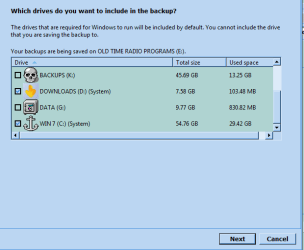
Ah, you have changed the your windows downloads location to your D: drive form its default location on your C: drive. It is considered as part of windows so will get backed up as part of the image. Don't know of a way to turn it off.
 

My Computer

Computer type
PC/Desktop
Computer Manufacturer/Model Number
Home built (GeneO industries)/Model 4
OS
Windows 10 Pro. EFI boot partition, full EFI boot
CPU
i7 4770k 4.4GHz (44-44-43-43 turbo) @ 1.248V
Motherboard
ASUS Maximus VI Hero
Memory
16GB (8GBx2) @2200 MHz G.skill Sniper 10-11-10-30-1, 1.6V
Graphics Card(s)
MSI GTX 970 Gaming 4G
Sound Card
Onboard SupremeFX Audio
Monitor(s) Displays
NEC Spectraview 2490WUXi-SV
Screen Resolution
1920 x 1200
Hard Drives
Samsung 850 Pro 256GB (OS), Samsung 2x 128GB 840 Pro SSD in RAID0, 3x WD Blue 6Gb/s 1TB RAID0, WD 2TB Black external USB 3.0, 2TB WD20EARS Green external USB 3.0, 2x 500GB Seagate and 1 750 GB external USB, 1x 350GB external USB3
PSU
Seasonic X-850 (2012 KM3 model)
Case
Fractal Design Define R4
Cooling
NH-D14, NF-F12, NF-A15; NF-P14, NF-P12,NF-A14, S12A PWM
Keyboard
Cooler Master Storm Quickfire Rapid - Brown
Mouse
Logitech G602
Internet Speed
126.4 Mb/s down, 24.3 Mb/s up
Other Info
USB 3.0 x8 , SATA III x8, eSATA, USB 2.0 x6. Samsung DVD R/W drive.

WEI: CPU 7.8, Memory 7.9, Graphics 7.9, Disk 7.9
Mr

GeneO - I found a way to turn off Drive D from the backup image.

I used Macrium to delete D Drive.
Started the system image.
It only showed system reserve and C Drive to backup (No D Drive).
After image was made, I used Macrium again to create partition for D Drive.
To further check, I rebooted and made another system image. Still no D Drive.

Now if only I can remember this the next time.

Thanks for your help & input.:)
 

My Computer

Computer type
PC/Desktop
Computer Manufacturer/Model Number
Custom
OS
Win 7 HP 64bit w/SP1
CPU
AMD Athlon 64 X2 5200+
Motherboard
Gigabyte Technology Co., Ltd. GA-MA770-UD3 (Socket M2)
Memory
6.0GB Dual-Channel DDR2 @ 387MHz (5-5-5-18)
Graphics Card(s)
Acer AL1906 @ 1280x1024 512MB GeForce 9500 GT (XFX Pine Grou
Sound Card
Realtek High Definition Audio
Monitor(s) Displays
Acer Generic PnP Monitor
Hard Drives
Crucial 128 gig M4 SSD
Seagate Backup 5T
Seagate GoFlex 2T
WDC WD1600JS-00NCB1 USB 1500 Gig
Seagate Backup 3T
Keyboard
Logitech HID-Compliant Keyboard
Mouse
PS/2 Compatible Mouse
Internet Speed
Cable broadband (up to 50Mbps)
Other Info
Nightly runs of Super AntiSpyware, CCleaner and Malware Anti-Malware and System Restore.
Back
Top