Solved System Restore in Dual Boot Situations

dlwmacgregor

New member
Member
Local time
5:27 AM
Messages
76
I have seen other discussions on this before but I have not been able to find a definitive answer that parallels my situation.
I dual boot Windows 7 and Windows 10 on 2 separate hard drives.
On each of the OS's I have configured System Restore to be "ON" for the C:. drive and "OFF" for the other drive on which the other OS resides.
I create a new Restore point on my Windows 7 and it works.
I then reboot into Windows 10 and create a Restore Point on its C: drive.
I then reboot and boot into Windows 7, only to find that the Restore point I created previously is gone.
If I then boot into Windows 10, the Restore point I created there is also gone.
Windows 7 is deleting the Windows 10 Restore Point and Windows 10 is deleting the Windows 7 Restore Point.
Now, Windows 7 can "see" the Windows 10 drive and vice-versa.
Is it possible - and I think this likely - that because I have set the "non-active" OS drive in each OS to Off in System Restore, it is becoming confused and deleting the Restore Points?
If that is the case, I can solve it easily in Device Manager by tell each OS to "Disable" the drive on which the other OS resides. This way the "other OS drive" will not even appear in the list of drives in System Restore.
Any thoughts?
 

My Computer My Computer

Computer type
PC/Desktop
Computer Manufacturer/Model Number
Custom
OS
Windows 7 Pro 64-bit SP1/Windows 10 Dual Boot
CPU
AMD FX-8350
Motherboard
ASUS 970 Pro Gaming Aura
Memory
Corsair Vengeance 8GBx2 1866
Graphics Card(s)
Sapphire RX-580 Nitro + 4GB
Sound Card
On-board HD Audio
Monitor(s) Displays
Acer P236H
Screen Resolution
1920x1080
Hard Drives
WD 500GB Blue x 2
WD 500GB Green
Samsung 850 EVO 500 GB
PSU
Corsair RM750
Case
Antec 1100
Keyboard
Kensington Washable
Mouse
Logitech M510
Internet Speed
LTE 30Mbps down/10Mbps up
Antivirus
BitDefender Anti Virus Plus 2019 Paid version
Browser
Firefox, Chrome
I had exactly the same issue, however for past week system restore stays intact even after multiple boots to both systems.No idea why it works properly now, didn't before, haven't change anything. So I rely on back ups just in case. Also, I'm sure you know about it, but just in case for others: Win10 does not shut down your computer when you click shutdown computer. IT HIBERNATES it. Worse yet, it does not update drives directories on restart. So, you work in WIn 10, shutdown (but in reality hibernate) and change into Win 7. You work in Win 7, then go back to Win 10 and your computer has old directories in it's memory and corrupts all the drives that you changed under Win 7. If you dual boot Win 10, make sure you completely disable hibernation, otherwise you will have corrupted drives and no system restore will help you, even if it works.
 

My Computer My Computer

OS
win7hp64
I used to have dual boot Win 7 and Win 10 on separate drives. I didn't do anything special with System Restore and it worked independently on each OS. System Restore did not affect the other OS.

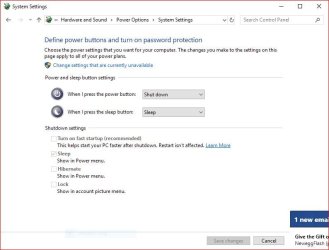
As far as Win 10 "Hibernate", its not really Hibernate, its called "Fast Startup" and can easily be disabled in the Power options. I have mine disabled as I use SSD's for the OS disc and that is fast anyway.

Here is a screen shot of the panel to disable it.
 

Attachments

  • Fast Startup Panel.JPG
    Fast Startup Panel.JPG
    51.2 KB · Views: 1

My Computer My Computer

Computer type
PC/Desktop
Computer Manufacturer/Model Number
My Own Build
OS
Windows 10 64 bit
CPU
Intel i7 6700K
Motherboard
ASUS ROG Maximus VIII Hero
Memory
16GB Corsair Dominator
Graphics Card(s)
Intel CPU Graphics
Sound Card
RealTek
Monitor(s) Displays
27" Dell S2719dgf
Screen Resolution
2560X1440
Hard Drives
1 TB Samsung 850 EVO SSD for Win 10 Pro
500GB Samsung 850 EVO SSD for Win 10 Insider
2 TB drive for backup
PSU
EVGA Supernova 750G2
Case
BeQuiet Silent Base 600
Cooling
Deepcool Captain 120EX
Keyboard
Microsoft Wireless 2000
Mouse
Microsoft wireless
Internet Speed
100 MB/sec (Cable)
Antivirus
Microsoft Defender and Malwarebytes
Browser
Edge/Firefox
Other Info
Cakewalk (Sonar) by BandLab and Studio One 4.1 Pro recording studio software. MOTU 896Mk3 Hybrid recording interface, Frontier Tranzport wireless control unit, Behringer X-Touch Control Surface.
Five USB connected optical drives for CD Audio production using Nero BurningROM
I turned of Hibernate a long time ago but thanks.

Here are a couple of screen grabs to give a better idea of the situation.
Not a big problem, just curious.
I do multiple backups each day in both OS's.

Samsung is my Windows 10 drive.

Windows 10 is the first screen capture.
 

Attachments

  • Windows 10 System Restore.jpg
    Windows 10 System Restore.jpg
    31.6 KB · Views: 1
  • Windows 7 System Restore.jpg
    Windows 7 System Restore.jpg
    35.7 KB · Views: 0

My Computer My Computer

Computer type
PC/Desktop
Computer Manufacturer/Model Number
Custom
OS
Windows 7 Pro 64-bit SP1/Windows 10 Dual Boot
CPU
AMD FX-8350
Motherboard
ASUS 970 Pro Gaming Aura
Memory
Corsair Vengeance 8GBx2 1866
Graphics Card(s)
Sapphire RX-580 Nitro + 4GB
Sound Card
On-board HD Audio
Monitor(s) Displays
Acer P236H
Screen Resolution
1920x1080
Hard Drives
WD 500GB Blue x 2
WD 500GB Green
Samsung 850 EVO 500 GB
PSU
Corsair RM750
Case
Antec 1100
Keyboard
Kensington Washable
Mouse
Logitech M510
Internet Speed
LTE 30Mbps down/10Mbps up
Antivirus
BitDefender Anti Virus Plus 2019 Paid version
Browser
Firefox, Chrome
Strange.
I just cycled thru 2 complete reboot cycles on both OS's and all Restore Points are still there.
I know that certain Windows 10 updates will clear the Restore Points in that OS. Maybe it also clears all the ones it finds on all drives.
I'll keep an eye on it.
Thanks all.
 

My Computer My Computer

Computer type
PC/Desktop
Computer Manufacturer/Model Number
Custom
OS
Windows 7 Pro 64-bit SP1/Windows 10 Dual Boot
CPU
AMD FX-8350
Motherboard
ASUS 970 Pro Gaming Aura
Memory
Corsair Vengeance 8GBx2 1866
Graphics Card(s)
Sapphire RX-580 Nitro + 4GB
Sound Card
On-board HD Audio
Monitor(s) Displays
Acer P236H
Screen Resolution
1920x1080
Hard Drives
WD 500GB Blue x 2
WD 500GB Green
Samsung 850 EVO 500 GB
PSU
Corsair RM750
Case
Antec 1100
Keyboard
Kensington Washable
Mouse
Logitech M510
Internet Speed
LTE 30Mbps down/10Mbps up
Antivirus
BitDefender Anti Virus Plus 2019 Paid version
Browser
Firefox, Chrome
Maybe MS finally fixed it in one of the updates? In the past mine would erase restore points in 90% of time, (but not always, mind you). For the past week or so all the restores are fine. I have similar setup to yours: Win 7 on SSD, Win 10 on hybrid drive and large data partition. It doesn't make sense to set restore points on data drive and setting restore for secondary partition could actually be dangerous: If I want to restore Win 7 C: drive due to some error for example, I don't want to restore Win 10 drive at the same time, not even sure how would that work, since Win 7 may not be aware of Win 10 registry, but could in theory replace some Win 10 files and royally mess everything up.
 

My Computer My Computer

OS
win7hp64
Well, the restore points are no longer being deleted, but wanted to restore my system and none of the 6 restore points I had, worked. All came up with error about registry files not saved properly or something. How difficult it is to save few files, incompetence of MS sometimes is so ridiculous and you can't even look at those files, because they're hidden, useless idiots.
 

My Computer My Computer

OS
win7hp64
Back
Top