System Restore not saving?

Mayfly

New member
Local time
9:37 PM
Messages
29
I have an HP 4740s i5 running Windows 7 Professional.

Some weeks ago I did a manual system restore as I like to do before I install a new programme. A couple of weeks later I did another but noticed there wasn't any previously recorder restore points [old age I thought] Any way I created another. Then last week I looked again was told there were no restore points again, after looking around I found they were switched off which surprised me because I was told they had been successfully created. So checked all the relevant boxes and made sure the drive protection was on.

Last week I created another one and again was told it has successfully completed but this morning when checking it tells one has never been created? The storage space says 3% used which for 1 restore I guess is could be right.

It seems to me that they are either being deleted after a day or so or they are simply not visible to me otherwise why does it tell me they have been successfully created?

Can ideas what is wrong.

I am not running anything different to my last PC and never had this problem with the Home Porofessional edition.
 

My Computer

Computer type
Laptop
Computer Manufacturer/Model Number
HP
OS
Windows 7 proffesional
CPU
Intel core i5
Memory
4Gb
Antivirus
Avg 2013
Browser
Google Chrome
Just a thought. What size do you have your restore point volume set to? I keep mine a 10%.
How much hard drive unused space do you have?
What firewall do you use?
Also I have read somewhere that AVG will play games with restore points.
 

My Computer

Computer type
PC/Desktop
Computer Manufacturer/Model Number
Home made Desktop
OS
Windows 10 Pro. 64/ version 1709 Windows 7 Pro/64
CPU
Intel i7-6800K @ 4.3
Motherboard
ASUS X-99 Deluxe II
Memory
Corsair Platinum 16 gig @2400
Graphics Card(s)
EVGA GTX 1070 OC
Monitor(s) Displays
Asus 27" LED LCD/VE278Q
Screen Resolution
1920-1080 or 1280-720 HDMI
Hard Drives
INTEL SSD 730-240 Gb Sata 3.0/
PSU
EVGA Platium 1200W
Case
Phanteks Luxe Tempered Glass 8 fans/ one radiator
Cooling
XSPC/ Water Cooled CPU
Keyboard
Das 4 Professional
Mouse
Logitech M705/MX Anywhere 2-S
Internet Speed
100 mbits
Antivirus
Microsoft Security Essentials/ Malwarebytes Premium 3.0/ SAS
Browser
I.E. 11 default/Firefox/ ISP Time Warner Cable/Spectrum
Other Info
LG BluRay Burner/
Sound system-KLipsch-THX/
Icy Dock ssd Hot Swap bays.
I use AVG have done for years,

my HDD is 500GB of which 383GB is free.

My restore point volume says current usage 204.64Mb - 3% (1.6GB) but wouldn't know how to change that.
 

My Computer

Computer type
Laptop
Computer Manufacturer/Model Number
HP
OS
Windows 7 proffesional
CPU
Intel core i5
Memory
4Gb
Antivirus
Avg 2013
Browser
Google Chrome
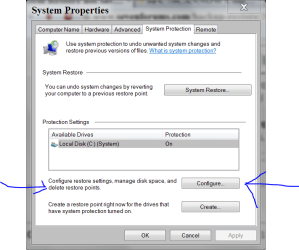
Your problem is probably the size of your restore point volume.
It's found in System Properties/System Protection/Configure Settings/Disk Space Usage.
 

My Computer

Computer type
PC/Desktop
Computer Manufacturer/Model Number
Home made Desktop
OS
Windows 10 Pro. 64/ version 1709 Windows 7 Pro/64
CPU
Intel i7-6800K @ 4.3
Motherboard
ASUS X-99 Deluxe II
Memory
Corsair Platinum 16 gig @2400
Graphics Card(s)
EVGA GTX 1070 OC
Monitor(s) Displays
Asus 27" LED LCD/VE278Q
Screen Resolution
1920-1080 or 1280-720 HDMI
Hard Drives
INTEL SSD 730-240 Gb Sata 3.0/
PSU
EVGA Platium 1200W
Case
Phanteks Luxe Tempered Glass 8 fans/ one radiator
Cooling
XSPC/ Water Cooled CPU
Keyboard
Das 4 Professional
Mouse
Logitech M705/MX Anywhere 2-S
Internet Speed
100 mbits
Antivirus
Microsoft Security Essentials/ Malwarebytes Premium 3.0/ SAS
Browser
I.E. 11 default/Firefox/ ISP Time Warner Cable/Spectrum
Other Info
LG BluRay Burner/
Sound system-KLipsch-THX/
Icy Dock ssd Hot Swap bays.
What would you recommend it is?
 

My Computer

Computer type
Laptop
Computer Manufacturer/Model Number
HP
OS
Windows 7 proffesional
CPU
Intel core i5
Memory
4Gb
Antivirus
Avg 2013
Browser
Google Chrome
Increasing the size of your restore point volume.
Start and select Control Panel.
Then select Systems
Then select System Protection
and you should get this.

Restore point.PNG
 

My Computer

Computer type
PC/Desktop
Computer Manufacturer/Model Number
Home made Desktop
OS
Windows 10 Pro. 64/ version 1709 Windows 7 Pro/64
CPU
Intel i7-6800K @ 4.3
Motherboard
ASUS X-99 Deluxe II
Memory
Corsair Platinum 16 gig @2400
Graphics Card(s)
EVGA GTX 1070 OC
Monitor(s) Displays
Asus 27" LED LCD/VE278Q
Screen Resolution
1920-1080 or 1280-720 HDMI
Hard Drives
INTEL SSD 730-240 Gb Sata 3.0/
PSU
EVGA Platium 1200W
Case
Phanteks Luxe Tempered Glass 8 fans/ one radiator
Cooling
XSPC/ Water Cooled CPU
Keyboard
Das 4 Professional
Mouse
Logitech M705/MX Anywhere 2-S
Internet Speed
100 mbits
Antivirus
Microsoft Security Essentials/ Malwarebytes Premium 3.0/ SAS
Browser
I.E. 11 default/Firefox/ ISP Time Warner Cable/Spectrum
Other Info
LG BluRay Burner/
Sound system-KLipsch-THX/
Icy Dock ssd Hot Swap bays.
Sorry, I feel I'm becoming a nuisance now, I can get to that window - I meant what do you recommend the size of the restore volume is set to?
 

My Computer

Computer type
Laptop
Computer Manufacturer/Model Number
HP
OS
Windows 7 proffesional
CPU
Intel core i5
Memory
4Gb
Antivirus
Avg 2013
Browser
Google Chrome
hey mayfly, If you have that much extra space, you can free up at least 5gb of space just so you can restore your computer. You have tons of rooms. I have a 1TB secondary drive that was my main drive for a while. I had like 15-20GB set for the backup so i could go back for a long time. But 204 MB is nothing. Change it up to higher volume and see if it does the trick. If it doesn't work you can always put it right back.
 

My Computer

Computer type
PC/Desktop
Computer Manufacturer/Model Number
custom build
OS
windows 7 home premium 64bit sp1
CPU
fx 8350 oc to 4.3 1.368v
Motherboard
gigabyte 970a-ud3p
Memory
16 gb crucial ballistic sport 1600mhz
Graphics Card(s)
nvidia gt 740
Sound Card
nvidia
Monitor(s) Displays
cheap
Screen Resolution
1680x1050
Hard Drives
240gb samsung 850 evo
1tb toshiba 7200rpm hhd
PSU
600 watts- corsair
Case
thermaltake snow edition
Cooling
ocz vendetta ii
Keyboard
dell
Mouse
dell
Internet Speed
34 mbps
Antivirus
avast
Browser
chrome
I increased it to 10 GB but it doesn't make any difference.

bvuz.jpg


mnt3.jpg


It tells me 'restore has completed successfully', I click on the System Restore button and it tells me there is no Restore point set. :confused:

Perhaps there is a tell tail sign in screen shots?
 

My Computer

Computer type
Laptop
Computer Manufacturer/Model Number
HP
OS
Windows 7 proffesional
CPU
Intel core i5
Memory
4Gb
Antivirus
Avg 2013
Browser
Google Chrome
hmmm. i thought for sure it was the amount of space you had for the backup. Well, you can always put it back, or you can leave it for when you get it figured out. I am out of ideas for right now, but if i think of anything else, i will let you know.
 

My Computer

Computer type
PC/Desktop
Computer Manufacturer/Model Number
custom build
OS
windows 7 home premium 64bit sp1
CPU
fx 8350 oc to 4.3 1.368v
Motherboard
gigabyte 970a-ud3p
Memory
16 gb crucial ballistic sport 1600mhz
Graphics Card(s)
nvidia gt 740
Sound Card
nvidia
Monitor(s) Displays
cheap
Screen Resolution
1680x1050
Hard Drives
240gb samsung 850 evo
1tb toshiba 7200rpm hhd
PSU
600 watts- corsair
Case
thermaltake snow edition
Cooling
ocz vendetta ii
Keyboard
dell
Mouse
dell
Internet Speed
34 mbps
Antivirus
avast
Browser
chrome
Check wjhether there are really no restore points. Open an elevated command prompt and run this command:

vssadmin list shadows

Make sure you look at the ones from C. If you like, you can copy the output in command prompt here and we'll have a look at it.

Right click on the command prompt window and click on 'select all. Then right click anywhere on the hihjlighted area. That puts everything on the clipboard and you can paste it into your answer here.
 

My Computer

Computer Manufacturer/Model Number
HP, Dell, Gateway, Toshiba - 4 laptops and 2 desktops
OS
Vista, Windows7, Mint Mate, Zorin, Windows 8
CPU
from 1.6GHz Duo to i7
Monitor(s) Displays
2x HP w2207
Hard Drives
5x HDD, 7x SSD, 12x Externals
Keyboard
with trackball - no mices
Mouse
Trackball mice
Internet Speed
DSL 6000
I had exactly the same problem (w7 64 ultimate)and solved it running check disk with the option to fix file errors.
Hope it helps
 

My Computer

Computer type
Laptop
Computer Manufacturer/Model Number
vaio vgn-z11
OS
Windows 7 Ultimate x64

My Computer

Computer type
PC/Desktop
Computer Manufacturer/Model Number
Home made Desktop
OS
Windows 10 Pro. 64/ version 1709 Windows 7 Pro/64
CPU
Intel i7-6800K @ 4.3
Motherboard
ASUS X-99 Deluxe II
Memory
Corsair Platinum 16 gig @2400
Graphics Card(s)
EVGA GTX 1070 OC
Monitor(s) Displays
Asus 27" LED LCD/VE278Q
Screen Resolution
1920-1080 or 1280-720 HDMI
Hard Drives
INTEL SSD 730-240 Gb Sata 3.0/
PSU
EVGA Platium 1200W
Case
Phanteks Luxe Tempered Glass 8 fans/ one radiator
Cooling
XSPC/ Water Cooled CPU
Keyboard
Das 4 Professional
Mouse
Logitech M705/MX Anywhere 2-S
Internet Speed
100 mbits
Antivirus
Microsoft Security Essentials/ Malwarebytes Premium 3.0/ SAS
Browser
I.E. 11 default/Firefox/ ISP Time Warner Cable/Spectrum
Other Info
LG BluRay Burner/
Sound system-KLipsch-THX/
Icy Dock ssd Hot Swap bays.
Please post the screen where you configured the system restore settings of C.
 

My Computer

Computer type
Laptop
Computer Manufacturer/Model Number
ACER ASPIRE 5742G
OS
Microsoft Windows 7 Home Premium 64-bits 7601 Multiprocessor Free Service Pack 1
CPU
Intel(R) Core(TM) i3 CPU M 370 @ 2.40GHz
Motherboard
Acer Aspire 5742G
Memory
4,00 GB
Graphics Card(s)
ATI Mobility Radeon HD 5400 Series
Sound Card
(1) AMD High Definition Audio Device (2) Realtek High Defi
Screen Resolution
1366 x 768 x 32 bits (4294967296 colors) @ 60 Hz
Hard Drives
WDC WD5000BEVT-22ZAT0
Sorry the laptop has had to back to the manufacturer for a different problem - whilst there I have asked to look the SR problem.
 

My Computer

Computer type
Laptop
Computer Manufacturer/Model Number
HP
OS
Windows 7 proffesional
CPU
Intel core i5
Memory
4Gb
Antivirus
Avg 2013
Browser
Google Chrome
Back
Top