system restore not working

doctor7scb

New member
Local time
7:58 AM
Messages
1
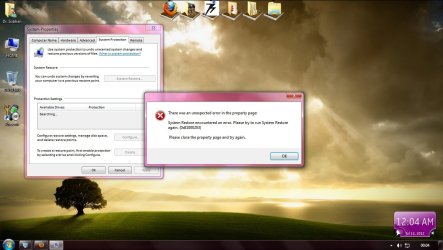
i opened system restore.error occured.no restore points.please help.see attached file
 

Attachments

  • Untitled.jpg
    Untitled.jpg
    103.5 KB · Views: 33

My Computer

OS
windows7 32 bit
Welcome to Seven Forums.

From a search on Google.
To resolve this issue, perform the following steps:

  • 1. Click Start, type regedit in the Start Search box, and hit Enter.
  • 2. Locate and then click the following registry key:
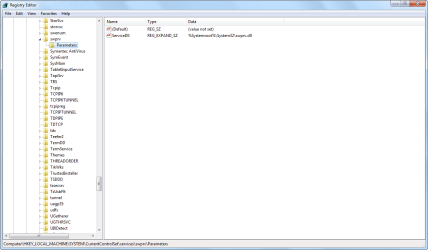
HKEY_LOCAL_MACHINE/SYSTEM/CurrentControlSet/services/swprv/Parameters
Note: If the Parameters registry key is missing, perform the following steps: Right-click the swprv registry key, select New, select Key, type Parameters and hit Enter.

  • 3. Once the Parameters registry key is selected, verify that the ServiceDll registry value has the following value:
%Systemroot%System32swprv.dll
Note: If the ServiceDll registry value is missing, perform the following steps:
Right-click the Parameters registry key, select New, and then select Expandable String Value.
For the value name, type ServiceDll and hit Enter.
Double-click the ServiceDll registry value.
In the Value Data box, type %Systemroot%System32swprv.dll, and then click OK.​
  • 4. Perform a backup operation to verify that the issue is resolved.

Solve Error 0×81000203 | System Restore Or Back Up Error In Windows 7 And Windows Server 2008

What mine looks like
2012-07-11_SR.png
 

My Computer

Computer type
PC/Desktop
Computer Manufacturer/Model Number
Dell Inspiron 530
OS
Windows 7 Professional SP1 64-bit
CPU
Intel Core 2 Duo Processor E8300 @ 2.83GHz
Motherboard
Dell Inc. 0RY007 (Socket 775)
Memory
4.00 GB Dual-Channel DDR2 @ 332MHz (5-5-5-15)
Graphics Card(s)
Intel(R) G33/G31 Express Chipset Family
Sound Card
Integrated 7.1 Channel Audio
Monitor(s) Displays
Acer G245HQL 23.6" LED(1920x1080@60Hz)
Screen Resolution
1920 x 1080
Hard Drives
Disk 0 HITACHI 1TB OS Installed - Disk 1 HITACHI 1TB For Backups
Keyboard
Dell USB Keyboard
Mouse
Dell Optical USB Mouse
Internet Speed
DSL 10 meg
Antivirus
Symantec(SEP)
Browser
Pale Moon
Would you happen to have TuneUp Utilities installed?

This problem persist @ users who had instaled TuneUp Utilities 2009 / 2010 / 2011,
TuneUp Utilities 2009 / 2010 / 2011 Turbo Mode block system protection / restore.

Which Turbo Mode is on, turn off Turbo Mode and go to Windows / Control Panel / System and Security / System Protection and these not anymore " error code 0x81000203 "


Problem fixed.
System Restore Error Code: 0x81000203 - Microsoft Answers
 

My Computer

Computer type
PC/Desktop
Computer Manufacturer/Model Number
Dell Inspiron 530
OS
Windows 7 Professional SP1 64-bit
CPU
Intel Core 2 Duo Processor E8300 @ 2.83GHz
Motherboard
Dell Inc. 0RY007 (Socket 775)
Memory
4.00 GB Dual-Channel DDR2 @ 332MHz (5-5-5-15)
Graphics Card(s)
Intel(R) G33/G31 Express Chipset Family
Sound Card
Integrated 7.1 Channel Audio
Monitor(s) Displays
Acer G245HQL 23.6" LED(1920x1080@60Hz)
Screen Resolution
1920 x 1080
Hard Drives
Disk 0 HITACHI 1TB OS Installed - Disk 1 HITACHI 1TB For Backups
Keyboard
Dell USB Keyboard
Mouse
Dell Optical USB Mouse
Internet Speed
DSL 10 meg
Antivirus
Symantec(SEP)
Browser
Pale Moon
Back
Top