System restore not working

Terry39

New member
Local time
1:24 AM
Messages
2
I cannot use system restore i get message .There was a unexpected error in the property page,The volume shadow copy service used by system restore is not working event log 0x81000202
When I try to start volume shadow copy service in services i get message.windows could not start the volume shadow service on local computer,cannot find the path specified error 3.Anybody please help
 

My Computer

Computer Manufacturer/Model Number
acer ferrari one
OS
windows 7
WIN key | type CMD.EXE | DO NOT HIT ENTER KEY |
in the list shown above where you typed cmd.exe, Right-Click on CMD.EXE |
click on "Run as administator" |
type SFC /SCANNOW | ENTER key |
when sfc finishes, then type EXIT |
shutdown your computer
Turn on your computer

Problem gone?
 

My Computer

Computer Manufacturer/Model Number
Toshiba Satellite S875D-S7239 laptop
OS
MS Windows 7 Ultimate SP1 64-bit
CPU
AMD A10-4600M
Motherboard
AMD Pumori (Socket FT1)
Memory
6.00 GB Dual-Channel DDR3 @ 798MHz (11-11-12-28)
Graphics Card(s)
AMD Radeon HD 7660G
Sound Card
High Definition Audio Device
Monitor(s) Displays
Generic PnP Monitor (1600x900@60Hz)
Screen Resolution
1600x900@60Hz
Hard Drives
SSD 119GB Corsair CSSD-V128GB2 ATA Device
Keyboard
Standard PS/2 Keyboard
Mouse
HP Wireless Optical Mobile Mouse Model FHA-3410
Internet Speed
What the local pub, local coffee shop offers.
Other Info
Optical Drive:MATSHITA BD-CMB UJ160B ATA Device


Also have an Asus ha1002xp netbook with Win 7 Ultimate installed.
Terry,
Please do not double-post. You have already posted the very same question in this forum just a few minutes ago.
thank you,
 

My Computer

Computer Manufacturer/Model Number
Toshiba Satellite S875D-S7239 laptop
OS
MS Windows 7 Ultimate SP1 64-bit
CPU
AMD A10-4600M
Motherboard
AMD Pumori (Socket FT1)
Memory
6.00 GB Dual-Channel DDR3 @ 798MHz (11-11-12-28)
Graphics Card(s)
AMD Radeon HD 7660G
Sound Card
High Definition Audio Device
Monitor(s) Displays
Generic PnP Monitor (1600x900@60Hz)
Screen Resolution
1600x900@60Hz
Hard Drives
SSD 119GB Corsair CSSD-V128GB2 ATA Device
Keyboard
Standard PS/2 Keyboard
Mouse
HP Wireless Optical Mobile Mouse Model FHA-3410
Internet Speed
What the local pub, local coffee shop offers.
Other Info
Optical Drive:MATSHITA BD-CMB UJ160B ATA Device


Also have an Asus ha1002xp netbook with Win 7 Ultimate installed.
S

Run as your instructions scsn found no faults problem still with me Thanks.
 

My Computer

Computer Manufacturer/Model Number
acer ferrari one
OS
windows 7
Terry,
Have been messing around with services or using some of these "speed up your system" softwares?

If so then, you might need to do a system repair.

Did you ever create a system image of your computer so that you could do a complete system image restore if needed?

Did you directly or with help of some of those speed up programs, disable system restore?

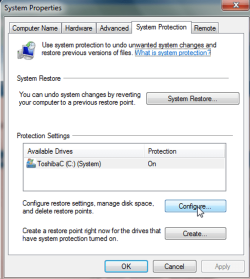
To create/configure system restore points:
WIN key | type Create a System Restore Point | ENTER key
You will have a configure option.
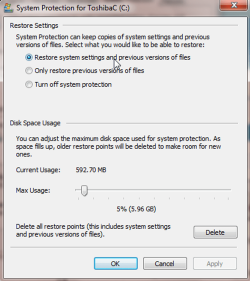
Be sure the radio button at the top is selected and that you don't have that slider set to 0.
Refer to the included snapshots.

You will also have noticed that at the same dialog where you selected Configure than you can select Create
 

Attachments

  • createrestorepoint1.png
    createrestorepoint1.png
    70 KB · Views: 27
  • createrestorepoint2.png
    createrestorepoint2.png
    75.1 KB · Views: 21

My Computer

Computer Manufacturer/Model Number
Toshiba Satellite S875D-S7239 laptop
OS
MS Windows 7 Ultimate SP1 64-bit
CPU
AMD A10-4600M
Motherboard
AMD Pumori (Socket FT1)
Memory
6.00 GB Dual-Channel DDR3 @ 798MHz (11-11-12-28)
Graphics Card(s)
AMD Radeon HD 7660G
Sound Card
High Definition Audio Device
Monitor(s) Displays
Generic PnP Monitor (1600x900@60Hz)
Screen Resolution
1600x900@60Hz
Hard Drives
SSD 119GB Corsair CSSD-V128GB2 ATA Device
Keyboard
Standard PS/2 Keyboard
Mouse
HP Wireless Optical Mobile Mouse Model FHA-3410
Internet Speed
What the local pub, local coffee shop offers.
Other Info
Optical Drive:MATSHITA BD-CMB UJ160B ATA Device


Also have an Asus ha1002xp netbook with Win 7 Ultimate installed.
It's caused by Disable services -

-Click on the pearl then type "Services" in the search box (Don't type in the quotes, of course).
-Right click on Services (with the gears beside it) and pick Run As Administrator
-Head down the list to "Volume Shadow Copy", double click on it and enable it if it's not enabled.
-Then go back up the list a bit to "Microsoft Software Shadow Copy Provider" and double click on it to enable it if it's disabled.

After that, Go back to the control panel and, voila - a successful restore point Will be Created.

You don't need to restart the computer to make this work, but that might be necessary for some.:party:
 

My Computer

Computer Manufacturer/Model Number
x
OS
xp, vista, seven
CPU
x
Motherboard
x
Memory
x
Graphics Card(s)
x
Sound Card
x
Monitor(s) Displays
x
Hard Drives
x
PSU
x
Case
x
Cooling
x
WIN key | type CMD.EXE | DO NOT HIT ENTER KEY |
in the list shown above where you typed cmd.exe, Right-Click on CMD.EXE |
click on "Run as administator" |
type SFC /SCANNOW | ENTER key |
when sfc finishes, then type EXIT |
shutdown your computer
Turn on your computer

Problem gone?

I've had the same problem as Terry39 for some time now including the error number. The difference being that I can start my volume shadow copy service from "Services." I did follow your instructions to the tee. This is the response I received from the command prompt "Windows Resource Protection could not start the repair service."

Is there anything else that may help?
 

My Computer

OS
Windows 7 Pro

My Computer

Computer Manufacturer/Model Number
HP, Dell, Gateway, Toshiba - 4 laptops and 2 desktops
OS
Vista, Windows7, Mint Mate, Zorin, Windows 8
CPU
from 1.6GHz Duo to i7
Monitor(s) Displays
2x HP w2207
Hard Drives
5x HDD, 7x SSD, 12x Externals
Keyboard
with trackball - no mices
Mouse
Trackball mice
Internet Speed
DSL 6000
Back
Top