System Restore Point : Create at System Startup

How to Automatically Create System Restore Points in Windows 7 and 8


The two (2) separate methods outlined herein make it very easy to have fresh, reliable System Restore points available for use whenever needed; whether created by a system startup/restart or created by the Windows Task Scheduler; once it's setup you never have to be concerned with it again, it's all completely automatic.​


   Note
System Restore isn't available for Windows RT.

Credit for this goes to our own Microsoft MVP and all around good guy Brink who wrote these "Restore Point" scripts, without whose dedication and hard work with the Windows Operating Systems none of this would even be possible. Thanks Shawn! :)

Please view his original tutorial for pertinent Windows 7 information .

Windows 7 System Restore Point Shortcut

This will also work with Windows Vista.
Please view the relevant tutorial at Vista Forums at the link below.

Vista System Restore Point Shortcut
   Information
For those of you that would like to have the option to create restore points without restarting the system have a look at step #4 A below to add a shortcut to the desktop or the taskbar that can be used whenever needed without a system restart.

Be sure to have a look at Method Two below to see the steps to use the Windows Task Scheduler to automatically create System Restore points, once the task is created there is nothing further to do, there will always be daily, fresh System Restore points available for use if needed, even if the PC is never restarted at all.

Let's get started!


Method One

System Startup / Restart


1) The first thing that needs done is to download the file you want to use; to create a restore point with a description click the button below and select to save the file to the desktop.
Restore_Point_Shortcut.zip file (with description)


Download


2) To create a restore point without a description click the button below and save the file to the desktop.
Instant_Restore_Point.zip file (without description)


Download


3) Open the downloaded zip file, extract (drag and drop) the VBS file to the desktop, and unblock the VBS file.


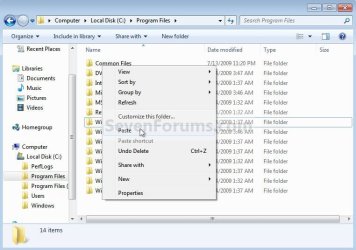
4) Navigate to "C:\Program Files" in Windows Explorer (not "Program Files (x86)" if you have 64-bit Windows), move the extracted and unblocked VBS file into the "C:\Program Files" folder, then close the "Program Files" window.
click any image to enlarge
Cut.jpg

Paste.jpg

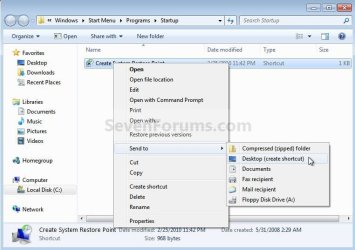
5) Now in the start menu navigate to and r click the "Startup File" to open the "Startup" file window; now back at the "Restore_Point Shortcut" window r click the "Create System Restore Point" shortcut and click cut, then in the "Startup" window at an empty spot click paste. A) Now if you want a shortcut on the desktop to create a restore point whenever needed (without restarting the PC) r click the "Instant Restore Point" shortcut in the "Startup" window and select "Send to, Desktop (create shortcut)" to place a shortcut on the desktop.
Start.jpg

Desktop Shortcut.jpg

6) You're done, now close all the windows and if you want, the zip and the restore point files that you downloaded can be deleted from the desktop.

To use the shortcut you just created.

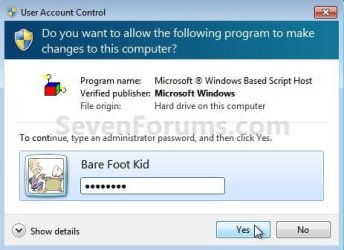
7) Whenever the PC boots to the desktop the first prompt you'll get is "Do you want to open this file?" click open then enter your user credentials for the UAC prompt and click yes.
click any image to enlarge
File Prompt.jpg

Prompt.jpg

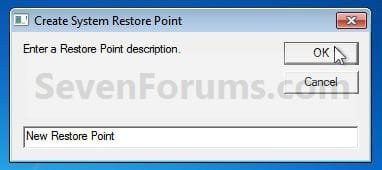
8) If you have chosen to use the restore point creator with a description this last snip is the last step in the process, enter the description you want to use and click ok to finish up, that's all there is to it. I use the one with no description and with 2 clicks at bootup it's done.
Description.jpg


Method Two

Windows Task Scheduler


1) Start by downloading this zip file to the Windows desktop.
Scheduled_Instant_Restore_Point.zip

Download


2) Open the downloaded zip file, extract (drag and drop) the VBS file to the desktop, and unblock the VBS file.

3) Navigate to "C:\Program Files" in Windows Explorer (not "Program Files (x86)" if you have 64-bit Windows), move the extracted and unblocked VBS file into the "C:\Program Files" folder, then close the "Program Files" window.
Cut.jpg

Paste.jpg

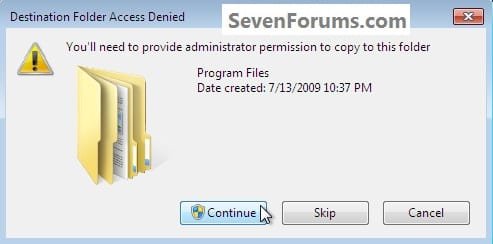
4) In the "Access Denied" dialog box that opens click Continue, if you get a UAC prompt, enter your user credentials and click Yes; then just close the Program Files window that opens.

You can now delete the downloaded Zip file from the desktop if you like.
Continue.jpg
Now in the Windows start menu search box type taskschd.msc and hit the <enter> key. In the Task Scheduler window that opens at the right pane Actions column, click Create Task.

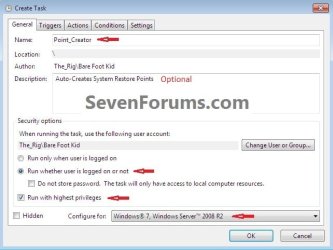
5) In the "Create Task" window that opens at the General tab, give the new task a Name, a description is optional, dot "Run whether user ... " put a check/tic at "Run with highest ... " and "Configure for ... " your flavor Windows.
click any image to enlarge
Task_General.jpg
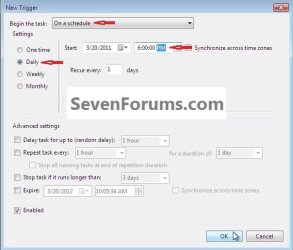
6) Now still in the "Create Task" window click the Triggers tab, at the bottom left click the New button, in the New Trigger dialog box that opens be sure to select when you want the task to run and the daily time you want it to run and click OK.
Task_Trigger.jpg
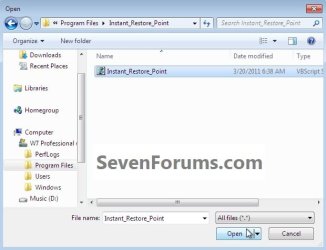
7) Now back at the "Create Task" window click the Actions tab, at the bottom left click the New button, in the New Action dialog box that opens click Browse (see #8 below), now browse to C:\Program Files and click the Instant_Restore_Point file you extracted there in step #2 above and click Open, then click the Instant_Restore_Point script and click Open again.
click any image to enlarge
Action_File.jpg

Action_Script.jpg

8) Now at the New Action dialog box that's still open click OK.
Action.jpg
9) In the Create Task window that's still open click OK, in the Account Information dialog box that opens add your user credentials and click OK.

That's all, you are now finished and you can close the Task Scheduler.
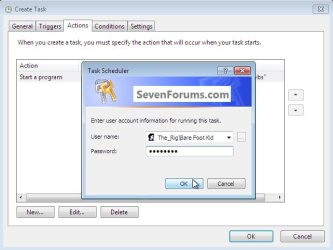
Password.jpg
Enjoy! :)
 

Attachments

Last edited by a moderator:
Hi,
I donot get an option to unblock the vbs file.

I get the open with option when I right click on the filw.

Hope this helps.
 

My Computer

Computer Manufacturer/Model Number
Dell 6420
OS
Win 6 Ultimate 64 bit

My Computer

Computer type
PC/Desktop
Computer Manufacturer/Model Number
Self built custom
OS
64-bit Windows 11 Pro for Workstations
CPU
Intel i7-8700K OC'd to 5 GHz
Motherboard
ASUS ROG Maximus XI Formula Z390
Memory
64 GB (4x16GB) G.SKILL TridentZ RGB DDR4 3600 MHz
Graphics Card(s)
ASUS ROG-STRIX-GTX1080TI-O11G-GAMING
Sound Card
Integrated
Monitor(s) Displays
2 x Samsung Odyssey G7 27"
Screen Resolution
2560x1440
Hard Drives
1TB Samsung 990 PRO M.2,
4TB Samsung 990 PRO PRO M.2,
TerraMaster F8 SSD Plus NAS
PSU
Seasonic Prime Titanium 850W
Case
Thermaltake Core P3
Cooling
Corsair Hydro H115i
Keyboard
Logitech wireless K800
Mouse
Logitech MX Master 4
Internet Speed
2 Gb/s Download and 100 Mb/s Upload
Antivirus
Malwarebyte Anti-Malware Premium
Browser
Google Chrome
Other Info
Logitech Z625 speaker system,
Logitech BRIO 4K Pro webcam,
HP Color LaserJet Pro MFP M477fdn,
APC SMART-UPS RT 1000 XL - SURT1000XLI,
Galaxy S23 Plus phone
Hi Brink,

Your sugesstion does not help.

My probkem is a little different.

Whenever I shutdown and reboot my laptop, Everytime, I need to remerge the default VBS file. Is there a way I can solve the problem permanently?

I also noticed that when I go "Open with"and go to "other programs" the option stating "always use this program to open this kind of file is greyed out"and I cannot check thsi option.

I use win 7 64 bit OS.
 

My Computer

Computer Manufacturer/Model Number
Dell 6420
OS
Win 6 Ultimate 64 bit
Futuristic,

Running the VBS file only creates the restore point for just that one time. If you want it to create a restore point at every startup, then you will need to do METHOD TWO in the tutorial instead.
 

My Computer

Computer type
PC/Desktop
Computer Manufacturer/Model Number
Self built custom
OS
64-bit Windows 11 Pro for Workstations
CPU
Intel i7-8700K OC'd to 5 GHz
Motherboard
ASUS ROG Maximus XI Formula Z390
Memory
64 GB (4x16GB) G.SKILL TridentZ RGB DDR4 3600 MHz
Graphics Card(s)
ASUS ROG-STRIX-GTX1080TI-O11G-GAMING
Sound Card
Integrated
Monitor(s) Displays
2 x Samsung Odyssey G7 27"
Screen Resolution
2560x1440
Hard Drives
1TB Samsung 990 PRO M.2,
4TB Samsung 990 PRO PRO M.2,
TerraMaster F8 SSD Plus NAS
PSU
Seasonic Prime Titanium 850W
Case
Thermaltake Core P3
Cooling
Corsair Hydro H115i
Keyboard
Logitech wireless K800
Mouse
Logitech MX Master 4
Internet Speed
2 Gb/s Download and 100 Mb/s Upload
Antivirus
Malwarebyte Anti-Malware Premium
Browser
Google Chrome
Other Info
Logitech Z625 speaker system,
Logitech BRIO 4K Pro webcam,
HP Color LaserJet Pro MFP M477fdn,
APC SMART-UPS RT 1000 XL - SURT1000XLI,
Galaxy S23 Plus phone
Hi Brink
Yes I understand. My problem is that I follow the tutorial and by use of task scheduler make an auto restore point creation.
This works perfectly well. But only tillmy laptop is running.
If at the end of the days shutdown my laptop the next day the restore point is not created attached upped time.

I need to once again run the vbs default file by choosing the regedit program from win 7 program file.
This will then work fine till the time I shutdown my laptop.

In short the VBS file is loosing its default program connection to regedit whenever I shutdown the laptop.

Thus I was asking if there is a way wherein the vbs file remains permanently associated with regedit.
 

My Computer

Computer Manufacturer/Model Number
Dell 6420
OS
Win 6 Ultimate 64 bit
I'm not sure why or where you got that you need to have VBS files to be associated to open with regedit. If you do, the VBS file will no longer work since it needs to be associated with C:\Windows\System32\wscript.exe (Microsoft Windows Based Scipt Host) instead.

Are you changing it to open with regedit? If so, then do what I posted above to restore the default associations of VBS files, and stop that. ;)
 

My Computer

Computer type
PC/Desktop
Computer Manufacturer/Model Number
Self built custom
OS
64-bit Windows 11 Pro for Workstations
CPU
Intel i7-8700K OC'd to 5 GHz
Motherboard
ASUS ROG Maximus XI Formula Z390
Memory
64 GB (4x16GB) G.SKILL TridentZ RGB DDR4 3600 MHz
Graphics Card(s)
ASUS ROG-STRIX-GTX1080TI-O11G-GAMING
Sound Card
Integrated
Monitor(s) Displays
2 x Samsung Odyssey G7 27"
Screen Resolution
2560x1440
Hard Drives
1TB Samsung 990 PRO M.2,
4TB Samsung 990 PRO PRO M.2,
TerraMaster F8 SSD Plus NAS
PSU
Seasonic Prime Titanium 850W
Case
Thermaltake Core P3
Cooling
Corsair Hydro H115i
Keyboard
Logitech wireless K800
Mouse
Logitech MX Master 4
Internet Speed
2 Gb/s Download and 100 Mb/s Upload
Antivirus
Malwarebyte Anti-Malware Premium
Browser
Google Chrome
Other Info
Logitech Z625 speaker system,
Logitech BRIO 4K Pro webcam,
HP Color LaserJet Pro MFP M477fdn,
APC SMART-UPS RT 1000 XL - SURT1000XLI,
Galaxy S23 Plus phone
I tried method two (Task Scheduler) and upon clicking OK at the Actions tab, I got:

"An error has occurred for task auto_restore_point. Error message: User account restriction error. The possible reasons are that blank passwords not allowed, or that a policy restriction has been enforced."

I carefully followed the instructions twice and I did not get in step 4 an 'Access Denied' dialog box or a UAC prompt.

What am I missing?
 

My Computer

Computer Manufacturer/Model Number
HP p6350z
OS
Windows 7 Professional x64
Memory
8 GB
Monitor(s) Displays
2 x Dell 2007WFPb
Hello ixodid,

Is this a home computer, or are you in a domain?

Are you logged in as an administrator?

Does it have a password created for your administrator account? If not, you will need one.

Do you have UAC turned on?

Hope this helps for now, :)
Shawn
 

My Computer

Computer type
PC/Desktop
Computer Manufacturer/Model Number
Self built custom
OS
64-bit Windows 11 Pro for Workstations
CPU
Intel i7-8700K OC'd to 5 GHz
Motherboard
ASUS ROG Maximus XI Formula Z390
Memory
64 GB (4x16GB) G.SKILL TridentZ RGB DDR4 3600 MHz
Graphics Card(s)
ASUS ROG-STRIX-GTX1080TI-O11G-GAMING
Sound Card
Integrated
Monitor(s) Displays
2 x Samsung Odyssey G7 27"
Screen Resolution
2560x1440
Hard Drives
1TB Samsung 990 PRO M.2,
4TB Samsung 990 PRO PRO M.2,
TerraMaster F8 SSD Plus NAS
PSU
Seasonic Prime Titanium 850W
Case
Thermaltake Core P3
Cooling
Corsair Hydro H115i
Keyboard
Logitech wireless K800
Mouse
Logitech MX Master 4
Internet Speed
2 Gb/s Download and 100 Mb/s Upload
Antivirus
Malwarebyte Anti-Malware Premium
Browser
Google Chrome
Other Info
Logitech Z625 speaker system,
Logitech BRIO 4K Pro webcam,
HP Color LaserJet Pro MFP M477fdn,
APC SMART-UPS RT 1000 XL - SURT1000XLI,
Galaxy S23 Plus phone
This is one of my favorite apps to use for Windows 7. Now that everything is switching towards Windows 8, someone needs create one for Windows 8. I can't seem to get it working working with Windows 8 with either methods.
 

My Computer

Computer Manufacturer/Model Number
Nvidia
OS
Windows 7
CPU
Intel Core 2 Quad CPU Q6700 @ 3.50 GHz
Motherboard
Nvidia 790i Ultra SLI
Memory
OCZ SLI 2048MB PC16000 DDR3 2000MHz Memory
Graphics Card(s)
EVGA Geforce GTX 260 Core 216
Sound Card
ASUS Xonar HDAV1.3 Deluxe
Monitor(s) Displays
LG Flatron W2453V
Hard Drives
Seagate Barracuda 1.5TB Serial ATA/300, 32MB Buffer
Hard Drive.-ST315005N4A1AS-RK
PSU
Swiftech Storm Universal Waterblock Rev 2
Case
CM Stacker 830
Cooling
Swiftech Storm Universal Waterblock Rev 2
Keyboard
Microsoft Wireless Comfort Keyboard 1.0A
Mouse
Gaming Mouse G500
Internet Speed
20 MB
many thanks for this!!! after last time my windows mysteriously crashed without any system restore points, i have the feeling that this post will save my life one day :D
 

My Computer

Computer type
PC/Desktop
Computer Manufacturer/Model Number
Sony Vaio VPCSB4M9E
OS
Windows 7 Professional 64 bit (German)
CPU
Intel® Core™ i3-2350M Prozessor
Memory
6 GB
Graphics Card(s)
Intel® HD Graphics 3000 AMD Radeon® HD 6470M
Antivirus
Avast! Free
Browser
Torch
many thanks for this!!! after last time my windows mysteriously crashed without any system restore points, i have the feeling that this post will save my life one day :D


Glad I could be a help mate
 

My Computer

Computer Manufacturer/Model Number
* BFK Customs *
OS
W 7 64-bit Ultimate
CPU
Intel Q9550 Yorkfield
Motherboard
ASUS P5Q Pro
Memory
8GB Dominator 8500C5D
Graphics Card(s)
ATI : XFX 5870
Sound Card
Realtek HD Audio 7-1
Monitor(s) Displays
1x 47" LCD HDMI & 3x 26" LCD HDMI
Screen Resolution
1920x1080P & 1920x1200
Hard Drives
1x 80GB Intel X25-M G2 SSD : 1x 500GB & 1x 640GB WD Caviar Black(s)
PSU
Corsair 620HX
Case
Cooler Master RC-690
Cooling
Tuniq Tower 120, 2x 140mm and 3x 120mm case fans
Keyboard
Microsoft 500
Mouse
Razer Diamondback 3G
Internet Speed
14 Mb/s
Other Info
1x Koutech 3Gb/s SATA HDD Hot Swap Rack
Can't get to work on Win 8.1

I followed the instructions to the letter in this thread to have a restore point created using the task scheduler in Windows 8.1 Professional. I set the trigger to be a certain time every two days. The task does not work on the schedule or if I tell task scheduler to run it by clicking "Run" with the task highlighted in Task Scheduler.

If I do that, the task says "Running", but it stays running forever and nothing happens, no restore point created. After I tried running it manually I went to system restore and the last restore point I had was one I created manually several days ago. However, is it possible that if the last normal restore point from the computer is identical, no new restore point will be created?

If I run the task manually as I said above, it stays "Running" for more than a half hour and never goes to the Ready state. So, I've had to manually end the task. Besides using the "Brink_Task" vbs file, I also tried the Instant_Restore_Point.zip from http://www.sevenforums.com/tutorials/494-system-restore-point-shortcut.html
Neither works. In the "Conditions" tab, only "Wake the computer to run this task" is checked. All other boxes are unchecked.


Code:
Information    2/2/2014 12:40:32 AM    330    Task stopping due to user request    Info    fa01ad9d-0480-42e3-babf-753e322d86ec
Information    2/2/2014 12:40:32 AM    102    Task completed    (2)    fa01ad9d-0480-42e3-babf-753e322d86ec
Information    2/2/2014 12:40:32 AM    201    Action completed    (2)    fa01ad9d-0480-42e3-babf-753e322d86ec
Information    2/2/2014 12:40:32 AM    111    Task terminated    Termination    fa01ad9d-0480-42e3-babf-753e322d86ec
Information    2/2/2014 12:46:35 AM    140    Task registration updated    Info    
Information    2/2/2014 12:46:44 AM    200    Action started    (1)    2a6e153f-3122-4b9a-a3f1-6003bd292a68
Information    2/2/2014 12:46:44 AM    100    Task Started    (1)    2a6e153f-3122-4b9a-a3f1-6003bd292a68
Information    2/2/2014 12:46:44 AM    129    Created Task Process    Info    
Information    2/2/2014 12:46:44 AM    110    Task triggered by user    Info    2a6e153f-3122-4b9a-a3f1-6003bd292a68
Information    2/2/2014 12:49:01 AM    200    Action started    (1)    c32e2e77-4d68-4410-b97a-2388a3eb6952
Information    2/2/2014 12:49:01 AM    100    Task Started    (1)    c32e2e77-4d68-4410-b97a-2388a3eb6952
Information    2/2/2014 12:49:01 AM    129    Created Task Process    Info    6cdb137a-1595-0002-7c13-db6c9515cf01
Information    2/2/2014 12:49:01 AM    110    Task triggered by user    Info    c32e2e77-4d68-4410-b97a-2388a3eb6952
Information    2/2/2014 12:49:09 AM    200    Action started    (1)    4ac807e9-94e8-4a81-9f6f-0260a5a14fad
Information    2/2/2014 12:49:09 AM    100    Task Started    (1)    4ac807e9-94e8-4a81-9f6f-0260a5a14fad
Information    2/2/2014 12:49:09 AM    129    Created Task Process    Info    
Information    2/2/2014 12:49:09 AM    110    Task triggered by user    Info    4ac807e9-94e8-4a81-9f6f-0260a5a14fad
Information    2/2/2014 12:49:10 AM    200    Action started    (1)    46309e20-1b47-49c5-aee3-d52ac932c700
Information    2/2/2014 12:49:10 AM    100    Task Started    (1)    46309e20-1b47-49c5-aee3-d52ac932c700
Information    2/2/2014 12:49:10 AM    129    Created Task Process    Info    
Information    2/2/2014 12:49:10 AM    110    Task triggered by user    Info    46309e20-1b47-49c5-aee3-d52ac932c700
Information    2/2/2014 12:49:10 AM    129    Created Task Process    Info    
Information    2/2/2014 12:49:10 AM    200    Action started    (1)    530bb36d-597d-4113-9c40-108443e2b880
Information    2/2/2014 12:49:10 AM    100    Task Started    (1)    530bb36d-597d-4113-9c40-108443e2b880
Information    2/2/2014 12:49:10 AM    110    Task triggered by user    Info    530bb36d-597d-4113-9c40-108443e2b880
Information    2/2/2014 12:49:36 AM    200    Action started    (1)    ff12244e-1b99-4827-8799-fed295170c95
Information    2/2/2014 12:49:36 AM    100    Task Started    (1)    ff12244e-1b99-4827-8799-fed295170c95
Information    2/2/2014 12:49:36 AM    129    Created Task Process    Info    
Information    2/2/2014 12:49:36 AM    110    Task triggered by user    Info    ff12244e-1b99-4827-8799-fed295170c95
Information    2/2/2014 1:08:52 AM    330    Task stopping due to user request    Info    2a6e153f-3122-4b9a-a3f1-6003bd292a68
Information    2/2/2014 1:08:52 AM    102    Task completed    (2)    2a6e153f-3122-4b9a-a3f1-6003bd292a68
Information    2/2/2014 1:08:52 AM    201    Action completed    (2)    2a6e153f-3122-4b9a-a3f1-6003bd292a68
Information    2/2/2014 1:08:52 AM    201    Action completed    (2)    c32e2e77-4d68-4410-b97a-2388a3eb6952
Information    2/2/2014 1:08:52 AM    102    Task completed    (2)    c32e2e77-4d68-4410-b97a-2388a3eb6952
Information    2/2/2014 1:08:52 AM    111    Task terminated    Termination    2a6e153f-3122-4b9a-a3f1-6003bd292a68
Information    2/2/2014 1:08:52 AM    330    Task stopping due to user request    Info    c32e2e77-4d68-4410-b97a-2388a3eb6952
Information    2/2/2014 1:08:52 AM    111    Task terminated    Termination    c32e2e77-4d68-4410-b97a-2388a3eb6952
Information    2/2/2014 1:08:52 AM    102    Task completed    (2)    4ac807e9-94e8-4a81-9f6f-0260a5a14fad
Information    2/2/2014 1:08:52 AM    201    Action completed    (2)    4ac807e9-94e8-4a81-9f6f-0260a5a14fad
Information    2/2/2014 1:08:52 AM    330    Task stopping due to user request    Info    4ac807e9-94e8-4a81-9f6f-0260a5a14fad
Information    2/2/2014 1:08:52 AM    111    Task terminated    Termination    4ac807e9-94e8-4a81-9f6f-0260a5a14fad
Information    2/2/2014 1:08:52 AM    102    Task completed    (2)    46309e20-1b47-49c5-aee3-d52ac932c700
Information    2/2/2014 1:08:52 AM    201    Action completed    (2)    46309e20-1b47-49c5-aee3-d52ac932c700
Information    2/2/2014 1:08:52 AM    330    Task stopping due to user request    Info    46309e20-1b47-49c5-aee3-d52ac932c700
Information    2/2/2014 1:08:52 AM    201    Action completed    (2)    530bb36d-597d-4113-9c40-108443e2b880
Information    2/2/2014 1:08:52 AM    102    Task completed    (2)    530bb36d-597d-4113-9c40-108443e2b880
Information    2/2/2014 1:08:52 AM    111    Task terminated    Termination    46309e20-1b47-49c5-aee3-d52ac932c700
Information    2/2/2014 1:08:52 AM    330    Task stopping due to user request    Info    530bb36d-597d-4113-9c40-108443e2b880
Information    2/2/2014 1:08:52 AM    201    Action completed    (2)    ff12244e-1b99-4827-8799-fed295170c95
Information    2/2/2014 1:08:52 AM    102    Task completed    (2)    ff12244e-1b99-4827-8799-fed295170c95
Information    2/2/2014 1:08:52 AM    111    Task terminated    Termination    530bb36d-597d-4113-9c40-108443e2b880
Information    2/2/2014 1:08:52 AM    330    Task stopping due to user request    Info    ff12244e-1b99-4827-8799-fed295170c95
Information    2/2/2014 1:08:52 AM    111    Task terminated    Termination    ff12244e-1b99-4827-8799-fed295170c95
Information    2/2/2014 1:09:26 AM    142    Task disabled    Info    
Information    2/2/2014 1:15:20 AM    140    Task registration updated    Info    
Information    2/2/2014 1:15:21 AM    129    Created Task Process    Info    
Information    2/2/2014 1:15:21 AM    200    Action started    (1)    2a77e8ac-b054-4d13-8b5b-523b7364f963
Information    2/2/2014 1:15:21 AM    100    Task Started    (1)    2a77e8ac-b054-4d13-8b5b-523b7364f963
Information    2/2/2014 1:15:21 AM    110    Task triggered by user    Info    2a77e8ac-b054-4d13-8b5b-523b7364f963
Information    2/2/2014 1:24:12 AM    330    Task stopping due to user request    Info    2a77e8ac-b054-4d13-8b5b-523b7364f963
Information    2/2/2014 1:24:12 AM    102    Task completed    (2)    2a77e8ac-b054-4d13-8b5b-523b7364f963
Information    2/2/2014 1:24:12 AM    201    Action completed    (2)    2a77e8ac-b054-4d13-8b5b-523b7364f963
Information    2/2/2014 1:24:12 AM    111    Task terminated    Termination    2a77e8ac-b054-4d13-8b5b-523b7364f963
Information    2/2/2014 1:55:19 AM    200    Action started    (1)    22c1b76c-bcd2-42c5-b866-9302df41a539
Information    2/2/2014 1:55:19 AM    100    Task Started    (1)    22c1b76c-bcd2-42c5-b866-9302df41a539
Information    2/2/2014 1:55:19 AM    129    Created Task Process    Info    
Information    2/2/2014 1:55:19 AM    110    Task triggered by user    Info    22c1b76c-bcd2-42c5-b866-9302df41a539
Information    2/2/2014 1:57:54 AM    330    Task stopping due to user request    Info    22c1b76c-bcd2-42c5-b866-9302df41a539
Information    2/2/2014 1:57:54 AM    201    Action completed    (2)    22c1b76c-bcd2-42c5-b866-9302df41a539
Information    2/2/2014 1:57:54 AM    102    Task completed    (2)    22c1b76c-bcd2-42c5-b866-9302df41a539
Information    2/2/2014 1:57:54 AM    111    Task terminated    Termination    22c1b76c-bcd2-42c5-b866-9302df41a539
Information    2/2/2014 1:57:59 AM    142    Task disabled    Info
 

My Computer

Computer type
PC/Desktop
OS
Win 8.1 Professional 64 bit, Win 7 Ultimate 64 biut
Hello Charles, and welcome to Seven Forums.

As a test to see if something may be wrong with your System Restore, see if you are able to create a restore point using the normal method below, then check to see if that restore point is listed afterwards. Sometimes it may take a bit before the created restore point shows up though.

Restore Point - Create in Windows 8
 

My Computer

Computer type
PC/Desktop
Computer Manufacturer/Model Number
Self built custom
OS
64-bit Windows 11 Pro for Workstations
CPU
Intel i7-8700K OC'd to 5 GHz
Motherboard
ASUS ROG Maximus XI Formula Z390
Memory
64 GB (4x16GB) G.SKILL TridentZ RGB DDR4 3600 MHz
Graphics Card(s)
ASUS ROG-STRIX-GTX1080TI-O11G-GAMING
Sound Card
Integrated
Monitor(s) Displays
2 x Samsung Odyssey G7 27"
Screen Resolution
2560x1440
Hard Drives
1TB Samsung 990 PRO M.2,
4TB Samsung 990 PRO PRO M.2,
TerraMaster F8 SSD Plus NAS
PSU
Seasonic Prime Titanium 850W
Case
Thermaltake Core P3
Cooling
Corsair Hydro H115i
Keyboard
Logitech wireless K800
Mouse
Logitech MX Master 4
Internet Speed
2 Gb/s Download and 100 Mb/s Upload
Antivirus
Malwarebyte Anti-Malware Premium
Browser
Google Chrome
Other Info
Logitech Z625 speaker system,
Logitech BRIO 4K Pro webcam,
HP Color LaserJet Pro MFP M477fdn,
APC SMART-UPS RT 1000 XL - SURT1000XLI,
Galaxy S23 Plus phone
Restore works

Yes, I created a restore point with the System Properties/System Protection tab, it works fine.

Oddly some time last night one of the task scheduler restores worked. I just saw it when I created the restore point from the system tab above. I am showing the tab created restore point I called "Test" and another restore point titled Instant Restore Point at 2:00:56 am.

I may have double clicked the icon for the Restore Point shortcut from the Instant_Restore_Point.zip folder, or it may have been when I used the different script for the Instant_Restore_Point.vbs from the Instant_Restore_Point.zip in the Program Files folder triggered by me telling the task scheduler to run that vbs file. I do remember that anytime I told the task scheduler to run it would change status to running and even after 10 minutes, stay running and not revert ever to Ready. The Brink_Task.zip Instant_Restore_Point.vbs is different from the Instant_Restore_Point.zip Instant_Restore_Point.vbs.

I am a former .Net developer and electrical engineer, but never did any substantial VB script (thankfully).

Anyway, I have to do a ton of errands and stuff today, so I may not reply to you for a day or so.

Thanks.
 

My Computer

Computer type
PC/Desktop
OS
Win 8.1 Professional 64 bit, Win 7 Ultimate 64 biut
Could be. Yeah, the .vbs file does the actual work.

For a task, I would recommend the Instant_Restore_Point.vbs to not have it wait on you to enter a description when you may not be there to do so.
 

My Computer

Computer type
PC/Desktop
Computer Manufacturer/Model Number
Self built custom
OS
64-bit Windows 11 Pro for Workstations
CPU
Intel i7-8700K OC'd to 5 GHz
Motherboard
ASUS ROG Maximus XI Formula Z390
Memory
64 GB (4x16GB) G.SKILL TridentZ RGB DDR4 3600 MHz
Graphics Card(s)
ASUS ROG-STRIX-GTX1080TI-O11G-GAMING
Sound Card
Integrated
Monitor(s) Displays
2 x Samsung Odyssey G7 27"
Screen Resolution
2560x1440
Hard Drives
1TB Samsung 990 PRO M.2,
4TB Samsung 990 PRO PRO M.2,
TerraMaster F8 SSD Plus NAS
PSU
Seasonic Prime Titanium 850W
Case
Thermaltake Core P3
Cooling
Corsair Hydro H115i
Keyboard
Logitech wireless K800
Mouse
Logitech MX Master 4
Internet Speed
2 Gb/s Download and 100 Mb/s Upload
Antivirus
Malwarebyte Anti-Malware Premium
Browser
Google Chrome
Other Info
Logitech Z625 speaker system,
Logitech BRIO 4K Pro webcam,
HP Color LaserJet Pro MFP M477fdn,
APC SMART-UPS RT 1000 XL - SURT1000XLI,
Galaxy S23 Plus phone
No I used the zip file that does not require the description. However, I am not sure which vbs script worked, if it worked via the task scheduler, and in all cases, the task scheduler always said "running" and never ended to revert to the ready state.
 

My Computer

Computer type
PC/Desktop
OS
Win 8.1 Professional 64 bit, Win 7 Ultimate 64 biut
I'm not sure why it would continue to show as running instead of ready in Task Scheduler though. Does it give you a "the operation compeleted successfully" message in the "Last Run Result" column for the task?
 

My Computer

Computer type
PC/Desktop
Computer Manufacturer/Model Number
Self built custom
OS
64-bit Windows 11 Pro for Workstations
CPU
Intel i7-8700K OC'd to 5 GHz
Motherboard
ASUS ROG Maximus XI Formula Z390
Memory
64 GB (4x16GB) G.SKILL TridentZ RGB DDR4 3600 MHz
Graphics Card(s)
ASUS ROG-STRIX-GTX1080TI-O11G-GAMING
Sound Card
Integrated
Monitor(s) Displays
2 x Samsung Odyssey G7 27"
Screen Resolution
2560x1440
Hard Drives
1TB Samsung 990 PRO M.2,
4TB Samsung 990 PRO PRO M.2,
TerraMaster F8 SSD Plus NAS
PSU
Seasonic Prime Titanium 850W
Case
Thermaltake Core P3
Cooling
Corsair Hydro H115i
Keyboard
Logitech wireless K800
Mouse
Logitech MX Master 4
Internet Speed
2 Gb/s Download and 100 Mb/s Upload
Antivirus
Malwarebyte Anti-Malware Premium
Browser
Google Chrome
Other Info
Logitech Z625 speaker system,
Logitech BRIO 4K Pro webcam,
HP Color LaserJet Pro MFP M477fdn,
APC SMART-UPS RT 1000 XL - SURT1000XLI,
Galaxy S23 Plus phone
I ran the Instant_Restore_Point.vbs from the Brink_Task folder. It creates a restore point.

In the task scheduler, I had the task to run the same Brink Instant_Restore_Point.vbs every two days at a certain time, but in the Last Run Result column of the task scheduler it says: "The operator or administrator has refused the request."

If I tell the task scheduler to run the task immediately, I get a status of running, but 15 minutes later a restore point has not been created and the task still stays in the "Running" status state, so I have to end it manually.


So for some reason, the task scheduler can't execute the vbs file properly.
 

My Computer

Computer type
PC/Desktop
OS
Win 8.1 Professional 64 bit, Win 7 Ultimate 64 biut
It sounds like something may be off with the task's settings. Triple check the steps using the instant.vbs to see if anything may not be the same as in the tutorial. :confused:

Of course, Windows needs to be running for the task to run at it's scheduled time.
 

My Computer

Computer type
PC/Desktop
Computer Manufacturer/Model Number
Self built custom
OS
64-bit Windows 11 Pro for Workstations
CPU
Intel i7-8700K OC'd to 5 GHz
Motherboard
ASUS ROG Maximus XI Formula Z390
Memory
64 GB (4x16GB) G.SKILL TridentZ RGB DDR4 3600 MHz
Graphics Card(s)
ASUS ROG-STRIX-GTX1080TI-O11G-GAMING
Sound Card
Integrated
Monitor(s) Displays
2 x Samsung Odyssey G7 27"
Screen Resolution
2560x1440
Hard Drives
1TB Samsung 990 PRO M.2,
4TB Samsung 990 PRO PRO M.2,
TerraMaster F8 SSD Plus NAS
PSU
Seasonic Prime Titanium 850W
Case
Thermaltake Core P3
Cooling
Corsair Hydro H115i
Keyboard
Logitech wireless K800
Mouse
Logitech MX Master 4
Internet Speed
2 Gb/s Download and 100 Mb/s Upload
Antivirus
Malwarebyte Anti-Malware Premium
Browser
Google Chrome
Other Info
Logitech Z625 speaker system,
Logitech BRIO 4K Pro webcam,
HP Color LaserJet Pro MFP M477fdn,
APC SMART-UPS RT 1000 XL - SURT1000XLI,
Galaxy S23 Plus phone
Manual trigger of task does not work

I triple checked the task settings, they are fine. Indeed I may have had the laptop lid closed for a day or two so that the computer would not awaken I think if the lid is closed.

However, I am focusing more on the fact that when I manually tell the task to run, it does not create the restore point, and just sits there saying it is running with nothing happening at all.

I would think that if I had a vbs script that when runs creates a popup window message, I could verify if the vbs script gets executed by the manual running of the task, which I am pretty sure is not happening.

I will try a message box popup script per the instructions here:
How to: Make a message box using VBScript
 

My Computer

Computer type
PC/Desktop
OS
Win 8.1 Professional 64 bit, Win 7 Ultimate 64 biut
Back
Top