System Restore Point : Create at System Startup

How to Automatically Create System Restore Points in Windows 7 and 8


The two (2) separate methods outlined herein make it very easy to have fresh, reliable System Restore points available for use whenever needed; whether created by a system startup/restart or created by the Windows Task Scheduler; once it's setup you never have to be concerned with it again, it's all completely automatic.​


   Note
System Restore isn't available for Windows RT.

Credit for this goes to our own Microsoft MVP and all around good guy Brink who wrote these "Restore Point" scripts, without whose dedication and hard work with the Windows Operating Systems none of this would even be possible. Thanks Shawn! :)

Please view his original tutorial for pertinent Windows 7 information .

Windows 7 System Restore Point Shortcut

This will also work with Windows Vista.
Please view the relevant tutorial at Vista Forums at the link below.

Vista System Restore Point Shortcut
   Information
For those of you that would like to have the option to create restore points without restarting the system have a look at step #4 A below to add a shortcut to the desktop or the taskbar that can be used whenever needed without a system restart.

Be sure to have a look at Method Two below to see the steps to use the Windows Task Scheduler to automatically create System Restore points, once the task is created there is nothing further to do, there will always be daily, fresh System Restore points available for use if needed, even if the PC is never restarted at all.

Let's get started!


Method One

System Startup / Restart


1) The first thing that needs done is to download the file you want to use; to create a restore point with a description click the button below and select to save the file to the desktop.
Restore_Point_Shortcut.zip file (with description)


Download


2) To create a restore point without a description click the button below and save the file to the desktop.
Instant_Restore_Point.zip file (without description)


Download


3) Open the downloaded zip file, extract (drag and drop) the VBS file to the desktop, and unblock the VBS file.


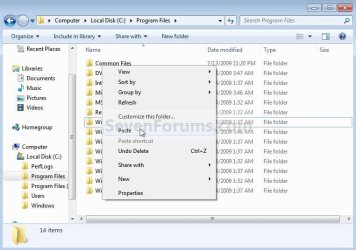
4) Navigate to "C:\Program Files" in Windows Explorer (not "Program Files (x86)" if you have 64-bit Windows), move the extracted and unblocked VBS file into the "C:\Program Files" folder, then close the "Program Files" window.
click any image to enlarge
Cut.jpg

Paste.jpg

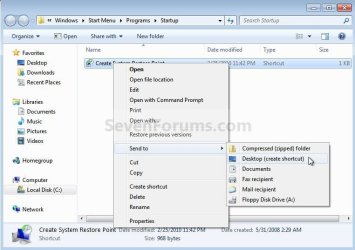
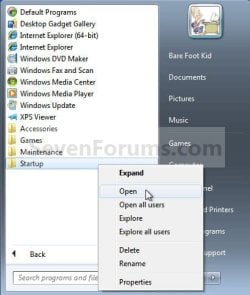
5) Now in the start menu navigate to and r click the "Startup File" to open the "Startup" file window; now back at the "Restore_Point Shortcut" window r click the "Create System Restore Point" shortcut and click cut, then in the "Startup" window at an empty spot click paste. A) Now if you want a shortcut on the desktop to create a restore point whenever needed (without restarting the PC) r click the "Instant Restore Point" shortcut in the "Startup" window and select "Send to, Desktop (create shortcut)" to place a shortcut on the desktop.
Start.jpg

Desktop Shortcut.jpg

6) You're done, now close all the windows and if you want, the zip and the restore point files that you downloaded can be deleted from the desktop.

To use the shortcut you just created.

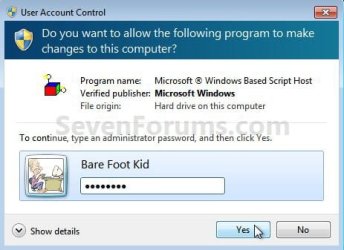
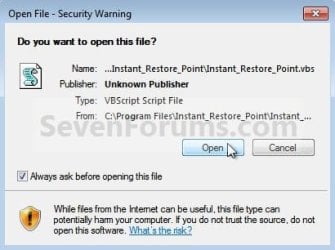
7) Whenever the PC boots to the desktop the first prompt you'll get is "Do you want to open this file?" click open then enter your user credentials for the UAC prompt and click yes.
click any image to enlarge
File Prompt.jpg

Prompt.jpg

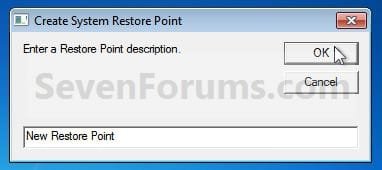
8) If you have chosen to use the restore point creator with a description this last snip is the last step in the process, enter the description you want to use and click ok to finish up, that's all there is to it. I use the one with no description and with 2 clicks at bootup it's done.
Description.jpg


Method Two

Windows Task Scheduler


1) Start by downloading this zip file to the Windows desktop.
Scheduled_Instant_Restore_Point.zip

Download


2) Open the downloaded zip file, extract (drag and drop) the VBS file to the desktop, and unblock the VBS file.

3) Navigate to "C:\Program Files" in Windows Explorer (not "Program Files (x86)" if you have 64-bit Windows), move the extracted and unblocked VBS file into the "C:\Program Files" folder, then close the "Program Files" window.
Cut.jpg

Paste.jpg

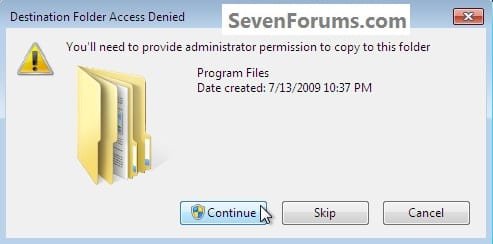
4) In the "Access Denied" dialog box that opens click Continue, if you get a UAC prompt, enter your user credentials and click Yes; then just close the Program Files window that opens.

You can now delete the downloaded Zip file from the desktop if you like.
Continue.jpg
Now in the Windows start menu search box type taskschd.msc and hit the <enter> key. In the Task Scheduler window that opens at the right pane Actions column, click Create Task.

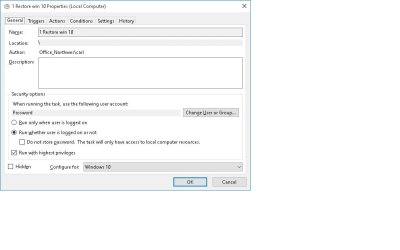
5) In the "Create Task" window that opens at the General tab, give the new task a Name, a description is optional, dot "Run whether user ... " put a check/tic at "Run with highest ... " and "Configure for ... " your flavor Windows.
click any image to enlarge
Task_General.jpg
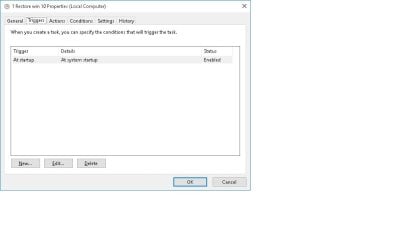
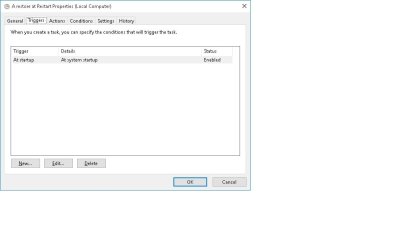
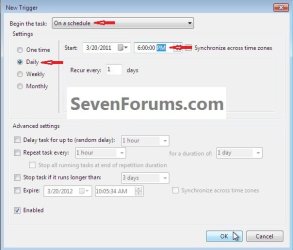
6) Now still in the "Create Task" window click the Triggers tab, at the bottom left click the New button, in the New Trigger dialog box that opens be sure to select when you want the task to run and the daily time you want it to run and click OK.
Task_Trigger.jpg
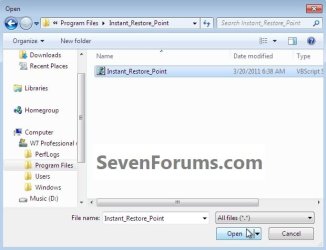
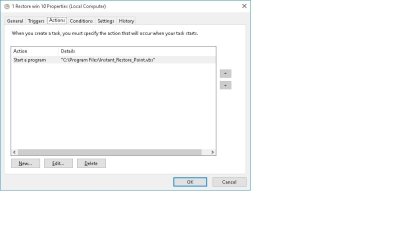
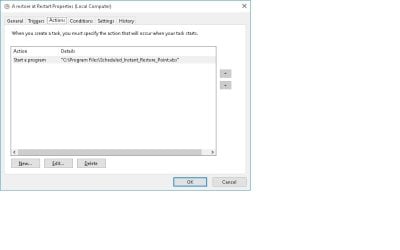
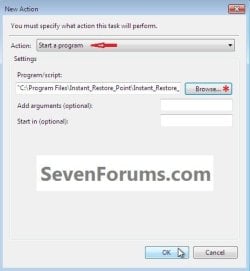
7) Now back at the "Create Task" window click the Actions tab, at the bottom left click the New button, in the New Action dialog box that opens click Browse (see #8 below), now browse to C:\Program Files and click the Instant_Restore_Point file you extracted there in step #2 above and click Open, then click the Instant_Restore_Point script and click Open again.
click any image to enlarge
Action_File.jpg

Action_Script.jpg

8) Now at the New Action dialog box that's still open click OK.
Action.jpg
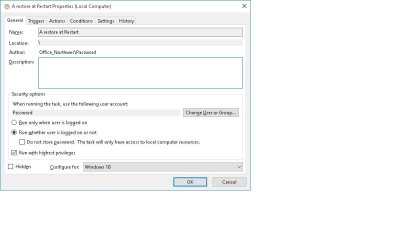
9) In the Create Task window that's still open click OK, in the Account Information dialog box that opens add your user credentials and click OK.

That's all, you are now finished and you can close the Task Scheduler.
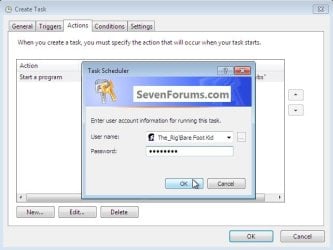
Password.jpg
Enjoy! :)
 

Attachments

Last edited by a moderator:
A few years later, but I hope you can help me.

When I click on the file in Explorer I get a system resore point. But when I make a task in Windows 8.1, Windows ask me what program I like to use for opening the vbs-file. I don't know what to answer.
 

My Computer

Computer type
PC/Desktop
OS
Zuid-Holland

My Computer

Computer type
PC/Desktop
OS
Win 8.1 Professional 64 bit, Win 7 Ultimate 64 biut
When I choose for wcript.exe I don't get the question anymore, bit I don't see a new system restore point.
 

My Computer

Computer type
PC/Desktop
OS
Zuid-Holland
Last edited by a moderator:

My Computer

Computer type
Laptop
Computer Manufacturer/Model Number
Macbook pro
OS
8.1 Pro x64
CPU
core2duo
Memory
3GB
Graphics Card(s)
ATI X1600
Antivirus
Defender
Browser
IE11
Thank you adamf

Adamf,

Thanks. I will try your new script
 

My Computer

Computer type
PC/Desktop
OS
Win 8.1 Professional 64 bit, Win 7 Ultimate 64 biut
How to have a restore point created:

a. automatically
b. ONCE a day, at pc start (i.e. not at each restart)
c. automatic naming e.g. RP-ddmmyyyy-hhmmss

Thanks!
 
Last edited:

My Computer

OS
Windows 7 Ultimate x64
Thanks, BFK... excellent presentation. Extremely easy to comprehend without raising any internal 'what to do' questions. :D
 

My Computer

Computer type
PC/Desktop
Computer Manufacturer/Model Number
HP ENVY 700-515xt CTO, with more cam, headers, and 4.11 gears.
OS
Windows 7 Pro SP1 x64
CPU
Intel Haswell i7-4770 3.4GHz
Motherboard
OEM Kaili2 (MSI MS-7826 v2.0)
Memory
G. SKILLS 32GB Ripjaws X Series DDR3 1600 SDRAM
Graphics Card(s)
Integrated HD4600- upgrade coming!
Sound Card
Integrated...for now.
Monitor(s) Displays
Dell ST-2310 Digital
Screen Resolution
I like 1920x1080
Hard Drives
C\:-Samsung 850PRO SSD-256gb, D:\-SG Barracuda 7200 HDD 1 TB (Storage)
PSU
350w OEM (About to become a display in the aquarium!)
Case
ENVY OEM
Cooling
FANS
Keyboard
Logitech and HP- USB.
Mouse
Logitech LS1 (Alltime favorite of mine!) and HP- both USB
Internet Speed
65Mbps Down (min)/4.5Mbps UP- Charter Comm HS cable
Antivirus
avast! Internet Security 2015/MBAM
Browser
Opera, at present. Love that Chromium horsepower!
Does not work in windows 10 with the task scheduler but the all the shortcuts work:confused:
can I get the restore to work when shutting down?? I have lost the start button 5 or 6 times the last time had to use restore to get it back
 

My Computer

Computer type
PC/Desktop
Computer Manufacturer/Model Number
dell
OS
Windows 10 pro 64 bit
Memory
16
Antivirus
nod32

My Computer

Computer type
PC/Desktop
Computer Manufacturer/Model Number
Self built custom
OS
64-bit Windows 11 Pro for Workstations
CPU
Intel i7-8700K OC'd to 5 GHz
Motherboard
ASUS ROG Maximus XI Formula Z390
Memory
64 GB (4x16GB) G.SKILL TridentZ RGB DDR4 3600 MHz
Graphics Card(s)
ASUS ROG-STRIX-GTX1080TI-O11G-GAMING
Sound Card
Integrated
Monitor(s) Displays
2 x Samsung Odyssey G7 27"
Screen Resolution
2560x1440
Hard Drives
1TB Samsung 990 PRO M.2,
4TB Samsung 990 PRO PRO M.2,
TerraMaster F8 SSD Plus NAS
PSU
Seasonic Prime Titanium 850W
Case
Thermaltake Core P3
Cooling
Corsair Hydro H115i
Keyboard
Logitech wireless K800
Mouse
Logitech MX Master 4
Internet Speed
2 Gb/s Download and 100 Mb/s Upload
Antivirus
Malwarebyte Anti-Malware Premium
Browser
Google Chrome
Other Info
Logitech Z625 speaker system,
Logitech BRIO 4K Pro webcam,
HP Color LaserJet Pro MFP M477fdn,
APC SMART-UPS RT 1000 XL - SURT1000XLI,
Galaxy S23 Plus phone
restore 1.jpg

restore 2.jpg

restore 3.jpg

restore 4.jpg

restore 5.jpg

restore 6.jpg
 

My Computer

Computer type
PC/Desktop
Computer Manufacturer/Model Number
dell
OS
Windows 10 pro 64 bit
Memory
16
Antivirus
nod32

My Computer

Computer type
PC/Desktop
Computer Manufacturer/Model Number
Self built custom
OS
64-bit Windows 11 Pro for Workstations
CPU
Intel i7-8700K OC'd to 5 GHz
Motherboard
ASUS ROG Maximus XI Formula Z390
Memory
64 GB (4x16GB) G.SKILL TridentZ RGB DDR4 3600 MHz
Graphics Card(s)
ASUS ROG-STRIX-GTX1080TI-O11G-GAMING
Sound Card
Integrated
Monitor(s) Displays
2 x Samsung Odyssey G7 27"
Screen Resolution
2560x1440
Hard Drives
1TB Samsung 990 PRO M.2,
4TB Samsung 990 PRO PRO M.2,
TerraMaster F8 SSD Plus NAS
PSU
Seasonic Prime Titanium 850W
Case
Thermaltake Core P3
Cooling
Corsair Hydro H115i
Keyboard
Logitech wireless K800
Mouse
Logitech MX Master 4
Internet Speed
2 Gb/s Download and 100 Mb/s Upload
Antivirus
Malwarebyte Anti-Malware Premium
Browser
Google Chrome
Other Info
Logitech Z625 speaker system,
Logitech BRIO 4K Pro webcam,
HP Color LaserJet Pro MFP M477fdn,
APC SMART-UPS RT 1000 XL - SURT1000XLI,
Galaxy S23 Plus phone
If I use the TASK SCHEDULER to disable AUTO SYS RESTORE is it possible that it can revert back to enabling AUTO SYS RESTORE? I swear that this occurred on one of my machines since I like to do MANUAL creation of RESTORE PTS. Nonetheless, a new AUTO RESTORE PT showed up today & I inspected the TASK SCHEDULER & sure enough it was on.

If it can revert back is it possible to ensure that it will not?
 

My Computer

Computer type
PC/Desktop
OS
Windows 7 Home Prem 32 bit
Hello betaupsilon, :)

It's not unusual for a Windows Update to sometimes reset Windows settings.
 

My Computer

Computer type
PC/Desktop
Computer Manufacturer/Model Number
Self built custom
OS
64-bit Windows 11 Pro for Workstations
CPU
Intel i7-8700K OC'd to 5 GHz
Motherboard
ASUS ROG Maximus XI Formula Z390
Memory
64 GB (4x16GB) G.SKILL TridentZ RGB DDR4 3600 MHz
Graphics Card(s)
ASUS ROG-STRIX-GTX1080TI-O11G-GAMING
Sound Card
Integrated
Monitor(s) Displays
2 x Samsung Odyssey G7 27"
Screen Resolution
2560x1440
Hard Drives
1TB Samsung 990 PRO M.2,
4TB Samsung 990 PRO PRO M.2,
TerraMaster F8 SSD Plus NAS
PSU
Seasonic Prime Titanium 850W
Case
Thermaltake Core P3
Cooling
Corsair Hydro H115i
Keyboard
Logitech wireless K800
Mouse
Logitech MX Master 4
Internet Speed
2 Gb/s Download and 100 Mb/s Upload
Antivirus
Malwarebyte Anti-Malware Premium
Browser
Google Chrome
Other Info
Logitech Z625 speaker system,
Logitech BRIO 4K Pro webcam,
HP Color LaserJet Pro MFP M477fdn,
APC SMART-UPS RT 1000 XL - SURT1000XLI,
Galaxy S23 Plus phone
Hello betaupsilon, :)

It's not unusual for a Windows Update to sometimes reset Windows settings.
I have WINDOWS UPDATE off as well. I do those manually.

Any other possibility?

This time I deleted all of the TRIGGERS so as to reduce the likelihood of AUTO RESTORE, but I am not convinced.
 

My Computer

Computer type
PC/Desktop
OS
Windows 7 Home Prem 32 bit
Were these Windows Backup or System Image restore points?

You could disable the task in Task Scheduler to see if that may help though.
 

My Computer

Computer type
PC/Desktop
Computer Manufacturer/Model Number
Self built custom
OS
64-bit Windows 11 Pro for Workstations
CPU
Intel i7-8700K OC'd to 5 GHz
Motherboard
ASUS ROG Maximus XI Formula Z390
Memory
64 GB (4x16GB) G.SKILL TridentZ RGB DDR4 3600 MHz
Graphics Card(s)
ASUS ROG-STRIX-GTX1080TI-O11G-GAMING
Sound Card
Integrated
Monitor(s) Displays
2 x Samsung Odyssey G7 27"
Screen Resolution
2560x1440
Hard Drives
1TB Samsung 990 PRO M.2,
4TB Samsung 990 PRO PRO M.2,
TerraMaster F8 SSD Plus NAS
PSU
Seasonic Prime Titanium 850W
Case
Thermaltake Core P3
Cooling
Corsair Hydro H115i
Keyboard
Logitech wireless K800
Mouse
Logitech MX Master 4
Internet Speed
2 Gb/s Download and 100 Mb/s Upload
Antivirus
Malwarebyte Anti-Malware Premium
Browser
Google Chrome
Other Info
Logitech Z625 speaker system,
Logitech BRIO 4K Pro webcam,
HP Color LaserJet Pro MFP M477fdn,
APC SMART-UPS RT 1000 XL - SURT1000XLI,
Galaxy S23 Plus phone
Were these Windows Backup or System Image restore points?

You could disable the task in Task Scheduler to see if that may help though.
The new AUTO RESTORE PT was created by the TASK SCHEDULER which I was pretty sure I had disabled. That is why I ask if this DISABLE can be reverted somehow?
 

My Computer

Computer type
PC/Desktop
OS
Windows 7 Home Prem 32 bit
It shouldn't automatically enable itself again since it's a task you added.
 

My Computer

Computer type
PC/Desktop
Computer Manufacturer/Model Number
Self built custom
OS
64-bit Windows 11 Pro for Workstations
CPU
Intel i7-8700K OC'd to 5 GHz
Motherboard
ASUS ROG Maximus XI Formula Z390
Memory
64 GB (4x16GB) G.SKILL TridentZ RGB DDR4 3600 MHz
Graphics Card(s)
ASUS ROG-STRIX-GTX1080TI-O11G-GAMING
Sound Card
Integrated
Monitor(s) Displays
2 x Samsung Odyssey G7 27"
Screen Resolution
2560x1440
Hard Drives
1TB Samsung 990 PRO M.2,
4TB Samsung 990 PRO PRO M.2,
TerraMaster F8 SSD Plus NAS
PSU
Seasonic Prime Titanium 850W
Case
Thermaltake Core P3
Cooling
Corsair Hydro H115i
Keyboard
Logitech wireless K800
Mouse
Logitech MX Master 4
Internet Speed
2 Gb/s Download and 100 Mb/s Upload
Antivirus
Malwarebyte Anti-Malware Premium
Browser
Google Chrome
Other Info
Logitech Z625 speaker system,
Logitech BRIO 4K Pro webcam,
HP Color LaserJet Pro MFP M477fdn,
APC SMART-UPS RT 1000 XL - SURT1000XLI,
Galaxy S23 Plus phone
It shouldn't automatically enable itself again since it's a task you added.

OK I guess I will have to be vigilant. I was pretty sure I had disabled it.
 

My Computer

Computer type
PC/Desktop
OS
Windows 7 Home Prem 32 bit
It shouldn't automatically enable itself again since it's a task you added.

OK I guess I will have to be vigilant. I was pretty sure I had disabled it.

Hi Shawn,
I think I figured out what happened. I ran your Enable System Restore.reg tool sometime back. That apparently overwrites what I specify in the TASK SCHEDULER prior to executing that tool. I should have been more cognizant of that. NOW I AM.

THANX
 

My Computer

Computer type
PC/Desktop
OS
Windows 7 Home Prem 32 bit
Shawn,
I know you have addressed the issue of losing RESTORE PTS in WindowsImageBackup. What about cloning, do the RESTORE PTS get preserved or not? I ran across the following link where someone mentioned this issue, and it seems they did not successfully transfer the RESTORE PTS to the clone.

http://www.sevenforums.com/installa...-way-clone-windows-7-volume-dual-booting.html


I posted a question about this, but no one has responded as of yet. The thread is pretty old so I am not sure my question will get looked at. Do you have any knowledge on this? I am not attempting to have both the CLONE & the ORIGINAL system in a dual boot capacity which I think they were attempting. The above thread was the only reference I found on discussing RESTORE PTS & cloning.
 

My Computer

Computer type
PC/Desktop
OS
Windows 7 Home Prem 32 bit
Back
Top