System Restore Point Shortcut

How to Make a "Create System Restore Point" Shortcut in XP, Vista, Windows 7, and Windows 8

   Information
This tutorial will provide you with a create a manual system restore point shortcut that will instantly create a restore point with an optional description and success message in XP, Vista, Windows 7, and Windows 8.

System Restore isn't available for Windows RT.

   Note
Restore points contain information about registry settings and other system information that Windows uses. System Restore points do not include personal user files in the C:\Users\(user-name) folders.

   Warning
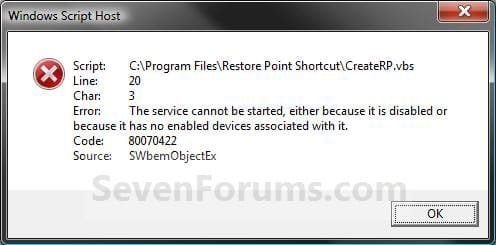
For this shortcut to work, you must have System Protection turned on for the C: (Windows) drive. If you do not have it on, then you will get the error below when you try to use the shortcut.
Error_Message.jpg


EXAMPLE: Create System Restore Point with description and message shortcut
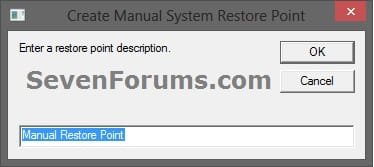
NOTE: When you click on the Create System Restore Point shortcut, you will see this window. Just type in a name for the restore point, and click on OK to create the restore point.
Decription_Prompt.jpg

Success_Message2.jpg


OPTION ONE

To Create the "Create Restore Point" Shortcut


1. Do step 2, 3, or 4 below for what type of shortcut you would like to use to create a restore point with.
2. For an Instant Create Restore Point Shortcut
NOTE: This shortcut will instantly create a restore point named Instant Restore Point in System Restore without prompting for a description or giving you any type of success message. If you didn't get an error, then the restore point was created successfully after a few moments.
A) Click/tap on the Download button below to download the file below, and go to step 5 below.
Instant_Restore_Point.zip

Download


3. For a Create Restore Point with Description Prompt Shortcut
NOTE: This shortcut will prompt you to enter a description name for the restore point, then create the restore point. If you didn't get an error, then the restore point was created successfully after a few moments.
A) Click/tap on the Download button below to download the file below, and go to step 5 below.
Restore_Point_Shortcut.zip

Download


4. For a Create Restore Point with Description and Success Message Shortcut
NOTE: This shortcut will prompt you to enter a description for the restore point, create the restore point, and give you a successfully completed message when it's finished.
A) Click/tap on the Download button below to download the file below, and go to step 5 below.
Restore_Point_Message_Shortcut.zip

Download


5. Save the downloaded .zip file to your desktop.

6. Unblock the downloaded .zip file.

7. Open the downloaded .zip file, right click on the Instant_Restore_Point (step 2), or Restore Point Shortcut (step 3), or Restore Point Message Shortcut (step 4) folder, and click/tap on Copy.

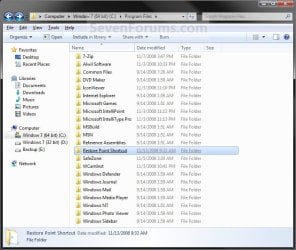
8. Navigate to and open the C:\Program Files folder in Windows Explorer, then right click or press and hold on an empty area in the folder window, and click/tap on Paste. (see screenshot below step 10)

9. If prompted by UAC, then click on Continue and Yes.

10. You should now see the Instant_Restore_Point (step 2), or Restore Point Shortcut (step 3), or Restore Point Message Shortcut (step 4) folder in the C:\Program Files window now. (see screenshot below)
Program_Files.jpg
11. Open the downloaded .zip file, extract (drag and drop) the Create System Restore Point or Instant Restore Point shortcut to your desktop.

13. You can now leave the Create System Restore Point (left screenshot below) or Instant Restore Point (right screenshot below) shortcut on the desktop or move it to where you like for easy use of it.

Shortcut-1.jpgShortcut.jpg


OPTION TWO

To Remove the "Create Restore Point" Shortcut


1. Navigate to C:\Program Files in Windows Explorer, then right click on either the Instant_Restore_Point (step 2 above), or Restore Point Shortcut (step 3 above), or Restore Point Message Shortcut (step 4 above) folder, and click on Delete. (see screenshot below)
Program_Files.jpg
2. If prompted by UAC, then click/tap on Yes (Windows 7/8) or Continue (Vista).

3. Right click or press and hold on the Create System Restore Point (left screenshot below) or Instant Restore Point (right screenshot below) shortcut, and click/tap on Delete.
Shortcut-1.jpgShortcut.jpg
That's it,
Shawn


Attachments

Last edited:
You're welcome Etrifonoves. I'm happy to hear that you got it the way you wanted. :)
 
Last edited:

My Computer

Computer type
PC/Desktop
Computer Manufacturer/Model Number
Self built custom
OS
64-bit Windows 11 Pro for Workstations
CPU
Intel i7-8700K OC'd to 5 GHz
Motherboard
ASUS ROG Maximus XI Formula Z390
Memory
64 GB (4x16GB) G.SKILL TridentZ RGB DDR4 3600 MHz
Graphics Card(s)
ASUS ROG-STRIX-GTX1080TI-O11G-GAMING
Sound Card
Integrated
Monitor(s) Displays
2 x Samsung Odyssey G7 27"
Screen Resolution
2560x1440
Hard Drives
1TB Samsung 990 PRO M.2,
4TB Samsung 990 PRO PRO M.2,
TerraMaster F8 SSD Plus NAS
PSU
Seasonic Prime Titanium 850W
Case
Thermaltake Core P3
Cooling
Corsair Hydro H115i
Keyboard
Logitech wireless K800
Mouse
Logitech MX Master 4
Internet Speed
2 Gb/s Download and 100 Mb/s Upload
Antivirus
Malwarebyte Anti-Malware Premium
Browser
Google Chrome
Other Info
Logitech Z625 speaker system,
Logitech BRIO 4K Pro webcam,
HP Color LaserJet Pro MFP M477fdn,
APC SMART-UPS RT 1000 XL - SURT1000XLI,
Galaxy S23 Plus phone
This is a great shortcut... Thanks guys :D


I know that it will display an error message if not successful... but is it possible to get a revised script that provides this standard confirmation message?


My Computer

OS
XP and Win7
HELLO..CAN I ASK..WHAT IS THE DIFFERENCE BETWEEN CREATE RESTORE POINT N INSTANT CREATE RESTORE POINT?N WHICH IS BETTER BETWEEN BOTH OF THEM?

OH..one more thing, i think it is much more convenient if we can choose to delete any restore point that we dont want manually..i think windows does not allow us to choose to delete restore point one by one..is it true?or i miss something?as example,we got three restore point, restore point 1, 2 n 3..we just want to keep restore point 1,so we just delete restre point 2 n 3 n keep restore point 1 only.so that we can gain more space on c. is there is any function like that in wndw 7?if no,then how to make it possible?
 
Last edited by a moderator:

My Computer

Computer Manufacturer/Model Number
Satellite E300 / PSE30L-009007
OS
Microsoft Windows 7 Ultimate x64 6.1.7601 Service Pack 1
CPU
Intel(R) Core(TM) i5-2410M CPU @ 2.30GHz
Motherboard
Intel Corp. Base Board Product Name (CPU1)
Memory
4.00 GB Dual-Channel DDR3 @ 665MHz (9-9-9-24)
Graphics Card(s)
Intel(R) HD Graphics Family version=8.15.10.2353
Sound Card
onexant SmartAudio HD, Intel(R) Display Audio version=6.14
Screen Resolution
1366 x 768 Pixels
Hard Drives
625GB TOSHIBA TOSHIBA MK6465GSXN (SATA)
Mouse
e-view
Other Info
NETWORK CARD

-HUAWEI Mobile Connect - 3G Network Card version=6,0,1,279
-Intel(R) Centrino(R) Advanced-N 6230 version=15.3.1.2
-Atheros AR8152/8158 PCI-E Fast Ethernet Controller (NDIS 6.20) version=2.0.15.16
Hello Mie,

HELLO..CAN I ASK..WHAT IS THE DIFFERENCE BETWEEN CREATE RESTORE POINT N INSTANT CREATE RESTORE POINT?N WHICH IS BETTER BETWEEN BOTH OF THEM?

One creates the restore point immediately, and the other asks for you to type in a name for the restore point first. Both do the same thing, but it just depends on how you want it created. That's all.

OH..one more thing, i think it is much more convenient if we can choose to delete any restore point that we dont want manually..i think windows does not allow us to choose to delete restore point one by one..is it true?or i miss something?as example,we got three restore point, restore point 1, 2 n 3..we just want to keep restore point 1,so we just delete restre point 2 n 3 n keep restore point 1 only.so that we can gain more space on c. is there is any function like that in wndw 7?if no,then how to make it possible?

Sorry, but no you cannot delete individual restore points by defualt in Windows 7. However, you can using CCleaner (Tools - System Restore).

Hope this helps,
Shawn
 

My Computer

Computer type
PC/Desktop
Computer Manufacturer/Model Number
Self built custom
OS
64-bit Windows 11 Pro for Workstations
CPU
Intel i7-8700K OC'd to 5 GHz
Motherboard
ASUS ROG Maximus XI Formula Z390
Memory
64 GB (4x16GB) G.SKILL TridentZ RGB DDR4 3600 MHz
Graphics Card(s)
ASUS ROG-STRIX-GTX1080TI-O11G-GAMING
Sound Card
Integrated
Monitor(s) Displays
2 x Samsung Odyssey G7 27"
Screen Resolution
2560x1440
Hard Drives
1TB Samsung 990 PRO M.2,
4TB Samsung 990 PRO PRO M.2,
TerraMaster F8 SSD Plus NAS
PSU
Seasonic Prime Titanium 850W
Case
Thermaltake Core P3
Cooling
Corsair Hydro H115i
Keyboard
Logitech wireless K800
Mouse
Logitech MX Master 4
Internet Speed
2 Gb/s Download and 100 Mb/s Upload
Antivirus
Malwarebyte Anti-Malware Premium
Browser
Google Chrome
Other Info
Logitech Z625 speaker system,
Logitech BRIO 4K Pro webcam,
HP Color LaserJet Pro MFP M477fdn,
APC SMART-UPS RT 1000 XL - SURT1000XLI,
Galaxy S23 Plus phone
thanks brink for the answer..k one more question, i already create system restore point by using ur method,but i didnt see any restore point that i create just now on my cc cleaner..why?
 

My Computer

Computer Manufacturer/Model Number
Satellite E300 / PSE30L-009007
OS
Microsoft Windows 7 Ultimate x64 6.1.7601 Service Pack 1
CPU
Intel(R) Core(TM) i5-2410M CPU @ 2.30GHz
Motherboard
Intel Corp. Base Board Product Name (CPU1)
Memory
4.00 GB Dual-Channel DDR3 @ 665MHz (9-9-9-24)
Graphics Card(s)
Intel(R) HD Graphics Family version=8.15.10.2353
Sound Card
onexant SmartAudio HD, Intel(R) Display Audio version=6.14
Screen Resolution
1366 x 768 Pixels
Hard Drives
625GB TOSHIBA TOSHIBA MK6465GSXN (SATA)
Mouse
e-view
Other Info
NETWORK CARD

-HUAWEI Mobile Connect - 3G Network Card version=6,0,1,279
-Intel(R) Centrino(R) Advanced-N 6230 version=15.3.1.2
-Atheros AR8152/8158 PCI-E Fast Ethernet Controller (NDIS 6.20) version=2.0.15.16
It may take it few moments before it shows up in CCleaner. Is it listed in System Protection?
 

My Computer

Computer type
PC/Desktop
Computer Manufacturer/Model Number
Self built custom
OS
64-bit Windows 11 Pro for Workstations
CPU
Intel i7-8700K OC'd to 5 GHz
Motherboard
ASUS ROG Maximus XI Formula Z390
Memory
64 GB (4x16GB) G.SKILL TridentZ RGB DDR4 3600 MHz
Graphics Card(s)
ASUS ROG-STRIX-GTX1080TI-O11G-GAMING
Sound Card
Integrated
Monitor(s) Displays
2 x Samsung Odyssey G7 27"
Screen Resolution
2560x1440
Hard Drives
1TB Samsung 990 PRO M.2,
4TB Samsung 990 PRO PRO M.2,
TerraMaster F8 SSD Plus NAS
PSU
Seasonic Prime Titanium 850W
Case
Thermaltake Core P3
Cooling
Corsair Hydro H115i
Keyboard
Logitech wireless K800
Mouse
Logitech MX Master 4
Internet Speed
2 Gb/s Download and 100 Mb/s Upload
Antivirus
Malwarebyte Anti-Malware Premium
Browser
Google Chrome
Other Info
Logitech Z625 speaker system,
Logitech BRIO 4K Pro webcam,
HP Color LaserJet Pro MFP M477fdn,
APC SMART-UPS RT 1000 XL - SURT1000XLI,
Galaxy S23 Plus phone
yeah..now i can see it..thnks alot :)
 

My Computer

Computer Manufacturer/Model Number
Satellite E300 / PSE30L-009007
OS
Microsoft Windows 7 Ultimate x64 6.1.7601 Service Pack 1
CPU
Intel(R) Core(TM) i5-2410M CPU @ 2.30GHz
Motherboard
Intel Corp. Base Board Product Name (CPU1)
Memory
4.00 GB Dual-Channel DDR3 @ 665MHz (9-9-9-24)
Graphics Card(s)
Intel(R) HD Graphics Family version=8.15.10.2353
Sound Card
onexant SmartAudio HD, Intel(R) Display Audio version=6.14
Screen Resolution
1366 x 768 Pixels
Hard Drives
625GB TOSHIBA TOSHIBA MK6465GSXN (SATA)
Mouse
e-view
Other Info
NETWORK CARD

-HUAWEI Mobile Connect - 3G Network Card version=6,0,1,279
-Intel(R) Centrino(R) Advanced-N 6230 version=15.3.1.2
-Atheros AR8152/8158 PCI-E Fast Ethernet Controller (NDIS 6.20) version=2.0.15.16
You're welcome. :)
 

My Computer

Computer type
PC/Desktop
Computer Manufacturer/Model Number
Self built custom
OS
64-bit Windows 11 Pro for Workstations
CPU
Intel i7-8700K OC'd to 5 GHz
Motherboard
ASUS ROG Maximus XI Formula Z390
Memory
64 GB (4x16GB) G.SKILL TridentZ RGB DDR4 3600 MHz
Graphics Card(s)
ASUS ROG-STRIX-GTX1080TI-O11G-GAMING
Sound Card
Integrated
Monitor(s) Displays
2 x Samsung Odyssey G7 27"
Screen Resolution
2560x1440
Hard Drives
1TB Samsung 990 PRO M.2,
4TB Samsung 990 PRO PRO M.2,
TerraMaster F8 SSD Plus NAS
PSU
Seasonic Prime Titanium 850W
Case
Thermaltake Core P3
Cooling
Corsair Hydro H115i
Keyboard
Logitech wireless K800
Mouse
Logitech MX Master 4
Internet Speed
2 Gb/s Download and 100 Mb/s Upload
Antivirus
Malwarebyte Anti-Malware Premium
Browser
Google Chrome
Other Info
Logitech Z625 speaker system,
Logitech BRIO 4K Pro webcam,
HP Color LaserJet Pro MFP M477fdn,
APC SMART-UPS RT 1000 XL - SURT1000XLI,
Galaxy S23 Plus phone

My Computer

Computer type
PC/Desktop
Computer Manufacturer/Model Number
Self built custom
OS
64-bit Windows 11 Pro for Workstations
CPU
Intel i7-8700K OC'd to 5 GHz
Motherboard
ASUS ROG Maximus XI Formula Z390
Memory
64 GB (4x16GB) G.SKILL TridentZ RGB DDR4 3600 MHz
Graphics Card(s)
ASUS ROG-STRIX-GTX1080TI-O11G-GAMING
Sound Card
Integrated
Monitor(s) Displays
2 x Samsung Odyssey G7 27"
Screen Resolution
2560x1440
Hard Drives
1TB Samsung 990 PRO M.2,
4TB Samsung 990 PRO PRO M.2,
TerraMaster F8 SSD Plus NAS
PSU
Seasonic Prime Titanium 850W
Case
Thermaltake Core P3
Cooling
Corsair Hydro H115i
Keyboard
Logitech wireless K800
Mouse
Logitech MX Master 4
Internet Speed
2 Gb/s Download and 100 Mb/s Upload
Antivirus
Malwarebyte Anti-Malware Premium
Browser
Google Chrome
Other Info
Logitech Z625 speaker system,
Logitech BRIO 4K Pro webcam,
HP Color LaserJet Pro MFP M477fdn,
APC SMART-UPS RT 1000 XL - SURT1000XLI,
Galaxy S23 Plus phone
You're welcome Ghostwalker. :)
 

My Computer

Computer type
PC/Desktop
Computer Manufacturer/Model Number
Self built custom
OS
64-bit Windows 11 Pro for Workstations
CPU
Intel i7-8700K OC'd to 5 GHz
Motherboard
ASUS ROG Maximus XI Formula Z390
Memory
64 GB (4x16GB) G.SKILL TridentZ RGB DDR4 3600 MHz
Graphics Card(s)
ASUS ROG-STRIX-GTX1080TI-O11G-GAMING
Sound Card
Integrated
Monitor(s) Displays
2 x Samsung Odyssey G7 27"
Screen Resolution
2560x1440
Hard Drives
1TB Samsung 990 PRO M.2,
4TB Samsung 990 PRO PRO M.2,
TerraMaster F8 SSD Plus NAS
PSU
Seasonic Prime Titanium 850W
Case
Thermaltake Core P3
Cooling
Corsair Hydro H115i
Keyboard
Logitech wireless K800
Mouse
Logitech MX Master 4
Internet Speed
2 Gb/s Download and 100 Mb/s Upload
Antivirus
Malwarebyte Anti-Malware Premium
Browser
Google Chrome
Other Info
Logitech Z625 speaker system,
Logitech BRIO 4K Pro webcam,
HP Color LaserJet Pro MFP M477fdn,
APC SMART-UPS RT 1000 XL - SURT1000XLI,
Galaxy S23 Plus phone
Shawn,

Were it not for your tutorials I would never have gained the understanding of the OS that you have provided. The most critical one has been what I think of as the UAC defeater - the ability to create shortcuts that can be run by me as administrator. I teach myself each new OS, except Vista, which I never ran, and there is no way in the world that I would have found that.

For some reason I would not "enhance your reputation", possibly because I'm a very new member.

Many thanks,

Gerry Rains
 

My Computer

Computer Manufacturer/Model Number
Home Made
OS
Windows 7 Home Premium
CPU
Intel I5Core750
Motherboard
Gigabyte P55A-UD3
Memory
6 GB Corsair DDR3 1600
Graphics Card(s)
Zotac GeForce 9600 GT
Sound Card
7:1 on otherboard
Monitor(s) Displays
ViewSonic VG2030m (one of the last 4 by 3 monitors)
Screen Resolution
1400 by 1050 (Native Resolution)
Hard Drives
2 500 GB Western Digital SATA
PSU
Thermaltake TR2 500W
Case
Cooler Master Elite 332
Cooling
Thermaltake SpinQ
Keyboard
400 v1.0
Mouse
Logitech LX-8
Internet Speed
9.82 Mbs download speed 1.87 Mbs Upload speed
Other Info
Monochrome Laser Printer -HP 1020
Ink-Jet color all in one without fax - Canon Pixma MP 170
500GB external portable hard drive - Iomega
You're most welcome Gerry, and thank you. :)
 

My Computer

Computer type
PC/Desktop
Computer Manufacturer/Model Number
Self built custom
OS
64-bit Windows 11 Pro for Workstations
CPU
Intel i7-8700K OC'd to 5 GHz
Motherboard
ASUS ROG Maximus XI Formula Z390
Memory
64 GB (4x16GB) G.SKILL TridentZ RGB DDR4 3600 MHz
Graphics Card(s)
ASUS ROG-STRIX-GTX1080TI-O11G-GAMING
Sound Card
Integrated
Monitor(s) Displays
2 x Samsung Odyssey G7 27"
Screen Resolution
2560x1440
Hard Drives
1TB Samsung 990 PRO M.2,
4TB Samsung 990 PRO PRO M.2,
TerraMaster F8 SSD Plus NAS
PSU
Seasonic Prime Titanium 850W
Case
Thermaltake Core P3
Cooling
Corsair Hydro H115i
Keyboard
Logitech wireless K800
Mouse
Logitech MX Master 4
Internet Speed
2 Gb/s Download and 100 Mb/s Upload
Antivirus
Malwarebyte Anti-Malware Premium
Browser
Google Chrome
Other Info
Logitech Z625 speaker system,
Logitech BRIO 4K Pro webcam,
HP Color LaserJet Pro MFP M477fdn,
APC SMART-UPS RT 1000 XL - SURT1000XLI,
Galaxy S23 Plus phone
verification message?

Hi, Shawn,

just stumbled onto this site, am really glad -- I am new to Win7 & can very much use any timesavers, etc, I can get. :confused:

Your shortcut for the system restore pt brought me here. Installed & working, a great timesaver - thanks!

A quick question -- I miss the security of seeing "restore pt sucessfully created" message. Any way to still get that that you know of?

Thanks,
Toni
 

My Computer

Computer type
Laptop
Computer Manufacturer/Model Number
Toshiba Satellite A665
OS
Win7 64 bit
Antivirus
Avast Free

My Computer

Computer type
PC/Desktop
Computer Manufacturer/Model Number
Self built custom
OS
64-bit Windows 11 Pro for Workstations
CPU
Intel i7-8700K OC'd to 5 GHz
Motherboard
ASUS ROG Maximus XI Formula Z390
Memory
64 GB (4x16GB) G.SKILL TridentZ RGB DDR4 3600 MHz
Graphics Card(s)
ASUS ROG-STRIX-GTX1080TI-O11G-GAMING
Sound Card
Integrated
Monitor(s) Displays
2 x Samsung Odyssey G7 27"
Screen Resolution
2560x1440
Hard Drives
1TB Samsung 990 PRO M.2,
4TB Samsung 990 PRO PRO M.2,
TerraMaster F8 SSD Plus NAS
PSU
Seasonic Prime Titanium 850W
Case
Thermaltake Core P3
Cooling
Corsair Hydro H115i
Keyboard
Logitech wireless K800
Mouse
Logitech MX Master 4
Internet Speed
2 Gb/s Download and 100 Mb/s Upload
Antivirus
Malwarebyte Anti-Malware Premium
Browser
Google Chrome
Other Info
Logitech Z625 speaker system,
Logitech BRIO 4K Pro webcam,
HP Color LaserJet Pro MFP M477fdn,
APC SMART-UPS RT 1000 XL - SURT1000XLI,
Galaxy S23 Plus phone
Thanks. & for providing great content.

That's OK. Thought it worth asking. I had already seen & tried the manual method before I posted the question.

Decided your way was much more convenient regardless of if there was a 'fix' for the confirmation or not. :))

Thanks.
 

My Computer

Computer type
Laptop
Computer Manufacturer/Model Number
Toshiba Satellite A665
OS
Win7 64 bit
Antivirus
Avast Free
Thanks for the input/help but I did use the one with the name -- IMHO, not just only a few extra keystrokes, but also a great reminder of what was going on at the time.
 

My Computer

Computer type
Laptop
Computer Manufacturer/Model Number
Toshiba Satellite A665
OS
Win7 64 bit
Antivirus
Avast Free
Back
Top