
Solved System Restore question (hopefully simple)

Tactics

New member
Member
VIP
Local time
8:41 AM
Messages
105
Hello- I've been on Google for an hour and checked 4 pages on here but do not see a duplicate thread so i'll post.

New system 64 bit. Why does system restore not create automatic restore points? I've had the system running out of the box for 3 weeks and installed many things - not 1 restore pt. created.

I did see where folks say "Scroll down until you see Volume Shadow copy and make sue it'd stated" I did that yesterday. Will SR 'kick in' or is this the way W7 is designed?

I can create them fine manually BTW

TIA folks.
 

My Computer

Computer type
PC/Desktop
Computer Manufacturer/Model Number
Dell Alienware Aurora R7
OS
Windows 10 64-bit
CPU
Intel i7K 8700K
Motherboard
Alienware 0VDT73
Memory
16GB Dual Channel DDR4 @2666MHz
Graphics Card(s)
EVGA GeForce RTX 2080 Ti XC Ultra Gaming 11GB GDDR6
Sound Card
Realtek on-board w/Logitech z506 5.1 Surround
Monitor(s) Displays
LG - 65" Class - OLED - C9
Screen Resolution
3840 x 2160 4K
Hard Drives
512GB M.2 PCIe SSD
1TB 7200RPM SATA 6Gb/s (Storage)
PSU
850W EPA Bronze PSU Liquid Cooled Chassis
Case
Alienware Aurora
Cooling
Liquid Cooled
Keyboard
Logitech Wireless K800
Mouse
Logitech Performance MX
Internet Speed
100MB
Antivirus
Emsisoft
Browser
Firefox 64-bit
Other Info
Steelseries Artics Pro Wireless gaming headset.

https://steelseries.com/gaming-headsets/arctis-pro-wireless
okay.. I just read "W7 does not auto-create unless no other restore point set in last 7 days."

Does that mean now that I created 1 it will now start to do it auto.?

Thx
 

My Computer

Computer type
PC/Desktop
Computer Manufacturer/Model Number
Dell Alienware Aurora R7
OS
Windows 10 64-bit
CPU
Intel i7K 8700K
Motherboard
Alienware 0VDT73
Memory
16GB Dual Channel DDR4 @2666MHz
Graphics Card(s)
EVGA GeForce RTX 2080 Ti XC Ultra Gaming 11GB GDDR6
Sound Card
Realtek on-board w/Logitech z506 5.1 Surround
Monitor(s) Displays
LG - 65" Class - OLED - C9
Screen Resolution
3840 x 2160 4K
Hard Drives
512GB M.2 PCIe SSD
1TB 7200RPM SATA 6Gb/s (Storage)
PSU
850W EPA Bronze PSU Liquid Cooled Chassis
Case
Alienware Aurora
Cooling
Liquid Cooled
Keyboard
Logitech Wireless K800
Mouse
Logitech Performance MX
Internet Speed
100MB
Antivirus
Emsisoft
Browser
Firefox 64-bit
Other Info
Steelseries Artics Pro Wireless gaming headset.

https://steelseries.com/gaming-headsets/arctis-pro-wireless
It's odd that you have done numerous app installs and no restore point was created. Most installs create one automatically.

Any significant Windows Update should create one also. Have you tried that?

I think the default is to create one weekly, but in the real world, doing what I do, I have 3 or 4 in an average week---none of which I create manually.

I'd give it some time and watch it for a week.
 

My Computer

Computer type
PC/Desktop
Computer Manufacturer/Model Number
Ignatz Special; 4 speed manual gearbox; factory air conditioning; one of one
OS
Windows 7 Home Premium SP1, 64-bit
CPU
Intel Skylake i5-6600K, not overclocked
Motherboard
AsRock Z170M Extreme 4, micro ATX
Memory
8 GB HyperX DDR4-2666 (2 x 4 GB)
Graphics Card(s)
none; graphics are integrated on CPU
Sound Card
onboard: Realtek ALC1150; external: USB Behringer UF0-202
Monitor(s) Displays
Dell S2340M 23 inch IPS
Screen Resolution
1600 x 900
Hard Drives
System: Crucial MX100 series SSD, 128 GB;
Data: Samsung Spinpoint 103SJ, 1 TB;
Backup: WD Caviar Green WD30EZRX-00D8PB0, 3 TB
PSU
Rosewill SilentNight 500 watt fanless, semi-modular
Case
Antec Solo II
Cooling
Noctua NH-U12S; Noctua F12 intake, Noctua S12A exhaust
Keyboard
Microsoft 200 6JH-00001 USB
Mouse
Dell or Microsoft optical wired; USB
Antivirus
Microsoft Security Essentials and Malwarebytes Premium
Browser
Pale Moon
Other Info
All fans PWM; speeds at idle: CPU circa 500 rpm; intake circa 600 rpm; exhaust circa 600 rpm; CPU temps 27 idle and 47 C load in a warm room (27 C/81 F) when running Intel Extreme Tuning Utility stress test.
If like many you find Windows a bit vague when it comes to automating restore points you may want to automate them according to your own requirements.

I came across this handy forum article recently and now have them scheduled every 12 hours. If you're dubious about downloading the file there, run your own virus/malware scans or upload it to Virus Total for peace of mind.
 

My Computer

Computer type
PC/Desktop
OS
Windows 7
Thx yea I read that already but was hoping to see if my OS is fooked somehow or this is the norm. Tons of threads in Google about W7 and no auto. restores so I guess its normal.

I will wait a bit and see what happens and yep all Windows updates done but no restore point even when SP1 was installed..
 

My Computer

Computer type
PC/Desktop
Computer Manufacturer/Model Number
Dell Alienware Aurora R7
OS
Windows 10 64-bit
CPU
Intel i7K 8700K
Motherboard
Alienware 0VDT73
Memory
16GB Dual Channel DDR4 @2666MHz
Graphics Card(s)
EVGA GeForce RTX 2080 Ti XC Ultra Gaming 11GB GDDR6
Sound Card
Realtek on-board w/Logitech z506 5.1 Surround
Monitor(s) Displays
LG - 65" Class - OLED - C9
Screen Resolution
3840 x 2160 4K
Hard Drives
512GB M.2 PCIe SSD
1TB 7200RPM SATA 6Gb/s (Storage)
PSU
850W EPA Bronze PSU Liquid Cooled Chassis
Case
Alienware Aurora
Cooling
Liquid Cooled
Keyboard
Logitech Wireless K800
Mouse
Logitech Performance MX
Internet Speed
100MB
Antivirus
Emsisoft
Browser
Firefox 64-bit
Other Info
Steelseries Artics Pro Wireless gaming headset.

https://steelseries.com/gaming-headsets/arctis-pro-wireless
It seems very strange that you have installed various software and have accrued no automated restore points? Have you done any tweaking?

It may be stating the obvious though have you checked the Disk Space Usage allocated for the relevant drive, in System Protection > Protection Settings?
If it's set to the lowest level then it's possible it won't have enough space to create even a single restore point, even though the VSC service is started?
 

My Computer

Computer type
PC/Desktop
OS
Windows 7
See picture:
 

Attachments

  • 2011-04-25_2248.png
    2011-04-25_2248.png
    26.1 KB · Views: 4

My Computer

Computer Manufacturer/Model Number
HP, Dell, Gateway, Toshiba - 4 laptops and 2 desktops
OS
Vista, Windows7, Mint Mate, Zorin, Windows 8
CPU
from 1.6GHz Duo to i7
Monitor(s) Displays
2x HP w2207
Hard Drives
5x HDD, 7x SSD, 12x Externals
Keyboard
with trackball - no mices
Mouse
Trackball mice
Internet Speed
DSL 6000
Good points last 2 replies. I just found this on another forum. Seems like its a space issue because my slider is all the wayyy to the left. I'll have to try it when I get home.

I did check it this morning after making sure the Volume Shadow service was started and it did create a restore point at 2:45AM so I was pumped but when I closed SR it was gone! I created another one on the spot - closed SR and re-opened and bam it dissapered also. LOTS of problems with this on the net. Hopefully below will be the fix.

"My problem with disappearing restore points (Windows 7) is resolved. I chatted with ms Windows 7 support and they did two things:

(1) Made sure 'System Restore' (SR) had all the authority it needed: system restore icon-> right click-> properties->click to security tab and put checks in all auth columns

(2) gave SR all the space it wanted: within the 'Search programs and Files' of the START menu type 'create restore point' -> click on link found for 'create restore point' -> Custom->stretch slider ALL the WAY to right (max). apply, Reboot. Go back to 'create restore point' and create one and reboot. See i restore point is there. Mine was hope yours is.

Note: this is clearly a Windows problem. You should NOT have to specify all you available free space to this component or chage it's Auth. Both will surely come back and haunt you. If this solves it for many others then someone should open a bug under MS Windows 7."

PS i'm now working on another issue when I open Task Scheduler

"The selected task {0} no longer exists. To see the current tasks"
- ughhhh (But have found a fix for that I hope) I hope they correct this stuff with SP2! this is silly nonsense to be honest.
 

My Computer

Computer type
PC/Desktop
Computer Manufacturer/Model Number
Dell Alienware Aurora R7
OS
Windows 10 64-bit
CPU
Intel i7K 8700K
Motherboard
Alienware 0VDT73
Memory
16GB Dual Channel DDR4 @2666MHz
Graphics Card(s)
EVGA GeForce RTX 2080 Ti XC Ultra Gaming 11GB GDDR6
Sound Card
Realtek on-board w/Logitech z506 5.1 Surround
Monitor(s) Displays
LG - 65" Class - OLED - C9
Screen Resolution
3840 x 2160 4K
Hard Drives
512GB M.2 PCIe SSD
1TB 7200RPM SATA 6Gb/s (Storage)
PSU
850W EPA Bronze PSU Liquid Cooled Chassis
Case
Alienware Aurora
Cooling
Liquid Cooled
Keyboard
Logitech Wireless K800
Mouse
Logitech Performance MX
Internet Speed
100MB
Antivirus
Emsisoft
Browser
Firefox 64-bit
Other Info
Steelseries Artics Pro Wireless gaming headset.

https://steelseries.com/gaming-headsets/arctis-pro-wireless
And after some extensive reading Volume Shadow Copy should be left at Manual and not Automatic...
 

My Computer

Computer type
PC/Desktop
Computer Manufacturer/Model Number
Dell Alienware Aurora R7
OS
Windows 10 64-bit
CPU
Intel i7K 8700K
Motherboard
Alienware 0VDT73
Memory
16GB Dual Channel DDR4 @2666MHz
Graphics Card(s)
EVGA GeForce RTX 2080 Ti XC Ultra Gaming 11GB GDDR6
Sound Card
Realtek on-board w/Logitech z506 5.1 Surround
Monitor(s) Displays
LG - 65" Class - OLED - C9
Screen Resolution
3840 x 2160 4K
Hard Drives
512GB M.2 PCIe SSD
1TB 7200RPM SATA 6Gb/s (Storage)
PSU
850W EPA Bronze PSU Liquid Cooled Chassis
Case
Alienware Aurora
Cooling
Liquid Cooled
Keyboard
Logitech Wireless K800
Mouse
Logitech Performance MX
Internet Speed
100MB
Antivirus
Emsisoft
Browser
Firefox 64-bit
Other Info
Steelseries Artics Pro Wireless gaming headset.

https://steelseries.com/gaming-headsets/arctis-pro-wireless
You should not put the slider all the way to the right. That will fill up your disk with shadows. I found, that the slider does not work very well anyhow. It is better to assign the space with Command Prompt. Open an elevated cmd (run as admin) and paste the following command - then hit Enter.

vssadmin resize shadowstorage /for=C: /on=C: /maxsize=10GB

If you want a different size, just change the 10 to your number. But I would not go any larger than 10GBs.
 

My Computer

Computer Manufacturer/Model Number
HP, Dell, Gateway, Toshiba - 4 laptops and 2 desktops
OS
Vista, Windows7, Mint Mate, Zorin, Windows 8
CPU
from 1.6GHz Duo to i7
Monitor(s) Displays
2x HP w2207
Hard Drives
5x HDD, 7x SSD, 12x Externals
Keyboard
with trackball - no mices
Mouse
Trackball mice
Internet Speed
DSL 6000
lol great thx! you guys are good! beating me to the punch. I just printed out some of that exact info. I'll try it tonight.
 

My Computer

Computer type
PC/Desktop
Computer Manufacturer/Model Number
Dell Alienware Aurora R7
OS
Windows 10 64-bit
CPU
Intel i7K 8700K
Motherboard
Alienware 0VDT73
Memory
16GB Dual Channel DDR4 @2666MHz
Graphics Card(s)
EVGA GeForce RTX 2080 Ti XC Ultra Gaming 11GB GDDR6
Sound Card
Realtek on-board w/Logitech z506 5.1 Surround
Monitor(s) Displays
LG - 65" Class - OLED - C9
Screen Resolution
3840 x 2160 4K
Hard Drives
512GB M.2 PCIe SSD
1TB 7200RPM SATA 6Gb/s (Storage)
PSU
850W EPA Bronze PSU Liquid Cooled Chassis
Case
Alienware Aurora
Cooling
Liquid Cooled
Keyboard
Logitech Wireless K800
Mouse
Logitech Performance MX
Internet Speed
100MB
Antivirus
Emsisoft
Browser
Firefox 64-bit
Other Info
Steelseries Artics Pro Wireless gaming headset.

https://steelseries.com/gaming-headsets/arctis-pro-wireless
We are the Pros - but only on a shady Tuesday morning - LOL.
 

My Computer

Computer Manufacturer/Model Number
HP, Dell, Gateway, Toshiba - 4 laptops and 2 desktops
OS
Vista, Windows7, Mint Mate, Zorin, Windows 8
CPU
from 1.6GHz Duo to i7
Monitor(s) Displays
2x HP w2207
Hard Drives
5x HDD, 7x SSD, 12x Externals
Keyboard
with trackball - no mices
Mouse
Trackball mice
Internet Speed
DSL 6000
Hello guys;

Great tips here. Had a similar idea and was about to post here. Thanks to Tactics for starting this one.

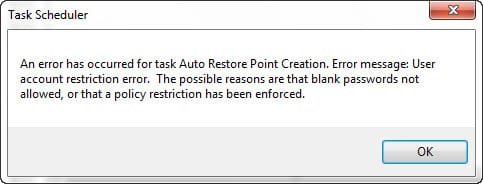
I'd like to ask something on the Brink_Task.zip(decided to apply the Task Scheduler tweak Method 2). I get an error when I have finished all of it. Please see image attached. I am running admin on the pc I have selected to do the Method 2 so I do not do step#3. Now I do not get to step#8 and the error appears...Now I already placed the Instant_Restore_Point folder as Trusted in my AV/Firewall but still there is the error.

Can you guys help me out please..

Thanks!:D
 

Attachments

  • errorBrink.jpg
    errorBrink.jpg
    13.9 KB · Views: 5

My Computer

Computer type
PC/Desktop
Computer Manufacturer/Model Number
Custom Build
OS
Win7 Ultimate 64bit
CPU
AMD A8 5600K APU
Motherboard
Gigabyte F2A75MD3H
Memory
16gb DDR3
Graphics Card(s)
Radeon 7560
Sound Card
onboard
Monitor(s) Displays
kingston lcd 23inch wide
Hard Drives
WD 500gb (2)
WD 1TB
Antivirus
EAM + Online Armor Premium -- desktop
Hello guys;

Great tips here. Had a similar idea and was about to post here. Thanks to Tactics for starting this one.

I'd like to ask something on the Brink_Task.zip(decided to apply the Task Scheduler tweak Method 2). I get an error when I have finished all of it. Please see image attached. I am running admin on the pc I have selected to do the Method 2 so I do not do step#3. Now I do not get to step#8 and the error appears...Now I already placed the Instant_Restore_Point folder as Trusted in my AV/Firewall but still there is the error.

Can you guys help me out please..

Thanks!:D
Suggest you start your own topic. This one is quasi closed and you will not get a good response.
 

My Computer

Computer Manufacturer/Model Number
HP, Dell, Gateway, Toshiba - 4 laptops and 2 desktops
OS
Vista, Windows7, Mint Mate, Zorin, Windows 8
CPU
from 1.6GHz Duo to i7
Monitor(s) Displays
2x HP w2207
Hard Drives
5x HDD, 7x SSD, 12x Externals
Keyboard
with trackball - no mices
Mouse
Trackball mice
Internet Speed
DSL 6000
Hello guys;

Great tips here. Had a similar idea and was about to post here. Thanks to Tactics for starting this one.

I'd like to ask something on the Brink_Task.zip(decided to apply the Task Scheduler tweak Method 2). I get an error when I have finished all of it. Please see image attached. I am running admin on the pc I have selected to do the Method 2 so I do not do step#3. Now I do not get to step#8 and the error appears...Now I already placed the Instant_Restore_Point folder as Trusted in my AV/Firewall but still there is the error.

Can you guys help me out please..

Thanks!:D
Hello.


Do you have a password enabled on your Windows 7, I'm concerned you may not be able to use the Method Two of that tutorial if you don't as adding a password for that in the Task Scheduler in a necessary step to complete successfully.
 

My Computer

Computer Manufacturer/Model Number
* BFK Customs *
OS
W 7 64-bit Ultimate
CPU
Intel Q9550 Yorkfield
Motherboard
ASUS P5Q Pro
Memory
8GB Dominator 8500C5D
Graphics Card(s)
ATI : XFX 5870
Sound Card
Realtek HD Audio 7-1
Monitor(s) Displays
1x 47" LCD HDMI & 3x 26" LCD HDMI
Screen Resolution
1920x1080P & 1920x1200
Hard Drives
1x 80GB Intel X25-M G2 SSD : 1x 500GB & 1x 640GB WD Caviar Black(s)
PSU
Corsair 620HX
Case
Cooler Master RC-690
Cooling
Tuniq Tower 120, 2x 140mm and 3x 120mm case fans
Keyboard
Microsoft 500
Mouse
Razer Diamondback 3G
Internet Speed
14 Mb/s
Other Info
1x Koutech 3Gb/s SATA HDD Hot Swap Rack
Hi;

I am sorry for posting here. But allow me to finish just this one. Pardon to Tactics too.

@BFK;

I think I sorted it out. I just placed a check-mark on the box where it says, "Do not record passwords...(something).." I checked earlier and I have a system restore entry at the time I have specified it. Thanks guys for the tips here. You guys rock!

damien:)
 

My Computer

Computer type
PC/Desktop
Computer Manufacturer/Model Number
Custom Build
OS
Win7 Ultimate 64bit
CPU
AMD A8 5600K APU
Motherboard
Gigabyte F2A75MD3H
Memory
16gb DDR3
Graphics Card(s)
Radeon 7560
Sound Card
onboard
Monitor(s) Displays
kingston lcd 23inch wide
Hard Drives
WD 500gb (2)
WD 1TB
Antivirus
EAM + Online Armor Premium -- desktop
We are the Pros - but only on a shady Tuesday morning - LOL.

That works! :D I didn't get a chance to try those settings last night. I was too busy setting up HDMI to work with my video card and LG TV - all good.
 

My Computer

Computer type
PC/Desktop
Computer Manufacturer/Model Number
Dell Alienware Aurora R7
OS
Windows 10 64-bit
CPU
Intel i7K 8700K
Motherboard
Alienware 0VDT73
Memory
16GB Dual Channel DDR4 @2666MHz
Graphics Card(s)
EVGA GeForce RTX 2080 Ti XC Ultra Gaming 11GB GDDR6
Sound Card
Realtek on-board w/Logitech z506 5.1 Surround
Monitor(s) Displays
LG - 65" Class - OLED - C9
Screen Resolution
3840 x 2160 4K
Hard Drives
512GB M.2 PCIe SSD
1TB 7200RPM SATA 6Gb/s (Storage)
PSU
850W EPA Bronze PSU Liquid Cooled Chassis
Case
Alienware Aurora
Cooling
Liquid Cooled
Keyboard
Logitech Wireless K800
Mouse
Logitech Performance MX
Internet Speed
100MB
Antivirus
Emsisoft
Browser
Firefox 64-bit
Other Info
Steelseries Artics Pro Wireless gaming headset.

https://steelseries.com/gaming-headsets/arctis-pro-wireless
Hello Tactics and Damien.


Glad you got it sorted and thanks for the update!
 

My Computer

Computer Manufacturer/Model Number
* BFK Customs *
OS
W 7 64-bit Ultimate
CPU
Intel Q9550 Yorkfield
Motherboard
ASUS P5Q Pro
Memory
8GB Dominator 8500C5D
Graphics Card(s)
ATI : XFX 5870
Sound Card
Realtek HD Audio 7-1
Monitor(s) Displays
1x 47" LCD HDMI & 3x 26" LCD HDMI
Screen Resolution
1920x1080P & 1920x1200
Hard Drives
1x 80GB Intel X25-M G2 SSD : 1x 500GB & 1x 640GB WD Caviar Black(s)
PSU
Corsair 620HX
Case
Cooler Master RC-690
Cooling
Tuniq Tower 120, 2x 140mm and 3x 120mm case fans
Keyboard
Microsoft 500
Mouse
Razer Diamondback 3G
Internet Speed
14 Mb/s
Other Info
1x Koutech 3Gb/s SATA HDD Hot Swap Rack
Going fine here. Checked it again and there is an entry in the system restore "Instant Restore Point". Great!
 

My Computer

Computer type
PC/Desktop
Computer Manufacturer/Model Number
Custom Build
OS
Win7 Ultimate 64bit
CPU
AMD A8 5600K APU
Motherboard
Gigabyte F2A75MD3H
Memory
16gb DDR3
Graphics Card(s)
Radeon 7560
Sound Card
onboard
Monitor(s) Displays
kingston lcd 23inch wide
Hard Drives
WD 500gb (2)
WD 1TB
Antivirus
EAM + Online Armor Premium -- desktop
I still haven't tried the info I have. Been so busy but I will this weekend for sure!
 

My Computer

Computer type
PC/Desktop
Computer Manufacturer/Model Number
Dell Alienware Aurora R7
OS
Windows 10 64-bit
CPU
Intel i7K 8700K
Motherboard
Alienware 0VDT73
Memory
16GB Dual Channel DDR4 @2666MHz
Graphics Card(s)
EVGA GeForce RTX 2080 Ti XC Ultra Gaming 11GB GDDR6
Sound Card
Realtek on-board w/Logitech z506 5.1 Surround
Monitor(s) Displays
LG - 65" Class - OLED - C9
Screen Resolution
3840 x 2160 4K
Hard Drives
512GB M.2 PCIe SSD
1TB 7200RPM SATA 6Gb/s (Storage)
PSU
850W EPA Bronze PSU Liquid Cooled Chassis
Case
Alienware Aurora
Cooling
Liquid Cooled
Keyboard
Logitech Wireless K800
Mouse
Logitech Performance MX
Internet Speed
100MB
Antivirus
Emsisoft
Browser
Firefox 64-bit
Other Info
Steelseries Artics Pro Wireless gaming headset.

https://steelseries.com/gaming-headsets/arctis-pro-wireless
Back
Top