
system restore

deanie44

New member
Member
Local time
12:30 AM
Messages
66
Location
West Haven, CT
Hi everyone. I had to do a factory restore of my PC. Unfortunately, when i open up the system restore utility the restore configuration is missing on drive C. Is there a work around--instead of doing a factory reset-- to replace the system file. I did a sfc/scannow and it said that all the files are correct. Here is a picture of the error and my pc specs.

Inspiron 560 MT
Windows 7 Home Premium
4GB of ram
TSSTcorp DVD+-RW TS-H653G [Optical drive]
Belkin Router

ATI Radeon HD 4300/4500 Series [Display adapter]
DELL IN1910N [Monitor] (18.5"vis, s/n H356N96J490S, June 2009)
Generic Non-PnP Monitor
Hauppauge Consumer Infrared Receiver
HID-compliant consumer control device
HID-compliant device (3x)
Microsoft eHome Infrared Transceiver


Attachments
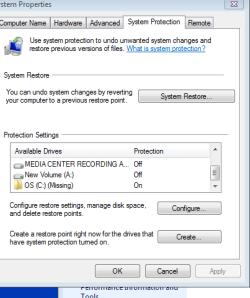
  • ERROR IN COMPUTER.PNG
    ERROR IN COMPUTER.PNG
    12.1 KB · Views: 8

My Computer

Computer Manufacturer/Model Number
INSPIRON 560MT
OS
windows 7 X64
CPU
Intel(R) Pentium(4) CPU 3.06 GHz
Memory
4 GB OF RAM
Sound Card
REALTEK HD AUDIO
Monitor(s) Displays
Dell Generic Monitor and Vizio E320VL LCD TV
Screen Resolution
1280 X 720
Hard Drives
1 TB SATA II HARDDRIVE
Keyboard
Dell generic keyboard
Internet Speed
16 Mbp
As I can understand your operating system is missing?
If it's like this I recomend one fesh install of windows.
 

My Computer

OS
Windows 7 ultimate 32
I posted for some help.
I have never seen that before.
If the OS was really missing it wouldn't boot past Bios. Nothing to load.
No Winodws 7 no Snip to post.

Mike
 

My Computer

Computer Manufacturer/Model Number
Hopalong/ Godzilla
OS
Windows7 Pro 64bit SP-1; Windows XP Pro 32bit
CPU
Intel Core i7-870 Lynnfield 2.93GHz LGA 1156 95W Quad-Core
Motherboard
ASUS P7P55D-E PRO
Memory
8GB@1400MHz Crucial Ballistix DDR3-1600 4x2GB
Graphics Card(s)
ASUS ENGTX460 DirectCU/2DI/1GD5 1GB 256-bit GDDR5
Sound Card
VIA Onboard
Monitor(s) Displays
Asus VS248H-P 24"; Samsung SyncMaster 941BW 19"ws
Screen Resolution
1920x1080; 1440x900
Hard Drives
Samsung 830 120GB SSD
Intel 320 120GB SSD
Western Digital Caviar Black WD7501AALS 750GB 7200 RPM SATA 3.0Gb/s
Western Digital Caviar Black WD6401AALS 640GB 7200 RPM SATA 3.0Gb/s
PSU
COOLER MASTER Silent Pro RS850-AMBAJ3-US 850W Modular
Case
COOLER MASTER HAF 932 RC-932-KKN5-GP Black
Cooling
Scythe "Mugen-2 Rev.B" (2 ScytheKaze-Jyuni PWM fans)
Keyboard
Logitech K-320
Mouse
Kensington
Antivirus
Avast Inernet Suite
Browser
IE 9 ; Chrome
Is there more than one operating system installed.
 

My Computer

OS
Windows 7 Home Premium 32bit.
Hi everyone. I had to do a factory restore of my PC. Unfortunately, when i open up the system restore utility the restore configuration is missing on drive C. Is there a work around--instead of doing a factory reset-- to replace the system file. I did a sfc/scannow and it said that all the files are correct. Here is a picture of the error and my pc specs.

Inspiron 560 MT
Windows 7 Home Premium
4GB of ram
TSSTcorp DVD+-RW TS-H653G [Optical drive]
Belkin Router

ATI Radeon HD 4300/4500 Series [Display adapter]
DELL IN1910N [Monitor] (18.5"vis, s/n H356N96J490S, June 2009)
Generic Non-PnP Monitor
Hauppauge Consumer Infrared Receiver
HID-compliant consumer control device
HID-compliant device (3x)
Microsoft eHome Infrared Transceiver


It could be malware related, some rogue apps can sometimes corrupt System Restore. Run a scan of malwarebytes
Try http://www.sevenforums.com/tutorials/1538-sfc-scannow-command-system-file-checker.html
 

My Computer

Computer type
PC/Desktop
Computer Manufacturer/Model Number
Custom Build
OS
Windows 10 Pro x64, Arch Linux
CPU
Intel Core 2 Quad Q8200 OC'd 3.08GHz
Motherboard
Asus Rampage formula LGA775
Memory
8GB DDR2 900Mhz
Graphics Card(s)
MSI GT730 2GB GDDR5 (Kepler)
Sound Card
Supreme FX2
Monitor(s) Displays
Samsung LS22F350 LED
Screen Resolution
1080P
Hard Drives
Kingston SSDNow UV400 120GB, 500GB Hitachi, 2TB Samsung, 500GB Seagate FreeAgent, 640GB Samsung, 160GB Toshiba (Arch)
PSU
AeroCool 500W Bronze
Cooling
Cooler Master V6 + 3X fans
Keyboard
Prolink keyboard
Mouse
Logitech M705
Internet Speed
1MiB/s
Browser
Chrome Beta
Is there more than one operating system installed.
Doesn't appear to be enough partitions for more than one OS.


Deanie44

Try Yowanvistas posting of Malwarebytes. After downloading click the update tab. Update then select a full scan!

If nothing is found try the SFC/ scannow.
Run it up to three times to correct problems. It will stop and tell you it can't finish.
Run it again. It takes multiple passes to repair everything.
 

My Computer

Computer Manufacturer/Model Number
Hopalong/ Godzilla
OS
Windows7 Pro 64bit SP-1; Windows XP Pro 32bit
CPU
Intel Core i7-870 Lynnfield 2.93GHz LGA 1156 95W Quad-Core
Motherboard
ASUS P7P55D-E PRO
Memory
8GB@1400MHz Crucial Ballistix DDR3-1600 4x2GB
Graphics Card(s)
ASUS ENGTX460 DirectCU/2DI/1GD5 1GB 256-bit GDDR5
Sound Card
VIA Onboard
Monitor(s) Displays
Asus VS248H-P 24"; Samsung SyncMaster 941BW 19"ws
Screen Resolution
1920x1080; 1440x900
Hard Drives
Samsung 830 120GB SSD
Intel 320 120GB SSD
Western Digital Caviar Black WD7501AALS 750GB 7200 RPM SATA 3.0Gb/s
Western Digital Caviar Black WD6401AALS 640GB 7200 RPM SATA 3.0Gb/s
PSU
COOLER MASTER Silent Pro RS850-AMBAJ3-US 850W Modular
Case
COOLER MASTER HAF 932 RC-932-KKN5-GP Black
Cooling
Scythe "Mugen-2 Rev.B" (2 ScytheKaze-Jyuni PWM fans)
Keyboard
Logitech K-320
Mouse
Kensington
Antivirus
Avast Inernet Suite
Browser
IE 9 ; Chrome
Hi deanie44 ! Do you have a windows 7 DVD (or a system recovery disk) ?

Try it using the disk . Boot to the disk ot the system recovery option screen , and the select the system restore option there .
 

My Computer

Computer type
PC/Desktop
Computer Manufacturer/Model Number
Self Assembled
OS
Microsoft Windows 10 Pro Insider Preview 64-bit
CPU
Intel(R) Core(TM) i3-4130 CPU @ 3.40GHz
Motherboard
Gigabyte Technology Co., Ltd. B85M-D3H
Memory
Corsair Vengence 4GB x2 (8.00GB Dual-Channel DDR3 @ 798MHz)
Graphics Card(s)
2047MB GeForce GTS 450 (ZOTAC International)
Sound Card
Onboard (Realtek High Definition Audio)
Monitor(s) Displays
LG Flatron E2040T
Screen Resolution
1600x900
Hard Drives
Western Digital 1 TB
Seagate 500 GB
PSU
Corsair VS550
Case
Cooler Master K380
Cooling
Cooler Master Seidon 120V Plus
Keyboard
Logitech MK260r
Mouse
Logitech MK260r
Internet Speed
PMPL Broadband
Antivirus
Windows Defender + MBAM
Browser
Firefox
Other Info
Dell Studio 15" Laptop
This sometimes happens after a repair, factory Recovery or reinstall where the HD is not wiped. A ghost remains in the machine.

Highlight the C: (missing) ghost listing, click Configure to Turn Off System Protection on it.

Now go back to the SysProtection list. The actual recovered OS partition should be at the top of the list (not showing in screenshot), highlight it, click Configure to Turn full Protection on.

If there are any further problems, please post back a screenshot of all the SysProtection drive listings and your full Disk Mgmt drive map with listings, using Snipping Tool in Start Menu.
 
Maybe a fresh install will be more fortunate
 

My Computer

OS
Windows 7 ultimate 32
Back
Top