
System restore

PattiChati

Member
Local time
5:58 PM
Messages
422
I cannot restore usinig any of my system restores. It gives me an error. Can I do a system repair. If so, how do I do that and then will my system restores work? Thanks.
 

My Computer

Computer Manufacturer/Model Number
Vostro 220 Mini Tower Desktop Details | Dell
OS
Windows 7 Home Premium SP 1, 32-bit
CPU
Intel(R) Core(TM)2 Duo CPU E7400 @ 2.80GHz
Motherboard
Dell Inc. 0P301D
Memory
3.00 GB
Graphics Card(s)
(1) Intel(R) G45/G43 Express Chipset (2) Intel(R) G45/G43
Sound Card
(1) High Definition Audio Device (2) High Definition Audio
Monitor(s) Displays
Dell 22" wide E228WFP Analog flat panelq
Mouse
Dell optical usb mouse vostro
Other Info
OPTICAL READER, MOUSE,SPEAKERS, MONITOR, MODEM
You can do a System Repair using the below tutorial.
http://www.sevenforums.com/tutorials/3413-repair-install.html

Although I doubt it will help your situation, it's worth a shot. While you're at it, you might also want to run the sfc/scannow command in an elevated command prompt to fix any corrupted or deleted system files.
http://www.sevenforums.com/tutorials/1538-sfc-scannow-command-system-file-checker.html

Also, does that error give you an error code of some sort? If not, could you post exactly what the error says? A screenshot of the message would also be helpful.
 
Last edited:

My Computer

Computer Manufacturer/Model Number
Custom Build
OS
Windows 7 Ultimate x64/Windows 8 Consumer Preview x64/Ubuntu 11.04
CPU
Intel Pentium Dual Core E6700 3.2GHz
Motherboard
ASUS P5G41T-M LX
Memory
Strontium 8192MB DDR3 1333Mhz
Graphics Card(s)
msi GeForce N560GTX-M2D1GD5 1GB
Sound Card
Realtek HD Audio
Monitor(s) Displays
CHIMEI CMV 221D 22"
Screen Resolution
1680x1050
Hard Drives
Seagate Barracuda LP Green 3.5'' 2TB Internal HDD 5900RPM + WD Elements Desktop 1TB External HDD 7200RPM
PSU
SHAW Viper-1500w Gaming PSU
Case
Black eMaxx ATX Mini Tower Case
Keyboard
Microsoft Wireless Keyboard 1000
Mouse
Microsoft Wireless Optical Mouse 2000
Internet Speed
100GB @ 4.76Mbps
What is the text of the error it gives?

Windows System Restore will not help you recover that file you lost. By design, System Restore does not affect your personal data files. Nor does a system repair.

If you were to do a system recovery using the recovery partition that may be on your hard drive, it would simply take the PC back to the state it was in the day you bought it----any personal data would be lost.

A system repair is normally done with a standard Windows installation disc. I doubt if you have one. In your case there might be a way to do it from a menu available when you boot by hitting one of the Function Keys.

Why do you need to do a System Restore or system repair---what issues are you having?
 

My Computer

Computer type
PC/Desktop
Computer Manufacturer/Model Number
Ignatz Special; 4 speed manual gearbox; factory air conditioning; one of one
OS
Windows 7 Home Premium SP1, 64-bit
CPU
Intel Skylake i5-6600K, not overclocked
Motherboard
AsRock Z170M Extreme 4, micro ATX
Memory
8 GB HyperX DDR4-2666 (2 x 4 GB)
Graphics Card(s)
none; graphics are integrated on CPU
Sound Card
onboard: Realtek ALC1150; external: USB Behringer UF0-202
Monitor(s) Displays
Dell S2340M 23 inch IPS
Screen Resolution
1600 x 900
Hard Drives
System: Crucial MX100 series SSD, 128 GB;
Data: Samsung Spinpoint 103SJ, 1 TB;
Backup: WD Caviar Green WD30EZRX-00D8PB0, 3 TB
PSU
Rosewill SilentNight 500 watt fanless, semi-modular
Case
Antec Solo II
Cooling
Noctua NH-U12S; Noctua F12 intake, Noctua S12A exhaust
Keyboard
Microsoft 200 6JH-00001 USB
Mouse
Dell or Microsoft optical wired; USB
Antivirus
Microsoft Security Essentials and Malwarebytes Premium
Browser
Pale Moon
Other Info
All fans PWM; speeds at idle: CPU circa 500 rpm; intake circa 600 rpm; exhaust circa 600 rpm; CPU temps 27 idle and 47 C load in a warm room (27 C/81 F) when running Intel Extreme Tuning Utility stress test.
I was hoping a system restore would give me back my excel worksheet. Since the system restore wouldn't work, I thought I would do a system repair. But if it won't give me my info back - what do I do? I guess it is lost forever. But they say nothing is really lost, it is in the hard drive somewhere.
 

My Computer

Computer Manufacturer/Model Number
Vostro 220 Mini Tower Desktop Details | Dell
OS
Windows 7 Home Premium SP 1, 32-bit
CPU
Intel(R) Core(TM)2 Duo CPU E7400 @ 2.80GHz
Motherboard
Dell Inc. 0P301D
Memory
3.00 GB
Graphics Card(s)
(1) Intel(R) G45/G43 Express Chipset (2) Intel(R) G45/G43
Sound Card
(1) High Definition Audio Device (2) High Definition Audio
Monitor(s) Displays
Dell 22" wide E228WFP Analog flat panelq
Mouse
Dell optical usb mouse vostro
Other Info
OPTICAL READER, MOUSE,SPEAKERS, MONITOR, MODEM
Unfortunately, you can't recover files or data back from System Restore. If you are looking to recover an Excel worksheet, you will be unable to use a System Restore. How did you lose it by the way? Was it accidentally deleted?
 

My Computer

Computer Manufacturer/Model Number
Custom Build
OS
Windows 7 Ultimate x64/Windows 8 Consumer Preview x64/Ubuntu 11.04
CPU
Intel Pentium Dual Core E6700 3.2GHz
Motherboard
ASUS P5G41T-M LX
Memory
Strontium 8192MB DDR3 1333Mhz
Graphics Card(s)
msi GeForce N560GTX-M2D1GD5 1GB
Sound Card
Realtek HD Audio
Monitor(s) Displays
CHIMEI CMV 221D 22"
Screen Resolution
1680x1050
Hard Drives
Seagate Barracuda LP Green 3.5'' 2TB Internal HDD 5900RPM + WD Elements Desktop 1TB External HDD 7200RPM
PSU
SHAW Viper-1500w Gaming PSU
Case
Black eMaxx ATX Mini Tower Case
Keyboard
Microsoft Wireless Keyboard 1000
Mouse
Microsoft Wireless Optical Mouse 2000
Internet Speed
100GB @ 4.76Mbps
It may not be lost forever.

Use Recuva or Getdataback as mentioned in your other thread.

It costs nothing to find out if you can get it back. You can view the recoverable "lost" files without paying a dime.

If you can get it back, it is up to you to decide if you want to pay the asking price to actually get it back onto your hard drive.

That's how I think those applications work.
 

My Computer

Computer type
PC/Desktop
Computer Manufacturer/Model Number
Ignatz Special; 4 speed manual gearbox; factory air conditioning; one of one
OS
Windows 7 Home Premium SP1, 64-bit
CPU
Intel Skylake i5-6600K, not overclocked
Motherboard
AsRock Z170M Extreme 4, micro ATX
Memory
8 GB HyperX DDR4-2666 (2 x 4 GB)
Graphics Card(s)
none; graphics are integrated on CPU
Sound Card
onboard: Realtek ALC1150; external: USB Behringer UF0-202
Monitor(s) Displays
Dell S2340M 23 inch IPS
Screen Resolution
1600 x 900
Hard Drives
System: Crucial MX100 series SSD, 128 GB;
Data: Samsung Spinpoint 103SJ, 1 TB;
Backup: WD Caviar Green WD30EZRX-00D8PB0, 3 TB
PSU
Rosewill SilentNight 500 watt fanless, semi-modular
Case
Antec Solo II
Cooling
Noctua NH-U12S; Noctua F12 intake, Noctua S12A exhaust
Keyboard
Microsoft 200 6JH-00001 USB
Mouse
Dell or Microsoft optical wired; USB
Antivirus
Microsoft Security Essentials and Malwarebytes Premium
Browser
Pale Moon
Other Info
All fans PWM; speeds at idle: CPU circa 500 rpm; intake circa 600 rpm; exhaust circa 600 rpm; CPU temps 27 idle and 47 C load in a warm room (27 C/81 F) when running Intel Extreme Tuning Utility stress test.
Capture.PNG

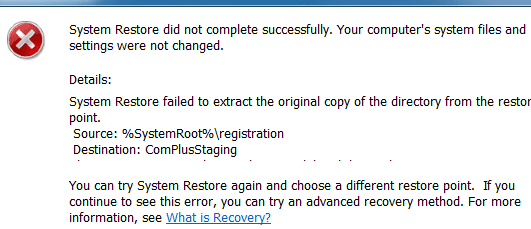
this is the error message I get when trying to do a system restore - and I have tried every restore point.
 

My Computer

Computer Manufacturer/Model Number
Vostro 220 Mini Tower Desktop Details | Dell
OS
Windows 7 Home Premium SP 1, 32-bit
CPU
Intel(R) Core(TM)2 Duo CPU E7400 @ 2.80GHz
Motherboard
Dell Inc. 0P301D
Memory
3.00 GB
Graphics Card(s)
(1) Intel(R) G45/G43 Express Chipset (2) Intel(R) G45/G43
Sound Card
(1) High Definition Audio Device (2) High Definition Audio
Monitor(s) Displays
Dell 22" wide E228WFP Analog flat panelq
Mouse
Dell optical usb mouse vostro
Other Info
OPTICAL READER, MOUSE,SPEAKERS, MONITOR, MODEM
My Computer

Computer Manufacturer/Model Number
Custom Build
OS
Windows 7 Ultimate x64/Windows 8 Consumer Preview x64/Ubuntu 11.04
CPU
Intel Pentium Dual Core E6700 3.2GHz
Motherboard
ASUS P5G41T-M LX
Memory
Strontium 8192MB DDR3 1333Mhz
Graphics Card(s)
msi GeForce N560GTX-M2D1GD5 1GB
Sound Card
Realtek HD Audio
Monitor(s) Displays
CHIMEI CMV 221D 22"
Screen Resolution
1680x1050
Hard Drives
Seagate Barracuda LP Green 3.5'' 2TB Internal HDD 5900RPM + WD Elements Desktop 1TB External HDD 7200RPM
PSU
SHAW Viper-1500w Gaming PSU
Case
Black eMaxx ATX Mini Tower Case
Keyboard
Microsoft Wireless Keyboard 1000
Mouse
Microsoft Wireless Optical Mouse 2000
Internet Speed
100GB @ 4.76Mbps
yes, I think it was accidently deleted
 

My Computer

Computer Manufacturer/Model Number
Vostro 220 Mini Tower Desktop Details | Dell
OS
Windows 7 Home Premium SP 1, 32-bit
CPU
Intel(R) Core(TM)2 Duo CPU E7400 @ 2.80GHz
Motherboard
Dell Inc. 0P301D
Memory
3.00 GB
Graphics Card(s)
(1) Intel(R) G45/G43 Express Chipset (2) Intel(R) G45/G43
Sound Card
(1) High Definition Audio Device (2) High Definition Audio
Monitor(s) Displays
Dell 22" wide E228WFP Analog flat panelq
Mouse
Dell optical usb mouse vostro
Other Info
OPTICAL READER, MOUSE,SPEAKERS, MONITOR, MODEM
Right. First, check your Recycle Bin. I know it sound stupid but it might still be there. If it isn't run Recuva and see if it can find the deleted file.
 

My Computer

Computer Manufacturer/Model Number
Custom Build
OS
Windows 7 Ultimate x64/Windows 8 Consumer Preview x64/Ubuntu 11.04
CPU
Intel Pentium Dual Core E6700 3.2GHz
Motherboard
ASUS P5G41T-M LX
Memory
Strontium 8192MB DDR3 1333Mhz
Graphics Card(s)
msi GeForce N560GTX-M2D1GD5 1GB
Sound Card
Realtek HD Audio
Monitor(s) Displays
CHIMEI CMV 221D 22"
Screen Resolution
1680x1050
Hard Drives
Seagate Barracuda LP Green 3.5'' 2TB Internal HDD 5900RPM + WD Elements Desktop 1TB External HDD 7200RPM
PSU
SHAW Viper-1500w Gaming PSU
Case
Black eMaxx ATX Mini Tower Case
Keyboard
Microsoft Wireless Keyboard 1000
Mouse
Microsoft Wireless Optical Mouse 2000
Internet Speed
100GB @ 4.76Mbps
it is not in the recycle bin and I tried recuva - found the file, but there was nothing in it. It was an excel spreadsheet that I had written to for 4 years and it is gone. I found a blank spreadsheet.
 

My Computer

Computer Manufacturer/Model Number
Vostro 220 Mini Tower Desktop Details | Dell
OS
Windows 7 Home Premium SP 1, 32-bit
CPU
Intel(R) Core(TM)2 Duo CPU E7400 @ 2.80GHz
Motherboard
Dell Inc. 0P301D
Memory
3.00 GB
Graphics Card(s)
(1) Intel(R) G45/G43 Express Chipset (2) Intel(R) G45/G43
Sound Card
(1) High Definition Audio Device (2) High Definition Audio
Monitor(s) Displays
Dell 22" wide E228WFP Analog flat panelq
Mouse
Dell optical usb mouse vostro
Other Info
OPTICAL READER, MOUSE,SPEAKERS, MONITOR, MODEM
Okay, then. Try one of the two other programs I linked in one of my previous posts.
 

My Computer

Computer Manufacturer/Model Number
Custom Build
OS
Windows 7 Ultimate x64/Windows 8 Consumer Preview x64/Ubuntu 11.04
CPU
Intel Pentium Dual Core E6700 3.2GHz
Motherboard
ASUS P5G41T-M LX
Memory
Strontium 8192MB DDR3 1333Mhz
Graphics Card(s)
msi GeForce N560GTX-M2D1GD5 1GB
Sound Card
Realtek HD Audio
Monitor(s) Displays
CHIMEI CMV 221D 22"
Screen Resolution
1680x1050
Hard Drives
Seagate Barracuda LP Green 3.5'' 2TB Internal HDD 5900RPM + WD Elements Desktop 1TB External HDD 7200RPM
PSU
SHAW Viper-1500w Gaming PSU
Case
Black eMaxx ATX Mini Tower Case
Keyboard
Microsoft Wireless Keyboard 1000
Mouse
Microsoft Wireless Optical Mouse 2000
Internet Speed
100GB @ 4.76Mbps
Hi Patti

Not sure if this will help at this stage but a program called Directory Snoop might help you. It is a paid-for application but you can trial it for 30 days I think for free and it is fully functional. The advantage it has over other recovery programs is that you can look at the contents of any particular file, even deleted ones, before recovery so this should help. If you run it and then look at the locations you have previously posted then you might see the relevant file and be able to recover it. You will have to run it as an administrator as it is quite powerful. It is basically a tool to look at the contents of any file but it does recovery quite well also although not probably for a large number of files. Very handy for the odd file.

It has two modules, one for NTFS and one for FAT, and probably you would use the NTFS one as this is the most common now - it will just give an error if the wrong one is chosen. It is easy to use, just run it and click on the drive letter for the drive or partition you need (Select Drive). It will show a tree directory structure through which you can then delve to find the right file. The contents of each selected file is shown in the lower box - and you can scroll through this. If you find the file then use the Undelete button at top left and follow the prompts - best to save this to a flash drive or other partition if you have one.

I won't go into the topic of backups (I noticed your other thread) but having all your data separate from the operating system and backed-up independently is usually much safer, especially when trying to recover deleted files.

Hope you have some luck getting your data back.

:cry:;):D
 

My Computer

Computer Manufacturer/Model Number
Compaq desktop
OS
Windows 7 x64 SP1
CPU
Athlon II x2 215
Memory
4.0 GB
Graphics Card(s)
Onboard
Sound Card
Creative SB X-Fi Titanium HD (nice)
Monitor(s) Displays
24" Dell LCD
Screen Resolution
1900 x 1200
Hard Drives
320 GB, 500 GB and 750 GB 7200 rpm
PSU
430w
Keyboard
USB
Mouse
USB
Internet Speed
approx 10 Mbps
I installed it and scrolled through my C:\ and couldn't find it. They were either jpeg or file folders, not the .xls I needed. I didn't see anything that said monthly expenses. Any other ideas?
 

My Computer

Computer Manufacturer/Model Number
Vostro 220 Mini Tower Desktop Details | Dell
OS
Windows 7 Home Premium SP 1, 32-bit
CPU
Intel(R) Core(TM)2 Duo CPU E7400 @ 2.80GHz
Motherboard
Dell Inc. 0P301D
Memory
3.00 GB
Graphics Card(s)
(1) Intel(R) G45/G43 Express Chipset (2) Intel(R) G45/G43
Sound Card
(1) High Definition Audio Device (2) High Definition Audio
Monitor(s) Displays
Dell 22" wide E228WFP Analog flat panelq
Mouse
Dell optical usb mouse vostro
Other Info
OPTICAL READER, MOUSE,SPEAKERS, MONITOR, MODEM
Jaidyn
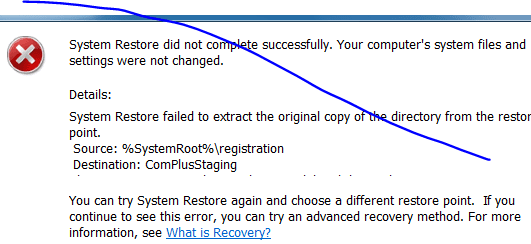
In order to run the scannow, it says I have to be the administrator, which I am. It is supposed to be on a black screen, right, like the old time computers. I am going to attempt to give you a screen shot of the error when I try to restore.
screenshot.PNG
 

My Computer

Computer Manufacturer/Model Number
Vostro 220 Mini Tower Desktop Details | Dell
OS
Windows 7 Home Premium SP 1, 32-bit
CPU
Intel(R) Core(TM)2 Duo CPU E7400 @ 2.80GHz
Motherboard
Dell Inc. 0P301D
Memory
3.00 GB
Graphics Card(s)
(1) Intel(R) G45/G43 Express Chipset (2) Intel(R) G45/G43
Sound Card
(1) High Definition Audio Device (2) High Definition Audio
Monitor(s) Displays
Dell 22" wide E228WFP Analog flat panelq
Mouse
Dell optical usb mouse vostro
Other Info
OPTICAL READER, MOUSE,SPEAKERS, MONITOR, MODEM
Hi Patti

Were your comments about Directory Snoop? If so then this might help - run as before and click on drive. Click on the Filter button, then on Status in the list, choose deleted then OK and OK. This will list all deleted items so scrolling through might find something. Not had much need to use the Search function so can't really help with that. Should have stated earlier that deleted items show in red and normal files in black.

:huh:
 

My Computer

Computer Manufacturer/Model Number
Compaq desktop
OS
Windows 7 x64 SP1
CPU
Athlon II x2 215
Memory
4.0 GB
Graphics Card(s)
Onboard
Sound Card
Creative SB X-Fi Titanium HD (nice)
Monitor(s) Displays
24" Dell LCD
Screen Resolution
1900 x 1200
Hard Drives
320 GB, 500 GB and 750 GB 7200 rpm
PSU
430w
Keyboard
USB
Mouse
USB
Internet Speed
approx 10 Mbps
it sure installed a lot of stuff and I had a hard time figuring out how to get it to run.
 

My Computer

Computer Manufacturer/Model Number
Vostro 220 Mini Tower Desktop Details | Dell
OS
Windows 7 Home Premium SP 1, 32-bit
CPU
Intel(R) Core(TM)2 Duo CPU E7400 @ 2.80GHz
Motherboard
Dell Inc. 0P301D
Memory
3.00 GB
Graphics Card(s)
(1) Intel(R) G45/G43 Express Chipset (2) Intel(R) G45/G43
Sound Card
(1) High Definition Audio Device (2) High Definition Audio
Monitor(s) Displays
Dell 22" wide E228WFP Analog flat panelq
Mouse
Dell optical usb mouse vostro
Other Info
OPTICAL READER, MOUSE,SPEAKERS, MONITOR, MODEM
Hi

You have to right click on install file and choose 'run as admininstrator' - sorry, it's some time since I had to install it. Real pain is Windows 7 in this regard when you need to install some software. Often you think you have something installed and just wonder why it is not working. CCleaner is the same I think.

:huh:
 

My Computer

Computer Manufacturer/Model Number
Compaq desktop
OS
Windows 7 x64 SP1
CPU
Athlon II x2 215
Memory
4.0 GB
Graphics Card(s)
Onboard
Sound Card
Creative SB X-Fi Titanium HD (nice)
Monitor(s) Displays
24" Dell LCD
Screen Resolution
1900 x 1200
Hard Drives
320 GB, 500 GB and 750 GB 7200 rpm
PSU
430w
Keyboard
USB
Mouse
USB
Internet Speed
approx 10 Mbps
hi patty, out of interest are you running macafee anti virus software.

if not which one do you use.
 

My Computer

Computer Manufacturer/Model Number
Hewlett packard/p6512uk
OS
Microsoft Windows 7 Home Premium 64-bit 7600
CPU
IIx4 amd athelon 635 processor
Motherboard
FOXCONN 2AA9
Memory
2x2gb
Graphics Card(s)
ati radeon HD 5450
Sound Card
(1) Realtek High Definition Audio (2) AMD High Definition
Monitor(s) Displays
samsung lcd tv 32"
Screen Resolution
1360x 768
Hard Drives
(1) WDC WD10 01FAES-60Z2A0 SATA Disk Device (2) Maxtor OneTouch USB Device (3) ST310003 33AS USB Device (4) WD My Book 1111 USB Device
PSU
?
Cooling
air!
Keyboard
wireless hp
Mouse
wireless Hp,optical
Internet Speed
1.10mb/s
Antivirus
MSE
Browser
Firefox
I use avast
 

My Computer

Computer Manufacturer/Model Number
Vostro 220 Mini Tower Desktop Details | Dell
OS
Windows 7 Home Premium SP 1, 32-bit
CPU
Intel(R) Core(TM)2 Duo CPU E7400 @ 2.80GHz
Motherboard
Dell Inc. 0P301D
Memory
3.00 GB
Graphics Card(s)
(1) Intel(R) G45/G43 Express Chipset (2) Intel(R) G45/G43
Sound Card
(1) High Definition Audio Device (2) High Definition Audio
Monitor(s) Displays
Dell 22" wide E228WFP Analog flat panelq
Mouse
Dell optical usb mouse vostro
Other Info
OPTICAL READER, MOUSE,SPEAKERS, MONITOR, MODEM
Back
Top