System Restore

How to Do a System Restore in Windows 7

   Information
This will show you how to do a System Restore to restore your Windows 7 system files to an earlier point in time. It's a way to undo system changes to your computer without affecting your personal user files, such as e‑mail, documents, or photos.

   Note
System Restore uses a feature called System Protection to regularly create and save restore points of selected hard disks in your computer. These restore points contain information about registry settings and other system information that Windows 7 uses. You can also create restore points manually.

   Warning
A System Restore will uninstall programs and drivers (step 8 in Option One below) that were installed after the date of the selected restore point.

A System Restore will replace the password of all local user accounts to what they were at the time of the selected restore point.

If you do a System Restore when the computer is in safe mode or Windows Recovery Environment (WinRE), then you will not be able to undo the restore operation. However, you are able to still run System Restore again and choose a different restore point if available.


CONTENTS:
  • Option One: To Do a System Restore in Windows 7 using System Protection
  • Option Two: To Do a System Restore at Boot using System Recovery Options


OPTION ONE

To Do a System Restore in Windows 7 using System Protection


NOTE: Be sure to temporarily disable your antivirus program first to prevent it from possibly preventing you from doing a system restore.
1. Do step 2, step 3, step 4, or step 5 below for how you would like to open System Restore.

2. Open the Start Menu, type rstrui.exe in the search box, press Enter, and go to step 6 below.

3. Open the Start Menu.
A) Click on All Programs, Accessories, System Tools, and System Restore, and go to step 6 below. (see screenshot below)
Start_Menu.jpg
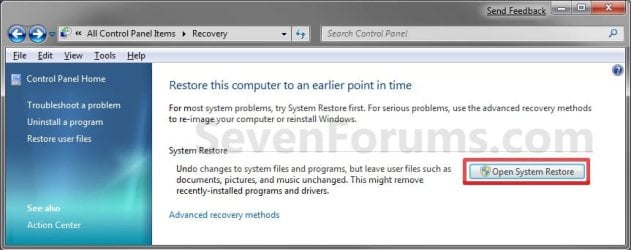
4. Open the Control Panel (icons view).
A) Click on the Recovery icon.

B) Click on the Open System Restore button. (see screenshot below)
Recovery.jpg
C) Go to step 7 or step 8 below.
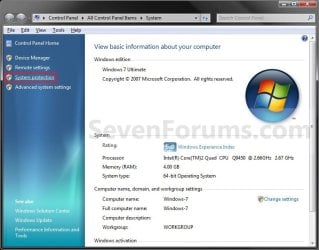
5. Open the Start Menu.
A) Right click on the Computer button and click on Properties.

B) Click on the System Protection link. (see screenshot below)
System.jpg
C) Close the System window, and go to step 6 below. (see screenshot above)
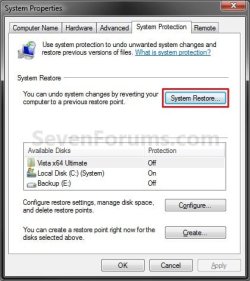
6. Click on the System Restore button. (see screenshot below)
System_Properties.jpg
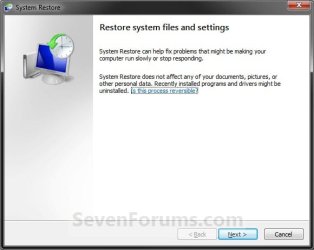
7. If You Have Not Done a System Restore Before
A) Click on the Next button, and go to step 9 below. (see screenshot below)
Restore.jpg
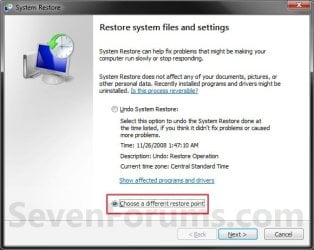
8. If You Have Done a System Restore Before
A) Select (dot) Choose a different restore point, click on the Next button, and go to step 9 below. (see screenshot below)
Restore_Point-2.jpg
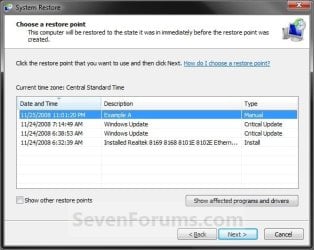
9. Select (click on) a listed restore point that you want to restore the drives that were included in the restore point back to how they were when the restore point was created. (see screenshot below)
NOTE: Check the Show other restore points box to see any restore points (older) that may not be listed here.
System_Restore.jpg
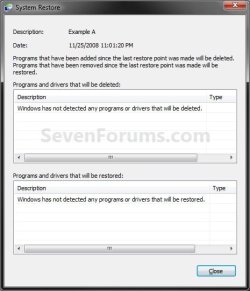
10. To Show Affected Programs and Drivers
NOTE: This will show you a list of programs and drivers that will be deleted and restored by the selected restore point.
A) Click on the Show affected programs and drivers button. (See screenshot above)

B) When done reviewing, click on the Close button. (see screenshot below)
Affected_Programs.jpg
11. Click on the Next button. (see screenshot below step 8)
NOTE: Make sure that the restore point you want is still selected (highlighted).

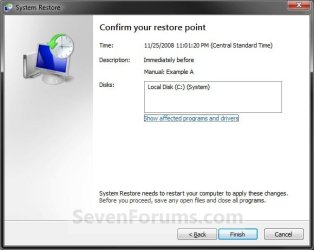
12. Click on the Finish button. (see screenshot below)
NOTE: The listed drives here will be restored back to how they were for the selected restore point.
Confirm.jpg
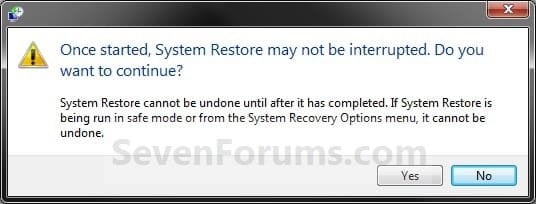
13. Click on Yes to confirm. (see screenshot below)
WARNING: This will immediately restart your computer to finish the system restore.
Last_Chance.jpg
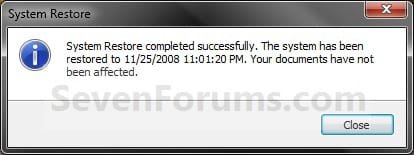
14. After the computer has restarted, click on the Close button. (see screenshot below)
After_Reboot.jpg


OPTION TWO

To Do a System Restore at Boot using System Recovery Options


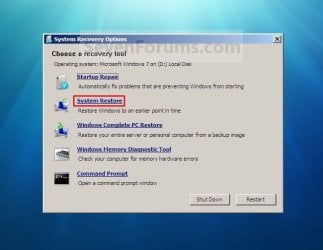
NOTE: This will allow you to restore Windows 7 to a earlier restore point with a Windows 7 installation disc or System Repair Disc from the System Recovery Options screen at bootup. This can be handy if you cannot startup Windows 7.
1. Using your retail Windows 7 installation disc or System Repair Disc, boot to the System Recovery Options screen.

2. Select the System Restore option. (see screenshot below)
System_Recovery_Options.jpg
3. Continue starting with step 7 or step 8 in Option One above.
That's it,
Shawn


Last edited:
Hi LouLou. As Tews suggested, Recuva is a pretty good utility if the missing files are files you created (documents, photos, etc.) The more you use your computer prior to running Recuva the greater the possibility that those missing files might be overwritten. So try using Recuva as soon as posisble.

If the deleted files were system files you should be able to restore them by running System File Checker in an elevated command prompt (option two in this tutorial.)

http://www.sevenforums.com/tutorials/1538-sfc-scannow-command-system-file-checker.html
 

My Computer

Computer type
Laptop
Computer Manufacturer/Model Number
Sony Vaio VPCEB47GM Laptop
OS
Win 7 Pro 64-bit
CPU
Intel i5 2.4 Ghz
Memory
8GB DDR3
Graphics Card(s)
Intel HD 3000
Sound Card
IDT High Definition
Monitor(s) Displays
15.6 WGXA Anti-Glare LED
Screen Resolution
1280x800
Hard Drives
640Gb 7200rpm
Antivirus
MSE
Browser
Opera (primary) with IE9 backup
I did this:
1. This can be do to the System Volume Information Folder attributes being set to Read-only.

The System Volume Information Folder is where Vista holds restore points or shadow copies.

For Windows Vista using the NTFS File System.
Click Start then My Computer.
On the Tools menu Then Folder Options.
On the View tab, click “Show hidden files and folders”.
Clear the Hide protected operating system files (Recommended) check box. Click Yes when you are prompted to confirm the change.
Click OK.
Right-click the System Volume Information folder in the root folder, and then click Properties.
If the Read-only attibutes is checked, uncheck it and click, OK
Now try creating a restore point.
Warning: Remember to hide the hidden System Files when done.

However it will not stay unclecked. When I repeat the process the check mark is there again.
What do I do now?
 

My Computer

OS
windows 7 home pereum 64
Hello a511475, and welcome to Seven Forums.

Since this is a system file, you might see if running a sfc /scannow command may be able to help fix what may be wrong.

Hope this helps,
Shawn
 

My Computer

Computer type
PC/Desktop
Computer Manufacturer/Model Number
Self built custom
OS
64-bit Windows 11 Pro for Workstations
CPU
Intel i7-8700K OC'd to 5 GHz
Motherboard
ASUS ROG Maximus XI Formula Z390
Memory
64 GB (4x16GB) G.SKILL TridentZ RGB DDR4 3600 MHz
Graphics Card(s)
ASUS ROG-STRIX-GTX1080TI-O11G-GAMING
Sound Card
Integrated
Monitor(s) Displays
2 x Samsung Odyssey G7 27"
Screen Resolution
2560x1440
Hard Drives
1TB Samsung 990 PRO M.2,
4TB Samsung 990 PRO PRO M.2,
TerraMaster F8 SSD Plus NAS
PSU
Seasonic Prime Titanium 850W
Case
Thermaltake Core P3
Cooling
Corsair Hydro H115i
Keyboard
Logitech wireless K800
Mouse
Logitech MX Master 4
Internet Speed
2 Gb/s Download and 100 Mb/s Upload
Antivirus
Malwarebyte Anti-Malware Premium
Browser
Google Chrome
Other Info
Logitech Z625 speaker system,
Logitech BRIO 4K Pro webcam,
HP Color LaserJet Pro MFP M477fdn,
APC SMART-UPS RT 1000 XL - SURT1000XLI,
Galaxy S23 Plus phone
I ran the file checker and the message was there is nothing to repair. All the files age good. I wonder why the system volume will not accept it when I uncheck "read only"
 

My Computer

OS
windows 7 home pereum 64
The "System Volume Information" folder is a protected operating system folder, so it will not allow you to. If it's a blue square, then it's not read-only. Only if it's checked is it read-only.
 

My Computer

Computer type
PC/Desktop
Computer Manufacturer/Model Number
Self built custom
OS
64-bit Windows 11 Pro for Workstations
CPU
Intel i7-8700K OC'd to 5 GHz
Motherboard
ASUS ROG Maximus XI Formula Z390
Memory
64 GB (4x16GB) G.SKILL TridentZ RGB DDR4 3600 MHz
Graphics Card(s)
ASUS ROG-STRIX-GTX1080TI-O11G-GAMING
Sound Card
Integrated
Monitor(s) Displays
2 x Samsung Odyssey G7 27"
Screen Resolution
2560x1440
Hard Drives
1TB Samsung 990 PRO M.2,
4TB Samsung 990 PRO PRO M.2,
TerraMaster F8 SSD Plus NAS
PSU
Seasonic Prime Titanium 850W
Case
Thermaltake Core P3
Cooling
Corsair Hydro H115i
Keyboard
Logitech wireless K800
Mouse
Logitech MX Master 4
Internet Speed
2 Gb/s Download and 100 Mb/s Upload
Antivirus
Malwarebyte Anti-Malware Premium
Browser
Google Chrome
Other Info
Logitech Z625 speaker system,
Logitech BRIO 4K Pro webcam,
HP Color LaserJet Pro MFP M477fdn,
APC SMART-UPS RT 1000 XL - SURT1000XLI,
Galaxy S23 Plus phone
But I thoughy you said to do this:

Quote: Originally Posted by Suranjit Hi,

I am unable to do 'System Restore' in my laptop. I tried but after restarting I got a message like not successfully completed. I have attached a screenshot for that. I tried with different restoring point but not working !!!!!!!!!!

Please let me know if there is any other way to do that.

Thanks,
Suranjit

According to this website (which is actually for Vista, but should apply to 7):

Error message created by System Restore, file backup and Defrag in Windows Vista:

Quote:
1. This can be do to the System Volume Information Folder attributes being set to Read-only.

The System Volume Information Folder is where Vista holds restore points or shadow copies.

For Windows Vista using the NTFS File System.
Click Start then My Computer.
On the Tools menu Then Folder Options.
On the View tab, click “Show hidden files and folders”.
Clear the Hide protected operating system files (Recommended) check box. Click Yes when you are prompted to confirm the change.
Click OK.
Right-click the System Volume Information folder in the root folder, and then click Properties.
If the Read-only attibutes is checked, uncheck it and click, OK
Now try creating a restore point.
Warning: Remember to hide the hidden System Files when done.

2. This error occurs because the recovery partition is enabled for File Backup or System Restore and is almost full. To work around this, do not select D:\ as a backup source. Also, go to System Protection in Control Panel and make sure that D:\ is not enabled for restore points.

Now I cam confused.
 

My Computer

OS
windows 7 home pereum 64
a511475,

Could you give us the exact full error message that you got and what you were trying to do when you got it?

If the read-only box is a blue square and not checked, then it's not read-only. Only if it's checked is it read-only.

We'll see what we can do to help. :)
 

My Computer

Computer type
PC/Desktop
Computer Manufacturer/Model Number
Self built custom
OS
64-bit Windows 11 Pro for Workstations
CPU
Intel i7-8700K OC'd to 5 GHz
Motherboard
ASUS ROG Maximus XI Formula Z390
Memory
64 GB (4x16GB) G.SKILL TridentZ RGB DDR4 3600 MHz
Graphics Card(s)
ASUS ROG-STRIX-GTX1080TI-O11G-GAMING
Sound Card
Integrated
Monitor(s) Displays
2 x Samsung Odyssey G7 27"
Screen Resolution
2560x1440
Hard Drives
1TB Samsung 990 PRO M.2,
4TB Samsung 990 PRO PRO M.2,
TerraMaster F8 SSD Plus NAS
PSU
Seasonic Prime Titanium 850W
Case
Thermaltake Core P3
Cooling
Corsair Hydro H115i
Keyboard
Logitech wireless K800
Mouse
Logitech MX Master 4
Internet Speed
2 Gb/s Download and 100 Mb/s Upload
Antivirus
Malwarebyte Anti-Malware Premium
Browser
Google Chrome
Other Info
Logitech Z625 speaker system,
Logitech BRIO 4K Pro webcam,
HP Color LaserJet Pro MFP M477fdn,
APC SMART-UPS RT 1000 XL - SURT1000XLI,
Galaxy S23 Plus phone
first I opened system protection. An error came up said it was turned off. I should click the red it to start the process of turning it on. Then up pops a windoows showing system recovery and configure it for certain drives. In the window shown were the various drive should be pictured. The words searching... cam up. After a few minutes, no drives appeared in the window and an error message came up about something wrong with the properties. Please start again.
Here is a picture of my volume system I think the picture got uploaded. it was a picture of the folder with a lock on it
 

Attachments

  • norton.PNG
    norton.PNG
    13.1 KB · Views: 522

My Computer

OS
windows 7 home pereum 64
a511476,

Could you post the exact error message that you got? It's important for us to know exactly what it said for us to be able to help better with it.


For now, double check to make sure these Services below are set this way.


Volume Shadow Copy
  • This service is set to Started and Manual by default.
Microsoft Software Shadow Copy Provider
  • This service is set to Started and Manual by default.
 

My Computer

Computer type
PC/Desktop
Computer Manufacturer/Model Number
Self built custom
OS
64-bit Windows 11 Pro for Workstations
CPU
Intel i7-8700K OC'd to 5 GHz
Motherboard
ASUS ROG Maximus XI Formula Z390
Memory
64 GB (4x16GB) G.SKILL TridentZ RGB DDR4 3600 MHz
Graphics Card(s)
ASUS ROG-STRIX-GTX1080TI-O11G-GAMING
Sound Card
Integrated
Monitor(s) Displays
2 x Samsung Odyssey G7 27"
Screen Resolution
2560x1440
Hard Drives
1TB Samsung 990 PRO M.2,
4TB Samsung 990 PRO PRO M.2,
TerraMaster F8 SSD Plus NAS
PSU
Seasonic Prime Titanium 850W
Case
Thermaltake Core P3
Cooling
Corsair Hydro H115i
Keyboard
Logitech wireless K800
Mouse
Logitech MX Master 4
Internet Speed
2 Gb/s Download and 100 Mb/s Upload
Antivirus
Malwarebyte Anti-Malware Premium
Browser
Google Chrome
Other Info
Logitech Z625 speaker system,
Logitech BRIO 4K Pro webcam,
HP Color LaserJet Pro MFP M477fdn,
APC SMART-UPS RT 1000 XL - SURT1000XLI,
Galaxy S23 Plus phone
a511476,

Could you post the exact error message that you got? It's important for us to know exactly what it said for us to be able to help better with it.


For now, double check to make sure these Services below are set this way.


Volume Shadow Copy
  • This service is set to Started and Manual by default.
Microsoft Software Shadow Copy Provider
  • This service is set to Started and Manual by default.
yes, but i am doing a norton ghost and it is going to take 24 hours
 

My Computer

OS
windows 7 home pereum 64
Ok. I'll be here when you're ready then. :)
 

My Computer

Computer type
PC/Desktop
Computer Manufacturer/Model Number
Self built custom
OS
64-bit Windows 11 Pro for Workstations
CPU
Intel i7-8700K OC'd to 5 GHz
Motherboard
ASUS ROG Maximus XI Formula Z390
Memory
64 GB (4x16GB) G.SKILL TridentZ RGB DDR4 3600 MHz
Graphics Card(s)
ASUS ROG-STRIX-GTX1080TI-O11G-GAMING
Sound Card
Integrated
Monitor(s) Displays
2 x Samsung Odyssey G7 27"
Screen Resolution
2560x1440
Hard Drives
1TB Samsung 990 PRO M.2,
4TB Samsung 990 PRO PRO M.2,
TerraMaster F8 SSD Plus NAS
PSU
Seasonic Prime Titanium 850W
Case
Thermaltake Core P3
Cooling
Corsair Hydro H115i
Keyboard
Logitech wireless K800
Mouse
Logitech MX Master 4
Internet Speed
2 Gb/s Download and 100 Mb/s Upload
Antivirus
Malwarebyte Anti-Malware Premium
Browser
Google Chrome
Other Info
Logitech Z625 speaker system,
Logitech BRIO 4K Pro webcam,
HP Color LaserJet Pro MFP M477fdn,
APC SMART-UPS RT 1000 XL - SURT1000XLI,
Galaxy S23 Plus phone
Microsoft Software Shadow Copy Provider was disabled. I am doing a MS backup now, but it has been running for 14 hours and only 38% done.
 

My Computer

OS
windows 7 home pereum 64
The last time I used system restore was during the XP days, but due to The User Profile Service failed the logon. User profile cannot be loaded. - Vista Forums, I will be using this later tonight. It's good to know that it now has the ability to show you which programs and drivers will be affected.

The whole trial of BitDefender which I was planning to replace MSE with killed my system. I'm definitely thankful of this feature. I'm creating disk images after this whole fiasco.
 

My Computer

Computer type
PC/Desktop
Computer Manufacturer/Model Number
Custom Build
OS
Windows 7 Ultimate x64 Service Pack 1
CPU
AMD Athlon II x4 Propus 2.9 GHz
Motherboard
ASRock N68C-GS FX
Memory
2 x 4GB Corsair XMS 3 DDR3 -1600 CL9
Graphics Card(s)
AMD Radeon HD 5850 1GB GDDR5
Sound Card
On-board 6-Channel HD Audio
Monitor(s) Displays
18' LG Flatron E1942TC-BN on DVI, 18' Chimei 95ND on HDMI
Screen Resolution
1366 x 768 x 2
Hard Drives
1 x 500 GB Seagate
1 x 1 TB Western Digital Caviar Green
1 x 1 TB Hitachi Touro Mobile USB 3
PSU
Seasonic S12II 520W
Case
Generic with Cable Management
Cooling
Deep Cool Gammaxx 200
Keyboard
Dragonwar Desert Eagle
Mouse
Logitech B85
Internet Speed
5Mb/s DL, 0.9Mb/s UL
Antivirus
ESET Nod32
Browser
Google Chrome 64 Bit
Other Info
LG G4 H818P - Rooted with Xposed Framework
I have a question. I got like problems with windows. And I think it has something to do with an update, 'cus since that update it has been acting strange yesterday. But I made a full backup on my external HDD.
When I was following your tutorial I noticed something rather "helpful" what would have to clean up my problem :) when I open up control panel and and click on recovery, I see there are these "advanced recovery settings"
when clicking that, I can choose between restoring by reinstalling Windows or by using a systemcopy I made before. Is kthe one with a system copy actualy the same as a restore point. But completly restoring my system? thanks for the help anyway :)
 

My Computer

Computer Manufacturer/Model Number
Dell Vostro 3700
OS
Microsoft Windows 7 Professional (x64) 6.1.7601
CPU
Intel(R) Core(TM) i5 CPU M 520 @ 2.40GHz (4 CPUs), ~2
Memory
4096MB RAM
Graphics Card(s)
NVIDIA GeForce GT 330M
Sound Card
nVIDIA GT216 - High Definition Audio Controller
Monitor(s) Displays
Integrated 17"
Screen Resolution
1600 x 900
Hard Drives
OS (C:) 451,07 GB
Recovery: 14,65 GB
Case
Standard
Keyboard
integrated
Internet Speed
2.4 Mbps

My Computer

Computer type
PC/Desktop
Computer Manufacturer/Model Number
Self built custom
OS
64-bit Windows 11 Pro for Workstations
CPU
Intel i7-8700K OC'd to 5 GHz
Motherboard
ASUS ROG Maximus XI Formula Z390
Memory
64 GB (4x16GB) G.SKILL TridentZ RGB DDR4 3600 MHz
Graphics Card(s)
ASUS ROG-STRIX-GTX1080TI-O11G-GAMING
Sound Card
Integrated
Monitor(s) Displays
2 x Samsung Odyssey G7 27"
Screen Resolution
2560x1440
Hard Drives
1TB Samsung 990 PRO M.2,
4TB Samsung 990 PRO PRO M.2,
TerraMaster F8 SSD Plus NAS
PSU
Seasonic Prime Titanium 850W
Case
Thermaltake Core P3
Cooling
Corsair Hydro H115i
Keyboard
Logitech wireless K800
Mouse
Logitech MX Master 4
Internet Speed
2 Gb/s Download and 100 Mb/s Upload
Antivirus
Malwarebyte Anti-Malware Premium
Browser
Google Chrome
Other Info
Logitech Z625 speaker system,
Logitech BRIO 4K Pro webcam,
HP Color LaserJet Pro MFP M477fdn,
APC SMART-UPS RT 1000 XL - SURT1000XLI,
Galaxy S23 Plus phone
Shawn,
Another way of running system restore:
:orb: | type System Restore | Enter
 

My Computer

Computer Manufacturer/Model Number
Toshiba Satellite S875D-S7239 laptop
OS
MS Windows 7 Ultimate SP1 64-bit
CPU
AMD A10-4600M
Motherboard
AMD Pumori (Socket FT1)
Memory
6.00 GB Dual-Channel DDR3 @ 798MHz (11-11-12-28)
Graphics Card(s)
AMD Radeon HD 7660G
Sound Card
High Definition Audio Device
Monitor(s) Displays
Generic PnP Monitor (1600x900@60Hz)
Screen Resolution
1600x900@60Hz
Hard Drives
SSD 119GB Corsair CSSD-V128GB2 ATA Device
Keyboard
Standard PS/2 Keyboard
Mouse
HP Wireless Optical Mobile Mouse Model FHA-3410
Internet Speed
What the local pub, local coffee shop offers.
Other Info
Optical Drive:MATSHITA BD-CMB UJ160B ATA Device


Also have an Asus ha1002xp netbook with Win 7 Ultimate installed.
Hello Karl,

Yeppers. Thank you. :)
 

My Computer

Computer type
PC/Desktop
Computer Manufacturer/Model Number
Self built custom
OS
64-bit Windows 11 Pro for Workstations
CPU
Intel i7-8700K OC'd to 5 GHz
Motherboard
ASUS ROG Maximus XI Formula Z390
Memory
64 GB (4x16GB) G.SKILL TridentZ RGB DDR4 3600 MHz
Graphics Card(s)
ASUS ROG-STRIX-GTX1080TI-O11G-GAMING
Sound Card
Integrated
Monitor(s) Displays
2 x Samsung Odyssey G7 27"
Screen Resolution
2560x1440
Hard Drives
1TB Samsung 990 PRO M.2,
4TB Samsung 990 PRO PRO M.2,
TerraMaster F8 SSD Plus NAS
PSU
Seasonic Prime Titanium 850W
Case
Thermaltake Core P3
Cooling
Corsair Hydro H115i
Keyboard
Logitech wireless K800
Mouse
Logitech MX Master 4
Internet Speed
2 Gb/s Download and 100 Mb/s Upload
Antivirus
Malwarebyte Anti-Malware Premium
Browser
Google Chrome
Other Info
Logitech Z625 speaker system,
Logitech BRIO 4K Pro webcam,
HP Color LaserJet Pro MFP M477fdn,
APC SMART-UPS RT 1000 XL - SURT1000XLI,
Galaxy S23 Plus phone
ok I understand how to do a system restore AND how to *undo* a system restore (in Win7).

BUT...Here is my question though, if I undo a system restore, can/will it reappear as a restore point so that I can restore THAT restore point again if needed. It was the oldest store point available and the newer ones won't help the issue.

The reason for this is because my system was unable to complete a restore, however since I ran the restore, that restore point as disappeared.

I need to retry the SAME restore from a recovery disk to see if it will complete, but only want to UNDO the partial restore if it will in fact reappear. I currently only have 2 other restore points, both showing todays date, which would not help me.

So need to know if undoing a restore point and redoing it is possible (would redo from a cd instead of within windows 7)

Thanks guys!
 

My Computer

Computer Manufacturer/Model Number
n/a
OS
primary OS is Windows 7 64 bit
CPU
phenom 2 940
Motherboard
gigabyte ga-ma785gm-us2h
Memory
8 gb
Graphics Card(s)
sapphire ati radeon hd 4670
Sound Card
asus xonar dx (pci express x1 based)
Monitor(s) Displays
ASUS MS238H - 23" LED with hdmi based connection
Hard Drives
seagate barracuda 1TB SATA HD 7200/32MB cache (may also connect an old WD 80gb eide drive to make bootable system if issue not resolved), external seagate 1TB usb drive
PSU
600 watt power supply
Case
don't remember
Cooling
slipping mind at moment, but working well
Hello JH, and welcome to Seven Forums.

Usually if a restore point is unable to complete, it will be cancelled and undone automatically reverting to back before you tried to do the restore. Since the restore point is not listed anymore, it may have been removed since it didn't work.

You could check to see if you are able to undo the last successfully completed system restore, and see what date it was for to see if that is the same one or not. However, the restore point that you undo will be gone afterwards and cannot be used again. :(

If you like, you could post whatever issue you are having in the appropriate forum subject to see if we may be able to help with it since it looks like a system restore will not be an option.
 

My Computer

Computer type
PC/Desktop
Computer Manufacturer/Model Number
Self built custom
OS
64-bit Windows 11 Pro for Workstations
CPU
Intel i7-8700K OC'd to 5 GHz
Motherboard
ASUS ROG Maximus XI Formula Z390
Memory
64 GB (4x16GB) G.SKILL TridentZ RGB DDR4 3600 MHz
Graphics Card(s)
ASUS ROG-STRIX-GTX1080TI-O11G-GAMING
Sound Card
Integrated
Monitor(s) Displays
2 x Samsung Odyssey G7 27"
Screen Resolution
2560x1440
Hard Drives
1TB Samsung 990 PRO M.2,
4TB Samsung 990 PRO PRO M.2,
TerraMaster F8 SSD Plus NAS
PSU
Seasonic Prime Titanium 850W
Case
Thermaltake Core P3
Cooling
Corsair Hydro H115i
Keyboard
Logitech wireless K800
Mouse
Logitech MX Master 4
Internet Speed
2 Gb/s Download and 100 Mb/s Upload
Antivirus
Malwarebyte Anti-Malware Premium
Browser
Google Chrome
Other Info
Logitech Z625 speaker system,
Logitech BRIO 4K Pro webcam,
HP Color LaserJet Pro MFP M477fdn,
APC SMART-UPS RT 1000 XL - SURT1000XLI,
Galaxy S23 Plus phone
Hello

Thanks for your response, the restore point is gone, but it did and still does) present me with the option to undo the restore point. There is no point in undoing it however, if it will not "reappear" after undoing it.

It did make changes, but they could not complete reverting some changes in the windows directory, so that is why it was "incomplete".
 

My Computer

Computer Manufacturer/Model Number
n/a
OS
primary OS is Windows 7 64 bit
CPU
phenom 2 940
Motherboard
gigabyte ga-ma785gm-us2h
Memory
8 gb
Graphics Card(s)
sapphire ati radeon hd 4670
Sound Card
asus xonar dx (pci express x1 based)
Monitor(s) Displays
ASUS MS238H - 23" LED with hdmi based connection
Hard Drives
seagate barracuda 1TB SATA HD 7200/32MB cache (may also connect an old WD 80gb eide drive to make bootable system if issue not resolved), external seagate 1TB usb drive
PSU
600 watt power supply
Case
don't remember
Cooling
slipping mind at moment, but working well
Back
Top