System Restore

How to Do a System Restore in Windows 7

   Information
This will show you how to do a System Restore to restore your Windows 7 system files to an earlier point in time. It's a way to undo system changes to your computer without affecting your personal user files, such as e‑mail, documents, or photos.

   Note
System Restore uses a feature called System Protection to regularly create and save restore points of selected hard disks in your computer. These restore points contain information about registry settings and other system information that Windows 7 uses. You can also create restore points manually.

   Warning
A System Restore will uninstall programs and drivers (step 8 in Option One below) that were installed after the date of the selected restore point.

A System Restore will replace the password of all local user accounts to what they were at the time of the selected restore point.

If you do a System Restore when the computer is in safe mode or Windows Recovery Environment (WinRE), then you will not be able to undo the restore operation. However, you are able to still run System Restore again and choose a different restore point if available.


CONTENTS:
  • Option One: To Do a System Restore in Windows 7 using System Protection
  • Option Two: To Do a System Restore at Boot using System Recovery Options


OPTION ONE

To Do a System Restore in Windows 7 using System Protection


NOTE: Be sure to temporarily disable your antivirus program first to prevent it from possibly preventing you from doing a system restore.
1. Do step 2, step 3, step 4, or step 5 below for how you would like to open System Restore.

2. Open the Start Menu, type rstrui.exe in the search box, press Enter, and go to step 6 below.

3. Open the Start Menu.
A) Click on All Programs, Accessories, System Tools, and System Restore, and go to step 6 below. (see screenshot below)
Start_Menu.jpg
4. Open the Control Panel (icons view).
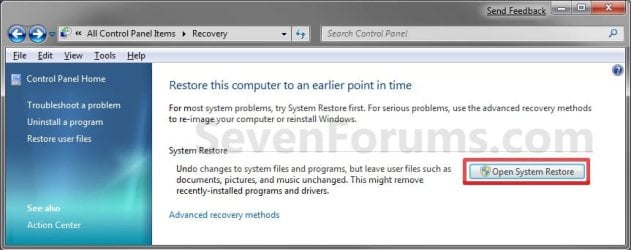
A) Click on the Recovery icon.

B) Click on the Open System Restore button. (see screenshot below)
Recovery.jpg
C) Go to step 7 or step 8 below.
5. Open the Start Menu.
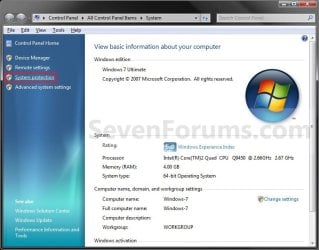
A) Right click on the Computer button and click on Properties.

B) Click on the System Protection link. (see screenshot below)
System.jpg
C) Close the System window, and go to step 6 below. (see screenshot above)
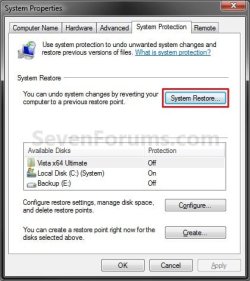
6. Click on the System Restore button. (see screenshot below)
System_Properties.jpg
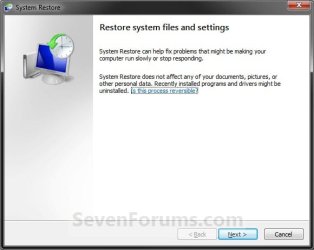
7. If You Have Not Done a System Restore Before
A) Click on the Next button, and go to step 9 below. (see screenshot below)
Restore.jpg
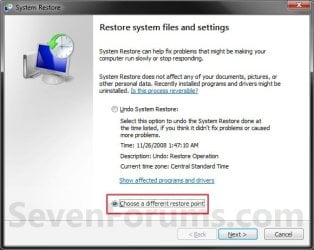
8. If You Have Done a System Restore Before
A) Select (dot) Choose a different restore point, click on the Next button, and go to step 9 below. (see screenshot below)
Restore_Point-2.jpg
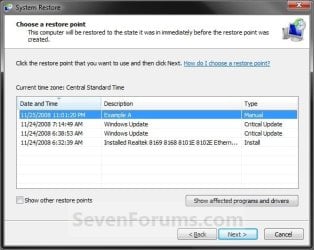
9. Select (click on) a listed restore point that you want to restore the drives that were included in the restore point back to how they were when the restore point was created. (see screenshot below)
NOTE: Check the Show other restore points box to see any restore points (older) that may not be listed here.
System_Restore.jpg
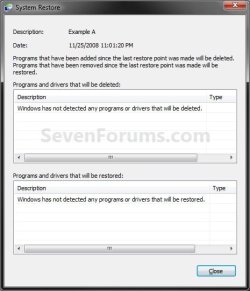
10. To Show Affected Programs and Drivers
NOTE: This will show you a list of programs and drivers that will be deleted and restored by the selected restore point.
A) Click on the Show affected programs and drivers button. (See screenshot above)

B) When done reviewing, click on the Close button. (see screenshot below)
Affected_Programs.jpg
11. Click on the Next button. (see screenshot below step 8)
NOTE: Make sure that the restore point you want is still selected (highlighted).

12. Click on the Finish button. (see screenshot below)
NOTE: The listed drives here will be restored back to how they were for the selected restore point.
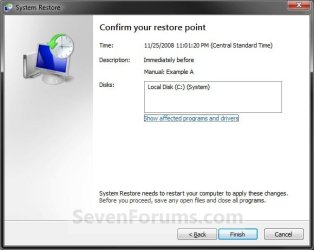
Confirm.jpg
13. Click on Yes to confirm. (see screenshot below)
WARNING: This will immediately restart your computer to finish the system restore.
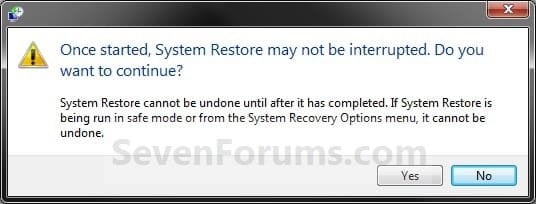
Last_Chance.jpg
14. After the computer has restarted, click on the Close button. (see screenshot below)
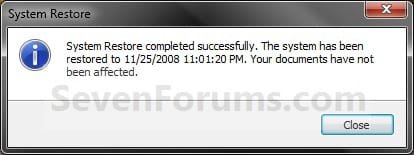
After_Reboot.jpg


OPTION TWO

To Do a System Restore at Boot using System Recovery Options


NOTE: This will allow you to restore Windows 7 to a earlier restore point with a Windows 7 installation disc or System Repair Disc from the System Recovery Options screen at bootup. This can be handy if you cannot startup Windows 7.
1. Using your retail Windows 7 installation disc or System Repair Disc, boot to the System Recovery Options screen.

2. Select the System Restore option. (see screenshot below)
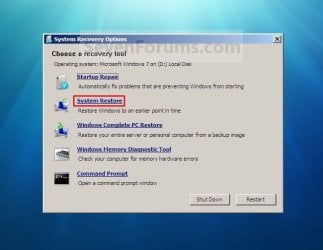
System_Recovery_Options.jpg
3. Continue starting with step 7 or step 8 in Option One above.
That's it,
Shawn


Last edited:
You're welcome JH.

Yeah, the undo option will be the restore point created automatically prior to when you did the last system restore. You would just be right back to where you were before doing the one that was incomplete. :(
 

My Computer

Computer type
PC/Desktop
Computer Manufacturer/Model Number
Self built custom
OS
64-bit Windows 11 Pro for Workstations
CPU
Intel i7-8700K OC'd to 5 GHz
Motherboard
ASUS ROG Maximus XI Formula Z390
Memory
64 GB (4x16GB) G.SKILL TridentZ RGB DDR4 3600 MHz
Graphics Card(s)
ASUS ROG-STRIX-GTX1080TI-O11G-GAMING
Sound Card
Integrated
Monitor(s) Displays
2 x Samsung Odyssey G7 27"
Screen Resolution
2560x1440
Hard Drives
1TB Samsung 990 PRO M.2,
4TB Samsung 990 PRO PRO M.2,
TerraMaster F8 SSD Plus NAS
PSU
Seasonic Prime Titanium 850W
Case
Thermaltake Core P3
Cooling
Corsair Hydro H115i
Keyboard
Logitech wireless K800
Mouse
Logitech MX Master 4
Internet Speed
2 Gb/s Download and 100 Mb/s Upload
Antivirus
Malwarebyte Anti-Malware Premium
Browser
Google Chrome
Other Info
Logitech Z625 speaker system,
Logitech BRIO 4K Pro webcam,
HP Color LaserJet Pro MFP M477fdn,
APC SMART-UPS RT 1000 XL - SURT1000XLI,
Galaxy S23 Plus phone
You're welcome Cathy. :)
 

My Computer

Computer type
PC/Desktop
Computer Manufacturer/Model Number
Self built custom
OS
64-bit Windows 11 Pro for Workstations
CPU
Intel i7-8700K OC'd to 5 GHz
Motherboard
ASUS ROG Maximus XI Formula Z390
Memory
64 GB (4x16GB) G.SKILL TridentZ RGB DDR4 3600 MHz
Graphics Card(s)
ASUS ROG-STRIX-GTX1080TI-O11G-GAMING
Sound Card
Integrated
Monitor(s) Displays
2 x Samsung Odyssey G7 27"
Screen Resolution
2560x1440
Hard Drives
1TB Samsung 990 PRO M.2,
4TB Samsung 990 PRO PRO M.2,
TerraMaster F8 SSD Plus NAS
PSU
Seasonic Prime Titanium 850W
Case
Thermaltake Core P3
Cooling
Corsair Hydro H115i
Keyboard
Logitech wireless K800
Mouse
Logitech MX Master 4
Internet Speed
2 Gb/s Download and 100 Mb/s Upload
Antivirus
Malwarebyte Anti-Malware Premium
Browser
Google Chrome
Other Info
Logitech Z625 speaker system,
Logitech BRIO 4K Pro webcam,
HP Color LaserJet Pro MFP M477fdn,
APC SMART-UPS RT 1000 XL - SURT1000XLI,
Galaxy S23 Plus phone
Restore point not back far enough.

Hello Brink,
My house system is: Dell 9200 PC-wireless, Dell PC (home office use) this one is wired and has router attached, Toshiba Satellite laptop-wireless, and my daughter has a wireless MAC laptop.
I am a new forum user, not too computer literate and have gotten my Toshiba Satellite laptop into big trouble. I have been: changing permissions,ownerships; configurations of everything possible; and it all started with trying to make my wireless HP Photosmart C6380 All-In-One printer connect with laptop.
Didn't realize until way too late it just needed an update so now I'm left with sending email which is unsigned or encrypted, Windows says "Access Denied" when I try to open or add Printer, and I'm not sure what other type of damage I have unwittingly done.
I would like to restore it back a few months if possible, the only choices it gives are in 2012. Is this possible or are those the only choices there will ever be? Should I take it to the fix it guys?? Any advice appreciated.
 

My Computer

Computer Manufacturer/Model Number
Toshiba Satellite Notebook
OS
Windows 7 Home Premium 64bit
CPU
Pentium(R) Dual-Core CPU T4300 @ 2.10GHz 2.10 GHz
Motherboard
(not sure what this means?)
Memory
4.00 GB (3.87 GB usable)
Graphics Card(s)
?
Sound Card
?
Monitor(s) Displays
15" LCD
Hello Island Lifer, and welcome to Seven Forums.

Unfortunately, the only restore points you have are what are listed. If you have a Show other restore points box to check, then you might have some older restore points that you could select from as well.

If not, then you could create a new thread in one of the forum areas to see if we may be able to help with the issues. :)
 

My Computer

Computer type
PC/Desktop
Computer Manufacturer/Model Number
Self built custom
OS
64-bit Windows 11 Pro for Workstations
CPU
Intel i7-8700K OC'd to 5 GHz
Motherboard
ASUS ROG Maximus XI Formula Z390
Memory
64 GB (4x16GB) G.SKILL TridentZ RGB DDR4 3600 MHz
Graphics Card(s)
ASUS ROG-STRIX-GTX1080TI-O11G-GAMING
Sound Card
Integrated
Monitor(s) Displays
2 x Samsung Odyssey G7 27"
Screen Resolution
2560x1440
Hard Drives
1TB Samsung 990 PRO M.2,
4TB Samsung 990 PRO PRO M.2,
TerraMaster F8 SSD Plus NAS
PSU
Seasonic Prime Titanium 850W
Case
Thermaltake Core P3
Cooling
Corsair Hydro H115i
Keyboard
Logitech wireless K800
Mouse
Logitech MX Master 4
Internet Speed
2 Gb/s Download and 100 Mb/s Upload
Antivirus
Malwarebyte Anti-Malware Premium
Browser
Google Chrome
Other Info
Logitech Z625 speaker system,
Logitech BRIO 4K Pro webcam,
HP Color LaserJet Pro MFP M477fdn,
APC SMART-UPS RT 1000 XL - SURT1000XLI,
Galaxy S23 Plus phone
Drat! That's what I was afraid of but thank you anyway! I am most concerned about the email issue as no encrypting or digital signing sounds like a security risk...so will look for an appropriate forum. thanks again!
 

My Computer

Computer Manufacturer/Model Number
Toshiba Satellite Notebook
OS
Windows 7 Home Premium 64bit
CPU
Pentium(R) Dual-Core CPU T4300 @ 2.10GHz 2.10 GHz
Motherboard
(not sure what this means?)
Memory
4.00 GB (3.87 GB usable)
Graphics Card(s)
?
Sound Card
?
Monitor(s) Displays
15" LCD
You're welcome. :)
 

My Computer

Computer type
PC/Desktop
Computer Manufacturer/Model Number
Self built custom
OS
64-bit Windows 11 Pro for Workstations
CPU
Intel i7-8700K OC'd to 5 GHz
Motherboard
ASUS ROG Maximus XI Formula Z390
Memory
64 GB (4x16GB) G.SKILL TridentZ RGB DDR4 3600 MHz
Graphics Card(s)
ASUS ROG-STRIX-GTX1080TI-O11G-GAMING
Sound Card
Integrated
Monitor(s) Displays
2 x Samsung Odyssey G7 27"
Screen Resolution
2560x1440
Hard Drives
1TB Samsung 990 PRO M.2,
4TB Samsung 990 PRO PRO M.2,
TerraMaster F8 SSD Plus NAS
PSU
Seasonic Prime Titanium 850W
Case
Thermaltake Core P3
Cooling
Corsair Hydro H115i
Keyboard
Logitech wireless K800
Mouse
Logitech MX Master 4
Internet Speed
2 Gb/s Download and 100 Mb/s Upload
Antivirus
Malwarebyte Anti-Malware Premium
Browser
Google Chrome
Other Info
Logitech Z625 speaker system,
Logitech BRIO 4K Pro webcam,
HP Color LaserJet Pro MFP M477fdn,
APC SMART-UPS RT 1000 XL - SURT1000XLI,
Galaxy S23 Plus phone
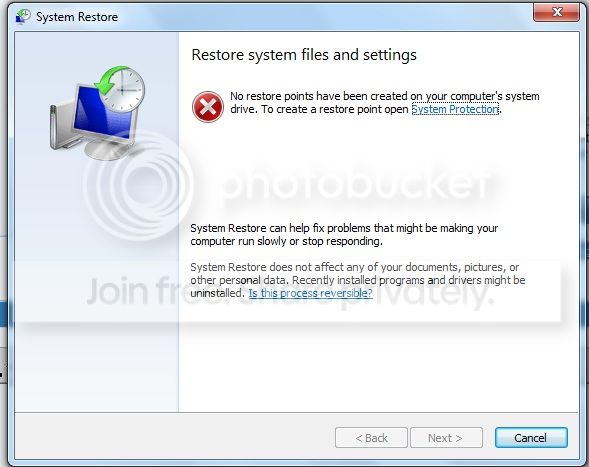
hi, i'm trying to follow the steps but i don't know why next button is disabled.. :sarc:

2.jpg


and i want to add my problem... --> http://www.sevenforums.com/general-discussion/231449-why-my.html
 

My Computer

OS
windows 7
Hello Heaven,

Next is grayed out since you do not have any restore points available to select and be able to click on Next to proceed with the System Restore. Sorry, but it looks like System Restore is off the table for you. :(
 

My Computer

Computer type
PC/Desktop
Computer Manufacturer/Model Number
Self built custom
OS
64-bit Windows 11 Pro for Workstations
CPU
Intel i7-8700K OC'd to 5 GHz
Motherboard
ASUS ROG Maximus XI Formula Z390
Memory
64 GB (4x16GB) G.SKILL TridentZ RGB DDR4 3600 MHz
Graphics Card(s)
ASUS ROG-STRIX-GTX1080TI-O11G-GAMING
Sound Card
Integrated
Monitor(s) Displays
2 x Samsung Odyssey G7 27"
Screen Resolution
2560x1440
Hard Drives
1TB Samsung 990 PRO M.2,
4TB Samsung 990 PRO PRO M.2,
TerraMaster F8 SSD Plus NAS
PSU
Seasonic Prime Titanium 850W
Case
Thermaltake Core P3
Cooling
Corsair Hydro H115i
Keyboard
Logitech wireless K800
Mouse
Logitech MX Master 4
Internet Speed
2 Gb/s Download and 100 Mb/s Upload
Antivirus
Malwarebyte Anti-Malware Premium
Browser
Google Chrome
Other Info
Logitech Z625 speaker system,
Logitech BRIO 4K Pro webcam,
HP Color LaserJet Pro MFP M477fdn,
APC SMART-UPS RT 1000 XL - SURT1000XLI,
Galaxy S23 Plus phone
Thank you so much Brink for your quite a good tutorial. But I have applied all the steps and I restart my computer. When the windows booted again, I have found this message :
It is in Arabic, but I would like to translate as far as I can: this message say that 'System Restore' 'wasn't successfully completed and the system files and settings of the computer weren't changed.
Details:
The System Restore failed in replacing(extract) the file "C:\Windows" with its original copy from 'System Restore'
An unspecified error occurred during the process of the System Restore (0x80071a91)
You can try to do the 'System Restore' again and choose a different restore point. If you continue to see this error, you can try an advanced recovey method can take another restore.


lllga.png
 

My Computer

Computer Manufacturer/Model Number
HP pavilion DV6
OS
Windows 7 Home Premium SP1-64bit.
CPU
Intel Core i5 2.30GHz
Motherboard
Hewlett-Packard- Model 1657
Memory
6GB
Graphics Card(s)
ATI Radeon HD 6770M
Screen Resolution
1366x768
Hard Drives
750GB Toshiba
Hello a cooperator, and welcome to Seven Forums.

If you have not already, you might see if you may be able to do the system restore at boot using OPTION TWO instead.

Hope this helps,
Shawn
 

My Computer

Computer type
PC/Desktop
Computer Manufacturer/Model Number
Self built custom
OS
64-bit Windows 11 Pro for Workstations
CPU
Intel i7-8700K OC'd to 5 GHz
Motherboard
ASUS ROG Maximus XI Formula Z390
Memory
64 GB (4x16GB) G.SKILL TridentZ RGB DDR4 3600 MHz
Graphics Card(s)
ASUS ROG-STRIX-GTX1080TI-O11G-GAMING
Sound Card
Integrated
Monitor(s) Displays
2 x Samsung Odyssey G7 27"
Screen Resolution
2560x1440
Hard Drives
1TB Samsung 990 PRO M.2,
4TB Samsung 990 PRO PRO M.2,
TerraMaster F8 SSD Plus NAS
PSU
Seasonic Prime Titanium 850W
Case
Thermaltake Core P3
Cooling
Corsair Hydro H115i
Keyboard
Logitech wireless K800
Mouse
Logitech MX Master 4
Internet Speed
2 Gb/s Download and 100 Mb/s Upload
Antivirus
Malwarebyte Anti-Malware Premium
Browser
Google Chrome
Other Info
Logitech Z625 speaker system,
Logitech BRIO 4K Pro webcam,
HP Color LaserJet Pro MFP M477fdn,
APC SMART-UPS RT 1000 XL - SURT1000XLI,
Galaxy S23 Plus phone
Hello a cooperator, and welcome to Seven Forums.

If you have not already, you might see if you may be able to do the system restore at boot using OPTION TWO instead.

Hope this helps,
Shawn

Thank you Brink for your reply. I have created a System Repair Disc and have done these steps for doing system restore with Using a Windows 7 Installation or System Repair Disc .
But when I booted from a System Repair Disc I didn't notice some windows such as in your explanation:
For instance I didn't see these two windows:

llllllt.jpg


llllec.jpg


I immediately skipped into this window below and this window which doesn't contain any system your Explanation, but it contains my system in my case. Thus, I am asking what next step I should do because I am afraid that if I continue and press 'next', the recovery of the factory which is on drive D(please look at the fourth image below) maybe will restore and my system will be reinstalled from the Recovery of factory.
But I think that the letter of drive in windows converts into the letter which follows it in MS-DOS. For instance, if the letter of my system's drive is C, then it will be "D" in the Ms-DOS, so that window above is normal and 'D' contains my system which is installed in my system and not the recovery of the factory. But could you confirm that for me to continue or not.

lllllml.jpg


65443964.png


In addition, when I check on the 'restore your computer using a system image that you created earlier, I have noticed possibility to browse my computer while I am on DOS, and I notice my computer contains many drivers which was in when I am on Windows:
System(C) 198MB
Location(D) 683GB
Recovery(E) 14.5GB
HP-Tools(F) 98.9MB
Boot(X)
However, When I am in windows:
Local Drive(C) 683GB
Recovery(D) 14.5GB

I would like respectfully you to answer me.
 

My Computer

Computer Manufacturer/Model Number
HP pavilion DV6
OS
Windows 7 Home Premium SP1-64bit.
CPU
Intel Core i5 2.30GHz
Motherboard
Hewlett-Packard- Model 1657
Memory
6GB
Graphics Card(s)
ATI Radeon HD 6770M
Screen Resolution
1366x768
Hard Drives
750GB Toshiba
a cooperator,

It looks like it may have tried to do a Startup Repair. This would be normal if a issue with startup was detected.

At boot, your driver letters may not always be the same as they are in Windows. This is normal.

If you click on Next, you should be taken to the "System Recovery Options" screen where you can select to do a "System Restore". :)
 

My Computer

Computer type
PC/Desktop
Computer Manufacturer/Model Number
Self built custom
OS
64-bit Windows 11 Pro for Workstations
CPU
Intel i7-8700K OC'd to 5 GHz
Motherboard
ASUS ROG Maximus XI Formula Z390
Memory
64 GB (4x16GB) G.SKILL TridentZ RGB DDR4 3600 MHz
Graphics Card(s)
ASUS ROG-STRIX-GTX1080TI-O11G-GAMING
Sound Card
Integrated
Monitor(s) Displays
2 x Samsung Odyssey G7 27"
Screen Resolution
2560x1440
Hard Drives
1TB Samsung 990 PRO M.2,
4TB Samsung 990 PRO PRO M.2,
TerraMaster F8 SSD Plus NAS
PSU
Seasonic Prime Titanium 850W
Case
Thermaltake Core P3
Cooling
Corsair Hydro H115i
Keyboard
Logitech wireless K800
Mouse
Logitech MX Master 4
Internet Speed
2 Gb/s Download and 100 Mb/s Upload
Antivirus
Malwarebyte Anti-Malware Premium
Browser
Google Chrome
Other Info
Logitech Z625 speaker system,
Logitech BRIO 4K Pro webcam,
HP Color LaserJet Pro MFP M477fdn,
APC SMART-UPS RT 1000 XL - SURT1000XLI,
Galaxy S23 Plus phone
a cooperator,

It looks like it may have tried to do a Startup Repair. This would be normal if a issue with startup was detected.

At boot, your driver letters may not always be the same as they are in Windows. This is normal.

If you click on Next, you should be taken to the "System Recovery Options" screen where you can select to do a "System Restore". :)

Thank you so much indeed, Then you think that I should be taken to 'System Restore'.
But could you please let me know why I immediately skipped into the window which I have mentioned before without I show those two windows(repair option and the other) as in your explanation.

Could you let me know what those all drives for? I only know D and E for what.

System(C) 198MB
Location(D) 683GB
Recovery(E) 14.5GB
HP-Tools(F) 98.9MB
Boot(X)

Because I would like after I do system restore to do a new 'Backup' copy. Can I select only D or all drives?

Finally: Could let me know when I created 'system restore', how I will benefit from it? Could you give me a like in which I can restore my system from the restore point.?

Please forgive me because this is the first time when I do these things
 

My Computer

Computer Manufacturer/Model Number
HP pavilion DV6
OS
Windows 7 Home Premium SP1-64bit.
CPU
Intel Core i5 2.30GHz
Motherboard
Hewlett-Packard- Model 1657
Memory
6GB
Graphics Card(s)
ATI Radeon HD 6770M
Screen Resolution
1366x768
Hard Drives
750GB Toshiba
You may have gotten that screen instead if it detected a possibly issue with startup (MBR) and ran startup repair automatically.

The partitions below came installed from the OEM (factory) to be able to restore Windows 7 back to factory conditions with.
System(C) 198MB
Recovery(E) 14.5GB
HP-Tools(F) 98.9MB
Boot(X)
Normally you would only have system protection turned on for your Windows 7 drive letter to be able have restore points for it. The tutorial on the first page and below can give you more details about a restore point and what it's for to help better explain them.
http://www.sevenforums.com/tutorials/697-system-restore-point-create.html
 

My Computer

Computer type
PC/Desktop
Computer Manufacturer/Model Number
Self built custom
OS
64-bit Windows 11 Pro for Workstations
CPU
Intel i7-8700K OC'd to 5 GHz
Motherboard
ASUS ROG Maximus XI Formula Z390
Memory
64 GB (4x16GB) G.SKILL TridentZ RGB DDR4 3600 MHz
Graphics Card(s)
ASUS ROG-STRIX-GTX1080TI-O11G-GAMING
Sound Card
Integrated
Monitor(s) Displays
2 x Samsung Odyssey G7 27"
Screen Resolution
2560x1440
Hard Drives
1TB Samsung 990 PRO M.2,
4TB Samsung 990 PRO PRO M.2,
TerraMaster F8 SSD Plus NAS
PSU
Seasonic Prime Titanium 850W
Case
Thermaltake Core P3
Cooling
Corsair Hydro H115i
Keyboard
Logitech wireless K800
Mouse
Logitech MX Master 4
Internet Speed
2 Gb/s Download and 100 Mb/s Upload
Antivirus
Malwarebyte Anti-Malware Premium
Browser
Google Chrome
Other Info
Logitech Z625 speaker system,
Logitech BRIO 4K Pro webcam,
HP Color LaserJet Pro MFP M477fdn,
APC SMART-UPS RT 1000 XL - SURT1000XLI,
Galaxy S23 Plus phone
Normally you would only have system protection turned on for your Windows 7 drive letter to be able have restore points for it. The tutorial on the first page and below can give you more details about a restore point and what it's for to help better explain them.http://www.sevenforums.com/tutorials/697-system-restore-point-create.html


Thank you so much, Brink
I have really when checked 'configure' button, I found out that the option' Restore system settings and previous versions of files' was selected.

Finally: The system restore will only make a restore point for 'data and settings' but if I want an a backup for all windows system. Are there any tools enable me to do this inside windows? Or I should to use another software such as, Norton Guest or Acronis Image

I know this tool whose image is below. But I don't know whehter this tool enables us to do image of the entire system with all data into a DVD or external HDD
lllllp.png

Could you please let me know what difference there is between this tool whose picture above and the other tool(which enables us to create a system restore) whose image is this:

lllllly.png
 

My Computer

Computer Manufacturer/Model Number
HP pavilion DV6
OS
Windows 7 Home Premium SP1-64bit.
CPU
Intel Core i5 2.30GHz
Motherboard
Hewlett-Packard- Model 1657
Memory
6GB
Graphics Card(s)
ATI Radeon HD 6770M
Screen Resolution
1366x768
Hard Drives
750GB Toshiba
Well, first System restore is not the same as a Windows Backup or a System Image. You already read about System Restore, but those other links here can help give you more details about them.

A system image is a complete image copy of the hard drives you selected to be included in the image. When restored, it will restore the included HDD's back to how they were then the image was created. You can use either DVDs or another external or internal HDD. It's best to use a separate HDD since DVDs are not a reliable. Creating a system image is the most reliable option to backup and restore your entire HDD.

A backup, is just a backup of the files you selected to be included in the backup. a backup doesn't restore the whole system unless you also include doing a system image with it.


The free 3rd party Macrium Reflect program is another great option to use for backups and images. Acronis is another good option as well though.
 

My Computer

Computer type
PC/Desktop
Computer Manufacturer/Model Number
Self built custom
OS
64-bit Windows 11 Pro for Workstations
CPU
Intel i7-8700K OC'd to 5 GHz
Motherboard
ASUS ROG Maximus XI Formula Z390
Memory
64 GB (4x16GB) G.SKILL TridentZ RGB DDR4 3600 MHz
Graphics Card(s)
ASUS ROG-STRIX-GTX1080TI-O11G-GAMING
Sound Card
Integrated
Monitor(s) Displays
2 x Samsung Odyssey G7 27"
Screen Resolution
2560x1440
Hard Drives
1TB Samsung 990 PRO M.2,
4TB Samsung 990 PRO PRO M.2,
TerraMaster F8 SSD Plus NAS
PSU
Seasonic Prime Titanium 850W
Case
Thermaltake Core P3
Cooling
Corsair Hydro H115i
Keyboard
Logitech wireless K800
Mouse
Logitech MX Master 4
Internet Speed
2 Gb/s Download and 100 Mb/s Upload
Antivirus
Malwarebyte Anti-Malware Premium
Browser
Google Chrome
Other Info
Logitech Z625 speaker system,
Logitech BRIO 4K Pro webcam,
HP Color LaserJet Pro MFP M477fdn,
APC SMART-UPS RT 1000 XL - SURT1000XLI,
Galaxy S23 Plus phone
A backup, is just a backup of the files you selected to be included in the backup. a backup doesn't restore the whole system unless you also include doing a system image with it.


The free 3rd party Macrium Reflect program is another great option to use for backups and images. Acronis is another good option as well though.

Then ' Backup and Restore icon' is similar to 'Macrium Reflect program , Acronis and 'Norton guest' to create a backup copy or 'Backup and Restore ' is different.

By the way, I have also a problem with this 'Backup and Restore icon', which is when I click on this tool, I didn't notice any response. This problem is new.
I also have problem with updates of windows.
I don't know what cause these problem and what the solution will be.

Finally: could you let me know that I should have two drivers when I want to restore my system from the backup which I created with either 'Acronis' or another software ?
As I read here some person told me that you need that two drivers,


----------------------------------------------------------------------------------------
Many users of computers choose to make two kinds of backups: a so-called image of the disk that includes all of the installed software at the time that the image (also called "clone") is made, and a frequently updated second backup of the user's home folder ("Documents and Settings") to keep a record of the current files which a user collects and generates. "Norton Ghost," "Acronis True Image," and (my preference) "Partition Magic" are examples of the first type. The backup utility that comes with Windows 7 is typically set up for the second type of incremental backup. A disk image, or clone, is particularly useful for transferring the entire contents of a hard drive to a new hard drive. An incremental backup is useful for transferring a user's files to a new operating system. A third option is to periodically make a copy onto a bootable external hard drive from which you can both boot up and restore.

In general, these software packages are designed so that you press a button on the screen, a dialog displays asking you where you want the copy to be made or restored, and that is that. For more detail on what gets copied and other options, you will have to look at the manuals that come with the software. Please read these first and then ask further questions. Be aware that if you intend to restore from a DVD-R while booted from a DVD-ROM, then you will need two DVD drives, one for the boot disc and another to read the backup.
 

My Computer

Computer Manufacturer/Model Number
HP pavilion DV6
OS
Windows 7 Home Premium SP1-64bit.
CPU
Intel Core i5 2.30GHz
Motherboard
Hewlett-Packard- Model 1657
Memory
6GB
Graphics Card(s)
ATI Radeon HD 6770M
Screen Resolution
1366x768
Hard Drives
750GB Toshiba

My Computer

Computer type
PC/Desktop
Computer Manufacturer/Model Number
Self built custom
OS
64-bit Windows 11 Pro for Workstations
CPU
Intel i7-8700K OC'd to 5 GHz
Motherboard
ASUS ROG Maximus XI Formula Z390
Memory
64 GB (4x16GB) G.SKILL TridentZ RGB DDR4 3600 MHz
Graphics Card(s)
ASUS ROG-STRIX-GTX1080TI-O11G-GAMING
Sound Card
Integrated
Monitor(s) Displays
2 x Samsung Odyssey G7 27"
Screen Resolution
2560x1440
Hard Drives
1TB Samsung 990 PRO M.2,
4TB Samsung 990 PRO PRO M.2,
TerraMaster F8 SSD Plus NAS
PSU
Seasonic Prime Titanium 850W
Case
Thermaltake Core P3
Cooling
Corsair Hydro H115i
Keyboard
Logitech wireless K800
Mouse
Logitech MX Master 4
Internet Speed
2 Gb/s Download and 100 Mb/s Upload
Antivirus
Malwarebyte Anti-Malware Premium
Browser
Google Chrome
Other Info
Logitech Z625 speaker system,
Logitech BRIO 4K Pro webcam,
HP Color LaserJet Pro MFP M477fdn,
APC SMART-UPS RT 1000 XL - SURT1000XLI,
Galaxy S23 Plus phone

My Computer

Computer Manufacturer/Model Number
HP pavilion DV6
OS
Windows 7 Home Premium SP1-64bit.
CPU
Intel Core i5 2.30GHz
Motherboard
Hewlett-Packard- Model 1657
Memory
6GB
Graphics Card(s)
ATI Radeon HD 6770M
Screen Resolution
1366x768
Hard Drives
750GB Toshiba
Back
Top