Solved System Services

HammerHead

Really Senior
Guru
Gold Member
VIP
Local time
8:02 AM
Messages
1,964
Location
Ohio (From WV)
I have a service that won't start. (can't find file, superfetch). This happened once before and I found a procedure to replace some corrupted files (catalogue, I believe). I can't find the procedure again. I thought I saved it but you know how that is. Has anyone got a link to something like that?
 

My Computer

Computer Manufacturer/Model Number
BGC (Bob's Garage Crew)
OS
win 7 X64 Ultimate SP1
CPU
I3770K
Motherboard
Asus P8Z77-V Deluxe
Memory
G Skill F3-14900CL9-4GBXL x 4
Graphics Card(s)
NVIDIA GeForce GTX670 + Intel 4000
Sound Card
Realtek HD 5.1 (MOB)
Monitor(s) Displays
Asus VW224T (1)
Screen Resolution
1920 x 1080
Hard Drives
SATA Corsair Force GT 2.5" 180GB (System) Sata 3
OCZ Vertex3 120GB
OCZ Vertex 2 120GB 2.5" SATA II
ST31000524AS 1000.2GB
WD15EARS (External)
PSU
CoolerMaster 1000 Watt
Case
CoolerMaster HAF X
Cooling
CPU -- CoolerMaster 520N
Keyboard
MS Wireless 3000 V2
Mouse
MS Wireless 3000 V2
Internet Speed
Cable
Antivirus
Norton Internet Security
Browser
IE9
Other Info
AMI Bios 1805
OC'd 3%
I assume you've already tried sfc /scannow. Did it report any error(s)?

What error you get when you try to start it?

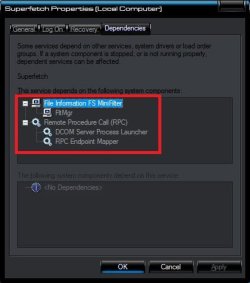
Also, are the following services running?
 

Attachments

  • SuperFetch.jpg
    SuperFetch.jpg
    23 KB · Views: 22

My Computer

Computer Manufacturer/Model Number
HCL
OS
Winbdows 7 ultimate x64 | Ubuntu 12.04 x64 LTS
CPU
Core 2 Duo e7400 @ 2.90GHz
Motherboard
Gigabyte G31M-ES2L
Memory
3GB DDR2
Graphics Card(s)
Asus Nvidia GTX 560Ti 1GB
Sound Card
On-board
Monitor(s) Displays
HCL eZeeBee 18.5" LCD
Screen Resolution
1366x768 @ 60Hz
Hard Drives
Western Digital 320GB
PSU
Corsair CX500 V2 500W
Cooling
Stock
Keyboard
Stock
Mouse
Stock
Internet Speed
15-25kBps D/L | 10kBps U/L | Hey Don't laugh
Sfc

No problems with sfc scan. I believe the catalouge file for services is corrupted if I could locate the procedure for resetting the catalogue I probably be allright.
 

My Computer

Computer Manufacturer/Model Number
BGC (Bob's Garage Crew)
OS
win 7 X64 Ultimate SP1
CPU
I3770K
Motherboard
Asus P8Z77-V Deluxe
Memory
G Skill F3-14900CL9-4GBXL x 4
Graphics Card(s)
NVIDIA GeForce GTX670 + Intel 4000
Sound Card
Realtek HD 5.1 (MOB)
Monitor(s) Displays
Asus VW224T (1)
Screen Resolution
1920 x 1080
Hard Drives
SATA Corsair Force GT 2.5" 180GB (System) Sata 3
OCZ Vertex3 120GB
OCZ Vertex 2 120GB 2.5" SATA II
ST31000524AS 1000.2GB
WD15EARS (External)
PSU
CoolerMaster 1000 Watt
Case
CoolerMaster HAF X
Cooling
CPU -- CoolerMaster 520N
Keyboard
MS Wireless 3000 V2
Mouse
MS Wireless 3000 V2
Internet Speed
Cable
Antivirus
Norton Internet Security
Browser
IE9
Other Info
AMI Bios 1805
OC'd 3%
You mean reset the Superfetch service?

Go to the start button, select Run, type in prefetch, click ok
When the screen comes up with a list, delete all of them.

This should reset the prefetch/superfetch function.
Source

Alternatively, Try this:

Microsoft gave me the solution to this. A couple of values in the registry
need changing to get it working. Both are under:

HKLM\System\CurrentControlSet\Control\Session Manager\Memory
Management\PrefetchParameters

Both 'EnableSuperfetch' & 'EnablePrefetcher' need to be set to a value of 1.

After doing that, I was able to enable the Superfetch Service to run.
Source
 
Last edited by a moderator:

My Computer

Computer Manufacturer/Model Number
HCL
OS
Winbdows 7 ultimate x64 | Ubuntu 12.04 x64 LTS
CPU
Core 2 Duo e7400 @ 2.90GHz
Motherboard
Gigabyte G31M-ES2L
Memory
3GB DDR2
Graphics Card(s)
Asus Nvidia GTX 560Ti 1GB
Sound Card
On-board
Monitor(s) Displays
HCL eZeeBee 18.5" LCD
Screen Resolution
1366x768 @ 60Hz
Hard Drives
Western Digital 320GB
PSU
Corsair CX500 V2 500W
Cooling
Stock
Keyboard
Stock
Mouse
Stock
Internet Speed
15-25kBps D/L | 10kBps U/L | Hey Don't laugh
Good Solution

Quote:
Microsoft gave me the solution to this. A couple of values in the registry
need changing to get it working. Both are under:

HKLM\System\CurrentControlSet\Control\Session Manager\Memory
Management\PrefetchParameters

Both 'EnableSuperfetch' & 'EnablePrefetcher' need to be set to a value of 1.

After doing that, I was able to enable the Superfetch Service to run.


Worked like a charm. Thanks much!
 

My Computer

Computer Manufacturer/Model Number
BGC (Bob's Garage Crew)
OS
win 7 X64 Ultimate SP1
CPU
I3770K
Motherboard
Asus P8Z77-V Deluxe
Memory
G Skill F3-14900CL9-4GBXL x 4
Graphics Card(s)
NVIDIA GeForce GTX670 + Intel 4000
Sound Card
Realtek HD 5.1 (MOB)
Monitor(s) Displays
Asus VW224T (1)
Screen Resolution
1920 x 1080
Hard Drives
SATA Corsair Force GT 2.5" 180GB (System) Sata 3
OCZ Vertex3 120GB
OCZ Vertex 2 120GB 2.5" SATA II
ST31000524AS 1000.2GB
WD15EARS (External)
PSU
CoolerMaster 1000 Watt
Case
CoolerMaster HAF X
Cooling
CPU -- CoolerMaster 520N
Keyboard
MS Wireless 3000 V2
Mouse
MS Wireless 3000 V2
Internet Speed
Cable
Antivirus
Norton Internet Security
Browser
IE9
Other Info
AMI Bios 1805
OC'd 3%
Quote:
Microsoft gave me the solution to this. A couple of values in the registry
need changing to get it working. Both are under:

HKLM\System\CurrentControlSet\Control\Session Manager\Memory
Management\PrefetchParameters

Both 'EnableSuperfetch' & 'EnablePrefetcher' need to be set to a value of 1.

After doing that, I was able to enable the Superfetch Service to run.


Worked like a charm. Thanks much!

Your welcome. Im glad it sorted. :)
 

My Computer

Computer Manufacturer/Model Number
HCL
OS
Winbdows 7 ultimate x64 | Ubuntu 12.04 x64 LTS
CPU
Core 2 Duo e7400 @ 2.90GHz
Motherboard
Gigabyte G31M-ES2L
Memory
3GB DDR2
Graphics Card(s)
Asus Nvidia GTX 560Ti 1GB
Sound Card
On-board
Monitor(s) Displays
HCL eZeeBee 18.5" LCD
Screen Resolution
1366x768 @ 60Hz
Hard Drives
Western Digital 320GB
PSU
Corsair CX500 V2 500W
Cooling
Stock
Keyboard
Stock
Mouse
Stock
Internet Speed
15-25kBps D/L | 10kBps U/L | Hey Don't laugh
*********Solved!*********
I have had this problem since first installing Windows 7 x64 for over a year. After reading a kazillion threads, I came across this one.

Shortly after boot, superfetch (sysmain.dll) would try to load and crash, together with about 6-8 other services. Aero would also crash. No BSOD but it was a big pain!!!!

Checked the two registry settings (EnableSuperfetch' & 'EnablePrefetcher) and they were set to 3. I first stopped the Superfetch service (made sure that it was set to automatic), deleted everything from c:\windows\prefetch, changed both registry settings to 1 and rebooted. Problem solved!!!!!

The reason I am posting is because it may help others get rid of this hideous error.

Many thanks Ezio. The liberation of Roma has begun.
 

My Computer

Computer Manufacturer/Model Number
EVGA 780i (132-CK-NF78-A2)
OS
Win7 x64
CPU
E6750 [email protected] OC
Motherboard
EVGA 780i (132-CK-NF78-A2)
Memory
6GB Crucial Balistix 800
Graphics Card(s)
2 X GTX460 SLI OC@849,2000
Sound Card
Audigy 2 (Creative is evil)
Monitor(s) Displays
65" Sony TV
Screen Resolution
1920X1080
Hard Drives
3X150 raptors @ Raid0
PSU
Corsair 850
Quote:
Microsoft gave me the solution to this. A couple of values in the registry
need changing to get it working. Both are under:

HKLM\System\CurrentControlSet\Control\Session Manager\Memory
Management\PrefetchParameters

Both 'EnableSuperfetch' & 'EnablePrefetcher' need to be set to a value of 1.

After doing that, I was able to enable the Superfetch Service to run.


Worked like a charm. Thanks much!
SOLVED.....

THE ABOVE SOLUTION WILL START "Superfetch" BUT NOT AUTOMATICALLY STARTS IT DURING START UP.... IF YOU WANT TO START IT AUTOMATICALLY THEN SET
'EnableSuperfetch'
TO "1" AND 'EnablePrefetcher' TO "0" . ALL OTHER STEPS REMAIN THE SAME.... ENJOY... IT'LL WORK LIKE DREAM...
 

My Computer

Computer Manufacturer/Model Number
HP DV6 Pavilion 2005AX
OS
Windows 7 Home Premium 32bit.
CPU
Amd Turion
Back
Top