System Slow

user77777

New member
Local time
3:08 PM
Messages
33
My laptop has been running slow lately . Tried Av , anti-malware , re-installing video card driver , msconfig for any suspicious entries . Nothing helps .
When I run Windows Experience Index from Control Panel , gives me error as in screen capture below .
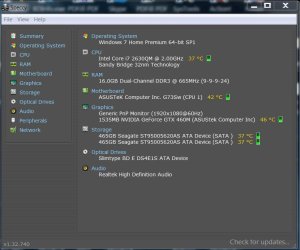
Copy of specs from Speccy also below .
Thanks .

Capture.JPG
Capture 1.JPG
 

My Computer

Computer type
Laptop
Computer Manufacturer/Model Number
ASUS
OS
Windows 7 Home Premium 64 SP1
Memory
16GB
Graphics Card(s)
Nvidia 460M
Antivirus
Avast
Browser
Chrome
Go to Accessories, System Tools and run the Disk Cleanup utility on the C: drive. When it says how much space it can recover, check the boxes for Temporary Files and Recycle Bin. When done, reboot. Does that help?
 

My Computer

Computer type
Laptop
Computer Manufacturer/Model Number
Dell M6500 Precision Work Station
OS
Windows 7 Pro SP1 64 bit
Memory
8 GB
Screen Resolution
1920x
Internet Speed
30 Mbps
Antivirus
Norton Security
Browser
IE 11
Thanks Wither 2 . I use CCleaner , and it deletes all of that stuff .
 

My Computer

Computer type
Laptop
Computer Manufacturer/Model Number
ASUS
OS
Windows 7 Home Premium 64 SP1
Memory
16GB
Graphics Card(s)
Nvidia 460M
Antivirus
Avast
Browser
Chrome
Hi user77777,

Under the heading Disk Cleanup - Extended . . ., please run Disk_Cleanup_Extended.bat, Option [2] from here => BATCH PROGRAMS [Standalone].

This allows you to free up HDD space by deleting temporary and not needed files etc from the HDD. It is an extension [advanced version] of the standard disk cleanup tool which allows hidden options to become available, allowing you to clean up even more HDD space.

Check the appropriate boxes for the items that you want cleaned and press [OK].

I hope this helps!
 

My Computer

Computer type
Laptop
Computer Manufacturer/Model Number
Fujitsu LIFEBOOK
OS
Win 7 HP SP1 64-bit Vista HB SP2 32-bit Linux Mint 18.3
CPU
Intel(R) Pentium(R) CPU P6200 @ 2.13GHz
Motherboard
FUJITSU FJNBB06
Memory
4.00 GB
Graphics Card(s)
Intel(R) Graphics Media Accelerator HD
Sound Card
[1] Realtek High Definition Audio [2] Intel(R) Display Audio
Screen Resolution
1366 x 768 x 32 bits (4294967296 colors) @ 59 Hz
Hard Drives
TOSHIBA MK5076GSX
Antivirus
AVG FREE
Thanks Paul Black - a lot of useful info there .
I'll give it a try .
 

My Computer

Computer type
Laptop
Computer Manufacturer/Model Number
ASUS
OS
Windows 7 Home Premium 64 SP1
Memory
16GB
Graphics Card(s)
Nvidia 460M
Antivirus
Avast
Browser
Chrome

My Computer

Computer type
Laptop
Computer Manufacturer/Model Number
Fujitsu LIFEBOOK
OS
Win 7 HP SP1 64-bit Vista HB SP2 32-bit Linux Mint 18.3
CPU
Intel(R) Pentium(R) CPU P6200 @ 2.13GHz
Motherboard
FUJITSU FJNBB06
Memory
4.00 GB
Graphics Card(s)
Intel(R) Graphics Media Accelerator HD
Sound Card
[1] Realtek High Definition Audio [2] Intel(R) Display Audio
Screen Resolution
1366 x 768 x 32 bits (4294967296 colors) @ 59 Hz
Hard Drives
TOSHIBA MK5076GSX
Antivirus
AVG FREE
Hi Paul Black .
I ran the Disk Cleanup - Extended . It finished really quick , and did not prompt me for any boxes to check .
Does that sound right ?
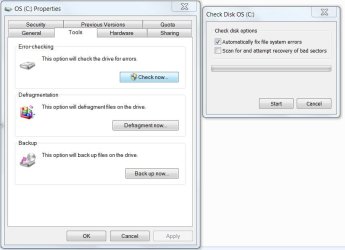
Also ran chkdsk C: /R . It finished OK This appears to be same ( similar ) to error-checking under Disk Properties ( see screen shot )
Capture.JPG
Doesn't appear to be any improvement after those two .
Will try some other stuff from your BATCH PROGRAMS [Standalone] thread .
Thanks .
 

My Computer

Computer type
Laptop
Computer Manufacturer/Model Number
ASUS
OS
Windows 7 Home Premium 64 SP1
Memory
16GB
Graphics Card(s)
Nvidia 460M
Antivirus
Avast
Browser
Chrome
Ran sfc - also no problems .
 

My Computer

Computer type
Laptop
Computer Manufacturer/Model Number
ASUS
OS
Windows 7 Home Premium 64 SP1
Memory
16GB
Graphics Card(s)
Nvidia 460M
Antivirus
Avast
Browser
Chrome
Hi user77777,

I ran the Disk Cleanup - Extended. It finished really quick , and did not prompt me for any boxes to check.
Does that sound right?

No, If you had downloaded Disk Cleanup - Extended and clicked Option 2, you would definately have seen a Window with check boxes. I suggest you try it again.
 

My Computer

Computer type
Laptop
Computer Manufacturer/Model Number
Fujitsu LIFEBOOK
OS
Win 7 HP SP1 64-bit Vista HB SP2 32-bit Linux Mint 18.3
CPU
Intel(R) Pentium(R) CPU P6200 @ 2.13GHz
Motherboard
FUJITSU FJNBB06
Memory
4.00 GB
Graphics Card(s)
Intel(R) Graphics Media Accelerator HD
Sound Card
[1] Realtek High Definition Audio [2] Intel(R) Display Audio
Screen Resolution
1366 x 768 x 32 bits (4294967296 colors) @ 59 Hz
Hard Drives
TOSHIBA MK5076GSX
Antivirus
AVG FREE

My Computer

Computer type
Laptop
Computer Manufacturer/Model Number
Fujitsu LIFEBOOK
OS
Win 7 HP SP1 64-bit Vista HB SP2 32-bit Linux Mint 18.3
CPU
Intel(R) Pentium(R) CPU P6200 @ 2.13GHz
Motherboard
FUJITSU FJNBB06
Memory
4.00 GB
Graphics Card(s)
Intel(R) Graphics Media Accelerator HD
Sound Card
[1] Realtek High Definition Audio [2] Intel(R) Display Audio
Screen Resolution
1366 x 768 x 32 bits (4294967296 colors) @ 59 Hz
Hard Drives
TOSHIBA MK5076GSX
Antivirus
AVG FREE
Hi Paul Black - you were right - I did somehow mess it up when I ran it .
Retried , and I got the check boxes - I just left the defaults , and no errors were detected .
Should I have checked all the boxes ? Was wary to do that .
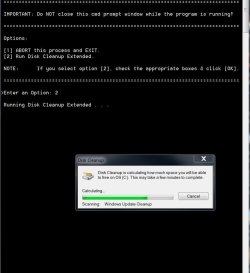
One thing is that calculating the cleanup space for each item took at least 1/2 an hour , if not more ( see screenshot ).
Is that OK ?
Capture.JPG
After re-booting , still have the slowness .
 

My Computer

Computer type
Laptop
Computer Manufacturer/Model Number
ASUS
OS
Windows 7 Home Premium 64 SP1
Memory
16GB
Graphics Card(s)
Nvidia 460M
Antivirus
Avast
Browser
Chrome
Hi user77777,

Hi Paul Black - you were right - I did somehow mess it up when I ran it .
Retried , and I got the check boxes - I just left the defaults , and no errors were detected .
Should I have checked all the boxes ? Was wary to do that .
One thing is that calculating the cleanup space for each item took at least 1/2 an hour , if not more.
Is that OK ?
After re-booting , still have the slowness .

[1] My batch script doesn't check for any errors on anything in the code!
[2] If you have never run the Disk Cleanup - Extended before, it will take quite a while!
[3] Have you checked in msconfig to see exactly you have got running?
[4] Have you got WU set to automatic?
 

My Computer

Computer type
Laptop
Computer Manufacturer/Model Number
Fujitsu LIFEBOOK
OS
Win 7 HP SP1 64-bit Vista HB SP2 32-bit Linux Mint 18.3
CPU
Intel(R) Pentium(R) CPU P6200 @ 2.13GHz
Motherboard
FUJITSU FJNBB06
Memory
4.00 GB
Graphics Card(s)
Intel(R) Graphics Media Accelerator HD
Sound Card
[1] Realtek High Definition Audio [2] Intel(R) Display Audio
Screen Resolution
1366 x 768 x 32 bits (4294967296 colors) @ 59 Hz
Hard Drives
TOSHIBA MK5076GSX
Antivirus
AVG FREE
Hi Paul Black ,
1 and 2 - OK .
3 - yes have checked msconfig many times - seems OK .
4. What is WU ?
 

My Computer

Computer type
Laptop
Computer Manufacturer/Model Number
ASUS
OS
Windows 7 Home Premium 64 SP1
Memory
16GB
Graphics Card(s)
Nvidia 460M
Antivirus
Avast
Browser
Chrome

My Computer

Computer type
Laptop
Computer Manufacturer/Model Number
Fujitsu LIFEBOOK
OS
Win 7 HP SP1 64-bit Vista HB SP2 32-bit Linux Mint 18.3
CPU
Intel(R) Pentium(R) CPU P6200 @ 2.13GHz
Motherboard
FUJITSU FJNBB06
Memory
4.00 GB
Graphics Card(s)
Intel(R) Graphics Media Accelerator HD
Sound Card
[1] Realtek High Definition Audio [2] Intel(R) Display Audio
Screen Resolution
1366 x 768 x 32 bits (4294967296 colors) @ 59 Hz
Hard Drives
TOSHIBA MK5076GSX
Antivirus
AVG FREE
Hi Paul - no , Windows Update is not automatic . Have it set to be notified , and then I download/update manually .
 

My Computer

Computer type
Laptop
Computer Manufacturer/Model Number
ASUS
OS
Windows 7 Home Premium 64 SP1
Memory
16GB
Graphics Card(s)
Nvidia 460M
Antivirus
Avast
Browser
Chrome
Do a disk check. Open a CMD window as administrator and type:
chkdsk C: /f
It will say your disk is in use and ask if you want to schedule to next boot = Yes
Reboot.
Pay attention on the results, specially bad blocks , bad clusters, bad sectors...
 

My Computers

System One System Two

  • Computer type
    PC/Desktop
    Computer Manufacturer/Model Number
    custom build
    OS
    Windows 7 HP 64
    CPU
    i5 6600K - 800MHz to 4200MHz
    Motherboard
    GA-Z170-HD3P
    Memory
    4+4G GSkill DDR4 3000
    Graphics Card(s)
    IG - Intel 530
    Monitor(s) Displays
    Samsung 226BW
    Screen Resolution
    1680x1050
    Hard Drives
    (1) -1 SM951 – 128GB M.2 AHCI PCIe SSD drive for Windows 7 and Lubuntu
    (2) -1 WD SATA 3 - 1T for Data
    (3) -1 WD SATA 3 - 1T for backup
    PSU
    Thermaltake 450W TR2 gold
    Keyboard
    Old and good Chicony mechanical keyboard
    Mouse
    Logitech mX performance - 9 buttons (had to disable some)
    Internet Speed
    500Mb/s
    Browser
    Firefox 64
    Other Info
    TinyWall firewall
  • Computer type
    Laptop
    System Manufacturer/Model Number
    Asus Q550LF
    OS
    Windows 7 Pro
    CPU
    i7-4500U 800MHz to 3.0GHz
    Motherboard
    Asus Q550LF
    Memory
    (4+4)G DDR3 1600
    Graphics Card(s)
    IG intel 4400 + NVIDIA GeForce GT 745M
    Sound Card
    Realtek
    Monitor(s) Displays
    LG Display LP156WF4-SPH1
    Screen Resolution
    1920 x 1080
    Hard Drives
    BX500 120G SSD for Windows and programs +
    1T HDD for data
    Internet Speed
    500 Mb/s
    Browser
    Firefox
    Other Info
    TinyWall firewall
Thanks Megahertz07 . See post #7 . I did run chkdsk C: /R with no problems .
Does this not include chkdsk C: /F ?
 

My Computer

Computer type
Laptop
Computer Manufacturer/Model Number
ASUS
OS
Windows 7 Home Premium 64 SP1
Memory
16GB
Graphics Card(s)
Nvidia 460M
Antivirus
Avast
Browser
Chrome

My Computer

Computer type
Laptop
Computer Manufacturer/Model Number
Fujitsu LIFEBOOK
OS
Win 7 HP SP1 64-bit Vista HB SP2 32-bit Linux Mint 18.3
CPU
Intel(R) Pentium(R) CPU P6200 @ 2.13GHz
Motherboard
FUJITSU FJNBB06
Memory
4.00 GB
Graphics Card(s)
Intel(R) Graphics Media Accelerator HD
Sound Card
[1] Realtek High Definition Audio [2] Intel(R) Display Audio
Screen Resolution
1366 x 768 x 32 bits (4294967296 colors) @ 59 Hz
Hard Drives
TOSHIBA MK5076GSX
Antivirus
AVG FREE
It would appear that there is a disk problem , but chkdsk etc. show all as OK .
I do recall from years ago , that Windows Memory Diagnostic could show no problems , but a different stand alone test ( can't recall the name ) would reveal problems .
Is there some safe/reliable stand alone test here which may do the same ?
 

My Computer

Computer type
Laptop
Computer Manufacturer/Model Number
ASUS
OS
Windows 7 Home Premium 64 SP1
Memory
16GB
Graphics Card(s)
Nvidia 460M
Antivirus
Avast
Browser
Chrome
Just ran Seagate SeaTools - the disks are Seagate .
So far , no problems detected .
Mentioned earlier that sfc ran OK . Could there be any other corruption problems causing this ?
 

My Computer

Computer type
Laptop
Computer Manufacturer/Model Number
ASUS
OS
Windows 7 Home Premium 64 SP1
Memory
16GB
Graphics Card(s)
Nvidia 460M
Antivirus
Avast
Browser
Chrome
Back
Top