System Slow

Try this.
- Boot in Safe mode. Safe mode doesn't load many drivers and all startup programs. If the computer runs good, then try a clean boot. Open msconfig. On Services tab, check Hide All Microsoft services and then disable all no MS services. On startup tab, disable all startup programs.
Restart
 

My Computers

System One System Two

  • Computer type
    PC/Desktop
    Computer Manufacturer/Model Number
    custom build
    OS
    Windows 7 HP 64
    CPU
    i5 6600K - 800MHz to 4200MHz
    Motherboard
    GA-Z170-HD3P
    Memory
    4+4G GSkill DDR4 3000
    Graphics Card(s)
    IG - Intel 530
    Monitor(s) Displays
    Samsung 226BW
    Screen Resolution
    1680x1050
    Hard Drives
    (1) -1 SM951 – 128GB M.2 AHCI PCIe SSD drive for Windows 7 and Lubuntu
    (2) -1 WD SATA 3 - 1T for Data
    (3) -1 WD SATA 3 - 1T for backup
    PSU
    Thermaltake 450W TR2 gold
    Keyboard
    Old and good Chicony mechanical keyboard
    Mouse
    Logitech mX performance - 9 buttons (had to disable some)
    Internet Speed
    500Mb/s
    Browser
    Firefox 64
    Other Info
    TinyWall firewall
  • Computer type
    Laptop
    System Manufacturer/Model Number
    Asus Q550LF
    OS
    Windows 7 Pro
    CPU
    i7-4500U 800MHz to 3.0GHz
    Motherboard
    Asus Q550LF
    Memory
    (4+4)G DDR3 1600
    Graphics Card(s)
    IG intel 4400 + NVIDIA GeForce GT 745M
    Sound Card
    Realtek
    Monitor(s) Displays
    LG Display LP156WF4-SPH1
    Screen Resolution
    1920 x 1080
    Hard Drives
    BX500 120G SSD for Windows and programs +
    1T HDD for data
    Internet Speed
    500 Mb/s
    Browser
    Firefox
    Other Info
    TinyWall firewall
Hi Megahertz07 . Decided to skip Safe Mode , and went straight to your msconfig suggestion .
Did not help , unfortunately .
I'm starting to suspect , that a Win 7 rebuild may be the only solution . But am very reluctant to take this course .
 

My Computer

Computer type
Laptop
Computer Manufacturer/Model Number
ASUS
OS
Windows 7 Home Premium 64 SP1
Memory
16GB
Graphics Card(s)
Nvidia 460M
Antivirus
Avast
Browser
Chrome
Hi user77777,

Decided to skip Safe Mode , and went straight to your msconfig suggestion .
Did not help , unfortunately .
I'm starting to suspect , that a Win 7 rebuild may be the only solution . But am very reluctant to take this course .

As Megahertz07 has recommended, I too suggest that you boot into Safe Mode and see if the computer has a marked increase in performance!

An alternative to a Clean Install is a Repair Install . . .

Repair Install - Overview

A repair install differs from a clean install in the fact that it ONLY replaces the corrupted OS with a new fresh copy. This means that ALL your User Accounts, Folders, Files, Documents, Pictures, Music, Videos, Data Files, Icons, and any installed programs are left intact. It does however, DELETE ALL the WU's [Window updates] installed, and could possibly affect, sounds, services, visual effect settings and device drivers by re-setting them to default [unusual though]. You CANNOT do a repair install at boot, in Safe Mode, using a system repair disk, or using an integrated Windows update disk. Basically, this process can ONLY be performed from within the LIVE OS.

I hope this helps!
 

My Computer

Computer type
Laptop
Computer Manufacturer/Model Number
Fujitsu LIFEBOOK
OS
Win 7 HP SP1 64-bit Vista HB SP2 32-bit Linux Mint 18.3
CPU
Intel(R) Pentium(R) CPU P6200 @ 2.13GHz
Motherboard
FUJITSU FJNBB06
Memory
4.00 GB
Graphics Card(s)
Intel(R) Graphics Media Accelerator HD
Sound Card
[1] Realtek High Definition Audio [2] Intel(R) Display Audio
Screen Resolution
1366 x 768 x 32 bits (4294967296 colors) @ 59 Hz
Hard Drives
TOSHIBA MK5076GSX
Antivirus
AVG FREE
Thanks Paul Black .
"Basically, this process can ONLY be performed from within the LIVE OS."
Any instructions anywhere on this ?
 

My Computer

Computer type
Laptop
Computer Manufacturer/Model Number
ASUS
OS
Windows 7 Home Premium 64 SP1
Memory
16GB
Graphics Card(s)
Nvidia 460M
Antivirus
Avast
Browser
Chrome
Hi user77777,

Basically, this process can ONLY be performed from within the LIVE OS.
Any instructions anywhere on this ?

If you decide to perform a Rerpair install I can post the instructions for you.

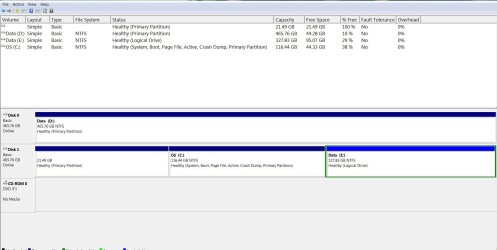
Disk Management

Post a screenshot of the Disk Management => Disk Management - Post a Screen Capture Image.
Pay special attention to Step 5.

I hope this helps!
 

My Computer

Computer type
Laptop
Computer Manufacturer/Model Number
Fujitsu LIFEBOOK
OS
Win 7 HP SP1 64-bit Vista HB SP2 32-bit Linux Mint 18.3
CPU
Intel(R) Pentium(R) CPU P6200 @ 2.13GHz
Motherboard
FUJITSU FJNBB06
Memory
4.00 GB
Graphics Card(s)
Intel(R) Graphics Media Accelerator HD
Sound Card
[1] Realtek High Definition Audio [2] Intel(R) Display Audio
Screen Resolution
1366 x 768 x 32 bits (4294967296 colors) @ 59 Hz
Hard Drives
TOSHIBA MK5076GSX
Antivirus
AVG FREE
Thanks Paul Black - probably couldn't be much clearer than that .
 

My Computer

Computer type
Laptop
Computer Manufacturer/Model Number
ASUS
OS
Windows 7 Home Premium 64 SP1
Memory
16GB
Graphics Card(s)
Nvidia 460M
Antivirus
Avast
Browser
Chrome
Paul Black - here is the screenshot :
Capture.JPG
 

My Computer

Computer type
Laptop
Computer Manufacturer/Model Number
ASUS
OS
Windows 7 Home Premium 64 SP1
Memory
16GB
Graphics Card(s)
Nvidia 460M
Antivirus
Avast
Browser
Chrome
Well Megahertz07 and Paul Black , appears you guys were right about Safe Mode - it did help .
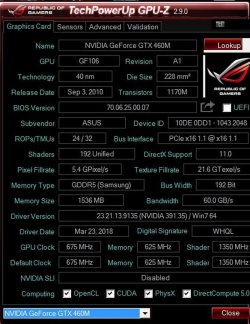
I see the graphics board not loaded - that may well be the problem .
See attached GPU display .
Any way I can test this board ?
Any way of using it in non-safe mode to bypass any problem ?
Thanks .
Capture.JPG
 

My Computer

Computer type
Laptop
Computer Manufacturer/Model Number
ASUS
OS
Windows 7 Home Premium 64 SP1
Memory
16GB
Graphics Card(s)
Nvidia 460M
Antivirus
Avast
Browser
Chrome
Hi user77777,

Well Megahertz07 and Paul Black , appears you guys were right about Safe Mode - it did help.
I see the graphics board not loaded - that may well be the problem.Any way I can test this board ?
Any way of using it in non-safe mode to bypass any problem?

This might help => Graphics Card Problems - Diagnose.
 

My Computer

Computer type
Laptop
Computer Manufacturer/Model Number
Fujitsu LIFEBOOK
OS
Win 7 HP SP1 64-bit Vista HB SP2 32-bit Linux Mint 18.3
CPU
Intel(R) Pentium(R) CPU P6200 @ 2.13GHz
Motherboard
FUJITSU FJNBB06
Memory
4.00 GB
Graphics Card(s)
Intel(R) Graphics Media Accelerator HD
Sound Card
[1] Realtek High Definition Audio [2] Intel(R) Display Audio
Screen Resolution
1366 x 768 x 32 bits (4294967296 colors) @ 59 Hz
Hard Drives
TOSHIBA MK5076GSX
Antivirus
AVG FREE
Hi

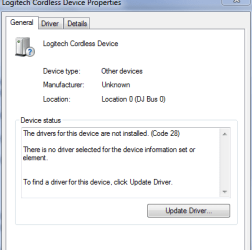
can you navigate to the Device driver menu,
Right click on the Nvidia driver - select properties - is it showing an error message and code
something like this


Roy
 

Attachments

  • decode.PNG
    decode.PNG
    24.7 KB · Views: 11

My Computer

Computer type
PC/Desktop
Computer Manufacturer/Model Number
medionl/Aspire 6930G/acer x55a
OS
W7 home premium 32bit/W7HP 64bit/w10 tp insider ring
CPU
E5300 dual core
Motherboard
medion MS7366
Memory
3gb
Graphics Card(s)
Nvidia Geforce 7100 Nforce 630i
Monitor(s) Displays
avixc
Internet Speed
n (isp resticted to 72)
Antivirus
mse/pands
Browser
palemoon
Other Info
Belkin Fd7050 n USB using Railink RT2870 drivers, more upto date
Under safe mode there are many other programs that are not loaded as antivirus etc. It can be any of them.
Is Windows update set to run automatically?
 

My Computers

System One System Two

  • Computer type
    PC/Desktop
    Computer Manufacturer/Model Number
    custom build
    OS
    Windows 7 HP 64
    CPU
    i5 6600K - 800MHz to 4200MHz
    Motherboard
    GA-Z170-HD3P
    Memory
    4+4G GSkill DDR4 3000
    Graphics Card(s)
    IG - Intel 530
    Monitor(s) Displays
    Samsung 226BW
    Screen Resolution
    1680x1050
    Hard Drives
    (1) -1 SM951 – 128GB M.2 AHCI PCIe SSD drive for Windows 7 and Lubuntu
    (2) -1 WD SATA 3 - 1T for Data
    (3) -1 WD SATA 3 - 1T for backup
    PSU
    Thermaltake 450W TR2 gold
    Keyboard
    Old and good Chicony mechanical keyboard
    Mouse
    Logitech mX performance - 9 buttons (had to disable some)
    Internet Speed
    500Mb/s
    Browser
    Firefox 64
    Other Info
    TinyWall firewall
  • Computer type
    Laptop
    System Manufacturer/Model Number
    Asus Q550LF
    OS
    Windows 7 Pro
    CPU
    i7-4500U 800MHz to 3.0GHz
    Motherboard
    Asus Q550LF
    Memory
    (4+4)G DDR3 1600
    Graphics Card(s)
    IG intel 4400 + NVIDIA GeForce GT 745M
    Sound Card
    Realtek
    Monitor(s) Displays
    LG Display LP156WF4-SPH1
    Screen Resolution
    1920 x 1080
    Hard Drives
    BX500 120G SSD for Windows and programs +
    1T HDD for data
    Internet Speed
    500 Mb/s
    Browser
    Firefox
    Other Info
    TinyWall firewall
Back
Top