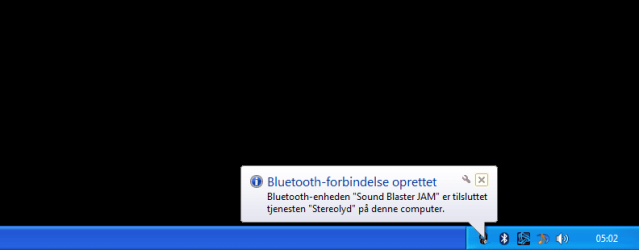
System tray icons

Dynentan

New member
Member
VIP
Local time
6:15 PM
Messages
329
Hello

I am looking to remove these icons and pop ups in my system tray.

1) Safely remove hardware icon. Solved.

2) Microsoft security essentials icon.

3) Bluetooth message that pops up in the notification area everytime I start my computer and says that my bluetooth headphones are connected to my computer.

I have googled this issue and the only suggestions I could find is a guide from windows that explains how to hide these icons, however what I want to do is to remove them completely.
 

Attachments
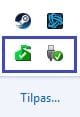
  • Icons.jpg
    Icons.jpg
    4.3 KB · Views: 82
  • 6.png
    6.png
    13.8 KB · Views: 3
Last edited:

My Computer

Computer type
PC/Desktop
OS
Windows 7 home premium
CPU
Intel core i5 4440
Motherboard
Asus h81m-k
Memory
Samsung 8gb ddr3
Graphics Card(s)
Asus gtx 1050
Monitor(s) Displays
Lg 27ea33
Hard Drives
Teamgroup gx2 512gb
PSU
Lenovo 400 watt
Case
Bitfenix nova
Browser
Microsoft edge
Not a good move because both are essential for proper operation of the system.
 

My Computer

Computer Manufacturer/Model Number
HP, Dell, Gateway, Toshiba - 4 laptops and 2 desktops
OS
Vista, Windows7, Mint Mate, Zorin, Windows 8
CPU
from 1.6GHz Duo to i7
Monitor(s) Displays
2x HP w2207
Hard Drives
5x HDD, 7x SSD, 12x Externals
Keyboard
with trackball - no mices
Mouse
Trackball mice
Internet Speed
DSL 6000
1) Safely remove hardware
Can't be removed, if you have "removable" devices connected and they have drive letters assigned. This includes external USB drives, phones, card readers, etc.

Any removable device which gets a drive letter has connected in MSC mode. Default support for this type of device utilizes buffered deferred output to the device, so that there may still be in-memory data that has not yet been written out but which obviously MUST be written out before you disconnect the removable device. If you pull the cable out before properly going through the "safely remove hardware" dialog for the device, you could do damage to the integrity of the file system or the data files themselves on the device.

So ANY removable device that you want to remove, you ALWAYS MUST FIRST click on the "safely remove hardware" icon, and then select the appropriate "eject" item in the popup list of currently connected removable devices. This will trigger Windows to write out any in-memory data which might still be unflushed yet. When this completes, you'll get a balloon message that "it is now safe to remove hardware", and now you can pull the cable.

So if you have that icon showing, it means you have removable devices that Windows is aware of. You need this icon in order to "safely remove hardware". The icon won't show if you don't have any removable devices currently connected. So why would you not want it to be visible???


2) Microsoft security essentials
If MSE is installed and running, this icon will appear. If you don't want to use that anti-Virus product, then uninstall it and you won't have the icon.

But as long as the product is installed it will produce its icon in the System Tray, to show you that you are protected. Its color changes depending on conditions (with green being normal), so why wouldn't you want it to be visible? You've already decided to use it (else you would just uninstall it, and thenyou wouldn't see the icon!).
 

My Computer

Computer type
PC/Desktop
Computer Manufacturer/Model Number
Home-built, two systems (1) and (2)
OS
Windows 7 Pro x64 (1), Win7 Pro X64 (2)
CPU
i5-3350p 3.1Ghz/6MB-cache (1); E8400 3.0Ghz/6MB-cache (2)
Motherboard
ASUS P8Z77-V Pro (1); ASUS P5Q3 (2)
Memory
8GB PC3-12800 DDR3 (1); 4GB PC3-10600 DDR3 (2)
Graphics Card(s)
ATI HD7750 (1), (see TV cards); ATI R7 250 (2)
Sound Card
Realtek ALC892 HD Audio (1); Realtek ALC1200 HD Audio (2)
Monitor(s) Displays
Eizo HD2441W LCD, Eizo S2433W (1); Eizo 24" S2433W (2)
Screen Resolution
1920x1200, 1920x1200 (1); 1920x1200 (2)
Hard Drives
(1) 1TB SATA-II (7200RPM), 2x2TB SATA-III (7200RPM), 250GB SATA-III (10000RPM) for OS; 2x2TB external USB 3.0

(2) 320GB SATA-II (7200RPM), 750GB SATA-II (7200RPM), 150GB SATA-II (10000RPM) for OS; 2TB external USB 3.0
PSU
Nesteq ECS-6001 600W (1); Nesteq ECS-5001 500W (2)
Case
Acousti-Case 360 (1) and (2)
Cooling
Noctua NH-U12P SE2 for CPU, 2x120mm case fans (1) and (2)
Keyboard
IBM PS/2 (1) and (2)
Mouse
Logitech MX Revolution wireless (1); Microsoft wired (2)
Internet Speed
100mbps down / 10mbps up
Antivirus
Microsoft Security Essentials; Malwarebyte Anti-Malware Pro
Browser
Firefox
Other Info
Ceton InfiniTV 4-tuner cablecard-enabled TV card as well as Hauppauge HVR-2250 OTA/ATSC 2-tuner TV card in (1), running under Win7 WMC
I never really use the safely remove hardware icon, and all of my devices are working, so I don't see any reason to have it taking up space in the notification area.

Microsoft security essentials is configured to scan for virus and spyware on a daily basis, so again, I do not see a reason to have it in my notification area.
 

My Computer

Computer type
PC/Desktop
OS
Windows 7 home premium
CPU
Intel core i5 4440
Motherboard
Asus h81m-k
Memory
Samsung 8gb ddr3
Graphics Card(s)
Asus gtx 1050
Monitor(s) Displays
Lg 27ea33
Hard Drives
Teamgroup gx2 512gb
PSU
Lenovo 400 watt
Case
Bitfenix nova
Browser
Microsoft edge

My Computer

Computer type
PC/Desktop
Computer Manufacturer/Model Number
Custom Build
OS
Windows 7 Ultimate x64 SP1
CPU
AMD Phenom 2 1090T
Motherboard
Gigabyte GA-890FXA-UD5
Memory
2x8GB Kingston HyperX Fury Black 1600Mhz Unganged
Graphics Card(s)
MSI GTX 970 Gaming 4G
Sound Card
Realtek On-Board HD 7.1 Audio / Logitech G35
Monitor(s) Displays
3xAcer GD245HQ
Screen Resolution
1920x1080
Hard Drives
Samsung 850 Pro 512GB SSD - OS /
WD Caviar Black SATA 3 - 1 TBx2 - Dynamic RAID 0 /
WD Caviar Green SATA 2 - 640GBx2 - Dynamic RAID 0 /
WD Caviar Green SATA 2 - 640GB - Internal Backup /
Seagate Barracude SATA 3 - 3TB - External Backup/ Sync
PSU
HighPower 1000W
Case
Cooler Master HAF 932
Cooling
Noctua NH-D14
Keyboard
Logitech G19
Mouse
Logitech G500
Internet Speed
100/4 Mbit Cable (100GB quota)
Antivirus
ZoneAlarm Extreme Security / MBAM Pro / MBAE Free / SAS Free
Browser
IE 11 - Firefox - Chrome
Other Info
Logitech F710/ G27/ G940/ Z5500 // TrackIR 5 // Nvidia 3D Surround Vision
That is something interesting stuff, I am going to check it out.
 

My Computer

Computer type
PC/Desktop
OS
Windows 7 home premium
CPU
Intel core i5 4440
Motherboard
Asus h81m-k
Memory
Samsung 8gb ddr3
Graphics Card(s)
Asus gtx 1050
Monitor(s) Displays
Lg 27ea33
Hard Drives
Teamgroup gx2 512gb
PSU
Lenovo 400 watt
Case
Bitfenix nova
Browser
Microsoft edge
just click on customized button in system tray here you can see all icons and their behavior so choose which want to remove here you only hide notification and icon so choose hide icon and notification and click on save that's all after that icon not showing in system tray and you can't get notification from these apps
 

My Computer

Computer type
PC/Desktop
OS
Windows 7 32bit
I am not interested in hiding them, I am interested in completely removing them.
 

My Computer

Computer type
PC/Desktop
OS
Windows 7 home premium
CPU
Intel core i5 4440
Motherboard
Asus h81m-k
Memory
Samsung 8gb ddr3
Graphics Card(s)
Asus gtx 1050
Monitor(s) Displays
Lg 27ea33
Hard Drives
Teamgroup gx2 512gb
PSU
Lenovo 400 watt
Case
Bitfenix nova
Browser
Microsoft edge
That windows guide says that it is going to tell us how to remove the icons from the notification area, but the guide actually only tells us how to hide them, and not remove them, so that guide isn't helping me out.

With that being said, I have tried the guide on the website that gokay suggested, and it works, when I use the batch file that removes the icon, the icon is removed.

The only problem is that I have to run the program everytime I start my computer.
 

My Computer

Computer type
PC/Desktop
OS
Windows 7 home premium
CPU
Intel core i5 4440
Motherboard
Asus h81m-k
Memory
Samsung 8gb ddr3
Graphics Card(s)
Asus gtx 1050
Monitor(s) Displays
Lg 27ea33
Hard Drives
Teamgroup gx2 512gb
PSU
Lenovo 400 watt
Case
Bitfenix nova
Browser
Microsoft edge
Seems like much ado about nothing. Hide them and it's the same as if they are gone, you don't see them and they don't take up space in the System tray.

I'm just the opposite, I want to see all Systray icons all the time.
 

My Computer

Computer type
PC/Desktop
Computer Manufacturer/Model Number
Lenovo IdeaCenter 450
OS
Windows 10 Pro X64
CPU
Intel Quad Core i7-4770 @ 3.4Ghz
Memory
16.0GB PC3-12800 DDR3 SDRAM 1600 MHz
Graphics Card(s)
Intel Integrated HD Graphics
Sound Card
Realtek HD Audio
Monitor(s) Displays
HP 22" LCD
Screen Resolution
1680 x 1050
Hard Drives
250GB Samsung EVO SATA-3 SSD
2TB Seagate ST2000DM001 SATA-2
1.5TB Seagate ST3150041AS SATA
Keyboard
Dell USB
Mouse
Lenovo USB
Internet Speed
Cable via Road Runner 3MB Upload, 30MB Download
Antivirus
Windows Defender, MBAM Pro, MBAE
Browser
Seamonkey
Other Info
UEFI/GPT
PLDS DVD-RW DH16AERSH
Leave them alone, they are there for a reason.
 

My Computer

Computer type
PC/Desktop
Computer Manufacturer/Model Number
Skylake Special #666
OS
Windows 10 Pro x64
CPU
Intel Core i7 6700K
Motherboard
Asus Sabertooth Z170 Mark 1
Memory
GSkill TridentZ RGB 16GB 3600 16-16-16-36
Graphics Card(s)
EVGA GTX 980 Ti SC x2
Sound Card
Realtek High Definition
Monitor(s) Displays
AOC G2460PG
Screen Resolution
1920 x 1080 144Hz
Hard Drives
Samsung 860 Pro 256GB, Seagate Barracuda 4TB x2
PSU
EVGA 1000 P2, EVGA White Custom Braided Cables
Case
Corsair Vengeance C70 Gunmetal Black
Cooling
Corsair H100i v2, Corsair ML120 x2, Thermal Grizzly Kryonaut
Keyboard
Logitech G910 Orion Spectrum
Mouse
Logitech G700s
Internet Speed
Verizon Fios Quantum Gateway 75/75
Antivirus
Windows Defender, Malwarebytes Free 3.8.3
Browser
Chrome
Other Info
Corsair SP120 x4, LG Blu-ray Drive, Durabrand HT-395 100 Watt Dolby Digital Amp, Corsair H2100 Wireless 7.1 Headset
Once again I am not responsible! :p

Copy the batch file (or shortcut - should work too) to:
C:\Users\<your user account name>\AppData\Roaming\Microsoft\Windows\Start Menu\Programs\Startup

This should start it automatically each log in.

If you have other users in the computer add this inside their user files too.
 

My Computer

Computer type
PC/Desktop
Computer Manufacturer/Model Number
Custom Build
OS
Windows 7 Ultimate x64 SP1
CPU
AMD Phenom 2 1090T
Motherboard
Gigabyte GA-890FXA-UD5
Memory
2x8GB Kingston HyperX Fury Black 1600Mhz Unganged
Graphics Card(s)
MSI GTX 970 Gaming 4G
Sound Card
Realtek On-Board HD 7.1 Audio / Logitech G35
Monitor(s) Displays
3xAcer GD245HQ
Screen Resolution
1920x1080
Hard Drives
Samsung 850 Pro 512GB SSD - OS /
WD Caviar Black SATA 3 - 1 TBx2 - Dynamic RAID 0 /
WD Caviar Green SATA 2 - 640GBx2 - Dynamic RAID 0 /
WD Caviar Green SATA 2 - 640GB - Internal Backup /
Seagate Barracude SATA 3 - 3TB - External Backup/ Sync
PSU
HighPower 1000W
Case
Cooler Master HAF 932
Cooling
Noctua NH-D14
Keyboard
Logitech G19
Mouse
Logitech G500
Internet Speed
100/4 Mbit Cable (100GB quota)
Antivirus
ZoneAlarm Extreme Security / MBAM Pro / MBAE Free / SAS Free
Browser
IE 11 - Firefox - Chrome
Other Info
Logitech F710/ G27/ G940/ Z5500 // TrackIR 5 // Nvidia 3D Surround Vision
Why on earth do you go thru all that trouble for no gain at all. This is beyond me and I would be interested to know why people waste their time on such exercises.
 

My Computer

Computer Manufacturer/Model Number
HP, Dell, Gateway, Toshiba - 4 laptops and 2 desktops
OS
Vista, Windows7, Mint Mate, Zorin, Windows 8
CPU
from 1.6GHz Duo to i7
Monitor(s) Displays
2x HP w2207
Hard Drives
5x HDD, 7x SSD, 12x Externals
Keyboard
with trackball - no mices
Mouse
Trackball mice
Internet Speed
DSL 6000
Leave them alone, they are there for a reason.

The safely remove hardware icon is definitely not there for a reason, as I have set all my devices to quick removal, which means, according to windows, that you may disconnect the devices without using the safely remove hardware icon, as it can be seen on this picture.

I managed to get rid of the icon by placing a batch file in my startup folder, its not ideal but it works.

The microsoft security essentials icon seems to be completely removed in windows 10.
 

My Computer

Computer type
PC/Desktop
OS
Windows 7 home premium
CPU
Intel core i5 4440
Motherboard
Asus h81m-k
Memory
Samsung 8gb ddr3
Graphics Card(s)
Asus gtx 1050
Monitor(s) Displays
Lg 27ea33
Hard Drives
Teamgroup gx2 512gb
PSU
Lenovo 400 watt
Case
Bitfenix nova
Browser
Microsoft edge
That windows guide says that it is going to tell us how to remove the icons from the notification area, but the guide actually only tells us how to hide them, and not remove them, so that guide isn't helping me out.

With that being said, I have tried the guide on the website that gokay suggested, and it works, when I use the batch file that removes the icon, the icon is removed.

The only (?) problem is that I have to run the program everytime I start my computer.

...and so the whole point of this worthless exercise is ??????????
 

My Computer

Computer Manufacturer/Model Number
Acer Aspire Timeline X Laptop - Model 5820TG - V1.23
OS
Windows 7 Home Premium x64 - SP1
CPU
Intel Core i5 @ 2.67GHz Arrandale 32nm Technology
Motherboard
Acer JM51_CP (CPU) Base Board Version
Memory
8 GB RAM [2 x 4 GB DDR3]
Graphics Card(s)
AMD Radeon HD 6650M, Intel (R) HD Graphics
Sound Card
Realtek HD Audio, ATI HD Audio Device
Monitor(s) Displays
Acer Aspire Notebook - 15.7"; Acer LCD Monitor X223Wsd - 22"
Screen Resolution
1366 x 768 x 60Hertz
Hard Drives
Notebook - 733GB Western Digital WDC WD7500BPVT- 22HXZT1 Sata.
External HDs [4];Maxtor One Touch4 - 500GB External HD [Drive M:\].Western Digital WDXMS1200TA - 120GB External HD. WD My Book 'Elite' 1TB External HD [Windows 7 dedicated - Partitioned
Mouse
Logitech Wireless V320 for Notebooks
Other Info
Brother MFC-465CN; PC to Fax/Scan/Copy/Photo Multi Function Centre. Epson Perfection V300 Photo Scanner.
Siemens Speedstream 6520 Router.
Wacom 'Bamboo Fun' CTE-650 PC Tablet, Stylus and Mouse. Logitech X-230 Notebook Stereo Speakers and Sub-woofer.
UAC - On. Internet - FireFox v13.0.1 & IE8.
Hon.RSM to the 4th [Assault Pioneer] Troop Pune Sepoys , and 3rd Troop Jodhpur Bengali Lancers
The microsoft security essentials icon seems to be completely removed in windows 10.

Open Control Panel, change View to Small Icons.
Right click on Windows Defender and select Create a shortcut.
 

My Computer

Computer type
PC/Desktop
Computer Manufacturer/Model Number
Lenovo IdeaCenter 450
OS
Windows 10 Pro X64
CPU
Intel Quad Core i7-4770 @ 3.4Ghz
Memory
16.0GB PC3-12800 DDR3 SDRAM 1600 MHz
Graphics Card(s)
Intel Integrated HD Graphics
Sound Card
Realtek HD Audio
Monitor(s) Displays
HP 22" LCD
Screen Resolution
1680 x 1050
Hard Drives
250GB Samsung EVO SATA-3 SSD
2TB Seagate ST2000DM001 SATA-2
1.5TB Seagate ST3150041AS SATA
Keyboard
Dell USB
Mouse
Lenovo USB
Internet Speed
Cable via Road Runner 3MB Upload, 30MB Download
Antivirus
Windows Defender, MBAM Pro, MBAE
Browser
Seamonkey
Other Info
UEFI/GPT
PLDS DVD-RW DH16AERSH
...and so the whole point of this worthless exercise is ??????????

To get rid of the annoyances and keep my notification area clean. I'm still looking for a way to get rid of the MSE icon as well as the bluetooth notification message.
 

My Computer

Computer type
PC/Desktop
OS
Windows 7 home premium
CPU
Intel core i5 4440
Motherboard
Asus h81m-k
Memory
Samsung 8gb ddr3
Graphics Card(s)
Asus gtx 1050
Monitor(s) Displays
Lg 27ea33
Hard Drives
Teamgroup gx2 512gb
PSU
Lenovo 400 watt
Case
Bitfenix nova
Browser
Microsoft edge
Back
Top