System Usable Ram Issue

IntelCorei7

New member
Local time
7:16 AM
Messages
6
Location
San Jose, CA
Hello all,
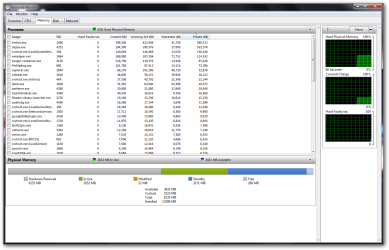
I've recently upgraded my system to 12GB ram (2x2gb + 2x4gb), and it worked fine for awhile, utilizing the entire 12gb, but recently half of it has been eaten up by the 'hardware'..

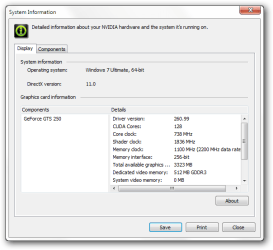
I've posted screenshots of my resource monitor and nvidia gpu settings - 3gb is apparently taken by the gpu.. Any way to fix this?
 

Attachments
  • nvidia.png
    nvidia.png
    14.7 KB · Views: 15
  • ram6gb.png
    ram6gb.png
    50.5 KB · Views: 16

My Computer

Computer Manufacturer/Model Number
Custom
OS
Windows 7 Ultimate x64
CPU
Intel Core i7 860 @ 2.8ghz (stock)
Motherboard
EVGA P55 SLI LGA 1156
Memory
2x2gb Crucial BallistiX + 2x4gb Patriot Sector 4 DDR3-1600
Graphics Card(s)
PNY XLR8 Geforce GTS 250 512mb GDDR3
Sound Card
Onboard
Monitor(s) Displays
AOC 2236vW
Screen Resolution
1920x1080
Hard Drives
Samsung HD103SJ F3 1TB SATAII HD
-200gb windows partition
-Data on rest
PSU
OCZ StealthXStream 600W
Case
Antec NSK6580
Cooling
Hyper 212+
Keyboard
Microsoft Wireless Laser Desktop 4000
Mouse
Microsoft Wireless Laser Desktop 4000
Internet Speed
DSL @ 3mbps
Bring up msconfig, click the Boot tab, and then the Advanced Options button.
In that window, there is a setting for Maximum Memory (top right) - Make sure the checkbox is unchecked, then reboot.
 

My Computer

Computer Manufacturer/Model Number
HP, Dell, Gateway, Toshiba - 4 laptops and 2 desktops
OS
Vista, Windows7, Mint Mate, Zorin, Windows 8
CPU
from 1.6GHz Duo to i7
Monitor(s) Displays
2x HP w2207
Hard Drives
5x HDD, 7x SSD, 12x Externals
Keyboard
with trackball - no mices
Mouse
Trackball mice
Internet Speed
DSL 6000
Bring up msconfig, click the Boot tab, and then the Advanced Options button.
In that window, there is a setting for Maximum Memory (top right) - Make sure the checkbox is unchecked, then reboot.

Checked that already - it's unchecked. Any other options?
 

My Computer

Computer Manufacturer/Model Number
Custom
OS
Windows 7 Ultimate x64
CPU
Intel Core i7 860 @ 2.8ghz (stock)
Motherboard
EVGA P55 SLI LGA 1156
Memory
2x2gb Crucial BallistiX + 2x4gb Patriot Sector 4 DDR3-1600
Graphics Card(s)
PNY XLR8 Geforce GTS 250 512mb GDDR3
Sound Card
Onboard
Monitor(s) Displays
AOC 2236vW
Screen Resolution
1920x1080
Hard Drives
Samsung HD103SJ F3 1TB SATAII HD
-200gb windows partition
-Data on rest
PSU
OCZ StealthXStream 600W
Case
Antec NSK6580
Cooling
Hyper 212+
Keyboard
Microsoft Wireless Laser Desktop 4000
Mouse
Microsoft Wireless Laser Desktop 4000
Internet Speed
DSL @ 3mbps

My Computer

Computer Manufacturer/Model Number
HP, Dell, Gateway, Toshiba - 4 laptops and 2 desktops
OS
Vista, Windows7, Mint Mate, Zorin, Windows 8
CPU
from 1.6GHz Duo to i7
Monitor(s) Displays
2x HP w2207
Hard Drives
5x HDD, 7x SSD, 12x Externals
Keyboard
with trackball - no mices
Mouse
Trackball mice
Internet Speed
DSL 6000
As whs said, you definitely want to read that thread and the link posted about halfway into it as well. Also, you may want to also go over the "Things to try" section of this KB article. Unless you changed something else recently, though, it doesn't make sense that the BIOS has started reserving more memory than it did previously. Some of the people who managed to fix their i7+RAM issues in the previously-linked threads found it was indeed issues with RAM at the wrong speeds, overclocking, or configuring Windows max CPU setting (avoiding some of the BIOS checks at boot).
 

My Computer

Computer type
PC/Desktop
Computer Manufacturer/Model Number
Custom
OS
Windows 10 Pro x64
CPU
Intel Core i7 4790K @ 4.5GHz
Motherboard
Asus Maximus Hero VII
Memory
32GB DDR3
Graphics Card(s)
Nvidia GeForce GTX970
Sound Card
Realtek HD Audio
Screen Resolution
1920x1200
Hard Drives
1x Samsung 250GB SSD
4x WD RE 2TB (RAIDZ)
PSU
Corsair AX760i
Case
Fractal Design Define R4
Cooling
Noctua NH-D15
Thanks for all the replies guys! I've reseated all four pieces, swapping the pairs - and it's starting to detect the full 12gb again!

I recall this was how it performed when I first installed it, so we will see how it goes in a couple of days. I'll be sure to come back to those reference if I have any more issues. Still love this forum! :D
 

My Computer

Computer Manufacturer/Model Number
Custom
OS
Windows 7 Ultimate x64
CPU
Intel Core i7 860 @ 2.8ghz (stock)
Motherboard
EVGA P55 SLI LGA 1156
Memory
2x2gb Crucial BallistiX + 2x4gb Patriot Sector 4 DDR3-1600
Graphics Card(s)
PNY XLR8 Geforce GTS 250 512mb GDDR3
Sound Card
Onboard
Monitor(s) Displays
AOC 2236vW
Screen Resolution
1920x1080
Hard Drives
Samsung HD103SJ F3 1TB SATAII HD
-200gb windows partition
-Data on rest
PSU
OCZ StealthXStream 600W
Case
Antec NSK6580
Cooling
Hyper 212+
Keyboard
Microsoft Wireless Laser Desktop 4000
Mouse
Microsoft Wireless Laser Desktop 4000
Internet Speed
DSL @ 3mbps
Looks good. Thanks for the feedback.
 

My Computer

Computer Manufacturer/Model Number
HP, Dell, Gateway, Toshiba - 4 laptops and 2 desktops
OS
Vista, Windows7, Mint Mate, Zorin, Windows 8
CPU
from 1.6GHz Duo to i7
Monitor(s) Displays
2x HP w2207
Hard Drives
5x HDD, 7x SSD, 12x Externals
Keyboard
with trackball - no mices
Mouse
Trackball mice
Internet Speed
DSL 6000
Back
Top