System Volume on Disk is Corrupt

Hatryst

New member
Local time
7:36 PM
Messages
15
Hi everyone. Here's a complex problem.

Preface:
While I was on my PC as usual one day, everything froze except the cursor, and I had to reboot. But upon restarting, I was presented with two options. 'Repair (recommended)' and 'Start Windows normally'.
(The following happens every time, and is still valid, nothing has changed).
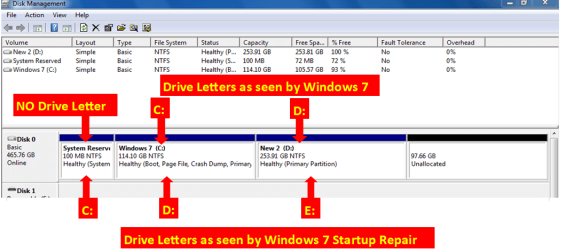
Upon selecting 'repair', startup repair starts, runs, and it identifies the problem 'System Volume on Disk is Corrupt'. Same is the case when I boot with the Windows installation DVD and try startup repair.
'Start Windows Normally' brings up the 'Starting Windows' screen, it stays there, no animation takes place for about a minute, and then the Windows logo animates in, and the computer restarts.

Please note:
I'll refer to:
New HDD on which I installed Windows: Spare HDD
The HDD with the corrupted Windows: Bad HDD (has 4 partitions, 2 for data and 1 for windows, and 1 system reserved partition). it is 1.5 years old.
Corrupted Windows partition: Bad partition
P.S. I don't have an image/backup of the bad partition.

What I did next:
Installed Windows 7 on a spare hard drive, and attached the bad HDD as secondary. All my data was found to be safe. Except for the partition which is supposed to be the Windows partition. It is not getting recognized as a readable partition. Windows sees it as 'raw' partition, unformatted. Of course, I won't format it.
I installed PartitionWizard and checked the contents of the unreadable partition. All the files and folders on the bad partition are intact, nothing has gone. But the problem is, it's unreadable. I also tried rebuilding the MBR of that disk via PartitionWizard, nothing. No change.

So in a nutshell, the whole question is:
One of the partitions (which happens to be the Windows partition) on my hard drive has corrupted, and my computer can no longer boot up. If I try accessing the partition from another Windows environment, it shows up as unformatted (raw). Although all files are intact, and readable by PartitionWizard. Question is, how do I make this partition readable (by Windows) again?
I believe, once it is made readable, I MIGHT be able to boot from it.

Thanks for any help guys. I'm running the same thread over at How-To Geek Forums, but things got a bit complex there, however you can check it out for reference. I'm looking for feasible solutions, and will try them.

Thanks in advance!
 

My Computer

Computer Manufacturer/Model Number
Custom Built
OS
Windows 7 Ultimate 32bit
CPU
2.7 GHz Pentium Dual Core E5400 (x64 supported)
Motherboard
Intel DG41RQ
Memory
2 GB DDR2
Graphics Card(s)
None yet
Sound Card
Onboard
Monitor(s) Displays
No special
Hard Drives
250 GB SATA
PSU
Standard
Case
Standard
Cooling
Huh? Whats that?

My Computer

OS
ME/XP/Vista/Win7
Thanks for the reply
Since the bad HDD is Western Digital, I used the WD utility. The test failed, so I tried 'Acronis drive monitor'.

And both tests tell the same story. This is what Acronis reported:
"The device, \Device\Harddisk1\DR1, has a bad block."

However, Acronis shows that the HDD is 98% healthy.

Where to go from here?
 

My Computer

Computer Manufacturer/Model Number
Custom Built
OS
Windows 7 Ultimate 32bit
CPU
2.7 GHz Pentium Dual Core E5400 (x64 supported)
Motherboard
Intel DG41RQ
Memory
2 GB DDR2
Graphics Card(s)
None yet
Sound Card
Onboard
Monitor(s) Displays
No special
Hard Drives
250 GB SATA
PSU
Standard
Case
Standard
Cooling
Huh? Whats that?
Thanks for the reply
Since the bad HDD is Western Digital, I used the WD utility. The test failed, so I tried 'Acronis drive monitor'.

And both tests tell the same story. This is what Acronis reported:
"The device, \Device\Harddisk1\DR1, has a bad block."

However, Acronis shows that the HDD is 98% healthy.

Where to go from here?

Depends on what you want. Do you want the hard disk working (which repairs could result in loss of data), or would you rather get your important files off? I would recommend first backing up your important files by following the steps in Backup Files Using PartedMagic. You can get PartedMagic at PartedMagic.

After you get your important files back, we can work on trying to fix the drive.
 

My Computer

Computer Manufacturer/Model Number
HP Pavilion e9110t
OS
Windows 7 Home Premium 64 Bit
CPU
Intel(R) Core(TM)2 Quad CPU Q9550 @ 2.83GHz
Motherboard
Pegatron IPIEL-LA3
Memory
6.00 GB Hundai HMT125U6BFR8C-H9
Graphics Card(s)
ATI Radeon HD 4850
Sound Card
Realtek High Definition Audio/ATI High Definition Audio
Monitor(s) Displays
Acer AL2216W
Screen Resolution
1680x1050
Hard Drives
Hitachi HDP725050GLA360 ATA Device 500 GB
PSU
Unknown/installed by HP
Case
HP generic case
Cooling
Intel Stock Cooling
Keyboard
HP Keyboard
Mouse
HP Mouse
Internet Speed
Download: 19.15 Mbps Upload: 1.67 Mbps
Other Info
Network Adapter Realtek RTL8168D/8111D Family PCI-E Gigabit Ethernet NIC (NDIS 6.20)
Network Adapter 802.11n Wireless PCI Express Card LAN Adapter
Depends on what you want. Do you want the hard disk working (which repairs could result in loss of data), or would you rather get your important files off? I would recommend first backing up your important files by following the steps in Backup Files Using PartedMagic. You can get PartedMagic at PartedMagic.

After you get your important files back, we can work on trying to fix the drive.

Hi. So I'll backup my data now. But once that's done, would it be possible to repair the hard disk and get it back up and running? Or is it, well, wasted?
 

My Computer

Computer Manufacturer/Model Number
Custom Built
OS
Windows 7 Ultimate 32bit
CPU
2.7 GHz Pentium Dual Core E5400 (x64 supported)
Motherboard
Intel DG41RQ
Memory
2 GB DDR2
Graphics Card(s)
None yet
Sound Card
Onboard
Monitor(s) Displays
No special
Hard Drives
250 GB SATA
PSU
Standard
Case
Standard
Cooling
Huh? Whats that?
Depends on what you want. Do you want the hard disk working (which repairs could result in loss of data), or would you rather get your important files off? I would recommend first backing up your important files by following the steps in Backup Files Using PartedMagic. You can get PartedMagic at PartedMagic.

After you get your important files back, we can work on trying to fix the drive.

Hi. So I'll backup my data now. But once that's done, would it be possible to repair the hard disk and get it back up and running? Or is it, well, wasted?

Depends on the extent of the damage to the hard drive. If it is a mechanical failure, the drive should be returned and replaced by the manufacturer if it is still under warranty. If you just have some bad sectors, it is possible to reclaim the drive, but you would want to monitor it for a while and make sure it is not mechanically failing. If it is mechanically failing, you will see these symptoms again within 1-4 weeks.
 

My Computer

Computer Manufacturer/Model Number
HP Pavilion e9110t
OS
Windows 7 Home Premium 64 Bit
CPU
Intel(R) Core(TM)2 Quad CPU Q9550 @ 2.83GHz
Motherboard
Pegatron IPIEL-LA3
Memory
6.00 GB Hundai HMT125U6BFR8C-H9
Graphics Card(s)
ATI Radeon HD 4850
Sound Card
Realtek High Definition Audio/ATI High Definition Audio
Monitor(s) Displays
Acer AL2216W
Screen Resolution
1680x1050
Hard Drives
Hitachi HDP725050GLA360 ATA Device 500 GB
PSU
Unknown/installed by HP
Case
HP generic case
Cooling
Intel Stock Cooling
Keyboard
HP Keyboard
Mouse
HP Mouse
Internet Speed
Download: 19.15 Mbps Upload: 1.67 Mbps
Other Info
Network Adapter Realtek RTL8168D/8111D Family PCI-E Gigabit Ethernet NIC (NDIS 6.20)
Network Adapter 802.11n Wireless PCI Express Card LAN Adapter
Installed Windows 7 on a spare hard drive, and attached the bad HDD as secondary.

You can copy & paste your DATA over.
 

My Computer

OS
ME/XP/Vista/Win7
Installed Windows 7 on a spare hard drive, and attached the bad HDD as secondary.

You can copy & paste your DATA over.

The spare HDD is only 80GB, so I'll have to manage some storage options...
 

My Computer

Computer Manufacturer/Model Number
Custom Built
OS
Windows 7 Ultimate 32bit
CPU
2.7 GHz Pentium Dual Core E5400 (x64 supported)
Motherboard
Intel DG41RQ
Memory
2 GB DDR2
Graphics Card(s)
None yet
Sound Card
Onboard
Monitor(s) Displays
No special
Hard Drives
250 GB SATA
PSU
Standard
Case
Standard
Cooling
Huh? Whats that?
Except for the partition which is supposed to be the Windows partition. It is not getting recognized as a readable partition. Windows sees it as 'raw' partition, unformatted.
Installed Windows 7 on a spare hard drive, and attached the bad HDD as secondary.

You can copy & paste your DATA over.

The spare HDD is only 80GB, so I'll have to manage some storage options...

I thought you said that the working Windows system you are currently running saw the old Windows partition as RAW and so it was inaccessible? Or did you store your users folders on another partition and can still access them?
 
Last edited:

My Computer

Computer Manufacturer/Model Number
HP Pavilion e9110t
OS
Windows 7 Home Premium 64 Bit
CPU
Intel(R) Core(TM)2 Quad CPU Q9550 @ 2.83GHz
Motherboard
Pegatron IPIEL-LA3
Memory
6.00 GB Hundai HMT125U6BFR8C-H9
Graphics Card(s)
ATI Radeon HD 4850
Sound Card
Realtek High Definition Audio/ATI High Definition Audio
Monitor(s) Displays
Acer AL2216W
Screen Resolution
1680x1050
Hard Drives
Hitachi HDP725050GLA360 ATA Device 500 GB
PSU
Unknown/installed by HP
Case
HP generic case
Cooling
Intel Stock Cooling
Keyboard
HP Keyboard
Mouse
HP Mouse
Internet Speed
Download: 19.15 Mbps Upload: 1.67 Mbps
Other Info
Network Adapter Realtek RTL8168D/8111D Family PCI-E Gigabit Ethernet NIC (NDIS 6.20)
Network Adapter 802.11n Wireless PCI Express Card LAN Adapter
Except for the partition which is supposed to be the Windows partition. It is not getting recognized as a readable partition. Windows sees it as 'raw' partition, unformatted.
You can copy & paste your DATA over.

The spare HDD is only 80GB, so I'll have to manage some storage options...

I thought you said that the working Windows system you are currently running saw the old Windows partition as RAW and so it was inaccessible? Or did you store your users folders on another partition and can still access them?

Exactly!
I mentioned in the first post. The Windows partition (now inaccessible) had no important data on it, all my data was in the other 2 partitions which are (luckily) readable and all the data is accessible.
Does that mean I don't need to backup any data?
I had some bookmarks in my browsers running in the Windows partition, so yes, a little data recovery is required, however...
 

My Computer

Computer Manufacturer/Model Number
Custom Built
OS
Windows 7 Ultimate 32bit
CPU
2.7 GHz Pentium Dual Core E5400 (x64 supported)
Motherboard
Intel DG41RQ
Memory
2 GB DDR2
Graphics Card(s)
None yet
Sound Card
Onboard
Monitor(s) Displays
No special
Hard Drives
250 GB SATA
PSU
Standard
Case
Standard
Cooling
Huh? Whats that?
Except for the partition which is supposed to be the Windows partition. It is not getting recognized as a readable partition. Windows sees it as 'raw' partition, unformatted.


The spare HDD is only 80GB, so I'll have to manage some storage options...

I thought you said that the working Windows system you are currently running saw the old Windows partition as RAW and so it was inaccessible? Or did you store your users folders on another partition and can still access them?

Exactly!
I mentioned in the first post. The Windows partition (now inaccessible) had no important data on it, all my data was in the other 2 partitions which are (luckily) readable and all the data is accessible.
Does that mean I don't need to backup any data?
I had some bookmarks in my browsers running in the Windows partition, so yes, a little data recovery is required, however...

You can use the link I posted in a previous post for PartedMagic to backup your browser favorites if you'd like. PartedMagic should be able to access the partition that Windows is seeing as RAW.
 

My Computer

Computer Manufacturer/Model Number
HP Pavilion e9110t
OS
Windows 7 Home Premium 64 Bit
CPU
Intel(R) Core(TM)2 Quad CPU Q9550 @ 2.83GHz
Motherboard
Pegatron IPIEL-LA3
Memory
6.00 GB Hundai HMT125U6BFR8C-H9
Graphics Card(s)
ATI Radeon HD 4850
Sound Card
Realtek High Definition Audio/ATI High Definition Audio
Monitor(s) Displays
Acer AL2216W
Screen Resolution
1680x1050
Hard Drives
Hitachi HDP725050GLA360 ATA Device 500 GB
PSU
Unknown/installed by HP
Case
HP generic case
Cooling
Intel Stock Cooling
Keyboard
HP Keyboard
Mouse
HP Mouse
Internet Speed
Download: 19.15 Mbps Upload: 1.67 Mbps
Other Info
Network Adapter Realtek RTL8168D/8111D Family PCI-E Gigabit Ethernet NIC (NDIS 6.20)
Network Adapter 802.11n Wireless PCI Express Card LAN Adapter
I thought you said that the working Windows system you are currently running saw the old Windows partition as RAW and so it was inaccessible? Or did you store your users folders on another partition and can still access them?

Exactly!
I mentioned in the first post. The Windows partition (now inaccessible) had no important data on it, all my data was in the other 2 partitions which are (luckily) readable and all the data is accessible.
Does that mean I don't need to backup any data?
I had some bookmarks in my browsers running in the Windows partition, so yes, a little data recovery is required, however...

You can use the link I posted in a previous post for PartedMagic to backup your browser favorites if you'd like. PartedMagic should be able to access the partition that Windows is seeing as RAW.

That's nice. I hope it wouldn't be like those other 'data recovery' softwares that backup a lot of unnecessary data as well. I'll give it a try
However, it looks a bit complex. Is there any alternative as well?
 

My Computer

Computer Manufacturer/Model Number
Custom Built
OS
Windows 7 Ultimate 32bit
CPU
2.7 GHz Pentium Dual Core E5400 (x64 supported)
Motherboard
Intel DG41RQ
Memory
2 GB DDR2
Graphics Card(s)
None yet
Sound Card
Onboard
Monitor(s) Displays
No special
Hard Drives
250 GB SATA
PSU
Standard
Case
Standard
Cooling
Huh? Whats that?
That's nice. I hope it wouldn't be like those other 'data recovery' softwares that backup a lot of unnecessary data as well. I'll give it a try
However, it looks a bit complex. Is there any alternative as well?

The only other alternatives are "softwares that backup a lot of unnecessary data as well" which it sounds like you want to avoid. ;)

With the method I outlined in Backup Files Using PartedMagic, you can navigate to the folders you want to backup and just copy and paste them.
 
Last edited:

My Computer

Computer Manufacturer/Model Number
HP Pavilion e9110t
OS
Windows 7 Home Premium 64 Bit
CPU
Intel(R) Core(TM)2 Quad CPU Q9550 @ 2.83GHz
Motherboard
Pegatron IPIEL-LA3
Memory
6.00 GB Hundai HMT125U6BFR8C-H9
Graphics Card(s)
ATI Radeon HD 4850
Sound Card
Realtek High Definition Audio/ATI High Definition Audio
Monitor(s) Displays
Acer AL2216W
Screen Resolution
1680x1050
Hard Drives
Hitachi HDP725050GLA360 ATA Device 500 GB
PSU
Unknown/installed by HP
Case
HP generic case
Cooling
Intel Stock Cooling
Keyboard
HP Keyboard
Mouse
HP Mouse
Internet Speed
Download: 19.15 Mbps Upload: 1.67 Mbps
Other Info
Network Adapter Realtek RTL8168D/8111D Family PCI-E Gigabit Ethernet NIC (NDIS 6.20)
Network Adapter 802.11n Wireless PCI Express Card LAN Adapter
That's nice. I hope it wouldn't be like those other 'data recovery' softwares that backup a lot of unnecessary data as well. I'll give it a try
However, it looks a bit complex. Is there any alternative as well?

The only other alternatives are "softwares that backup a lot of unnecessary data as well" which it sounds like you want to avoid. ;)


I understand! Okay, so I'll use PartedMagic.

I have an idea in mind, and I want to make sure if it will work. You see, the bad HDD (the crashed partition) had a lot of programs installed, and a lot of custom settings and stuff. Is there some way I can copy that partition's data (settings and programs etc.) to my current HDD, and some way, replicate how my computer was running before the HDD crashed. All the files are intact, so they should (or might) work when copied to a fresh partition. Problem is, WHAT do I need to copy to the new HDD.
It's kinda like 'easy transfer' from one computer to another, with just 2 differences:
1. The HDD (from which the data is to be transferred) is dead
2. The computer is the same, so there's no issue regarding drivers and stuff

Hope I've made myself clear. So, is it feasible, somehow?
 

My Computer

Computer Manufacturer/Model Number
Custom Built
OS
Windows 7 Ultimate 32bit
CPU
2.7 GHz Pentium Dual Core E5400 (x64 supported)
Motherboard
Intel DG41RQ
Memory
2 GB DDR2
Graphics Card(s)
None yet
Sound Card
Onboard
Monitor(s) Displays
No special
Hard Drives
250 GB SATA
PSU
Standard
Case
Standard
Cooling
Huh? Whats that?
That's nice. I hope it wouldn't be like those other 'data recovery' softwares that backup a lot of unnecessary data as well. I'll give it a try
However, it looks a bit complex. Is there any alternative as well?

The only other alternatives are "softwares that backup a lot of unnecessary data as well" which it sounds like you want to avoid. ;)


I understand! Okay, so I'll use PartedMagic.

I have an idea in mind, and I want to make sure if it will work. You see, the bad HDD (the crashed partition) had a lot of programs installed, and a lot of custom settings and stuff. Is there some way I can copy that partition's data (settings and programs etc.) to my current HDD, and some way, replicate how my computer was running before the HDD crashed. All the files are intact, so they should (or might) work when copied to a fresh partition. Problem is, WHAT do I need to copy to the new HDD.
It's kinda like 'easy transfer' from one computer to another, with just 2 differences:
1. The HDD (from which the data is to be transferred) is dead
2. The computer is the same, so there's no issue regarding drivers and stuff

Hope I've made myself clear. So, is it feasible, somehow?

I'm afraid it is not worth the hassle and would likely cause more problems to deal with. Programs generate files that are placed in the Windows folder, (registry files, dll files, sys files, etc.) and all of those files would have to be replicated and properly linked for the software to work, which means you would probably have to re-install the software to have it work properly anyway.

Now, if you have online programs that are large and you do not want to download those again, some of those can be copied over and just re-installed if the downloader is aware that parts of the program are already in place. I know Steam has a backup feature, and World of Warcraft has methods for this that you can Google. Basically, if you have any downloaded games or software, Google to see if there are backup methods and whether they would work with your programs.
 

My Computer

Computer Manufacturer/Model Number
HP Pavilion e9110t
OS
Windows 7 Home Premium 64 Bit
CPU
Intel(R) Core(TM)2 Quad CPU Q9550 @ 2.83GHz
Motherboard
Pegatron IPIEL-LA3
Memory
6.00 GB Hundai HMT125U6BFR8C-H9
Graphics Card(s)
ATI Radeon HD 4850
Sound Card
Realtek High Definition Audio/ATI High Definition Audio
Monitor(s) Displays
Acer AL2216W
Screen Resolution
1680x1050
Hard Drives
Hitachi HDP725050GLA360 ATA Device 500 GB
PSU
Unknown/installed by HP
Case
HP generic case
Cooling
Intel Stock Cooling
Keyboard
HP Keyboard
Mouse
HP Mouse
Internet Speed
Download: 19.15 Mbps Upload: 1.67 Mbps
Other Info
Network Adapter Realtek RTL8168D/8111D Family PCI-E Gigabit Ethernet NIC (NDIS 6.20)
Network Adapter 802.11n Wireless PCI Express Card LAN Adapter
I'm afraid it is not worth the hassle and would likely cause more problems to deal with. Programs generate files that are placed in the Windows folder, (registry files, dll files, sys files, etc.) and all of those files would have to be replicated and properly linked for the software to work, which means you would probably have to re-install the software to have it work properly anyway.

Now, if you have online programs that are large and you do not want to download those again, some of those can be copied over and just re-installed if the downloader is aware that parts of the program are already in place. I know Steam has a backup feature, and World of Warcraft has methods for this that you can Google. Basically, if you have any downloaded games or software, Google to see if there are backup methods and whether they would work with your programs.

In short, it won't work for programs. That's fine. How about settings? Can settings be transferred?
 

My Computer

Computer Manufacturer/Model Number
Custom Built
OS
Windows 7 Ultimate 32bit
CPU
2.7 GHz Pentium Dual Core E5400 (x64 supported)
Motherboard
Intel DG41RQ
Memory
2 GB DDR2
Graphics Card(s)
None yet
Sound Card
Onboard
Monitor(s) Displays
No special
Hard Drives
250 GB SATA
PSU
Standard
Case
Standard
Cooling
Huh? Whats that?
In short, it won't work for programs. That's fine. How about settings? Can settings be transferred?

Setting should be able to be transferred. What settings are you looking for? Your themes?
 

My Computer

Computer Manufacturer/Model Number
HP Pavilion e9110t
OS
Windows 7 Home Premium 64 Bit
CPU
Intel(R) Core(TM)2 Quad CPU Q9550 @ 2.83GHz
Motherboard
Pegatron IPIEL-LA3
Memory
6.00 GB Hundai HMT125U6BFR8C-H9
Graphics Card(s)
ATI Radeon HD 4850
Sound Card
Realtek High Definition Audio/ATI High Definition Audio
Monitor(s) Displays
Acer AL2216W
Screen Resolution
1680x1050
Hard Drives
Hitachi HDP725050GLA360 ATA Device 500 GB
PSU
Unknown/installed by HP
Case
HP generic case
Cooling
Intel Stock Cooling
Keyboard
HP Keyboard
Mouse
HP Mouse
Internet Speed
Download: 19.15 Mbps Upload: 1.67 Mbps
Other Info
Network Adapter Realtek RTL8168D/8111D Family PCI-E Gigabit Ethernet NIC (NDIS 6.20)
Network Adapter 802.11n Wireless PCI Express Card LAN Adapter
In short, it won't work for programs. That's fine. How about settings? Can settings be transferred?

Setting should be able to be transferred. What settings are you looking for? Your themes?

Yeah, kind of. Sorry I confused settings with programs for a while... Please ignore :rolleyes:

I'm downloading PartedMagic now, will burn to a CD, and will post back on my progress regarding recovery...
 

My Computer

Computer Manufacturer/Model Number
Custom Built
OS
Windows 7 Ultimate 32bit
CPU
2.7 GHz Pentium Dual Core E5400 (x64 supported)
Motherboard
Intel DG41RQ
Memory
2 GB DDR2
Graphics Card(s)
None yet
Sound Card
Onboard
Monitor(s) Displays
No special
Hard Drives
250 GB SATA
PSU
Standard
Case
Standard
Cooling
Huh? Whats that?
PartedMagic doesn't start. Gets stuck at /etc/fstab (or something). Waited 5 minutes for it, and then I rebooted manually.

Alternatives? :huh:
 

My Computer

Computer Manufacturer/Model Number
Custom Built
OS
Windows 7 Ultimate 32bit
CPU
2.7 GHz Pentium Dual Core E5400 (x64 supported)
Motherboard
Intel DG41RQ
Memory
2 GB DDR2
Graphics Card(s)
None yet
Sound Card
Onboard
Monitor(s) Displays
No special
Hard Drives
250 GB SATA
PSU
Standard
Case
Standard
Cooling
Huh? Whats that?

My Computer

Computer Manufacturer/Model Number
HP Pavilion e9110t
OS
Windows 7 Home Premium 64 Bit
CPU
Intel(R) Core(TM)2 Quad CPU Q9550 @ 2.83GHz
Motherboard
Pegatron IPIEL-LA3
Memory
6.00 GB Hundai HMT125U6BFR8C-H9
Graphics Card(s)
ATI Radeon HD 4850
Sound Card
Realtek High Definition Audio/ATI High Definition Audio
Monitor(s) Displays
Acer AL2216W
Screen Resolution
1680x1050
Hard Drives
Hitachi HDP725050GLA360 ATA Device 500 GB
PSU
Unknown/installed by HP
Case
HP generic case
Cooling
Intel Stock Cooling
Keyboard
HP Keyboard
Mouse
HP Mouse
Internet Speed
Download: 19.15 Mbps Upload: 1.67 Mbps
Other Info
Network Adapter Realtek RTL8168D/8111D Family PCI-E Gigabit Ethernet NIC (NDIS 6.20)
Network Adapter 802.11n Wireless PCI Express Card LAN Adapter
Back
Top