System wakes up on its own (hp tm2)

felixfreiberger

New member
Local time
7:56 PM
Messages
17
Hi,

I have a problem with my hp TouchSmart tm2-1090eg, running Windows 7 Ultimate (64 Bit).

My laptop wakes up at night at random times. Usually, I hibernate my laptop at night, but at the morning, my laptop is often running and draining battery.

Disabling the "allow timers to wake the computer" (German: "Zeitgeber zur Aktivierung zulassen")-setting in power options solves the problem, but, of course, disables all wake timers. (I want to use the timers, i.e. for Windows Media Center).

Therefore, I think that my problem is not a hardware or driver issue, but a software issue.

There's only one problem: I have no idea what software causes this. I thought I could catch it with "powercfg -waketimers", but I only get
C:\Windows\system32>powercfg -waketimers
Im System sind keine Aktivierungszeitgeber aktiv.
(translation: "There are no active wake timers.") :cry:


Does anyone have an idea what could cause this problem?

Thank you in advance,
Felix Freiberger
 

My Computer My Computer

At a glance

Windows 7 Ultimate (64 Bit)
Computer Manufacturer/Model Number
hp tm2-1090eg
OS
Windows 7 Ultimate (64 Bit)
Hello Felix , welcome to Seven Forums!


Have a look at the tutorial at the link below to see if there's a something that may help solve your issue; though it says Vista the principals are the same; be sure to post back to let us know how it sorts out.

Power Options and Sleep Mode Problems - Vista Forums
 

My Computer My Computer

At a glance

W 7 64-bit UltimateIntel Q9550 Yorkfield8GB Dominator 8500C5DATI : XFX 5870
Computer Manufacturer/Model Number
* BFK Customs *
OS
W 7 64-bit Ultimate
CPU
Intel Q9550 Yorkfield
Motherboard
ASUS P5Q Pro
Memory
8GB Dominator 8500C5D
Graphics Card(s)
ATI : XFX 5870
Sound Card
Realtek HD Audio 7-1
Monitor(s) Displays
1x 47" LCD HDMI & 3x 26" LCD HDMI
Screen Resolution
1920x1080P & 1920x1200
Hard Drives
1x 80GB Intel X25-M G2 SSD : 1x 500GB & 1x 640GB WD Caviar Black(s)
PSU
Corsair 620HX
Case
Cooler Master RC-690
Cooling
Tuniq Tower 120, 2x 140mm and 3x 120mm case fans
Keyboard
Microsoft 500
Mouse
Razer Diamondback 3G
Internet Speed
14 Mb/s
Other Info
1x Koutech 3Gb/s SATA HDD Hot Swap Rack
Felix,
Have you had an opportunity to investigate some of the other PowerCfg options?

Windows 7 offers many. Try PowerCfg /?

Especially of interest to you might be:
PowerCfg -lastwake
 

My Computer My Computer

At a glance

MS Windows 7 Ultimate SP1 64-bitAMD A10-4600M6.00 GB Dual-Channel DDR3 @ 798MHz (11-11-12-28)AMD Radeon HD 7660G
Computer Manufacturer/Model Number
Toshiba Satellite S875D-S7239 laptop
OS
MS Windows 7 Ultimate SP1 64-bit
CPU
AMD A10-4600M
Motherboard
AMD Pumori (Socket FT1)
Memory
6.00 GB Dual-Channel DDR3 @ 798MHz (11-11-12-28)
Graphics Card(s)
AMD Radeon HD 7660G
Sound Card
High Definition Audio Device
Monitor(s) Displays
Generic PnP Monitor (1600x900@60Hz)
Screen Resolution
1600x900@60Hz
Hard Drives
SSD 119GB Corsair CSSD-V128GB2 ATA Device
Keyboard
Standard PS/2 Keyboard
Mouse
HP Wireless Optical Mobile Mouse Model FHA-3410
Internet Speed
What the local pub, local coffee shop offers.
Other Info
Optical Drive:MATSHITA BD-CMB UJ160B ATA Device


Also have an Asus ha1002xp netbook with Win 7 Ultimate installed.
Hi,

@karlsnooks
I will try to have a look at the lastwake-option the next time it happens. Until now, I only checked the Event Log, which didn't help me much :cry: .
By the way: Does BitLocker prevent Windows from getting the wake source or does it pass that information to Windows? (Of course, I will keep my BitLocker-USB-Stick plugged into the device so it can boot up normally.)

@Bare Foot Kid
I already had a look at it.
BIOS: I see no possibility to configure anything related to sleep modes here.
wake_armed: Exits without listing anything. (Should be OK?)
device manager: I found no device which is configured to wake the computer. (Although I checked only the "usual suspects")
screen saver: The problem also exists with "none" as a screen saver.
startup programs: I did not try disabling them, but as there are no wake_timers set, this shouldn't be a problem, is it?
system restore: the problem existed since I bought my laptop.

additionally, I did a wake_from_any, which gave me:
Apple iPhone
UMBusenumerator
USB-Root-Hub
USB-Root-Hub (001)
Intel(R) ICH9-Familie USB2 erweiterter Hostcontroller - 293A
USB-Root-Hub (005)
ACPI-Einschaltknopf
ACPI-Energiezustandknopf
Intel(R) ICH9-Familie USB universeller Hostcontroller - 2934
Intel(R) ICH9-Familie USB universeller Hostcontroller - 2935
Apple Mobile Device USB Driver (004)
UMBusenumerator (002)
Intel(R) WiFi Link 1000 BGN


Thank you for you answers!

Felix Freiberger
 

My Computer My Computer

At a glance

Windows 7 Ultimate (64 Bit)
Computer Manufacturer/Model Number
hp tm2-1090eg
OS
Windows 7 Ultimate (64 Bit)
Hello again.


If memory serves, my first HP box had something in the startup file to do with a "HP Update Tool" that didn't do as designed anyway, so that may be something to check on.

I'm aware you know "msconfig" but I'm going to list this tutorial for others that may happen along at a later time to view this thread, at the link below.

Be sure to keep us updated.

http://www.sevenforums.com/crashes-debugging/70248-troubleshooting-msconfig.html
 

My Computer My Computer

At a glance

W 7 64-bit UltimateIntel Q9550 Yorkfield8GB Dominator 8500C5DATI : XFX 5870
Computer Manufacturer/Model Number
* BFK Customs *
OS
W 7 64-bit Ultimate
CPU
Intel Q9550 Yorkfield
Motherboard
ASUS P5Q Pro
Memory
8GB Dominator 8500C5D
Graphics Card(s)
ATI : XFX 5870
Sound Card
Realtek HD Audio 7-1
Monitor(s) Displays
1x 47" LCD HDMI & 3x 26" LCD HDMI
Screen Resolution
1920x1080P & 1920x1200
Hard Drives
1x 80GB Intel X25-M G2 SSD : 1x 500GB & 1x 640GB WD Caviar Black(s)
PSU
Corsair 620HX
Case
Cooler Master RC-690
Cooling
Tuniq Tower 120, 2x 140mm and 3x 120mm case fans
Keyboard
Microsoft 500
Mouse
Razer Diamondback 3G
Internet Speed
14 Mb/s
Other Info
1x Koutech 3Gb/s SATA HDD Hot Swap Rack
Hi,

@Bare Foot Kid: What do you mean with "in the startup file"? I looked in msconfig, but didn't find it here.

I'm going to bed now, I will:

  • hibernate my laptop
  • let the power plugged in (if the power is plugged in, the "allow timers to wake the computer" is on)
  • plug my BitLocker USB-Stick
I have configured Windows to stay on if the device is running on external power, so it should wake at night and stay on until next morning, so I can use "lastwake".

I will post again tomorrow.

Thank you for your help,
Felix Freiberger
 

My Computer My Computer

At a glance

Windows 7 Ultimate (64 Bit)
Computer Manufacturer/Model Number
hp tm2-1090eg
OS
Windows 7 Ultimate (64 Bit)
Maybe it was a task set to run at certain intervals to check for updates for the HP services and part of it was in the msconfig startup file to start with the PC.
 

My Computer My Computer

At a glance

W 7 64-bit UltimateIntel Q9550 Yorkfield8GB Dominator 8500C5DATI : XFX 5870
Computer Manufacturer/Model Number
* BFK Customs *
OS
W 7 64-bit Ultimate
CPU
Intel Q9550 Yorkfield
Motherboard
ASUS P5Q Pro
Memory
8GB Dominator 8500C5D
Graphics Card(s)
ATI : XFX 5870
Sound Card
Realtek HD Audio 7-1
Monitor(s) Displays
1x 47" LCD HDMI & 3x 26" LCD HDMI
Screen Resolution
1920x1080P & 1920x1200
Hard Drives
1x 80GB Intel X25-M G2 SSD : 1x 500GB & 1x 640GB WD Caviar Black(s)
PSU
Corsair 620HX
Case
Cooler Master RC-690
Cooling
Tuniq Tower 120, 2x 140mm and 3x 120mm case fans
Keyboard
Microsoft 500
Mouse
Razer Diamondback 3G
Internet Speed
14 Mb/s
Other Info
1x Koutech 3Gb/s SATA HDD Hot Swap Rack
My two cents.

Similar to others, software dialing out.

Check Microsoft Security Essentials for one(if you run it) - it always defaults to check for updates at 2 or 4am GMT for some odd reason (from what I remember!)

If it isn't software, disable any USB devices one by one to find the culprit.
 

My Computer My Computer

At a glance

WIN7 Ultimate 64bitAMD FX8150/Trinity A10-5700G-Skill 2400 x2 @ 1866 (both pc's)Sapphire (factory OC version) AMD 7770
Computer type
PC/Desktop
Computer Manufacturer/Model Number
D.I.Y.
OS
WIN7 Ultimate 64bit
CPU
AMD FX8150/Trinity A10-5700
Motherboard
Asus Sabertooth v.1 /Asus F2A85-M Pro
Memory
G-Skill 2400 x2 @ 1866 (both pc's)
Graphics Card(s)
Sapphire (factory OC version) AMD 7770
Sound Card
onboard
Monitor(s) Displays
T260 Samsung
Screen Resolution
1920x1080
Hard Drives
Western Digital Sata 2TB/1TB Caviar Blacks
Buffalo 1TB usb (excellent drive)
PSU
Be-Quiet 700W E-9/Be-Quiet 550W E-9(E-9 = built by FSP)
Case
Antec P183/Antec P180mini
Cooling
x2 Xigmatek SXHH7-U01 + C-Master R4-EXBB-20PK-R0 120mm Fans
Keyboard
Cherry
Mouse
MS Explorer 3.0
Other Info
LG Blu ray combo
Pioneer 207D/208 Blu ray burners
Hi,

my testing results:
None, my system didn't wake up. I have no idea whether I have fixed the problem while dabbling with the settings today, or whether I was just lucky.

After waking my device manually, the activation source is unknown, powercfg says
C:\Windows\system32>powercfg lastwake
Aktivierungsverlaufsanzahl - 1
Aktivierungsverlauf [0]
Aktivierungsquellenanzahl - 0

Is this normal for a manual wake or do I have more problems here?

@Bare Foot Kid:
The problem with you idea: The wakeup intervals seem to be quite random, between midnight and seven o'clock in the morning. And, shouldn't the "waketimers"-option be able to list such programs?

@neo101: No, no security essentials.
No device listed with wake_armed, and as it's a laptop, there are no USB devices plugged in permanently.

I will try again next night...


Thank you for your help,
Felix Freiberger
 

My Computer My Computer

At a glance

Windows 7 Ultimate (64 Bit)
Computer Manufacturer/Model Number
hp tm2-1090eg
OS
Windows 7 Ultimate (64 Bit)
Hello again Felix.


I'm fresh out of ideas, keep checking back as someone else may be along to help anytime.
 

My Computer My Computer

At a glance

W 7 64-bit UltimateIntel Q9550 Yorkfield8GB Dominator 8500C5DATI : XFX 5870
Computer Manufacturer/Model Number
* BFK Customs *
OS
W 7 64-bit Ultimate
CPU
Intel Q9550 Yorkfield
Motherboard
ASUS P5Q Pro
Memory
8GB Dominator 8500C5D
Graphics Card(s)
ATI : XFX 5870
Sound Card
Realtek HD Audio 7-1
Monitor(s) Displays
1x 47" LCD HDMI & 3x 26" LCD HDMI
Screen Resolution
1920x1080P & 1920x1200
Hard Drives
1x 80GB Intel X25-M G2 SSD : 1x 500GB & 1x 640GB WD Caviar Black(s)
PSU
Corsair 620HX
Case
Cooler Master RC-690
Cooling
Tuniq Tower 120, 2x 140mm and 3x 120mm case fans
Keyboard
Microsoft 500
Mouse
Razer Diamondback 3G
Internet Speed
14 Mb/s
Other Info
1x Koutech 3Gb/s SATA HDD Hot Swap Rack
AAARGH! :cry:

After sleeping two nights without problems (on external power), my laptop now woke up while being on battery.
I will try again, being on battery. Only problem: My battery won't last till next morning, so I won't be able to run powercfg -lastwake before it sleeps again. Does anybody know weather the event log provides exactly the same information? (I'm sure it logs something about the waking event, but I don't know how many details it logs...)

Thank you for your help,
Felix Freiberger
 

My Computer My Computer

At a glance

Windows 7 Ultimate (64 Bit)
Computer Manufacturer/Model Number
hp tm2-1090eg
OS
Windows 7 Ultimate (64 Bit)
felix,
Here's another idea:
Download, install, and run as administrator Autoruns.

Go to the Scheduled Tasks tab (not sure about the name but you've got the idea).
uncheck as many things as you dare (have no fear- you can always go back and checkmark them again)

Autoruns for Windows
 

My Computer My Computer

At a glance

MS Windows 7 Ultimate SP1 64-bitAMD A10-4600M6.00 GB Dual-Channel DDR3 @ 798MHz (11-11-12-28)AMD Radeon HD 7660G
Computer Manufacturer/Model Number
Toshiba Satellite S875D-S7239 laptop
OS
MS Windows 7 Ultimate SP1 64-bit
CPU
AMD A10-4600M
Motherboard
AMD Pumori (Socket FT1)
Memory
6.00 GB Dual-Channel DDR3 @ 798MHz (11-11-12-28)
Graphics Card(s)
AMD Radeon HD 7660G
Sound Card
High Definition Audio Device
Monitor(s) Displays
Generic PnP Monitor (1600x900@60Hz)
Screen Resolution
1600x900@60Hz
Hard Drives
SSD 119GB Corsair CSSD-V128GB2 ATA Device
Keyboard
Standard PS/2 Keyboard
Mouse
HP Wireless Optical Mobile Mouse Model FHA-3410
Internet Speed
What the local pub, local coffee shop offers.
Other Info
Optical Drive:MATSHITA BD-CMB UJ160B ATA Device


Also have an Asus ha1002xp netbook with Win 7 Ultimate installed.
Problem solved?

Hi,

after sleeping another night - on battery, with the setting "allow timers to wake the computer" on battery enabled - I think that my problem is solved...

Thank you all for your help!

Unluckily, I'm not sure what exactly caused the problem. I can just recommend looking around in Device Manager, even if "powercfg -devicequery wake_armed" lists nothing - "powercfg -devicequery wake_from_any" might give a few devices worth looking at.

[How can I mark this thread as solved? If just moderators can, please...]


Greetings,
Felix Freiberger
 

My Computer My Computer

At a glance

Windows 7 Ultimate (64 Bit)
Computer Manufacturer/Model Number
hp tm2-1090eg
OS
Windows 7 Ultimate (64 Bit)
Hello again Felix.


We're glad you found a solution that works for you; thanks for the update.
 

My Computer My Computer

At a glance

W 7 64-bit UltimateIntel Q9550 Yorkfield8GB Dominator 8500C5DATI : XFX 5870
Computer Manufacturer/Model Number
* BFK Customs *
OS
W 7 64-bit Ultimate
CPU
Intel Q9550 Yorkfield
Motherboard
ASUS P5Q Pro
Memory
8GB Dominator 8500C5D
Graphics Card(s)
ATI : XFX 5870
Sound Card
Realtek HD Audio 7-1
Monitor(s) Displays
1x 47" LCD HDMI & 3x 26" LCD HDMI
Screen Resolution
1920x1080P & 1920x1200
Hard Drives
1x 80GB Intel X25-M G2 SSD : 1x 500GB & 1x 640GB WD Caviar Black(s)
PSU
Corsair 620HX
Case
Cooler Master RC-690
Cooling
Tuniq Tower 120, 2x 140mm and 3x 120mm case fans
Keyboard
Microsoft 500
Mouse
Razer Diamondback 3G
Internet Speed
14 Mb/s
Other Info
1x Koutech 3Gb/s SATA HDD Hot Swap Rack
Hi,

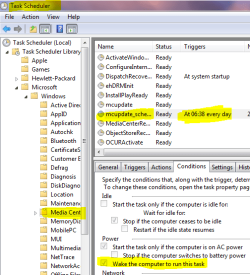
today, my laptop woke up again automatically - but I think I found the culprit. Luckily, BitLocker delayed the boot, and after booting manually, Windows Media Center instantly started updating the TV data. In the planned tasks, I found something interesting:

MediaCenterWakeTask.PNG

If someone else has the same problem - check the planned tasks for this one!


Greetings,
Felix Freiberger

EDIT: Replaced the screenshot with an English version.
 
Last edited:

My Computer My Computer

At a glance

Windows 7 Ultimate (64 Bit)
Computer Manufacturer/Model Number
hp tm2-1090eg
OS
Windows 7 Ultimate (64 Bit)
Back
Top