
Take Ownership Shortcut

Add "Take Ownership" to Context Menu of Files, Folders, and Drives in Windows


   Information
This tutorial will show you how to add Take Ownership to the context menu of all files, folders, and drives for all users in Windows.

This will allow you to be able to instantly take ownership of a file, folder (and all contents), or drive (and all contents) by changing the owner to the current user and grant the Owner_Rights SID (current owner) full access permission.

You must be an administrator to be able to add, remove, and use the "Take Ownership" context menu.

   Note
Application files (ex: EXE, CMD, MSI) will continue to have Run as administrator instead of Take Ownership in their context menu.


When you right click or press and hold on a file, folder, or drive, and click/tap on Take Ownership, you may be prompted by UAC for permission to do so first.

If a user is logged in as an administrator, then the user would just click/tap on Yes to approve and take ownership. The owner of the file, folder, or drive would be changed to the current administrator user account. Permissions would be set to allow the Owner_Rights SID (current owner) full control of the file, folder, or drive.

If a user is logged in as a standard user, then the user would need to enter a selected administrator's password to approve and take ownership. The owner of the file, folder, or drive would be changed to the selected administrator account, and not the standard user. Permissions would be set to allow the Owner_Rights SID (current owner) full control of the file, folder, or drive.


The Take Ownership context menu will not be available when you right click on the C: drive, C:\Program Files folder, C:\Program Files (x86) folder, C:\ProgramData folder, C:\Users folder, and C:\Windows folder. This was done because taking ownership of these system folders can make Windows unstable since it would also take ownership of all the folder's content at the same time.

You will still be able to use the Take Ownership context menu of files inside the folder locations above.

If you would like to have a custom location(s) of your own to not have the context menu, then please feel free to post a request in this tutorial thread. I'll be happy to post back with a custom .reg file for it.

   Warning
This context menu will only work with English Windows installations.

If you have a different language, then please post a reply with what language you have instead. I'll be happy to post back a translated version for you.


EXAMPLE: Take Ownership in Context Menu
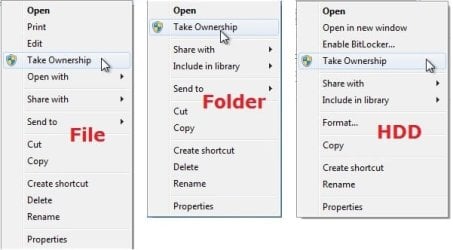
example.jpg


Here's How:

1. Do step 2, 3, or 4 below for what you would like to do.


2. To Add "Take Ownership" to Context Menu

   Note
Application files (ex: EXE, CMD, MSI) will still have Run as administrator instead of Take Ownership in the context menu when you use this step.

A) Click/tap on the Download button below to download the file below, and go to step 5 below.

Add_Take_Ownership_to_context_menu


Download


3. To Add "Take Ownership" with Pause to Context Menu

   Note
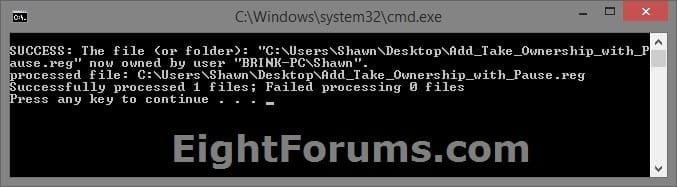
This option pauses the command when you use the "Take Ownership" context menu to be able to see the command results. This can be handy to verify setting ownership and permissions was successful or not.

Application files (ex: EXE, CMD, MSI) will still have Run as administrator instead of Take Ownership in the context menu when you use this step.


Take_Ownership_Pause.jpg


A) Click/tap on the Download button below to download the file below, and go to step 5 below.

Add_Take_Ownership_with_Pause_to_context_menu.reg


Download


4. To Remove "Take Ownership" from Context Menu

   Note
This is the default setting, and will also restore the default Run as administrator for .exe files.


A) Click/tap on the Download button below to download the file below, and go to step 5 below.

Remove_Take_Ownership_from_context_menu.reg


Download


5. Save the .reg file to your Desktop.

6. Double click on the downloaded .reg file to merge it.

7. If prompted, click on Run, Yes (UAC), Yes, and OK to approve the merge.

8. When finished, you can delete the downloaded .reg file if you like.


That's it,
Shawn


Attachments

Last edited:

My Computer My Computer

At a glance

64-bit Windows 11 Pro for WorkstationsIntel i7-8700K OC'd to 5 GHz64 GB (4x16GB) G.SKILL TridentZ RGB DDR4 3600...ASUS ROG-STRIX-GTX1080TI-O11G-GAMING
Computer type
PC/Desktop
Computer Manufacturer/Model Number
Self built custom
OS
64-bit Windows 11 Pro for Workstations
CPU
Intel i7-8700K OC'd to 5 GHz
Motherboard
ASUS ROG Maximus XI Formula Z390
Memory
64 GB (4x16GB) G.SKILL TridentZ RGB DDR4 3600 MHz
Graphics Card(s)
ASUS ROG-STRIX-GTX1080TI-O11G-GAMING
Sound Card
Integrated
Monitor(s) Displays
2 x Samsung Odyssey G7 27"
Screen Resolution
2560x1440
Hard Drives
1TB Samsung 990 PRO M.2,
4TB Samsung 990 PRO PRO M.2,
TerraMaster F8 SSD Plus NAS
PSU
Seasonic Prime Titanium 850W
Case
Thermaltake Core P3
Cooling
Corsair Hydro H115i
Keyboard
Logitech wireless K800
Mouse
Logitech MX Master 4
Internet Speed
2 Gb/s Download and 100 Mb/s Upload
Antivirus
Malwarebyte Anti-Malware Premium
Browser
Google Chrome
Other Info
Logitech Z625 speaker system,
Logitech BRIO 4K Pro webcam,
HP Color LaserJet Pro MFP M477fdn,
APC SMART-UPS RT 1000 XL - SURT1000XLI,
Galaxy S23 Plus phone
UPDATE:

I have updated the .reg files for the Take Ownership context menu in this tutorial.

The Take Ownership context menu will now no longer be available when you right click on the C: drive, C:\Program Files folder, C:\Program Files (x86) folder, C:\ProgramData folder, C:\Users folder, and C:\Windows folder since taking ownership of these Windows system folders can make Windows unstable.

This was done to prevent taking ownership of these locations by mistake.
 

My Computer My Computer

At a glance

64-bit Windows 11 Pro for WorkstationsIntel i7-8700K OC'd to 5 GHz64 GB (4x16GB) G.SKILL TridentZ RGB DDR4 3600...ASUS ROG-STRIX-GTX1080TI-O11G-GAMING
Computer type
PC/Desktop
Computer Manufacturer/Model Number
Self built custom
OS
64-bit Windows 11 Pro for Workstations
CPU
Intel i7-8700K OC'd to 5 GHz
Motherboard
ASUS ROG Maximus XI Formula Z390
Memory
64 GB (4x16GB) G.SKILL TridentZ RGB DDR4 3600 MHz
Graphics Card(s)
ASUS ROG-STRIX-GTX1080TI-O11G-GAMING
Sound Card
Integrated
Monitor(s) Displays
2 x Samsung Odyssey G7 27"
Screen Resolution
2560x1440
Hard Drives
1TB Samsung 990 PRO M.2,
4TB Samsung 990 PRO PRO M.2,
TerraMaster F8 SSD Plus NAS
PSU
Seasonic Prime Titanium 850W
Case
Thermaltake Core P3
Cooling
Corsair Hydro H115i
Keyboard
Logitech wireless K800
Mouse
Logitech MX Master 4
Internet Speed
2 Gb/s Download and 100 Mb/s Upload
Antivirus
Malwarebyte Anti-Malware Premium
Browser
Google Chrome
Other Info
Logitech Z625 speaker system,
Logitech BRIO 4K Pro webcam,
HP Color LaserJet Pro MFP M477fdn,
APC SMART-UPS RT 1000 XL - SURT1000XLI,
Galaxy S23 Plus phone
Shawn,

Thanks for the updated Reg download info.

If we had previously downloaded the earlier version, will the updated version overwrite the earlier version?

For example, do we need to remove the earlier download version before downloading the updated version?
 

My Computer My Computer

At a glance

Windows 7 Home Premium 64 bitIntel i5 650 Dual Core 3.20 GHz Cache 4MB Thr...Corsair 16GB DDR3 1600MHz 9-9-9-24 P/N: CMZ8G...ZOTAC GeFORCE 9500 ZT-95TEK2M-FSL 1GB GDDR2
Computer type
PC/Desktop
Computer Manufacturer/Model Number
Built at Micro Center Richardson, TX
OS
Windows 7 Home Premium 64 bit
CPU
Intel i5 650 Dual Core 3.20 GHz Cache 4MB Threads: 4
Motherboard
ASUS PRO P7P55D-E
Memory
Corsair 16GB DDR3 1600MHz 9-9-9-24 P/N: CMZ8GX3M2A1600C
Graphics Card(s)
ZOTAC GeFORCE 9500 ZT-95TEK2M-FSL 1GB GDDR2
Sound Card
Mother Bd
Monitor(s) Displays
ASUS V228H 21.5” Diag
Screen Resolution
1440 x 900
Hard Drives
SEAGATE BARRACUDA (2ea) 3.5” INTERNAL 1Tb 16 MB SATA ST1000DM003-9YN162 7200RPM, 64MB, SATA 6Gb/s ** 2 Sata Hot-Swap Racks installed in Tower
PSU
Thermaltake Model TR2 RX 750W
Cooling
2 Tower Fans
Keyboard
Dell Quietkey PS/2 Windows 104 P/N 0463CD
Mouse
Kensington Mechanical Trackball USB Model 64217
Internet Speed
35/35
Antivirus
Norton 360 & MBAM Pro
Browser
IE10
Other Info
Printer: HP DeskJet 3520 USB 2.0 **
Speakers: ALTEC Model VS4621 2.1 28 W/Channel w/Sub-woofer **
IOGEAR HDMI Monitor Switcher Swx3 MODEL GHDSW3 ** Addonics ZDRWESU3 eSata/USB 3.0 external DVD Read/Write DVD Drive** SEAGATE GoFlex USB 2.0 Portable HD 500GB 5400 RPM P/N: 9ZF2A2-570
Hello Scoop,

No need to remove the old one. The new .reg file only has two new "Applies to" string values that get added to restrict the context menu. Just merging the new .reg file is fine to update. :)
 

My Computer My Computer

At a glance

64-bit Windows 11 Pro for WorkstationsIntel i7-8700K OC'd to 5 GHz64 GB (4x16GB) G.SKILL TridentZ RGB DDR4 3600...ASUS ROG-STRIX-GTX1080TI-O11G-GAMING
Computer type
PC/Desktop
Computer Manufacturer/Model Number
Self built custom
OS
64-bit Windows 11 Pro for Workstations
CPU
Intel i7-8700K OC'd to 5 GHz
Motherboard
ASUS ROG Maximus XI Formula Z390
Memory
64 GB (4x16GB) G.SKILL TridentZ RGB DDR4 3600 MHz
Graphics Card(s)
ASUS ROG-STRIX-GTX1080TI-O11G-GAMING
Sound Card
Integrated
Monitor(s) Displays
2 x Samsung Odyssey G7 27"
Screen Resolution
2560x1440
Hard Drives
1TB Samsung 990 PRO M.2,
4TB Samsung 990 PRO PRO M.2,
TerraMaster F8 SSD Plus NAS
PSU
Seasonic Prime Titanium 850W
Case
Thermaltake Core P3
Cooling
Corsair Hydro H115i
Keyboard
Logitech wireless K800
Mouse
Logitech MX Master 4
Internet Speed
2 Gb/s Download and 100 Mb/s Upload
Antivirus
Malwarebyte Anti-Malware Premium
Browser
Google Chrome
Other Info
Logitech Z625 speaker system,
Logitech BRIO 4K Pro webcam,
HP Color LaserJet Pro MFP M477fdn,
APC SMART-UPS RT 1000 XL - SURT1000XLI,
Galaxy S23 Plus phone
Hello Scoop,

No need to remove the old one. The new .reg file only has two new "Applies to" string values that get added to restrict the context menu. Just merging the new .reg file is fine to update. :)

10-4, thanks :)
 

My Computer My Computer

At a glance

Windows 7 Home Premium 64 bitIntel i5 650 Dual Core 3.20 GHz Cache 4MB Thr...Corsair 16GB DDR3 1600MHz 9-9-9-24 P/N: CMZ8G...ZOTAC GeFORCE 9500 ZT-95TEK2M-FSL 1GB GDDR2
Computer type
PC/Desktop
Computer Manufacturer/Model Number
Built at Micro Center Richardson, TX
OS
Windows 7 Home Premium 64 bit
CPU
Intel i5 650 Dual Core 3.20 GHz Cache 4MB Threads: 4
Motherboard
ASUS PRO P7P55D-E
Memory
Corsair 16GB DDR3 1600MHz 9-9-9-24 P/N: CMZ8GX3M2A1600C
Graphics Card(s)
ZOTAC GeFORCE 9500 ZT-95TEK2M-FSL 1GB GDDR2
Sound Card
Mother Bd
Monitor(s) Displays
ASUS V228H 21.5” Diag
Screen Resolution
1440 x 900
Hard Drives
SEAGATE BARRACUDA (2ea) 3.5” INTERNAL 1Tb 16 MB SATA ST1000DM003-9YN162 7200RPM, 64MB, SATA 6Gb/s ** 2 Sata Hot-Swap Racks installed in Tower
PSU
Thermaltake Model TR2 RX 750W
Cooling
2 Tower Fans
Keyboard
Dell Quietkey PS/2 Windows 104 P/N 0463CD
Mouse
Kensington Mechanical Trackball USB Model 64217
Internet Speed
35/35
Antivirus
Norton 360 & MBAM Pro
Browser
IE10
Other Info
Printer: HP DeskJet 3520 USB 2.0 **
Speakers: ALTEC Model VS4621 2.1 28 W/Channel w/Sub-woofer **
IOGEAR HDMI Monitor Switcher Swx3 MODEL GHDSW3 ** Addonics ZDRWESU3 eSata/USB 3.0 external DVD Read/Write DVD Drive** SEAGATE GoFlex USB 2.0 Portable HD 500GB 5400 RPM P/N: 9ZF2A2-570
UPDATE:

I have updated the .reg files for the Take Ownership context menu in this tutorial.

The Take Ownership context menu will now no longer be available when you right click on the C: drive, C:\Program Files folder, C:\Program Files (x86) folder, C:\ProgramData folder, C:\Users folder, and C:\Windows folder since taking ownership of these Windows system folders can make Windows unstable.

This was done to prevent taking ownership of these locations by mistake.

And is a great idea!
I see you've already added it to Windows 8 AND Windows 10 tutorials already
I assume you are going to do that for your Vista one as well?
Vista: Context Menu - Take Ownership
 

My Computer My Computer

At a glance

Vista/Win7/8/10/11 (x86/x64)i7
Computer type
PC/Desktop
Computer Manufacturer/Model Number
..all towers built from scratch
OS
Vista/Win7/8/10/11 (x86/x64)
CPU
i7
You can use this on Vista as well if you like, but I pretty much haven't been updating anything for Vista anymore since it's so old now.
 

My Computer My Computer

At a glance

64-bit Windows 11 Pro for WorkstationsIntel i7-8700K OC'd to 5 GHz64 GB (4x16GB) G.SKILL TridentZ RGB DDR4 3600...ASUS ROG-STRIX-GTX1080TI-O11G-GAMING
Computer type
PC/Desktop
Computer Manufacturer/Model Number
Self built custom
OS
64-bit Windows 11 Pro for Workstations
CPU
Intel i7-8700K OC'd to 5 GHz
Motherboard
ASUS ROG Maximus XI Formula Z390
Memory
64 GB (4x16GB) G.SKILL TridentZ RGB DDR4 3600 MHz
Graphics Card(s)
ASUS ROG-STRIX-GTX1080TI-O11G-GAMING
Sound Card
Integrated
Monitor(s) Displays
2 x Samsung Odyssey G7 27"
Screen Resolution
2560x1440
Hard Drives
1TB Samsung 990 PRO M.2,
4TB Samsung 990 PRO PRO M.2,
TerraMaster F8 SSD Plus NAS
PSU
Seasonic Prime Titanium 850W
Case
Thermaltake Core P3
Cooling
Corsair Hydro H115i
Keyboard
Logitech wireless K800
Mouse
Logitech MX Master 4
Internet Speed
2 Gb/s Download and 100 Mb/s Upload
Antivirus
Malwarebyte Anti-Malware Premium
Browser
Google Chrome
Other Info
Logitech Z625 speaker system,
Logitech BRIO 4K Pro webcam,
HP Color LaserJet Pro MFP M477fdn,
APC SMART-UPS RT 1000 XL - SURT1000XLI,
Galaxy S23 Plus phone
Shawn,

I just downloaded & ran the updated reg file and noticed something changed besides the removal of the 'take ownership' option from my C: drive.

Here's what I did:

Right before downloading & running the updated reg file, I checked a few of my folders, some in 'My Docs', a couple on my Desktop. The 'take ownership' option was there as expected before running the updated reg file download.

After running the updated reg download, the 'take ownership' option isn't present with folders in the right-click menu.

Individual files within folders are ok, the option is still there.

I don't see a need for me to use that option on folders but I thought I'd mention it in case it wasn't known that this changed with the updated reg download.
 

My Computer My Computer

At a glance

Windows 7 Home Premium 64 bitIntel i5 650 Dual Core 3.20 GHz Cache 4MB Thr...Corsair 16GB DDR3 1600MHz 9-9-9-24 P/N: CMZ8G...ZOTAC GeFORCE 9500 ZT-95TEK2M-FSL 1GB GDDR2
Computer type
PC/Desktop
Computer Manufacturer/Model Number
Built at Micro Center Richardson, TX
OS
Windows 7 Home Premium 64 bit
CPU
Intel i5 650 Dual Core 3.20 GHz Cache 4MB Threads: 4
Motherboard
ASUS PRO P7P55D-E
Memory
Corsair 16GB DDR3 1600MHz 9-9-9-24 P/N: CMZ8GX3M2A1600C
Graphics Card(s)
ZOTAC GeFORCE 9500 ZT-95TEK2M-FSL 1GB GDDR2
Sound Card
Mother Bd
Monitor(s) Displays
ASUS V228H 21.5” Diag
Screen Resolution
1440 x 900
Hard Drives
SEAGATE BARRACUDA (2ea) 3.5” INTERNAL 1Tb 16 MB SATA ST1000DM003-9YN162 7200RPM, 64MB, SATA 6Gb/s ** 2 Sata Hot-Swap Racks installed in Tower
PSU
Thermaltake Model TR2 RX 750W
Cooling
2 Tower Fans
Keyboard
Dell Quietkey PS/2 Windows 104 P/N 0463CD
Mouse
Kensington Mechanical Trackball USB Model 64217
Internet Speed
35/35
Antivirus
Norton 360 & MBAM Pro
Browser
IE10
Other Info
Printer: HP DeskJet 3520 USB 2.0 **
Speakers: ALTEC Model VS4621 2.1 28 W/Channel w/Sub-woofer **
IOGEAR HDMI Monitor Switcher Swx3 MODEL GHDSW3 ** Addonics ZDRWESU3 eSata/USB 3.0 external DVD Read/Write DVD Drive** SEAGATE GoFlex USB 2.0 Portable HD 500GB 5400 RPM P/N: 9ZF2A2-570
Thank you for letting me know Scoop.

It was the option to exclude the context menu on the "C:\Users" folder. It carried over to the "This PC" and desktop folders as well. I updated the .reg files to remove this option to restore the context menu to them now.

Downloading and merging the updated .reg file will fix it for you. :)
 

My Computer My Computer

At a glance

64-bit Windows 11 Pro for WorkstationsIntel i7-8700K OC'd to 5 GHz64 GB (4x16GB) G.SKILL TridentZ RGB DDR4 3600...ASUS ROG-STRIX-GTX1080TI-O11G-GAMING
Computer type
PC/Desktop
Computer Manufacturer/Model Number
Self built custom
OS
64-bit Windows 11 Pro for Workstations
CPU
Intel i7-8700K OC'd to 5 GHz
Motherboard
ASUS ROG Maximus XI Formula Z390
Memory
64 GB (4x16GB) G.SKILL TridentZ RGB DDR4 3600 MHz
Graphics Card(s)
ASUS ROG-STRIX-GTX1080TI-O11G-GAMING
Sound Card
Integrated
Monitor(s) Displays
2 x Samsung Odyssey G7 27"
Screen Resolution
2560x1440
Hard Drives
1TB Samsung 990 PRO M.2,
4TB Samsung 990 PRO PRO M.2,
TerraMaster F8 SSD Plus NAS
PSU
Seasonic Prime Titanium 850W
Case
Thermaltake Core P3
Cooling
Corsair Hydro H115i
Keyboard
Logitech wireless K800
Mouse
Logitech MX Master 4
Internet Speed
2 Gb/s Download and 100 Mb/s Upload
Antivirus
Malwarebyte Anti-Malware Premium
Browser
Google Chrome
Other Info
Logitech Z625 speaker system,
Logitech BRIO 4K Pro webcam,
HP Color LaserJet Pro MFP M477fdn,
APC SMART-UPS RT 1000 XL - SURT1000XLI,
Galaxy S23 Plus phone
A needed preventative, Brink, although don’t you think banning the entire C:\Window hierarchy is a little too much? If I were unable to manipulate permission settings on my own, I would certainly like a tool like this that will permit myself to edit single files in the System32 folder with ease, but at the same time prevent me from doing anything drastically stupid.

As such, I propose the following AppliesTo string.
Code:
"AppliesTo"="NOT (System.ItemPathDisplay:=\"C:\\Users\" OR System.ItemPathDisplay:=\"C:\\ProgramData\" OR System.ItemPathDisplay:=\"C:\\Windows\" OR System.ItemPathDisplay:=\"C:\\Windows\\System32\" OR System.ItemPathDisplay:=\"C:\\Program Files\" OR System.ItemPathDisplay:=\"C:\\Program Files (x86)\")"
It’s similar to the one now except it applies strictly exclusively to those folders and not any of their child items.
 

My Computer My Computer

At a glance

Windows 10, Windows 8.1 Pro, Windows 7 Profes...
Computer type
PC/Desktop
OS
Windows 10, Windows 8.1 Pro, Windows 7 Professional, OS X El Capitan
Shawn,

I downloaded & ran the updated version. Folders all showing the ownership option.
15o87wj.jpg
 

My Computer My Computer

At a glance

Windows 7 Home Premium 64 bitIntel i5 650 Dual Core 3.20 GHz Cache 4MB Thr...Corsair 16GB DDR3 1600MHz 9-9-9-24 P/N: CMZ8G...ZOTAC GeFORCE 9500 ZT-95TEK2M-FSL 1GB GDDR2
Computer type
PC/Desktop
Computer Manufacturer/Model Number
Built at Micro Center Richardson, TX
OS
Windows 7 Home Premium 64 bit
CPU
Intel i5 650 Dual Core 3.20 GHz Cache 4MB Threads: 4
Motherboard
ASUS PRO P7P55D-E
Memory
Corsair 16GB DDR3 1600MHz 9-9-9-24 P/N: CMZ8GX3M2A1600C
Graphics Card(s)
ZOTAC GeFORCE 9500 ZT-95TEK2M-FSL 1GB GDDR2
Sound Card
Mother Bd
Monitor(s) Displays
ASUS V228H 21.5” Diag
Screen Resolution
1440 x 900
Hard Drives
SEAGATE BARRACUDA (2ea) 3.5” INTERNAL 1Tb 16 MB SATA ST1000DM003-9YN162 7200RPM, 64MB, SATA 6Gb/s ** 2 Sata Hot-Swap Racks installed in Tower
PSU
Thermaltake Model TR2 RX 750W
Cooling
2 Tower Fans
Keyboard
Dell Quietkey PS/2 Windows 104 P/N 0463CD
Mouse
Kensington Mechanical Trackball USB Model 64217
Internet Speed
35/35
Antivirus
Norton 360 & MBAM Pro
Browser
IE10
Other Info
Printer: HP DeskJet 3520 USB 2.0 **
Speakers: ALTEC Model VS4621 2.1 28 W/Channel w/Sub-woofer **
IOGEAR HDMI Monitor Switcher Swx3 MODEL GHDSW3 ** Addonics ZDRWESU3 eSata/USB 3.0 external DVD Read/Write DVD Drive** SEAGATE GoFlex USB 2.0 Portable HD 500GB 5400 RPM P/N: 9ZF2A2-570
A needed preventative, Brink, although don’t you think banning the entire C:\Window hierarchy is a little too much? If I were unable to manipulate permission settings on my own, I would certainly like a tool like this that will permit myself to edit single files in the System32 folder with ease, but at the same time prevent me from doing anything drastically stupid.

As such, I propose the following AppliesTo string.
Code:
"AppliesTo"="NOT (System.ItemPathDisplay:=\"C:\\Users\" OR System.ItemPathDisplay:=\"C:\\ProgramData\" OR System.ItemPathDisplay:=\"C:\\Windows\" OR System.ItemPathDisplay:=\"C:\\Windows\\System32\" OR System.ItemPathDisplay:=\"C:\\Program Files\" OR System.ItemPathDisplay:=\"C:\\Program Files (x86)\")"
It’s similar to the one now except it applies strictly exclusively to those folders and not any of their child items.

Thank you. Updated. :)
 

My Computer My Computer

At a glance

64-bit Windows 11 Pro for WorkstationsIntel i7-8700K OC'd to 5 GHz64 GB (4x16GB) G.SKILL TridentZ RGB DDR4 3600...ASUS ROG-STRIX-GTX1080TI-O11G-GAMING
Computer type
PC/Desktop
Computer Manufacturer/Model Number
Self built custom
OS
64-bit Windows 11 Pro for Workstations
CPU
Intel i7-8700K OC'd to 5 GHz
Motherboard
ASUS ROG Maximus XI Formula Z390
Memory
64 GB (4x16GB) G.SKILL TridentZ RGB DDR4 3600 MHz
Graphics Card(s)
ASUS ROG-STRIX-GTX1080TI-O11G-GAMING
Sound Card
Integrated
Monitor(s) Displays
2 x Samsung Odyssey G7 27"
Screen Resolution
2560x1440
Hard Drives
1TB Samsung 990 PRO M.2,
4TB Samsung 990 PRO PRO M.2,
TerraMaster F8 SSD Plus NAS
PSU
Seasonic Prime Titanium 850W
Case
Thermaltake Core P3
Cooling
Corsair Hydro H115i
Keyboard
Logitech wireless K800
Mouse
Logitech MX Master 4
Internet Speed
2 Gb/s Download and 100 Mb/s Upload
Antivirus
Malwarebyte Anti-Malware Premium
Browser
Google Chrome
Other Info
Logitech Z625 speaker system,
Logitech BRIO 4K Pro webcam,
HP Color LaserJet Pro MFP M477fdn,
APC SMART-UPS RT 1000 XL - SURT1000XLI,
Galaxy S23 Plus phone
can two additions to context menue be done?

Nice one Brink! I am new here. It seems to me that "take ownership" "and restore to system", or other previous owner, would be very convenient if installed together. The problem as I see it is that the directory in the registry is always given as "runas/command" so the first installed is overwritten by the second. Is this a hard restriction or is there a way round it? I have tried a number of fudges but no luck.
 

My Computer My Computer

At a glance

windows 7 professional 64bit Version 6.1.7601...Processor Intel(R) Core(TM) i5-2430M CPU @ 2....Total Physical Memory 5.98 GBnvidia GFORCE 410M
Computer type
Laptop
Computer Manufacturer/Model Number
sony vaio VPCEH2C
OS
windows 7 professional 64bit Version 6.1.7601 Service Pack 1 Build 7601
CPU
Processor Intel(R) Core(TM) i5-2430M CPU @ 2.40GHz, 2401 Mhz
Motherboard
?
Memory
Total Physical Memory 5.98 GB
Graphics Card(s)
nvidia GFORCE 410M
Hard Drives
SATA ST9500325AS
Antivirus
ms security essentials + Super anti spyware pro
Browser
IE11
Hello Rob, and welcome to Seven Forums. :)

Yeah, that's the main issue I ran across as well with it under "runas". I haven't found a viable alternative yet either.
 

My Computer My Computer

At a glance

64-bit Windows 11 Pro for WorkstationsIntel i7-8700K OC'd to 5 GHz64 GB (4x16GB) G.SKILL TridentZ RGB DDR4 3600...ASUS ROG-STRIX-GTX1080TI-O11G-GAMING
Computer type
PC/Desktop
Computer Manufacturer/Model Number
Self built custom
OS
64-bit Windows 11 Pro for Workstations
CPU
Intel i7-8700K OC'd to 5 GHz
Motherboard
ASUS ROG Maximus XI Formula Z390
Memory
64 GB (4x16GB) G.SKILL TridentZ RGB DDR4 3600 MHz
Graphics Card(s)
ASUS ROG-STRIX-GTX1080TI-O11G-GAMING
Sound Card
Integrated
Monitor(s) Displays
2 x Samsung Odyssey G7 27"
Screen Resolution
2560x1440
Hard Drives
1TB Samsung 990 PRO M.2,
4TB Samsung 990 PRO PRO M.2,
TerraMaster F8 SSD Plus NAS
PSU
Seasonic Prime Titanium 850W
Case
Thermaltake Core P3
Cooling
Corsair Hydro H115i
Keyboard
Logitech wireless K800
Mouse
Logitech MX Master 4
Internet Speed
2 Gb/s Download and 100 Mb/s Upload
Antivirus
Malwarebyte Anti-Malware Premium
Browser
Google Chrome
Other Info
Logitech Z625 speaker system,
Logitech BRIO 4K Pro webcam,
HP Color LaserJet Pro MFP M477fdn,
APC SMART-UPS RT 1000 XL - SURT1000XLI,
Galaxy S23 Plus phone
can two additions to context menue be done?

Thanks for the prompt reply Brink. I don't have the system knowledge to research this possibility so I think it stays at that.:confused:
Thanks again
 

My Computer My Computer

At a glance

windows 7 professional 64bit Version 6.1.7601...Processor Intel(R) Core(TM) i5-2430M CPU @ 2....Total Physical Memory 5.98 GBnvidia GFORCE 410M
Computer type
Laptop
Computer Manufacturer/Model Number
sony vaio VPCEH2C
OS
windows 7 professional 64bit Version 6.1.7601 Service Pack 1 Build 7601
CPU
Processor Intel(R) Core(TM) i5-2430M CPU @ 2.40GHz, 2401 Mhz
Motherboard
?
Memory
Total Physical Memory 5.98 GB
Graphics Card(s)
nvidia GFORCE 410M
Hard Drives
SATA ST9500325AS
Antivirus
ms security essentials + Super anti spyware pro
Browser
IE11
Thanks a bunch. Hours ago I lost ownership to a folder. Do not know why. When I wanted to take ownership a window did pop out asking the object names ?What the hell was that ? I tried to place the path of the folder but it did not work.
Other dd message I got ws that I would need administrator rights in other files, being i was the administrator.
It was very annoying.
Until I found your wonderful shortcut that solved my problem.
That has never happened to me in windows XP. But it happens in windows 7. Annoying. Thank you.
Your shortcut was magical.
It worked like a charm.

Thank you
 

My Computer My Computer

At a glance

windows 7 SP1intel8 gb
Computer type
PC/Desktop
Computer Manufacturer/Model Number
unknown
OS
windows 7 SP1
CPU
intel
Motherboard
ASUS
Memory
8 gb
Hard Drives
2
Antivirus
avira
You're most welcome Pedro. I'm glad it could help. :)
 

My Computer My Computer

At a glance

64-bit Windows 11 Pro for WorkstationsIntel i7-8700K OC'd to 5 GHz64 GB (4x16GB) G.SKILL TridentZ RGB DDR4 3600...ASUS ROG-STRIX-GTX1080TI-O11G-GAMING
Computer type
PC/Desktop
Computer Manufacturer/Model Number
Self built custom
OS
64-bit Windows 11 Pro for Workstations
CPU
Intel i7-8700K OC'd to 5 GHz
Motherboard
ASUS ROG Maximus XI Formula Z390
Memory
64 GB (4x16GB) G.SKILL TridentZ RGB DDR4 3600 MHz
Graphics Card(s)
ASUS ROG-STRIX-GTX1080TI-O11G-GAMING
Sound Card
Integrated
Monitor(s) Displays
2 x Samsung Odyssey G7 27"
Screen Resolution
2560x1440
Hard Drives
1TB Samsung 990 PRO M.2,
4TB Samsung 990 PRO PRO M.2,
TerraMaster F8 SSD Plus NAS
PSU
Seasonic Prime Titanium 850W
Case
Thermaltake Core P3
Cooling
Corsair Hydro H115i
Keyboard
Logitech wireless K800
Mouse
Logitech MX Master 4
Internet Speed
2 Gb/s Download and 100 Mb/s Upload
Antivirus
Malwarebyte Anti-Malware Premium
Browser
Google Chrome
Other Info
Logitech Z625 speaker system,
Logitech BRIO 4K Pro webcam,
HP Color LaserJet Pro MFP M477fdn,
APC SMART-UPS RT 1000 XL - SURT1000XLI,
Galaxy S23 Plus phone
Thank you for your answer.
Knowing very little about computers an explanation would be welcome.
I use windows 7 SP1

1- FOLDER OK

When I check folder properties ,security tab , I see in group or user names.

account unknown and a string of numbers.

PEDRO PEDROSO ( PEDROPEDROSO-PC \ PEDRO PEDROSO ) -


The folder is fine
The name pedrpedroso-pc , matches the name of my computer.

The folder is in external drive.
I did access the external drives through another computer weeks ago-windows XP.
That user unknown might be that computer i used.

All ok

2. but I have a folder I cannot delete
The folder is empty , so no big deal I guess.

When I try to delete it I got the message I need permission from administrator .

When I check the folder permissions, I find that the permissions are for pedropedroso-pc , and unknown user.

The permissions for both the folder that works fine and the folder I cannot delete are the same , but the folder I cannot delete ask me administrator permission

I checked the accounts I have and there is only one. Pedro Pedroso , who is administrator.


Why the folder is asking me administrator rights when I am administrator ?
I guess system is not OK.

Its a bug.

There is only one account in this PC , I am administrator, and the folder asks me Administrator rights ?

Anyway :

My question is about changing permissions manually.

I try to change permission , add user name .

Box opens

SELECT THIS OBJECT TYPE


Users, groups, or built in security principles

( All options are selected )


FROM THIS LOCATION

PEDROPEDROSO-PC

(There is only this option .Only this location available)


ENTER THE OBJECTS NAME TO SELECT

A problem is here .

What is that ?

I guess they are asking to name the folder I want to change.

I tried to place the folder address , but it did not work.

So I reach a dead end.

How to select object name ?

Besides if the permissions of the folders are only for pedropedroso-pc , what if I change computer with windows 10 ?

I wont be anymore in pedropedroso-pc

Will the folders open in another PC ?


Thank you in advance for your time.

These systems dont work very well anyway.

But you were my savior.

Besides this problem and chrome crashes, PC works well.
 
Last edited:

My Computer My Computer

At a glance

windows 7 SP1intel8 gb
Computer type
PC/Desktop
Computer Manufacturer/Model Number
unknown
OS
windows 7 SP1
CPU
intel
Motherboard
ASUS
Memory
8 gb
Hard Drives
2
Antivirus
avira
Hi brink, your TakeOwnership batch was very useful to me. It's necesary to adapt it for SPANISH windows versions replacing the 4 instances of "/D y" (where y means yes) by "/D s" (where s= si, spanish for yes). That odd behaviour between different localized versions of programs used with command lines breaks a lot of batch files. MS guys are dumb avoiding universal command formats (among other things).
 

My Computer My Computer

At a glance

Windows XP 32bitCeleron G18408GbIntel Haswell HD
Computer type
PC/Desktop
Computer Manufacturer/Model Number
custom
OS
Windows XP 32bit
CPU
Celeron G1840
Motherboard
Asrock B85M Pro4
Memory
8Gb
Graphics Card(s)
Intel Haswell HD
Hard Drives
2Tb + 4Tb
Antivirus
Microsoft
Browser
Firefox
I'm glad it could help isidroco, and welcome to seven Forums. :)

Yeah, it would be nice to have parameters that would be universal for all languages.
 

My Computer My Computer

At a glance

64-bit Windows 11 Pro for WorkstationsIntel i7-8700K OC'd to 5 GHz64 GB (4x16GB) G.SKILL TridentZ RGB DDR4 3600...ASUS ROG-STRIX-GTX1080TI-O11G-GAMING
Computer type
PC/Desktop
Computer Manufacturer/Model Number
Self built custom
OS
64-bit Windows 11 Pro for Workstations
CPU
Intel i7-8700K OC'd to 5 GHz
Motherboard
ASUS ROG Maximus XI Formula Z390
Memory
64 GB (4x16GB) G.SKILL TridentZ RGB DDR4 3600 MHz
Graphics Card(s)
ASUS ROG-STRIX-GTX1080TI-O11G-GAMING
Sound Card
Integrated
Monitor(s) Displays
2 x Samsung Odyssey G7 27"
Screen Resolution
2560x1440
Hard Drives
1TB Samsung 990 PRO M.2,
4TB Samsung 990 PRO PRO M.2,
TerraMaster F8 SSD Plus NAS
PSU
Seasonic Prime Titanium 850W
Case
Thermaltake Core P3
Cooling
Corsair Hydro H115i
Keyboard
Logitech wireless K800
Mouse
Logitech MX Master 4
Internet Speed
2 Gb/s Download and 100 Mb/s Upload
Antivirus
Malwarebyte Anti-Malware Premium
Browser
Google Chrome
Other Info
Logitech Z625 speaker system,
Logitech BRIO 4K Pro webcam,
HP Color LaserJet Pro MFP M477fdn,
APC SMART-UPS RT 1000 XL - SURT1000XLI,
Galaxy S23 Plus phone
Back
Top