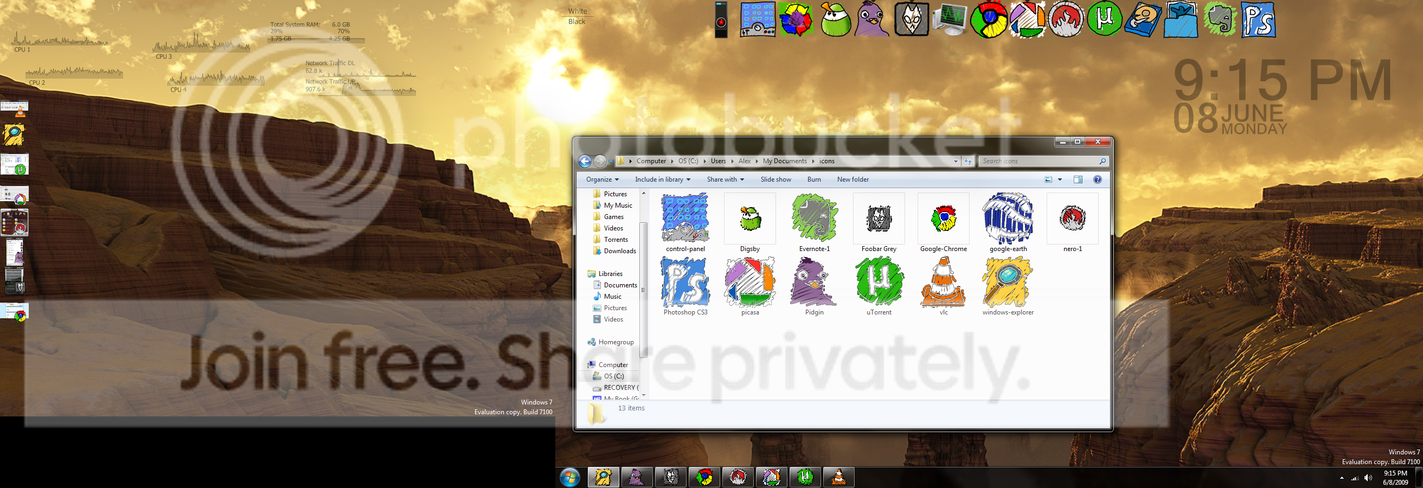
Task bar icons

lozanoa11

New member
Local time
1:08 PM
Messages
22
how would i go about changing the icons on the task bar?
 

My Computer

OS
Windows 7 build 7100
CPU
amd 940 phenom2 x4
Motherboard
gigabyte ma790x-ud4p
Memory
4gb kingston 800 ddr2
Graphics Card(s)
ati 4890
Sound Card
xonar essence st
Monitor(s) Displays
20 lcd and 17'' dell crt
Screen Resolution
total 2624x900
Hard Drives
vertex 2 and others
PSU
640gb ximatech
Case
Lian-li pc-k62
Cooling
Mugan 2
Do you mean startorb right click/ properties/
 

My Computer

Computer Manufacturer/Model Number
Gateway GT5692
OS
Windows 7 Ulti. x64
CPU
AMD Phenom 8450 triple-core 2.10 ghz
Memory
4GB
Graphics Card(s)
ATI Radion HD 3200
Monitor(s) Displays
Gateway FPD1775W
Screen Resolution
1280x720
Hard Drives
465.6613 Gibibytes
sorry i mean the actual icons. The apperence of them. i have some icons i use for my dock that i would like to use for the task bar
 

My Computer

OS
Windows 7 build 7100
CPU
amd 940 phenom2 x4
Motherboard
gigabyte ma790x-ud4p
Memory
4gb kingston 800 ddr2
Graphics Card(s)
ati 4890
Sound Card
xonar essence st
Monitor(s) Displays
20 lcd and 17'' dell crt
Screen Resolution
total 2624x900
Hard Drives
vertex 2 and others
PSU
640gb ximatech
Case
Lian-li pc-k62
Cooling
Mugan 2
found a way to but all my icons are .png can i just change the file type on them? What should the extension be?
 

My Computer

OS
Windows 7 build 7100
CPU
amd 940 phenom2 x4
Motherboard
gigabyte ma790x-ud4p
Memory
4gb kingston 800 ddr2
Graphics Card(s)
ati 4890
Sound Card
xonar essence st
Monitor(s) Displays
20 lcd and 17'' dell crt
Screen Resolution
total 2624x900
Hard Drives
vertex 2 and others
PSU
640gb ximatech
Case
Lian-li pc-k62
Cooling
Mugan 2

My Computer

Computer Manufacturer/Model Number
Gateway GT5692
OS
Windows 7 Ulti. x64
CPU
AMD Phenom 8450 triple-core 2.10 ghz
Memory
4GB
Graphics Card(s)
ATI Radion HD 3200
Monitor(s) Displays
Gateway FPD1775W
Screen Resolution
1280x720
Hard Drives
465.6613 Gibibytes

My Computer

Computer Manufacturer/Model Number
Gateway GT5692
OS
Windows 7 Ulti. x64
CPU
AMD Phenom 8450 triple-core 2.10 ghz
Memory
4GB
Graphics Card(s)
ATI Radion HD 3200
Monitor(s) Displays
Gateway FPD1775W
Screen Resolution
1280x720
Hard Drives
465.6613 Gibibytes
lozanoa11, just make a shortcut the program you want to change the icon for. change the shortcut's icons in its properties dialog, then pin the shortcut to the taskbar. that way you can use whatever icons you like.
 

My Computer

OS
7600 x86
CPU
Core 2 Duo e7200, 2.53 ghz
Motherboard
Micro-Star MS-7529
Memory
2x DDR2 PC5300 1gb, 667 mhz
Graphics Card(s)
GeForce 9500gt, 512mb
Monitor(s) Displays
22" LG Flatron w2234s
Screen Resolution
1680x1050
Hard Drives
Excelstor SATA-II 250gb 7200rpm, 8mb cache
PSU
CoolerMaster M520
Internet Speed
30/20 mbits
i dont want anything pinned to my taskbar is the problem.
 

My Computer

OS
Windows 7 build 7100
CPU
amd 940 phenom2 x4
Motherboard
gigabyte ma790x-ud4p
Memory
4gb kingston 800 ddr2
Graphics Card(s)
ati 4890
Sound Card
xonar essence st
Monitor(s) Displays
20 lcd and 17'' dell crt
Screen Resolution
total 2624x900
Hard Drives
vertex 2 and others
PSU
640gb ximatech
Case
Lian-li pc-k62
Cooling
Mugan 2
i dont want anything pinned to my taskbar is the problem.

I think I understand your problem. U start an app with a nice icon from the desktop and on the taskbar appears the original icon of the app. That was my problem with the TotalCommander. You may use ResourceHacker or something to change the icon inside the app's .exe or .dll .
I think Resource Hacker is not compatible with win7, so you have to "hack" it in XP.

You can convert your .png files also with the free irfanview.
 

My Computer

Computer Manufacturer/Model Number
home made
OS
Windows 7 RTM x64
CPU
AMD X2 5000+
Motherboard
Asrock
Memory
4GB
Graphics Card(s)
Nvidia 9400GT
Sound Card
onboard 6Ch
Monitor(s) Displays
Medion 22" + HannSpree 22"
Screen Resolution
1680X1050 + 1920X1080
Hard Drives
Intel SSD 80GB
WD 1.5 TB
WD 1 TB
Samsung 1TB X 3
PSU
noname
Case
noname
Cooling
Zalman
Keyboard
DeLUX multimedia keyboard
Mouse
Microsoft
Internet Speed
25MB/s
Hi. Just right click and unpin them from the task bar. J:)
 

My Computer

Computer Manufacturer/Model Number
The Monolith. 3.1
OS
Windows 7 Home Premium 64 bit
CPU
i7 [email protected]
Motherboard
Gigabyte Z77-D3H
Memory
2x4GB Corsair Vegeance DDR3
Graphics Card(s)
XFX GTX 260 Black Edition
Sound Card
none-through large stereo hi fi
Monitor(s) Displays
Croosover 27MDP LED IPS Dell 2408 WFP
Screen Resolution
2560x1440 1920x1200
Hard Drives
1x Samsung 840Pro 128GB SSD
1x Samsung Spinpoint F1 1TB
PSU
Corsair AX 850 Watt
Case
Cooler Master ACTS 840
Cooling
Be Quiet! Dark Rock Pro
Keyboard
Enermax Aurora
Mouse
Logitech Ballmouse
Internet Speed
20MBPS
still does not let me change the icon to a .png image
 

My Computer

OS
Windows 7 build 7100
CPU
amd 940 phenom2 x4
Motherboard
gigabyte ma790x-ud4p
Memory
4gb kingston 800 ddr2
Graphics Card(s)
ati 4890
Sound Card
xonar essence st
Monitor(s) Displays
20 lcd and 17'' dell crt
Screen Resolution
total 2624x900
Hard Drives
vertex 2 and others
PSU
640gb ximatech
Case
Lian-li pc-k62
Cooling
Mugan 2
?
You want to make a customized icon for a png image?
Or you want to change the default icon of png files?
My be my bad (sorry) but I now I really don't understand what is your question? :confused:
 

My Computer

Computer Manufacturer/Model Number
home made
OS
Windows 7 RTM x64
CPU
AMD X2 5000+
Motherboard
Asrock
Memory
4GB
Graphics Card(s)
Nvidia 9400GT
Sound Card
onboard 6Ch
Monitor(s) Displays
Medion 22" + HannSpree 22"
Screen Resolution
1680X1050 + 1920X1080
Hard Drives
Intel SSD 80GB
WD 1.5 TB
WD 1 TB
Samsung 1TB X 3
PSU
noname
Case
noname
Cooling
Zalman
Keyboard
DeLUX multimedia keyboard
Mouse
Microsoft
Internet Speed
25MB/s
i want to change the icons when they are on the taskbar. I have png images for icons that i want to use. Windohs will not let me change them to a .png it has to be a icon file
 

My Computer

OS
Windows 7 build 7100
CPU
amd 940 phenom2 x4
Motherboard
gigabyte ma790x-ud4p
Memory
4gb kingston 800 ddr2
Graphics Card(s)
ati 4890
Sound Card
xonar essence st
Monitor(s) Displays
20 lcd and 17'' dell crt
Screen Resolution
total 2624x900
Hard Drives
vertex 2 and others
PSU
640gb ximatech
Case
Lian-li pc-k62
Cooling
Mugan 2
Ok to do want you wish you have a two part process

First use one of the suggestions above to convert the .PNG files you have to .ICO files

Once you have done this you then need to use an application such as ResourceHacker to replace the .ico files embedded in the programs .exe or .Dll files with the new .ico files you have created
 

My Computers

System One System Two

  • Computer type
    PC/Desktop
    Computer Manufacturer/Model Number
    ChillBlast - Custom to my design
    OS
    Windows 11 Pro x64 [Latest Release and Release Preview]
    CPU
    Ryzen 9 5950X, 3.8 - 5.2 MHz
    Motherboard
    Asus Prime X570-Pro
    Memory
    64GB [2 x 32GB] DDR4 3200MHz
    Graphics Card(s)
    4GB NVIDIA GEFORCE GTX 1650 Ti
    Sound Card
    On-board SPDIF to 5.1 System + HDMI [5.1 system]
    Monitor(s) Displays
    32" UHD 32 Bit HDR Monitor + 43" UHD 4K 32Bit HDR TV
    Screen Resolution
    2 x 3840 x 2160 @60Hz
    Hard Drives
    1TB M2 SSD OS, 500GB Fast Access SSD, 2 x 8TB Data + Various Externals from 1TB to 4TB, 10TB NAS
    PSU
    NZXT C750 80 PLUS Gold 750W Modular PSU
    Case
    Workstation Case [Matt Black]
    Cooling
    NZXT Kraken X63 280mm CPU Cooler +2x Quiet Case fans
    Keyboard
    Logitech Wireless MX Keys & K400 + others
    Mouse
    Logitech Wireless MX Master 3S
    Internet Speed
    920 MB Down 50 MB Up
    Antivirus
    BitDefender Total Security Pro
    Browser
    Chrome (always run latest Non-Beta)
    Other Info
    Also run ...
    Laptop - Quad 8GB - Windows 10 Pro x64
    Nexus 7 Android tablet x2
    Samsung 10.2" tablet
    Blackview TAB 8 4G Android Tablet c/w Keyboard
    Wacom Intuos Pro Medium Pen Pad
    Wacom Intuos Pro Small Pen Pad
    Wacom Expresskeys Remote
    Loopdeck+ Graphics Controller
    Shuttle Pro v2 Control
  • Computer type
    Laptop
    System Manufacturer/Model Number
    Dell XPS 17 10750H
    OS
    Windows 11 Pro x64 Latest RP
    CPU
    Intel I7 10750H 5.0GHz
    Motherboard
    Dell XPS
    Memory
    32GB [2x16GB] DDR4 2933 MHz
    Graphics Card(s)
    nVidia GTX1650Ti 4 GB GDDR6
    Sound Card
    Stock [Realtek] 4 Speaker
    Monitor(s) Displays
    17" IPS UHD+ Infinity Edge Touchscreen
    Screen Resolution
    3840 x 2400
    Hard Drives
    2TB M2 NVMe, 4TB External + various 500GB & 1TB External NVMe (also have access to spinner HDD from
    PSU
    Stock
    Case
    Stock XPS Aluminium & Carbon Fibre
    Cooling
    Stock - Active Fan Control
    Keyboard
    Backlit + Various Logitech
    Mouse
    Stock Track Pad + Logitech MX Trackball
    Internet Speed
    72 MB Down 18MB Up
    Browser
    Chrome
    Other Info
    Also run ...
    Laptop - Quad 8GB - Windows 10 Pro x64
    Nexus 7 Android tablet x2
    10.2" tablet
    Sony Z3 Android Smartphone
    Wacom Intuos Pro Medium Pen Pad
    Wacom Intuos Pro Small Pen Pad
    Wacom Expresskeys Remote
    Loopdeck+ Graphics Controller
    Shuttle Pro v2 Control Pad
    10TB NAS
i want to change the icons when they are on the taskbar. I have png images for icons that i want to use. Windohs will not let me change them to a .png it has to be a icon file
I think someone mentioned Irfanview, this is a freedownload image editor. all you do is right click on your png file then open with Irfanview and then click save as and in the dropdown for filetype there is an ico for windows icons. hope this helps
 

My Computer

Computer Manufacturer/Model Number
Gateway GT5692
OS
Windows 7 Ulti. x64
CPU
AMD Phenom 8450 triple-core 2.10 ghz
Memory
4GB
Graphics Card(s)
ATI Radion HD 3200
Monitor(s) Displays
Gateway FPD1775W
Screen Resolution
1280x720
Hard Drives
465.6613 Gibibytes
ok thanks
 

My Computer

OS
Windows 7 build 7100
CPU
amd 940 phenom2 x4
Motherboard
gigabyte ma790x-ud4p
Memory
4gb kingston 800 ddr2
Graphics Card(s)
ati 4890
Sound Card
xonar essence st
Monitor(s) Displays
20 lcd and 17'' dell crt
Screen Resolution
total 2624x900
Hard Drives
vertex 2 and others
PSU
640gb ximatech
Case
Lian-li pc-k62
Cooling
Mugan 2
ohh its working ill get you guys a screen shot when im done
 

My Computer

OS
Windows 7 build 7100
CPU
amd 940 phenom2 x4
Motherboard
gigabyte ma790x-ud4p
Memory
4gb kingston 800 ddr2
Graphics Card(s)
ati 4890
Sound Card
xonar essence st
Monitor(s) Displays
20 lcd and 17'' dell crt
Screen Resolution
total 2624x900
Hard Drives
vertex 2 and others
PSU
640gb ximatech
Case
Lian-li pc-k62
Cooling
Mugan 2
06-08.png

havent done them all yet but you get the idea
 

My Computer

OS
Windows 7 build 7100
CPU
amd 940 phenom2 x4
Motherboard
gigabyte ma790x-ud4p
Memory
4gb kingston 800 ddr2
Graphics Card(s)
ati 4890
Sound Card
xonar essence st
Monitor(s) Displays
20 lcd and 17'' dell crt
Screen Resolution
total 2624x900
Hard Drives
vertex 2 and others
PSU
640gb ximatech
Case
Lian-li pc-k62
Cooling
Mugan 2
ohh its working ill get you guys a screen shot when im done
lozanoa11 Glad it is working for you looks good. Thanks for sharing the results with us. lm
 

My Computer

Computer Manufacturer/Model Number
Gateway GT5692
OS
Windows 7 Ulti. x64
CPU
AMD Phenom 8450 triple-core 2.10 ghz
Memory
4GB
Graphics Card(s)
ATI Radion HD 3200
Monitor(s) Displays
Gateway FPD1775W
Screen Resolution
1280x720
Hard Drives
465.6613 Gibibytes
Nice job lozanoa11!
Does the Resource Hacker work on Win7?
 

My Computer

Computer Manufacturer/Model Number
home made
OS
Windows 7 RTM x64
CPU
AMD X2 5000+
Motherboard
Asrock
Memory
4GB
Graphics Card(s)
Nvidia 9400GT
Sound Card
onboard 6Ch
Monitor(s) Displays
Medion 22" + HannSpree 22"
Screen Resolution
1680X1050 + 1920X1080
Hard Drives
Intel SSD 80GB
WD 1.5 TB
WD 1 TB
Samsung 1TB X 3
PSU
noname
Case
noname
Cooling
Zalman
Keyboard
DeLUX multimedia keyboard
Mouse
Microsoft
Internet Speed
25MB/s
Back
Top