Task - Create to Run a Program at Startup and Log On

How to Create a Task to Run a Program at Startup and Log On in Windows 7

   Information
This will show you how to create a task in Windows 7 Task Scheduler to run a program of your choice at the Startup and/or Log On of any user account.

   Note
By default, you cannot run a elevated (Run as administrator) program that requires UAC permission at startup using the normal Windows 7 startup programs.

For a Administrator User Account:
You are able to have Run as administrator (elevated) programs run at startup or at log on for a administrator account in a task in Task Scheduler.

For a Standard User Account:
You will not be able to run elevated programs at startup or at log on for a standard user account though. Only unelevated programs (ex: Notepad).


Here's How:
1. Log on to the user account that you want to create this task to run for.

2. Open the Start Menu, then type taskschd.msc in the search box and press enter.

3. If prompted by UAC, click on Yes.

4. In the left pane of Task Scheduler, click on the Task Scheduler Library folder, then click on New Folder in the far right pane. (see screenshot below)
Step1.jpg
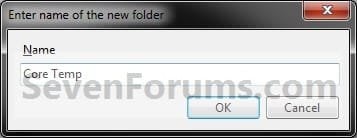
5. Type in a name (ex: program name "Core Temp") you want for the new task folder to make finding the task easier, then click on OK. (see screenshot below)
Step2.jpg
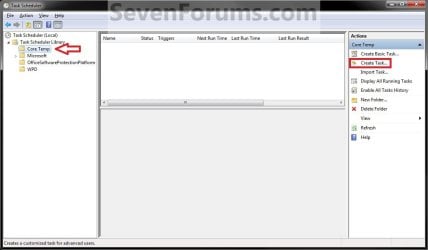
6. In the left pane of Task Scheduler, click on the new task folder (ex: Core Temp), and click on Create Task in the far right pane. (see screenshot below)
Step3.jpg
7. Under the General tab, type in a name for the task (ex: Program Name "Core Temp"). (see screenshot below)
Step4.jpg

8. Under the General tab,
  • If Used in a Administrator User Account
    • Check the Run with highest Privileges box. (see screenshot above)
  • If Used in a Standard User Account
    • Leave the Run with highest Privileges box unchecked. (see screenshot above)
9. Click on the Configure for drop down box to open it, and select Windows® 7, Windows Server™ 2008 R2. (see screenshot above and below)
NOTE: This is like compatibility mode. If the program does not support running in Windows 7 normally, then you can select the OS that is does support running in instead to have it run in compatibility mode as if it was running in that OS instead of Windows 7.

Drop_Down_Box.jpg
10. Do steps 11 and/or 12 below for when you would like to have this task run.

11. To Have the Task Run "At startup"
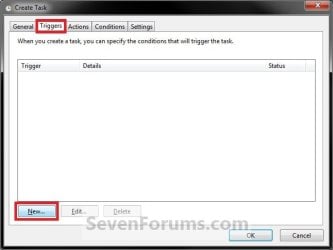
A) Click on the Triggers tab and New button. (see screenshot below)
Step5.jpg
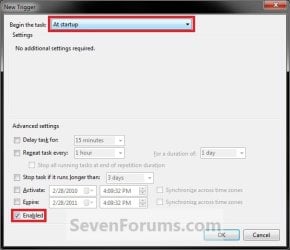
B) In the Begin the task drop down menu list, select At startup. Next, make sure that Enabled is checked, and click on OK. (see screenshot below)
Step6.jpg
C) Do step 12 as well. It is required for the "At startup" to work.
12. To Have the Task Run "At log on"
A) Under the Triggers tab, click on the New button. (see screenshot below)
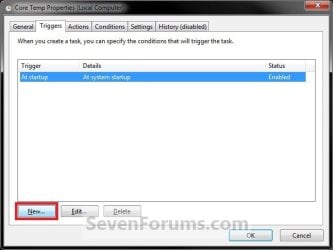
Step6A.jpg
B) In the Begin the task drop down menu list, select At log on. Next, make sure that Enabled is checked, and click on OK. (see screenshot below)
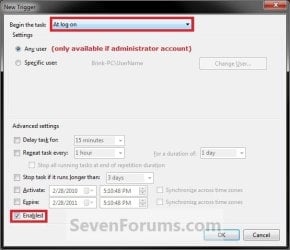
Step6B.jpg
13. Click on the Actions tab and New button. (see screenshot below)
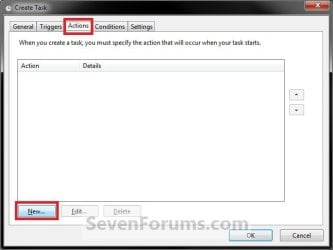
Step7.jpg
14. In the Action drop down menu list, select Start a program, then click on the Browse button. (see screenshot below)
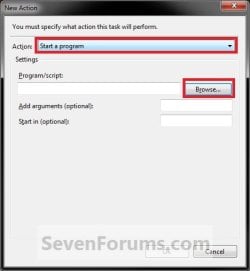
Step8.jpg
15. Navigate to and select the program's EXE file or shortcut to the EXE file, then click on Open. (see screenshot below)
NOTE: Remember that a standard user account cannot run a elevated program at startup or log on. See NOTE at top of tutorial for more information.

   Tip
If you created an elevated program shortcut and wanted to run it at startup and/or log in, you would enter the full path of the elevated program shortcut here.
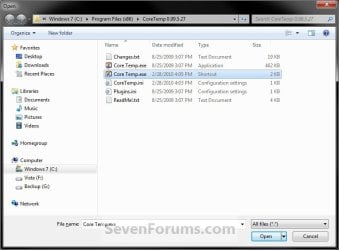
Step9.jpg
16. Click on OK. (see screenshot below)
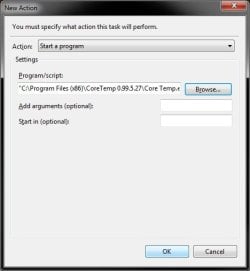
Step10.jpg
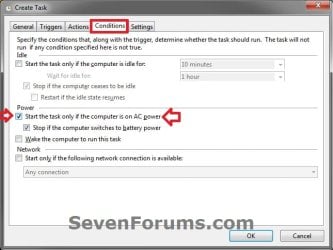
17. Click on the Conditions tab, and uncheck the Stop if the computer switches to battery power box first, then uncheck the Start the task only if the computer is on AC power box. (see screenshots below)
NOTE: This step is mostly for laptops, so that you will be able to run the program when the laptop is running on battery power.
Step11.jpg

Conditions.jpg

18. Click on the Settings tab, and check the If the task fails, restart every box. (see screenshot below)
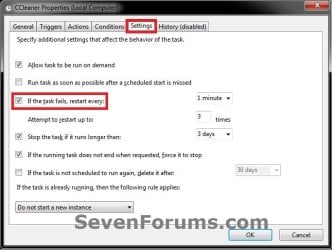
Settings.jpg
19. Click on OK. (see screenshot above)

20. You can now close Task Scheduler. (see screenshot below)
NOTE: If you look in the middle pane under the Author column for the task that you just created, you will be able to tell what user account the task is for.
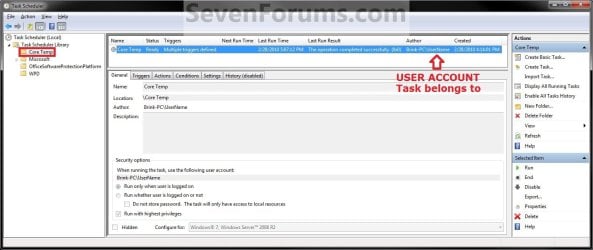
Step12.jpg
21. Log off and log on this user account, or restart the computer to test you new task.

   Tip
To Delete the Task:

If you decide you would like to delete the task later, then you can right click on the task (step 8) in the middle pane and click on Delete and Yes. Next, you can delete the task folder (step 5) when empty the same way. (see screenshot above)

That's it,
Shawn


Last edited:
Oh ok. I tried adding tasks for two of my programs, CPU-Z and HWMonitor and when I set the Trigger to At Startup and then restart the computer, the programs don't run at all. But when I set the Trigger to At Startup AND At Log On, then the programs run after a restart. What's does that indicate? Also, what does a 0x41031 Last Run Result mean?
 

My Computer

Computer Manufacturer/Model Number
Sager NP8130
OS
Windows 7 Ultimate x6
CPU
i5 2670QM
Memory
2x4GB RAM Kingston HyperX Memory DDR3 1600 MHz Sticks
Graphics Card(s)
Nvidia GeForce GTX 560M
Sound Card
Realtek HD Audio (Built-in)
Screen Resolution
1920x1080
Hard Drives
128GB Crucial M4 SSD
500GB Seagate 7200RPM HDD
Internet Speed
12Mbps down/4Mbps up
I would recommend to have it run at both startup and logon to make sure it runs.

I'm afraid that I have no idea about "0x41031 Last Run Result".
 

My Computer

Computer type
PC/Desktop
Computer Manufacturer/Model Number
Self built custom
OS
64-bit Windows 11 Pro for Workstations
CPU
Intel i7-8700K OC'd to 5 GHz
Motherboard
ASUS ROG Maximus XI Formula Z390
Memory
64 GB (4x16GB) G.SKILL TridentZ RGB DDR4 3600 MHz
Graphics Card(s)
ASUS ROG-STRIX-GTX1080TI-O11G-GAMING
Sound Card
Integrated
Monitor(s) Displays
2 x Samsung Odyssey G7 27"
Screen Resolution
2560x1440
Hard Drives
1TB Samsung 990 PRO M.2,
4TB Samsung 990 PRO PRO M.2,
TerraMaster F8 SSD Plus NAS
PSU
Seasonic Prime Titanium 850W
Case
Thermaltake Core P3
Cooling
Corsair Hydro H115i
Keyboard
Logitech wireless K800
Mouse
Logitech MX Master 4
Internet Speed
2 Gb/s Download and 100 Mb/s Upload
Antivirus
Malwarebyte Anti-Malware Premium
Browser
Google Chrome
Other Info
Logitech Z625 speaker system,
Logitech BRIO 4K Pro webcam,
HP Color LaserJet Pro MFP M477fdn,
APC SMART-UPS RT 1000 XL - SURT1000XLI,
Galaxy S23 Plus phone
I would recommend to have it run at both startup and logon to make sure it runs.

I'm afraid that I have no idea about "0x41031 Last Run Result".

Ok. Do you know the reason why the program doesn't run when I set it to run At Startup only?
 

My Computer

Computer Manufacturer/Model Number
Sager NP8130
OS
Windows 7 Ultimate x6
CPU
i5 2670QM
Memory
2x4GB RAM Kingston HyperX Memory DDR3 1600 MHz Sticks
Graphics Card(s)
Nvidia GeForce GTX 560M
Sound Card
Realtek HD Audio (Built-in)
Screen Resolution
1920x1080
Hard Drives
128GB Crucial M4 SSD
500GB Seagate 7200RPM HDD
Internet Speed
12Mbps down/4Mbps up

My Computer

Computer type
PC/Desktop
Computer Manufacturer/Model Number
n/a
OS
W7 Ultimate SP1, LM19.2 MATE, W10 Home 1703, W10 Pro 1703 VM, #All 64 bit
CPU
AMD Phenom II x6 1100T, 3.3 GHz
Motherboard
ASUS M4A88T-M/USB3 (AM3)
Memory
12GB DDR3 1333 G-Skill (4GB x 2), G-Skill (2GB x 2)
Graphics Card(s)
NVIDIA GeForce GTX 660
Sound Card
Realtek?
Monitor(s) Displays
Samsung S23B350
Screen Resolution
1920x1080
Hard Drives
WD Green 2TB (SATA), WD Green 3TB (SATA), WD Blue 4TB (SATA), WD Blue 6TB (SATA)
PSU
Cooler Master
Case
Antec GX300 Tower
Cooling
3x Antec TRICOOL 120mm Fans
Mouse
Wired Optical
Internet Speed
DSL
Antivirus
Avast
Browser
Pale Moon (64 bit)
Other Info
2018-12-27 Upgraded HDDs
2015-12-10 Upgraded case, graphics card, storage
2015-08-15 Upgraded motherboard & RAM
2015-07-15 Upgraded LM17.1 to LM17.2
That indicates the process is already running.
SCHED_S_TASK_RUNNING
0x00041301
The task is currently running.
Task Scheduler Error and Success Constants (Windows)

My "Run Process Explorer at logon" task gives that result (constantly), but the task runs correctly anyway. :confused:

Yup, I think it means it is running currently. Weird, I have a ShadowSpawn task that I created and the last run results says 0x8003 and I can't seem to find it anywhere in the net?
 

My Computer

Computer Manufacturer/Model Number
Sager NP8130
OS
Windows 7 Ultimate x6
CPU
i5 2670QM
Memory
2x4GB RAM Kingston HyperX Memory DDR3 1600 MHz Sticks
Graphics Card(s)
Nvidia GeForce GTX 560M
Sound Card
Realtek HD Audio (Built-in)
Screen Resolution
1920x1080
Hard Drives
128GB Crucial M4 SSD
500GB Seagate 7200RPM HDD
Internet Speed
12Mbps down/4Mbps up
Can you have a task automatically bypass asking for Administrator password upon booting into a Standard Account ?
I tried looking for an answer, probably didn't search hard enough !
 

My Computer

Computer type
PC/Desktop
Computer Manufacturer/Model Number
Custom Built
OS
Windows 10 Pro
CPU
Core2Quad (2.6 Ghz)
Motherboard
nVidia 775
Memory
8 Gigs DDR2
Graphics Card(s)
Geforce Titan Black
Sound Card
Motherboard Audio
Monitor(s) Displays
25" Asus LCD
Screen Resolution
1680x1050
Hard Drives
120 Gig SSD
60 Gig SSD
750 Gig HDD
PSU
850 Watts
Case
Mid-Size
Keyboard
Logitech
Mouse
Logitech - I love logitech mouses
Internet Speed
DSL 25Mbps - Although extremely expensive
Antivirus
Microsoft Anti-Virus
Browser
FireFox 36.x
Hello Jerome,

Sorry, but you will not be able to run elevated programs at startup or at log on for a standard user account without being prompted by UAC. Only unelevated programs. :(
 

My Computer

Computer type
PC/Desktop
Computer Manufacturer/Model Number
Self built custom
OS
64-bit Windows 11 Pro for Workstations
CPU
Intel i7-8700K OC'd to 5 GHz
Motherboard
ASUS ROG Maximus XI Formula Z390
Memory
64 GB (4x16GB) G.SKILL TridentZ RGB DDR4 3600 MHz
Graphics Card(s)
ASUS ROG-STRIX-GTX1080TI-O11G-GAMING
Sound Card
Integrated
Monitor(s) Displays
2 x Samsung Odyssey G7 27"
Screen Resolution
2560x1440
Hard Drives
1TB Samsung 990 PRO M.2,
4TB Samsung 990 PRO PRO M.2,
TerraMaster F8 SSD Plus NAS
PSU
Seasonic Prime Titanium 850W
Case
Thermaltake Core P3
Cooling
Corsair Hydro H115i
Keyboard
Logitech wireless K800
Mouse
Logitech MX Master 4
Internet Speed
2 Gb/s Download and 100 Mb/s Upload
Antivirus
Malwarebyte Anti-Malware Premium
Browser
Google Chrome
Other Info
Logitech Z625 speaker system,
Logitech BRIO 4K Pro webcam,
HP Color LaserJet Pro MFP M477fdn,
APC SMART-UPS RT 1000 XL - SURT1000XLI,
Galaxy S23 Plus phone
Crap. I'm going to have to try another solution !
 

My Computer

Computer type
PC/Desktop
Computer Manufacturer/Model Number
Custom Built
OS
Windows 10 Pro
CPU
Core2Quad (2.6 Ghz)
Motherboard
nVidia 775
Memory
8 Gigs DDR2
Graphics Card(s)
Geforce Titan Black
Sound Card
Motherboard Audio
Monitor(s) Displays
25" Asus LCD
Screen Resolution
1680x1050
Hard Drives
120 Gig SSD
60 Gig SSD
750 Gig HDD
PSU
850 Watts
Case
Mid-Size
Keyboard
Logitech
Mouse
Logitech - I love logitech mouses
Internet Speed
DSL 25Mbps - Although extremely expensive
Antivirus
Microsoft Anti-Virus
Browser
FireFox 36.x

My Computer

Computer type
PC/Desktop
Computer Manufacturer/Model Number
Self built custom
OS
64-bit Windows 11 Pro for Workstations
CPU
Intel i7-8700K OC'd to 5 GHz
Motherboard
ASUS ROG Maximus XI Formula Z390
Memory
64 GB (4x16GB) G.SKILL TridentZ RGB DDR4 3600 MHz
Graphics Card(s)
ASUS ROG-STRIX-GTX1080TI-O11G-GAMING
Sound Card
Integrated
Monitor(s) Displays
2 x Samsung Odyssey G7 27"
Screen Resolution
2560x1440
Hard Drives
1TB Samsung 990 PRO M.2,
4TB Samsung 990 PRO PRO M.2,
TerraMaster F8 SSD Plus NAS
PSU
Seasonic Prime Titanium 850W
Case
Thermaltake Core P3
Cooling
Corsair Hydro H115i
Keyboard
Logitech wireless K800
Mouse
Logitech MX Master 4
Internet Speed
2 Gb/s Download and 100 Mb/s Upload
Antivirus
Malwarebyte Anti-Malware Premium
Browser
Google Chrome
Other Info
Logitech Z625 speaker system,
Logitech BRIO 4K Pro webcam,
HP Color LaserJet Pro MFP M477fdn,
APC SMART-UPS RT 1000 XL - SURT1000XLI,
Galaxy S23 Plus phone
Worked

Thank you very much for this tutorial !
It took me 2minutes to set it up and it's working like a charm :)
 

My Computer

Computer type
PC/Desktop
OS
Windows Server 2012 RD
Welcome to Seven Forums socket. I'm glad that you found the tutorial helpful. :)
 

My Computer

Computer type
PC/Desktop
Computer Manufacturer/Model Number
Self built custom
OS
64-bit Windows 11 Pro for Workstations
CPU
Intel i7-8700K OC'd to 5 GHz
Motherboard
ASUS ROG Maximus XI Formula Z390
Memory
64 GB (4x16GB) G.SKILL TridentZ RGB DDR4 3600 MHz
Graphics Card(s)
ASUS ROG-STRIX-GTX1080TI-O11G-GAMING
Sound Card
Integrated
Monitor(s) Displays
2 x Samsung Odyssey G7 27"
Screen Resolution
2560x1440
Hard Drives
1TB Samsung 990 PRO M.2,
4TB Samsung 990 PRO PRO M.2,
TerraMaster F8 SSD Plus NAS
PSU
Seasonic Prime Titanium 850W
Case
Thermaltake Core P3
Cooling
Corsair Hydro H115i
Keyboard
Logitech wireless K800
Mouse
Logitech MX Master 4
Internet Speed
2 Gb/s Download and 100 Mb/s Upload
Antivirus
Malwarebyte Anti-Malware Premium
Browser
Google Chrome
Other Info
Logitech Z625 speaker system,
Logitech BRIO 4K Pro webcam,
HP Color LaserJet Pro MFP M477fdn,
APC SMART-UPS RT 1000 XL - SURT1000XLI,
Galaxy S23 Plus phone
Hi,
Some exe are not working, even if scheduled. For eg. A scheduler is given in the program tab of the exe file.
I tried to copy the exe shortcut to startup all, user folder and it is not executing.
Sometimes, it is showing as running in nirsoft lastrun tool, also shows the instance of program, but i suppose, it is running in the background. I could also see the process of exe in task manager.
But the status of the lact run code is 1, denoting that it has not run successfully.
I think , i need not say the name of the exe, but is there any way for workaround for this problem?
I want the program to start and popup to full windows, so that i could see it , it is running. I have even tried to change the normal window to maximized and it is not working. Would you please say
 

My Computer

Computer type
PC/Desktop
Computer Manufacturer/Model Number
custom build
OS
Microsoft Windows 7 Ultimate 64-bit 7601 Multiprocessor Free Service Pack 1
CPU
Intel(R) Core(TM)2 Duo CPU E7200 @ 2.53GHz
Motherboard
To be filled by O.E.M. To be filled by O.E.M.
Memory
4.00 GB
Graphics Card(s)
NVIDIA GeForce 210
Sound Card
(1) NVIDIA High Definition Audio (2) Realtek High Definiti
Screen Resolution
1920 x 1080 x 32 bits (4294967296 colors) @ 60 Hz
Hard Drives
ST3500312CS ATA Device
Hello jraju, :)

If the .exe requires to run elevated, then you'll need to check "Run whether user is logged on or not" and "Run with highest privileges" at step 7 to have it run elevated.
 

My Computer

Computer type
PC/Desktop
Computer Manufacturer/Model Number
Self built custom
OS
64-bit Windows 11 Pro for Workstations
CPU
Intel i7-8700K OC'd to 5 GHz
Motherboard
ASUS ROG Maximus XI Formula Z390
Memory
64 GB (4x16GB) G.SKILL TridentZ RGB DDR4 3600 MHz
Graphics Card(s)
ASUS ROG-STRIX-GTX1080TI-O11G-GAMING
Sound Card
Integrated
Monitor(s) Displays
2 x Samsung Odyssey G7 27"
Screen Resolution
2560x1440
Hard Drives
1TB Samsung 990 PRO M.2,
4TB Samsung 990 PRO PRO M.2,
TerraMaster F8 SSD Plus NAS
PSU
Seasonic Prime Titanium 850W
Case
Thermaltake Core P3
Cooling
Corsair Hydro H115i
Keyboard
Logitech wireless K800
Mouse
Logitech MX Master 4
Internet Speed
2 Gb/s Download and 100 Mb/s Upload
Antivirus
Malwarebyte Anti-Malware Premium
Browser
Google Chrome
Other Info
Logitech Z625 speaker system,
Logitech BRIO 4K Pro webcam,
HP Color LaserJet Pro MFP M477fdn,
APC SMART-UPS RT 1000 XL - SURT1000XLI,
Galaxy S23 Plus phone
Hi, Brink, I tried your idea, but no luck.
The run last activity shows as running 267009 in background and would not start. I also checked the password square box in general along with run whether a user log or not check box. If i leave that unchecked , i get error, so i did try that.
The program is running in the back ground and i could see the process of its running with about 2000kb size.
One more thing, when i click the process on normal log on, the process did not show, but when i click process from all users, it shows . pl
 

My Computer

Computer type
PC/Desktop
Computer Manufacturer/Model Number
custom build
OS
Microsoft Windows 7 Ultimate 64-bit 7601 Multiprocessor Free Service Pack 1
CPU
Intel(R) Core(TM)2 Duo CPU E7200 @ 2.53GHz
Motherboard
To be filled by O.E.M. To be filled by O.E.M.
Memory
4.00 GB
Graphics Card(s)
NVIDIA GeForce 210
Sound Card
(1) NVIDIA High Definition Audio (2) Realtek High Definiti
Screen Resolution
1920 x 1080 x 32 bits (4294967296 colors) @ 60 Hz
Hard Drives
ST3500312CS ATA Device

My Computer

Computer type
PC/Desktop
Computer Manufacturer/Model Number
Self built custom
OS
64-bit Windows 11 Pro for Workstations
CPU
Intel i7-8700K OC'd to 5 GHz
Motherboard
ASUS ROG Maximus XI Formula Z390
Memory
64 GB (4x16GB) G.SKILL TridentZ RGB DDR4 3600 MHz
Graphics Card(s)
ASUS ROG-STRIX-GTX1080TI-O11G-GAMING
Sound Card
Integrated
Monitor(s) Displays
2 x Samsung Odyssey G7 27"
Screen Resolution
2560x1440
Hard Drives
1TB Samsung 990 PRO M.2,
4TB Samsung 990 PRO PRO M.2,
TerraMaster F8 SSD Plus NAS
PSU
Seasonic Prime Titanium 850W
Case
Thermaltake Core P3
Cooling
Corsair Hydro H115i
Keyboard
Logitech wireless K800
Mouse
Logitech MX Master 4
Internet Speed
2 Gb/s Download and 100 Mb/s Upload
Antivirus
Malwarebyte Anti-Malware Premium
Browser
Google Chrome
Other Info
Logitech Z625 speaker system,
Logitech BRIO 4K Pro webcam,
HP Color LaserJet Pro MFP M477fdn,
APC SMART-UPS RT 1000 XL - SURT1000XLI,
Galaxy S23 Plus phone
Hi, Brink,
Thanks for the link. It worked perfectly . Nothing missing. No uac prompt and file open error., But could you say, what is the difference in this link and other link. especially in cmd exe, and c start, what it does,
Please also say , what the shortcut says.The idea is excellent, but i want to know, why cmd exe is given in arguments.
Moreover, the idea of trigger tab, is missing in the last link.At point no.5 Please add that in your tutorial link.
A word on elevated may be incorporated in this tutorial suitably so that one easily adopt, that in case of elevated.
Excellent Tutorials in all the subjects, Thanks.. Hoping to get reply
 

My Computer

Computer type
PC/Desktop
Computer Manufacturer/Model Number
custom build
OS
Microsoft Windows 7 Ultimate 64-bit 7601 Multiprocessor Free Service Pack 1
CPU
Intel(R) Core(TM)2 Duo CPU E7200 @ 2.53GHz
Motherboard
To be filled by O.E.M. To be filled by O.E.M.
Memory
4.00 GB
Graphics Card(s)
NVIDIA GeForce 210
Sound Card
(1) NVIDIA High Definition Audio (2) Realtek High Definiti
Screen Resolution
1920 x 1080 x 32 bits (4294967296 colors) @ 60 Hz
Hard Drives
ST3500312CS ATA Device
Hi, I also right clicked the exe shortcut, i created using your idea in the link, and then select properties and changed the normal window to minimized and clicked apply. Now there is no such thing of minimizing once popup, it just minimized to the tray icon. If you want , you could click to open. But it opens the exe
 

My Computer

Computer type
PC/Desktop
Computer Manufacturer/Model Number
custom build
OS
Microsoft Windows 7 Ultimate 64-bit 7601 Multiprocessor Free Service Pack 1
CPU
Intel(R) Core(TM)2 Duo CPU E7200 @ 2.53GHz
Motherboard
To be filled by O.E.M. To be filled by O.E.M.
Memory
4.00 GB
Graphics Card(s)
NVIDIA GeForce 210
Sound Card
(1) NVIDIA High Definition Audio (2) Realtek High Definiti
Screen Resolution
1920 x 1080 x 32 bits (4294967296 colors) @ 60 Hz
Hard Drives
ST3500312CS ATA Device
jrafu,

That's great news. :party:

By default, Windows will not run an elevated program at startup for security reasons. The other tutorial is a workaround to allow it to do so.

Those steps are missing in the other tutorial since it's for a different purpose than this one.
 

My Computer

Computer type
PC/Desktop
Computer Manufacturer/Model Number
Self built custom
OS
64-bit Windows 11 Pro for Workstations
CPU
Intel i7-8700K OC'd to 5 GHz
Motherboard
ASUS ROG Maximus XI Formula Z390
Memory
64 GB (4x16GB) G.SKILL TridentZ RGB DDR4 3600 MHz
Graphics Card(s)
ASUS ROG-STRIX-GTX1080TI-O11G-GAMING
Sound Card
Integrated
Monitor(s) Displays
2 x Samsung Odyssey G7 27"
Screen Resolution
2560x1440
Hard Drives
1TB Samsung 990 PRO M.2,
4TB Samsung 990 PRO PRO M.2,
TerraMaster F8 SSD Plus NAS
PSU
Seasonic Prime Titanium 850W
Case
Thermaltake Core P3
Cooling
Corsair Hydro H115i
Keyboard
Logitech wireless K800
Mouse
Logitech MX Master 4
Internet Speed
2 Gb/s Download and 100 Mb/s Upload
Antivirus
Malwarebyte Anti-Malware Premium
Browser
Google Chrome
Other Info
Logitech Z625 speaker system,
Logitech BRIO 4K Pro webcam,
HP Color LaserJet Pro MFP M477fdn,
APC SMART-UPS RT 1000 XL - SURT1000XLI,
Galaxy S23 Plus phone
In that case, you might use the tutorial below to create an elevated shortcut to run the program, and place the elevated shortcut in the Startup folder to see if that may work instead.

How to Create a Elevated Program Shortcut without a UAC Prompt

Confirmed - does not work on shortcuts, here's a screenshot, check attachment, I don't think I can link to the attachment here on the post, can I?

Also it doesn't completely bypass UAC as you still need to either click Yes or No when prompted, but at least you don't need to type in the admin password every time as if you were in admin account running a program that requires admin privileges.

I know CCleaner has it for their program, how do I copy?? I tried copying their settings but it doesn't work...

I tried it with fraps but using Ccleaner's settings but it didn't work...

Now I know it doesn't work on standard accounts, but why not why is there no work around besides to above link which partially does what I want it to?
 

Attachments

  • Doesn't work on shotcuts.png
    Doesn't work on shotcuts.png
    7.4 KB · Views: 425
  • Capture4.png
    Capture4.png
    99.8 KB · Views: 98
  • Capture3.png
    Capture3.png
    88.9 KB · Views: 116
  • Capture2.png
    Capture2.png
    89 KB · Views: 263
  • Capture1.png
    Capture1.png
    90.9 KB · Views: 183
  • Capture.PNG
    Capture.PNG
    36.7 KB · Views: 432
  • Capture5.png
    Capture5.png
    98.5 KB · Views: 113

My Computer

Computer type
PC/Desktop
Computer Manufacturer/Model Number
custom build
OS
The one I am using to register is my Windows 7 Professional x64 one.
CPU
Intel Core i7-3970x
Motherboard
Asus Rampage 4 Extreme
Memory
Cosair Dominator Platinum
Graphics Card(s)
2x eVGA GTX 770 4GB CLassified with ACX cooler
Antivirus
I have KIS 2016 which is an internet security suite....?
Browser
Fiefox
Thank you, Brink. I tried using the task scheduler for this exact purpose years ago but couldn't figure it out. I just happened to be looking again today and found this tutorial. It worked like a charm and was very easy to understand and do.

Thanks again.
 

My Computer

Computer type
PC/Desktop
Computer Manufacturer/Model Number
Lenovo
OS
Windows 7 Home Premium 64bit Service Pack 1
CPU
Pentium Dual-Core E5300 @ 2.60GHz
Motherboard
Lenovo MTQ45 NK or L-IQ45 Antelope : Both are on MB
Memory
6 GB DDR3
Hard Drives
WL1000GSA3272 1TB - 100GB used for Windows
Antivirus
Microsoft Security Essentials
Browser
Firefox 53.0 64bit
Back
Top