
Solved Task Manager (Processes) shows 2 "Firefox.exe*32" while online. Why?

spc3rd

New member
Member
VIP
Local time
11:08 AM
Messages
101
Location
Mid-Atlantic Region - U.S.A.
Task Manager (Processes) shows 2 "Firefox.exe*32" while online. Why?

Good evening everyone,

I've noticed an oddity in Windows Task Manager when I view the list shown under the "Processes" tab, as described below. I'm not sure what it means, and whether or not there is some action I should take. :banghead:

[Description of issue]

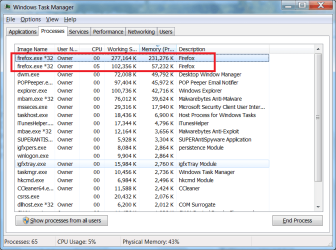
When I am online using the Firefox browser (set as the default), I noticed in the Windows Task Manager (under the Processes tab), there are two identical entries at the top of the list which say: firefox.exe*32. (As shown in the attached screenshot).

My questions:

1. Why are these two identical processes being shown in the Processes tab?
(I've never seen but one "firefox.exe*32" listed until just recently)

2. What action(s) should I take (if any)?

Thank you for your time and any enlightenment!


Attachments
  • Task Manager - two Firefox processes being shown.png
    Task Manager - two Firefox processes being shown.png
    119 KB · Views: 1

My Computer

Computer type
PC/Desktop
Computer Manufacturer/Model Number
Dell Inspiron Desktop (refurbished)
OS
Win 7 Home Premium x64 SP1
CPU
Intel Core i3, 3.07 gHz
Motherboard
Dell
Memory
6 GB
Graphics Card(s)
ASUS VH198 (1440x900@60Hz) Intel Q965/Q963 Express Chipset F
Monitor(s) Displays
Asus
Hard Drives
Western Digital 1 TB SATA HDD (Internal)

WD 1-TB "My Passport Ultra" (external drive used for system images)
Keyboard
Azio KB505U wired, standard, large print 3-color backlit
Mouse
Logitech (wired)
Internet Speed
Download: up to 50 Mbps | Upload: 5 Mbps
Antivirus
MSE
Browser
Firefox (default) and IE11
Other Info
MBAM 3xx (lifetime license) |
SAS (on-demand) | FF w/NoScript & IE11 | uBlock Origin | POP Peeper Pro | Aeris Calendar | GWX Control Panel Monitor | CPUID
Hi,
Yep not something i would expect to see in a 32 bit version :/
Palemoon does not do it is the odd thing since they are essentially the same.
 

My Computer

Computer type
PC/Desktop
Computer Manufacturer/Model Number
Custom assembled by me :}
OS
Win-7-Pro64bit 7-H-Prem-64bit
CPU
i7-5930K 2nd i9-9940x both water blocked VRM's too
Motherboard
ASUS SABERTOOTH X99 2nd ASUS x299 Apex
Memory
Trident-z 3200C14 2nd Trident-z 3600C16
Graphics Card(s)
EVGA 1080ti ftw3 2nd Titan Xp both water blocked
Sound Card
Built-in Realtek
Monitor(s) Displays
1-AOC G2460PG 24"G-Sync 144Hz/ 2nd 1-ASUS VG248QE 24" 144Hz
Screen Resolution
1920 x 1080 144Hz
Hard Drives
2-Samsung M.2 Evo & Evo Plus
2-Samsung 850 EVO 500GB SSD's/ 3-2.5 W.D. Black 1tb-&3-1tb/3-3.5 WD Black 1tb hdd's
PSU
EVGA SuperNOVA 1000-P2 2nd 1200-P2
Case
2-Corsair Obsidian Series 450D Black ATX Mid Tower
Cooling
Custom water loops
Keyboard
Logitech G710+/ 2nd Logitech G910
Mouse
2-RedDragon M901 Perdition 16400 dpi Gaming mouse = wired
Internet Speed
Comcast Ping 19ms 89.31mbps download speed 6.12mbps upload
Antivirus
Malwarebytes Pro/ Superantispyware Pro
Browser
FireFox & Pale moon
Other Info
2nd ASUS X299 Apex/Intel i9-9940x with Custom water loop/7H-Prem-x64/Corsair 450D case/Ram Trident-z 3600C16 4x8gb / Samsung970Evo plus 500gb SSD/Dual ssd EZ swap evo/PSU EVGA SuperNova 1200w-P2 80+Platinum/GPU Titan Xp /8-ML-140 on push-pull on 2-280GTX rads
I have just had a look at my Task Manager while Opera is open & running & it's showing 5 Opera.exe *32's, so I assume this is normal.

Just to stop jumping to conclusions I am running Opera 64 bit on Win 7 64 bit. Incidentally those 5 Opera.exe's are when here on Seven Forums.

As a test I closed Opera & those 5 Opera.exe's disappeared immediately. Then reopened Opera again, then back here on the Forum & all 5 are back again.
 

My Computer

Computer type
PC/Desktop
Computer Manufacturer/Model Number
Self built using existing case
OS
Windows 7 Home Premium 64 bit sp1
CPU
Intel i5 3570 3.4Ghz Ivy Bridge SKT 1155 quad core
Motherboard
Gigabyte Z77-HD3 SKT 1155 2xSata 3, 4x USB 3.0
Memory
G-Skill Rip Jaws 16Gb (8x2) DDR3 -1600 PC3 12800 CL 10 red
Graphics Card(s)
Gigabyte NVIDIA GT610 1Gb DDR3 810/1200 PCI-E 2.0 Silent
Sound Card
NVIDIA High Definition & Realtech High Definition Audio
Monitor(s) Displays
2 x Philips 226V4L 16:9 aspect ratio
Screen Resolution
1920 x 1080 HD
Hard Drives
Samsung 840 Pro 256gb SSD, SATA 3.
Hitachi Touro Portable 1tb, USB 3.0 HDD used for image b/ups.
PSU
Corsair VS450
Case
Codeng
Cooling
PSU fan & CPU fan
Keyboard
Logitech
Mouse
Logitech Wireless trackball M570
Internet Speed
Wireless 3G. 3mg down & 550kb up.
Antivirus
Bitdefender Internet Security 2020
Browser
Opera (Current Version) & Firefox
Other Info
MS Office 2013 Pro. Davis weather station software. MGE Nova 600 avr UPS.
Right click on each entry and select open file location. If either doesn't open up the file in the firefox folder then you have a problem. Otherwise there could be numerous reasons why there is a second process. If they are both legit processes then I wouldn't worry about it.
 

My Computers

System One System Two

Task Manager (Processes) shows 2 "Firefox.exe*32" while online. Why

Thank you to everyone who has replied to my inquiry!

Per townsbg's instructions, I checked the file location for both the firefox.exe*32 entries, and as you can see in the attached screenshot, both go to the same location: C:\Program Files(x86)\Mozilla Firefox.

The two identical entries will continue to be shown in the Processes tab in Task Manager as long as I have Firefox open. Once I click the red [X] at the top right of the webpage to return to my Desktop screen, the entries will no longer be displayed in TM.

Also, I've not seen more than two entries at any time, regardless of what website I may be on, or doing a Google search, etc. Scans with MSE, MBAM Premium, and SAS are clean. No issues found.

Like Ranger4, I'm using a Win 7 64-bit machine. (This refurbished computer is one that was recently given to me & set-up by a trusted friend who owns a local computer repair shop, to replace the previous Dell Optiplex 64-bit machine I had which finally bit the dust).

I guess this must be just some odd quirk for which there is no explanation.

Again..thank you to everyone who replied to my topic! :)
 

Attachments

  • Firefox exe location.png
    Firefox exe location.png
    219.9 KB · Views: 1

My Computer

Computer type
PC/Desktop
Computer Manufacturer/Model Number
Dell Inspiron Desktop (refurbished)
OS
Win 7 Home Premium x64 SP1
CPU
Intel Core i3, 3.07 gHz
Motherboard
Dell
Memory
6 GB
Graphics Card(s)
ASUS VH198 (1440x900@60Hz) Intel Q965/Q963 Express Chipset F
Monitor(s) Displays
Asus
Hard Drives
Western Digital 1 TB SATA HDD (Internal)

WD 1-TB "My Passport Ultra" (external drive used for system images)
Keyboard
Azio KB505U wired, standard, large print 3-color backlit
Mouse
Logitech (wired)
Internet Speed
Download: up to 50 Mbps | Upload: 5 Mbps
Antivirus
MSE
Browser
Firefox (default) and IE11
Other Info
MBAM 3xx (lifetime license) |
SAS (on-demand) | FF w/NoScript & IE11 | uBlock Origin | POP Peeper Pro | Aeris Calendar | GWX Control Panel Monitor | CPUID
Hi,
I suppose it might be the quick dial page that is the weird 2nd process
If you end the smaller .....k process the tab you're on will end leaving a message window saying bad news is your tab closed....
Good news.....

End the large .......k process and firefox will completely crash :)

Either way like I said prior palemoon does not do it I have both and both are 32 bit version of the browser on a 64 bit machine
So seems firefox has a 64 bit feature/ bug in it's 32 bit browser version.

64 bit versions or at least internet explorer has always had a 64 bit process managing all 32 bit tabs so with even 1 tab open you'd always see 2 ie processes open.
 

My Computer

Computer type
PC/Desktop
Computer Manufacturer/Model Number
Custom assembled by me :}
OS
Win-7-Pro64bit 7-H-Prem-64bit
CPU
i7-5930K 2nd i9-9940x both water blocked VRM's too
Motherboard
ASUS SABERTOOTH X99 2nd ASUS x299 Apex
Memory
Trident-z 3200C14 2nd Trident-z 3600C16
Graphics Card(s)
EVGA 1080ti ftw3 2nd Titan Xp both water blocked
Sound Card
Built-in Realtek
Monitor(s) Displays
1-AOC G2460PG 24"G-Sync 144Hz/ 2nd 1-ASUS VG248QE 24" 144Hz
Screen Resolution
1920 x 1080 144Hz
Hard Drives
2-Samsung M.2 Evo & Evo Plus
2-Samsung 850 EVO 500GB SSD's/ 3-2.5 W.D. Black 1tb-&3-1tb/3-3.5 WD Black 1tb hdd's
PSU
EVGA SuperNOVA 1000-P2 2nd 1200-P2
Case
2-Corsair Obsidian Series 450D Black ATX Mid Tower
Cooling
Custom water loops
Keyboard
Logitech G710+/ 2nd Logitech G910
Mouse
2-RedDragon M901 Perdition 16400 dpi Gaming mouse = wired
Internet Speed
Comcast Ping 19ms 89.31mbps download speed 6.12mbps upload
Antivirus
Malwarebytes Pro/ Superantispyware Pro
Browser
FireFox & Pale moon
Other Info
2nd ASUS X299 Apex/Intel i9-9940x with Custom water loop/7H-Prem-x64/Corsair 450D case/Ram Trident-z 3600C16 4x8gb / Samsung970Evo plus 500gb SSD/Dual ssd EZ swap evo/PSU EVGA SuperNova 1200w-P2 80+Platinum/GPU Titan Xp /8-ML-140 on push-pull on 2-280GTX rads
Much obliged for your follow-up info, TZ!

FWIW, I also uploaded the firefox.exe file to VirusTotal...just to make sure it was legit - which it was.
Since it doesn't appear the two identical entries are causing any issues, I'll go ahead and consider this issue solved.

Cheers!
 

My Computer

Computer type
PC/Desktop
Computer Manufacturer/Model Number
Dell Inspiron Desktop (refurbished)
OS
Win 7 Home Premium x64 SP1
CPU
Intel Core i3, 3.07 gHz
Motherboard
Dell
Memory
6 GB
Graphics Card(s)
ASUS VH198 (1440x900@60Hz) Intel Q965/Q963 Express Chipset F
Monitor(s) Displays
Asus
Hard Drives
Western Digital 1 TB SATA HDD (Internal)

WD 1-TB "My Passport Ultra" (external drive used for system images)
Keyboard
Azio KB505U wired, standard, large print 3-color backlit
Mouse
Logitech (wired)
Internet Speed
Download: up to 50 Mbps | Upload: 5 Mbps
Antivirus
MSE
Browser
Firefox (default) and IE11
Other Info
MBAM 3xx (lifetime license) |
SAS (on-demand) | FF w/NoScript & IE11 | uBlock Origin | POP Peeper Pro | Aeris Calendar | GWX Control Panel Monitor | CPUID

My Computer

Computer type
PC/Desktop
Computer Manufacturer/Model Number
HP
OS
Windows 7 Pro 64 bit
CPU
Xeon W3520
Memory
8 GB
Graphics Card(s)
Nvidia Geforce 210
Thanks very much for the additional info & link, LMiller7!
 

My Computer

Computer type
PC/Desktop
Computer Manufacturer/Model Number
Dell Inspiron Desktop (refurbished)
OS
Win 7 Home Premium x64 SP1
CPU
Intel Core i3, 3.07 gHz
Motherboard
Dell
Memory
6 GB
Graphics Card(s)
ASUS VH198 (1440x900@60Hz) Intel Q965/Q963 Express Chipset F
Monitor(s) Displays
Asus
Hard Drives
Western Digital 1 TB SATA HDD (Internal)

WD 1-TB "My Passport Ultra" (external drive used for system images)
Keyboard
Azio KB505U wired, standard, large print 3-color backlit
Mouse
Logitech (wired)
Internet Speed
Download: up to 50 Mbps | Upload: 5 Mbps
Antivirus
MSE
Browser
Firefox (default) and IE11
Other Info
MBAM 3xx (lifetime license) |
SAS (on-demand) | FF w/NoScript & IE11 | uBlock Origin | POP Peeper Pro | Aeris Calendar | GWX Control Panel Monitor | CPUID
It appears that Firefox is going to a multiprocess model, such as has been used by other popular browsers for some time. This is being done for reasons of security, reliability, and performance. Firefox has been late to adopt this model, primarily due to incompatible extensions designed for the old model.

Firefox takes the next step toward rolling out multi-process to everyone | Ars Technica

Hi,
Yea seems we should just switch to the 64 bit version if that is the case :)
 

My Computer

Computer type
PC/Desktop
Computer Manufacturer/Model Number
Custom assembled by me :}
OS
Win-7-Pro64bit 7-H-Prem-64bit
CPU
i7-5930K 2nd i9-9940x both water blocked VRM's too
Motherboard
ASUS SABERTOOTH X99 2nd ASUS x299 Apex
Memory
Trident-z 3200C14 2nd Trident-z 3600C16
Graphics Card(s)
EVGA 1080ti ftw3 2nd Titan Xp both water blocked
Sound Card
Built-in Realtek
Monitor(s) Displays
1-AOC G2460PG 24"G-Sync 144Hz/ 2nd 1-ASUS VG248QE 24" 144Hz
Screen Resolution
1920 x 1080 144Hz
Hard Drives
2-Samsung M.2 Evo & Evo Plus
2-Samsung 850 EVO 500GB SSD's/ 3-2.5 W.D. Black 1tb-&3-1tb/3-3.5 WD Black 1tb hdd's
PSU
EVGA SuperNOVA 1000-P2 2nd 1200-P2
Case
2-Corsair Obsidian Series 450D Black ATX Mid Tower
Cooling
Custom water loops
Keyboard
Logitech G710+/ 2nd Logitech G910
Mouse
2-RedDragon M901 Perdition 16400 dpi Gaming mouse = wired
Internet Speed
Comcast Ping 19ms 89.31mbps download speed 6.12mbps upload
Antivirus
Malwarebytes Pro/ Superantispyware Pro
Browser
FireFox & Pale moon
Other Info
2nd ASUS X299 Apex/Intel i9-9940x with Custom water loop/7H-Prem-x64/Corsair 450D case/Ram Trident-z 3600C16 4x8gb / Samsung970Evo plus 500gb SSD/Dual ssd EZ swap evo/PSU EVGA SuperNova 1200w-P2 80+Platinum/GPU Titan Xp /8-ML-140 on push-pull on 2-280GTX rads
Right click on each entry and select open file location. If either doesn't open up the file in the firefox folder then you have a problem. Otherwise there could be numerous reasons why there is a second process. If they are both legit processes then I wouldn't worry about it.

I tried this and I get an explorer window open to the location where the image name is stored. No matter what browser.


Could it be that browser threads are terminate and stay resident?
 

My Computer

Computer type
PC/Desktop
OS
Windows 7 x64, Vista x64, 8.1 smartphone
CPU
Intel E8400 65W 64-bit
Motherboard
Gigabyte EP45-UD3LR
Memory
DDR2 2 x 2GB, 1GB x 2
Graphics Card(s)
XFX Radeon HD5750
Sound Card
AMD High Definition Audio; Realtek High Definition Audio
Monitor(s) Displays
iiyama prolite X2377HDS
Screen Resolution
1920 x 1080
Hard Drives
500GB 7200 rpm Seagate ST3500413AS 16MB, 500GB 5400 rpm Toshiba MQ02ABF050H 32MB, 200GB 7200 rpm Seagate ST3200820AS 8MB, 2TB 7200 rpm Western Digital WD20EZRX 64MB
PSU
Enermax Liberty Modular
Case
Antec P193 Midi Tower
Keyboard
Mionix ZIBAL 60
Mouse
Razer USB 2.0 Diamondback Mouse or Huion Graphics Tablet
Browser
Internet Explorer, Lunascape, Firefox, Opera, Avast Safezone
Back
Top