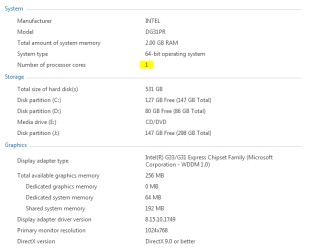
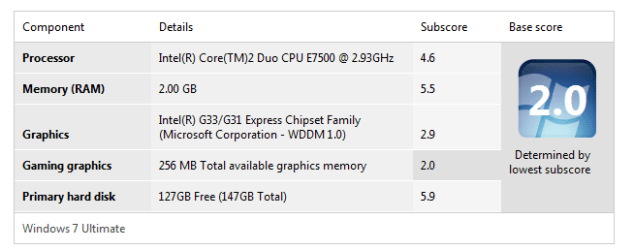
Task Manager showing just 1 Processor

hiren

New member
Local time
12:54 AM
Messages
2
I have upgraded to Intel core 2 Duo processer ans my task manager is displaying only one processer. i have attached some pics for reference . if anybody can help it would be really appreciated.

Thanks in advance
 

Attachments

  • log.PNG
    log.PNG
    9.2 KB · Views: 41
  • log2.PNG
    log2.PNG
    9 KB · Views: 23
  • log3.PNG
    log3.PNG
    15.4 KB · Views: 15
Last edited by a moderator:

My Computer

Computer Manufacturer/Model Number
Intel DG31PR
OS
Windows 7
CPU
Intel Core 2 Duo E7500 @ 2.93GHz
Motherboard
Intel G33/G31
Memory
2.00 GB
Graphics Card(s)
onboard
Sound Card
onboard
Monitor(s) Displays
Samsung
Hard Drives
500 GB Sata
Hello Hiren, and welcome to Seven Forums.

Using the tutorial below, double check to make sure that the Number of processors box is unchecked. This way Windows 7 will be set to use all available processors.

http://www.sevenforums.com/tutorials/66504-processors-limit-number-used-windows-7-a.html

You will probably also need to reset your CMOS or BIOS to factory defaults to toggle it to recognize your new CPU as well.

Hope this helps,
Shawn
 

My Computer

Computer type
PC/Desktop
Computer Manufacturer/Model Number
Self built custom
OS
64-bit Windows 11 Pro for Workstations
CPU
Intel i7-8700K OC'd to 5 GHz
Motherboard
ASUS ROG Maximus XI Formula Z390
Memory
64 GB (4x16GB) G.SKILL TridentZ RGB DDR4 3600 MHz
Graphics Card(s)
ASUS ROG-STRIX-GTX1080TI-O11G-GAMING
Sound Card
Integrated
Monitor(s) Displays
2 x Samsung Odyssey G7 27"
Screen Resolution
2560x1440
Hard Drives
1TB Samsung 990 PRO M.2,
4TB Samsung 990 PRO PRO M.2,
TerraMaster F8 SSD Plus NAS
PSU
Seasonic Prime Titanium 850W
Case
Thermaltake Core P3
Cooling
Corsair Hydro H115i
Keyboard
Logitech wireless K800
Mouse
Logitech MX Master 4
Internet Speed
2 Gb/s Download and 100 Mb/s Upload
Antivirus
Malwarebyte Anti-Malware Premium
Browser
Google Chrome
Other Info
Logitech Z625 speaker system,
Logitech BRIO 4K Pro webcam,
HP Color LaserJet Pro MFP M477fdn,
APC SMART-UPS RT 1000 XL - SURT1000XLI,
Galaxy S23 Plus phone
Hello Hiren, and welcome to Seven Forums.

Using the tutorial below, double check to make sure that the Number of processors box is unchecked. This way Windows 7 will be set to use all available processors.

http://www.sevenforums.com/tutorials/66504-processors-limit-number-used-windows-7-a.html

You will probably also need to reset your CMOS or BIOS to factory defaults to toggle it to recognize your new CPU as well.

Hope this helps,
Shawn

Hey Brink thanks for ur advice but i have checked it already and the checkbox is not checked, and even after checking it i am getting the option as 1. please advice something regarding BIOS or CMOS. thanks
 

My Computer

Computer Manufacturer/Model Number
Intel DG31PR
OS
Windows 7
CPU
Intel Core 2 Duo E7500 @ 2.93GHz
Motherboard
Intel G33/G31
Memory
2.00 GB
Graphics Card(s)
onboard
Sound Card
onboard
Monitor(s) Displays
Samsung
Hard Drives
500 GB Sata

My Computer

Computer type
PC/Desktop
Computer Manufacturer/Model Number
Self built custom
OS
64-bit Windows 11 Pro for Workstations
CPU
Intel i7-8700K OC'd to 5 GHz
Motherboard
ASUS ROG Maximus XI Formula Z390
Memory
64 GB (4x16GB) G.SKILL TridentZ RGB DDR4 3600 MHz
Graphics Card(s)
ASUS ROG-STRIX-GTX1080TI-O11G-GAMING
Sound Card
Integrated
Monitor(s) Displays
2 x Samsung Odyssey G7 27"
Screen Resolution
2560x1440
Hard Drives
1TB Samsung 990 PRO M.2,
4TB Samsung 990 PRO PRO M.2,
TerraMaster F8 SSD Plus NAS
PSU
Seasonic Prime Titanium 850W
Case
Thermaltake Core P3
Cooling
Corsair Hydro H115i
Keyboard
Logitech wireless K800
Mouse
Logitech MX Master 4
Internet Speed
2 Gb/s Download and 100 Mb/s Upload
Antivirus
Malwarebyte Anti-Malware Premium
Browser
Google Chrome
Other Info
Logitech Z625 speaker system,
Logitech BRIO 4K Pro webcam,
HP Color LaserJet Pro MFP M477fdn,
APC SMART-UPS RT 1000 XL - SURT1000XLI,
Galaxy S23 Plus phone
Did you install your new CPU without reformatting? If so, you may need to go into device manager and click "processors" and under it right click on your CPU than click uninstall. Restart your PC.

Another solution is that your BIOS doesn't support your new CPU and you may need to update it.
 

My Computer

OS
Windows 7 Home Premium x64
CPU
Core i7 930 @ 4.2GHz/1.33v
Motherboard
EVGA X58 Classified E760
Memory
3x2GB Corsair Dominator GT @ 2000MHz
Graphics Card(s)
2x EVGA GTX 480 Superclocked + (Backplate/High Flow Bracket)
Sound Card
Sound Blaster X-Fi Fatal1ty Professional
Monitor(s) Displays
Dell U2711
Screen Resolution
2560x1440
Hard Drives
Intel X-25M G2 80GB
2x 1TB Samsung F3 RAID 0
PSU
Corsair AX1200
Case
Corsair Obsidian 800D
Cooling
EK Supreme HF Nickel Acetal + XSPC RX360
Back
Top